
Bacula是一款开源的跨平台的网络备份工具,基于c/s架构,通过它,管理员可以对数据进行备份,恢复,以及完整性验证等操作。适合业务系统数据量巨大,每天都在迅速增长,还需要用以tar打包进行低级备份,并且没有相应的异地容灾策略,应该考虑bacula,bacula支持多种备份方式,还支持远程容灾备份。通过bacula,将数据备份到任意一个远程主机。用户只需要对bacula进行简单的设置即可自动完成数据备份。
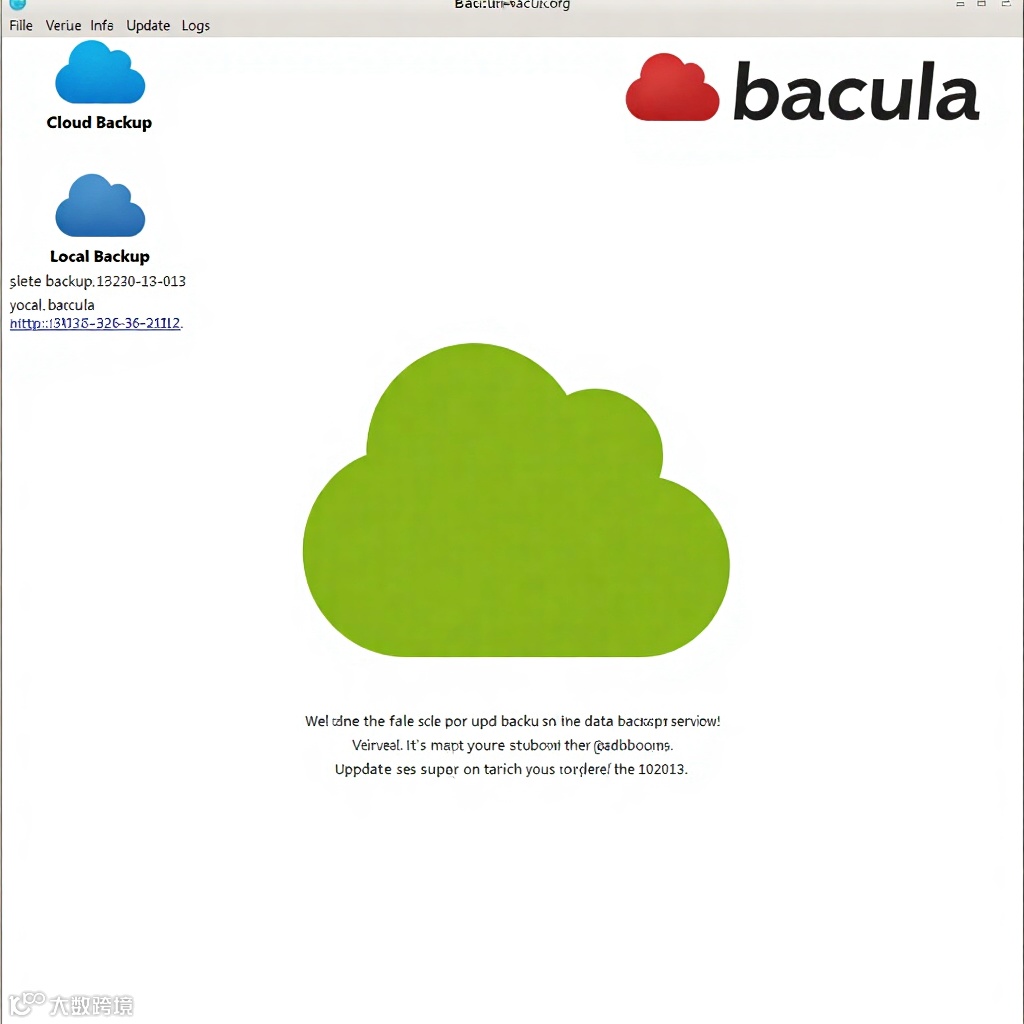
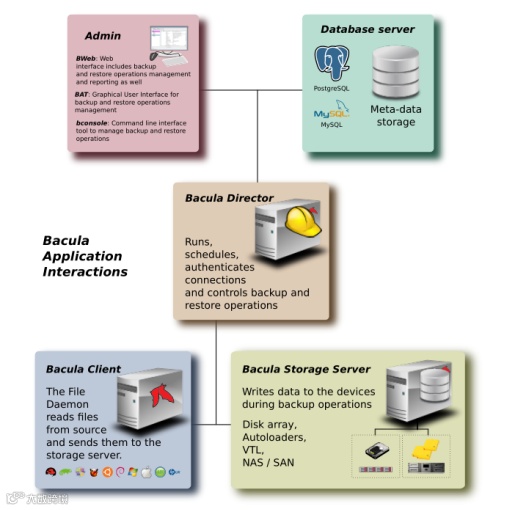
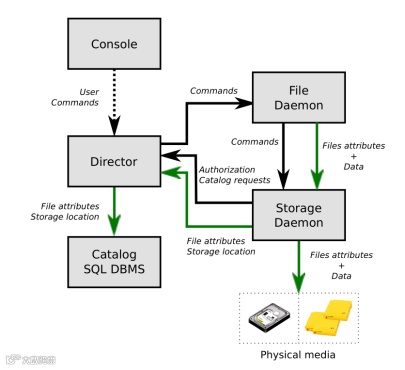
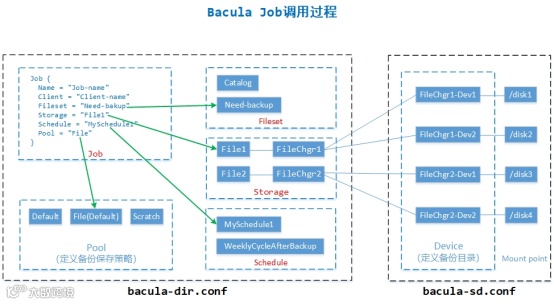
理解job调用的关系图
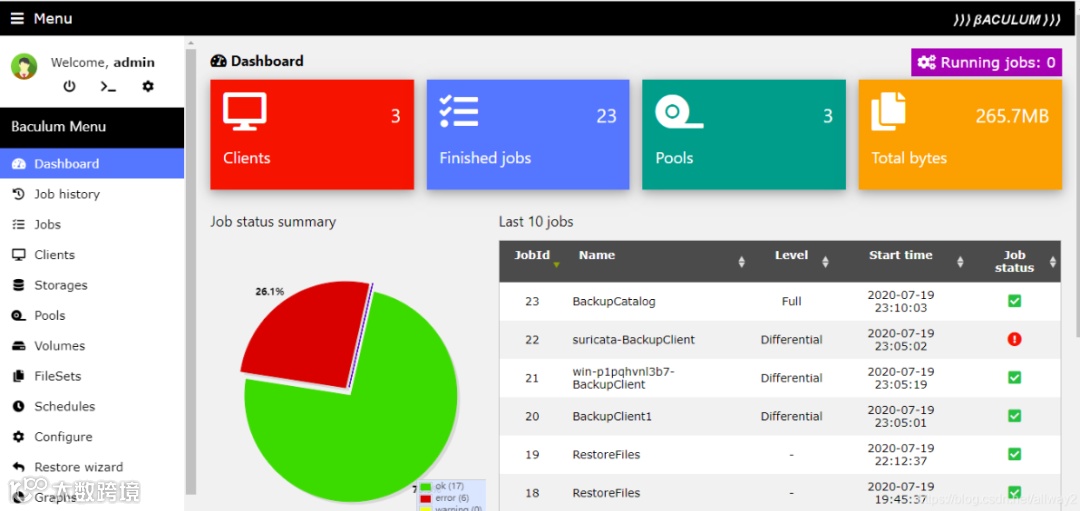
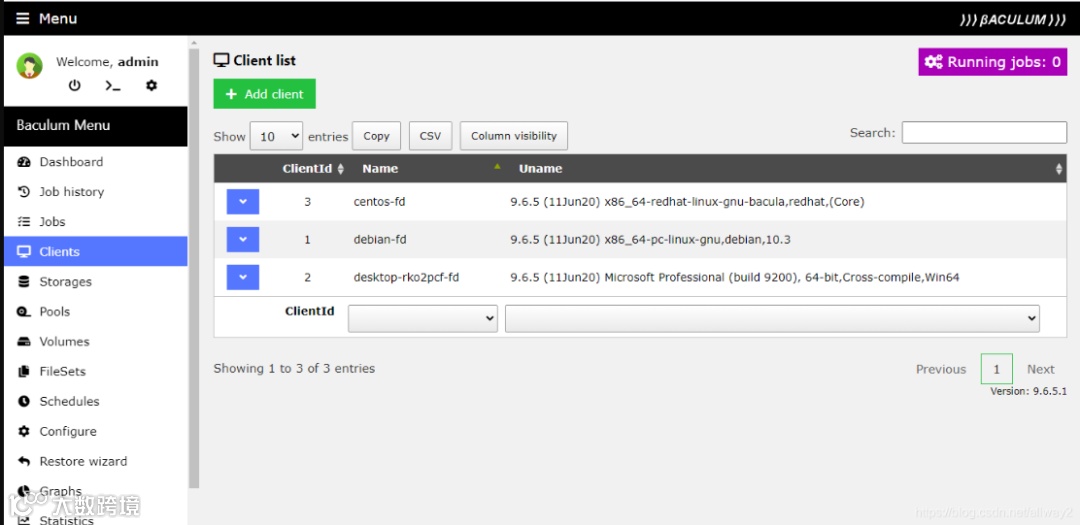
bacula图形化Web界面
Bacula Server端实施安装
安装依赖包
Centos7:yum install -y gcc gcc-c++ mysql-devel libacl libacl-devel
安装mysql数据库
rpm -ivh mysql-community-common-5.7.37-1.el7.x86_64.rpm
rpm -ivh mysql-community-libs-5.7.37-1.el7.x86_64.rpm
rpm -ivh mysql-community-client-5.7.37-1.el7.x86_64.rpm
rpm -ivh mysql-community-server-5.7.37-1.el7.x86_64.rpm
rpm -ivh mysql-community-devel-5.7.37-1.el7.x86_64.rpm
安装bacula服务端
tar -zxvf bacula-11.0.5.tar.gz
cd bacula-11.0.5/
# build 包
CFLAGS="-g -Wall" ./configure \
--sbindir=/usr/local/bacula/bin \
--sysconfdir=/usr/local/bacula/etc \
--with-pid-dir=/usr/local/bacula/working \
--with-subsys-dir=/usr/local/bacula/working \
--with-working-dir=/usr/local/bacula/working \
--enable-smartalloc \
--with-mysql \
--enable-readline \
--with-dump-email=nmonitor@163.com \
--with-job-email=nmonitor@163.com \
--with-smtp-host=mail.163.com
# 使用源码包安装的mysql
# --with-mysql=/usr/local/mysql/
# 安装bacula
make && make install && make install-autostart
创建并授权数据库
Centos7:
systemctl start mysqld
systemctl enable mysqld
cd bacula-11.0.5/src/cats
# 赋予权限
./grant_mysql_privileges -p
# 创建数据库
./create_mysql_database -p
# 创建相关表
./make_mysql_tables -p
Bacula配置及启动
Server装完后,默认是无法启动的,需要修改以下信息才能正常启动
修改address
vi /usr/local/bacula/etc/bacula-dir.conf
# 7.x的为Storage,9.x的为Autochanger
Autochanger {
Name = File1
Address = x.x.x.x # N.B. Use a fully qualified name here
# 不能使用localhost,写主机名(可以解析到)或IP地址
Autochanger {
Name = File2
Address = x.x.x.x # N.B. Use a fully qualified name here
修改存储目录(根据实际环境修改)
vi /usr/local/bacula/etc/bacula-sd.conf
# /data 目录为存储备份的目录
Device {
Name = FileChgr1-Dev1
Media Type = File1
Archive Device = /data
LabelMedia = yes; # lets Bacula label unlabeled media
Random Access = Yes;
AutomaticMount = yes; # when device opened, read it
RemovableMedia = no;
AlwaysOpen = no;
Maximum Concurrent Jobs = 5
}
Device {
Name = FileChgr1-Dev2
Media Type = File1
Archive Device = /data
LabelMedia = yes; # lets Bacula label unlabeled media
Random Access = Yes;
AutomaticMount = yes; # when device opened, read it
RemovableMedia = no;
AlwaysOpen = no;
Maximum Concurrent Jobs = 5
}
修改配置文件中的部分密码
# 查看console密码(示例)
grep Password /usr/local/bacula/etc/bconsole.conf
Password = "xxxxxxxxxxxxxxxxxxxxxxxxxxxxxxxxxxx"
# 随机生成的密码
vi /usr/local/bacula/etc/bacula-dir.conf
Director { # define myself
Name = server-dir
DIRport = 9101 # where we listen for UA connections
QueryFile = "/usr/local/bacula/etc/query.sql"
WorkingDirectory = "/usr/local/bacula/working"
PidDirectory = "/usr/local/bacula/working"
Maximum Concurrent Jobs = 20
Password = "xxxxxxxxxxxxxxxxxxxxxxxxxxxxxxxxxxx" # Console password
# 此处为console密码,默认相同无需修改。
}
Console {
Name = server-mon
Password = "xxxxxxxxxxxxxxxxxxxxxxxxxxxxxxxxxxx"
# 系统随机生成的mon密码
CommandACL = status, .status
}
# Client (File Services) to backup
Client {
Name = server-fd
Address = localhost
FDPort = 9102
Catalog = MyCatalog
Password = "xxxxxxxxxxxxxxxxxxxxxxxxxxxxxxxxxxx" # password for FileDaemon
# 系统随机生成的client密码
}
vi /usr/local/bacula/etc/bacula-sd.conf
Director {
Name = server-mon
Password = "xxxxxxxxxxxxxxxxxxxxxxxxxxxxxxxxxxx"
# 此处的mon密码为随机密码,我理解是防止其他Director连接。
Monitor = yes
Client配置
vi /usr/local/bacula/etc/bacula-fd.conf
Director {
Name = centos6-dir
Password = "xxxxxxxxxxxxxxxxxxxxxxxxxxxxxxxxxxx"
# bacula-dir.conf 中指定的 Client 密码,默认相同无需修改。
}
Director {
Name = server-mon
Password = "xxxxxxxxxxxxxxxxxxxxxxxxxxxxxxxxxxx"
# 此处的mon密码为随机密码,我理解是防止其他Director连接。
# 官网上也写着
Monitor = yes
}
启动bacula
cd /usr/local/bacula/bin/
#查看bacula状态
./bacula status
bacula-sd is stopped
bacula-fd is stopped
bacula-dir is stopped
# 启动bacula
./bacula start
Starting the Bacula Storage daemon
Starting the Bacula File daemon
Starting the Bacula Director daemon
./bacula status
bacula-sd (pid 14981) is running...
bacula-fd (pid 14990) is running...
bacula-dir (pid 14998) is running...
bacula日志位于/opt/bacula/log/bacula.log
# 日志路径由bacula-dir.conf配置
# 此配置是在bacula-dir.conf中定义的“append = "/opt/bacula/log/bacula.log" = all, !skipped”
# centos6下只有出现错误时才会产生bacula.log,默认无bacula.log文件。
# centos7下安装完成后会自动生成bacula.log
配置说明
bconsole.conf 控制台配置文件
配置详解
vi bconsole.conf
Director {
Name = server-dir
DIRport = 9101
address = localhost
Password = "xxxxxxxxxxxxxxxxxxxxxxxxxxxxxxxxxxx"
# 控制台密码,与后面的dir等配置文件相关联
}
bacula-dir.conf Director配置文件
配置详解
vi bacula-dir.conf
Director { # define myself
Name = server-dir
DIRport = 9101 # where we listen for UA connections
QueryFile = "/usr/local/bacula/bin/query.sql"
WorkingDirectory = "/root/bacula/bin/working"
PidDirectory = "/usr/local/bacula/bin/working"
Maximum Concurrent Jobs = 20
Password = "xxxxxxxxxxxxxxxxxxxxxxxxxxxxxxxxxxx"
# 要和bconsole配置文件中的密码一样
Messages = Daemon
}
# JOB模板
JobDefs {
Name = "DefaultJob"
Type = Backup
Level = Incremental
Client = server-fd
FileSet = "Full Set"
Schedule = "WeeklyCycle"
Storage = File1
Messages = Standard
Pool = File
SpoolAttributes = yes
Priority = 10
Write Bootstrap = "/root/bacula/bin/working/%c.bsr"
}
# 设置需要备份的文件和不需要备份的文件
FileSet {
Name = "Full Set"
Include {
Options {
signature = MD5
}
File = /usr/local/bacula/bin
}
Exclude {
File = /root/bacula/bin/working
File = /tmp
File = /proc
File = /tmp
File = /sys
File = /.journal
File = /.fsck
}
}
# 存储相关配置
Autochanger {
Name = File2
# Do not use "localhost" here
Address = 192.168.222.202 # N.B. Use a fully qualified name here
SDPort = 9103
Password = "xxxxxxxxxxxxxxxxxxxxxxxxxxxxxxxxxxx"
# 存储端密码,要和bacula-sd.conf中Director字段密码一样
Device = FileChgr1
# 指定数据备份的存储介质,必须与存储端的bacula-sd.conf配置文#件中的“Device” 逻辑段的“Name”项名称相同
Device = FileChgr2
Media Type = File2
# 指定存储介质的类别,必须与存储端SD的bacula-sd.conf配置文#件中的“Device” 逻辑段的“Media Type”项名称相同
Autochanger = File2 # point to ourself
Maximum Concurrent Jobs = 10 # run up to 10 jobs a the same time
}
#定义供Job任务使用的池属性信息,例如,设定备份文件过期时间、是否覆盖过期的备份数据、是否自动清除过期备份等
# 建议:一个client最好对应一个Pool,多个client对应一个pool时所有的备份文件不利于区分备份文件的名字
Pool {
Name = File
Pool Type = Backup
Recycle = yes # Bacula can automatically recycle Volumes 重复使用
AutoPrune = yes # Prune expired volumes表示自动清除过期备份文件
Volume Retention = 365 days # one year 指定备份文件保留的时间
Maximum Volume Bytes = 50G # Limit Volume size to something reasonable最大卷的大小(默认为Bytes,使用M或G)
Maximum Volumes = 100 # Limit number of Volumes in Pool设置最多保存多少个备份文件
Label Format = "Vol-" # Auto label自动命名创建的备份文件(Vol-0001开始的数字,后面的数字为jobid的数字)(Vol,可以自定义(File-、 Sky-......))
Label Format ="${Job}-${Year}-${Month:p/2/0/r}-${Day:p/2/0/r}-id${JobId}"
#设定备份文件的命名格式,这个设定格式会产生的命名文件为Jobname-2013-01-27-id23
# 经过测试备份中会存在问题,当单个备份文件大于50G(Maximum Volume Bytes),会提示文件已存在。
Maximum Volume Jobs = 1 # 每个卷文件最大支持一个Job,即每个Job产生一个文件
Recycle Current Volume = yes # 表示可以使用最近过期的备份文件来存储新备份
# 修改Pool信息之后,重启bacula,原volume未满则需要等volum满了之后新的策略,或者删除现有的volume新的任务会使用新策略生成新volume
}
Volume Retention、Maximum Volume Bytes、Maximum Volumes三者之间的关系
Volume Retention= 365 days # one year 指定备份文件保留的时间
Maximum Volume Bytes= 50G # Limit Volume size to something reasonable最大卷的大小(单位:M G)
Maximum Volumes= 100 # Limit number of Volumes in Pool设置最多保存多少个备份文件
某个Volume(vol-0001)超出Volume Retention限定的时间(365天)后,该volume(vol-0001)将置为可写状态,即新产生的备份会存放到该volume(vol-0001)上。(前提是备份空间足够、Maximum Volumes未达到100)
Maximum Volumes不能设置的太小,当volume数量超过了Maximum Volumes的值,即时备份磁盘空间足够也无法写入。
所以,假设一个备份存储空间为1T,Maximum Volume Bytes * Maximum Volumes的值要略大于备份介质的空间。
例如:Maximum Volume Bytes=20G、Maximum Volumes=150。 然后通过Volume Retention值设置回收。Volume Retention值需要根据备份数据的大小去设置,比如一个月做4次全备其他为差异备份,总数据量约为20G,那么volume的Volume Retention可以设置为小于10个月(建议更小的值)。
# 限定Console利用tray-monitor获得Director的状态信息
Console {
Name = server-mon
Password = "xxxxxxxxxxxxxxxxxxxxxxxxxxxxxxxxxxx"
CommandACL = status, .status
}
# 新建备份参考如下配置:
# Add by skyshao
# 设置计划任务(包括备份级别、备份时间)
Schedule {
Name = "Schedule1"
Run = Level=Full on 1 at 0:05
Run = Level=Differential sun at 0:05
Run = Level=Incremental hourly at 0:55
}
Schedule {
Name = "Schedule2"
Run = Level=Full on 1 at 0:05
Run = Level=Differential sun at 0:05
Run = Level=Incremental hourly at 0:05
Run = Level=Incremental hourly at 0:15
Run = Level=Incremental hourly at 0:25
Run = Level=Incremental hourly at 0:35
Run = Level=Incremental hourly at 0:45
Run = Level=Incremental hourly at 0:55
}
# 设置备份保存策略
Pool {
Name = Pool1
Pool Type = Backup
Recycle = yes # Bacula can automatically recycle Volumes
AutoPrune = yes # Prune expired volumes
Volume Retention = 365 days # or 365d one year
# 可以是12小时(12h)或者是一天(1days) ,需要根据存储空间大小以及备份策略设置合适的时间。
Maximum Volume Bytes = 50G # Limit Volume size to something reasonable
# 备份在服务端产生的文件限制为50G
Maximum Volumes = 100 # Limit number of Volumes in Pool
# 备份在服务端最多为100,即服务端最大保存的容量为50G*100=5T,可根据实际容量去配置
Label Format = "Vol-" # Auto label
# 备份在服务端产生的文件会以Vol-XXXX的形式保存,可自定义修改
}
Client{
Name = client1-fd
Address = 192.168.119.130
FDPort = 9102
Catalog = MyCatalog
Password = "xxxxxxxxxxxxxxxxxxxxxxxxxxxxxxxxxxx"
}
FileSet {
Name = "FileSet1"
Include {
Options {
signature = MD5
Compression = GZIP
}
File = /var/log/
}
Exclude {
File = /var/log/yum.log
}
}
Job {
Name = "client1-backup"
JobDefs = "DefaultJob"
Type = Backup
Client = client1-fd
FileSet = "FileSet1"
Storage = File1
Pool = Pool1
Schedule = "Schedule1"
Maximum Bandwidth = 5Mb/s
# 限制带宽为5Mb/s
}
Job {
Name = "client1-restores"
Type = Restore
Client = client1-fd
FileSet = "FileSet1"
Storage = File1
Pool = Pool1
Messages = Standard
Where = /tmp/bacula-restores
}
# Client 2
Pool {
Name = Pool2
Pool Type = Backup
Recycle = yes # Bacula can automatically recycle Volumes
AutoPrune = yes # Prune expired volumes
Volume Retention = 365 days # one year
Maximum Volume Bytes = 50G # Limit Volume size to something reasonable
Maximum Volumes = 100 # Limit number of Volumes in Pool
Label Format = "${Job}-${Year}-${Month:p/2/0/r}-${Day:p/2/0/r}-id${JobId}"
}
Client{
Name = client2-fd
Address = 192.168.119.131
FDPort = 9102
Catalog = MyCatalog
Password = "xxxxxxxxxxxxxxxxxxxxxxxxxxxxxxxxxxx"
}
FileSet {
Name = "FileSet2"
Include {
Options {
signature = MD5
Compression = GZIP
}
File = /data
}
Exclude {
File = /data/test.log
}
}
Job {
Name = "client2-backup"
JobDefs = "DefaultJob"
Type = Backup
Client = client2-fd
FileSet = "FileSet2"
Storage = File1
Pool = Pool2
Schedule = "Schedule1"
}
Job {
Name = "client2-restores"
Type = Restore
Client = client2-fd
FileSet = "FileSet2"
Storage = File1
Pool = Pool2
Messages = Standard
Where = /tmp/bacula-restores
}
# End by sky
bacula-sd.conf 存储配置文件
配置详解
vi bacula-sd.conf
Storage { # definition of myself
Name = server-sd
SDPort = 9103 # Director's port
WorkingDirectory = "/root/bacula/bin/working"
Pid Directory = "/usr/local/bacula/bin/working"
Maximum Concurrent Jobs = 20
}
Director {
Name = server-dir
Password = "xxxxxxxxxxxxxxxxxxxxxxxxxxxxxxxxxxx"
# 存储端密码,要和bacula-dir.conf中Storage字段密码一样
}
#
# Restricted Director, used by tray-monitor to get the
# status of the storage daemon
# 限定Director使用tray-monitor去获取sd的状态
Director {
Name = server-mon
Password = "xxxxxxxxxxxxxxxxxxxxxxxxxxxxxxxxxxx"
#要和bacula-dir.conf中Console字段密码一样
Monitor = yes
}
# 存储设备配置
Autochanger {
Name = FileChgr1
Device = FileChgr1-Dev1, FileChgr1-Dev2
Changer Command = ""
Changer Device = /dev/null
}
Device {
Name = FileChgr1-Dev1
# 定义Device的名称,这个名称在Director端配置文件
Media Type = File1
# 指定存储介质的类型,File表示使用文件系统存储
Archive Device = /data
# Archive Device用来指定备份存储的介质,可以是cd、dvd、tap等,这里是将备份的文件保存的/data目录下
LabelMedia = yes;
# lets Bacula label unlabeled media通过Label命令来建立卷文件
Random Access = Yes;
#设置是否采用随机访问存储介质
AutomaticMount = yes;
# when device opened, read it表示当存储设备打开时是否自动使用它
RemovableMedia = no;
#是否支持可移动的设备,如tap或cd
AlwaysOpen = no;
#是否确保tap设备总是可用
Maximum Concurrent Jobs = 5
}
Device {
Name = FileChgr1-Dev2
Media Type = File1
Archive Device = /data
LabelMedia = yes; # lets Bacula label unlabeled media
Random Access = Yes;
AutomaticMount = yes; # when device opened, read it
RemovableMedia = no;
AlwaysOpen = no;
}
bacula-fd.conf 客户端配置文件
配置说明:
vi bacula-fd.conf
Director {
Name = server-dir
# name要与Director端配置文件bacula-dir.conf中Director逻辑段名称相同
Password = "xxxxxxxxxxxxxxxxxxxxxxxxxxxxxxxxxxx"
# 此处密码要与Director端配置文件bacula-dir.conf中Client逻辑段密码相同(client端手动添加)
}
Director {
Name = server-mon
# 要与Director端配置文件bacula-dir.conf中console 段name相同
Password = "xxxxxxxxxxxxxxxxxxxxxxxxxxxxxxxxxxx"
# 此处密码要与Director端配置文件bacula-dir.conf中console逻辑段密码相同
Monitor = yes
}
重启服务
./bacula restart
./bacula status
Schedule 任务计划
# 以下是关于官方文档的时间设定规范:
<void-keyword> = on
<at-keyword> = at
<week-keyword> = 1st | 2nd | 3rd | 4th| 5th | first |
second | third | fourth | fifth
<wday-keyword> = sun | mon | tue | wed | thu | fri | sat |
sunday | monday | tuesday | wednesday |
Bacula 配置
11
thursday | friday | saturday
<week-of-year-keyword> = w00 | w01 | ... w52 | w53
<month-keyword> = jan | feb | mar | apr | may | jun | jul |
aug | sep | oct | nov | dec | january |
february | ... | december
<daily-keyword> = daily
<weekly-keyword> = weekly
<monthly-keyword> = monthly
<hourly-keyword> = hourly
<digit> = 1 | 2 | 3 | 4 | 5 | 6 | 7 | 8 | 9 | 0
<number> = <digit> | <digit><number>
<12hour> = 0 | 1 | 2 | ... 12
<hour> = 0 | 1 | 2 | ... 23
<minute> = 0 | 1 | 2 | ... 59
<day> = 1 | 2 | ... 31
<time> = <hour>:<minute> |
<12hour>:<minute>am |
<12hour>:<minute>pm
<time-spec> = <at-keyword> <time> |
<hourly-keyword>
<date-keyword> = <void-keyword> <weekly-keyword>
<day-range> = <day>-<day>
<month-range> = <month-keyword>-<month-keyword>
<wday-range> = <wday-keyword>-<wday-keyword>
<range> = <day-range> | <month-range> |
<wday-range>
<date> = <date-keyword> | <day> | <range>
<date-spec> = <date> | <date-spec>
<day-spec> = <day> | <wday-keyword> |
<day> | <wday-range> |
<week-keyword> <wday-keyword> |
<week-keyword> <wday-range> |
<daily-keyword>
<month-spec> = <month-keyword> | <month-range> |
<monthly-keyword>
<date-time-spec> = <month-spec> <day-spec> <time-spec>
针对时间设定规范中的一些词解释一下:
mday 月的某一天
wday 周的某一天
wom 月的某一周
woy 年的某一周
# 例子:
# 周日2.05做一次全备,周一至周六2.05做增量备份
Schedule{
Name = "WeeklyCycle"
Run = Level=Full sun at 2:05
Run = Level=Incremental mon-sat at 2:05
}
# 每月第一个周日做全备,2-5周的周日做差异增量备份,每天做增量备份
Schedule {
Name = "WeeklyCycle"
Run = Full 1st sun at 23:05
Run = Differential 2nd-5th sun at 23:05
Run = Incremental mon-sat at 23:05
}
# 每月的第一天做全量备份,其他天做增量备份
Schedule {
Name = "First"
Run = Level=Full on 1 at 2:05
Run = Level=Incremental on 2-31 at 2:05
}
# 每天7点做一次全备
Schedule {
Name = DaySchedule7:00
Run = Level=Full daily at 7:00
}
# 每10分钟做一次全备
Schedule {
Name = "TenMinutes"
Run = Level=Full hourly at 0:05
Run = Level=Full hourly at 0:15
Run = Level=Full hourly at 0:25
Run = Level=Full hourly at 0:35
Run = Level=Full hourly at 0:45
Run = Level=Full hourly at 0:55
}
# 第一周的周日晚23:05分进行完全备份,第2-5周晚23:05进行差异备份,所有周一至晚23:05进行增量备份
Schedule {
Name = "WeeklyCycle"
Run = Full 1st sun at 23:05
Run = Differential 2nd-5th sun at 23:05
Run = Incremental mon-sat at 23:05
}
# 每4个小时做一次增量备份
Schedule {
Name = "Schedule1"
Run = Full 1st sun at 0:05
Run = Differential 2nd-5th sun at 0:05
Run = Incremental mon-sun at 0:30
Run = Incremental mon-sun at 4:30
Run = Incremental mon-sun at 8:30
Run = Incremental mon-sun at 12:30
Run = Incremental mon-sun at 16:30
Run = Incremental mon-sun at 20:30
}
# 每周一次全被,周一到周六做差异,每天5次增量
Schedule {
Name = "Schedule2"
Run = Full sun at 0:05
Run = Differential mon-sat at 0:05
Run = Incremental mon-sun at 4:05
Run = Incremental mon-sun at 8:05
Run = Incremental mon-sun at 12:05
Run = Incremental mon-sun at 16:05
Run = Incremental mon-sun at 20:05
}
# 自定义备份
Schedule {
Name = "schedule1"
Run = Level=Full sun at 0:00
Run = Level=Incremental hourly at 0:00
}
JOB配置说明
Job {
Name = "client-vm1-backup"
# 备份JOB的名称
JobDefs = "DefaultJob"
# JOB不指定参数时,会使用DefaultJOB参数
Type = Backup
Client = client-vm1-fd
# 指定备份的客户端
FileSet = "FileSet1"
# 指定需要备份的文件
Storage = File1
# 调用File1(Storage)的配置,File1会指定Device=FileCHAR,MediaType=File1(这两个配置项位于bacula-sd.conf中)。
Pool = Pool1
# 调用Pool1(Pool),定义备份文件保留的策略(备份文件名称、指定单个文件大小、备份文件的数量、备份文件保留的时间...)。
Schedule = "Schedule1"
# 调用Schedule1(Schedule),设定备份的策略(全备、差异、增量备份的时间)
}
启动Bacula
第一次启动后发现状态可能还是stop
./bacula status
bacula-sd is stopped
bacula-fd is stopped
bacula-dir is stopped
是由于3个服务的pid会创建在/usr/local/bacula/working目录下,而该目录不存在, 创建目录即可。
mkdir -p /usr/local/bacula/bin/working
再次启动该服务
./bacula start
Starting the Bacula Storage daemon
Starting the Bacula File daemon
Starting the Bacula Director daemon
[root@server bin]# ./bacula status
bacula-sd (pid 18150) is running...
bacula-fd (pid 18159) is running...
bacula-dir (pid 18167) is running...
https://www.bacula.org/