



极市导读
在python和c++两种语言环境,将pytorch模型转化为tensorRT,能够帮助刚接触TensorRT的同学们快速上手。 >>加入极市CV技术交流群,走在计算机视觉的最前沿
一.简介
TensorRT是Nvidia公司出的能加速模型推理的框架,其实就是让你训练的模型在测试阶段的速度加快,比如你的模型测试一张图片的速度是50ms,那么用tensorRT加速的话,可能只需要10ms。当然具体能加速多少也不能保证,反正确实速度能提升不少。但是TensorRT坑爹的地方在于,有些模型操作是不支持的、又或者就算支持但是支持并不完善,对于这些难题,要么自己写插件,要么就只能等待官方的更新了。
现在我们训练深度学习模型主流的框架有tensorflow,pytorch,mxnet,caffe等。这个贴子只涉及pytorch,对于tensorflow的话,可以参考TensorRT部署深度学习模型,https://zhuanlan.zhihu.com/p/84125533,这个帖子是c++如何部署TensorRT。其实原理都是一样的,对于tensorflow模型,需要把pb模型转化为uff模型;对于pytorch模型,需要把pth模型转化为onnx模型;对于caffe模型,则不需要转化,因为tensorRT是可以直接读取caffe模型的。mxnet模型也是需要转化为onnx的。
那么,这篇教学贴主要是从python和c++两种语言环境下,尝试将pytorch模型转化为tensorRT,教刚接触TensorRT的同学们如何快速上手。
二.TensorRT的安装
TensorRT的安装并不难,推荐安装最新版本的。由于我使用的是Centos,因此我一般是按照这个教程来安装TensorRT的。
CentOS安装TensorRT指南
https://tbr8.org/how-to-install-tensorrt-on-centos/
安装完成后,在python环境下import tensorrt看能不能成功,并且编译一下官方的sampleMnist的例子,如果都可以的话,就安装成功了。

python环境下,成功导入tensorrt

运行官方的mnist例子
三.Python环境下pytorch模型如何转化为TensorRT
python环境下pytorch模型转化为TensorRT有两种路径,一种是先把pytorch的pt模型转化为onnx,然后再转化为TensorRT;另一种是直接把pytorch的pt模型转成TensorRT。
首先,我们先把pt模型转化为onnx模型,需要安装onnx,直接pip install onnx即可。我们以ResNet50为例,代码如下:
import torchvisionimport torchfrom torch.autograd import Variableimport onnxprint(torch.__version__)input_name = ['input']output_name = ['output']input = Variable(torch.randn(1, 3, 224, 224)).cuda()model = torchvision.models.resnet50(pretrained=True).cuda()torch.onnx.export(model, input, 'resnet50.onnx', input_names=input_name, output_names=output_name, verbose=True)
以上代码使用torchvision里面预训练的resnet50模型为基础,将resnet50的pt模型转化成res50.onnx,其中规定onnx的输入名是'input',输出名是'output',输入图像的大小是3通道224x224。其中batch size是1,其实这个batch size你可以取3、4、5等。运行这个代码就可以生成一个名为resnet50.onnx文件。
最好检查一下生成的onnx,代码如下:
test = onnx.load('resnet50.onnx')
onnx.checker.check_model(test)
print("==> Passed")
接下来比较一下pytorch模型和TensorRT的结果吧:
import pycuda.autoinitimport numpy as npimport pycuda.driver as cudaimport tensorrt as trtimport torchimport osimport timefrom PIL import Imageimport cv2import torchvisionfilename = 'test.jpg'max_batch_size = 1onnx_model_path = 'resnet50.onnx'TRT_LOGGER = trt.Logger() # This logger is required to build an enginedef get_img_np_nchw(filename):image = cv2.imread(filename)image_cv = cv2.cvtColor(image, cv2.COLOR_BGR2RGB)image_cv = cv2.resize(image_cv, (224, 224))miu = np.array([0.485, 0.456, 0.406])std = np.array([0.229, 0.224, 0.225])img_np = np.array(image_cv, dtype=float) / 255.r = (img_np[:, :, 0] - miu[0]) / std[0]g = (img_np[:, :, 1] - miu[1]) / std[1]b = (img_np[:, :, 2] - miu[2]) / std[2]img_np_t = np.array([r, g, b])img_np_nchw = np.expand_dims(img_np_t, axis=0)return img_np_nchwclass HostDeviceMem(object):def __init__(self, host_mem, device_mem):"""Within this context, host_mom means the cpu memory and device means the GPU memory"""self.host = host_memself.device = device_memdef __str__(self):return "Host:\n" + str(self.host) + "\nDevice:\n" + str(self.device)def __repr__(self):return self.__str__()def allocate_buffers(engine):inputs = []outputs = []bindings = []stream = cuda.Stream()for binding in engine:size = trt.volume(engine.get_binding_shape(binding)) * engine.max_batch_sizedtype = trt.nptype(engine.get_binding_dtype(binding))# Allocate host and device buffershost_mem = cuda.pagelocked_empty(size, dtype)device_mem = cuda.mem_alloc(host_mem.nbytes)# Append the device buffer to device bindings.bindings.append(int(device_mem))# Append to the appropriate list.if engine.binding_is_input(binding):inputs.append(HostDeviceMem(host_mem, device_mem))else:outputs.append(HostDeviceMem(host_mem, device_mem))return inputs, outputs, bindings, streamdef get_engine(max_batch_size=1, onnx_file_path="", engine_file_path="", \fp16_mode=False, int8_mode=False, save_engine=False,):"""Attempts to load a serialized engine if available, otherwise builds a new TensorRT engine and saves it."""def build_engine(max_batch_size, save_engine):"""Takes an ONNX file and creates a TensorRT engine to run inference with"""with trt.Builder(TRT_LOGGER) as builder, \builder.create_network() as network, \trt.OnnxParser(network, TRT_LOGGER) as parser:builder.max_workspace_size = 1 << 30 # Your workspace sizebuilder.max_batch_size = max_batch_size# pdb.set_trace()builder.fp16_mode = fp16_mode # Default: Falsebuilder.int8_mode = int8_mode # Default: Falseif int8_mode:# To be updatedraise NotImplementedError# Parse model fileif not os.path.exists(onnx_file_path):quit('ONNX file {} not found'.format(onnx_file_path))print('Loading ONNX file from path {}...'.format(onnx_file_path))with open(onnx_file_path, 'rb') as model:print('Beginning ONNX file parsing')parser.parse(model.read())print('Completed parsing of ONNX file')print('Building an engine from file {}; this may take a while...'.format(onnx_file_path))engine = builder.build_cuda_engine(network)print("Completed creating Engine")if save_engine:with open(engine_file_path, "wb") as f:f.write(engine.serialize())return engineif os.path.exists(engine_file_path):# If a serialized engine exists, load it instead of building a new one.print("Reading engine from file {}".format(engine_file_path))with open(engine_file_path, "rb") as f, trt.Runtime(TRT_LOGGER) as runtime:return runtime.deserialize_cuda_engine(f.read())else:return build_engine(max_batch_size, save_engine)def do_inference(context, bindings, inputs, outputs, stream, batch_size=1):# Transfer data from CPU to the GPU.[cuda.memcpy_htod_async(inp.device, inp.host, stream) for inp in inputs]# Run inference.context.execute_async(batch_size=batch_size, bindings=bindings, stream_handle=stream.handle)# Transfer predictions back from the GPU.[cuda.memcpy_dtoh_async(out.host, out.device, stream) for out in outputs]# Synchronize the streamstream.synchronize()# Return only the host outputs.return [out.host for out in outputs]def postprocess_the_outputs(h_outputs, shape_of_output):h_outputs = h_outputs.reshape(*shape_of_output)return h_outputsimg_np_nchw = get_img_np_nchw(filename)img_np_nchw = img_np_nchw.astype(dtype=np.float32)# These two modes are dependent on hardwaresfp16_mode = Falseint8_mode = Falsetrt_engine_path = './model_fp16_{}_int8_{}.trt'.format(fp16_mode, int8_mode)# Build an engineengine = get_engine(max_batch_size, onnx_model_path, trt_engine_path, fp16_mode, int8_mode)# Create the context for this enginecontext = engine.create_execution_context()# Allocate buffers for input and outputinputs, outputs, bindings, stream = allocate_buffers(engine) # input, output: host # bindings# Do inferenceshape_of_output = (max_batch_size, 1000)# Load data to the bufferinputs[0].host = img_np_nchw.reshape(-1)# inputs[1].host = ... for multiple inputt1 = time.time()trt_outputs = do_inference(context, bindings=bindings, inputs=inputs, outputs=outputs, stream=stream) # numpy datat2 = time.time()feat = postprocess_the_outputs(trt_outputs[0], shape_of_output)print('TensorRT ok')model = torchvision.models.resnet50(pretrained=True).cuda()resnet_model = model.eval()input_for_torch = torch.from_numpy(img_np_nchw).cuda()t3 = time.time()feat_2= resnet_model(input_for_torch)t4 = time.time()feat_2 = feat_2.cpu().data.numpy()print('Pytorch ok!')mse = np.mean((feat - feat_2)**2)print("Inference time with the TensorRT engine: {}".format(t2-t1))print("Inference time with the PyTorch model: {}".format(t4-t3))print('MSE Error = {}'.format(mse))print('All completed!')
运行结果如下:
TensorRT okPytorch ok!Inference time with the TensorRT engine: 0.0037250518798828125Inference time with the PyTorch model: 0.3574800491333008MSE Error = 3.297184357139993e-12
这个结果Pytorch模型ResNet50竟然需要340ms,感觉有些迷,但是好像没发现有啥问题。可以发现,TensorRT进行inference的结果和pytorch前向的结果差距很小。代码来源于https://github.com/RizhaoCai/PyTorch_ONNX_TensorRT
接下来介绍python环境下,直接把pytorch模型转化为TensorRT,参考的代码来源于NVIDIA-AI-IOT/torch2trt,https://github.com/NVIDIA-AI-IOT/torch2trt这个工程比较简单易懂,质量很高,安装也不难,我自己运行的结果如下:

对于你自己的Pytorch模型,只需要把该代码的model进行替换即可。注意在运行过程中经常会出现"output tensor has no attribute _trt",这是因为你模型当中有一些操作还没有实现,需要自己实现。
四.C++环境下Pytorch模型如何转化为TensorRT
c++环境下,以TensorRT5.1.5.0的sampleOnnxMNIST为例子,用opencv读取一张图片,然后让TensorRT进行doInference输出(1,1000)的特征。代码如下所示,把这个代码替换sampleOnnxMNIST替换,然后编译就能运行了。
using namespace nvinfer1;static const int INPUT_H = 224;static const int INPUT_W = 224;static const int INPUT_C = 3;static const int OUTPUT_SIZE = 1000;const char* INPUT_BLOB_NAME = "input";const char* OUTPUT_BLOB_NAME = "output";const std::string gSampleName = "TensorRT.sample_onnx_image";samplesCommon::Args gArgs;bool onnxToTRTModel(const std::string& modelFile, // name of the onnx modelunsigned int maxBatchSize, // batch size - NB must be at least as large as the batch we want to run withIHostMemory*& trtModelStream) // output buffer for the TensorRT model{// create the builderIBuilder* builder = createInferBuilder(gLogger.getTRTLogger());assert(builder != nullptr);nvinfer1::INetworkDefinition* network = builder->createNetwork();auto parser = nvonnxparser::createParser(*network, gLogger.getTRTLogger());//Optional - uncomment below lines to view network layer information//config->setPrintLayerInfo(true);//parser->reportParsingInfo();if ( !parser->parseFromFile( locateFile(modelFile, gArgs.dataDirs).c_str(), static_cast<int>(gLogger.getReportableSeverity()) ) ){gLogError << "Failure while parsing ONNX file" << std::endl;return false;}// Build the enginebuilder->setMaxBatchSize(maxBatchSize);//builder->setMaxWorkspaceSize(1 << 20);builder->setMaxWorkspaceSize(10 << 20);builder->setFp16Mode(gArgs.runInFp16);builder->setInt8Mode(gArgs.runInInt8);if (gArgs.runInInt8){samplesCommon::setAllTensorScales(network, 127.0f, 127.0f);}samplesCommon::enableDLA(builder, gArgs.useDLACore);ICudaEngine* engine = builder->buildCudaEngine(*network);assert(engine);// we can destroy the parserparser->destroy();// serialize the engine, then close everything downtrtModelStream = engine->serialize();engine->destroy();network->destroy();builder->destroy();return true;}void doInference(IExecutionContext& context, float* input, float* output, int batchSize){const ICudaEngine& engine = context.getEngine();// input and output buffer pointers that we pass to the engine - the engine requires exactly IEngine::getNbBindings(),// of these, but in this case we know that there is exactly one input and one output.assert(engine.getNbBindings() == 2);void* buffers[2];// In order to bind the buffers, we need to know the names of the input and output tensors.// note that indices are guaranteed to be less than IEngine::getNbBindings()const int inputIndex = engine.getBindingIndex(INPUT_BLOB_NAME);const int outputIndex = engine.getBindingIndex(OUTPUT_BLOB_NAME);DebugP(inputIndex); DebugP(outputIndex);// create GPU buffers and a streamCHECK(cudaMalloc(&buffers[inputIndex], batchSize * INPUT_C * INPUT_H * INPUT_W * sizeof(float)));CHECK(cudaMalloc(&buffers[outputIndex], batchSize * OUTPUT_SIZE * sizeof(float)));cudaStream_t stream;CHECK(cudaStreamCreate(&stream));// DMA the input to the GPU, execute the batch asynchronously, and DMA it back:CHECK(cudaMemcpyAsync(buffers[inputIndex], input, batchSize * INPUT_C * INPUT_H * INPUT_W * sizeof(float), cudaMemcpyHostToDevice, stream));context.enqueue(batchSize, buffers, stream, nullptr);CHECK(cudaMemcpyAsync(output, buffers[outputIndex], batchSize * OUTPUT_SIZE * sizeof(float), cudaMemcpyDeviceToHost, stream));cudaStreamSynchronize(stream);// release the stream and the bufferscudaStreamDestroy(stream);CHECK(cudaFree(buffers[inputIndex]));CHECK(cudaFree(buffers[outputIndex]));}//!//! \brief This function prints the help information for running this sample//!void printHelpInfo(){std::cout << "Usage: ./sample_onnx_mnist [-h or --help] [-d or --datadir=<path to data directory>] [--useDLACore=<int>]\n";std::cout << "--help Display help information\n";std::cout << "--datadir Specify path to a data directory, overriding the default. This option can be used multiple times to add multiple directories. If no data directories are given, the default is to use (data/samples/mnist/, data/mnist/)" << std::endl;std::cout << "--useDLACore=N Specify a DLA engine for layers that support DLA. Value can range from 0 to n-1, where n is the number of DLA engines on the platform." << std::endl;std::cout << "--int8 Run in Int8 mode.\n";std::cout << "--fp16 Run in FP16 mode." << std::endl;}int main(int argc, char** argv){bool argsOK = samplesCommon::parseArgs(gArgs, argc, argv);if (gArgs.help){printHelpInfo();return EXIT_SUCCESS;}if (!argsOK){gLogError << "Invalid arguments" << std::endl;printHelpInfo();return EXIT_FAILURE;}if (gArgs.dataDirs.empty()){gArgs.dataDirs = std::vector<std::string>{"data/samples/mnist/", "data/mnist/"};}auto sampleTest = gLogger.defineTest(gSampleName, argc, const_cast<const char**>(argv));gLogger.reportTestStart(sampleTest);// create a TensorRT model from the onnx model and serialize it to a streamIHostMemory* trtModelStream{nullptr};if (!onnxToTRTModel("resnet50.onnx", 1, trtModelStream))gLogger.reportFail(sampleTest);assert(trtModelStream != nullptr);std::cout << "Successfully parsed ONNX file!!!!" << std::endl;std::cout << "Start reading the input image!!!!" << std::endl;cv::Mat image = cv::imread(locateFile("test.jpg", gArgs.dataDirs), cv::IMREAD_COLOR);if (image.empty()) {std::cout << "The input image is empty!!! Please check....."<<std::endl;}DebugP(image.size());cv::cvtColor(image, image, cv::COLOR_BGR2RGB);cv::Mat dst = cv::Mat::zeros(INPUT_H, INPUT_W, CV_32FC3);cv::resize(image, dst, dst.size());DebugP(dst.size());float* data = normal(dst);// deserialize the engineIRuntime* runtime = createInferRuntime(gLogger);assert(runtime != nullptr);if (gArgs.useDLACore >= 0){runtime->setDLACore(gArgs.useDLACore);}ICudaEngine* engine = runtime->deserializeCudaEngine(trtModelStream->data(), trtModelStream->size(), nullptr);assert(engine != nullptr);trtModelStream->destroy();IExecutionContext* context = engine->createExecutionContext();assert(context != nullptr);float prob[OUTPUT_SIZE];typedef std::chrono::high_resolution_clock Time;typedef std::chrono::duration<double, std::ratio<1, 1000>> ms;typedef std::chrono::duration<float> fsec;double total = 0.0;// run inference and cout timeauto t0 = Time::now();doInference(*context, data, prob, 1);auto t1 = Time::now();fsec fs = t1 - t0;ms d = std::chrono::duration_cast<ms>(fs);total += d.count();// destroy the enginecontext->destroy();engine->destroy();runtime->destroy();std::cout << std::endl << "Running time of one image is:" << total << "ms" << std::endl;gLogInfo << "Output:\n";for (int i = 0; i < OUTPUT_SIZE; i++){gLogInfo << prob[i] << " ";}gLogInfo << std::endl;return gLogger.reportTest(sampleTest, true);}
其中image.cpp的代码为:
static const float kMean[3] = { 0.485f, 0.456f, 0.406f };static const float kStdDev[3] = { 0.229f, 0.224f, 0.225f };static const int map_[7][3] = { {0,0,0} ,{128,0,0},{0,128,0},{0,0,128},{128,128,0},{128,0,128},{0,128,0}};float* normal(cv::Mat img) {//cv::Mat image(img.rows, img.cols, CV_32FC3);float * data;data = (float*)calloc(img.rows*img.cols * 3, sizeof(float));for (int c = 0; c < 3; ++c){for (int i = 0; i < img.rows; ++i){ //获取第i行首像素指针cv::Vec3b *p1 = img.ptr<cv::Vec3b>(i);//cv::Vec3b *p2 = image.ptr<cv::Vec3b>(i);for (int j = 0; j < img.cols; ++j){data[c * img.cols * img.rows + i * img.cols + j] = (p1[j][c] / 255.0f - kMean[c]) / kStdDev[c];}}}return data;}
image.hpp的内容为:
typedef struct {int w;int h;int c;float *data;} image;float* normal(cv::Mat img);
运行结果为:

同样的test.jpg在python环境下的运行结果为:

可以发现,c++环境下resnet50输出的(1,1000)的特征与python环境下feat1(TensorRT)和feat2(pytorch)的结果差距很小。
上面的是将pytorch首先转化为onnx,然后让TensorRT解析onnx从而构建TensorRT引擎。那么我们如何让TensorRT直接加载引擎文件呢,也就是说,我们先把onnx转化为TensorRT的trt文件,然后让c++环境下的TensorRT直接加载trt文件,从而构建engine。
在这里我们首先使用onnx-tensorrt这个项目来使resnet50.onnx转化为resnet50.trt。采用的项目是https://github.com/onnx/onnx-tensorrt这个项目的安装也不难。按要求安装好protobuf就可以。安装成功的结果如下:

运行如下命令,就可以获得rensnet50.trt这个引擎文件
onnx2trt resnet50.onnx -o resnet50.trt
需要注意的是,onnx-tensort这个项目在编译的时有一个指定GPU计算能力的选项,如下图所示:
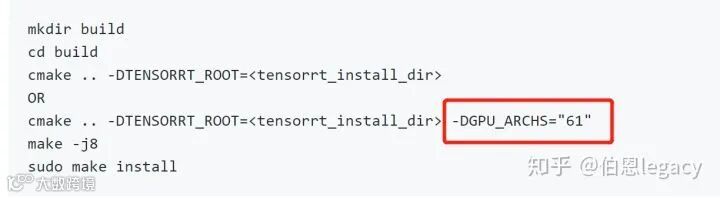
https://developer.nvidia.com/cuda-gpus可以查看不同显卡的计算能力,比如你用7.5计算力生成的trt文件,是不能用6.5的显卡来解析的。

另外在onnx2trt命令有个-b操作,是指定生成的trt文件的batch size的。在实际test过程中,你的batch size是多少,这个就设置成多少。我记得我当时trt文件的batch size是1,但是我实际的batch size是8,运行后,只有一张图片有结果,其他7张图片都是0。
如果能顺利生成trt文件的话,在代码中可以直接添加以下函数,来生成engine, 其他就不需要改变。
bool read_TRT_File(const std::string& engineFile, IHostMemory*& trtModelStream){std::fstream file;std::cout << "loading filename from:" << engineFile << std::endl;nvinfer1::IRuntime* trtRuntime;//nvonnxparser::IPluginFactory* onnxPlugin = createPluginFactory(gLogger.getTRTLogger());file.open(engineFile, std::ios::binary | std::ios::in);file.seekg(0, std::ios::end);int length = file.tellg();std::cout << "length:" << length << std::endl;file.seekg(0, std::ios::beg);std::unique_ptr<char[]> data(new char[length]);file.read(data.get(), length);file.close();std::cout << "load engine done" << std::endl;std::cout << "deserializing" << std::endl;trtRuntime = createInferRuntime(gLogger.getTRTLogger());//ICudaEngine* engine = trtRuntime->deserializeCudaEngine(data.get(), length, onnxPlugin);ICudaEngine* engine = trtRuntime->deserializeCudaEngine(data.get(), length, nullptr);std::cout << "deserialize done" << std::endl;assert(engine != nullptr);std::cout << "The engine in TensorRT.cpp is not nullptr" <<std::endl;trtModelStream = engine->serialize();return true;}
如果想保存引擎文件的话,可以在自己的代码中添加这几句话,就可以生成trt文件,然后下次直接调用trt文件。
nvinfer1::IHostMemory* data = engine->serialize();std::ofstream file;file.open(filename, std::ios::binary | std::ios::out);cout << "writing engine file..." << endl;file.write((const char*)data->data(), data->size());cout << "save engine file done" << endl;file.close();
五.总结
TensorRT的部署并不难,难的是模型转化,在这个过程中有太多的操作是TensorRT不支持的,或者pytorch模型转化成的onnx本身就有问题。经常会出现,expand, Gather, reshape不支持等。感觉TensorRT对pytorch的维度变化特别不友好,我自己在模型转化过程中绝大多数bug都出在维度变化上。如果你有什么问题的话,请在下方留言吧!好吧,暂时就先写这么多,以后再补充吧。
最近TensorRT7出来了,支持了挺多5版本,6版本无法支持的操作。发现了一个tiny-tensorrt,貌似在C++和python环境下部署很easy,暂时还没测试过,但是先记录一下。https://github.com/zerollzeng/tiny-tensorrt

推荐阅读


