



极市导读
Swarm 开源后引起了热烈讨论,有网友表示这能帮助简化许多潜在的多智能体用例的工作流程。 >>加入极市CV技术交流群,走在计算机视觉的最前沿
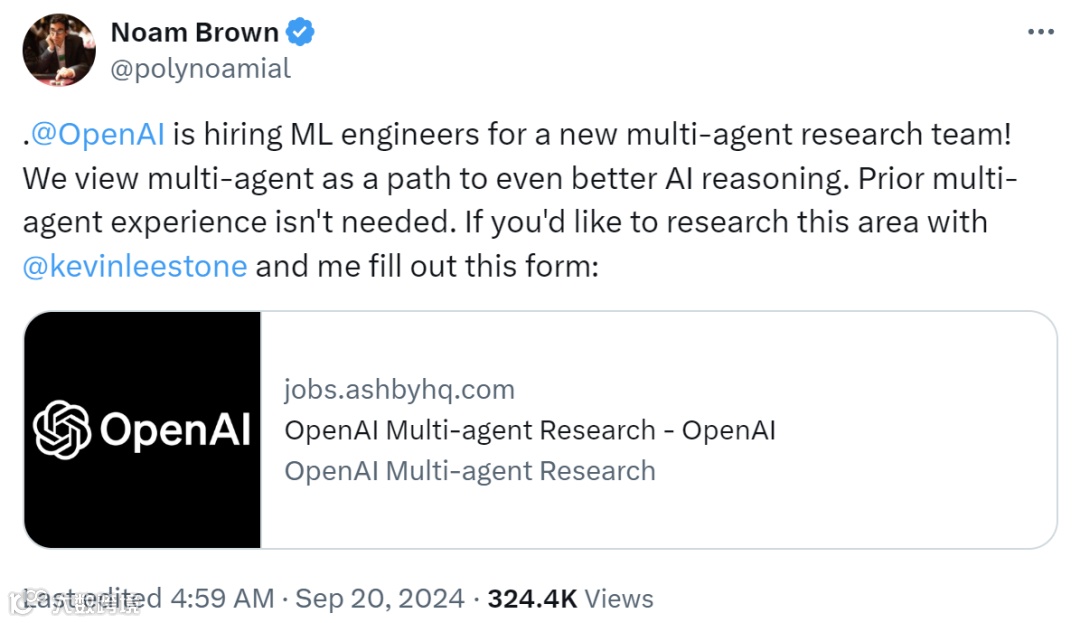
毫无疑问,多智能体肯定是 OpenAI 未来重要的研究方向之一,前些天 OpenAI 著名研究科学家 Noam Brown 还在 X 上为 OpenAI 正在组建的一个新的多智能体研究团队招募机器学习工程师。

-
项目地址:https://github.com/openai/swarm
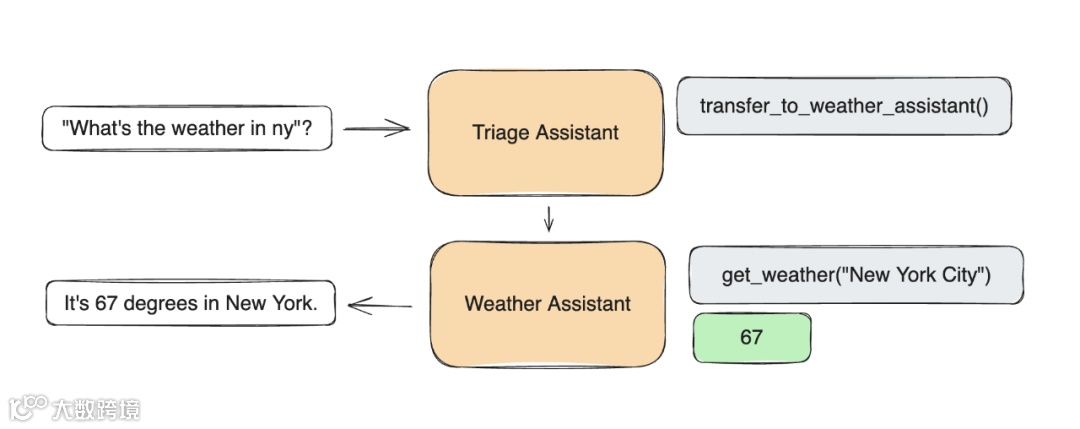
pip install git+ssh://git@github.com/openai/swarm.gitfrom swarm import Swarm, Agentclient = Swarm()def transfer_to_agent_b():return agent_bagent_a = Agent(name="Agent A",instructions="You are a helpful agent.",functions=[transfer_to_agent_b],)agent_b = Agent(name="Agent B",instructions="Only speak in Haikus.",)response = client.run(agent=agent_a,messages=[{"role": "user", "content": "I want to talk to agent B."}],)print(response.messages[-1]["content"])
Hope glimmers brightly,New paths converge gracefully,What can I assist?
from swarm import Swarmclient = Swarm()
-
先让当前智能体完成一个结果 -
执行工具调用并附加结果 -
如有必要,切换智能体 -
如有必要,更新上下文变量 -
如果没有新的函数调用,则返回
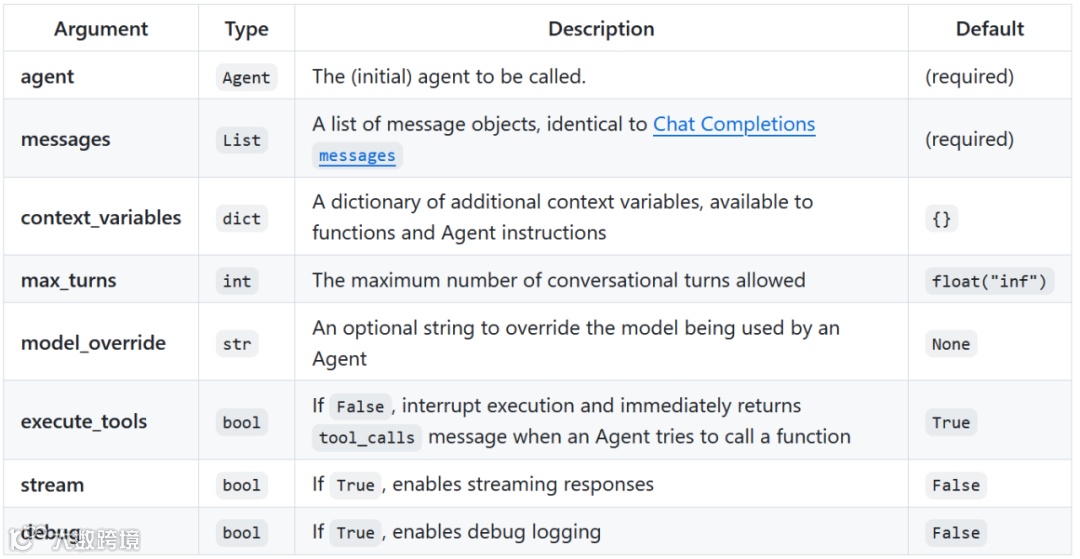
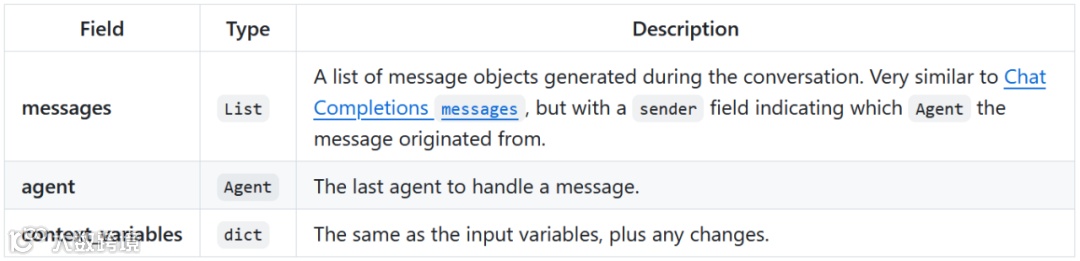
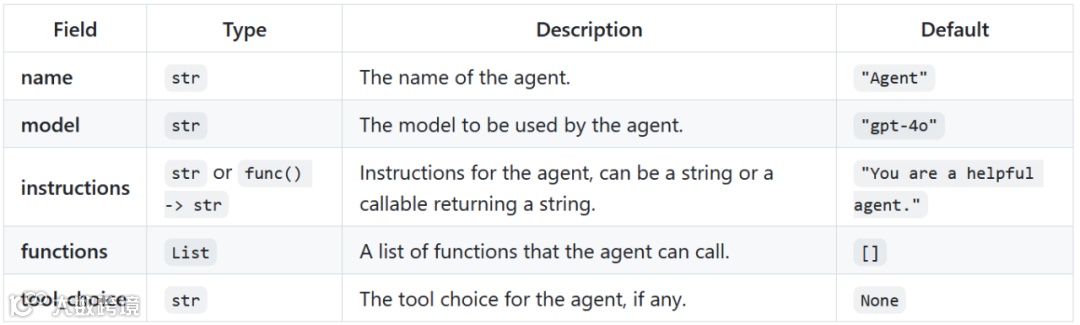
agent = Agent(instructions="You are a helpful agent.")
def instructions(context_variables):user_name = context_variables["user_name"]return f"Help the user, {user_name}, do whatever they want."agent = Agent(instructions=instructions)response = client.run(agent=agent,messages=[{"role":"user", "content": "Hi!"}],context_variables={"user_name":"John"})print(response.messages[-1]["content"])
Hi John, how can I assist you today?-
Swarm Agent 可以直接调用 Python 函数。 -
函数通常应返回一个字符串(数值会被转换为字符串)。 -
如果一个函数返回了一个 Agent,则执行过程将转交给该 Agent。 -
如果函数定义了 context_variables 参数,则它将由传递到 client.run() 的 context_variables 填充。
def greet(context_variables, language):user_name = context_variables["user_name"]greeting = "Hola" if language.lower() == "spanish" else "Hello"print(f"{greeting}, {user_name}!")return "Done"agent = Agent(functions=[print_hello])client.run(agent=agent,messages=[{"role": "user", "content": "Usa greet() por favor."}],context_variables={"user_name": "John"})
Hola, John!sales_agent = Agent(name="Sales Agent")def transfer_to_sales():return sales_agentagent = Agent(functions=[transfer_to_sales])response = client.run(agent, [{"role":"user", "content":"Transfer me to sales."}])print(response.agent.name)
Sales Agentsales_agent = Agent(name="Sales Agent")def talk_to_sales():print("Hello, World!")return Result(value="Done",agent=sales_agent,context_variables={"department": "sales"})agent = Agent(functions=[talk_to_sales])response = client.run(agent=agent,messages=[{"role": "user", "content": "Transfer me to sales"}],context_variables={"user_name": "John"})print(response.agent.name)print(response.context_variables)
Sales Agent{'department': 'sales', 'user_name': 'John'}
-
文档字符串会转换为函数 description。 -
没有默认值的参数会设置为 required。 -
类型提示会映射到参数的 type(默认为 string)。 -
不明确支持对每个参数进行描述,但如果只是在文档字符串中添加,应该能以相似的方式工作。
def greet(name, age: int, location: str = "New York"):"""Greets the user. Make sure to get their name and age before calling.Args:name: Name of the user.age: Age of the user.location: Best place on earth."""print(f"Hello {name}, glad you are {age} in {location}!"){"type": "function","function": {"name": "greet","description": "Greets the user. Make sure to get their name and age before calling.\n\nArgs:\n name: Name of the user.\n age: Age of the user.\n location: Best place on earth.","parameters": {"type": "object","properties": {"name": {"type": "string"},"age": {"type": "integer"},"location": {"type": "string"}},"required": ["name", "age"]}}}
stream = client.run(agent, messages, stream=True)for chunk in stream:print(chunk)
-
{"delim":"start"} 和 {"delim":"start"},用于在 Agent 每次处理单个消息(响应或函数调用)时发出信号。这有助于识别 Agent 之间的切换。 -
为方便起见,{"response": Response} 将在流的末尾返回带有已聚合的(完整)响应的 Response 对象。
-
Ilan Bigio - ibigio -
James Hills - jhills20 -
Shyamal Anadkat - shyamal-anadkat -
Charu Jaiswal - charuj -
Colin Jarvis - colin-openai

公众号后台回复“数据集”获取100+深度学习各方向资源整理
极市干货

点击阅读原文进入CV社区
收获更多技术干货