如果你是 Flutter 的新手,那么请访问 Flutter 官网安装 Flutter。
在https://pub.dev/搜索“Agora”,下载声网Agora Flutter SDK v3.2.1
在https://pub.dev/搜索“Agora”,声网Agora Flutter RTM SDK v0.9.14
VS Code 或其他 IDE
声网Agora 开发者账户,请访问 Agora.io 注册
flutter create agora_live_streamingdependencies:flutter:sdk: fluttercupertino_icons: ^1.0.0permission_handler: ^5.1.0+2agora_rtc_engine: ^3.2.1agora_rtm: ^0.9.14
flutter pub get
class MyHomePage extends StatefulWidget {@override_MyHomePageState createState() => _MyHomePageState();}class _MyHomePageState extends State<MyHomePage> {final _username = TextEditingController();final _channelName = TextEditingController();bool _isBroadcaster = false;String check = '';@overrideWidget build(BuildContext context) {return Scaffold(resizeToAvoidBottomInset: true,body: Center(child: SingleChildScrollView(physics: NeverScrollableScrollPhysics(),child: Stack(children: <Widget>[Center(child: Column(mainAxisAlignment: MainAxisAlignment.center,children: <Widget>[Padding(padding: const EdgeInsets.all(30.0),child: Image.network('https://www.agora.io/en/wp-content/uploads/2019/06/agoralightblue-1.png',scale: 1.5,),),Container(width: MediaQuery.of(context).size.width * 0.85,height: MediaQuery.of(context).size.height * 0.2,child: Column(mainAxisAlignment: MainAxisAlignment.spaceBetween,children: <Widget>[TextFormField(controller: _username,decoration: InputDecoration(border: OutlineInputBorder(borderRadius: BorderRadius.circular(20),borderSide: BorderSide(color: Colors.grey),),hintText: 'Username',),),TextFormField(controller: _channelName,decoration: InputDecoration(border: OutlineInputBorder(borderRadius: BorderRadius.circular(20),borderSide: BorderSide(color: Colors.grey),),hintText: 'Channel Name',),),],),),Container(width: MediaQuery.of(context).size.width * 0.65,padding: EdgeInsets.symmetric(vertical: 10),child: SwitchListTile(title: _isBroadcaster? Text('Broadcaster'): Text('Audience'),value: _isBroadcaster,activeColor: Color.fromRGBO(45, 156, 215, 1),secondary: _isBroadcaster? Icon(Icons.account_circle,color: Color.fromRGBO(45, 156, 215, 1),): Icon(Icons.account_circle),onChanged: (value) {setState(() {_isBroadcaster = value;print(_isBroadcaster);});}),),Padding(padding: const EdgeInsets.symmetric(vertical: 25),child: Container(width: MediaQuery.of(context).size.width * 0.85,decoration: BoxDecoration(color: Colors.blue,borderRadius: BorderRadius.circular(20)),child: MaterialButton(onPressed: onJoin,child: Row(mainAxisAlignment: MainAxisAlignment.center,children: <Widget>[Text('Join ',style: TextStyle(color: Colors.white,letterSpacing: 1,fontWeight: FontWeight.bold,fontSize: 20),),Icon(Icons.arrow_forward,color: Colors.white,)],),),),),Text(check,style: TextStyle(color: Colors.red),)],),),],),),));}}
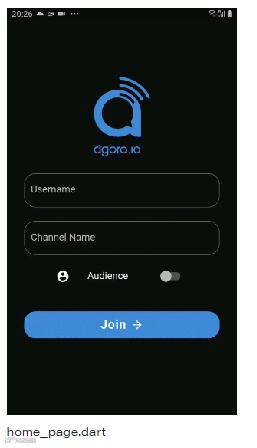
Future<void> onJoin() async {if (_username.text.isEmpty || _channelName.text.isEmpty) {setState(() {check = 'Username and Channel Name are required fields';});} else {setState(() {check = '';});await _handleCameraAndMic(Permission.camera);await _handleCameraAndMic(Permission.microphone);Navigator.of(context).push(MaterialPageRoute(builder: (context) => BroadcastPage(userName: _username.text,channelName: _channelName.text,isBroadcaster: _isBroadcaster,),),);}}
Future<void> onJoin() async {if (_username.text.isEmpty || _channelName.text.isEmpty) {setState(() {check = 'Username and Channel Name are required fields';});} else {setState(() {check = '';});await _handleCameraAndMic(Permission.camera);await _handleCameraAndMic(Permission.microphone);Navigator.of(context).push(MaterialPageRoute(builder: (context) => BroadcastPage(userName: _username.text,channelName: _channelName.text,isBroadcaster: _isBroadcaster,),),);}}
class BroadcastPage extends StatefulWidget {final String channelName;final String userName;final bool isBroadcaster;const BroadcastPage({Key key, this.channelName, this.userName, this.isBroadcaster}) : super(key: key);@override_BroadcastPageState createState() => _BroadcastPageState();}class _BroadcastPageState extends State<BroadcastPage> {final _users = <int>[];final _infoStrings = <String>[];RtcEngine _engine;bool muted = false;@overridevoid dispose() {// clear users_users.clear();// destroy sdk and leave channel_engine.destroy();super.dispose();}@overridevoid initState() {super.initState();// initialize agora sdkinitialize();}Future<void> initialize() async {}@overrideWidget build(BuildContext context) {return Scaffold(body: Center(child: Stack(children: <Widget>[_viewRows(),_toolbar(),],),),);}}
在我们的 BroadcastPage 类中,我们声明一个 RtcEngine 类的对象。为了初始化这个对象,我们创建一个initState()方法,在这个方法中我们调用了初始化函数。
initialize() 函数不仅初始化声网Agora SDK,它也是调用的其他主要函数的函数,如_initAgoraRtcEngine(),_addAgoraEventHandlers(), 和joinChannel()。
Future<void> initialize() async {print('Client Role: ${widget.isBroadcaster}');if (appId.isEmpty) {setState(() {_infoStrings.add('APP_ID missing, please provide your APP_ID in settings.dart',);_infoStrings.add('Agora Engine is not starting');});return;}await _initAgoraRtcEngine();_addAgoraEventHandlers();await _engine.joinChannel(null, widget.channelName, null, 0);}
_initAgoraRtcEngine()用于创建声网Agora SDK的实例。使用你从声网Agora开发者后台得到的项目App ID来初始化它。在这里面,我们使用enableVideo()函数来启用视频模块。为了将频道配置文件从视频通话(默认值)改为直播,我们调用setChannelProfile() 方法,然后设置用户角色。
Future<void> _initAgoraRtcEngine() async {_engine = await RtcEngine.create(appId);await _engine.enableVideo();await _engine.setChannelProfile(ChannelProfile.LiveBroadcasting);if (widget.isBroadcaster) {await _engine.setClientRole(ClientRole.Broadcaster);} else {await _engine.setClientRole(ClientRole.Audience);}}
_addAgoraEventHandlers()是一个处理所有主要回调函数的函数。我们从setEventHandler()开始,它监听engine事件并接收相应RtcEngine的统计数据。
joinChannelSuccess()在本地用户加入指定频道时被触发。它返回频道名,用户的uid,以及本地用户加入频道所需的时间(以毫秒为单位)。
leaveChannel()与joinChannelSuccess()相反,因为它是在用户离开频道时触发的。每当用户离开频道时,它就会返回调用的统计信息。这些统计包括延迟、CPU使用率、持续时间等。
userJoined()是一个当远程用户加入一个特定频道时被触发的方法。一个成功的回调会返回远程用户的id和经过的时间。
userOffline()与userJoined() 相反,因为它发生在用户离开频道的时候。一个成功的回调会返回uid和离线的原因,包括掉线、退出等。
firstRemoteVideoFrame()是一个当远程视频的第一个视频帧被渲染时被调用的方法,它可以帮助你返回uid、宽度、高度和经过的时间。
void _addAgoraEventHandlers() {_engine.setEventHandler(RtcEngineEventHandler(error: (code) {setState(() {final info = 'onError: $code';_infoStrings.add(info);});}, joinChannelSuccess: (channel, uid, elapsed) {setState(() {final info = 'onJoinChannel: $channel, uid: $uid';_infoStrings.add(info);});}, leaveChannel: (stats) {setState(() {_infoStrings.add('onLeaveChannel');_users.clear();});}, userJoined: (uid, elapsed) {setState(() {final info = 'userJoined: $uid';_infoStrings.add(info);_users.add(uid);});}, userOffline: (uid, elapsed) {setState(() {final info = 'userOffline: $uid';_infoStrings.add(info);_users.remove(uid);});},));}
joinChannel()一个频道在视频通话中就是一个房间。一个joinChannel()函数可以帮助用户订阅一个特定的频道。这可以使用我们的RtcEngine对象来声明:
await _engine.joinChannel(token, "channel-name", "Optional Info", uid);注意:此项目是开发环境,仅供参考,请勿直接用于生产环境。建议在生产环境中运行的所有RTE App都使用Token鉴权。关于声网Agora平台中基于Token鉴权的更多信息,请参考声网文档中心:https://docs.agora.io/cn。
List<Widget> _getRenderViews() {final List<StatefulWidget> list = [];if(widget.isBroadcaster) {list.add(RtcLocalView.SurfaceView());}_users.forEach((int uid) => list.add(RtcRemoteView.SurfaceView(uid: uid)));return list;}/// Video view wrapperWidget _videoView(view) {return Expanded(child: Container(child: view));}/// Video view row wrapperWidget _expandedVideoRow(List<Widget> views) {final wrappedViews = views.map<Widget>(_videoView).toList();return Expanded(child: Row(children: wrappedViews,),);}/// Video layout wrapperWidget _viewRows() {final views = _getRenderViews();switch (views.length) {case 1:return Container(child: Column(children: <Widget>[_videoView(views[0])],));case 2:return Container(child: Column(children: <Widget>[_expandedVideoRow([views[0]]),_expandedVideoRow([views[1]])],));case 3:return Container(child: Column(children: <Widget>[_expandedVideoRow(views.sublist(0, 2)),_expandedVideoRow(views.sublist(2, 3))],));case 4:return Container(child: Column(children: <Widget>[_expandedVideoRow(views.sublist(0, 2)),_expandedVideoRow(views.sublist(2, 4))],));default:}return Container();}
Widget _toolbar() {return widget.isBroadcaster? Container(alignment: Alignment.bottomCenter,padding: const EdgeInsets.symmetric(vertical: 48),child: Row(mainAxisAlignment: MainAxisAlignment.center,children: <Widget>[RawMaterialButton(onPressed: _onToggleMute,child: Icon(muted ? Icons.mic_off : Icons.mic,color: muted ? Colors.white : Colors.blueAccent,size: 20.0,),shape: CircleBorder(),elevation: 2.0,fillColor: muted ? Colors.blueAccent : Colors.white,padding: const EdgeInsets.all(12.0),),RawMaterialButton(onPressed: () => _onCallEnd(context),child: Icon(Icons.call_end,color: Colors.white,size: 35.0,),shape: CircleBorder(),elevation: 2.0,fillColor: Colors.redAccent,padding: const EdgeInsets.all(15.0),),RawMaterialButton(onPressed: _onSwitchCamera,child: Icon(Icons.switch_camera,color: Colors.blueAccent,size: 20.0,),shape: CircleBorder(),elevation: 2.0,fillColor: Colors.white,padding: const EdgeInsets.all(12.0),),RawMaterialButton(onPressed: _goToChatPage,child: Icon(Icons.message_rounded,color: Colors.blueAccent,size: 20.0,),shape: CircleBorder(),elevation: 2.0,fillColor: Colors.white,padding: const EdgeInsets.all(12.0),),],),): Container(alignment: Alignment.bottomCenter,padding: EdgeInsets.only(bottom: 48),child: RawMaterialButton(onPressed: _goToChatPage,child: Icon(Icons.message_rounded,color: Colors.blueAccent,size: 20.0,),shape: CircleBorder(),elevation: 2.0,fillColor: Colors.white,padding: const EdgeInsets.all(12.0),),);}
_onToggleMute()可以让你的数据流静音或者取消静音。这里,我们使用 muteLocalAudioStream()方法,它采用一个布尔输入来使数据流静音或取消静音。
void _onToggleMute() {setState(() {muted = !muted;});_engine.muteLocalAudioStream(muted);}
_onSwitchCamera()可以让你在前摄像头和后摄像头之间切换。在这里,我们使用switchCamera()方法,它可以帮助你实现所需的功能。
void _onSwitchCamera() {_engine.switchCamera();}
_onCallEnd()断开呼叫并返回主页 。
void _onCallEnd(BuildContext context) {Navigator.pop(context);}
_goToChatPage() 导航到聊天界面。
void _goToChatPage() {Navigator.of(context).push(MaterialPageRoute(builder: (context) => RealTimeMessaging(channelName: widget.channelName,userName: widget.userName,isBroadcaster: widget.isBroadcaster,),));}
class RealTimeMessaging extends StatefulWidget {final String channelName;final String userName;final bool isBroadcaster;const RealTimeMessaging({Key key, this.channelName, this.userName, this.isBroadcaster}): super(key: key);@override_RealTimeMessagingState createState() => _RealTimeMessagingState();}class _RealTimeMessagingState extends State<RealTimeMessaging> {bool _isLogin = false;bool _isInChannel = false;final _channelMessageController = TextEditingController();final _infoStrings = <String>[];AgoraRtmClient _client;AgoraRtmChannel _channel;@overridevoid initState() {super.initState();_createClient();}@overrideWidget build(BuildContext context) {return MaterialApp(home: Scaffold(body: Container(padding: const EdgeInsets.all(16),child: Column(children: [_buildInfoList(),Container(width: double.infinity,alignment: Alignment.bottomCenter,child: _buildSendChannelMessage(),),],),)),);}}
void _createClient() async {_client = await AgoraRtmClient.createInstance(appId);_client.onMessageReceived = (AgoraRtmMessage message, String peerId) {_logPeer(message.text);};_client.onConnectionStateChanged = (int state, int reason) {print('Connection state changed: ' +state.toString() +', reason: ' +reason.toString());if (state == 5) {_client.logout();print('Logout.');setState(() {_isLogin = false;});}};_toggleLogin();_toggleJoinChannel();}
_toggleLogin()使用 AgoraRtmClient 对象来登录和注销一个频道。它需要一个Token和一个 user ID 作为参数。这里,我使用用户名作为用户ID。
void _toggleLogin() async {if (!_isLogin) {try {await _client.login(null, widget.userName);print('Login success: ' + widget.userName);setState(() {_isLogin = true;});} catch (errorCode) {print('Login error: ' + errorCode.toString());}}}
_toggleJoinChannel()创建了一个AgoraRtmChannel对象,并使用这个对象来订阅一个特定的频道。这个对象将被用于所有的回调,当一个成员加入,一个成员离开,或者一个用户收到消息时,回调都会被触发。
void _toggleJoinChannel() async {try {_channel = await _createChannel(widget.channelName);await _channel.join();print('Join channel success.');setState(() {_isInChannel = true;});} catch (errorCode) {print('Join channel error: ' + errorCode.toString());}}
_buildSendChannelMessage()创建一个输入字段并触发一个函数来发送消息。
_buildInfoList()对消息进行样式设计,并将它们放在唯一 的容器中。你可以根据设计需求来定制这些小组件。
_buildSendChannelMessage()我已经声明了一个Row,它添加了一个文本输入字段和一 个按钮,这个按钮在被按下时调用 _toggleSendChannelMessage。
Widget _buildSendChannelMessage() {if (!_isLogin || !_isInChannel) {return Container();}return Row(mainAxisAlignment: MainAxisAlignment.spaceEvenly,children: <Widget>[Container(width: MediaQuery.of(context).size.width * 0.75,child: TextFormField(showCursor: true,enableSuggestions: true,textCapitalization: TextCapitalization.sentences,controller: _channelMessageController,decoration: InputDecoration(hintText: 'Comment...',border: OutlineInputBorder(borderRadius: BorderRadius.circular(20),borderSide: BorderSide(color: Colors.grey, width: 2),),enabledBorder: OutlineInputBorder(borderRadius: BorderRadius.circular(20),borderSide: BorderSide(color: Colors.grey, width: 2),),),),),Container(decoration: BoxDecoration(borderRadius: BorderRadius.all(Radius.circular(40)),border: Border.all(color: Colors.blue,width: 2,)),child: IconButton(icon: Icon(Icons.send, color: Colors.blue),onPressed: _toggleSendChannelMessage,),)],);}
void _toggleSendChannelMessage() async {String text = _channelMessageController.text;if (text.isEmpty) {print('Please input text to send.');return;}try {await _channel.sendMessage(AgoraRtmMessage.fromText(text));_log(text);_channelMessageController.clear();} catch (errorCode) {print('Send channel message error: ' + errorCode.toString());}}
Widget _buildInfoList() {return Expanded(child: Container(child: _infoStrings.length > 0? ListView.builder(reverse: true,itemBuilder: (context, i) {return Container(child: ListTile(title: Align(alignment: _infoStrings[i].startsWith('%')? Alignment.bottomLeft: Alignment.bottomRight,child: Container(padding: EdgeInsets.symmetric(horizontal: 6, vertical: 3),color: Colors.grey,child: Column(crossAxisAlignment: _infoStrings[i].startsWith('%') ? CrossAxisAlignment.start : CrossAxisAlignment.end,children: [_infoStrings[i].startsWith('%')? Text(_infoStrings[i].substring(1),maxLines: 10,overflow: TextOverflow.ellipsis,textAlign: TextAlign.right,style: TextStyle(color: Colors.black),): Text(_infoStrings[i],maxLines: 10,overflow: TextOverflow.ellipsis,textAlign: TextAlign.right,style: TextStyle(color: Colors.black),),Text(widget.userName,textAlign: TextAlign.right,style: TextStyle(fontSize: 10,),)],),),),),);},itemCount: _infoStrings.length,): Container()));}
flutter run获取更多教程、Demo、技术帮助,请点击「阅读原文」访问声网开发者社区