


项目简介
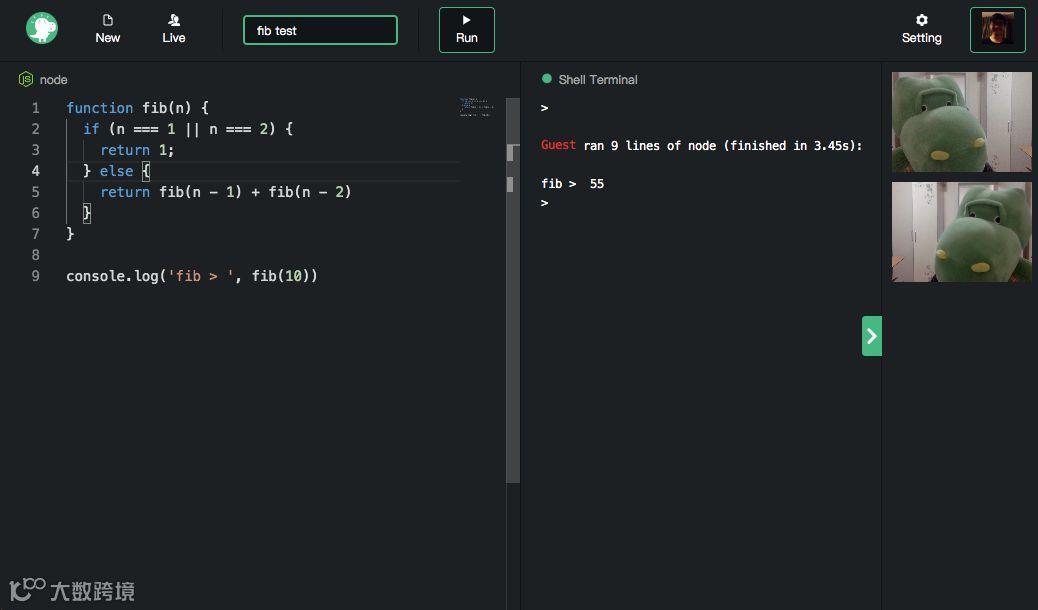
CoderLane 是一款在线实时编程环境, 它的目的是为了解决在线多人实时编程环境困难的问题。通过各种技术手段希望提高在线编程的体验。
项目初心
-
候选人的简历不能真实的反应出实际的技能 -
传统的线下面试缺少可执行环节给候选人造成困扰(常因为一些问题相互理解的差异导致面试无法有效的取得对候选人准确的判断,或者候选人表现低于预期) -
电话无法有效的评估候选人的实际技能所以我就开始构思做一个更好用的在线编程工具,使用起来无障碍且足够简单 -
现场面试会带来更多时间、费用等方面的负担(若现场不是上机测试,给你一张 A4 纸,不久以后你得到的是一张好像写满草书的文字。没办法运行并且也很难看清楚上面写的是什么。)
基于个人兴趣爱好,我就开始构思做一个更好用的在线编程工具,使用起来无障碍且足够简单。机缘巧合,了解到了声网 Agora SDK,觉得在之前想法的基础上可以增加音视频功能,便于面试者能在 CodeLane 有更多的实时体验。于是就借着比赛的机会把作品好好打磨一下。
主要功能
-
支持 20+语言 -
强大的代码编辑器 -
高效的实时音视频沟通 -
面试过程回放
-
现代化的 IDE, 通过集成 Monaco 编辑器可以拥有非常完善的编辑体验
// 编辑器import React from 'react';import VSCode from './VSCode';class CodeEditor extends React.Component {render() {const { width, height, style, onInit } = this.props;return (<divstyle={{width: width || '100%',height: height || '100%',position: 'absolute',top: 0,left: 0,right: 0,bottom: 0,...style}}><VSCode {...this.props} onInit={onInit} /></div>)}}export default CodeEditor;
-
自定义编辑器,通过设置可以自定义基础的编辑器设置 -
快速创建,只需要5秒即可创建数十种在线编程语言环境
// 编辑器设置class Setting extends React.Component {static contextType = ContextbindVaue = key => {const { setting, dispatch } = this.context;return {value: setting[key],setValue: value => dispatch(settingUpdate({ key, value })),}}render() {const { isOpen } = this.props;return (<ModalisOpen={isOpen}onRequestClose={this.props.closeModal}style={modalStyle}><div className="setting"><h3>Settings</h3><SettingItemtitle="Line numbers"type="boolean"{...this.bindVaue('lineNumbers')}/><SubDescription>Controls whether to show line numbers. Defaults to true.</SubDescription><Split /><SettingItemtitle="Auto Indent"type="boolean"{...this.bindVaue('autoIndent')}/><SubDescription>Enable auto indentation adjustment. Defaults to false.</SubDescription><Split /><SettingItemtitle="Tab Size"type="number"{...this.bindVaue('tabSize')}/><SubDescription>Number of spaces per indentation level. Inherited by all formatters.</SubDescription><Split /><SettingItemtitle="Font Size"type="number"{...this.bindVaue('fontSize')}/><SubDescription>Controls the font size in pixels</SubDescription></div></Modal>)}}
高保真控制台(REPL), 它会连接到语言的REPL可以用于调试等高级操作
// REPLfunction dockerExec(lang, isPty) {const containerId = get('containerId');let execParams = [];execParams.push('exec');if (isPty) {execParams.push('-it');} else {execParams.push('-t');}execParams.push('-w', ws, containerId);if (isDynamic(lang) && isPty) {execParams.push(...replParams(lang)); // 动态语言运行} else {execParams.push(...replParams(lang, true)); // 动态语言运行}if (isDynamic(lang) && isPty) { // 动态语言需要ptyreturn nodePty.spawn('docker', execParams);} else { // 不需要pty,直接执行return spawn('docker', execParams);}}
实时音视频,我们通过声网 Agora SDK 来实现
//音视频实时通讯initVideo() {const { sandbox: { _id }, app: { token } } = this.props;if(!AgoraRTC.checkSystemRequirements()) {alert("Your browser does not support WebRTC!");}AgoraRTC.getDevices(devices => {var defaultAudio, defaultVideo;let localStream;defaultAudio = _.head(_.filter(devices, function(v) {return v.kind === 'audioinput';}));defaultVideo = _.head(_.filter(devices, function(v) {return v.kind === 'videoinput';}));this.client.init(appId, () => {//加入频道console.log('token > ', token, _id, this.uid)this.client.join(token, _id/* channel id */, this.uid, uid => {const localStream = AgoraRTC.createStream({streamID: uid,audio: true,cameraId: defaultVideo.deviceId,microphoneId: defaultAudio.deviceId,video: true, // 是否开启视频screen: false});this.stream = localStream;localStream.setVideoProfile('480p');localStream.init(() => {localStream.play("preview");// 如果创建者自动开启发布流// 发布视频流到SD-RTNthis.client.publish(localStream, (err) => {console.error("发布视频流错误: " + err);});});})})});}
后续计划
项目开源
-
在线体验:https://coderlane.net/ -
作者:蒋著,主要工作是做前端,懂一点后端,偶尔也做做产品。 -
作者主页:https://github.com/monsterooo -
开源地址:https://github.com/AgoraIO-Community/2019-Hackathon-Works-CoderLane

-
编译指南:
Run dependencies docker, mongodb, nodejs to make sure you have installed the above software normally• Rename .env.example to .env and fill in the values according to the configuration in the prompt• npm i installer dependencies• Start a console and run npm run build• Start another console and run npm run serverVisit the browser http: // localhost: 3000 and log in using github to create it.
RTC 2020 编程挑战赛
RTC 2020 编程挑战赛春季赛已经开启报名了!本次大赛从 3月10日 ~ 4月21日 进行报名、组队与开发,4 月 22 日至 4 月 24 日提交作品,4 月 25 日评奖,全程在线上进行。本次大赛准备了丰厚的大奖,快拉上小伙伴报名吧!

点击「阅读原文」,报名参赛!