



前言
设计思路
1. 在做产品之前需要明确需求,本次需求:实现语音聊天室Demo;
2. 在确定需求之后,还需要对音视频这块有一定的了解,可以参考声网官网提供的[音视频时序图](https://docs.agora.io/cn/video-call-4.x/start_call_ios_ng?platform=iOS#othermethods),本次我们要实现的是多人语聊房,实现原理可以参考音视频的实现,音频通话不区分主播和观众,所有用户都是主播角色。


另外,在实现demo之前你需要一些准备工作,可参见【开发环境】。
开发环境
项目设置
1. 创建项目,集成声网SDK
项目名为:VoiceChatDemo,打开终端,进入根目录VoiceChatDemo下,输入命令pod init,该命令生成Podfile文件,并在Podfile文件中,输入pod 'AgoraRtcEngine_iOS','4.1.1’,表示集成声网sdk。之后在终端中输入命令pod install,表示下载依赖。

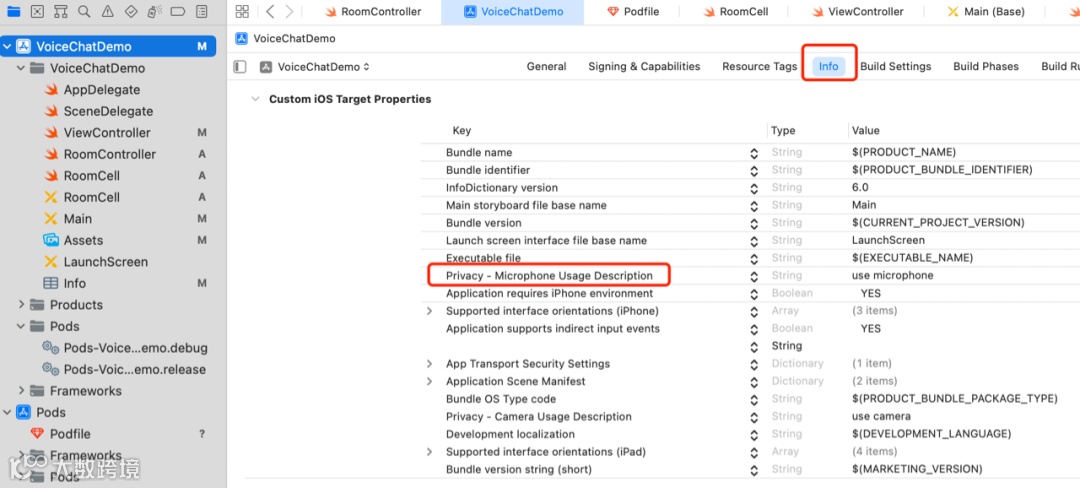
2. 添加媒体设备权限
本次实现的语聊房Demo,所以只需要给予麦克风权限
客户端实现
1. 加房页面创建
本次语音聊天室 Demo 主要涉及两个页面,一是用户加房页面 ViewController ,二是用户聊天室页面 RoomController 。而在RoomController中包含一个UICollection View,用于展示远端用户视图。
import UIKitclass ViewController: UIViewController {weak var appidTF: UITextField!weak var tokenTF: UITextField!weak var uidTF: UITextField!weak var roomTF: UITextField!override func viewDidLoad() {super.viewDidLoad()// Do any additional setup after loading the view.}}
加房跳转逻辑在页面中设计,具体如下图

2. 聊天室实现逻辑
在RoomController.swift文件中,实现聊天室逻辑功能
import AgoraRtcKit//自 3.0.0 版本起,AgoraRtcEngineKit 类名更换为 AgoraRtcKit
2)初始化声网引擎
// 初始化AgoraRtcEngineKit,可加入自定义配置,比如加入频道是否开启麦克风、摄像头等。let config = AgoraRtcEngineConfig()config.appId = appidconfig.channelProfile = profileagoraKit = AgoraRtcEngineKit.sharedEngine(with: config, delegate: self)agoraKit.enableAudio()agoraKit.disableVideo()agoraKit.enableAudioVolumeIndication(200, smooth: 3, reportVad: true)//默认加入频道即发送音频,不发送视频let option = AgoraRtcChannelMediaOptions()option.publishCameraTrack = falseoption.publishMicrophoneTrack = trueoption.enableAudioRecordingOrPlayout = trueoption.clientRoleType = .broadcasteroption.autoSubscribeAudio = true
2.2 聊天室页面设计


var nibName = UINib(nibName: "RoomCell", bundle:nil)userList.register(nibName, forCellWithReuseIdentifier: "RoomCell")
2)数据绑定
userList.delegate = selfuserList.dataSource = self
那么dataSource是怎么绑定数据的呢?当远端用户加房后,怎么显示在界面上?
//远端用户加入房间func rtcEngine(_ engine: AgoraRtcEngineKit, didJoinedOfUid uid: UInt, elapsed: Int) {let length = userArray.countif length == 0 {userArray.insert(Int(uid), at: 0)}else {userArray.insert(Int(uid), at: length-1 )}userList.reloadData()}//远端用户离开房间func rtcEngine(_ engine: AgoraRtcEngineKit, didOfflineOfUid uid: UInt, reason: AgoraUserOfflineReason) {var indexNum : Int = 0for (index,value) in userArray.enumerated() {if value == uid {indexNum = index}}userArray.remove(at: indexNum)userList.reloadData()}
另外,当用户加入房间后,用户的uid是怎么显示在界面上的呢?numberOfItemsInSection 表示区域内有多少个item(元素),也就是表示数组的个数,如果数组为5,那么就会返回5给collectionView;每一个cell 都可自己定义,有几个元素,那么第二个方法就会调用几次。而当用户进来时,显示用户uid,即 cell.uidLabel.text = "\(userArray[indexPath.row])"
extension RoomController : UICollectionViewDataSource {func collectionView(_ collectionView: UICollectionView, numberOfItemsInSection section: Int) -> Int {return userArray.count}func collectionView(_ collectionView: UICollectionView, cellForItemAt indexPath: IndexPath) -> UICollectionViewCell {let cell = collectionView.dequeueReusableCell(withReuseIdentifier: "RoomCell", for: indexPath) as! RoomCellcell.uidLabel.text = "\(userArray[indexPath.row])"return cell}
3)mute/unmute实现
//打开麦克风func openMic(_ sender: UIButton) {agoraKit.muteLocalAudioStream(false)}//关闭麦克风func closeMic(_ sender: UIButton) {agoraKit.muteLocalAudioStream(true)}
2.3 完整代码如下
import UIKitimport AgoraRtcKitclass RoomController: UIViewController, UICollectionViewDelegate {// 初始化操作var isJoined : Bool = falsevar agoraKit : AgoraRtcEngineKit!var appid,token,roomid : String!var uid : Int32 = 0var profile:AgoraChannelProfile = .liveBroadcasting//用户列表var userArray = [Int]()@IBOutlet weak var userList: UICollectionView!//展示用户列表override func viewDidLoad() {super.viewDidLoad()self.setUp()}func setUp() {//初始化userList.delegate = selfuserList.dataSource = selfappid = "afe...7063"token = niluid = 0roomid = "zeng"let nibName = UINib(nibName: "RoomCell", bundle:nil)userList.register(nibName, forCellWithReuseIdentifier: "RoomCell")let config = AgoraRtcEngineConfig()config.appId = appidconfig.channelProfile = profileagoraKit = AgoraRtcEngineKit.sharedEngine(with: config, delegate: self)agoraKit.enableAudio()agoraKit.disableVideo()agoraKit.enableAudioVolumeIndication(200, smooth: 3, reportVad: true)let option = AgoraRtcChannelMediaOptions()option.publishCameraTrack = falseoption.publishMicrophoneTrack = trueoption.enableAudioRecordingOrPlayout = trueoption.clientRoleType = .broadcasteroption.autoSubscribeAudio = truelet result = agoraKit.joinChannel(byToken: token, channelId: roomid, uid: UInt(uid), mediaOptions: option)if result != 0 {self.showAlert(title: "Error", message: "joinChannel call failed: \(result), please check your params")} else {print("joinChannel successed!")self.showAlert(title: "Info", message: "joinChannel successed!")}}//打开麦克风@IBAction func openMic(_ sender: UIButton) {agoraKit.muteLocalAudioStream(false)}//关闭麦克风@IBAction func closeMic(_ sender: UIButton) {agoraKit.muteLocalAudioStream(true)}//显示用户列表界面@IBAction func showUserList(_ sender: Any) {}@IBAction func leaveRoom(_ sender: Any) {dismiss(animated: true)}override func viewDidDisappear(_ animated: Bool) {super.viewDidDisappear(animated)if isJoined {agoraKit.leaveChannel()}}func showAlert(title: String? = nil, message: String, textAlignment: NSTextAlignment = .center) {let alertController = UIAlertController(title: title, message: message, preferredStyle: .alert)let action = UIAlertAction(title: "OK", style: .cancel, handler: nil)alertController.addAction(action)if let messageLabel = alertController.view.value(forKeyPath: "_messageLabel") as? UILabel {messageLabel.textAlignment = textAlignment}self.present(alertController, animated: true, completion: nil)}}///AgoraRtcEngineDelegateextension RoomController : AgoraRtcEngineDelegate {func rtcEngine(_ engine: AgoraRtcEngineKit, didOccur errorType: AgoraEncryptionErrorType) {self.showAlert(title: "Error", message: "didOccur: \(errorType), please check your params")}func rtcEngine(_ engine: AgoraRtcEngineKit, didJoinedOfUid uid: UInt, elapsed: Int) {// self.showAlert(title: "Info", message: "didJoinedOfUid: \(uid)")let length = userArray.countif length == 0 {userArray.insert(Int(uid), at: 0)}else {userArray.insert(Int(uid), at: length-1 )}userList.reloadData()}func rtcEngine(_ engine: AgoraRtcEngineKit, didJoinChannel channel: String, withUid uid: UInt, elapsed: Int) {self.isJoined = true}func rtcEngine(_ engine: AgoraRtcEngineKit, didOfflineOfUid uid: UInt, reason: AgoraUserOfflineReason) {var indexNum : Int = 0for (index,value) in userArray.enumerated() {if value == uid {indexNum = index}}userArray.remove(at: indexNum)userList.reloadData()}}///UITableViewDataSource && UITableViewDelegateextension RoomController : UICollectionViewDataSource {func collectionView(_ collectionView: UICollectionView, numberOfItemsInSection section: Int) -> Int {return userArray.count}func collectionView(_ collectionView: UICollectionView, cellForItemAt indexPath: IndexPath) -> UICollectionViewCell {let cell = collectionView.dequeueReusableCell(withReuseIdentifier: "RoomCell", for: indexPath) as! RoomCellcell.uidLabel.text = "\(userArray[indexPath.row])"return cell}}}
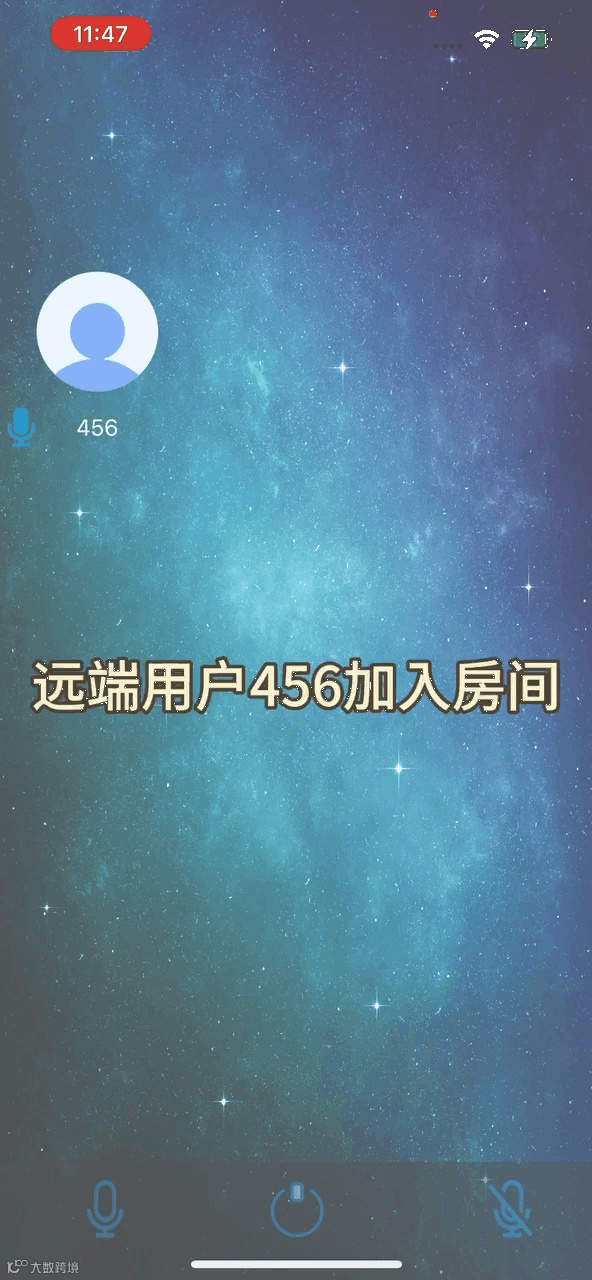
Demo展示
小结
https://docportal.shengwang.cn/cn/Agora+Platform/get_appid_token?utm_medium=referral&utm_campaign=XZ03
● 免费注册
● 官方文档
关注实时互动领域的
技术实践、行业洞察、人物观点
☟☟☟