


效果演示
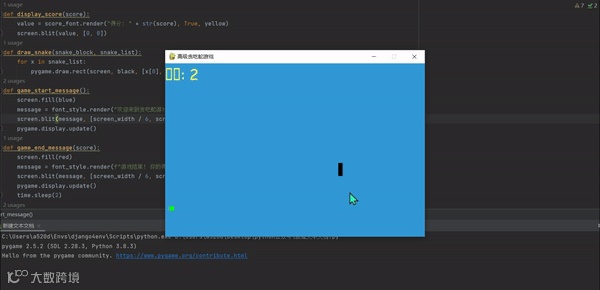
❝大家好,我是程序员黎明,今天我们来做一个贪吃蛇游戏,这个游戏主要是用Pygame库实现,最后还会加入一些高级功能,比如游戏的开始和结束界面、动态难度等。让我们开始吧!
游戏介绍
贪吃蛇是一款经典的游戏,玩家控制一条蛇在屏幕上移动,吃食物让蛇变长,同时避免撞到墙壁或自己的身体,其中这个版本会有以下功能:
-
游戏的开始和结束界面。 -
动态难度:随着蛇变长,游戏速度会增加。 -
自定义的食物生成和随机性。 -
游戏结束后的重新开始功能。
代码实现
import pygame
import time
import random
# 初始化 Pygame
pygame.init()
# 定义颜色
white = (255, 255, 255)
yellow = (255, 255, 102)
black = (0, 0, 0)
red = (213, 50, 80)
green = (0, 255, 0)
blue = (50, 153, 213)
# 屏幕大小
screen_width = 600
screen_height = 400
# 创建屏幕对象
screen = pygame.display.set_mode((screen_width, screen_height))
pygame.display.set_caption('高级贪吃蛇游戏')
# 设置时钟
clock = pygame.time.Clock()
snake_block = 10  # 贪吃蛇方块大小
snake_speed = 15  # 初始速度
font_style = pygame.font.SysFont("bahnschrift", 25)
score_font = pygame.font.SysFont("comicsansms", 35)
def display_score(score):
    value = score_font.render("得分: " + str(score), True, yellow)
    screen.blit(value, [0, 0])
def draw_snake(snake_block, snake_list):
    for x in snake_list:
        pygame.draw.rect(screen, black, [x[0], x[1], snake_block, snake_block])
def game_start_message():
    screen.fill(blue)
    message = font_style.render("欢迎来到贪吃蛇游戏!按任意键开始", True, yellow)
    screen.blit(message, [screen_width / 6, screen_height / 3])
    pygame.display.update()
def game_end_message(score):
    screen.fill(red)
    message = font_style.render(f"游戏结束! 你的得分: {score}", True, white)
    screen.blit(message, [screen_width / 6, screen_height / 3])
    pygame.display.update()
    time.sleep(2)
def game_loop():
    game_over = False
    game_close = False
    # 初始贪吃蛇位置
    x = screen_width / 2
    y = screen_height / 2
    # 位置变化
    x_change = 0
    y_change = 0
    # 初始蛇
    snake_list = []
    length_of_snake = 1
    # 随机生成食物
    food_x = round(random.randrange(0, screen_width - snake_block) / 10.0) * 10.0
    food_y = round(random.randrange(0, screen_height - snake_block) / 10.0) * 10.0
    # 等待玩家开始游戏
    game_start_message()
    while not game_over:
        while game_close:
            game_end_message(length_of_snake - 1)
            game_start_message()
            for event in pygame.event.get():
                if event.type == pygame.KEYDOWN:
                    game_loop()
        for event in pygame.event.get():
            if event.type == pygame.QUIT:
                game_over = True
            if event.type == pygame.KEYDOWN:
                if event.key == pygame.K_LEFT:
                    x_change = -snake_block
                    y_change = 0
                elif event.key == pygame.K_RIGHT:
                    x_change = snake_block
                    y_change = 0
                elif event.key == pygame.K_UP:
                    y_change = -snake_block
                    x_change = 0
                elif event.key == pygame.K_DOWN:
                    y_change = snake_block
                    x_change = 0
        if x >= screen_width or x < 0 or y >= screen_height or y < 0:
            game_close = True
        x += x_change
        y += y_change
        screen.fill(blue)
        pygame.draw.rect(screen, green, [food_x, food_y, snake_block, snake_block])
        snake_head = [x, y]
        snake_list.append(snake_head)
        if len(snake_list) > length_of_snake:
            del snake_list[0]
        for block in snake_list[:-1]:
            if block == snake_head:
                game_close = True
        draw_snake(snake_block, snake_list)
        display_score(length_of_snake - 1)
        pygame.display.update()
        if x == food_x and y == food_y:
            food_x = round(random.randrange(0, screen_width - snake_block) / 10.0) * 10.0
            food_y = round(random.randrange(0, screen_height - snake_block) / 10.0) * 10.0
            length_of_snake += 1
        # 随着蛇变长,增加游戏速度
        clock.tick(snake_speed + length_of_snake // 5)
    pygame.quit()
    quit()
game_loop()
代码解释
-
初始化部分:我们导入了Pygame库,定义了一些颜色常量和屏幕的大小。创建了屏幕对象,并设置了游戏的标题。
-
得分显示函数:
display_score函数用来在游戏界面的顶部实时显示玩家的当前得分(蛇的长度减去1)。 -
绘制贪吃蛇函数:
draw_snake函数负责根据蛇的位置列表绘制蛇的身体。蛇的每一节都由一个小矩形组成。 -
游戏开始和结束界面:我们分别设计了
game_start_message和game_end_message函数,用于显示开始和结束时的提示信息。开始界面鼓励玩家按任意键开始游戏,而结束界面则显示玩家的最终得分。 -
游戏主循环game_loop:这里是游戏的核心逻辑部分,包括:
-
玩家控制贪吃蛇移动。 -
碰撞检测(蛇撞到边界或自身)。 -
食物的生成和食物被吃掉后蛇的增长。 -
游戏结束和重新开始的逻辑。 -
动态难度调整:随着蛇变长,游戏的速度也会逐渐增加,使得游戏挑战性逐渐加大。
结尾
到这我们就完成了一个完整的贪吃蛇游戏!实现了基本的游戏功能,还添加了一些高级特性,让游戏更具趣味性。如果你有任何问题或改进建议,欢迎在评论区留言。希望这个项目能帮助你更好地理解Python游戏开发的基础,我们下期再见!