




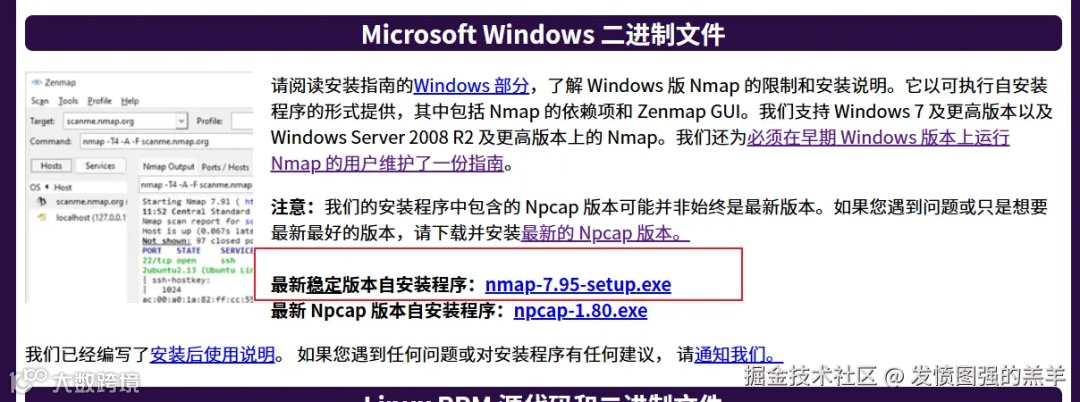


test/org/nmap4j/Nmap4jTest.java
publicclassNmap4jTest{
@Test
publicvoidbasicNmap4jUsageTest(){

try {
               // 这里的路径要改为刚才 nmap 软件的安装路径
   String path = "/usr/local" ;

   Nmap4j nmap4j = new Nmap4j( path ) ;
               // 这地方使用了 -oX 后面要跟文件名称
   nmap4j.addFlags( "-sV -T5 -O -oX -" ) ;
   nmap4j.includeHosts( "localhost" ) ;
   nmap4j.execute() ;
   if( !nmap4j.hasError() ) {

    NMapRun nmapRun = nmap4j.getResult() ;  // 这一行一定要注释掉,不然会一直报错
    String output = nmap4j.getOutput() ;  // 这一样代码意义也不大,我直接删掉了
    if( output == null ) {
     fail() ;
    }
    String errors = nmap4j.getExecutionResults().getErrors() ;
    if (errors == null ) {
     fail() ;
    }
   }
  } catch (NMapInitializationException e) {
   // TODO Auto-generated catch block
   e.printStackTrace();
   fail() ;
  } catch (NMapExecutionException e) {
   // TODO Auto-generated catch block
   e.printStackTrace();
   fail() ;
  }

 }

}
-
-iL: 从文件中读取扫描目标列表。例如,nmap -iL targets.txt,会从targets.txt文件中读取每行一个的 IP 地址或域名作为扫描目标。 -
-iR: 随机选择指定数量的主机进行扫描。如nmap -iR 100,会随机选取 100 个主机进行扫描。 -
--exclude <host1[,host2,...]>: 排除指定的主机或网络不进行扫描。例如,nmap 192.168.1.0/24 --exclude 192.168.1.100,192.168.1.200,将扫描192.168.1.0/24网段,但排除192.168.1.100和192.168.1.200这两台主机。 -
--excludefile <exclude_file>: 从文件中读取要排除的主机或网络列表。
-
-sS: TCP SYN 扫描,也称为半开放扫描。它发送 SYN 包到目标端口,如果收到SYN/ACK响应,就表示端口开放;如果收到 RST 响应,则表示端口关闭。这种扫描方式速度快,且不容易被目标系统记录,相对隐蔽,例如nmap -sS 192.168.1.100。 -
-sT: TCP 连接扫描,通过完整的 TCP 三次握手来确定端口是否开放。这种扫描方式最准确,但也最容易被检测到,如nmap -sT 192.168.1.100。 -
-sU: UDP 扫描,用于检测目标主机上的 UDP 端口是否开放。因为 UDP 是无连接协议,所以判断端口状态相对复杂,nmap -sU 192.168.1.100可对指定主机进行 UDP 扫描。 -
-sF、-sX、-sN: 分别是 FIN 扫描、XMAS 扫描和 NULL 扫描。这些扫描方式通过发送特殊标志位的 TCP 包来判断端口状态,常用于绕过一些简单的防火墙检测。
-
-p: 指定要扫描的端口范围。可以是单个端口,如-p 80;也可以是多个端口,如-p 80,443,8080;还可以是端口范围,如-p 1-1000表示扫描 1 到 1000 号端口。 -
--top-ports: 扫描最常用的指定数量的端口。例如,nmap --top-ports 100 192.168.1.100会扫描目标主机上最常用的 100 个端口。 -
-F: 快速扫描模式,只扫描一些常见的端口,相当于-p 1-1024加上一些其他常用端口。
-
-sV: 启用服务版本探测,尝试确定目标主机上运行的服务及其版本信息。例如,nmap -sV 192.168.1.100可以扫描出目标主机开放端口上运行的服务名称和版本号。 -
--version-intensity: 设置服务版本探测的强度,级别越高,探测越全面,但耗时也越长,取值范围是 0 到 9。
-
-O: 启用操作系统探测,尝试识别目标主机的操作系统类型和版本。如nmap -O 192.168.1.100。 -
--osscan-limit: 限制操作系统探测只对可能的目标进行,这样可以加快扫描速度,但可能会降低准确性。 -
--osscan-guess: 更积极地猜测操作系统类型,当 Nmap 不确定时会给出更宽泛的猜测结果。
-
-oN: 将扫描结果以正常格式保存到指定文件。例如,nmap -oN scan_results.txt 192.168.1.100会把扫描结果保存到scan_results.txt文件中。 -
-oX: 将扫描结果以 XML 格式保存到指定文件,方便后续使用脚本或其他工具进行解析和处理。 -
-oG: 将扫描结果以 Grep 格式保存,这种格式便于使用文本处理工具进行分析。 -
-oA: 以多种格式(包括正常、XML 和 Grep 格式)保存扫描结果,文件名为指定的基本名称加上相应的扩展名。 -
-v: 详细输出模式,显示更多的扫描过程信息,如发送的数据包、收到的响应等。使用多个v可以增加详细程度,如-vv、-vvv。
/**
 * 使用 nmap4j 工具进行扫描
 *
 * @param ip    目标 ip
 * @param ports 目标端口
 * @return 端口信息列表
 */
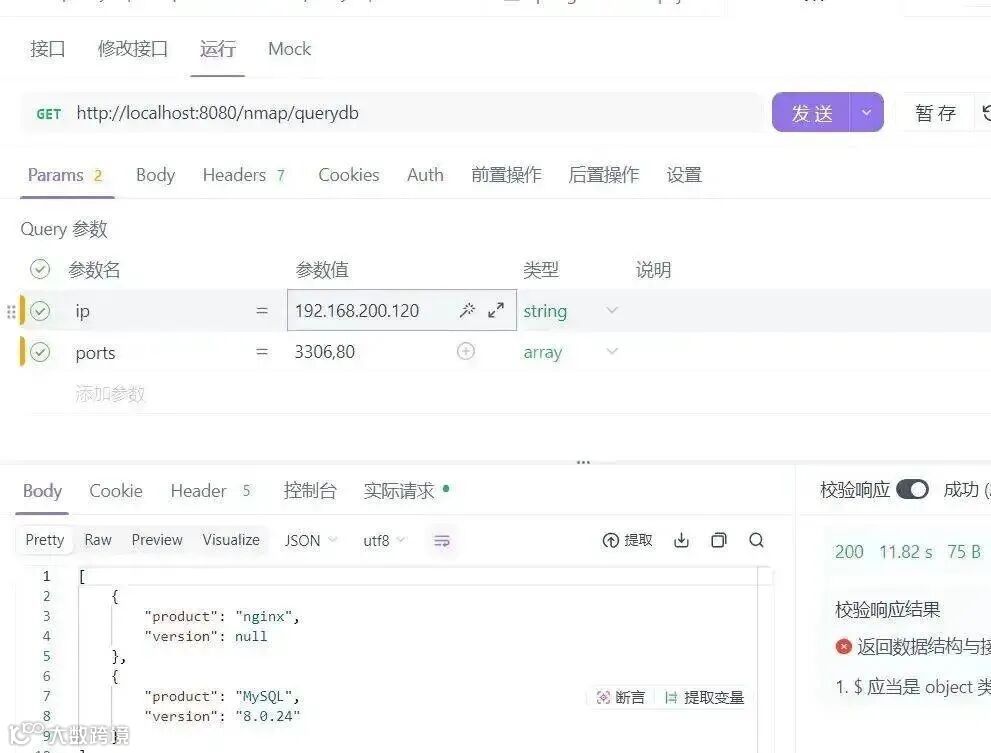
@RequestMapping("/querydb")
public List<NmapPortInfo> querydb(@RequestParam(value = "ip") String ip, @RequestParam("ports") List<String> ports) {
    ArrayList<NmapPortInfo> portInfos = new ArrayList<>();
    // 1.拼接端口
    String portStr = StrUtil.join(",", ports);
    //2. 指定 nmap 路径
    String path = "D:/StudyApps/nmap";
    String fileName = "temp_result.xml";

    Nmap4j nmap4j = new Nmap4j(path);

    //3.读取端口耗时较长,可以使用异步
    CompletableFuture<Void> future = CompletableFuture.runAsync(() -> {
        nmap4j.addFlags("-sV -p " + portStr + " -T5 -O -oX " + fileName);
        nmap4j.includeHosts(ip);
        try {
            nmap4j.execute();
        } catch (Exception e) {
            thrownew RuntimeException(e);
        }
    }, threadPoolExecutor);

    future.join();

    //4. 获取端口信息
    return getPortInfo(portInfos, fileName);
}
/**
     * 获取 ip + 端口信息,封装为集合返回前端
     *
     * @param portInfos 返回前端集合
     * @param fileName  临时的 xml 文件
     * @return 信息列表
     */
    @SneakyThrows
    private List<NmapPortInfo> getPortInfo(List<NmapPortInfo> portInfos, String fileName){
        // 获取项目所在路径
        String projectPath = System.getProperty("user.dir");
        // 拼接文件路径
        String filePath = projectPath + FileUtil.FILE_SEPARATOR + fileName;
        log.info("文件路径:{}", filePath);

        // nmap 返回 xml 格式固定,使用 dom4j 解析
        SAXReader reader = new SAXReader();
        org.dom4j.Document document = reader.read(FileUtil.file(filePath));
        org.dom4j.Element rootElement = document.getRootElement();
        org.dom4j.Element element = rootElement.element("host");

        org.dom4j.Element xmlPorts = element.element("ports");

        List<org.dom4j.Element> port = xmlPorts.elements("port");
        for (org.dom4j.Element port1 : port) {
            Element service = port1.element("service");
            String product = service.attributeValue("product");
            String version = service.attributeValue("version");
            NmapPortInfo nmapPortInfo = new NmapPortInfo(product, version);
            portInfos.add(nmapPortInfo);
        }

        // 删除临时文件
        FileUtil.del(filePath);
        return portInfos;
    }
}


/**
 * 使用 nmap4j 工具进行扫描, linux系统
 *
 * @param ip    目标 ip
 * @param ports 目标端口
 * @return 端口信息列表
 */
@GetMapping("/linux/querydb")
@SneakyThrows
public List<NmapPortInfo> linuxQuerydb(@RequestParam(value = "ip") String ip, @RequestParam("ports") List<String> ports) {
    ArrayList<NmapPortInfo> portInfos = new ArrayList<>();
    // 1.拼接端口
    String portStr = StrUtil.join(",", ports);
    String fileName = "temp_result.xml";
    //2. linux namp 命令
    String nmapCommand = "nmap -sV -p " + portStr + " -T5 -O -oX " + fileName + " " + ip;

    //3. 读取端口耗时较长,可以使用异步
    CompletableFuture<Void> future = CompletableFuture.runAsync(() -> {
        Process nampProcess = null;
        try {
            // 3. 运行命令
            nampProcess = Runtime.getRuntime().exec(nmapCommand);
            // 4. 等待命令执行完成
            nampProcess.waitFor();
        } catch (Exception e) {
            thrownew RuntimeException(e);
        }
    }, threadPoolExecutor);

    future.join();

    // 5. 获取端口信息
    return getPortInfo(portInfos, fileName);
}


往期推荐
世界上运行时间最长的服务器是多久?
SpringBoot大文件上传卡死?分块切割术搞定GB级传输,速度飙升!
掌握 Spring 框架这 10 个扩展点,开发效率直接翻倍!
告别繁琐集成,一行代码搞定全球AI大模型!
再见Maven!官方推出全新一代Java项目构建工具,性能提升2~10倍
Docker 拉取镜像超时?别再瞎抄配置了!亲测 3 个有效镜像源 + 避坑指南