




-
环境搭建: 从安装Docker开始,到通过Docker安装Redis、Ollama,并部署DeepSeek模型,一步步带你搞定环境配置。 -
Spring AI集成: 详细讲解如何将Ollama和DeepSeek集成到Spring AI中,并实现连续对话功能。 -
效果验证: 通过实际测试,展示系统的运行效果,让你直观感受这一方案的强大之处。


-
操作系统: Windows 11 -
Java版本: JDK 17+(请注意Spring Boot 3.4.3的兼容性) -
依赖管理: Maven 3.8.3+


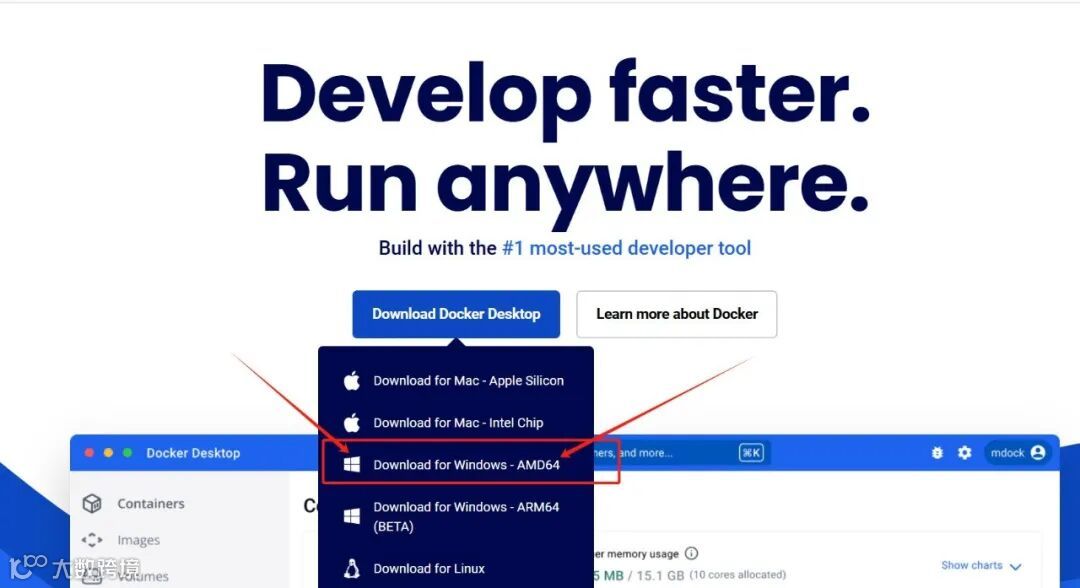


docker pull redis:7.4.2
bind 0.0.0.0
port 6379
requirepass 123123
dir /data
appendonly yes
-
bind 0.0.0.0 :允许外部访问 -
requirepass 123123 :设置访问密码,你可以根据需要自行设定,虽然是本地环境,但养成良好的安全习惯很重要 -
appendonly yes :开启AOF持久化
docker run -d \
-p 6579:6379 \
-v C:/docker/redis/data:/data \
-v C:/docker/redis/conf:/usr/local/etc/redis \
--name redis \
redis:7.4.2 redis-server /usr/local/etc/redis/redis.conf
docker pull ollama/ollama:0.6.2
docker run -d \
-v C:\docker\ollama:/root/.ollama \
-p 11434:11434 \
--name ollama \
ollama/ollama:0.6.2
docker exec -it ollama ollama pull deepseek-r1:7b


<!-- 全局属性管理 -->
<properties>
    <java.version>23</java.version>
    <project.build.sourceEncoding>UTF-8</project.build.sourceEncoding>
    <project.reporting.outputEncoding>UTF-8</project.reporting.outputEncoding>
    <!-- 自定义依赖版本 -->
    <spring-boot.version>3.4.3</spring-boot.version>
    <spring.ai.version>1.0.0-M6</spring.ai.version>
    <maven.compiler.version>3.11.0</maven.compiler.version>
</properties>

<dependencies>
    <dependency>
        <groupId>org.springframework.boot</groupId>
        <artifactId>spring-boot-starter-data-redis</artifactId>
        <version>${spring-boot.version}</version>
    </dependency>
    <dependency>
        <groupId>org.springframework.boot</groupId>
        <artifactId>spring-boot-starter-web</artifactId>
        <version>${spring-boot.version}</version>
    </dependency>
    <dependency>
        <groupId>org.springframework.ai</groupId>
        <artifactId>spring-ai-ollama-spring-boot-starter</artifactId>
    </dependency>

    <dependency>
        <groupId>org.projectlombok</groupId>
        <artifactId>lombok</artifactId>
        <version>1.18.32</version>
        <optional>true</optional>
    </dependency>
    <dependency>
        <groupId>org.springframework.boot</groupId>
        <artifactId>spring-boot-starter-test</artifactId>
        <scope>test</scope>
    </dependency>
</dependencies>
<dependencyManagement>
    <dependencies>
        <dependency>
            <groupId>org.springframework.ai</groupId>
            <artifactId>spring-ai-bom</artifactId>
<!--  <version>1.0.0-SNAPSHOT</version>-->
            <version>1.0.0-M6</version>
            <type>pom</type>
            <scope>import</scope>
        </dependency>
    </dependencies>
</dependencyManagement>

<!-- 构建配置 -->
<build>
    <plugins>
        <!-- 编译器插件 -->
        <plugin>
            <groupId>org.apache.maven.plugins</groupId>
            <artifactId>maven-compiler-plugin</artifactId>
            <version>${maven.compiler.version}</version>
            <configuration>
                <release>${java.version}</release>
                <annotationProcessorPaths>
                    <path>
                        <groupId>org.projectlombok</groupId>
                        <artifactId>lombok</artifactId>
                        <version>1.18.32</version>
                    </path>
                </annotationProcessorPaths>
            </configuration>
        </plugin>

        <!-- Spring Boot打包插件 -->
        <plugin>
            <groupId>org.springframework.boot</groupId>
            <artifactId>spring-boot-maven-plugin</artifactId>
            <configuration>
                <excludes>
                    <exclude>
                        <groupId>org.projectlombok</groupId>
                        <artifactId>lombok</artifactId>
                    </exclude>
                </excludes>
            </configuration>
        </plugin>
    </plugins>
</build>

<!-- 仓库配置 -->
<repositories>
    <repository>
        <id>alimaven</id>
        <name>aliyun maven</name>
        <url>https://maven.aliyun.com/repository/public</url>
    </repository>
    <repository>
        <id>spring-milestones</id>
        <name>Spring Milestones</name>
        <url>https://repo.spring.io/milestone</url>
        <snapshots>
            <enabled>false</enabled>
        </snapshots>
    </repository>
    <repository>
        <id>spring-snapshots</id>
        <name>Spring Snapshots</name>
        <url>https://repo.spring.io/snapshot</url>
        <releases>
            <enabled>false</enabled>
        </releases>
    </repository>
    <repository>
        <name>Central Portal Snapshots</name>
        <id>central-portal-snapshots</id>
        <url>https://central.sonatype.com/repository/maven-snapshots/</url>
        <releases>
            <enabled>false</enabled>
        </releases>
        <snapshots>
            <enabled>true</enabled>
        </snapshots>
    </repository>
</repositories>
server:
  port:8083
spring:
application:
    name:Ollama-AI
data:
    redis:
      host:127.0.0.1
      port:6579
      password:123123
      database:0
ai:
    ollama:
      base-url:http://127.0.0.1:11434
      chat:
        model:deepseek-r1:7b
@Slf4j
@RestController
@RequestMapping("/ai/v1")
publicclass OllamaChatController {

    privatefinal ChatClient chatClient;
    privatefinal ChatMemory chatMemory;

    publicOllamaChatController(ChatClient.Builder builder, ChatMemory chatMemory){
        this.chatClient = builder
                .defaultSystem("只回答问题,不进行解释")
                .defaultAdvisors(new MessageChatMemoryAdvisor(chatMemory))
                .build();
        this.chatMemory = chatMemory;
    }

    @GetMapping("/ollama/redis/chat")
    public String chat(@RequestParam String userId, @RequestParam String input){
        log.info("/ollama/redis/chat   input:  [{}]", input);

        String text = chatClient.prompt()
                .user(input)
                .advisors(spec -> spec.param(AbstractChatMemoryAdvisor.CHAT_MEMORY_CONVERSATION_ID_KEY, userId)
                        .param(AbstractChatMemoryAdvisor.CHAT_MEMORY_RETRIEVE_SIZE_KEY, 100))
                .call()
                .content();

        return text.split("</think>")[1].trim();
    }
}
@Slf4j
@Component
publicclass ChatRedisMemory implements ChatMemory {

    privatestaticfinal String KEY_PREFIX = "chat:history:";
    privatefinal RedisTemplate<String, Object> redisTemplate;

    publicChatRedisMemory(RedisTemplate<String, Object> redisTemplate){
        this.redisTemplate = redisTemplate;
    }

    @Override
    publicvoidadd(String conversationId, List<Message> messages){
        String key = KEY_PREFIX + conversationId;
        List<ChatEntity> listIn = new ArrayList<>();
        for(Message msg: messages){
            String[] strs = msg.getText().split("</think>");
            String text = strs.length==2?strs[1]:strs[0];

            ChatEntity ent = new ChatEntity();
            ent.setChatId(conversationId);
            ent.setType(msg.getMessageType().getValue());
            ent.setText(text);
            listIn.add(ent);
        }
        redisTemplate.opsForList().rightPushAll(key,listIn.toArray());
        redisTemplate.expire(key, 30, TimeUnit.MINUTES);
    }

   @Override
    public List<Message> get(String conversationId, int lastN){
        String key = KEY_PREFIX + conversationId;
        Long size = redisTemplate.opsForList().size(key);
        if (size == null || size == 0){
            return Collections.emptyList();
        }

        int start = Math.max(0, (int) (size - lastN));
        List<Object> listTmp = redisTemplate.opsForList().range(key, start, -1);
        List<Message> listOut = new ArrayList<>();
        ObjectMapper objectMapper = new ObjectMapper();
        for(Object obj: listTmp){
            ChatEntity chat =  objectMapper.convertValue(obj, ChatEntity.class);
//            log.info("MessageType.USER [{}], chat.getType [{}]",MessageType.USER, chat.getType());
            if(MessageType.USER.getValue().equals(chat.getType())){
                listOut.add(new UserMessage(chat.getText()));
            }elseif(MessageType.ASSISTANT.getValue().equals(chat.getType())){
                listOut.add(new AssistantMessage(chat.getText()));
            }elseif(MessageType.SYSTEM.getValue().equals(chat.getType())){
                listOut.add(new SystemMessage(chat.getText()));
            }
        }
        return listOut;
    }

    @Override
    publicvoidclear(String conversationId){
        redisTemplate.delete(KEY_PREFIX + conversationId);
    }
}
@Configuration
publicclass RedisConfig {

    @Bean
    public RedisTemplate<String, Object> redisTemplate(RedisConnectionFactory factory){
        //生成整个 RedisTemplate
        RedisTemplate<String, Object> redisTemplate = new RedisTemplate<>();
        redisTemplate.setConnectionFactory(factory);
        redisTemplate.setKeySerializer(new StringRedisSerializer());
        redisTemplate.setValueSerializer(new Jackson2JsonRedisSerializer<>(Object.class));
        redisTemplate.setHashKeySerializer(new StringRedisSerializer());
        redisTemplate.setHashValueSerializer(new Jackson2JsonRedisSerializer<>(Object.class));
        redisTemplate.afterPropertiesSet();
        return redisTemplate;
    }
}
@NoArgsConstructor
@AllArgsConstructor
@Data
publicclassChatEntityimplementsSerializable{
    String chatId;
    String type;
    String text;
}
@EnableCaching
@SpringBootApplication
publicclassOllamaChatDemoApplication{

    publicstaticvoidmain(String[] args){
        SpringApplication.run(OllamaChatDemoApplication.class, args);
    }
}



-
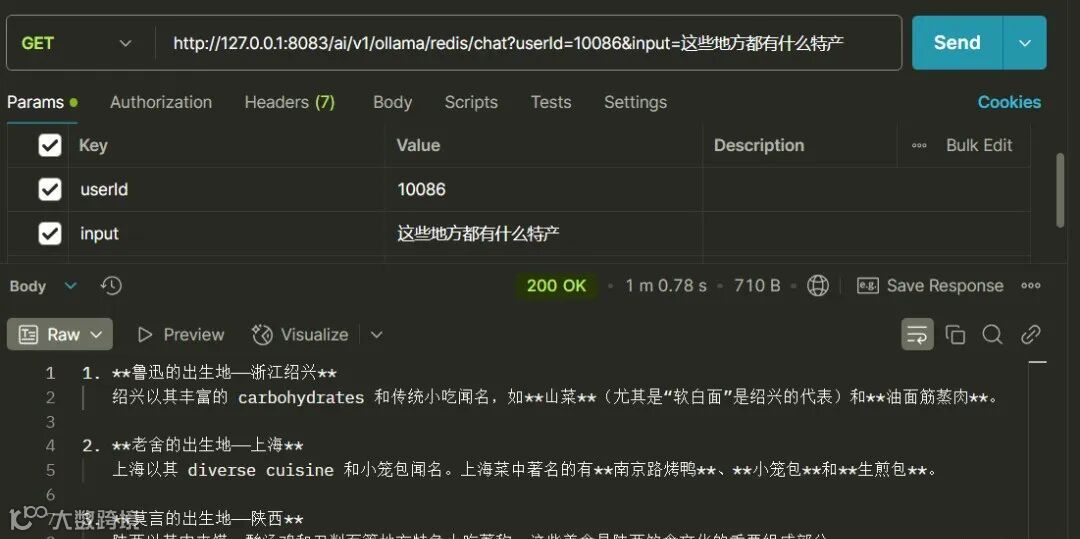
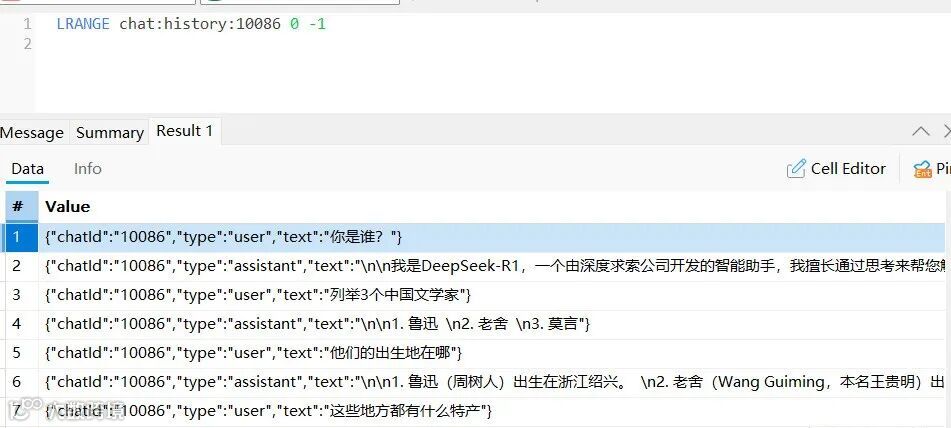
你是谁 -
列举3个中国文学家 -
他们的出生地在哪 -
这些地方都有什么特产
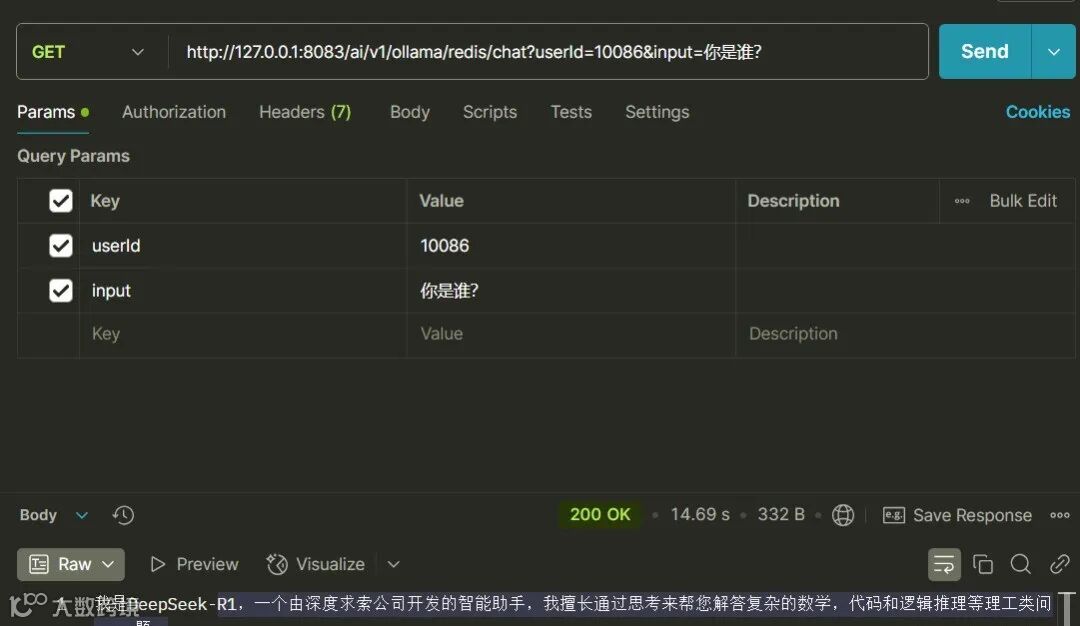
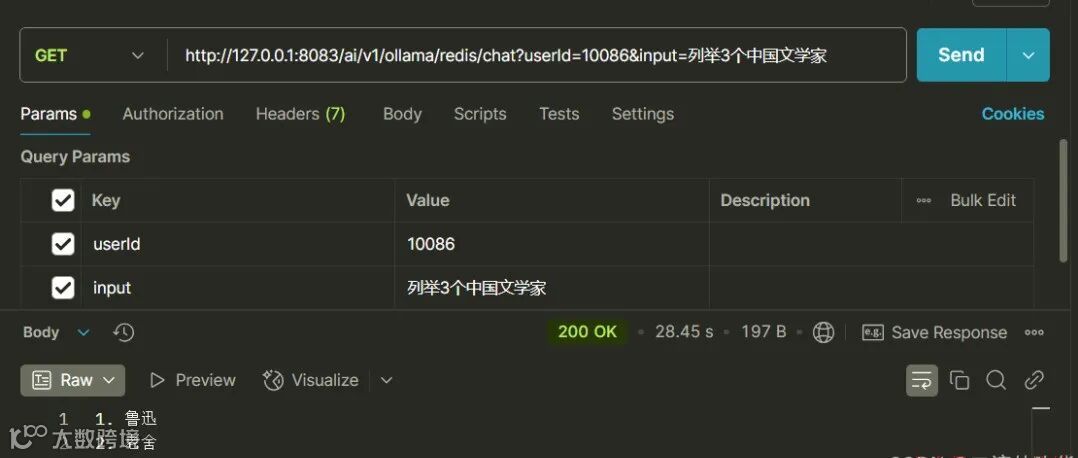
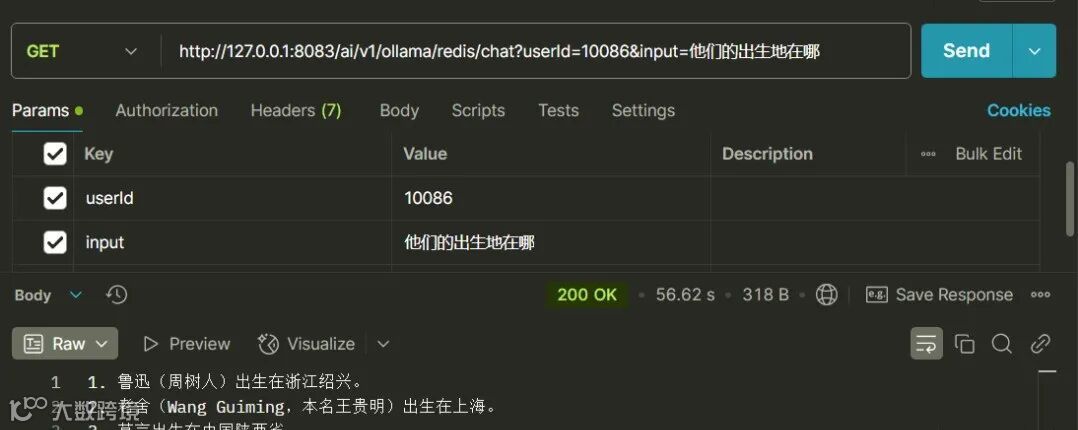


往期推荐
洗个澡把offer洗没了。。
开源项目|35k Star,一款免费高效的在线数据库设计神器
支付宝崩了,淘宝崩了,闲鱼崩了...
超硬核:SpringBoot+ResponseBodyEmitter异步流式推送神技,非常强大!
Spring 项目别再乱注入 Service 了!用 Lambda 封装个统一调用组件,爽到飞起
Spring Boot 3 + Netty 构建高并发即时通讯服务