


前言
在电商内容爆发的今天,“产品图质量”几乎决定了转化率。但对于个人卖家、小团队、初创品牌来说,请摄影棚、租场景、搭灯光……成本高、门槛高,也耗费大量时间。
而现在,只需上传一张普通产品图,你就能自动生成——广角、特写、左右 45°、俯拍、多比例、多背景的高质量产品展示图,适用于电商主图、详情页、社媒素材等。
本期教程将带你从 0 到 1,使用 Qwen-Image-Edit-2509 + 多角度 LoRA + Lightning 加速 LoRA,构建一个基于 Gradio 的可视化产品图优化应用。
⚡无需本地显卡
⚡无需复杂环境
⚡所有模型已上传 BitaHub,可一键转存、直接使用
🌟 为什么选择 Qwen-Image-Edit-2509 + 多角度 LoRA?
Qwen-Image-Edit-2509 是当前最稳定的图像编辑模型之一,具备更强的细节保持与多图一致性能力。然而,常规文生图模型对“角度控制”并不擅长,经常出现:
❌ 产品形变
❌ 材质改变
❌ 结构重绘
❌ 无法保持同一物体
为了实现“摄影棚里转动相机”的效果,我们加载了两个关键 LoRA:
🔧1. 多角度控制 LoRA (Qwen-Edit-2509-Multiple-angles)
可稳定执行以下虚拟相机指令,相当于是为模型加上了“可控摄像机”。
将镜头转为广角镜头
将镜头转为特写镜头
将镜头向左旋转 45°
将镜头向右移动
将镜头转为俯视
⚡2. Lightning LoRA(Qwen-Image-Lightning)
启用后可大幅加速推理,适合批量生成。

👉 这三个模型均已上传至 Bitahub,用户可直接转存到自己云端一键复用。
一.准备工作
1.模型准备
进入对应的模型主页进行转存。
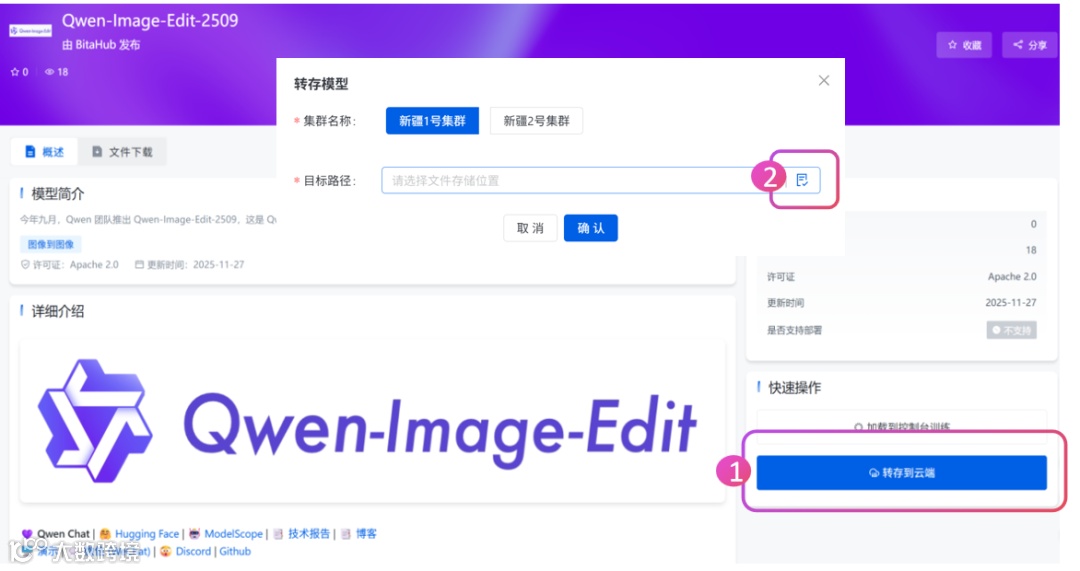
2.创建开发环境
将上述转存好的模型挂载到 BitaHub 工作台的文件存储中。
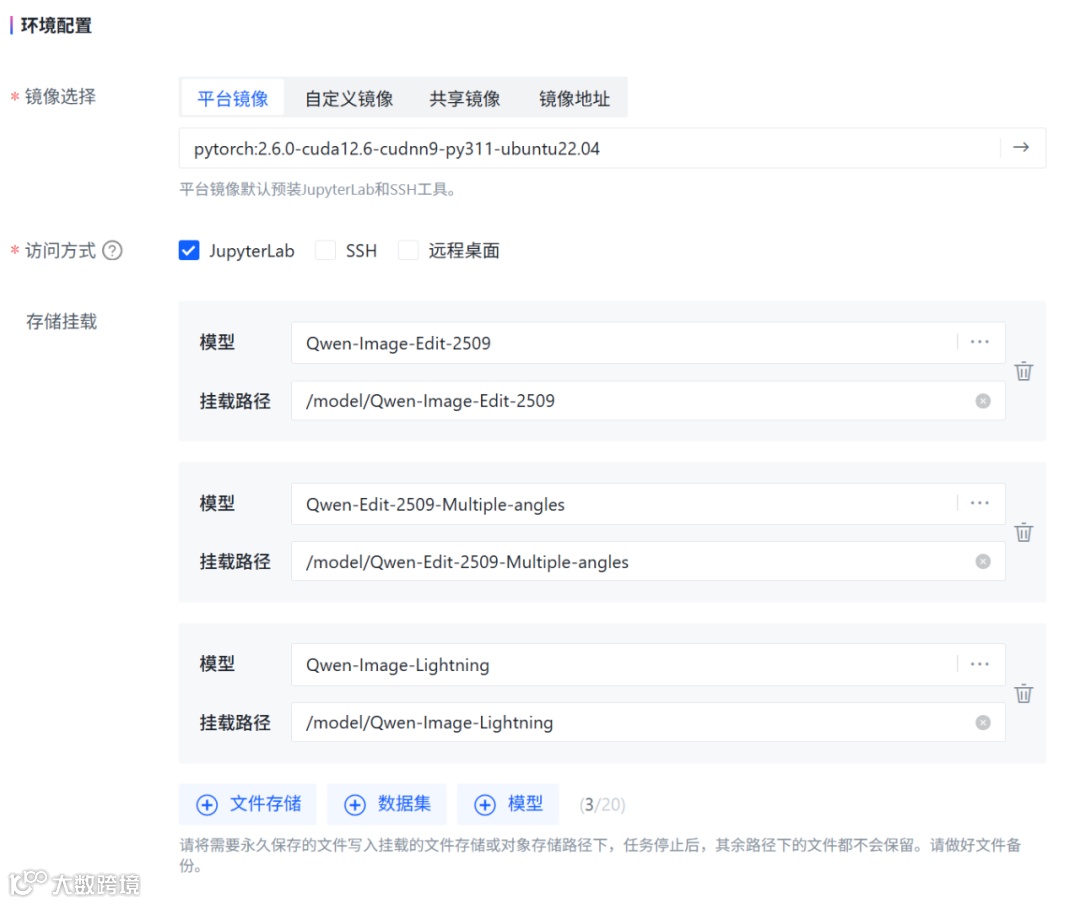
最后,选择单卡 A100 GPU,并通过JupyterLab访问方式进入开发环境。
二.环境配置
# Transformers / Diffusers / 加速 / PEFT / SafeTensorspip install -q transformers>=4.44.0 accelerate>=0.33.0 safetensors>=0.4.3 diffusers @ git+https://github.com/huggingface/diffusers.git peft==0.18.0# 图像处理和UIpip install -q Pillow>=10.2.0 numpy>=1.26.0 gradio==5.9.1
三.核心代码
首先导入项目运行所需的库,包括图像处理、模型加载与推理,以及搭建交互界面的工具,为整个应用的运行提供环境支持。
import ioimport zipfilefrom typing import List, Tuple, Optionalimport gcimport torchfrom PIL import Imagefrom diffusers import QwenImageEditPlusPipelineimport gradio as gr
def get_gpu_config():return {'device': 'cuda','dtype': torch.bfloat16,'gpu_name': torch.cuda.get_device_name(0),'vram_gb': torch.cuda.get_device_properties(0).total_memory / 1e9,'max_batch': 4,'enable_attention_slicing': False,'enable_vae_slicing': False,}gpu_config = get_gpu_config()
此外,我们还需定义模型和数据的路径以及一些辅助配置,包括基础模型和两个 LoRA 模型的路径、不同拍摄角度对应的文字描述、预设的背景场景文本,以及常用的图片宽高比,用于在生成图像时快速组合提示词和调整输出尺寸。
HF_BASE_MODEL = "/model/Qwen-Image-Edit-2509"LORA_ANGLES = "/model/Qwen-Edit-2509-Multiple-angles"LORA_LIGHTNING = "/model/Qwen-Image-Lightning"ANGLE_MACROS = {"Wide-angle": "将镜头转为广角镜头","Close-up": "将镜头转为特写镜头","Forward": "将镜头向前移动","Left": "将镜头向左移动","Right": "将镜头向右移动","Down": "将镜头向下移动","Rotate 45° Left": "将镜头向左旋转45度","Rotate 45° Right": "将镜头向右旋转45度","Top-down": "将镜头转为俯视",}BACKGROUND_PRESETS = {"(None)": None,"Pure Studio (white seamless)": "in a professional studio with seamless white background, soft shadows, product centered","Soft Gray Studio": "in a professional studio with seamless soft gray background, gentle vignette, softbox lighting","Lifestyle (cozy desk)": "on a cozy wooden desk near a window, soft natural light, minimal props","Lifestyle (marble)": "on a clean white marble surface, bright daylight, subtle reflections","Lifestyle (outdoor)": "outdoors on a neutral table, soft shade, bokeh background",}ASPECT_RATIOS = {"1:1 (Square)": (1024, 1024),"4:3 (Standard)": (1024, 768),"3:4 (Portrait)": (768, 1024),"16:9 (Widescreen)": (1024, 576),"9:16 (Mobile)": (576, 1024),"3:2 (Photo)": (1024, 683),"2:3 (Portrait Photo)": (683, 1024),}
下面这段代码先从本地路径加载基础的 Qwen 图像编辑模型,并将其移动到指定 GPU,同时根据配置启用注意力切片或 VAE 切片以节省显存。随后加载用于多角度生成的 LoRA 权重,并定义了一个函数来控制LoRA使用模式模式,当启用“Lightning LoRA”快速模式时,会额外加载加速 LoRA,并设置对应的适配器组合,否则只使用默认角度 LoRA。
pipe = QwenImageEditPlusPipeline.from_pretrained(HF_BASE_MODEL,torch_dtype=gpu_config['dtype'],)pipe.to(gpu_config['device'])if gpu_config['enable_attention_slicing']:pipe.enable_attention_slicing()if gpu_config['enable_vae_slicing']:pipe.enable_vae_slicing()# 加载 LoRApipe.load_lora_weights(LORA_ANGLES, adapter_name="angles")current_mode = {"fast": False}def set_pipeline_mode(use_lightning: bool):global current_modeif use_lightning and not current_mode["fast"]:pipe.load_lora_weights(LORA_LIGHTNING, adapter_name="lightning")pipe.set_adapters(["angles", "lightning"], adapter_weights=[1.0, 1.0])current_mode["fast"] = Trueelif not use_lightning and current_mode["fast"]:pipe.set_adapters(["angles"], adapter_weights=[1.0])current_mode["fast"] = Falseelif not use_lightning and not current_mode["fast"]:pipe.set_adapters(["angles"], adapter_weights=[1.0])set_pipeline_mode(False)
我们还需要定义一些函数工具,首先通过 compose_prompt 函数将用户选择的角度、背景预设、自定义场景和额外风格组合成最终的生成提示词。resize_image 函数则会把输入图片按目标长宽比缩放并裁剪,以适配模型的输入尺寸。
generate_images 是核心生成函数,它根据用户选择的角度和其他参数循环生成图像,每次都调用模型生成对应角度的结果,并将生成的图片收集到列表中返回。create_zip 则将生成的图片打包成 ZIP 文件,方便用户下载。整个流程实现了从用户输入到多角度图像生成,再到批量导出的完整操作。
def compose_prompt(angle_phrase: str,bg_preset_text: Optional[str],custom_scene: str,extra_style: str) -> str:parts = [angle_phrase]if bg_preset_text:parts.append(f"{bg_preset_text}")if custom_scene.strip():parts.append(custom_scene.strip())if extra_style.strip():parts.append(extra_style.strip())return " | ".join(parts)def resize_image(img: Image.Image, target_size: Tuple[int, int]) -> Image.Image:target_w, target_h = target_sizeorig_w, orig_h = img.sizescale = max(target_w / orig_w, target_h / orig_h)new_w = int(orig_w * scale)new_h = int(orig_h * scale)img = img.resize((new_w, new_h), Image.Resampling.LANCZOS)left = (new_w - target_w) // 2top = (new_h - target_h) // 2img = img.crop((left, top, left + target_w, top + target_h))return imgdef generate_images(source_img: Image.Image,angle_keys: List[str],bg_key: str,custom_scene: str,extra_style: str,aspect_ratio: str,use_lightning: bool,seed: int,steps: int,guidance_scale: float,true_cfg_scale: float,images_per_prompt: int,progress=gr.Progress()) -> List[Image.Image]:if source_img is None:return [], "WARNING: Please upload an image first!"if not angle_keys:return [], "WARNING: Please select at least one angle!"target_size = ASPECT_RATIOS[aspect_ratio]source_img = resize_image(source_img, target_size)set_pipeline_mode(use_lightning)results = []generator = torch.manual_seed(seed)bg_preset_text = BACKGROUND_PRESETS.get(bg_key)total_angles = len(angle_keys)for idx, angle_name in enumerate(angle_keys):progress((idx + 1) / total_angles, f"Generating {angle_name}...")angle_phrase = ANGLE_MACROS[angle_name]full_prompt = compose_prompt(angle_phrase, bg_preset_text, custom_scene, extra_style)inputs = {"image": [source_img],"prompt": full_prompt,"generator": generator,"true_cfg_scale": true_cfg_scale,"negative_prompt": " ","num_inference_steps": steps,"guidance_scale": guidance_scale,"num_images_per_prompt": images_per_prompt,"height": target_size[1],"width": target_size[0],}with torch.inference_mode():out = pipe(**inputs)for img_idx, im in enumerate(out.images):results.append(im)return resultsdef create_zip(images: List[Image.Image]) -> Optional[str]:if not images:return Nonezip_path = "product_shot_booster.zip"with zipfile.ZipFile(zip_path, mode="w", compression=zipfile.ZIP_DEFLATED) as zf:zf.writestr("manifest.txt", "Product Shot Booster Export\nGenerated angles exported as PNG files.\n")for idx, img in enumerate(images):buf = io.BytesIO()img.save(buf, format="PNG")zf.writestr(f"angle_{idx+1:03d}.png", buf.getvalue())return zip_path
最后,我们实现了一个基于 Gradio 的可视化工具,用于对产品图片进行多角度生成和优化。用户可以上传一张产品图,选择拍摄角度、背景预设、画面比例以及自定义场景描述和风格说明,工具会调用 QwenImageEditPlusPipeline 模型生成对应的多角度图像。支持启用 Lightning LoRA 的快速模式以加速生成过程,用户还可以调整随机种子、推理步数、引导强度等高级参数。生成的多张图片会显示在界面中,同时可以打包成 ZIP 文件供下载,方便批量保存。整体功能是让用户无需编程即可快速生成高质量、不同角度和风格的产品图片。
with gr.Blocks(title="产品图优化加速器", theme=gr.themes.Soft()) as demo:gr.Markdown("<h1 style='text-align: center;font-weight: bold;'>产品图优化加速器</h1>")with gr.Row():with gr.Column(scale=1):input_image = gr.Image(label="产品图片",type="pil",height=300)angle_choices = gr.CheckboxGroup(choices=list(ANGLE_MACROS.keys()),value=["Wide-angle", "Close-up", "Rotate 45° Left", "Rotate 45° Right", "Top-down"],label="拍摄角度")aspect_ratio = gr.Dropdown(choices=list(ASPECT_RATIOS.keys()),value="1:1 (Square)",label="画面比例")bg_preset = gr.Dropdown(choices=list(BACKGROUND_PRESETS.keys()),value="(None)",label="背景预设")custom_scene = gr.Textbox(label="自定义场景描述",placeholder="如:'置于哑光黑桌面,带轻微反射'",lines=2)extra_style = gr.Textbox(label="风格说明",value="专业摄影棚灯光、高清晰度、适用于电商拍摄",lines=2)with gr.Column(scale=2):output_gallery = gr.Gallery(label="生成结果",show_label=True,columns=3,height="auto",object_fit="contain")info_output = gr.Markdown("")zip_output = gr.File(label="下载全部(ZIP)")with gr.Accordion("高级设置", open=False):with gr.Row():use_lightning = gr.Checkbox(label="快速模式(Lightning LoRA)",value=False,info="启用 Lightning LoRA 加速 ")seed = gr.Number(label="Seed",value=123,precision=0)steps = gr.Slider(label="Inference Steps",minimum=10,maximum=60,value=28,step=1)with gr.Row():guidance_scale = gr.Slider(label="Guidance Scale",minimum=0.0,maximum=8.0,value=1.0,step=0.1)true_cfg_scale = gr.Slider(label="True CFG Scale",minimum=0.0,maximum=10.0,value=4.0,step=0.1)images_per_prompt = gr.Slider(label="Images per Angle",minimum=1,maximum=4,value=1,step=1)generate_btn = gr.Button("开始生成", variant="primary", size="lg")def generate_and_zip(*args):images = generate_images(*args)zip_file = create_zip(images) if images else Nonereturn images, zip_filegenerate_btn.click(fn=generate_and_zip,inputs=[input_image,angle_choices,bg_preset,custom_scene,extra_style,aspect_ratio,use_lightning,seed,steps,guidance_scale,true_cfg_scale,images_per_prompt],outputs=[output_gallery, zip_output])demo.launch(share=True, debug=True, show_error=True)
四.项目效果展示
将上述代码保存为 app.py,打开终端运行 python app.py 即可启动。上传一张产品照片,你可以一键输出:
多角度视图(±45°、俯拍、广角、特写…)
多背景风格(棚拍白底、灰棚、生活场景、户外)
多画幅(1:1、3:4、16:9、9:16 等)
批量生成 ZIP 打包下载

🎉 欢迎到 BitaHub 体验完整 Demo,开启你的 AI 产品摄影之旅!

