
【Qwen3-VL】手把手教程|用Ollama在本地部署Qwen3-VL,免费使用多模态大模型(附详细步骤)
通过 ollama.com 的 API 可直接调用云端模型。在此模式下,ollama.com 相当于远程 Ollama 主机。
要直接访问 ollama.com 的 API,需先创建 API 密钥。
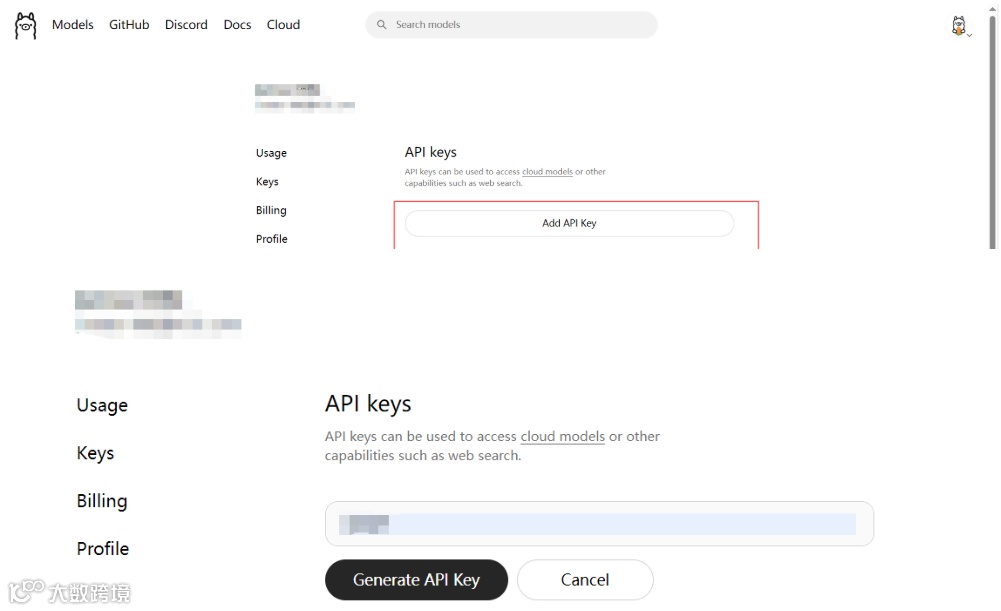
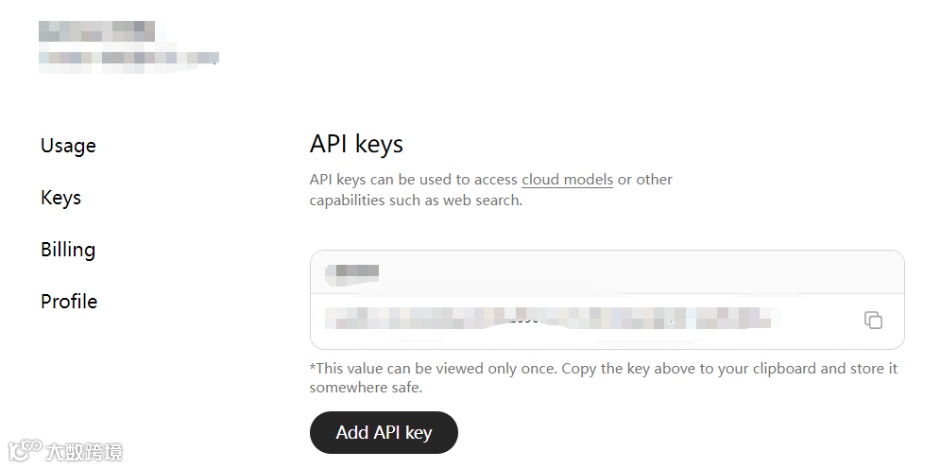
本地创建一个.env文件,用于保存API KEY。
接下来,我们使用Python通过API方式调用Ollama云端大模型。
通过下面的代码加载Ollama云端大模型的地址及API KEY。
import os
import base64
from openai import OpenAI
from dotenv import load_dotenv
# 加载.env文件,确保API Key受到保护
load_dotenv()
# Ollama Cloud
ollama_cloud_base_url = os.getenv("ollama_cloud_base_url") # 读取云端地址
ollama_cloud_model = os.getenv("ollama_cloud_model") # 读取云端模型,默认为“qwen3-vl:235b-cloud”
ollama_cloud_api_key = os.getenv("ollama_cloud_api_key") # 读取云端API Key
现在,通过下面的代码验证API密钥是否有效。
import requests

def test_ollama_api_key(api_key):
    """测试 API 密钥是否有效"""
    url = "https://ollama.com/api/tags"
    headers = {
        'Authorization': f'Bearer {api_key}'
    }

    try:
        response = requests.get(url, headers=headers)
        if response.status_code == 200:
            print("✅ API 密钥有效")
            return True
        else:
            print(f"❌ API 密钥无效,状态码: {response.status_code}")
            return False
    except Exception as e:
        print(f"❌ 请求失败: {e}")
        return False

# 测试你的密钥
test_ollama_api_key(ollama_cloud_api_key)
输出为:
✅ API 密钥有效
True
通过下面的代码测试Ollama云端大模型是否能进行智能问答。
import os
from ollama import Client

client = Client(
    host="https://ollama.com",
    headers={'Authorization': 'Bearer ' + ollama_cloud_api_key}
)

messages = [
  {
    'role': 'user',
    'content': 'Why is the sky blue?',
  },
]

for part in client.chat('gpt-oss:120b', messages=messages, stream=True):
  print(part['message']['content'], end='', flush=True)
输出为:
**Short answer:**
Because the molecules and tiny particles in Earth’s atmosphere scatter short‑wavelength (blue) light much more efficiently than long‑wavelength (red) light. Our eyes see that scattered blue light coming from all directions, so the sky looks blue.

---

## 1. Light from the Sun is a mixture of colors

Sunlight is essentially white light – a superposition of all visible wavelengths (≈ 380 nm – 750 nm). If you pass sunlight through a prism you see a continuous rainbow of colors, each wavelength corresponding to a different hue.

## 2. What happens to that light when it enters the atmosphere?

The atmosphere is not empty; it contains air molecules (N₂, O₂), tiny dust particles, water droplets, etc. When a photon encounters one of these scatterers, its direction can change – this is called **scattering**.

Two main kinds of scattering are relevant:

| Scattering type | Typical particle size | Dependence on wavelength λ |
|-----------------|-----------------------|----------------------------|
| **Rayleigh scattering** | Particles ≪ λ (air molecules, very tiny aerosols) | ∝ 1/λ⁴ |
| **Mie scattering** | Particles ≈ λ (larger aerosols, water droplets, dust) | ≈ 1/λ⁰ (almost wavelength‑independent) |

For a clear, dry day the dominant process is **Rayleigh scattering**.

### Rayleigh scattering math (very brief)

The scattered intensity *I* for a single molecule is

\[
I \propto \frac{1}{\lambda^4}\,,
\]

so if you compare blue light (λ≈450 nm) to red light (λ≈650 nm),

\[
\frac{I_{\text{blue}}}{I_{\text{red}}}
   = \left(\frac{650}{450}\right)^{4}
   \approx 5.7 .
\]

A molecule scatters roughly *six times* more blue light than red light. Integrated over the whole atmosphere, that difference is enormous.

## 3. Why we see a *blue* sky, not violet

1. **Human eye sensitivity** – The photopic (daytime) eye is roughly twice as sensitive to blue (≈ 450 nm) as to violet (≈ 380 nm).
2. **Solar spectrum** – The Sun emits less violet than blue to begin with.
3. **Atmospheric absorption** – Ozone and other gases absorb a portion of the violet/UV, further reducing its contribution.

Together, these factors make the net scattered light appear blue rather than violet.

## 4. Why the sky changes color at sunrise and sunset

When the Sun is low on the horizon, its light must traverse a **much longer path** through the atmosphere (up to ~40 times longer than at zenith).

* **Blue light**, being scattered strongly, is removed from the direct beam early and gets redirected sideways or absorbed.
* The remaining direct sunlight is therefore enriched in longer wavelengths (yellow, orange, red).
* The scattered light that does reach our eyes from the horizon is also more reddish because the red photons have survived the long journey.

That’s why the sky near the Sun at sunrise/sunset turns shades of orange, pink, and red.

## 5. What happens on other planets?

- **Mars:** Thin CO₂ atmosphere with dust → sky appears reddish‑orange (dust scatters similarly to Mie scattering, favoring longer wavelengths).
- **Titan (Saturn’s moon):** Thick haze of organic aerosols → sky is orange‑brown.
- **Gas giants:** Deep, thick clouds and scattering by ammonia crystals give pale yellowish or bluish hues.

The same physics—wavelength‑dependent scattering—governs all of them; the exact hue depends on atmospheric composition, particle size distribution, and the spectrum of the incident sunlight.

---

### TL;DR

- Sunlight = all colors.
- Tiny air molecules scatter light **much more** strongly at short wavelengths (≈ 1/λ⁴).
- Blue light gets scattered in every direction; we see that scattered blue everywhere overhead.
- Human eyes, solar output, and atmospheric absorption make the sky look blue rather than violet.
- Long paths at sunrise/sunset filter out the blue, leaving reds and oranges.

That’s why, on a clear day, we look up and see a beautiful blue dome. 🌤️
import ollama
现在,我们可以利用Ollama云端的Qwen3-VL大模型对在线图片进行理解。
import ollama
import requests
import base64

# 将图片转换为 base64
image_url = 'https://modelscope.oss-cn-beijing.aliyuncs.com/demo/images/audrey_hepburn.jpg'

# 下载图片并转换为 base64
response = requests.get(image_url)
image_base64 = base64.b64encode(response.content).decode('utf-8')

# 使用 Ollama 客户端
client = ollama.Client(host=ollama_cloud_base_url,
                      headers={'Authorization': 'Bearer ' + ollama_cloud_api_key})
response = client.chat(
    model=ollama_cloud_model,
    messages=[{
        'role': 'user',
        'content': '描述这幅图',
        'images': [image_base64]
    }]
)

print(response['message']['content'])
运行上面的代码,得到输出为:
这是一幅**黑白老照片**,呈现了20世纪中期(推测为1950年代左右)的厨房场景。画面核心是一位**赤脚蹲着的女性**,她身穿**吊带式花卉图案连衣裙**(长度至大腿,风格复古),留着利落的短发,正专注地操作一台**老式白色烤箱**——她的左手拉开烤箱门(门内可见金属烤架),右手似乎在调整或取放物品,神情认真投入。

周围环境细节丰富:
- 背景中,**上方橱柜**带有玻璃窗(部分柜门敞开),左侧角落放着一只**垫有报纸的垃圾桶**,左上角还能看到一株**室内植物**的叶片,增添生活气息;
- 地面是深色的光滑材质(可能是木质或油毡),整体厨房陈设简洁实用,符合当时家庭空间的典型特征。

照片通过复古的服饰、家电与空间布局,传递出**怀旧的生活质感**,既展现了日常家务的瞬间,也折射出特定年代的审美与生活方式。
更多时候,我们希望能利用Ollam云端的Qwen3-VL大模型对导入本地一张或者多张图片进行图片理解。实现代码如下:
# 基本函数
import ollama
import base64
import os

def analyze_image_with_ollama(image_path, prompt="请描述这幅图片", model=None,
                            base_url=None, api_key=None):
    """
    使用 Ollama 分析本地图片

    Args:
        image_path (str): 本地图片文件路径
        prompt (str): 分析图片的提示词
        model (str): Ollama 模型名称
        base_url (str): Ollama API 地址
        api_key (str): Ollama API 密钥

    Returns:
        str: 图片分析结果
    """
    # 读取图片并转换为 base64
    image_base64 = image_to_base64(image_path)
    if image_base64 is None:
        return None

    # 设置默认值
    if model is None:
        model = ollama_cloud_model
    if base_url is None:
        base_url = ollama_cloud_base_url
    if api_key is None:
        api_key = ollama_cloud_api_key

    # 创建客户端
    client = ollama.Client(
        host=base_url,
        headers={'Authorization': f'Bearer {api_key}'}
    )

    try:
        response = client.chat(
            model=model,
            messages=[{
                'role': 'user',
                'content': prompt,
                'images': [image_base64]
            }]
        )
        return response['message']['content']

    except Exception as e:
        print(f"❌ 调用 Ollama API 时出错: {e}")
        return None

def image_to_base64(image_path):
    """将本地图片转换为 base64 编码"""
    try:
        with open(image_path, 'rb') as image_file:
            image_data = image_file.read()
            image_base64 = base64.b64encode(image_data).decode('utf-8')
            print(f"✅ 成功读取图片: {os.path.basename(image_path)}")
            return image_base64
    except Exception as e:
        print(f"❌ 读取图片失败: {e}")
        return None

# 更丰富版本
import ollama
import base64
import os
from typing import Optional, Dict, Any

class OllamaImageAnalyzer:
    """Ollama 图片分析器"""

    def __init__(self, base_url: str, api_key: str, default_model: str = "llava:latest"):
        """
        初始化分析器

        Args:
            base_url (str): Ollama API 地址
            api_key (str): API 密钥
            default_model (str): 默认模型名称
        """
        self.base_url = base_url
        self.api_key = api_key
        self.default_model = default_model
        self.client = ollama.Client(
            host=base_url,
            headers={'Authorization': f'Bearer {api_key}'}
        )

    def analyze_image(self, image_path: str, prompt: str = "请详细描述这幅图片",
                     model: Optional[str] = None, stream: bool = False) -> Optional[str]:
        """
        分析图片内容

        Args:
            image_path (str): 图片文件路径
            prompt (str): 分析提示词
            model (str, optional): 模型名称,默认为初始化时设置的模型
            stream (bool): 是否使用流式输出

        Returns:
            str: 分析结果,失败时返回 None
        """
        # 验证图片文件
        if not self._validate_image(image_path):
            return None

        # 转换为 base64
        image_base64 = self._image_to_base64(image_path)
        if image_base64 is None:
            return None

        # 使用指定模型或默认模型
        model_name = model or self.default_model

        try:
            if stream:
                return self._stream_analysis(model_name, prompt, image_base64)
            else:
                return self._standard_analysis(model_name, prompt, image_base64)

        except Exception as e:
            print(f"❌ 分析图片时出错: {e}")
            return None

    def _validate_image(self, image_path: str) -> bool:
        """验证图片文件"""
        if not os.path.exists(image_path):
            print(f"❌ 文件不存在: {image_path}")
            return False

        if not os.path.isfile(image_path):
            print(f"❌ 不是文件: {image_path}")
            return False

        # 检查文件大小(限制为 20MB)
        file_size = os.path.getsize(image_path)
        if file_size > 20 * 1024 * 1024:
            print(f"❌ 文件太大: {file_size/1024/1024:.1f}MB (最大20MB)")
            return False

        valid_extensions = {'.jpg', '.jpeg', '.png', '.gif', '.bmp', '.webp'}
        file_ext = os.path.splitext(image_path)[1].lower()
        if file_ext not in valid_extensions:
            print(f"❌ 不支持的图片格式: {file_ext}")
            return False

        return True

    def _image_to_base64(self, image_path: str) -> Optional[str]:
        """图片转 base64"""
        try:
            with open(image_path, 'rb') as image_file:
                image_data = image_file.read()
                image_base64 = base64.b64encode(image_data).decode('utf-8')
                file_size = len(image_data) / 1024  # KB
                print(f"✅ 已加载图片: {os.path.basename(image_path)} ({file_size:.1f}KB)")
                return image_base64
        except Exception as e:
            print(f"❌ 读取图片失败: {e}")
            return None

    def _standard_analysis(self, model: str, prompt: str, image_base64: str) -> str:
        """标准分析(一次性返回结果)"""
        print(f"🔄 使用模型 {model} 分析图片...")
        response = self.client.chat(
            model=model,
            messages=[{
                'role': 'user',
                'content': prompt,
                'images': [image_base64]
            }]
        )
        return response['message']['content']

    def _stream_analysis(self, model: str, prompt: str, image_base64: str) -> str:
        """流式分析(逐字输出)"""
        print(f"🔄 使用模型 {model} 流式分析图片...")
        full_response = ""

        for part in self.client.chat(
            model=model,
            messages=[{
                'role': 'user',
                'content': prompt,
                'images': [image_base64]
            }],
            stream=True
        ):
            content = part['message']['content']
            print(content, end='', flush=True)
            full_response += content

        print()  # 换行
        return full_response

    def get_available_models(self) -> Optional[list]:
        """获取可用模型列表"""
        try:
            models_response = self.client.list()
            return [model['name'] for model in models_response.get('models', [])]
        except Exception as e:
            print(f"❌ 获取模型列表失败: {e}")
            return None


# 使用示例函数
def analyze_multiple_images(image_paths: list, prompts: list = None,
                          base_url: str = None, api_key: str = None,
                          model: str = None) -> Dict[str, Any]:
    """
    批量分析多张图片

    Args:
        image_paths (list): 图片路径列表
        prompts (list): 对应的提示词列表
        base_url (str): API 地址
        api_key (str): API 密钥
        model (str): 模型名称

    Returns:
        dict: 分析结果字典
    """
    if prompts is None:
        prompts = ["请描述这幅图片"] * len(image_paths)

    if len(image_paths) != len(prompts):
        print("❌ 图片数量和提示词数量不匹配")
        return {}

    # 创建分析器
    analyzer = OllamaImageAnalyzer(
        base_url=base_url or ollama_cloud_base_url,
        api_key=api_key or ollama_cloud_api_key,
        default_model=model or "llava:latest"
    )

    results = {}
    for i, (img_path, prompt) in enumerate(zip(image_paths, prompts)):
        print(f"\n📷 分析第 {i+1}/{len(image_paths)} 张图片: {os.path.basename(img_path)}")
        print("=" * 50)

        result = analyzer.analyze_image(img_path, prompt)
        if result:
            results[img_path] = result
        else:
            results[img_path] = "分析失败"

        print("\n" + "=" * 50)

    return results
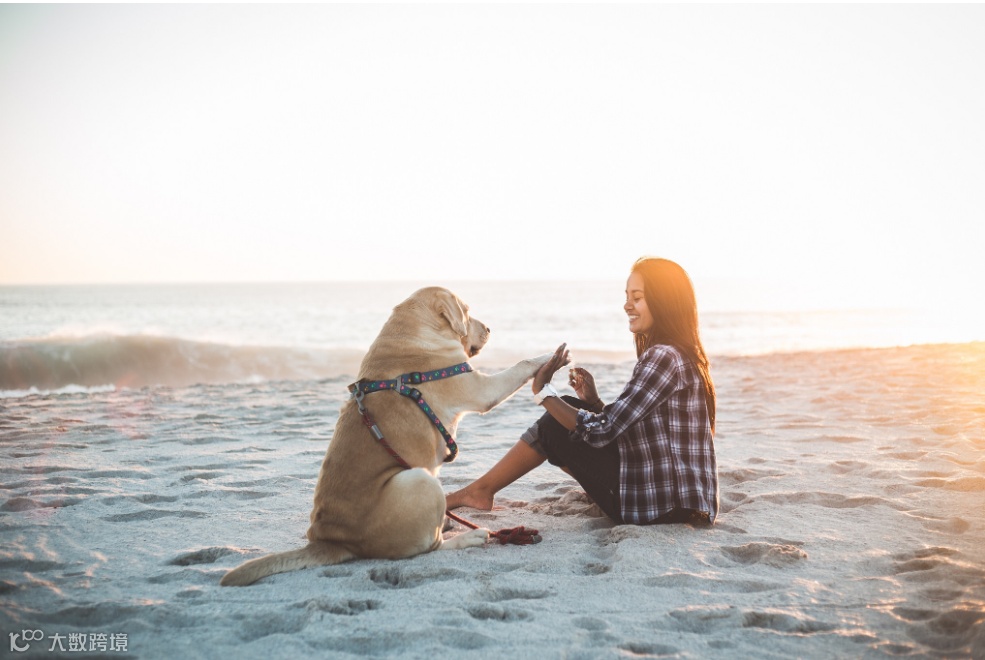
示例1:使用基础函数,对本地一张图片进行理解。
result = analyze_image_with_ollama(
    image_path="./images/demo.jpeg",
    prompt="描述图片中的人物和场景",
    model=ollama_cloud_model,
    base_url=ollama_cloud_base_url,
    api_key=ollama_cloud_api_key
)

if result:
    print("分析结果:", result)
运行上面的代码输出为:
✅ 成功读取图片: demo.jpeg
分析结果: 画面呈现了一幅充满温情的海滨场景:

### 人物与互动
- **女性**:坐在沙滩上,身着黑白格纹衬衫与深色长裤,手腕佩戴白色手表,面带笑意,正与狗狗进行“击掌”互动,姿态放松且亲昵。
- **狗狗**:是一只浅棕色的大型犬(推测为拉布拉多),佩戴着带有彩色装饰的项圈与牵引绳,前爪抬起与女性手掌相触,神态专注又温顺。


### 场景与氛围
背景是**夕阳下的海滩**:海面波光粼粼,远处海浪轻拍沙滩,天空被暖金色的夕阳光晕染,沙滩上布满自然的脚印纹理。整体光线柔和温暖,营造出宁静、惬意的氛围,传递出人与宠物在自然中共享美好时光的温馨感。

画面通过人与犬的亲密互动、海天相接的开阔景致与暖调光影,将“陪伴”与“自然治愈”的情感具象化,给人以放松、愉悦的视觉与情感体验。
示例2: 使用类的方式对本地一张图片进行理解。
analyzer = OllamaImageAnalyzer(
    base_url=ollama_cloud_base_url,
    api_key=ollama_cloud_api_key,
    default_model=ollama_cloud_model
)

# 分析单张图片
result = analyzer.analyze_image(
    image_path="./images/demo.jpeg",
    prompt="这张图片展示了什么内容?",
    stream=True  # 流式输出
)
运行代码输出为:
✅ 已加载图片: demo.jpeg (484.8KB)
🔄 使用模型 qwen3-vl:235b-cloud 流式分析图片...
这张图片展示了**一位女性与一只狗在海滩上互动的温馨场景**,具体内容如下:

- **环境背景**:画面以夕阳下的海滩为背景,远处海面泛起波浪,天空被暖色调的夕阳光晕染,营造出柔和、静谧的氛围;沙滩上布满脚印,增添了生活气息。
- **人物与动物**:
  - 一位穿着**蓝白格子衬衫**和**深色裤子**的女性坐在沙滩上,面带微笑,正与狗狗互动;她的姿态放松,一只手与狗狗的前爪相触(似“击掌”动作),另一只手似乎拿着零食。
  - 一只**浅棕色的大型犬**(推测为拉布拉多)坐在女性对面,佩戴着带有彩色装饰的项圈与牵引绳,前爪抬起与女性互动,神态专注而温顺。
- **整体氛围**:画面通过夕阳暖光、人与宠物的亲密互动,传递出**轻松愉悦、人与动物和谐共处**的温馨感,仿佛定格了一段悠闲美好的海滩时光。
示例3: 批量分析本地多张图片。
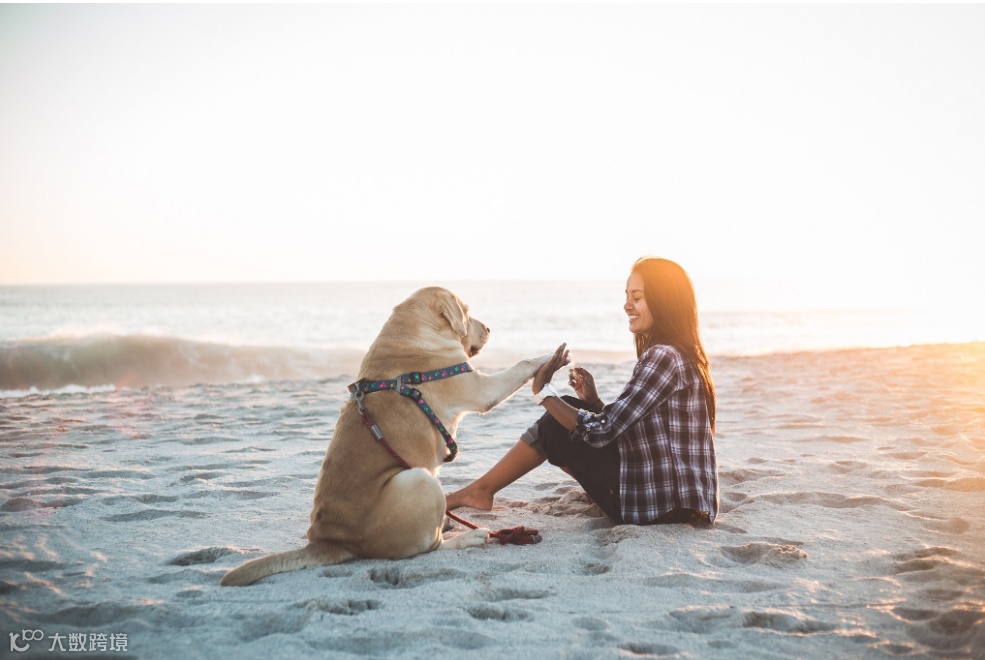
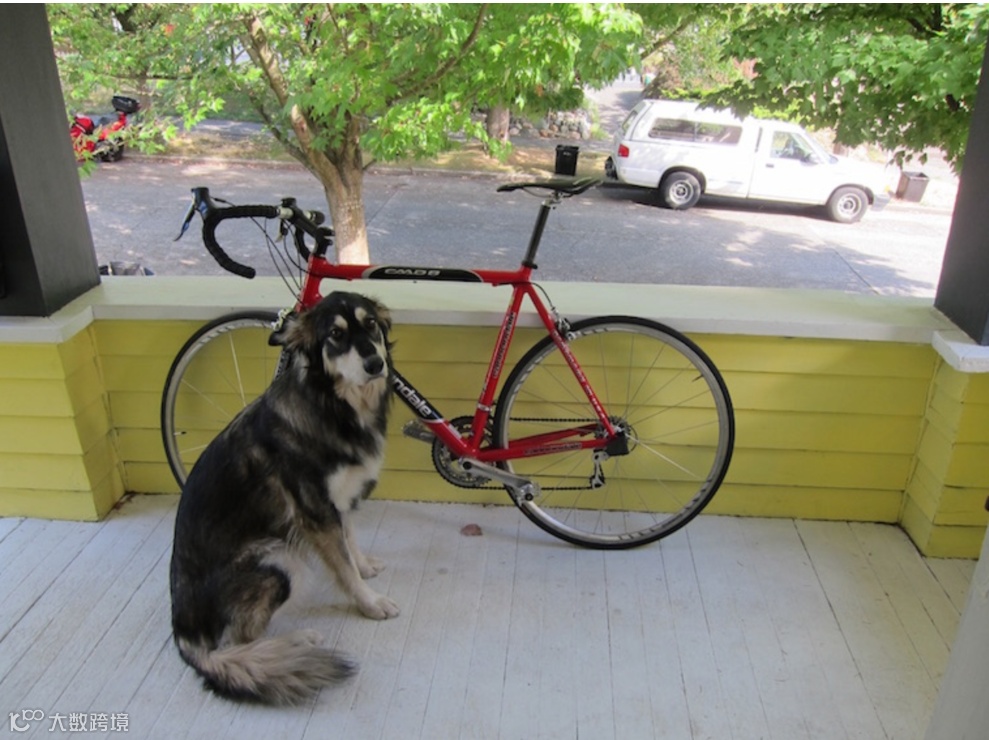
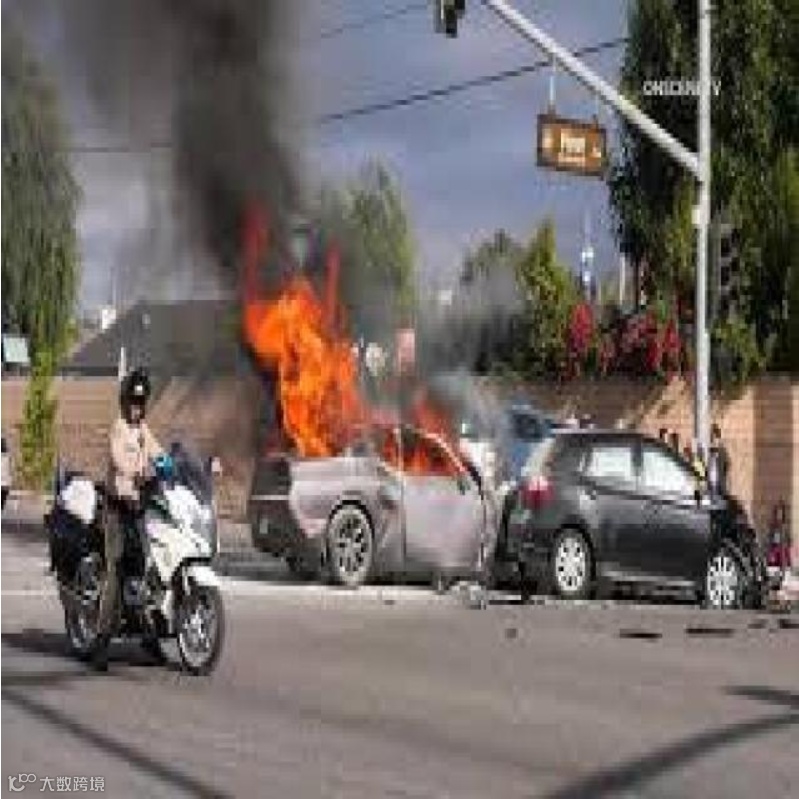
image_list = ["./images/demo.jpeg", "./images/dog.png", "./images/car2.jpg"]
prompt_list = [
    "描述第一张图片",
    "分析第二张图片中的物体",
    "第三张图片发生了什么"
]

results = analyze_multiple_images(
    image_paths=image_list,
    prompts=prompt_list,
    base_url=ollama_cloud_base_url,
    api_key=ollama_cloud_api_key,
    model=ollama_cloud_model
)

# 打印批量结果
for img_path, result in results.items():
    print(f"\n图片: {os.path.basename(img_path)}")
    print(f"结果: {result}"
运行上面的代码输出为:
📷 分析第 1/3 张图片: demo.jpeg
==================================================
✅ 已加载图片: demo.jpeg (484.8KB)
🔄 使用模型 qwen3-vl:235b-cloud 分析图片...

==================================================

📷 分析第 2/3 张图片: dog.png
==================================================
✅ 已加载图片: dog.png (803.2KB)
🔄 使用模型 qwen3-vl:235b-cloud 分析图片...

==================================================

📷 分析第 3/3 张图片: car2.jpg
==================================================
✅ 已加载图片: car2.jpg (56.9KB)
🔄 使用模型 qwen3-vl:235b-cloud 分析图片...

==================================================

图片: demo.jpeg
结果: 这张图片展现了一幅温馨的海滩场景,画面中一位女子与一只狗狗在日落时分的沙滩上互动。

**环境与光线**:背景是辽阔的海洋,远处海浪轻拍沙滩,泛起白色浪花;天空被柔和的暖光晕染,呈现出淡蓝至金黄的渐变,阳光从右侧斜照,给整个场景镀上一层温暖的金色,营造出宁静而惬意的氛围。沙滩上布满细密的脚印,显得自然生动。

**人物与动物**:
- **女子**:她坐在沙滩上,身穿黑白格纹衬衫与黑色长裤,棕色长发自然垂落,面带灿烂笑容,神情愉悦。她双腿弯曲,一只脚伸直,正与狗狗进行互动——右手轻握狗狗的前爪,左手似乎拿着零食,手腕上戴着一块白色手表,姿态放松而充满爱意。
- **狗狗**:这是一只浅黄色的拉布拉多犬,佩戴着彩色图案的胸背带(带有红、蓝等色点缀),坐姿端正,前爪抬起与女子击掌,眼神专注,显得温顺又活泼。它身旁还散落着一段红色牵引绳,进一步点明了人与宠物的亲密关系。

**整体氛围**:画面传递出人与动物之间的深厚情感,暖色调的光线、轻柔的海浪与两者的互动细节,共同构成了一幅充满温情、自由与自然之美的生活图景,仿佛能让人感受到海风的轻拂与阳光的暖意。

图片: dog.png
结果: 图中包含以下主要物体,按类别分析如下:

### 1. 动物
- **狗**:一只毛发浓密的中大型犬,毛色以黑、棕、白为主(面部、胸部、尾部有白色毛发,背部和腿部为深色)。它呈坐姿,面向镜头,耳朵竖起,神态专注,位于门廊的浅色木地板上,处于画面左前方位置。


### 2. 交通工具
- **红色公路自行车**:
  - 车架主体为红色,带有黑色装饰条,车架上清晰可见品牌标识 *Cannondale*(坎诺达,知名自行车品牌)和型号 *CAAD8*;
  - 采用公路车典型的**弯把设计**,搭配细胎、轻量化轮组,属于竞速型公路自行车;
  - 停靠在门廊的黄色围栏旁,车轮、车架、变速系统等细节清晰可见。
- **背景车辆**:
  - 一辆**白色皮卡车**停在街道上,车窗、车轮等细节完整;
  - 画面左侧远处还有一辆红色小型车辆(疑似摩托车),部分被树木遮挡。


### 3. 建筑与环境
- **门廊**:
  - 由**浅色木质地板**、**黄色木质围栏**和**深色立柱**构成,是房屋外的半开放空间;
  - 围栏高度约至自行车轮轴位置,为场景提供“前景 - 中景”的层次感。
- **自然与街道元素**:
  - 门廊外有**茂密绿树**(树干、枝叶清晰),为场景提供阴凉;
  - 街道为沥青路面,路边可见**垃圾桶**等市政设施,整体呈现宁静的居民区氛围。


### 4. 空间关系
狗位于自行车左前方,二者共同处于门廊区域;自行车倚靠围栏,背景的街道、车辆和树木则构成中远景,整体画面层次分明,展现了“门廊休闲场景 + 户外街道环境”的日常感。

图片: car2.jpg
结果: 这张图片呈现的是**交通事故引发车辆起火**的场景。画面中可以看到一辆汽车正燃起熊熊火焰并冒出大量黑烟,旁边还有一辆明显受损的车辆;左侧有一名骑着摩托车的警察(推测是执法或应急人员)在现场,背景是街道、交通信号灯与周边建筑,整体显示出事故后的紧急状况。