


Qwen-Omni 模型支持传入多张图片。对输入图片的要求如下:
-
单个图片文件的大小不超过10 MB; -
图片数量受模型图文总 Token 上限(即最大输入)的限制,所有图片的总 Token 数必须小于模型的最大输入; -
图片的宽度和高度均应大于10像素,宽高比不应超过200:1或1:200; -
支持的图片类型请参见视觉理解。
以下示例代码以传入图片公网 URL 为例,当前只支持以流式输出的方式进行调用。
# 初始化OpenAI客户端,配置API连接参数
client = OpenAI(
    api_key = dash_api_key,      # 使用传入的API密钥进行身份验证
    base_url = dash_base_url,    # 设置API服务的基础URL地址
)

# 创建多模态聊天补全请求
completion = client.chat.completions.create(
    model="qwen3-omni-flash", # 指定使用的模型为Qwen3-Omni-Flash
    # 构建消息内容,包含多模态输入
    messages=[
        {
            "role": "user",      # 消息角色为用户
            "content": [         # 消息内容包含多个部分
                {
                    "type": "image_url",     # 第一部分:图片URL
                    "image_url": {
                        "url": "https://help-static-aliyun-doc.aliyuncs.com/file-manage-files/zh-CN/20241022/emyrja/dog_and_girl.jpeg"  # 图片网络地址
                    },
                },
                {"type": "text", "text": "图中描绘的是什么景象?"},  # 第二部分:文本问题
            ],
        },
    ],
    # 设置输出数据的模态,指定需要返回的内容类型
    modalities=["text", "audio"],  # 要求同时返回文本和音频两种输出
    # 音频输出配置
    audio={"voice": "Cherry", "format": "wav"},  # 使用Cherry音色,输出WAV格式音频
    # 流式传输设置
    stream=True,  # 启用流式传输,实时接收响应数据
    # 流式传输选项配置
    stream_options={
        "include_usage": True  # 在流式响应中包含用量统计信息
    }
)

# 处理流式响应数据
for chunk in completion:
    # 检查当前数据块是否包含AI生成的内容
    if chunk.choices:
        # 打印AI返回的增量内容(文本或音频数据)
        print(chunk.choices[0].delta)
    else:
        # 如果没有生成内容,则打印API用量统计信息
        print(chunk.usage)
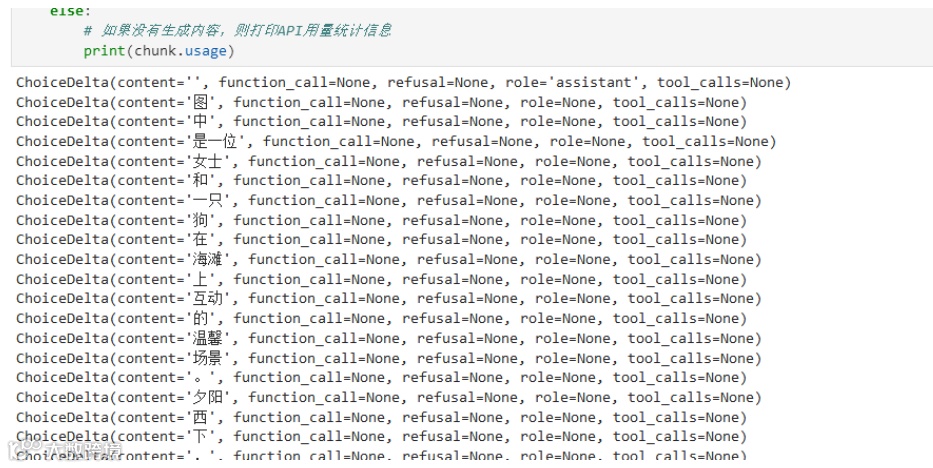
以下代码实时打印模型对图片的文字描述,并将将语音回答保存为本地WAV文件。
# 运行前的准备工作:
# 运行下列命令安装第三方依赖
# pip install numpy soundfile openai

import os
import base64
import soundfile as sf
import numpy as np
from openai import OpenAI

# 初始化OpenAI客户端,配置API连接参数
client = OpenAI(
    api_key=dash_api_key,      # 使用传入的API密钥进行身份验证
    base_url=dash_base_url,    # 设置API服务的基础URL地址
)

try:
    # 创建多模态聊天补全请求
    completion = client.chat.completions.create(
        model="qwen3-omni-flash", # 指定使用的模型为Qwen3-Omni-Flash
        # 构建消息内容,包含多模态输入
        messages=[
            {
                "role": "user",      # 消息角色为用户
                "content": [         # 消息内容包含多个部分
                    {
                        "type": "image_url",     # 第一部分:图片URL
                        "image_url": {
                            "url": "https://help-static-aliyun-doc.aliyuncs.com/file-manage-files/zh-CN/20241022/emyrja/dog_and_girl.jpeg"  # 图片网络地址
                        },
                    },
                    {"type": "text", "text": "图中描绘的是什么景象?"},  # 第二部分:文本问题
                ],
            },
        ],
        # 设置输出数据的模态
        modalities=["text", "audio"],  # 要求同时返回文本和音频两种输出
        # 音频输出配置
        audio={"voice": "Cherry", "format": "wav"},  # 使用Cherry音色,输出WAV格式音频
        # 流式传输设置
        stream=True,  # 启用流式传输,实时接收响应数据
        # 流式传输选项配置
        stream_options={
            "include_usage": True  # 在流式响应中包含用量统计信息
        }
    )

    # 处理流式响应并解码音频
    print("模型对图片的描述:")
    audio_base64_string = ""  # 用于累积音频的base64数据

    for chunk in completion:
        # 处理文本部分:打印模型生成的文本内容
        if chunk.choices and chunk.choices[0].delta.content:
            print(chunk.choices[0].delta.content, end="", flush=True)

        # 收集音频部分:累积音频的base64数据
        if (chunk.choices and
            hasattr(chunk.choices[0].delta, "audio") and
            chunk.choices[0].delta.audio and
            chunk.choices[0].delta.audio.get("data")):
            audio_base64_string += chunk.choices[0].delta.audio["data"]

    # 保存音频文件到本地
    if audio_base64_string:
        # 解码base64音频数据
        wav_bytes = base64.b64decode(audio_base64_string)
        # 将字节数据转换为numpy数组
        audio_np = np.frombuffer(wav_bytes, dtype=np.int16)
        # 保存为WAV文件,采样率为24000Hz
        sf.write("image_description.wav", audio_np, samplerate=24000)
        print(f"\n音频文件已保存至:image_description.wav")
    else:
        print("\n未接收到音频数据")

except Exception as e:
    print(f"请求失败: {e}")
输出为:
模型对图片的描述:
图中是一位女士和一只狗在海滩上互动的温馨场景。夕阳西下,海浪轻拍沙滩,女士坐在沙地上,与穿着彩色背带的金毛犬击掌,气氛轻松愉快。
音频文件已保存至:image_description.wav自定义函数,支持多种模式:
-
文本+音频(流式) -
仅文本(流式) -
仅文本(非流式) -
生成音频但不保存文件
import base64
import soundfile as sf
import numpy as np

def analyze_image(client, image_url, question="图中描绘的是什么景象?",
                 voice="Cherry", audio_format="wav",
                 generate_audio=True, save_audio=True,
                 audio_filename="image_description.wav",
                 print_text=True, samplerate=24000,
                 stream=True):
    """
    分析图片并获取文本描述,可选择是否生成语音回复

    参数:
        client: OpenAI客户端实例
        image_url (str): 图片的URL地址
        question (str): 对图片的提问,默认为"图中描绘的是什么景象?"
        voice (str): 语音类型,默认为"Cherry"(仅在generate_audio=True时有效)
        audio_format (str): 音频格式,默认为"wav"(仅在generate_audio=True时有效)
        generate_audio (bool): 是否生成音频,默认为True
        save_audio (bool): 是否保存音频文件,默认为True(仅在generate_audio=True时有效)
        audio_filename (str): 音频文件名,默认为"image_description.wav"(仅在generate_audio=True且save_audio=True时有效)
        print_text (bool): 是否打印文本回复,默认为True
        samplerate (int): 音频采样率,默认为24000(仅在generate_audio=True时有效)
        stream (bool): 是否使用流式传输,默认为True

    返回:
        dict: 包含文本回复和音频数据的字典
    """

    try:
        # 构建多模态消息内容
        messages = [
            {
                "role": "user",
                "content": [
                    {
                        "type": "image_url",
                        "image_url": {"url": image_url},
                    },
                    {"type": "text", "text": question},
                ],
            }
        ]

        # 准备请求参数
        request_params = {
            "model": "qwen3-omni-flash",
            "messages": messages,
            "stream": stream,
        }

        # 根据是否生成音频设置参数
        if generate_audio:
            request_params["modalities"] = ["text", "audio"]
            request_params["audio"] = {"voice": voice, "format": audio_format}
            request_params["stream_options"] = {"include_usage": True}
        else:
            request_params["modalities"] = ["text"]
            # 如果不生成音频,强制关闭流式传输以获得完整响应
            if not stream:
                request_params["stream"] = False

        # 发起聊天补全请求
        completion = client.chat.completions.create(**request_params)

        # 初始化变量
        text_response = ""  # 存储完整的文本回复
        audio_base64_string = ""  # 存储音频的base64数据

        if print_text:
            print("模型回复:")

        # 处理响应(流式或非流式)
        if stream:
            # 流式处理
            for chunk in completion:
                # 处理文本部分
                if chunk.choices and chunk.choices[0].delta.content:
                    chunk_text = chunk.choices[0].delta.content
                    text_response += chunk_text
                    if print_text:
                        print(chunk_text, end="", flush=True)

                # 收集音频部分(仅在生成音频时)
                if (generate_audio and chunk.choices and
                    hasattr(chunk.choices[0].delta, "audio") and
                    chunk.choices[0].delta.audio and
                    chunk.choices[0].delta.audio.get("data")):
                    audio_base64_string += chunk.choices[0].delta.audio["data"]
        else:
            # 非流式处理
            text_response = completion.choices[0].message.content
            if print_text:
                print(text_response)

        # 保存音频文件(仅在生成音频且需要保存时)
        audio_data = None
        if generate_audio and audio_base64_string and save_audio:
            wav_bytes = base64.b64decode(audio_base64_string)
            audio_data = np.frombuffer(wav_bytes, dtype=np.int16)
            sf.write(audio_filename, audio_data, samplerate=samplerate)
            if print_text:
                print(f"\n音频文件已保存至:{audio_filename}")

        # 返回结果
        result = {
            "success": True,
            "text": text_response,
            "audio_base64": audio_base64_string if generate_audio else "",
            "audio_data": audio_data if generate_audio else None,
            "audio_saved": (generate_audio and save_audio and bool(audio_base64_string)),
            "audio_filename": audio_filename if (generate_audio and save_audio and audio_base64_string) else None,
            "generate_audio": generate_audio,
            "image_url": image_url,
            "question": question
        }

        return result

    except Exception as e:
        print(f"图片分析请求失败: {e}")
        return {
            "success": False,
            "text": "",
            "audio_base64": "",
            "audio_data": None,
            "audio_saved": False,
            "audio_filename": None,
            "generate_audio": generate_audio,
            "error": str(e),
            "image_url": image_url,
            "question": question
        }
示例1:完整功能(文本+音频)- 流式
# 示例1:完整功能(文本+音频)- 流式
print("=== 示例1:完整功能(文本+音频)===")
result1 = analyze_image(
    client=client,
    image_url="https://help-static-aliyun-doc.aliyuncs.com/file-manage-files/zh-CN/20241022/emyrja/dog_and_girl.jpeg",
    question="图中描绘的是什么景象?请详细描述。",
    generate_audio=True,
    save_audio=True,
    audio_filename="full_analysis.wav",
    print_text=True,
    stream=True
)
输出为:
=== 示例1:完整功能(文本+音频)===
模型回复:
图中描绘的是一幅温馨的海滩场景。夕阳西下,金色的阳光洒在沙滩上,海浪轻轻拍打着岸边。一位年轻女子坐在沙滩上,穿着格子衬衫和牛仔裤,面带微笑,与她身旁的一只金毛犬互动。这只狗戴着彩色的项圈,正用前爪轻轻搭在女子的手上,仿佛在进行“击掌”游戏。整个画面充满了宁静与和谐,展现了人与宠物之间深厚的情感纽带。
音频文件已保存至:full_analysis.wav
示例2:仅文本分析 - 流式
# 示例2:仅文本分析 - 流式
print("\n=== 示例2:仅文本分析(流式)===")
result2 = analyze_image(
    client=client,
    image_url="https://help-static-aliyun-doc.aliyuncs.com/file-manage-files/zh-CN/20241022/emyrja/dog_and_girl.jpeg",
    question="图片中有哪些主要元素?",
    generate_audio=False,
    print_text=True,
    stream=True
)
输出为:
=== 示例2:仅文本分析(流式)===
模型回复:
好的,根据您提供的图片,以下是其中的主要元素:

- **人物**:一位年轻女性,她坐在沙滩上,面带微笑地看着她的狗。她穿着一件黑白格子衬衫和深色裤子。
- **动物**:一只金毛寻回犬,它戴着一个带有彩色图案的胸背带,正坐着并抬起一只前爪与女子互动。
- **互动**:女子和狗正在进行一个类似“击掌”的互动,女子伸出一只手,狗用爪子轻轻触碰,展现了它们之间亲密和愉快的关系。
- **环境**:场景是在一个海滩上。背景是平静的海面和天空,可以看到海浪在岸边拍打。
示例3:仅文本分析 - 非流式
# 示例3:仅文本分析 - 非流式
print("\n=== 示例3:仅文本分析(非流式)===")
result3 = analyze_image(
    client=client,
    image_url="https://help-static-aliyun-doc.aliyuncs.com/file-manage-files/zh-CN/20241022/emyrja/dog_and_girl.jpeg",
    question="用一句话描述图片内容",
    generate_audio=False,
    print_text=True,
    stream=False
)
输出为:
=== 示例3:仅文本分析(非流式)===
模型回复:
在夕阳下的海滩上,一位年轻女子与一只戴着彩色背带的金毛犬开心地击掌互动。
示例4:生成音频但不保存文件
# 示例4:生成音频但不保存文件
print("\n=== 示例4:生成音频但不保存文件 ===")
result4 = analyze_image(
    client=client,
    image_url="https://help-static-aliyun-doc.aliyuncs.com/file-manage-files/zh-CN/20241022/emyrja/dog_and_girl.jpeg",
    question="简单描述图片",
    generate_audio=True,
    save_audio=False,  # 只生成但不保存
    print_text=True,
    stream=True
)
输出为:
=== 示例4:生成音频但不保存文件 ===
模型回复:
这是一张在海滩上拍摄的照片。画面中,一位女士坐在沙滩上,她穿着格子衬衫和深色裤子,面带微笑,正在和一只狗互动。这只狗是一只金毛犬,戴着彩色的项圈,正用前爪轻轻搭在女士的手上,似乎在“握手”。背景是平静的海面和柔和的夕阳,阳光洒在沙滩上,营造出温暖、宁静的氛围。整个场景显得非常温馨、和谐,展现了人与宠物之间的亲密关系。
打印结果摘要
# 打印结果摘要
print("\n=== 结果摘要 ===")
for i, result in enumerate([result1, result2, result3, result4], 1):
    print(f"示例{i}: 成功={result['success']}, 文本长度={len(result['text'])}, "
          f"生成音频={result['generate_audio']}, 音频保存={result['audio_saved']}")
输出为:
=== 结果摘要 ===
示例1: 成功=True, 文本长度=150, 生成音频=True, 音频保存=True
示例2: 成功=True, 文本长度=288, 生成音频=False, 音频保存=False
示例3: 成功=True, 文本长度=36, 生成音频=False, 音频保存=False
示例4: 成功=True, 文本长度=159, 生成音频=True, 音频保存=False
传入本地图片:输入 Base64 编码的本地文件。我们修改上面的函数,用于支持读取本地图片进行分析。
def analyze_local_image(client, image_path, question="图中描绘的是什么景象?",
                       voice="Cherry", audio_format="wav",
                       generate_audio=True, save_audio=True,
                       audio_filename="image_description.wav",
                       print_text=True, samplerate=24000,
                       stream=True):
    """
    分析本地图片并获取文本描述,可选择是否生成语音回复

    参数:
        client: OpenAI客户端实例
        image_path (str): 本地图片文件路径
        question (str): 对图片的提问,默认为"图中描绘的是什么景象?"
        voice (str): 语音类型,默认为"Cherry"(仅在generate_audio=True时有效)
        audio_format (str): 音频格式,默认为"wav"(仅在generate_audio=True时有效)
        generate_audio (bool): 是否生成音频,默认为True
        save_audio (bool): 是否保存音频文件,默认为True(仅在generate_audio=True时有效)
        audio_filename (str): 音频文件名,默认为"image_description.wav"(仅在generate_audio=True且save_audio=True时有效)
        print_text (bool): 是否打印文本回复,默认为True
        samplerate (int): 音频采样率,默认为24000(仅在generate_audio=True时有效)
        stream (bool): 是否使用流式传输,默认为True

    返回:
        dict: 包含文本回复和音频数据的字典
    """

    try:
        # 检查图片文件是否存在
        if not os.path.exists(image_path):
            raise FileNotFoundError(f"图片文件不存在: {image_path}")

        # 检查文件格式
        valid_extensions = {'.png', '.jpg', '.jpeg', '.gif', '.bmp', '.webp'}
        file_ext = os.path.splitext(image_path)[1].lower()
        if file_ext not in valid_extensions:
            raise ValueError(f"不支持的图片格式: {file_ext},支持的格式: {valid_extensions}")

        # 读取图片文件并编码为base64
        with open(image_path, "rb") as image_file:
            image_data = image_file.read()
            base64_image = base64.b64encode(image_data).decode('utf-8')

        # 构建数据URL
        mime_type = "image/png" if file_ext == '.png' else \
                   "image/jpeg" if file_ext in ['.jpg', '.jpeg'] else \
                   "image/gif" if file_ext == '.gif' else \
                   "image/bmp" if file_ext == '.bmp' else \
                   "image/webp"

        image_url = f"data:{mime_type};base64,{base64_image}"

        # 构建多模态消息内容
        messages = [
            {
                "role": "user",
                "content": [
                    {
                        "type": "image_url",
                        "image_url": {"url": image_url},
                    },
                    {"type": "text", "text": question},
                ],
            }
        ]

        # 准备请求参数
        request_params = {
            "model": "qwen3-omni-flash",
            "messages": messages,
            "stream": stream,
        }

        # 根据是否生成音频设置参数
        if generate_audio:
            request_params["modalities"] = ["text", "audio"]
            request_params["audio"] = {"voice": voice, "format": audio_format}
            request_params["stream_options"] = {"include_usage": True}
        else:
            request_params["modalities"] = ["text"]
            # 如果不生成音频,强制关闭流式传输以获得完整响应
            if not stream:
                request_params["stream"] = False

        # 发起聊天补全请求
        completion = client.chat.completions.create(**request_params)

        # 初始化变量
        text_response = ""  # 存储完整的文本回复
        audio_base64_string = ""  # 存储音频的base64数据

        if print_text:
            print("模型回复:")

        # 处理响应(流式或非流式)
        if stream:
            # 流式处理
            for chunk in completion:
                # 处理文本部分
                if chunk.choices and chunk.choices[0].delta.content:
                    chunk_text = chunk.choices[0].delta.content
                    text_response += chunk_text
                    if print_text:
                        print(chunk_text, end="", flush=True)

                # 收集音频部分(仅在生成音频时)
                if (generate_audio and chunk.choices and
                    hasattr(chunk.choices[0].delta, "audio") and
                    chunk.choices[0].delta.audio and
                    chunk.choices[0].delta.audio.get("data")):
                    audio_base64_string += chunk.choices[0].delta.audio["data"]
        else:
            # 非流式处理
            text_response = completion.choices[0].message.content
            if print_text:
                print(text_response)

        # 保存音频文件(仅在生成音频且需要保存时)
        audio_data = None
        if generate_audio and audio_base64_string and save_audio:
            wav_bytes = base64.b64decode(audio_base64_string)
            audio_data = np.frombuffer(wav_bytes, dtype=np.int16)
            sf.write(audio_filename, audio_data, samplerate=samplerate)
            if print_text:
                print(f"\n音频文件已保存至:{audio_filename}")

        # 返回结果
        result = {
            "success": True,
            "text": text_response,
            "audio_base64": audio_base64_string if generate_audio else "",
            "audio_data": audio_data if generate_audio else None,
            "audio_saved": (generate_audio and save_audio and bool(audio_base64_string)),
            "audio_filename": audio_filename if (generate_audio and save_audio and audio_base64_string) else None,
            "generate_audio": generate_audio,
            "image_path": image_path,
            "image_size": len(image_data),
            "question": question
        }

        return result

    except Exception as e:
        print(f"图片分析请求失败: {e}")
        return {
            "success": False,
            "text": "",
            "audio_base64": "",
            "audio_data": None,
            "audio_saved": False,
            "audio_filename": None,
            "generate_audio": generate_audio,
            "error": str(e),
            "image_path": image_path,
            "question": question
        }
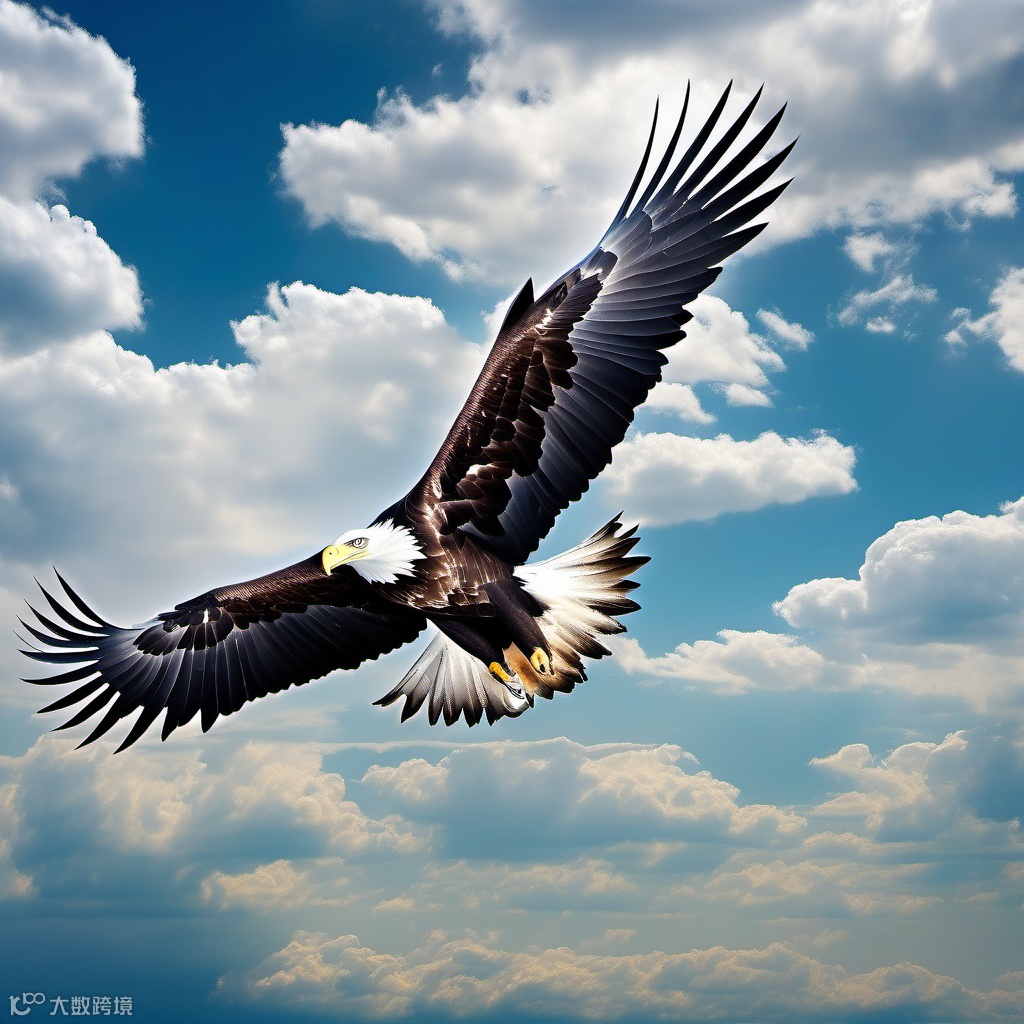
本地有一张engle.png的图片。
简单调用
result = analyze_local_image(
    client=client,
    image_path="eagle.png",
    question="描述这张图片"
)
输出为:
模型回复:
这是一只白头海雕在蓝天白云间展翅飞翔。它有着标志性的白色头部和尾部,深棕色的身体和翅膀,黄色的喙和爪子。翅膀完全展开,姿态雄健有力,背景是层次分明的云朵,整体画面充满力量与自由感。
音频文件已保存至:local_image_description.wav
您的浏览器不支持音频元素。
高级调用
result = analyze_local_image(
    client=client,
    image_path="eagle.png",
    question="这只鹰有什么特征?",
    generate_audio=True,
    audio_filename="eagle_analysis.wav",
    voice="Cherry"
)
输出为:
模型回复:
这是一只白头海雕,特征很明显:头部和尾部是白色的,身体和翅膀是深棕色的。它有黄色的喙和爪子,看起来非常威武。
音频文件已保存至:eagle_analysis.wav
【Qwen3-VL】:多模态AI新玩法! 基于Qwen3-VL的文档智能解析(一)
【Qwen3-VL】:多模态AI新玩法! 基于Qwen3-VL的文档智能解析(二)将图片解析为Markdown
【Qwen3-VL】:多模态AI新玩法! 基于Qwen3-VL的文档智能解析(三)对图片解析Markdown结果进行智能问答
【Qwen3-VL】:多模态AI新玩法! 基于Qwen3-VL的文档智能解析(四)搭建文档解析平台
【Qwen3-VL】:多模态AI新玩法! 基于Qwen3-VL的文档智能解析(五)搭建功能完善的文档解析平台
【Qwen3-VL】:多模态AI新玩法! 基于Streamlit搭建长文档智能解析平台