


dotnet-exec 0.15.0 Released
Intro
dotnet-exec 是一个 dotnet tool 一个命令行小工具,可以帮助我们方便地执行 C# 代码,可以用来运行一些简单的 C# 程序而无需创建项目文件,让 C# 像 python/nodejs 一样简单,而且可以自定义项目的入口方法,支持但不限于 Main 方法。
0.15.0 版本是基于 .NET 8 正式版本发布的第一个稳定版,一直在等 Roslyn 的稳定版本发布,今天终于发布了一个稳定版本了
Install/Update
dotnet-exec 是一个 dotnet tool,可以使用安装 dotnet tool 的命令来安装
安装/更新最新稳定版本:
dotnet tool update -g dotnet-execute
安装最新的 preview 版本:
dotnet tool update -g dotnet-execute --prerelease
执行 dotnet-exec -h 或者 dotnet-exec --help 即可看到一些使用说明
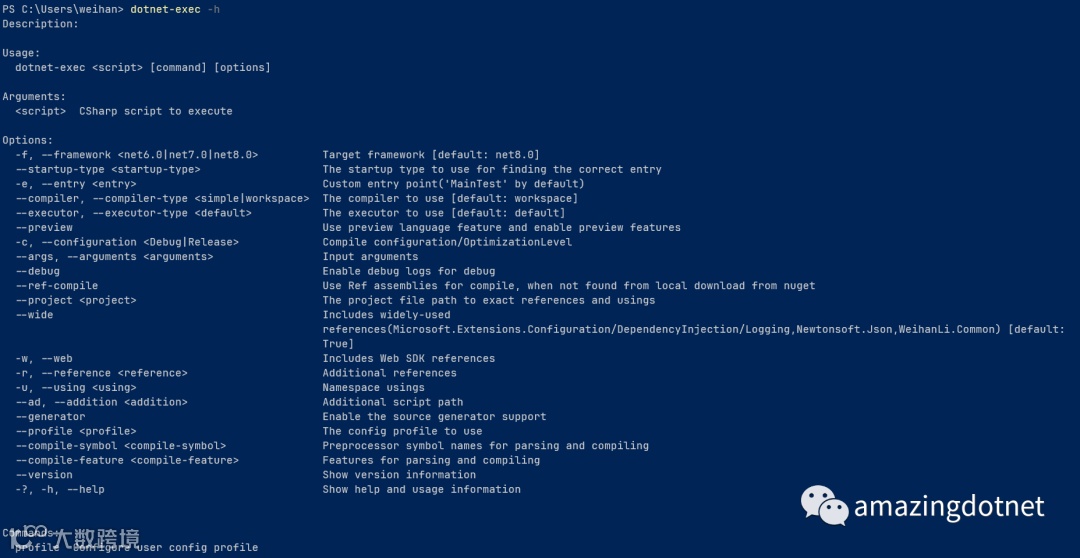
也可以通过 docker/podman 来在不安装 dotnet sdk 的情况下体验,例如:
docker run --rm --pull=always weihanli/dotnet-exec:latest dotnet-exec "ApplicationHelper.RuntimeInfo"
New features
Interceptor Support
C# 12 中支持 Interceptor, 在这个版本的更新中也支持了 Interceptor 的编译执行
Interceptor 示例代码如下:
// Copyright (c) 2022-2023 Weihan Li. All rights reserved.
// Licensed under the Apache license version 2.0 http://www.apache.org/licenses/LICENSE-2.0

namespace CSharp12Sample
{
    public static class InterceptorSample
    {
        public static void MainTest()
        {
            var a = new A();
            a.TestMethod();
        }
    }

    public class A
    {
        public void TestMethod()
        {
            Console.WriteLine("A.TestMethod");
        }
    }
}

namespace System.Runtime.CompilerServices
{
    [AttributeUsage(AttributeTargets.Method, AllowMultiple = true)]
#pragma warning disable CS9113 // Parameter is unread.
    file sealed class InterceptsLocationAttribute(string filePath, int line, int character) : Attribute
#pragma warning restore CS9113 // Parameter is unread.
    {
    }
}

namespace CSharp12Sample.Generated
{
    public static class Extensions
    {
        [System.Runtime.CompilerServices.InterceptsLocation(
            @"C:\projects\sources\dotnet-exec\artifacts\bin\IntegrationTest\debug\CodeSamples\InterceptorSample.cs",
            line: 11, character: 15)
        ]
        public static void TestMethodInterceptor(this A a)
        {
            Console.WriteLine($"Intercepted: {nameof(TestMethodInterceptor)}");
        }
    }
}
之前有写过一篇文章介绍过 Interceptor ,没有看过的朋友建议可以看一下 C# 12 中的 Interceptor 特性
直接执行的话会报错,如下:

会提示我们需要在项目文件里添加 InterceptorPreviewNamespaces 配置,添加我们的 Interceptor 所在的 namespace 才能正常使用,使用 dotnet-exec 可以通过新增的 --compile-feature 来配置,如下:
dotnet-exec .\InterceptorSample.cs --compile-feature
  InterceptorsPreviewNamespaces=CSharp12Sample.Generated

Preprocessor Symbol Name Support
在这个版本中我们还支持了传入 symbol name,类似于在项目文件里的 DefineConstants,可以在代码使用 #if 来条件编译
我们来看一个示例,示例代码如下:
#if SYMBOL_TEST
Console.WriteLine("Symbol hit");
return 0;
#else
Console.WriteLine("Symbol not hit");
return 1;
#endif
代码里使用 SYMBOL_TEST 这个 symbol,我们来看下不同的 case 执行结果吧
首先来看下没有指定 symbol 的情况下是什么样的

从输出结果可以看到,逻辑走的是 else 使用 $? 可以看命令是否执行成功,exit code 是 1, 所以返回的是 False,我们再通过 $LASTEXITCODE 验证一下 exit code

我们再来带着 symbol 来试一下,可以通过 --compile-symbol 来指定 symbol
dotnet-exec .\SymbolSample.cs --compile-symbol SYMBOL_TEST
可以看到此时执行的是 if 的逻辑,并且 $LASTEXITCODE 返回的 exit code 是 0,是成功的,$? 返回的是 True

More
除了前面的两个更新之外,--compiler-type 的值原来是 default/workspace,但是之前的版本中我们的默认值改成了 workspace,再叫 default 觉得有点不太合适,这次改成了 simple 对应着 SimpleCodeCompiler,不指定 --compiler-type 时不会受到影响
另外是一些代码上的清理和重构,感兴趣的朋友可以看 Github 上的详细变更:https://github.com/WeihanLi/dotnet-exec/compare/0.14.0...0.15.0
References
-
https://github.com/WeihanLi/dotnet-exec -
https://www.nuget.org/packages/dotnet-execute/ -
https://hub.docker.com/r/weihanli/dotnet-exec -
https://github.com/WeihanLi/dotnet-exec/compare/0.14.0...0.15.0 -
C# 12 中的 Interceptor 特性