



01
引言
词云图是一种可视化工具,可以显示从文本或文档中检索到的单词集合。通常,词云图使用文字大小和文字颜色来显示词语的频率。其结果可以在第一时间引起人们的注意。
说到词云图的特点,让我们比较一下下面的两张图。第一张是包含一篇文章前 100 个词的词云图。第二张是比较同样 100 个单词数量的条形图。我们可以发现,条形图中的单词很难读懂。另一方面,可以看出词云很好地处理了多个高频单词。

词云显示了维基百科气候变化文章 100 个高频词

显示 100 个单词出现频率的条形图
词云图能够处理许多单词,并有助于大致对比单词出现的频率。不过,词云图也有一些缺点。在处理过多单词时,很难分辨哪个单词比其他单词出现得更频繁。
此外,文档通常由段落或章节等部分组成。词云只显示整个文档的词频。它无法提供每个章节部分的细节。
02
爬取数据
本文将使用维基百科上 "气候变化 "一文中的文字。环境问题是当前的一个全球现象。我想看看我们能从这篇文章中获取哪些信息,文章链接如下:
Wikipedia:https://en.wikipedia.org/wiki/Climate_change
我们先从导入Python库开始吧。
import numpy as npimport pandas as pdimport matplotlib.pyplot as pltimport seaborn as snsimport urllibimport reimport wikipedia
import nltkfrom nltk.corpus import stopwords
接着我们使用以下代码来下载和清理文本,代码如下:
wiki = wikipedia.page('Climatechange')text = wiki.content# Clean texttext_c = re.sub('[^A-Za-z0-9°]+', ' ', text)text_c = text_c.replace('\n', '').lower()text_c
为了与后面三种可视化的结果进行比较,让我们用获得的数据创建一个词云。使用以下 Python 代码制作简单的词云图。
from wordcloud import WordCloud, STOPWORDSwordcloud = WordCloud(width= 1000, height = 600, max_words=100,random_state=1, background_color='gray', colormap='viridis_r',collocations=False, stopwords = STOPWORDS).generate(text_c)plt.figure(figsize=(40, 30))plt.imshow(wordcloud)plt.axis("off")plt.show()
运行上述代码后,得到结果如下:

03
准备工作
为了简化后续过程,我们将定义一个函数来创建 DataFrame。由于我们需要处理多个单词,因此使用颜色可以帮助我们区分它们。我们还将定义另一个函数来获取颜色字典,以便以后使用。
stop_words = set(stopwords.words("english"))#create function to get a DataFramedef get_df(input_text):list_words = input_text.split(' ')set_words_full = list(set(list_words))#remove stop wordsset_words = [i for i in set_words_full if i not in stop_words]#count each wordcount_words = [list_words.count(i) for i in set_words]#create DataFramedf = pd.DataFrame(zip(set_words, count_words), columns=['words','count'])df.sort_values('count', ascending=False, inplace=True)df.reset_index(drop=True, inplace=True)return df#create function to get a color dictionarydef get_colordict(palette,number,start):pal = list(sns.color_palette(palette=palette, n_colors=number).as_hex())color_d = dict(enumerate(pal, start=start))return color_d
在文本中应用该函数,得到一个 DataFrame,如下:
df_words = get_df(text_c)df_words.head(10)
结果如下:

04
条形图网格
如前所述,由于文本区域较小,简单的条形柱形图在显示文本时会受到限制。我们可以通过创建多个条形图并将它们组合起来来重新排列,以节省空间。
代码如下:
index_list = [[i[0],i[-1]+1] for i in np.array_split(range(100), 5)]n = df_words['count'].max()color_dict = get_colordict('viridis', n, 1)fig, axs = plt.subplots(1, 5, figsize=(16,8), facecolor='white', squeeze=False)for col, idx in zip(range(0,5), index_list):df = df_words[idx[0]:idx[-1]]label = [w + ': ' + str(n) for w,n in zip(df['words'],df['count'])]color_l = [color_dict.get(i) for i in df['count']]x = list(df['count'])y = list(range(0,20))sns.barplot(x = x, y = y, data=df, alpha=0.9, orient = 'h',ax = axs[0][col], palette = color_l)axs[0][col].set_xlim(0,n+1)axs[0][col].set_yticklabels(label, fontsize=12)axs[0][col].spines['bottom'].set_color('white')axs[0][col].spines['right'].set_color('white')axs[0][col].spines['top'].set_color('white')axs[0][col].spines['left'].set_color('white')plt.tight_layout()plt.show()
运行结果如下:

05
继续美化
文档通常由章节或段落等部分组成。维基百科上的气候变化文章也由许多章节组成,如术语、观测到的温度上升等。比较这些章节部分之间的高频词频将有助于我们了解更多有深度的细节。
首先手动创建一个章节内容列表,然后使用列表元素对文本进行切分。
#manually create a list of contentscontents = ['Terminology', 'Observed temperature rise','Drivers of recent temperature rise','Future warming and the carbon budget','Impacts','Reducing and recapturing emissions','Adapting to a changing climate', 'Policies and politics','Scientific consensus and society', 'Discovery','See also']pr_text = []#slice text with content listfor i in contents:idx1 = contents.index(i)if (idx1>=0) and (idx1<=len(contents)-2):text_s1 = text.split('\n\n\n== ' + i)[1]text_s2 = text_s1.split('\n\n\n== ' + contents[idx1+1])[0]pr_text.append(text_s2)else:pass
接下来,清理文本并应用上述定义的函数从每个文本中获取 DataFrame。在下面的代码中,我将创建一个 DataFrame,其中包含每个 DataFrame 中出现频率最高的 10 个单词。
#create DataFrame from top 10 words most appear in each contentdf_cn_words = [list(get_df(i)['words'][0:10]) for i in cn_clean_text]df_cn_count = [list(get_df(i)['count'][0:10]) for i in cn_clean_text]df_cn_content = [[i.lower()] * len(j) for i,j in zip(contents, df_cn_words)]df_cont = pd.DataFrame(zip(sum(df_cn_content,[]), sum(df_cn_words,[]),sum(df_cn_count,[])),columns = ['contents','words','count'])df_cont

接着,我们来准备颜色字典和每个 DataFrame 的列表。
#color dictionaryn = df_cont['count'].max()color_dict = get_colordict('viridis',n , 1)#create a list contains DataFrame of each contentkeep_dfcon = [df_cont[df_cont['contents']==i.lower()] for i in contents[0:-1]]num_w = len(keep_dfcon)
现在,一切准备就绪,让我们开始绘制条形图网格,其中包含 "气候变化 "文章各章节内容中出现频率最高的 10 个词。
fig, axs = plt.subplots(1, num_w, figsize=(16,6), facecolor='white', squeeze=False)for col, df in zip(range(0, num_w), keep_dfcon):label = [w + ':' + str(n) for w,n in zip(df['words'],df['count'])]color_l = [color_dict.get(i) for i in df['count']]x = list(df['count'])y = list(range(0,10))sns.barplot(x = x, y = y, data=df, alpha=0.9, orient = 'h',ax = axs[0][col], palette = color_l)axs[0][col].set_xlim(0, n+1)axs[0][col].set_yticklabels(label)axs[0][col].spines['bottom'].set_color('white')axs[0][col].spines['right'].set_color('white')axs[0][col].spines['top'].set_color('white')axs[0][col].spines['left'].set_color('white')title = df['contents'].iloc[0].replace(' ','\n')axs[0][col].set_title(title, y=-0.39)plt.tight_layout()plt.show()
结果如下:

条形图网格,显示每个内容的前 10 个词
可以看出,从整篇文章来看,"气候 "是出现最多的词。但是,如果按照文章内容进行划分,"气候 "一词并没有出现在减少和回收排放的内容中。原来,"能源 "才是该内容中出现最多的词。
06
旭日图
第二种可视化方法是旭日图。我们将从具有相同基本概念的环形图开始。下面的代码展示了使用 Plotly 创建环形图的简单方法。
n = 30pal = list(sns.color_palette(palette='Reds_r', n_colors=n).as_hex())import plotly.express as pxfig = px.pie(df_words[0:30], values='count', names='words',color_discrete_sequence=pal)fig.update_traces(textposition='outside', textinfo='percent+label',hole=.6, hoverinfo="label+percent+name")fig.update_layout(width = 800, height = 600,margin = dict(t=0, l=0, r=0, b=0))fig.show()
运行后得到结果如下:
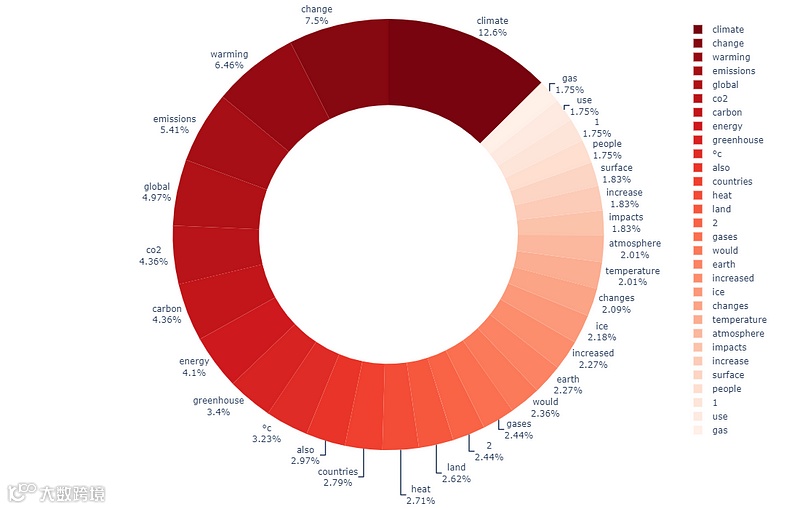
显示前 30 个单词的环形图
因此,环形图中只显示了30 个单词,几乎占满了空间的。我们可以对此进行改进,将图的层次结构从只有一级增加到两级。第一层是章节内容,第二层是每个章节的高频 10 个单词。
import plotly.graph_objects as gofig = go.Figure(go.Sunburst(labels = sb_words,parents = sb_contents,values = sb_count,marker = dict(colors=sb_color)))=800, height=800,margin = dict(t=0, l=0, r=0, b=0))fig.show()
得到结果如下:

旭日图显示每个章节内容的 10 个高频单词
07
树状图是使用数字可视化分层数据的绝佳图表。我们目前掌握的数据已经可以绘制树状地图了。我们可以直接使用下面的代码。首先绘制一个包含前 100 个单词的简单树状图。
import plotly.express as pxfig = px.treemap(df_words[0:100], path=[px.Constant("climate change"), 'words'],values='count',color='count',color_continuous_scale='viridis',color_continuous_midpoint=np.average(df_words['count']))fig.update_layout(margin = dict(t=50, l=25, r=25, b=25))fig.show()
运行后,得到结果如下:

显示100 个高频词的树状图
08
fig = px.treemap(df_cont, path=[px.Constant("climate change"), 'contents', 'words'],values='count',color='count', hover_data=['count'],color_continuous_scale='viridis',color_continuous_midpoint=np.average(df_cont['count']))fig.update_layout(margin = dict(t=0, l=0, r=0, b=0))fig.show()
运行后得到结果如下:

09
本文重点介绍了三种可以替代词云图的可视化技巧,这些技巧可以分层次的展示层级关系,方便大家进行日常工作中的数据分析。
您学废了吗?
点击上方小卡片关注我
扫码进群,交个朋友!
