


01
引言
Matplotlib 是 Python 中最受欢迎的数据可视化软件包之一,支持跨平台运行,它是 Python 常用的 2D 绘图库,同时它也提供了一部分 3D 绘图接口。Matplotlib 通常与 NumPy、Pandas 一起使用,是数据分析中不可或缺的重要工具之一。 http://c.biancheng.net/matplotlib/
在上一节中我们介绍了使用matplotlib进行数据可视化的几种表现方法,包括折线图、散点图、饼状图以及柱状图; 今天我们来继续学习堆叠图、树地图、箱型图和提琴图,那么我们开始吧。。。
02
堆叠图和树地图
堆叠图可以很方便的比较数据间不同情况下的差异。
树地图的思想就是通过方块的面积来表示,面积越大,其代表的值就越大,反之亦然。
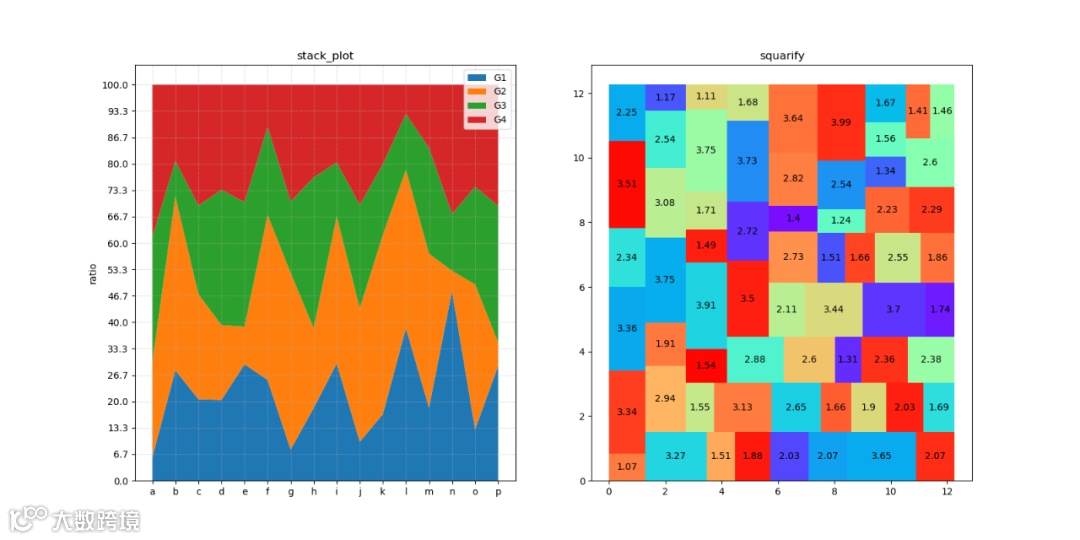
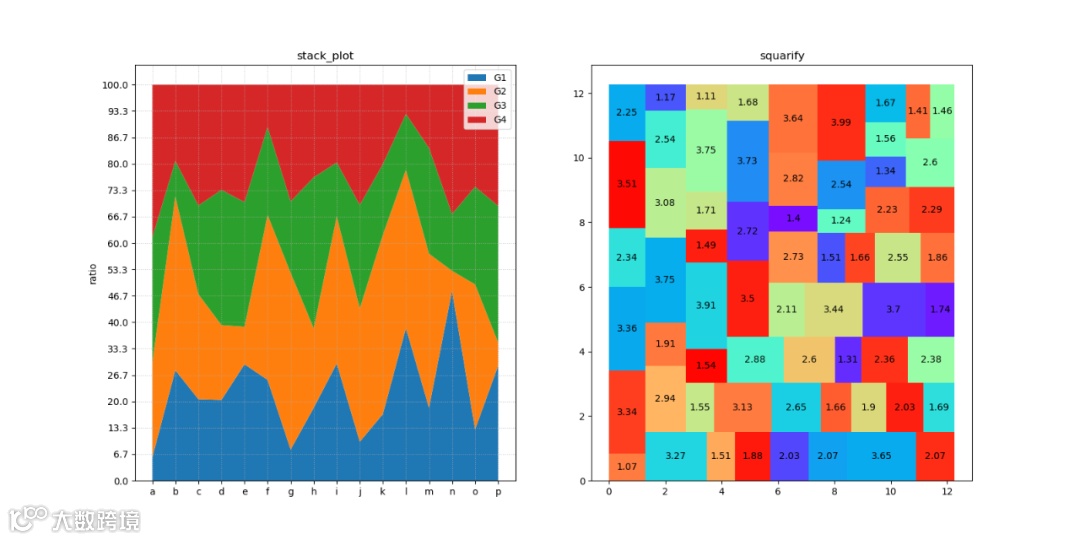
堆叠图:左上占比100%的堆叠面积图。它用于表示各种数据集而不会彼此重叠,它显示了每个组件相互堆叠以及每个组件如何构成完整的图形。其中各个组件可以用不同的颜色表示。
树地图:右上借助squarify显示树地图。
代码如下:
def test1():# left dataM, N = 16, 4dadosEmp = np.random.random((N, M)) * 0.9 + 0.1empilha = 100 * dadosEmp / np.sum(dadosEmp, axis=0)# right datafolhas = 64area = np.random.random(folhas) * 3 + 1area = np.round_(area, decimals=2)cores = np.random.random(folhas)lado = area.sum() ** 0.5# paramcmapArvore = cm.get_cmap('rainbow')cores = cmapArvore(cores)from squarify import squarifypartes = squarify(area, 0, 0, lado, lado)x = [parte['x'] for parte in partes]y = [parte['y'] for parte in partes]dx = [parte['dx'] for parte in partes]dy = [parte['dy'] for parte in partes]fig, (axA, axB) = plt.subplots(1, 2)# draw leftaxA.stackplot(np.arange(M), empilha, baseline='zero')axA.set_title('stack_plot')axA.set_ylabel('ratio')axA.set_xticks(np.arange(M))axA.set_yticks(np.linspace(0, 100, M))axA.set_xticklabels([chr(i + ord('a')) for i in range(M)])axA.legend(['G{}'.format(i + 1) for i in range(N)])axA.grid(alpha=0.75, linestyle=':')# draw rightaxB.bar(x, dy, width=dx, bottom=y, color=cores, align='edge')for p, a in zip(partes, area):x, y, dx, dy = p['x'], p['y'], p['dx'], p['dy']axB.text(x + dx * 0.5, y + dy * 0.5, a, va='center', ha='center')axB.set_title('squarify')plt.show()
函数说明:
stackplot(x, *args, labels=(), colors=None, baseline=’zero’, data=None, **kwargs)
x:形状为(N,)的类数组结构,即尺寸为N的一维数组。必备参数。
y:形状为(M,N)的类数组结构,即尺寸为(M,N)的二维数组。必备参数。
labels:为每个数据系列指定标签。长度为N的字符串列表。
colors:每组面积图所使用的的颜色,循环使用。颜色列表或元组。
baseline:基线。字符串,取值范围为
{'zero', 'sym','wiggle','weighted_wiggle'}。
默认值为'zero'表示绘制简单的堆积面积图。
squarify(values, x, y, dx, dy)
values 数据列表
x,y 起始点横坐标x与纵坐标y
dx,dy 树地图的宽和高
03
箱型图和提琴图
箱型图(Box Plot)于 1977 年由美国著名统计学家约翰·图基(John Tukey)发明。它能显示出一组数据的最大值、最小值、中位数、及上下四分位数。
小提琴图(Violin Plot)是用来展示数据分布状态以及概率密度的图表。这种图表结合了箱形图和密度图的特征
可视化结果:
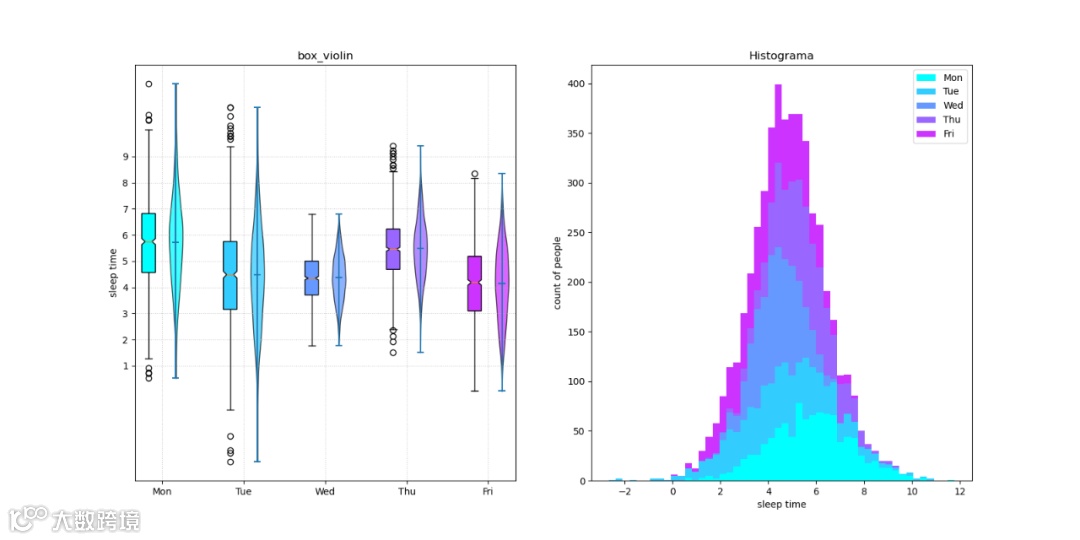
小提琴绘图:左上箱图和小提琴图形并列显示。
直方图:右上堆叠直方图显示。
def test2():# 统计数据entrev_dia = 1000dias = ['Mon', 'Tue', 'Wed', 'Thu', 'Fri']ndias = len(dias)mu = 4 + np.random.random(ndias) * 2sigma = 0.5 + np.random.random(ndias) * 2horas = np.random.normal(mu, sigma, (entrev_dia, ndias))horas += np.random.random((entrev_dia, ndias)) * 2 - 1# 显示参数cmapStat = cm.get_cmap('cool')posicao = np.arange(ndias) * 1.5fig, (axA, axB) = plt.subplots(1, 2)# 箱图和小提琴图bplots = axA.boxplot(horas, positions=posicao - 0.25,vert=True, widths=0.25,patch_artist=True, notch=True)violins = axA.violinplot(horas, positions=posicao + 0.25,widths=0.25, showmeans=True)for i, (box, violin) in enumerate(zip(bplots['boxes'], violins['bodies'])):cor = cmapStat(i / ndias)box.set_facecolor(cor)violin.set_facecolor(cor)violin.set_edgecolor('black')violin.set_alpha(0.75)axA.set_title('box_violin')axA.set_ylabel('sleep time')axA.set_xticks(posicao)axA.set_yticks(range(1, 10))axA.set_xticklabels(dias)axA.set_xlim((-0.5, 6.5))axA.grid(alpha=0.75, linestyle=':')# Histogramn, bins, patches = axB.hist(horas, bins=50, stacked=True)for i, patchList in enumerate(patches):for patch in patchList:patch.set_facecolor(cmapStat(i / ndias))axB.set_title('Histograma')axB.set_xlabel('sleep time')axB.set_ylabel('count of people')axB.legend(dias)plt.show()
boxplot(x,notch=None,vert=None,positions=None,widths=None,patch_artist=None, **kwargs)
x:指定要绘制箱线图的数据。
notch: 是否是凹口的形式展现箱线图
vert: 是否需要将箱线图垂直摆放
positions: 指定箱线图的位置
widths: 指定箱线图的宽度
patch_artist: 是否填充箱体的颜色
violinplot(dataset, positions=None, widths=0.5, showmeans=False, data=None)
dataset: 指定要绘制提琴图的数据
positions: 指定提琴图的位置
widths: 指定提琴图的宽度
showmeans:指定是否在图中显示均值
04
总结
本文详细地介绍了使用matplotlib画堆叠图、树地图、箱型图和提琴图的样例,并给出了相关可视化效果。
您学废了吗?
注:关注公众号,后台回复 matplotlib, 即可获取完整代码