


01
引言
这是我关于StableDiffusion 学习系列的第三篇文章,如果之前的文章你还没有阅读,强烈推荐大家翻看前篇内容。在本文中,我们将学习构成StableDiffusion 的第二个基础组件变分自编码器VAE,并针该组件的功能进行详细的阐述。
02
概览
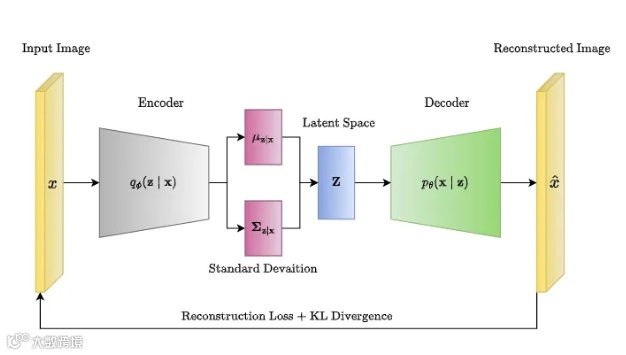
通常来说一个自编码器autoencoder包含两部分:
-
Encoder: 将图像作为输入,并将其转换为潜在特征空间的低维度表示 Decoder: 将低纬度特征表示作为输入,并将其解码为图像进行输出

正如我们在上图看到的,编码器就像一个压缩器,将图像压缩到较低的维度,解码器从压缩表示中重新创建原始图像。需要注意的是编码器解码器压缩解压缩并不是无损的。让我们开始通过代码来研究VAE。
我们将从导入所需的库和定义一些辅助函数开始。
03
导入所需的库
首先让我们导入我们所需要的Python基础库,并加载我们的VAE模型,代码如下:
## Imaging libraryfrom PIL import Imagefrom torchvision import transforms as tfms## Basic librariesimport numpy as npimport matplotlib.pyplot as plt## Loading a VAE modelfrom diffusers import AutoencoderKLsd_path = r'/media/stable_diffusion/stable-diffusion-v1-4'vae = AutoencoderKL.from_pretrained(sd_path,subfolder="vae",local_files_only=True,torch_dtype=torch.float16).to("cuda")
由于我们之前已经下载过stable-diffusion-v1-4相关文件,在其子目录下存在vae目录,即为本节需要测试验证的变分自编码器,此时需要将变量local_files_only设置为True,表示从本地读取相关权重文件。
04
定义编码辅助函数
接着我们来实现用VAE对图像进行编码操作的辅助函数,其相关定义如下:
def pil_to_latents(image,vae):init_image = tfms.ToTensor()(image).unsqueeze(0) * 2.0 - 1.0init_image = init_image.to(device="cuda",dtype=torch.float16)init_latent_dist = vae.encode(init_image).latent_dist.sample() * 0.18215return init_latent_dist
05
读取测试图像
接着,我们就可以读取测试图像来进行编码器功能验证了。首先,我们来进行图像读取工作:
img_path = r'/home/VAEs/Scarlet-Macaw-2.jpg'img = Image.open(img_path).convert("RGB").resize((512,512))print(f"Dimension of this image : {np.array(img).shape}")plt.imshow(img)plt.show()
得到结果如下:
Dimension of this image: (512, 512, 3)
06
验证编码器
现在,让我们使用VAE编码器来压缩此图像,我们将使用pil_to_latents辅助函数对齐进行编码操作,代码如下:
latent_img = pil_to_latents(img,vae)print(f"Dimension of this latent representation: {latent_img.shape}")
得到结果如下:
Dimension of this latent representation: torch.Size([1, 4, 64, 64])
正如我们所看到的,VAE将3 x 512 x 512维图像压缩为4 x 64 x 64维图像的。这是48倍的压缩比!接着让我们可视化一下这四个通道的潜在特征。
# visualfig,axs = plt.subplots(1,4,figsize=(16,4))for c in range(4):axs[c].imshow(latent_img[0][c].detach().cpu(),cmap='Greys')plt.show()
得到可视化结果如下:

07
定义解码辅助函数
接着,与编码操作类似,我们来定义解码的辅助函数,其过程为编码操作的逆过程,相关代码示例如下:
def latent_to_pil(latents,vae):latents = (1/0.18215) * latentswith torch.no_grad():image = vae.decode(latents).sampleimage = (image / 2 + 0.5).clamp(0,1)image = image.detach().cpu().permute(0,2,3,1).numpy()images = (image * 255).round().astype("uint8")pil_images = [ Image.fromarray(image) for image in images ]return pil_images
08
验证解码器
让我们在上述编码后得到的特征表示1x4x64x64上使用解码辅助函数,看看我们可以得到什么。相关函数调用如下所示:
# decodedecoded_img = latent_to_pil(latent_img,vae)plt.imshow(decoded_img[0])plt.show()
得到结果如下:

09
VAE 在SD中的用途
10
总结
点击上方小卡片关注我
新年寄语:
所求皆如愿,
所行皆坦途。
多喜乐,长安宁。