

01
引言
饼图是显示分类数据比例的典型图表。基本上,它是一个圆形图形,分成若干切片,显示数据与总数的比例关系。通过计算 360 度的总和等于 100%,可以用百分比来表示面积。
不过,饼图也存在一些有争议的问题。一些资料解释说,人类很难仅从饼图上的切片来衡量具体数量。幸运的是,饼图并不是我们唯一的选择。还有各种图表可以表达比例或百分比。本文将介绍如何使用哑铃图来代替饼图进行数据可视化。
闲话少说,我们直接开始吧!
02
样例数据
本文将使用维基百科上按煤炭产量划分的国家列表中的数据。
Wikipedia:https://en.wikipedia.org/wiki/List_of_countries_by_coal_production
我们先从导入我们的离线数据开始吧。
import numpy as npimport pandas as pdimport matplotlib.pyplot as pltimport seaborn as snsdata = pd.read_csv('data.csv',encoding='utf-8')print(data)
运行后得到结果如下:
Country Year Value0 Russia 2020 399.81 Germany 2020 107.42 Poland 2020 100.73 Ukraine 2020 24.14 Romania 2020 15.05 Greece 2020 14.06 Bulgaria 2020 12.
接着我们增加一列Percent,用来表示相应的占比,代码如下:
data['Percent'] = [round(i*100 / sum(data.Value),1) for i in data.Value]print(data)
运行后得到结果如下:
Country Year Value Percent0 Russia 2020 399.8 59.41 Germany 2020 107.4 16.02 Poland 2020 100.7 15.03 Ukraine 2020 24.1 3.64 Romania 2020 15.0 2.25 Greece 2020 14.0 2.16 Bulgaria 2020 12.3 1.8
03
绘制饼图
有了上述百分比的数据后,我们接下来使用以下代码绘制饼图,代码如下:
#get a color list, palette name can be changedpal_ = list(sns.color_palette(palette='plasma_r',n_colors=len(data.Country)).as_hex())#plot a pie chartplt.figure(figsize=(14, 14))plt.rcParams.update({'font.size': 16})plt.pie(data.Value,labels= data.Country,colors=pal_, autopct='%1.1f%%',pctdistance=0.9)plt.legend(bbox_to_anchor=(1, 1), loc=2, frameon=False)plt.show()
运行后得到结果如下:

饼图显示了 2020 年所选欧洲国家煤炭产量比例。
04
哑铃图数据处理
顾名思义,哑铃图由两个圆形图形和一条直线组成。通常,哑铃图一种用于比较两个数据点的图表。
我们可以用哑铃图对每个类别进行比较。在本文中,我们将把 X 轴的范围设置为 0 到 100%,以显示煤炭产量的百分比。
绘制哑铃图数据处理过程如下:
df_select = data[['Country', 'Percent']]df_select['Label_color'] = [i for i in data['Country']]df_coalmod = data[['Country']]df_coalmod['Percent'] = [100-i for i in data['Percent']]df_coalmod['Label_color'] = ['Other countries']*len(data.Country)df_db = pd.concat([df_select, df_coalmod],axis=0)print(df_db)
运行结果如下:
Country Percent Label_color0 Russia 59.4 Russia1 Germany 16.0 Germany2 Poland 15.0 Poland3 Ukraine 3.6 Ukraine4 Romania 2.2 Romania5 Greece 2.1 Greece6 Bulgaria 1.8 Bulgaria0 Russia 40.6 Other countries1 Germany 84.0 Other countries2 Poland 85.0 Other countries3 Ukraine 96.4 Other countries4 Romania 97.8 Other countries5 Greece 97.9 Other countries6 Bulgaria 98.2 Other countries
05
绘制简单哑铃图
接着我们选择上述煤炭产量最高的两个国家进行展示,代码如下:
#create a dictionary to color each countrycolor_country = dict(zip(data.Country,pal_))color_country['Other countries'] = '#b9b9b9'#select countries and add a column to set the Y-axis valuedf_ = df_select.iloc[0:2,:]df_['Y'] = [1]*len(df_)import plotly.express as pxfig = px.scatter(df_, x='Percent', y='Y', color='Label_color',text = [str(i)+' %' for i in df_.Percent][0:len(df_)],opacity=1,color_discrete_map=color_country)fig.update_layout(width = 950, height = 300, plot_bgcolor = 'white',margin = dict(t=40, l=20, r=20, b=20),yaxis={'categoryorder':'total descending'},legend=dict(title='Countries'),showlegend=True)for c in data.Country:df = df_[df_['Country']==c]fig.add_shape(type="line", layer="below",line=dict(color='black', width=6),y0=1, x0=list(df_.Percent)[0],y1=1, x1=list(df_.Percent)[1])fig.update_traces(textposition='top center', marker={'size':65},textfont=dict(color='black'))fig.update_yaxes(visible=False)fig.update_xaxes(visible=True, showgrid =False, range=[-1, 101])fig.show()
我们使用Plotly绘制后得到结果如下:

哑铃图比较了 2020 年煤炭产量最高的两个欧洲国家
06
继续美化
我们当然可以将上述哑铃图进行扩充,来展示每个国家的百分比与其他国家进行一一对比,代码如下:
#create a dictionary to color each countrycolor_country = dict(zip(data.Country,pal_))#add a color to the dictionarycolor_country['Other countries'] = '#b9b9b9'import plotly.express as pxfig = px.scatter(df_db, x='Percent', y='Country', color='Label_color',text = [str(i)+' %' for i in df_db.Percent],opacity=1,color_discrete_map=color_country)fig.update_layout(width = 950, height = 900, plot_bgcolor = 'white',margin = dict(t=40, l=20, r=20, b=20),yaxis={'categoryorder':'total descending'},legend=dict(title='Countries'),showlegend=True)for c in data.Country:df = df_db[df_db['Country']==c]fig.add_shape(type="line", layer="below",line=dict(color=color_country.get(c), width=6),y0=c, x0=list(df.Percent)[0],y1=c, x1=list(df.Percent)[1])fig.update_traces(textposition='top center', marker={'size':58},textfont=dict(color='black'))fig.update_yaxes(title='', visible=True, showgrid =False)fig.update_xaxes(visible=False)fig.show()
运行后得到结果如下:

哑铃图显示各国煤炭产量与所选数据集中其他国家的百分比对比
07
虽然上述结果看起来不错,但不同数据点显示的大小都是相同的。这可能会给国家间的比较带来不便。我们可以根据百分比值改变圆形的大小来改善可视化结果。此外不同的大小有助于比较不同类别的百分比。
代码如下:
color_country = dict(zip(data.Country,pal_))import plotly.express as pxfig = px.scatter(df_db, x='Percent', y='Country', color='Label_color',text = [str(i)+' %' for i in df_db.Percent],size = 'Percent', size_max=45,opacity=1,color_discrete_map=color_country)fig.update_layout(width = 950, height = 900, plot_bgcolor = 'white',margin = dict(t=40, l=20, r=20, b=20),yaxis={'categoryorder':'total descending'},legend=dict(title='Countries'),showlegend=True)for c in data.Country:df = df_db[df_db['Country']==c]fig.add_shape(type="line", layer="below",line=dict(color=color_country.get(c), width=6),y0=c, x0=list(df.Percent)[0],y1=c, x1=list(df.Percent)[1])fig.update_traces(textposition='top center',textfont=dict(color='black'))fig.update_yaxes(title='', visible=True, showgrid =False)fig.update_xaxes(visible=False)fig.show()
运行后,得到结果如下:
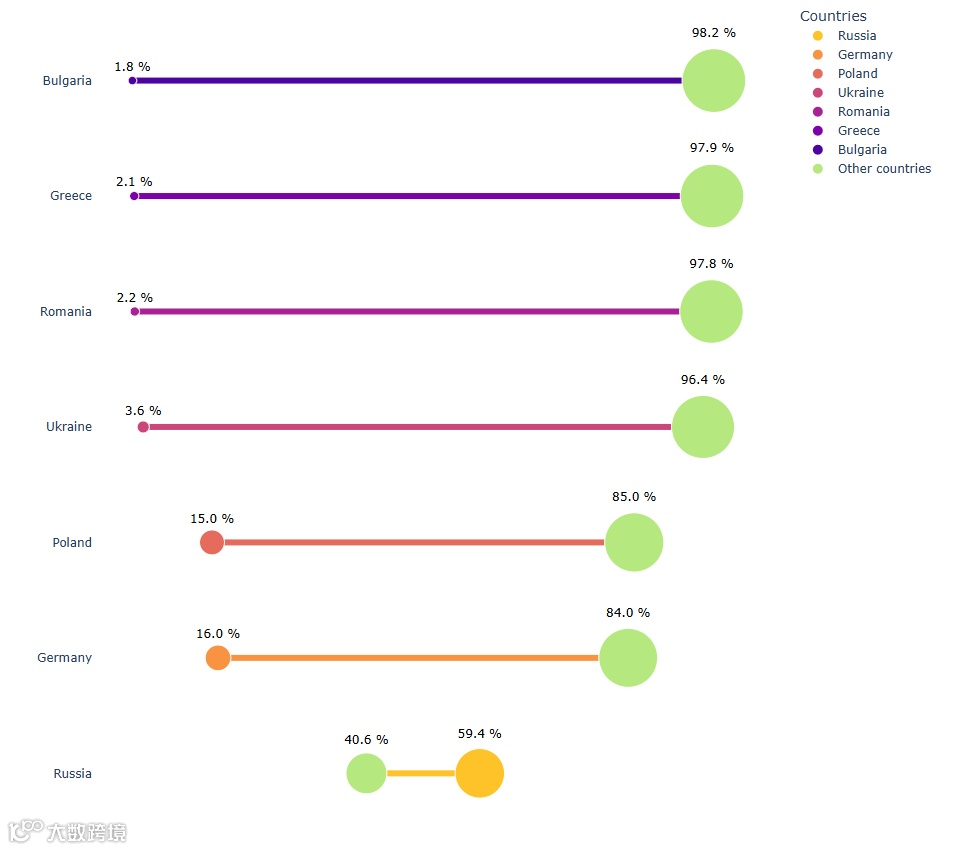
哑铃图显示各国煤炭产量与其他国家数据的百分比对比
08
本文重点介绍了如何一步步准备哑铃图的数据,绘制不同风格的哑铃图,这些技巧可以方便大家日常绘制百分比数据的可视化工作提供参考。
您学废了吗?
点击上方小卡片关注我
扫码进群,交个朋友!