


关注上方“公众号”,有福利哦!
小伙伴们好,我是阿旭。专注于人工智能、计算机视觉领域相关分享研究。【目标检测、图像分类、图像分割、目标跟踪等项目都可做,也可做不同模型对比实验;需要的可联系(备注来意)。】
《------往期经典推荐------》
一、AI应用系统实战项目
《------正文------》
引言
在计算机视觉领域,目标分割是一项核心任务,而SAM3(Segment Anything Model 3)凭借其强大的交互式分割能力,成为了众多开发者的首选工具。
之前的两篇文章介绍了如何使用SAM3通过样本点或者提示框进行图片中相似物体的一键检测分割。
《【SAM3教程-1】SAM3 使用文本提示进行图像分割详细步骤与示例》
《【SAM3教程-2】使用正负样本提示框一键分割图片中的相似目标详细步骤与示例》
本文将介绍SAM3如何通过提示点(包括正负样本)、提示框,以及两者结合的方式,精准分割出图像中的指定目标。后续文章将会介绍如何使用SAM3高效分割视频相关内容,欢迎感兴趣的小伙伴持续关注。
一、准备工作:环境与库导入
首先,我们需要导入必要的库,包括PyTorch(模型运行)、SAM3相关模块(模型与处理器)、Supervision(可视化与格式转换)等。
# 导入核心库
import torch
from sam3.model_builder import build_sam3_image_model  # 构建SAM3模型
from sam3.model.sam3_image_processor import Sam3Processor  # SAM3图像处理器
import supervision as sv  # 用于可视化和结果处理
import matplotlib
matplotlib.use('TkAgg')  # 设置matplotlib后端
from PIL import Image  # 处理图像
from typing import List, Tuple, Optional
import numpy as np  # 数组操作
import matplotlib.pyplot as plt  # 绘图
import cv2  # 图像处理
%matplotlib inline  # Jupyter中显示图像
二、加载SAM3模型
准备工作完成后,我们需要加载SAM3模型和预训练权重,并初始化处理器。
# 定义可视化调色板
COLOR = sv.ColorPalette.from_hex([
    "#ffff00", "#ff9b00", "#ff8080", "#ff66b2", "#ff66ff", "#b266ff",
    "#9999ff", "#3399ff", "#66ffff", "#33ff99", "#66ff66", "#99ff00"
])

# 设置设备(优先GPU)
DEVICE = "cuda" if torch.cuda.is_available() else "cpu"

# 加载模型(需提前准备模型文件和BPE文件)
checkpoint_path = "models/sam3.pt"  # SAM3模型权重路径
bpe_path = "assets/bpe_simple_vocab_16e6.txt.gz"  # BPE词汇表路径
image_model = build_sam3_image_model(
    checkpoint_path=str(checkpoint_path),
    bpe_path=str(bpe_path),
    device=DEVICE,
    enable_inst_interactivity=True  # 启用交互式分割
)

# 创建图像处理器(设置置信度阈值0.3)
image_predictor = Sam3Processor(image_model, confidence_threshold=0.3, device=DEVICE)
三、实战示例:从提示点到提示框的分割技巧
示例1:单个提示点分割目标
场景:只需点击目标上的一个点,即可分割出整个目标。
# 加载图像
image_path = "TestFiles/dog.jpg"
image = Image.open(image_path).convert('RGB')
# 预处理图像(编码为模型可接受的格式)
inference_state = image_predictor.set_image(image)
# 重置之前的提示(避免干扰)
image_predictor.reset_all_prompts(inference_state)

# 定义提示点(单个正样本点,坐标根据实际图像调整)
points = [
    {'x': 348, 'y': 266, 'label': 'positive'},  # 点击狗的身体
]

# 提取正负样本点并格式化
points_positive = get_xy_points(points, "positive")
points_negatives = get_xy_points(points, "negative")  # 无负样本点
input_point = np.vstack((points_positive, points_negatives))  # 合并点
input_label = np.array([1]*len(points_positive) + [0]*len(points_negatives))  # 标签(1=正,0=负)

# 运行分割(multimask_output=True返回多个结果,False返回置信度最高的一个)
masks, scores, logits = image_model.predict_inst(
    inference_state,
    point_coords=input_point,
    point_labels=input_label,
    multimask_output=True  # 多结果模式
)

# 展示分割结果
sv.plot_images_grid(
    images=masks,
    titles=[f"score: {score:.2f}" for score in scores],  # 显示置信度
    grid_size=(1, 3),
    size=(12, 12)
)
效果:单个点即可驱动SAM3分割出目标(如狗),多个结果可选择最优解。 原图: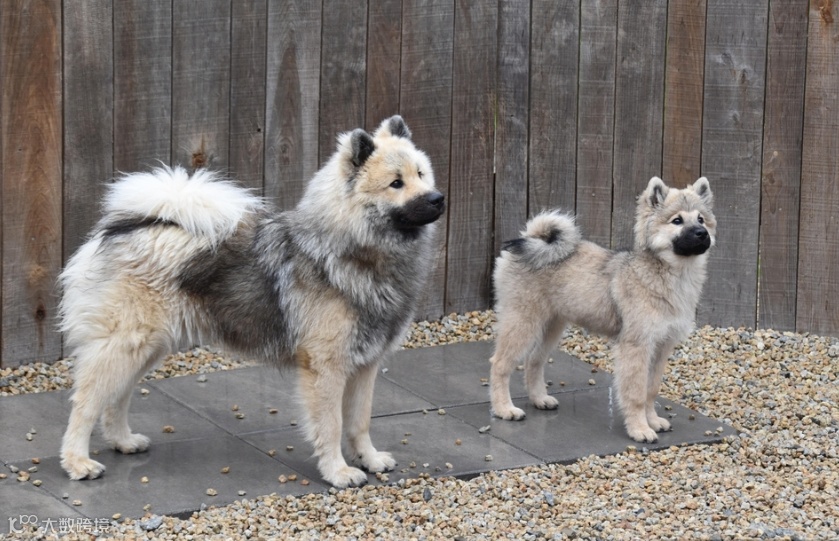 提示点:
提示点: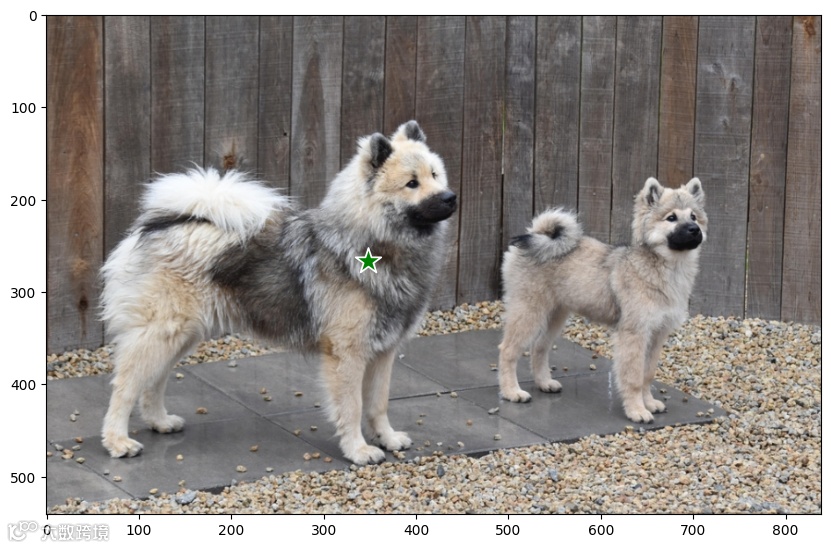 SAM3分割结果: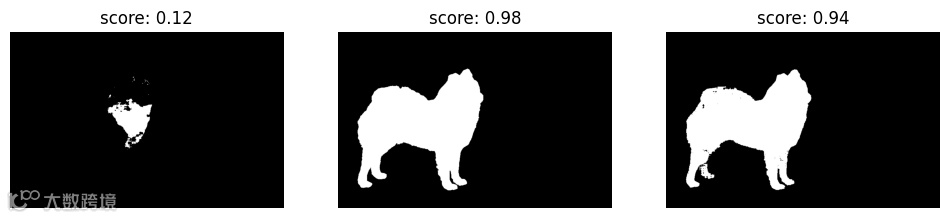
示例2:多个提示点提升精度
场景:当目标较大或形状复杂时,多个正样本点可让分割更完整。
# 加载图像(以卡车为例)
image_path = "TestFiles/truck.jpg"
image = Image.open(image_path).convert('RGB')
inference_state = image_predictor.set_image(image)
image_predictor.reset_all_prompts(inference_state)

# 定义两个正样本点(分别点击卡车的车头和车身)
points = [
    {'x': 500, 'y': 375, 'label': 'positive'},
    {'x': 1125, 'y': 625, 'label': 'positive'},
]

# 处理提示点(同上)
points_positive = get_xy_points(points, "positive")
points_negatives = get_xy_points(points, "negative")
input_point = np.vstack((points_positive, points_negatives))
input_label = np.array([1]*len(points_positive) + [0]*len(points_negatives))

# 分割(单结果模式,返回置信度最高的掩码)
masks, scores, logits = image_model.predict_inst(
    inference_state,
    point_coords=input_point,
    point_labels=input_label,
    multimask_output=False
)

# 展示结果(叠加掩码和提示点)
plt.figure(figsize=(10,10))
plt.imshow(image)
show_mask(masks, plt.gca())
show_points(input_point, input_label, plt.gca())
plt.axis('off')
plt.show()
通过两个提示点分割整辆汽车。
原图: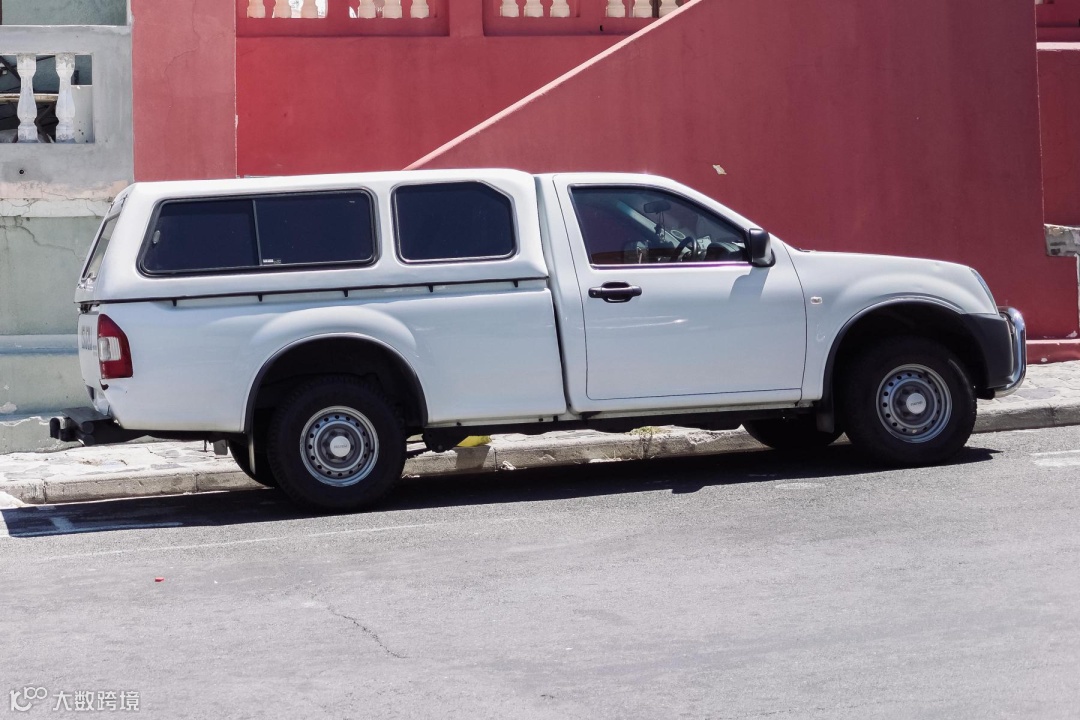 提示点:
提示点: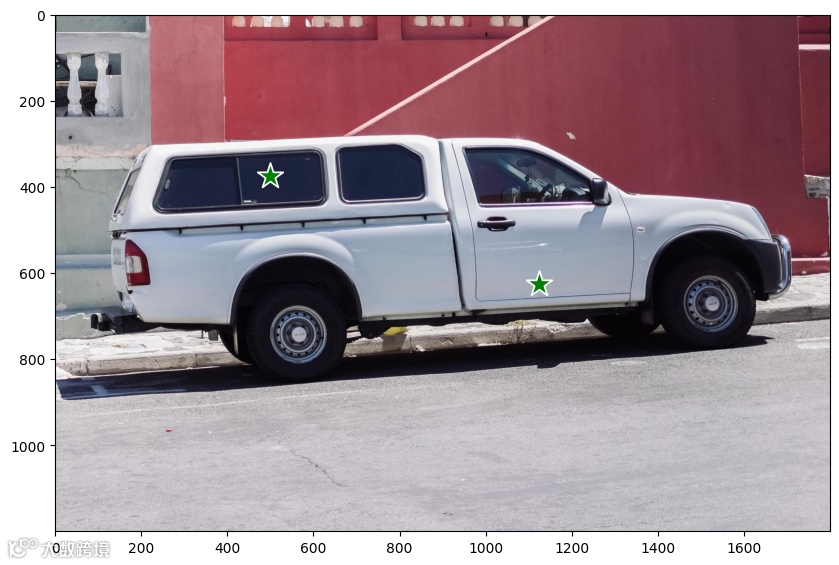 SAM3分割结果:
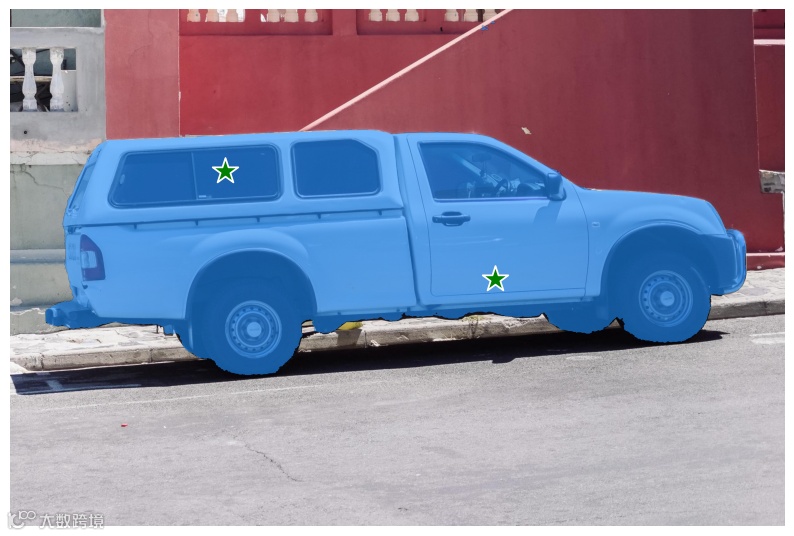 效果:多个点可覆盖目标的不同区域,分割结果更完整(如整辆卡车)。
示例3:正负提示点精准筛选
场景:需要排除目标中的部分区域,可结合负样本点。
# 复用卡车图像的inference_state
# 定义提示点(正样本点在轮胎,负样本点在轮毂)
points = [
    {'x': 500, 'y': 375, 'label': 'positive'},  # 轮胎(保留)
    {'x': 1125, 'y': 625, 'label': 'negative'},  # 轮毂(排除)
]

# 处理提示点
points_positive = get_xy_points(points, "positive")
points_negatives = get_xy_points(points, "negative")
input_point = np.vstack((points_positive, points_negatives))
input_label = np.array([1]*len(points_positive) + [0]*len(points_negatives))

# 分割(单结果模式)
masks, scores, logits = image_model.predict_inst(
    inference_state,
    point_coords=input_point,
    point_labels=input_label,
    multimask_output=False
)

# 展示结果
plt.figure(figsize=(10,10))
plt.imshow(image)
show_mask(masks, plt.gca())
show_points(input_point, input_label, plt.gca())
plt.axis('off')
plt.show()
效果:负样本点会“告诉”模型哪些区域不需要分割,结果更精准。 下面分割下图中的车窗区域,而不要分割车身。 原图: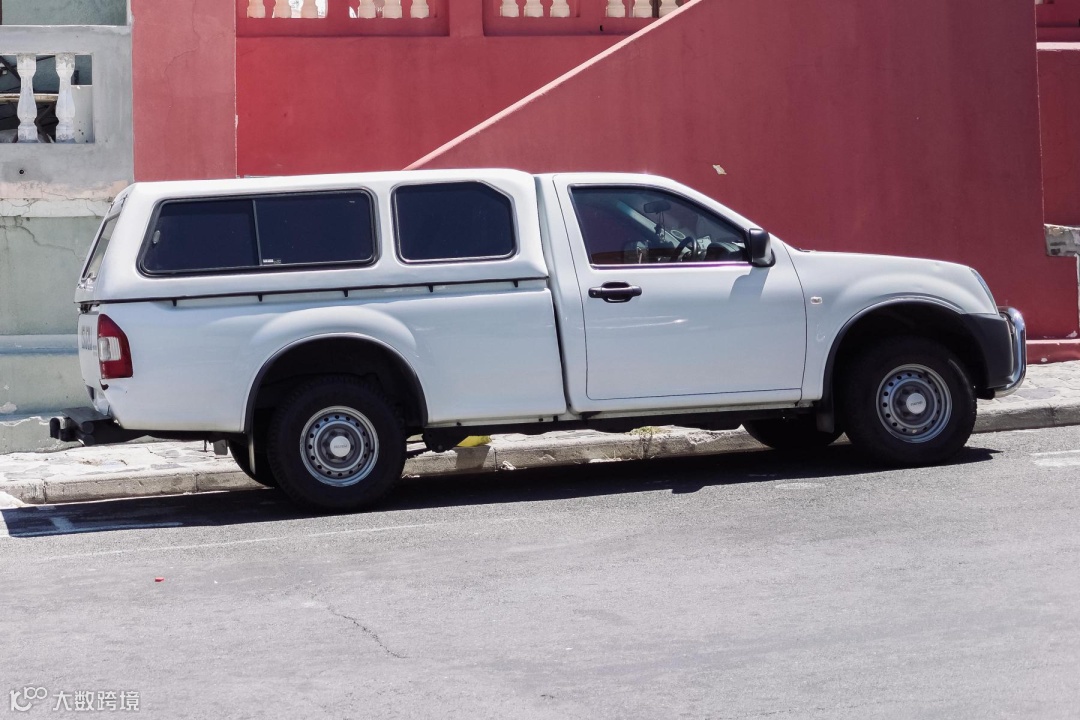 提示点:【绿色表示正样本点,红色表示负样本点】
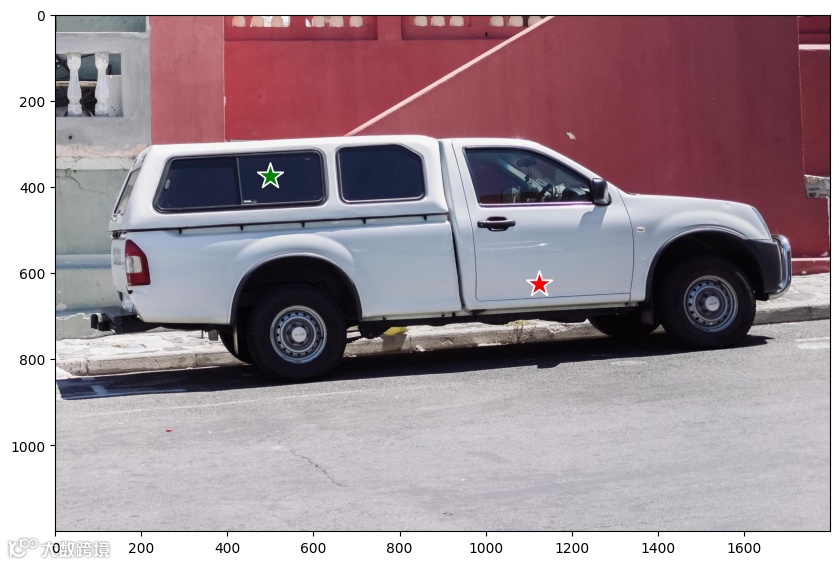 SAM3分割结果: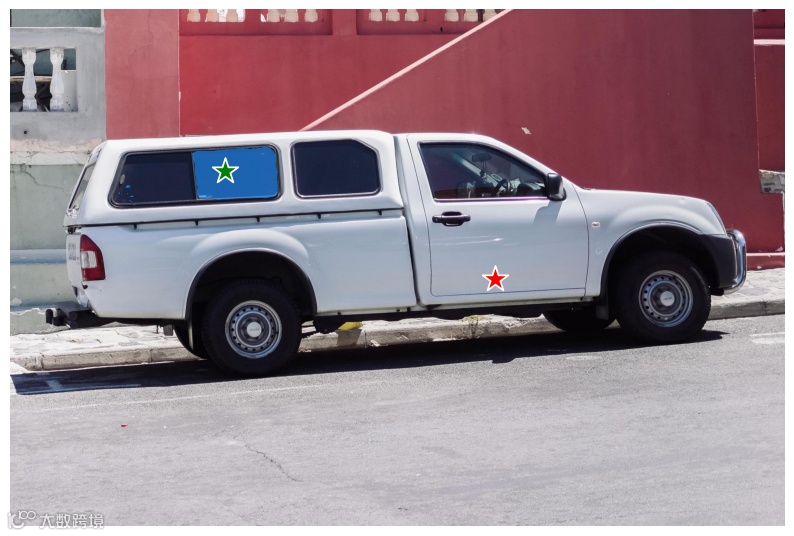
示例4:提示框分割单个/多个目标
场景:用矩形框框住目标,SAM3会自动分割每个框内的物体。
# 单个提示框示例(以狗的图像为例)
image_path = "TestFiles/dog.jpg"
image = Image.open(image_path).convert('RGB')
inference_state = image_predictor.set_image(image)
image_predictor.reset_all_prompts(inference_state)

# 定义提示框,可以添加多个提示框
boxes = [
    {'x1': 361, 'y1': 183, 'x2': 440, 'y2': 343, 'label': 'positive'},
    {'x1': 438, 'y1': 173, 'x2': 509, 'y2': 346, 'label': 'positive'},
    {'x1': 508, 'y1': 173, 'x2': 581, 'y2': 340, 'label': 'positive'},
]

# 将提示框转为SAM3需要的格式
boxes = get_xyxy_boxes(boxes=boxes, label='positive')

# 分割(单结果模式)
masks, scores, logits = image_model.predict_inst(
    inference_state,
    box=boxes,
    multimask_output=False
)

# 转换结果格式并可视化
detections = from_sam_interactive((masks, scores))
box_annotator = sv.BoxAnnotator(color_lookup=sv.ColorLookup.INDEX)
mask_annotator = sv.MaskAnnotator(color_lookup=sv.ColorLookup.INDEX)

source_image = box_annotator.annotate(scene=image.copy(), detections=detections)
result_image = mask_annotator.annotate(scene=image.copy(), detections=detections)

sv.plot_images_grid(
    images=[source_image, result_image],
    grid_size=(1, 2),
    titles=['原图(带框)', '分割结果']
)
多个提示框:只需在boxes列表中添加多个框,即可同时分割多个目标(如货架上的多个商品)。 提示框与分割结果: 左图为给SAM3的提示框,右图为SAM3分割结果。可以看到,很好的分割出了每个物体。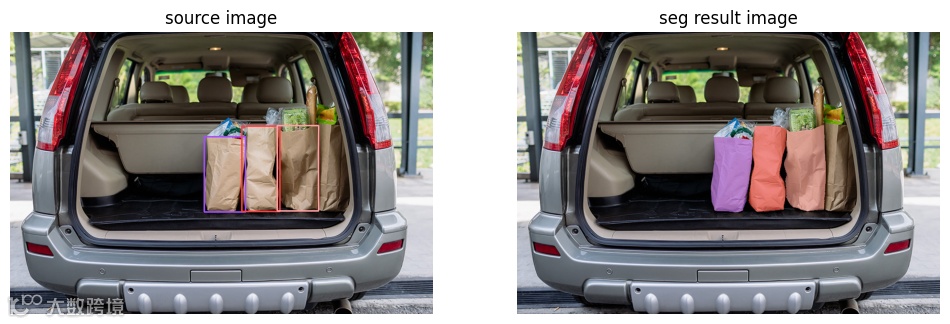
示例5:提示框+提示点结合分割
场景:用框大致定位目标,再用点细化(排除不需要的区域)。
# 分割卡车轮胎(排除轮毂)
image_path = "TestFiles/truck.jpg"
image = Image.open(image_path).convert('RGB')
inference_state = image_predictor.set_image(image)
image_predictor.reset_all_prompts(inference_state)

# 定义提示框(框住轮胎)
boxes = [
    {'x1': 425, 'y1': 600, 'x2': 700, 'y2': 875, 'label': 'positive'},
]
boxes = get_xyxy_boxes(boxes=boxes, label='positive')

# 定义负样本点(轮毂位置,需排除)
points = [
    {'x': 575, 'y': 750, 'label': 'negative'},
]
points_positive = get_xy_points(points, "positive")
points_negatives = get_xy_points(points, "negative")
input_point = np.vstack((points_positive, points_negatives))
input_label = np.array([1]*len(points_positive) + [0]*len(points_negatives))

# 结合框和点分割
masks, scores, logits = image_model.predict_inst(
    inference_state,
    point_coords=input_point,
    point_labels=input_label,
    box=boxes,
    multimask_output=False
)

# 展示结果
plt.figure(figsize=(10,10))
plt.imshow(image)
show_mask(masks[0], plt.gca())
plt.axis('off')
plt.show()
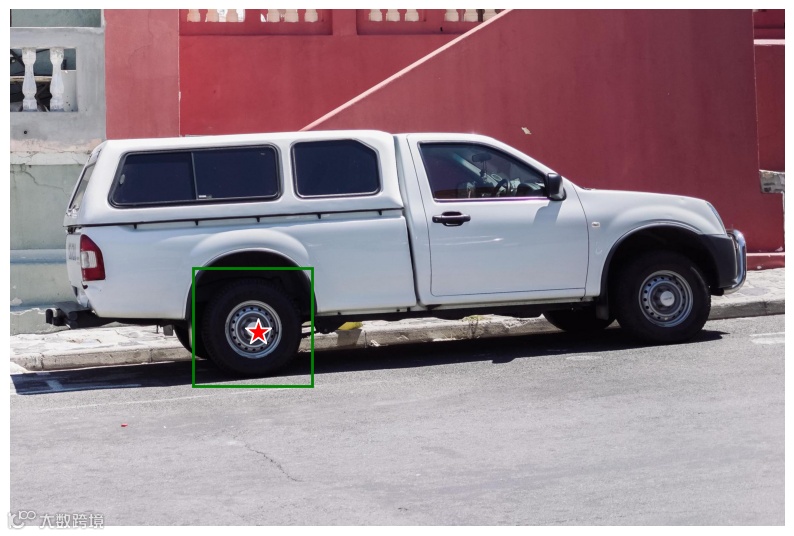
效果:框负责定位大致范围,点负责排除干扰区域,分割精度大幅提升。 目标:分割出车辆轮胎,不要中心轮毂。 原图: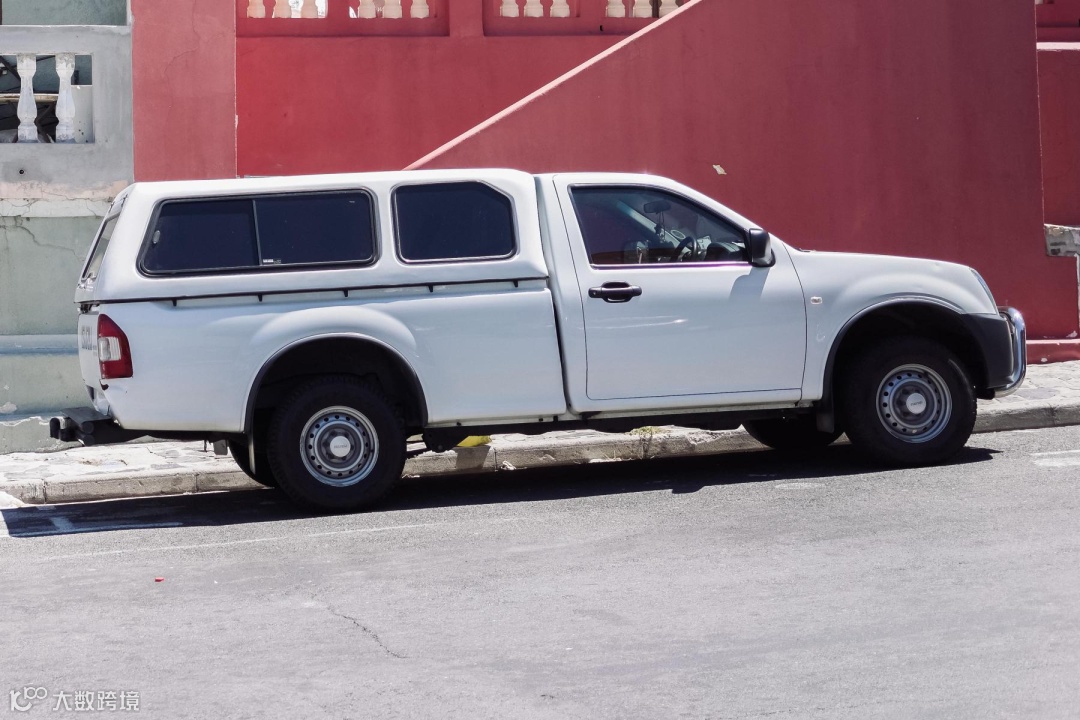 提示框与点:【框表示要分割的轮胎,红色点表示负样本点】
 SAM3分割结果:
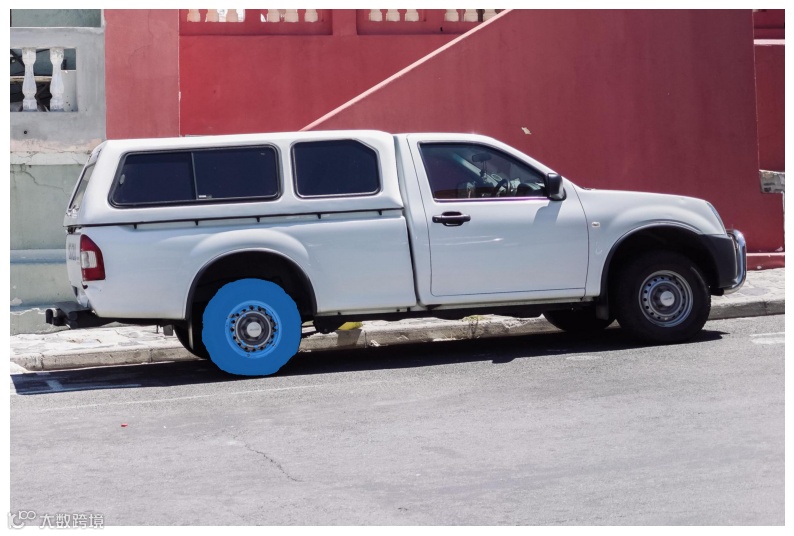 可以看出,SAM3根据要求分割出了轮胎,而去掉了中间轮毂区域。
总结
SAM3通过灵活的提示方式(点、框、点框结合),实现了对任意目标的精准分割。无论是单个目标、多个目标,还是需要排除特定区域的场景,都能通过简单的提示快速完成分割。 核心技巧:
-
单个点:适用于简单、明显的目标; -
多个点:提升复杂目标的分割完整性; -
正负点结合:精准排除不需要的区域; -
提示框:快速定位目标,适合批量分割; -
点+框:兼顾定位效率和分割精度。
好了,这篇文章就介绍到这里,喜欢的小伙伴感谢给点个赞和关注,更多精彩内容持续更新~~
       end


    福利!!!本公众号为粉丝精心整理了超级全面的python学习、算法、大数据、人工智能等重磅干货资源,关注公众号即可免费领取!无套路!
看到这里,如果你喜欢这篇文章的话,
点击下方【在看】【转发】就是对我最大支持!
如果觉得有用就点个“赞”呗