
✅geom_ribbon() 是干嘛的?
用来在 ymin 和 ymax 两条曲线之间填充颜色,最常见是画置信区间/范围带,再叠一条中心线(geom_line)。
和 geom_area() 的区别:geom_area 是从曲线到基线(一般 y=0)的面积;geom_ribbon 是两条边界之间的带。
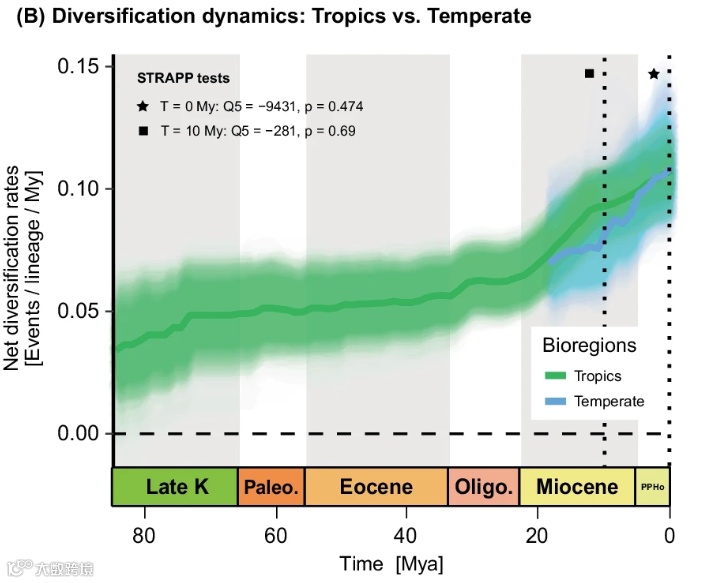
📌本期分享2025年9月发表在Nature Communications 题为“Evolutionaryhistoryofponerine ants highlights howthetimingofdispersal events shapes modernbiodiversity” 的折线图(如下图)。
library(tidyverse)# --- File paths ---rates_path <- "diversification_rates.csv"periods_path <- "geologic_periods.csv"tests_path<-"strapp_tests.csv"# --- Read data ---rates <- read_csv(rates_path, show_col_types = FALSE)periods <- read_csv(periods_path, show_col_types = FALSE)rates$region <- factor(rates$region, levels = c("Tropics", "Temperate"))tests <- read_csv(tests_path, show_col_types = FALSE)# ===== 关键:给曲线增加“起伏” =====# 说明:# - 用多个频率/幅度的正弦、余弦叠加 -> 自然的上下波动# - 给两个区域不同相位与幅度,避免完全重叠mk_waves <- function(t, region){# t:time_mya(单位:Mya;我们用 80 - t 让“向现在靠近”更直观)x <- 80 - tbase <- 0.005 * sin(2*pi * x/18) +0.0025* sin(2*pi * x/7) +0.0015* cos(2*pi * x/3.5)# 区域差异(相位与幅度微调)if(region == "Temperate"){base <- 0.8*base + 0.0015*sin(2*pi * x/11 + pi/4)} else {base <- base + 0.0010*cos(2*pi * x/9)}return(base)}rates_wavy <- rates %>%group_by(region) %>%mutate(wave = mk_waves(time_mya, unique(region)),mean_wavy = pmax(0, mean_rate + wave),# 以原带宽为基础平移,不改变不确定性大小(你也可以放大/缩小)span = (upper - lower)/2,lower_wavy = pmax(0, mean_wavy - span),upper_wavy = mean_wavy + span) %>% ungroup()library(ggstar)library(ggplot2)#devtools::install_github('thomasp85/ggfx')library(ggfx)
🧩 准备了3个数据
模拟了两组需要绘图的数据(包括折线及上下置信区间的)
模拟底部色块位置的数据
关于左上角的注释文本数据
ggplot() +geom_rect(aes(xmin =66, xmax = 80, ymin = -Inf, ymax = Inf),fill = "gray6", alpha = 0.12,inherit.aes = FALSE, show.legend = FALSE)+geom_rect(aes(xmin =34, xmax = 56, ymin = -Inf, ymax = Inf),fill = "gray6", alpha = 0.12,inherit.aes = FALSE, show.legend = FALSE)+# ======= Glow 层(先画:带模糊的 ribbon + 线条光晕)=======with_blur(geom_ribbon(data = rates_wavy %>% filter(region == "Tropics"),aes(x = time_mya, ymin = lower_wavy, ymax = upper_wavy),fill = col_trop, alpha = 1),sigma = 5) +with_blur(geom_ribbon(data = rates_wavy %>% filter(region == "Temperate"),aes(x = time_mya, ymin = lower_wavy, ymax = upper_wavy),fill = col_temp, alpha = 1),sigma = 5) +# 两条线的“光晕”——用更粗的线 + 模糊with_blur(geom_line(data = rates_wavy %>% filter(region == "Tropics"),aes(x = time_mya, y = mean_wavy),linewidth = 4, color = col_trop, alpha = 1),sigma = 5) +with_blur(geom_line(data = rates_wavy %>% filter(region == "Temperate"),aes(x = time_mya, y = mean_wavy),linewidth = 4, color = col_temp, alpha = 0.6),sigma = 5) +# ======= 清晰层(叠在上面:正常 ribbon + 细线)=======geom_ribbon(data = rates_wavy %>% filter(region == "Tropics"),aes(x = time_mya, ymin = lower_wavy, ymax = upper_wavy),fill = col_trop, alpha = 0.35, show.legend = FALSE) +geom_ribbon(data = rates_wavy %>% filter(region == "Temperate"),aes(x = time_mya, ymin = lower_wavy, ymax = upper_wavy),fill = col_temp, alpha = 0.25, show.legend = FALSE) +geom_line(data = rates_wavy,aes(x = time_mya, y = mean_wavy, color = region),linewidth = 2) +scale_x_reverse(limits = c(80, 0), expand=c(0,0),breaks = seq(80, 0, by = -20),name = "Time [Mya]") +scale_y_continuous(limits = c(-0.03, 0.17),expand=c(0.0,0),name = "Net diversification rates\n[Events / lineage / Myr]") +scale_color_manual(values = col_lines, name = "Bioregions") +scale_fill_manual(values = c( "Late K"="#b6d77a", "Paleocene"="#f3c37a","Eocene"="#f6c48c", "Oligocene"="#f4b070","Miocene"="#f0a756", "Pliocene–Holocene"="#e9d977"),guide = "none") +theme_minimal(base_size = 12) +theme(panel.grid = element_blank(),axis.line = element_line(color="black",size=0.6),axis.ticks = element_line(color = "black",size=0.6),legend.position = c(0.86, 0.27),legend.title = element_text(size = 10),legend.background = element_rect(fill = "white", color = "grey80"),plot.title = element_text(face = "bold"),axis.title.y = element_text(margin = margin(r = 8)),axis.title.x = element_text(margin = margin(t = 6)),plot.margin = margin(10, 15, 10, 10))+geom_rect(data = periods,aes(xmin = end_mya, xmax = start_mya,ymin = -0.03, ymax = -0.01, fill = label),color = "black", linewidth = 0.6, show.legend = FALSE) +geom_text(data = periods,aes(x = (start_mya + end_mya)/2,y = (-0.01-0.03)/2, label = label),size =3.5) +geom_hline(yintercept = 0, linetype = "dashed", linewidth = 0.) +geom_vline(xintercept = 0, linetype = "dotted", linewidth = 0.6) +geom_vline(xintercept = 10, linetype = "dotted", linewidth = 0.6)+geom_star(data = data.frame(x = 2, y = 0.148),aes(x = x, y = y),starshape = 1, # 五角星/多角星,常用1size = 4,fill = "black", # 常量颜色color = "black",stroke = 0.5,inherit.aes = FALSE) +annotate("point", x =12, y = 0.148, shape = 15, size = 4) +annotate("text", x = 75, y = 0.152,label = sprintf("STRAPP tests\nT = 0 My: Q5 = %s, p = %.3f\nT = 10 My: Q5 = %s, p = %.2f",tests$Q5[tests$T==0], tests$p[tests$T==0],tests$Q5[tests$T==10], tests$p[tests$T==10]),hjust = 0, vjust = 1, size = 3.3)
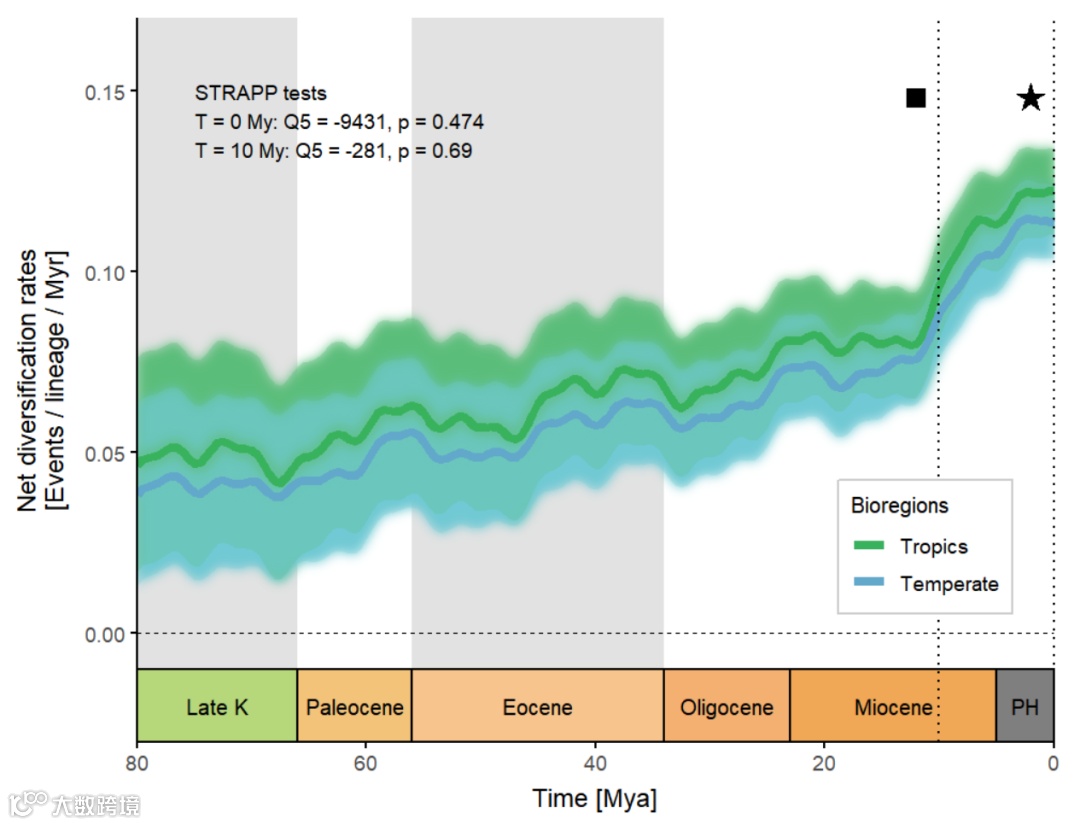
ggstar:添加五角星
ggfx:添加晕染
geom_ribbon:绘制折线及区间
geom_rect:绘制色块
好啦,本期分享就到这结束啦~感谢大家关注支持,代码和示例数据可复制也可打赏后获得,祝大家科研顺利~