
在数据分析的实际应用中,我们经常需要“针对不同的群体或类别分别建立模型”。传统的做法可能是手动筛选数据、循环处理,但这种方法既繁琐又容易出错。今天我将介绍如何利用 pandas 的 `groupby()` 和 `apply()` 组合,优雅高效地实现这一需求。
为什么需要按类别分别建模?
在现实世界中,数据往往具有层次结构或分组特性。比如:不同品类的商品销售规律完全不同、不同疾病类型的治疗效果差异显著、不同客户分群的信用风险模型各不相同等,使用统一的模型可能会忽略组间差异,而分组建模能够捕获每个类别特有的模式,提高预测精度。
基础原理:groupby + apply 的强大组合
import pandas as pd
import numpy as np
# 基础语法
result = df.groupby('分组列').apply(自定义函数)
# 其中自定义函数接收每个分组的数据框,返回处理结果
实战案例:电商销售预测
场景描述:某电商平台有多个商品类别,我们需要为每个类别分别建立销售预测模型。
代码实现
# pythonimport pandas as pdimport numpy as npfrom sklearn.linear_model import LinearRegressionfrom sklearn.metrics import r2_score, mean_squared_errorimport matplotlib.pyplot as plt
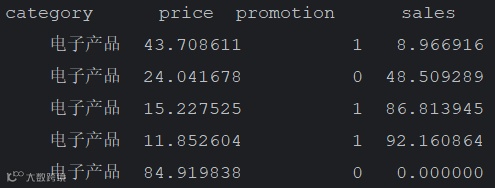
# 生成模拟数据np.random.seed(42)n_samples = 500data = []categories = ['电子产品', '服装', '家居用品', '美妆', '食品']for category in categories:for i in range(n_samples // len(categories)):# 不同类别有不同的销售规律if category == '电子产品':base_sales = 100price_effect = -2.5promo_effect = 15elif category == '服装':base_sales = 50price_effect = -1.8promo_effect = 8elif category == '家居用品':base_sales = 30price_effect = -1.2promo_effect = 5elif category == '美妆':base_sales = 40price_effect = -1.5promo_effect = 6else: # 食品base_sales = 80price_effect = -0.8promo_effect = 10price = np.random.uniform(10, 100)promotion = np.random.choice([0, 1], p=[0.7, 0.3])seasonality = np.sin(i * 0.1) * 10sales = (base_sales +price_effect * price +promo_effect * promotion +seasonality +np.random.normal(0, 5))data.append({'category': category,'price': price,'promotion': promotion,'sales': max(sales, 0) # 确保销售量为非负})df = pd.DataFrame(data)print(df.head())
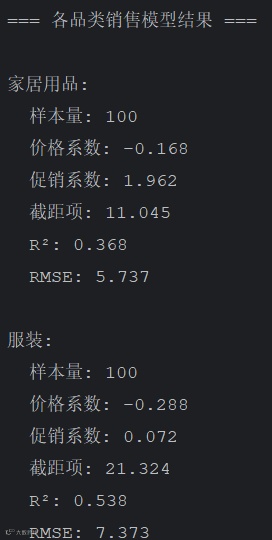
# 定义建模函数def build_sales_model(group):"""为每个商品类别建立销售预测模型"""X = group[['price', 'promotion']]y = group['sales']# 训练线性回归模型model = LinearRegression()model.fit(X, y)# 预测y_pred = model.predict(X)# 计算评估指标r2 = r2_score(y, y_pred)rmse = np.sqrt(mean_squared_error(y, y_pred))# 返回模型结果return pd.Series({'model': model,'coefficients': model.coef_,'intercept': model.intercept_,'r_squared': r2,'rmse': rmse,'predictions': y_pred,'sample_size': len(group)})# 应用分组建模print("开始分组建模...")model_results = df.groupby('category').apply(build_sales_model)# 显示模型结果print("\n=== 各品类销售模型结果 ===")for category in model_results.index:result = model_results.loc[category]print(f"\n{category}:")print(f" 样本量: {result['sample_size']}")print(f" 价格系数: {result['coefficients'][0]:.3f}")print(f" 促销系数: {result['coefficients'][1]:.3f}")print(f" 截距项: {result['intercept']:.3f}")print(f" R²: {result['r_squared']:.3f}")print(f" RMSE: {result['rmse']:.3f}")
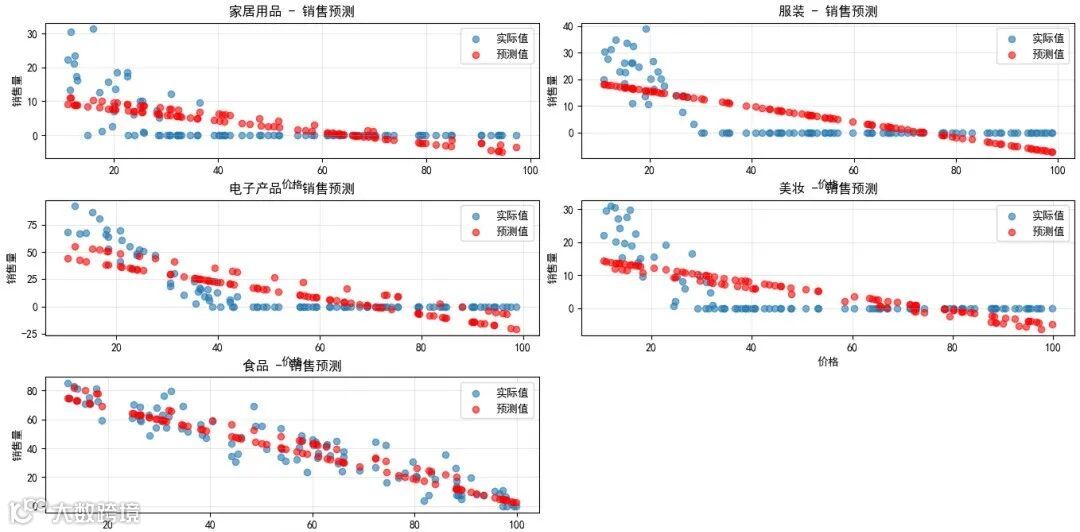
# 可视化结果from matplotlib.font_manager import FontProperties# 设置matplotlib正常显示中文plt.rcParams['font.sans-serif'] = ['SimHei'] # 指定默认字体为黑体plt.rcParams['axes.unicode_minus'] = False # 解决保存图像时负号'-'显示为方块的问题# 绘图plt.figure(figsize=(15, 10))for i, category in enumerate(model_results.index, 1):plt.subplot(3, 2, i)category_data = df[df['category'] == category]predictions = model_results.loc[category, 'predictions']plt.scatter(category_data['price'], category_data['sales'],alpha=0.6, label='实际值')plt.scatter(category_data['price'], predictions,alpha=0.6, label='预测值', color='red')plt.xlabel('价格')plt.ylabel('销售量')plt.title(f'{category} - 销售预测')plt.legend()plt.grid(True, alpha=0.3)plt.tight_layout()plt.show()
### 业务洞察
从结果中可以明显看出:
- 电子产品对价格最敏感(价格系数-2.5)
- 食品对价格相对不敏感(价格系数-0.8)
- 促销活动对电子产品和食品的效果最好
上面的`groupby()` + `apply()` 组合展示了如何分组建模。其具备的核心优势有:1. 代码简洁:几行代码实现复杂的分组分析;2. 维护性好:统一的建模逻辑,易于维护和扩展;3. 灵活性高:支持任意复杂的分组和建模逻辑;4. 可解释性强:结果按组别清晰组织,便于业务理解。
分组建模不仅提升了分析效率,更重要的是让数据分析更加贴近业务实际,为精细化运营和个性化服务提供了有力的技术支撑。