


对 Microsoft 的 GraphRAG 论文的深入研究发现,提升度存在问题,提升定义模糊,因此我使用 Neo4j 与 FAISS 整体分析了 RAG 中的知识图谱。
请注意(强调以解决评论),本系列的第 1 部分将 Neo4j 向量数据库存储(作为基线)与 FAISS 进行了比较,第 2 部分将基于 Neo4j 密码的图形创建和检索与作为简单基线的 FAISS 向量数据库检索进行了比较。在将知识图谱与简单基线进行比较之前,这会记录数据库检索本身的任何差异。
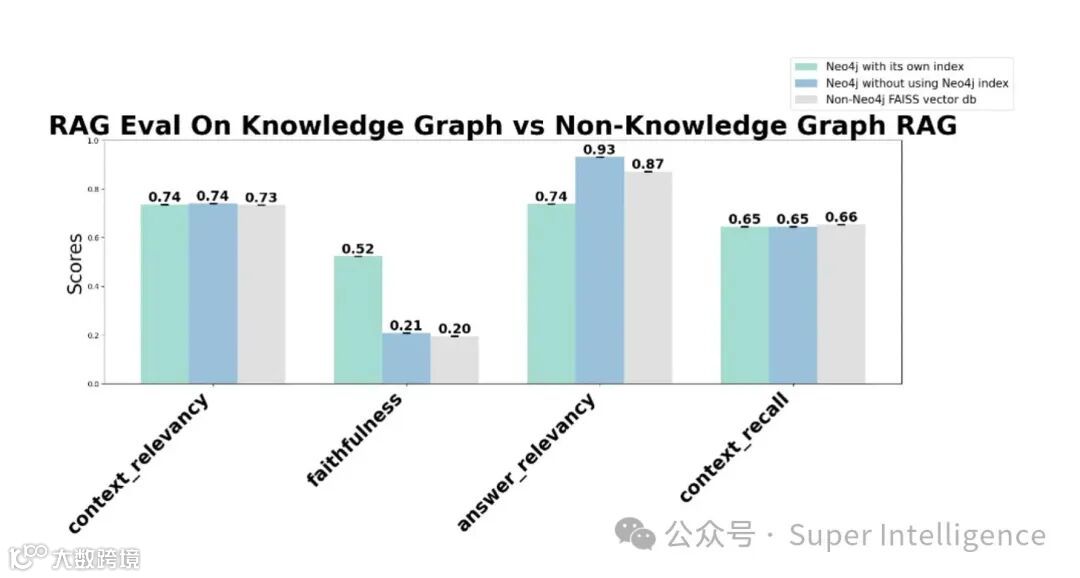
Neo4j 与 FAISS 向量数据库的比较可能不会显著影响上下文检索,这允许我们在第 2 部分中使用 Neo4j 创建的节点和边缘的良好基线——我检查的 Neo4j 向量数据库显示出与 FAISS 相似的上下文相关性得分 (~0.74)。
没有自己的索引的 Neo4j 向量数据库获得了更高的答案相关性分数 (0.93),但比 FAISS 高出 8% 可能不值得 ROI 限制。 将此分数与 Neo4j 向量 db WITH 指数 (0.74) 和 FAISS (0.87) 进行比较,表明对于需要高精度答案的应用程序具有潜在优势。
与不使用 Neo4j 指数 (0.21) 或使用 FAISS (0.20) 相比,使用 Neo4j 指数 (0.52) 时,忠实度得分显著提高。这减少了捏造的信息,并且是有益的,但仍然给开发人员提出了一个问题,即使用 GraphRAG 是否值得 ROI 限制(与微调相比,微调的成本可能会略高,但会导致更高的分数)。
显示知识图谱与非知识图谱比较的图表(第 1 部分):Neo4j 向量数据库与 FAISS:
导致我分析的原始问题(和背景):
如果 GraphRAG 方法与最近围绕它们的炒作一样深刻,那么我何时以及为什么要在我的 RAG 应用程序中使用知识图谱?
除了当前大肆宣传的讨论之外,我一直在寻求了解这项技术的实际应用,因此我查看了原始的 Microsoft 研究论文,以更深入地了解他们的方法和发现。
MSFT 论文声称 GraphRAG 提升的 2 个指标:
指标 #1 - “全面性”:
“答案提供了多少细节来涵盖问题的所有方面和细节?”
认识到响应的细节水平会受到知识图谱实现之外的各种因素的影响——该论文包含的“直接性”指标提供了一种有趣的方法来控制响应长度,但我很惊讶这只是引用的提升的两个指标之一,并且对其他指标感到好奇。
指标 #2 - “多样性”:
“在这个问题上提供不同的观点和见解时,答案有多多样化和丰富?”
响应多样性的概念提出了一个复杂的指标,可能受到各种因素的影响,包括受众期望和提示设计。该指标提供了一种有趣的评估方法,尽管对于在 RAG 中直接测量知识图谱,它可能会从进一步优化中受益。
更让人好奇为什么升力幅度在论文中含糊不清:
该报关于上述 2 个指标报告提升的官方声明:
“与简单的 RAG 基线相比有实质性的改进”
该论文报告称,GraphRAG 是一个新的开源 RAG 管道,与“基线”相比,它显示出“实质性的改进”。这些术语的模糊性质激发了我对更精确量化的兴趣(考虑到测量的所有已知偏差)。
由于他们的论文中缺乏细节,我受到启发进行了额外的研究,以进一步探索 RAG 中的整体知识图谱主题,首先将 Neo4j 向量数据库与 FAISS 进行比较,然后将 Neo4j 知识图谱与 FAISS 进行比较。
注意:Microsoft 的 GraphRAG 论文可在此处下载,但请考虑查看以下分析,作为补充视角,其中包含与论文结果更相关的细节。
分析方法概述(第 1 部分):
设置:
对于此分析的所有变体,我将 PDF 文档拆分为相同的块(2024 年 6 月美国总统辩论记录,对于在那场辩论之前创建的模型来说,这是一个合适的 RAG 机会)。
使用它找到的语义值的图形表示将文档加载到 Neo4j 中,并创建一个 Neo4j 索引。
创建了 3 个检索器,用作测试的变体:
一个使用 Neo4j 知识图谱和 Neo4j 索引
另一个使用 Neo4j 知识图谱,没有 Neo4j 索引
一个 FAISS 检索器基线,它加载相同的文档,而不引用 Neo4j。
然后进行评估:
开发了 Ground Truth Q&A 数据集,以研究规模依赖性对性能指标的潜在影响。
使用 RAGAS 评估检索质量和答案质量的结果(准确率和召回率),这为 Microsoft 研究中使用的指标提供了补充视角。
绘制了下面的结果,并带有偏差。
分析:
快速浏览一下下面的代码 — 我使用了 langchain、OpenAI 进行嵌入(以及 eval 和检索)、Neo4j 和 RAGAS:
# Ignore Warnings
import warnings
warnings.filterwarnings('ignore')

# Import packages
import os
import asyncio
import nest_asyncio
nest_asyncio.apply()
import pandas as pd
from dotenv import load_dotenv
from typing import List, Dict, Union
from scipy import stats
from collections import OrderedDict
import openai
from langchain_openai import OpenAI, OpenAIEmbeddings
from langchain_community.document_loaders import PyPDFLoader
from langchain_text_splitters import RecursiveCharacterTextSplitter
from langchain.text_splitter import TokenTextSplitter
from langchain_community.vectorstores import Neo4jVector, FAISS
from langchain_core.retrievers import BaseRetriever
from langchain_core.runnables import RunnablePassthrough
from langchain_core.output_parsers import StrOutputParser
from langchain_core.prompts import PromptTemplate, ChatPromptTemplate
from langchain.chat_models import ChatOpenAI
from langchain.schema import Document
from neo4j import GraphDatabase
import numpy as np
import matplotlib.pyplot as plt
from ragas import evaluate
from ragas.metrics import (
    faithfulness,
    answer_relevancy,
    context_relevancy,
    context_recall,
)
from datasets import Dataset
import random
添加了来自 OAI 的 OpenAI API 密钥和来自 Neo4j 的 neo4j 身份验证:
# Set up API keys
load_dotenv()
openai.api_key = os.getenv("OPENAI_API_KEY")
neo4j_url = os.getenv("NEO4J_URL")
neo4j_user = os.getenv("NEO4J_USER")
neo4j_password = os.getenv("NEO4J_PASSWORD")
openai_api_key = os.getenv("OPENAI_API_KEY") # changed keys - ignore

# Load and process the PDF
pdf_path = "debate_transcript.pdf"
loader = PyPDFLoader(pdf_path)
documents = loader.load()
text_splitter = RecursiveCharacterTextSplitter(chunk_size=1000, chunk_overlap=200) # Comparable to Neo4j
texts = text_splitter.split_documents(documents)

# Set up Neo4j connection
driver = GraphDatabase.driver(neo4j_url, auth=(neo4j_user, neo4j_password))
使用 Cypher 加载到 Neo4j 中并创建了一个 Neo4j 索引:
# Create function for vector index in Neo4j after the graph representation is complete below
def create_vector_index(tx):
    query = """
    CREATE VECTOR INDEX pdf_content_index IF NOT EXISTS
    FOR (c:Content)
    ON (c.embedding)
    OPTIONS {indexConfig: {
      `vector.dimensions`: 1536,
      `vector.similarity_function`: 'cosine'
    }}
    """
    tx.run(query)

# Function for Neo4j graph creation
def create_document_graph(tx, texts, pdf_name):
    query = """
    MERGE (d:Document {name: $pdf_name})
    WITH d
    UNWIND $texts AS text
    CREATE (c:Content {text: text.page_content, page: text.metadata.page})
    CREATE (d)-[:HAS_CONTENT]->(c)
    WITH c, text.page_content AS content
    UNWIND split(content, ' ') AS word
    MERGE (w:Word {value: toLower(word)})
    MERGE (c)-[:CONTAINS]->(w)
    """
    tx.run(query, pdf_name=pdf_name, texts=[
        {"page_content": t.page_content, "metadata": t.metadata}
        for t in texts
    ])

# Create graph index and structure
with driver.session() as session:
    session.execute_write(create_vector_index)
    session.execute_write(create_document_graph, texts, pdf_path)

# Close driver
driver.close()
# Create function for vector index in Neo4j after the graph representation is complete below
def create_vector_index(tx):
    query = """
    CREATE VECTOR INDEX pdf_content_index IF NOT EXISTS
    FOR (c:Content)
    ON (c.embedding)
    OPTIONS {indexConfig: {
      `vector.dimensions`: 1536,
      `vector.similarity_function`: 'cosine'
    }}
    """
    tx.run(query)

# Function for Neo4j graph creation
def create_document_graph(tx, texts, pdf_name):
    query = """
    MERGE (d:Document {name: $pdf_name})
    WITH d
    UNWIND $texts AS text
    CREATE (c:Content {text: text.page_content, page: text.metadata.page})
    CREATE (d)-[:HAS_CONTENT]->(c)
    WITH c, text.page_content AS content
    UNWIND split(content, ' ') AS word
    MERGE (w:Word {value: toLower(word)})
    MERGE (c)-[:CONTAINS]->(w)
    """
    tx.run(query, pdf_name=pdf_name, texts=[
        {"page_content": t.page_content, "metadata": t.metadata}
        for t in texts
    ])

# Create graph index and structure
with driver.session() as session:
    session.execute_write(create_vector_index)
    session.execute_write(create_document_graph, texts, pdf_path)

# Close driver
driver.close()
设置 OpenAI 以进行检索和嵌入:
# Define model for retrieval
llm = ChatOpenAI(model_name="gpt-3.5-turbo", openai_api_key=openai_api_key)

# Setup embeddings model w default OAI embeddings
embeddings = OpenAIEmbeddings(openai_api_key=openai_api_key)
设置 3 个要测试的检索器:
Neo4j 引用其索引
Neo4j 没有引用其索引,因此它在存储时从 Neo4j 创建了嵌入
FAISS 在与基线相同的分块文档上设置非 Neo4j 矢量数据库
# Neo4j retriever setup using Neo4j, OAI embeddings model using Neo4j index
neo4j_vector_store = Neo4jVector.from_existing_index(
    embeddings,
    url=neo4j_url,
    username=neo4j_user,
    password=neo4j_password,
    index_name="pdf_content_index",
    node_label="Content",
    text_node_property="text",
    embedding_node_property="embedding"
)
neo4j_retriever = neo4j_vector_store.as_retriever(search_kwargs={"k": 2})

# OpenAI retriever setup using Neo4j, OAI embeddings model NOT using Neo4j index
openai_vector_store = Neo4jVector.from_documents(
    texts,
    embeddings,
    url=neo4j_url,
    username=neo4j_user,
    password=neo4j_password
)
openai_retriever = openai_vector_store.as_retriever(search_kwargs={"k": 2})

# FAISS retriever setup - OAI embeddings model baseline for non Neo4j vector store touchpoint
faiss_vector_store = FAISS.from_documents(texts, embeddings)
faiss_retriever = faiss_vector_store.as_retriever(search_kwargs={"k": 2})
从 PDF 为 RAGAS eval 创建真值 (N = 100)。
使用 OpenAI 模型获取真实数据,但也使用 OpenAI 模型作为所有变体中检索的默认值,因此在创建真实数据时不会引入真正的偏差(在 OpenAI 训练数据之外!
# Move to N = 100 for more Q&A ground truth
def create_ground_truth2(texts: List[Union[str, Document]], num_questions: int = 100) -> List[Dict]:
    llm_ground_truth = ChatOpenAI(model_name="gpt-3.5-turbo", temperature=0.7)

    # Function to extract text from str or Document
    def get_text(item):
        if isinstance(item, Document):
            return item.page_content
        return item

    # Split long texts into smaller chunks
    text_splitter = RecursiveCharacterTextSplitter(chunk_size=1000, chunk_overlap=200)
    all_splits = text_splitter.split_text(' '.join(get_text(doc) for doc in texts))

    ground_truth2 = []

    question_prompt = ChatPromptTemplate.from_template(
        "Given the following text, generate {num_questions} diverse and specific questions that can be answered based on the information in the text. "
        "Provide the questions as a numbered list.\\n\\nText: {text}\\n\\nQuestions:"
    )

    all_questions = []
    for split in all_splits:
        response = llm_ground_truth(question_prompt.format_messages(num_questions=3, text=split))
        questions = response.content.strip().split('\\n')
        all_questions.extend([q.split('. ', 1)[1] if '. ' in q else q for q in questions])

    random.shuffle(all_questions)
    selected_questions = all_questions[:num_questions]

    llm = ChatOpenAI(temperature=0)

    for question in selected_questions:
        answer_prompt = ChatPromptTemplate.from_template(
            "Given the following question, provide a concise and accurate answer based on the information available. "
            "If the answer is not directly available, respond with 'Information not available in the given context.'\\n\\nQuestion: {question}\\n\\nAnswer:"
        )
        answer_response = llm(answer_prompt.format_messages(question=question))
        answer = answer_response.content.strip()

        context_prompt = ChatPromptTemplate.from_template(
            "Given the following question and answer, provide a brief, relevant context that supports this answer. "
            "If no relevant context is available, respond with 'No relevant context available.'\\n\\n"
            "Question: {question}\\nAnswer: {answer}\\n\\nRelevant context:"
        )
        context_response = llm(context_prompt.format_messages(question=question, answer=answer))
        context = context_response.content.strip()

        ground_truth2.append({
            "question": question,
            "answer": answer,
            "context": context,
        })

    return ground_truth2

ground_truth2 = create_ground_truth2(texts)
为每个检索方法创建了一个 RAG 链。
# RAG chain works for each retrieval method
def create_rag_chain(retriever):
    template = """Answer the question based on the following context:
    {context}

    Question: {question}
    Answer:"""
    prompt = PromptTemplate.from_template(template)

    return (
        {"context": retriever, "question": RunnablePassthrough()}
        | prompt
        | llm
        | StrOutputParser()
    )

# Calling the function for each method
neo4j_rag_chain = create_rag_chain(neo4j_retriever)
faiss_rag_chain = create_rag_chain(faiss_retriever)
openai_rag_chain = create_rag_chain(openai_retriever)
然后使用 RAGAS 中的所有 4 个指标对每个 RAG 链进行评估(上下文相关性和上下文回忆指标评估 RAG 检索,而答案相关性和忠实度指标根据基本事实评估完整的及时响应)
# Eval function for RAGAS at N = 100
async def evaluate_rag_async2(rag_chain, ground_truth2, name):
    splitter = TokenTextSplitter(chunk_size=500, chunk_overlap=50)

    generated_answers = []
    for item in ground_truth2:
        question = splitter.split_text(item["question"])[0]

        try:
            answer = await rag_chain.ainvoke(question)
        except AttributeError:
            answer = rag_chain.invoke(question)

        truncated_answer = splitter.split_text(str(answer))[0]
        truncated_context = splitter.split_text(item["context"])[0]
        truncated_ground_truth = splitter.split_text(item["answer"])[0]

        generated_answers.append({
            "question": question,
            "answer": truncated_answer,
            "contexts": [truncated_context],
            "ground_truth": truncated_ground_truth
        })

    dataset = Dataset.from_pandas(pd.DataFrame(generated_answers))

    result = evaluate(
        dataset,
        metrics=[
            context_relevancy,
            faithfulness,
            answer_relevancy,
            context_recall,
        ]
    )

    return {name: result}

async def run_evaluations(rag_chains, ground_truth2):
    results = {}
    for name, chain in rag_chains.items():
        result = await evaluate_rag_async(chain, ground_truth2, name)
        results.update(result)
    return results

def main(ground_truth2, rag_chains):
    # Get event loop
    loop = asyncio.get_event_loop()

    # Run evaluations
    results = loop.run_until_complete(run_evaluations(rag_chains, ground_truth2))

    return results

# Run main function for N = 100
if __name__ == "__main__":

    rag_chains = {
        "Neo4j": neo4j_rag_chain,
        "FAISS": faiss_rag_chain,
        "OpenAI": openai_rag_chain
    }

    results = main(ground_truth2, rag_chains)

    for name, result in results.items():
        print(f"Results for {name}:")
        print(result)
        print()
开发了一个函数来计算 95% 的置信区间,为 LLM 检索和真实值之间的相似性提供了不确定性度量,但是由于结果已经是一个值,因此我没有使用该函数并确认了在多次重新运行后观察到相同的增量幅度和模式时的方向差异。
# Plot CI - low sample size due to Q&A constraint at 100
def bootstrap_ci(data, num_bootstraps=1000, ci=0.95):
    bootstrapped_means = [np.mean(np.random.choice(data, size=len(data), replace=True)) for _ in range(num_bootstraps)]
    return np.percentile(bootstrapped_means, [(1-ci)/2 * 100, (1+ci)/2 * 100])
创建了一个函数来绘制条形图,最初使用估计误差。
# Function to plot
def plot_results(results):
    name_mapping = {
        'Neo4j': 'Neo4j with its own index',
        'OpenAI': 'Neo4j without using Neo4j index',
        'FAISS': 'FAISS vector db (not knowledge graph)'
    }

    # Create a new OrderedDict
    ordered_results = OrderedDict()
    ordered_results['Neo4j with its own index'] = results['Neo4j']
    ordered_results['Neo4j without using Neo4j index'] = results['OpenAI']
    ordered_results['Non-Neo4j FAISS vector db'] = results['FAISS']

    metrics = list(next(iter(ordered_results.values())).keys())
    chains = list(ordered_results.keys())

    fig, ax = plt.subplots(figsize=(18, 10))

    bar_width = 0.25
    opacity = 0.8
    index = np.arange(len(metrics))

    for i, chain in enumerate(chains):
        means = [ordered_results[chain][metric] for metric in metrics]

        all_values = list(ordered_results[chain].values())
        error = (max(all_values) - min(all_values)) / 2
        yerr = [error] * len(means)

        bars = ax.bar(index + i*bar_width, means, bar_width,
               alpha=opacity,
               color=plt.cm.Set3(i / len(chains)),
               label=chain,
               yerr=yerr,
               capsize=5)

        for bar in bars:
            height = bar.get_height()
            ax.text(bar.get_x() + bar.get_width()/2., height,
                    f'{height:.2f}',  # Changed to 2 decimal places
                    ha='center', va='bottom', rotation=0, fontsize=18, fontweight='bold')

    ax.set_xlabel('RAGAS Metrics', fontsize=16)
    ax.set_ylabel('Scores', fontsize=16)
    ax.set_title('RAGAS Evaluation Results with Error Estimates', fontsize=26, fontweight='bold')
    ax.set_xticks(index + bar_width * (len(chains) - 1) / 2)
    ax.set_xticklabels(metrics, rotation=45, ha='right', fontsize=14, fontweight='bold')

    ax.legend(loc='upper right', fontsize=14, bbox_to_anchor=(1, 1), ncol=1)

    plt.ylim(0, 1)
    plt.tight_layout()
    plt.show()
最后,绘制这些指标。
为了便于进行重点比较,文档分块、嵌入模型和检索模型等关键参数在实验中保持不变。CI 没有被绘制出来,虽然我通常会绘制它,但在这种情况下,在多次重新运行后看到它成立后,我对这种模式感到很舒服(这假定数据具有一定程度的一致性)。因此,需要注意的是,结果正在等待统计差异窗口。
重新运行时,重复运行时的相对分数模式始终显示出可忽略不计的可变性(令人惊讶),并且在由于资源超时而意外运行此分析几次后,模式保持一致,我通常对这个结果感到满意。
# Plot
plot_results(results)
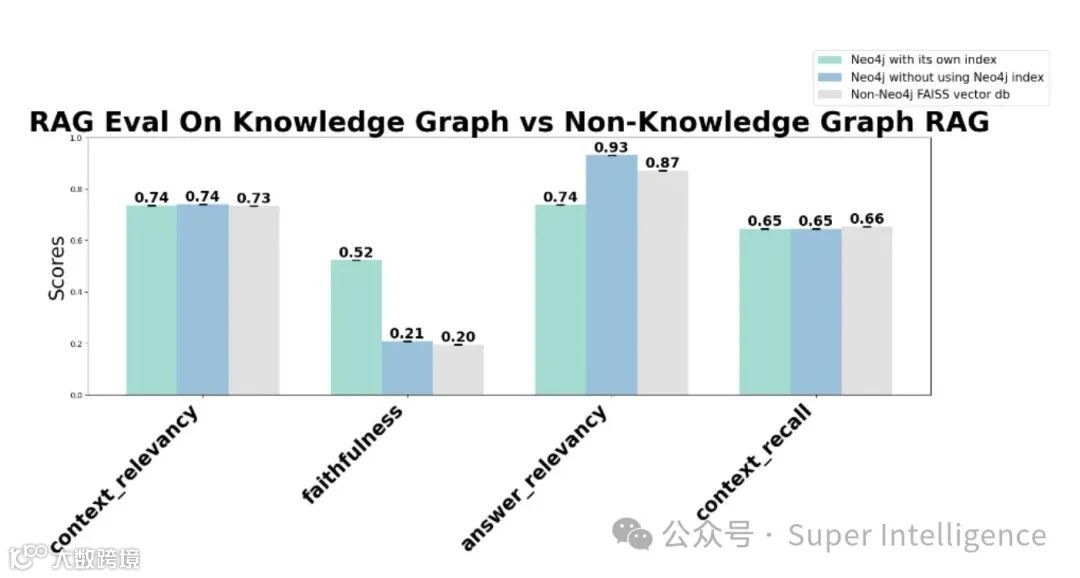
这表明 Neo4j 和 FAISS 之间具有相似的上下文相关性,以及类似的上下文回调 - 请继续关注第 2 部分,当我将 Neo4j 中 LLM 创建的节点和边缘与相同的 FAISS 基线进行比较时。