
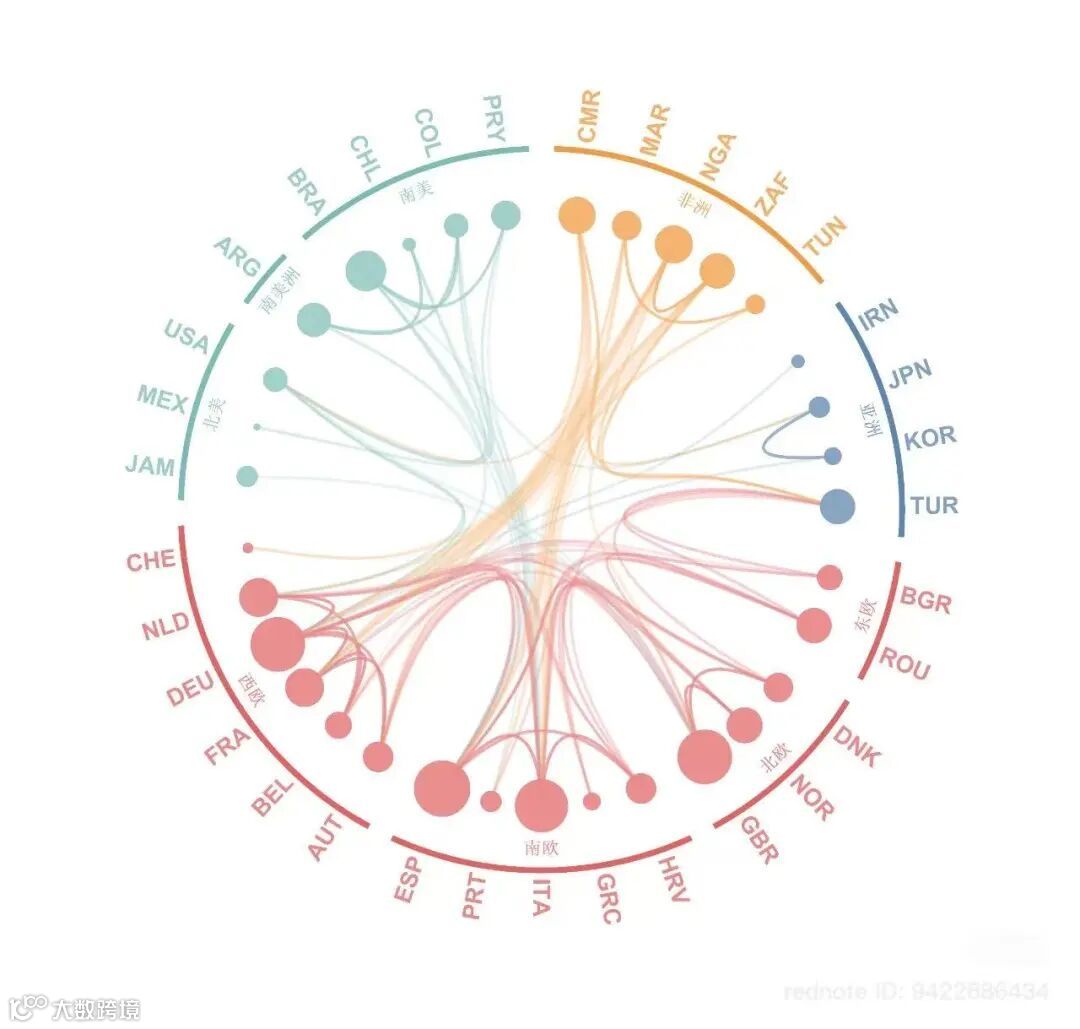
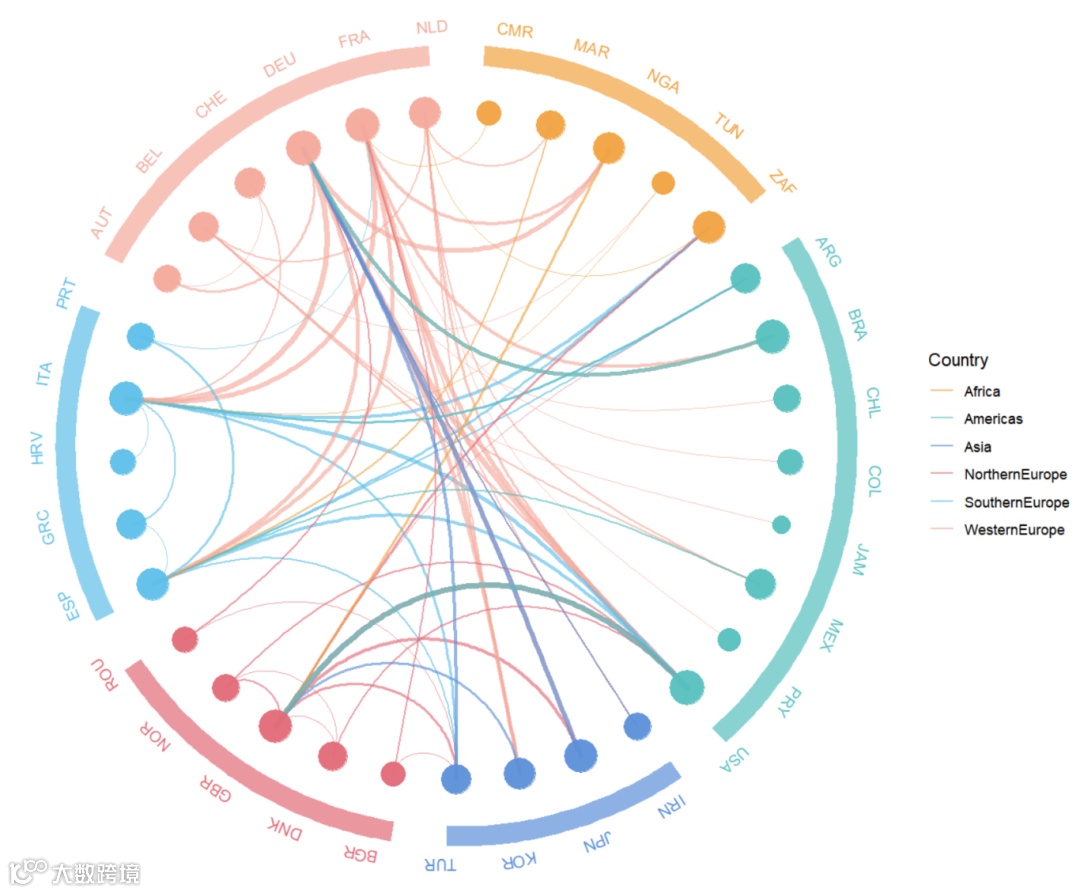
🧬 本期分享Origin同款的分层边捆绑图,也可以是相关性热图或者弦图,大家可根据自己数据调整(如下图)。
准备nodes和links数据即可。
nodes即映射点的属性
links即映射连线的属性

library(tidyverse)library(igraph)library(ggraph)library(ggforce)# ---- 1) 读数据 ---------------------------------------------------------------nodes <- read_csv("nodes.csv") # 必含: country, group, sizelinks <- tryCatch(read_csv("links.csv"), error = function(e) NULL)
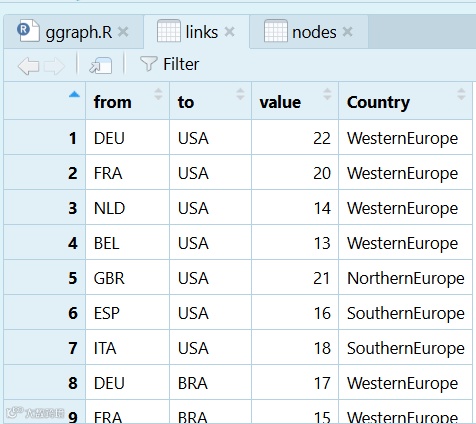
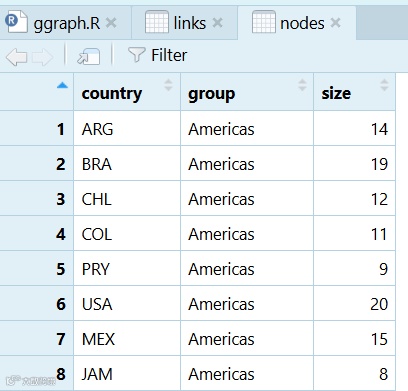
nodes_ordered <- nodes %>%arrange(group, country) %>% # 组内字母序,可自行调整mutate(name = country) # ggraph 默认使用 name# 用因子锁定顺序,确保圆周顺序稳定nodes_ordered$name <- factor(nodes_ordered$name, levels = nodes_ordered$name)g <- graph_from_data_frame(d = links %>% select(from, to, value,Country),vertices = nodes_ordered %>% select(name, group, size),directed = FALSE)
n_total <- gorder(g)idx_tbl <- tibble(name = V(g)$name,idx = seq_len(n_total)) %>% left_join(as_tibble(vertex_attr(g)), by = "name")group_span <- idx_tbl %>%group_by(group) %>%summarise(start = min(idx),end = max(idx), .groups = "drop") %>%mutate(# 把序号映射到角度(弧度)start_angle = 2*pi*(start-1)/n_total,end_angle = 2*pi*(end)/n_total)
V(g)$name:g 的顶点向量(节点),这里取节点名;它的顺序就是圆周上的顺序(因为我们之前固定了因子顺序并用 circular 布局)。
idx = 1..N:给节点按当前顺序编号,后面要用编号换算角度。
vertex_attr(g):取每个节点的属性(比如 group、size),转成 tibble。
left_join(..., by="name"):把节点属性并到这张“节点顺序表”里,这样每行既有 name/idx,也有 group 等属性。
group_by(group):按分组汇总。
start = min(idx)、end = max(idx):每个组在圆周上的第一个节点和最后一个节点的顺序号 → 这就给出了该组在圆周上的“起止位置”。
start_angle / end_angle:把顺序号换算成弧度角(0~2π)。
圆周被均匀分成
n_total份:-
第
i个节点左边界角 ≈2π*(i-1)/n_total第
i个节点右边界角 ≈2π*i/n_total于是某组的角区间就用最小 idx 的左边界到最大 idx 的右边界来表示:
-
start_angle = 2π*(start-1)/n_totalend_angle = 2π*(end)/n_total

lay <- create_layout(g, layout = "linear", circular = TRUE)rad_est <- mean(sqrt(lay$x^2 + lay$y^2)) # 节点所在半径(约 ~1)# 设定三圈半径r_nodes <- rad_est# 外圈色带 # 厚度 ~ 0.06(更薄)r_band0 <- r_nodes + 0.06r_band1 <- r_nodes + 0.12# 组间缝隙(度数);数值越大,组与组的缝越明显group_gap_deg <- 8gap_rad <- group_gap_deg * pi/180group_span_gap <- group_span %>%mutate(start_angle2 = start_angle + gap_rad/2,end_angle2 = end_angle - gap_rad/2) %>%mutate(end_angle2 = ifelse(end_angle2 <= start_angle2,start_angle2 + 0.005, end_angle2))# ---- 3) 颜色(按组) ---------------------------------------------------------group_cols <- c(Americas = "#55C0BE",Africa = "#F1A340",Asia = "#5B8FD9",NorthernEurope = "#E36A77",SouthernEurope ="#5DBFE9",WesternEurope ="#F4A99B")# 弦颜色映射到 links$Countryedge_cols<-group_cols#-------text标注在点上--------ggraph(lay) +geom_edge_arc2(aes(width = value, colour = Country),alpha = 0.65, lineend = "round") +scale_edge_width(range = c(0.2, 2.8), guide = "none") +scale_edge_colour_manual(values = edge_cols, name = "Country") +ggforce::geom_arc_bar(data = group_span_gap,aes(x0 = 0, y0 = 0, r0 = r_band0, r = r_band1,start = start_angle2, end = end_angle2, fill = group),color = NA, alpha = 0.35, inherit.aes = FALSE) +scale_fill_manual(values = group_cols, guide = "none") +geom_node_point(aes(x = x, y = y, colour = group, size = size),show.legend = FALSE, alpha = 0.95) +scale_colour_manual(values = group_cols) +scale_size(range = c(2.8, 8.5)) +geom_node_text(aes(label = name),repel = FALSE, size = 3.2,angle = -((as.numeric(factor(V(g)$name,levels = levels(nodes_ordered$name))) - 0.5) / gorder(g)) * 360,hjust = 0, nudge_y = 0.06) +coord_equal() + theme_void() +theme(plot.margin = margin(15, 15, 15, 15),panel.background = element_rect(fill = "white", colour = NA))
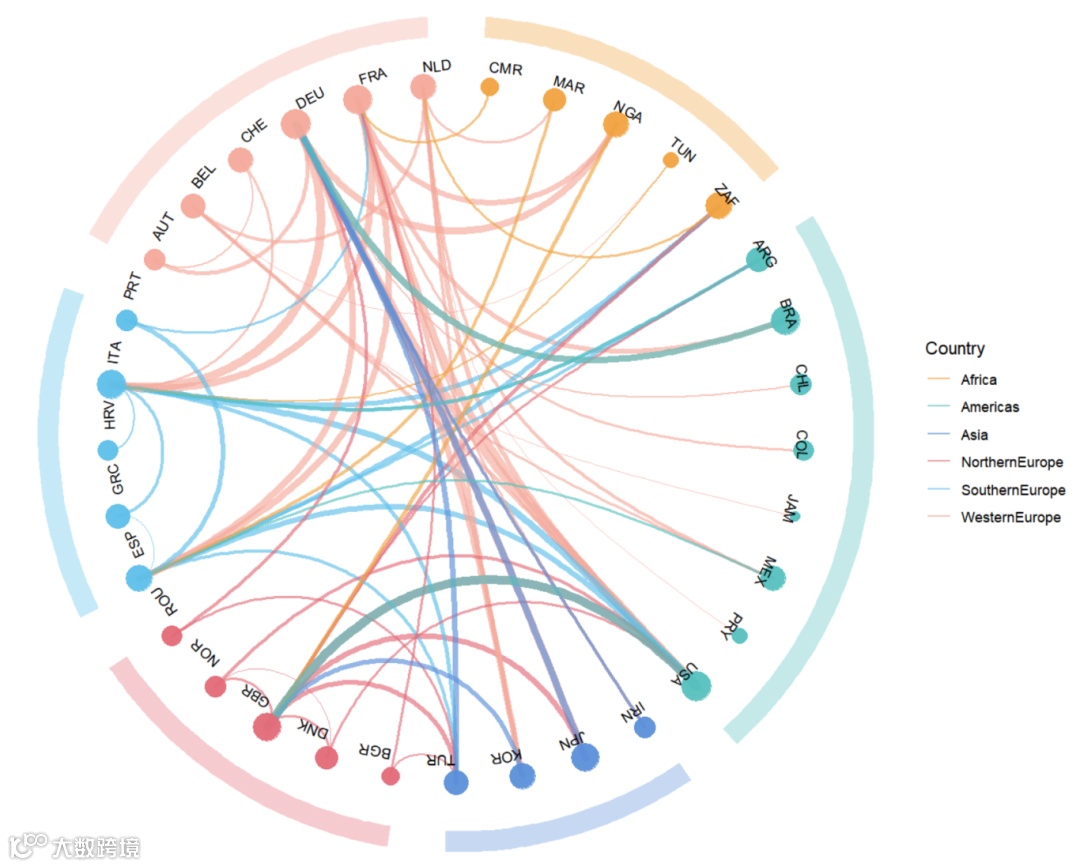
# 先求节点所在半径lay <- create_layout(g, layout = "linear", circular = TRUE)r_nodes <- mean(sqrt(lay$x^2 + lay$y^2))# 想要更远一点,就把 clearance 调大;thickness 控制色带厚度band_clearance <- 0.14 # 节点 → 色带内侧的距离(原先 0.06/0.08)band_thickness <- 0.06 # 色带厚度label_clearance <- 0.06 # 色带外再留一点给文字r_band0 <- r_nodes + band_clearancer_band1 <- r_band0 + band_thicknessr_label <- r_band1 + label_clearancelab_df <- as_tibble(lay) |>mutate(name = V(g)$name,# 节点向外缩放到 r_label 的坐标scale = r_label / sqrt(x^2 + y^2),x_lab = x * scale,y_lab = y * scale,# 与你原来一致的角度,让文字沿圆周转动angle = -((as.numeric(factor(name, levels = levels(nodes_ordered$name))) - 0.5) / gorder(g)) * 360)ggraph(lay) +geom_edge_arc2(aes(width = value, colour = Country),alpha = 0.65, lineend = "round") +scale_edge_width(range = c(0.1, 1.8), guide = "none") +scale_edge_colour_manual(values = edge_cols, name = "Country") +ggforce::geom_arc_bar(data = group_span_gap,aes(x0 = 0, y0 = 0, r0 = r_band0, r = r_band1,start = start_angle2, end = end_angle2, fill = group),color = NA, alpha = 0.7, inherit.aes = FALSE) +scale_fill_manual(values = group_cols, guide = "none") +geom_node_point(aes(x = x, y = y, colour = group, size = size),show.legend = FALSE, alpha = 0.95) +scale_colour_manual(values = group_cols) +scale_size(range = c(5, 10)) +geom_text(data = lab_df,aes(x = x_lab, y = y_lab, label = name,angle = angle,color=group),hjust = 0, vjust = 0.5, size = 3.5) +coord_equal() + theme_void() +guides(colour = "none")+theme(plot.margin = margin(15, 15, 15, 15),panel.background = element_rect(fill = "white", colour = NA))
好啦,本期分享就到这结束啦~感谢大家关注支持,代码和示例数据可复制也可打赏后获得,祝大家科研顺利~