
✅ggdendro 提供一组工具,把聚类/树对象(例如 hclust、dendrogram、tree、rpart 等)的绘图数据抽取出来,变成数据框,然后用 ggplot2 完全控制绘图外观(而不是直接用基本图形的 plot.dendrogram())。
核心思想:把“数据”和“展示”分离——先用 dendro_data() 抽出 segment / label 等数据框,再用 ggplot() 自由作图(或用包提供的便捷 wrapper ggdendrogram())。
支持的对象类型:hclust、dendrogram、tree、rpart(以及 cluster 包的 agnes/diana 等)的方法。
参考网址:https://github.com/andrie/ggdendro
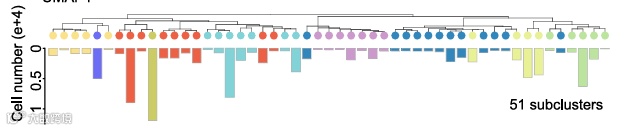
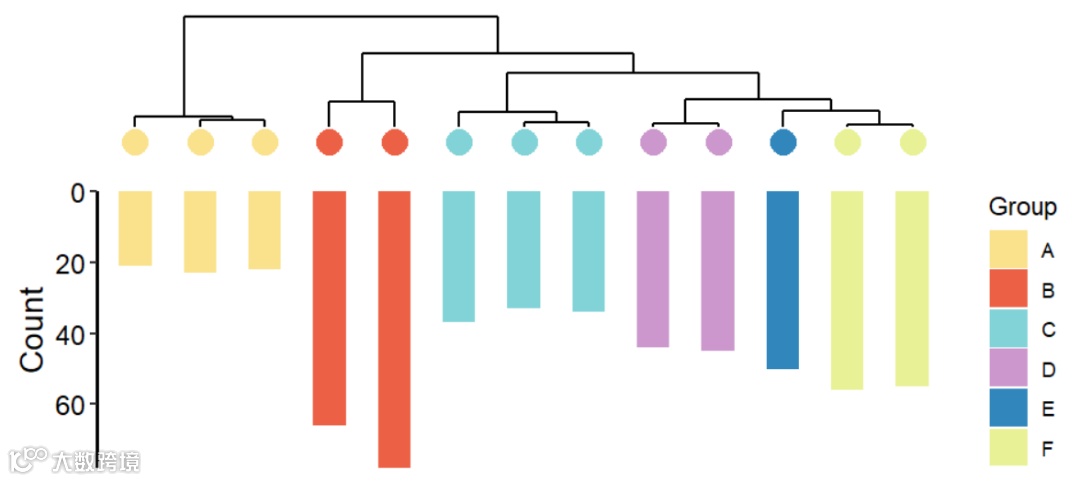
📌本期分享发表在Cell题为“Modeling the vertebrate regulatory sequence landscape by UUATAC-seq and deep learning“的聚类图+反向柱状图。(如下图)
# 加载必要的库library(ggplot2)library(ggdendro)library(openxlsx)library(vegan)library(patchwork) # 用于拼接图形# 读取数据df <- read.xlsx("COUNT.xlsx") # 读取数据group <- read.xlsx("Group.xlsx") # 读取分组信息
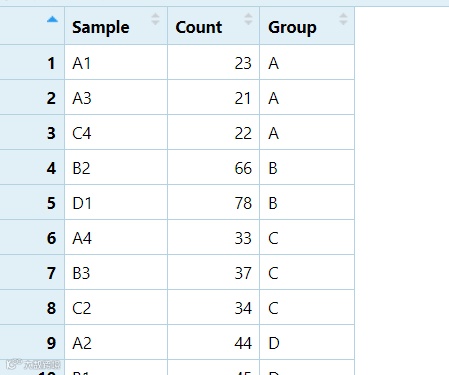
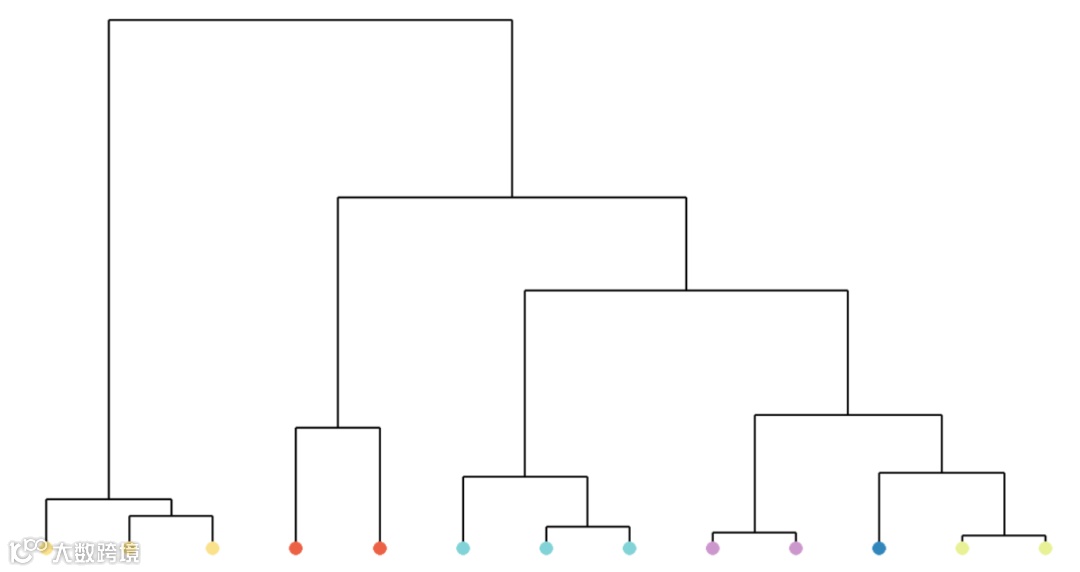
# 假设数据已经有顺序列df$order <- 1:nrow(df)# 计算样本之间的距离(Bray-Curtis距离)dis_bray <- vegan::vegdist(as.matrix(df$Count), method = 'bray')# 进行层次聚类tree <- hclust(dis_bray, method = 'average') # 使用UPGMA(平均法)聚类# 使用ggdendro从hclust对象中提取树的分段和标签数据dendro_data <- ggdendro::dendro_data(tree)# 获取聚类树的顺序tree_order <- tree$order # 获取聚类树中的顺序# 根据聚类树的顺序重新排列df的分组信息sorted_groups <- df$Group[tree_order]# 将样本按照聚类树的顺序排序df$Sample <- factor(df$Sample, levels = df$Sample[tree_order]) # 根据聚类树顺序重新排列样本df$Group <- sorted_groups # 更新分组信息# 将重新排序的分组信息添加到树的标签中dendro_data$labels$Group <- sorted_groups
这一步主要是为了让聚类树和柱状图顺序一致
tree_plot <- ggplot() +# 绘制树的线段geom_segment(data = dendro_data$segments, aes(x = x, y = y, xend = xend, yend = yend)) +# 添加每个tip的圆形点,并根据Group映射颜色geom_point(data = dendro_data$labels, aes(x = x, y = y-0.05, color = Group),size = 5, shape = 16) + # 圆形点# 设置颜色映射scale_color_manual(values = group_colors) +# 主题设置theme_minimal() +theme(axis.text = element_blank(), axis.title = element_blank(),legend.position = "none", # 去掉图例plot.margin = unit(c(0, 0, 0, 0), "cm"),panel.grid = element_blank()) # 去掉网格线
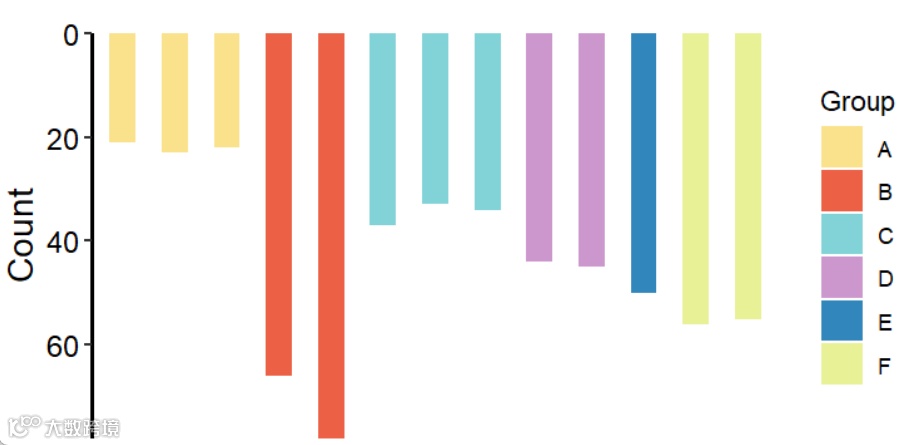
df$Count<-as.numeric(df$Count)df$value <- df$Count * (-1) # 如果需要,取Count的负值绘制柱状图bar_plot <- ggplot(df, aes(x = Sample, y = value, fill = Group)) +geom_col(position = position_dodge(width = 0.5), width = 0.5, size = 0.3) + # 绘制柱状图scale_x_discrete(position = "top", name = "") + # 设置 X 轴在上方scale_y_continuous(expand = c(0, 0), labels = function(x) abs(x)) + # 使 Y 轴显示正值labs(x = 'Sample', y = 'Count') + # 设置标签scale_fill_manual(values = group_colors) + # 统一颜色theme(panel.grid = element_blank(), # 去除网格线axis.line = element_line(colour = "black", size = 0.8), # 添加坐标轴线panel.background = element_blank(), # 去除背景axis.text.x = element_blank(), # 设置 X 轴标签axis.text.y = element_text(size = 12, color = "black"), # 设置 Y 轴标签axis.title.y = element_text(size = 14), # 设置 Y 轴标题axis.line.x = element_blank(),axis.ticks.x=element_blank(),axis.ticks.length = unit(0.1, "cm"), # 设置刻度线长度plot.margin = unit(c(0, 0.2, 0.1, 0.1), "cm")) # 调整边距
# ----- 拼接柱状图和聚类树图 -----tree_plot <- tree_plot + coord_cartesian(clip = 'off')bar_plot <- bar_plot + coord_cartesian(clip = 'off')combined_plot <- tree_plot /bar_plot # 使用 patchwork 进行竖向拼接combined_plot <- tree_plot / bar_plot +plot_layout(heights = c(0.25, 0.5))# 展示图形print(combined_plot)
好啦,本期分享就到这结束啦~感谢大家关注支持,代码和示例数据可复制也可打赏后获得,祝大家科研顺利~