



Ngnix已经广泛应用于J-one和Jdos的环境部署上,本文对Ngnix的常用的配置和基本功能进行讲解,适合Ngnix入门学习。
找到Nginx安装目录下的conf目录下nginx.conf文件,Ngnix的基本功能配置是由它提供的。
1.1 配置文件结构
Nginx的配置文件(conf/nginx.conf)整体上分为如下几个部分:
| 区域 |
职业 |
| 全局块 | 配置和Nginx运行相关的全局配置 |
| events块 | 配置和网络链接相关的配置 |
| http块 | 配置代理、缓存、日志记录、虚拟主机等配置 |
| server块 | 配置虚拟主机的相关参数,一个http块中可以有多个server块 |
| location块 | 配置请求的路由,以及各种页面的处理情况 |
配置层级图如下所示。
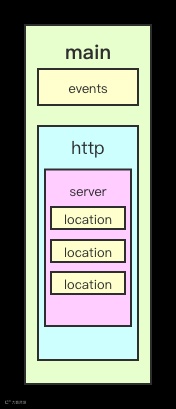
# 以下是全局段配置#user administrator administrators; #配置用户或者组,默认为nobody nobody。#worker_processes 2; #设置进程数,默认为1#pid /nginx/pid/nginx.pid; #指定nginx进程运行文件存放地址error_log log/error.log debug; #制定日志路径,级别:debug|info|notice|warn|error|crit|alert|emerg# events段配置信息events {accept_mutex on; #设置网路连接序列化,防止惊群现象发生,默认为onmulti_accept on; #设置一个进程是否同时接受多个网络连接,默认为off#use epoll; #事件驱动模型,select|poll|kqueue|epoll|resig|/dev/poll|eventportworker_connections 1024; #最大连接数,默认为512}# http、配置请求信息http {include mime.types; #文件扩展名与文件类型映射表default_type application/octet-stream; #默认文件类型,默认为text/plain#access_log off; #取消服务日志log_format myFormat '$remote_addr–$remote_user [$time_local] $request $status $body_bytes_sent $http_referer $http_user_agent $http_x_forwarded_for'; #自定义格式access_log log/access.log myFormat; #combined为日志格式的默认值sendfile on; #允许sendfile方式传输文件,默认为off,可以在http块,server块,location块。sendfile_max_chunk 100k; #每个进程每次调用传输数量不能大于设定的值,默认为0,即不设上限。keepalive_timeout 65; #连接超时时间,默认为75s,可以在http,server,location块。upstream mysvr {server 127.0.0.1:7878;server 192.168.10.121:3333 backup; #热备}error_page 404 https://www.baidu.com; #错误页# 第一个Server区块开始,表示一个独立的虚拟主机站点server {keepalive_requests 120; #单连接请求上限次数。listen 4545; #监听端口server_name 127.0.0.1; #监听地址location ~*^.+$ { #请求的url过滤,正则匹配,~为区分大小写,~*为不区分大小写。#root path; #根目录#index vv.txt; #设置默认页proxy_pass http://mysvr; #请求转向mysvr 定义的服务器列表deny 127.0.0.1; #拒绝的ipallow 172.18.5.54; #允许的ip}}}
-
[不加] < [~/~*] < [^~] < [=] -
示例如下:
location = / {# 精确匹配/,主机名后面不能带任何字符串 /# 只匹配http://abc.com# http://abc.com [匹配成功]# http://abc.com/index [匹配失败]}location ^~ /img/ {#以 /img/ 开头的请求,都会匹配上#http://abc.com/img/a.jpg [成功]#http://abc.com/img/b.mp4 [成功]}location ~* /Example/ {# 则会忽略 uri 部分的大小写#http://abc.com/test/Example/ [匹配成功]#http://abc.com/example/ [匹配成功]}location /documents {# 如果有正则表达式可以匹配,则优先匹配正则表达式。#http://abc.com/documentsabc [匹配成功]}location / {#http://abc.com/abc [匹配成功]}
2.1 反向代理概念:
server {listen 80;server_name localhost;location / {proxy_pass http://localhost:8081;proxy_set_header Host $host:$server_port;#为请求头添加Host字段,用于指定请求服务器的域名/IP地址和端口号。# 设置用户ip地址proxy_set_header X-Forwarded-For $remote_addr;#为请求头添加XFF字段,值为客户端的IP地址。# 当请求服务器出错去寻找其他服务器proxy_next_upstream error timeout invalid_header http_500 http_502 http_503;}
upstream web_servers {server localhost:8081;server localhost:8082;}server {listen 80;server_name localhost;#access_log logs/host.access.log main;location / {proxy_pass http://web_servers;proxy_set_header Host $host:$server_port;}}
upstream web_servers {server 127.0.0.1:7878;server 192.168.10.121:3333 backup; #热备}
upstream web_servers {server localhost:8081 weight=1;server localhost:8082 weight=2;}
upstream test {ip_hash;server localhost:8080;server localhost:8081;}
upstream backend {fair;server localhost:8080;server localhost:8081;}
upstream backend {hash_method crc32;hash $request_uri;server localhost:8080;server localhost:8081;}
upstream web_servers {server localhost:8081;server localhost:8082;}server {listen 80;server_name localhost;set $doc_root /usr/local/var/www;location ~* \.(gif|jpg|jpeg|png|bmp|ico|swf|css|js)$ {root $doc_root/img;}location / {proxy_pass http://web_servers;proxy_set_header Host $host:$server_port;}error_page 500 502 503 504 /50x.html; #出现 500 502 503 504错误时走内部跳转location = /50x.html {root $doc_root;}}
return code [text];return code URL;return URL;例如:location / {return 404; # 直接返回状态码}location / {return 404 "pages not found"; # 返回状态码 + 一段文本}location / {return 302 /bbs ; # 返回状态码 + 重定向地址}location / {return https://www.baidu.com ; # 返回重定向地址}
-
last 重写后的 URL 发起新请求,再次进入 server 段,重试 location 的中的匹配;
-
break 直接使用重写后的 URL ,不再匹配其它 location 中语句;
-
redirect 返回302临时重定向;
-
permanent 返回301永久重定向;
location /users/ {rewrite ^/users/(.*)$ /show?user=$1 break;}
server{error_page 500 502 503 504 /50x.html;location =/50x.html{root html;}}
log_format main '$remote_addr - $remote_user [$time_local] "$request" ''$status $body_bytes_sent "$http_referer" ''"$http_user_agent" "$http_x_forwarded_for"';access_log /usr/local/etc/nginx/logs/host.access.log main;gzip on
#禁止访问某个目录location / {allow 192.168.0.0;allow 127.0.0.1;deny all;#这段配置值允许192.168.0./24网段和127.0.0.1的请求,其他来源IP全部拒绝。}5.6 内置变量
-
$args :#这个变量等于请求行中的参数,同$query_string
-
$content_length :请求头中的Content-length字段。
-
$content_type :请求头中的Content-Type字段。
-
$document_root :当前请求在root指令中指定的值。
-
$host :请求行的主机名,为空则为请求头字段 Host 中的主机名,再为空则与请求匹配的server_name
-
$http_user_agent :客户端agent信息
-
$http_cookie :客户端cookie信息
-
$limit_rate :这个变量可以限制连接速率。 -
$request_method :客户端请求的动作,通常为GET或POST。 -
$remote_addr :客户端的IP地址。 -
$remote_port :客户端的端口。 -
$remote_user :已经经过Auth Basic Module验证的用户名。 -
$request_filename :当前请求的文件路径,由root或alias指令与URI请求生成。 -
$scheme :HTTP方法(如http,https)。 -
$server_protocol :请求使用的协议,通常是HTTP/1.0或HTTP/1.1。 -
$server_addr :服务器地址,在完成一次系统调用后可以确定这个值。 -
$server_name :服务器名称。 -
$server_port :请求到达服务器的端口号。 -
$request_uri :包含请求参数的原始URI,不包含主机名,如:”/foo/bar.php?arg=baz”。 -
$uri :不带请求参数的当前URI,$uri不包含主机名,如”/foo/bar.html”。 -
$document_uri :与$uri相同