大数跨境
0
0

Power Platform 监控警报:带来变革却仍有期待(双语版)

Power Platform 监控警报:带来变革却仍有期待(双语版) Power Platform 企业应用
2025-10-19
1
In the world of Power Platform, monitoring and alerting for Power Automate flows and Power Apps are crucial. While Application Insights is a known option, it comes with a learning curve, especially for SRE teams and citizen developers. This blog presents a no-code alternative: the new preview feature, Power Platform Monitor Alerts.
在 Power Platform 的世界里,对 Power Automate 流和 Power Apps 进行监控与警报至关重要。虽然应用洞察(Application Insights)是一个广为人知的选择,但它存在一定的学习门槛,尤其对于站点可靠性工程(SRE)团队和普通开发者来说更是如此。本博客将介绍一种无需代码的替代方案:全新的预览功能 ——Power Platform 监控警报。
Discover real-world examples of alerts for Power Automate flows, like long-running and error-prone flows, and for Power Apps, such as slowness and low open-success-rate alerts. Learn essential best practices, from starting small with high-value rules to validating email routing.
你将在这里看到针对 Power Automate 流(如长时间运行和易出错的流)以及 Power Apps(如速度缓慢和打开成功率低的警报)的实际警报示例。同时,还能学到一些关键的最佳实践,从以高价值规则为切入点逐步开展,到验证邮件路由设置等。
However, the feature has room for improvement. The author, drawing on extensive enterprise experience, especially in finance, offers suggestions to Microsoft. These include enabling near-real-time alerting for mission-critical applications, improving scope and threshold definition, incorporating new performance metrics, addressing user access restrictions, and removing the 50-rule limit. Dive in to explore how to better manage and enhance your Power Platform alerting today.
然而,该功能仍有改进空间。作者凭借在企业(尤其是金融领域)积累的丰富经验,向微软提出了一些建议。其中包括为关键任务应用程序实现近乎实时的警报功能、改进范围和阈值定义、纳入新的性能指标、解决用户访问限制问题,以及取消 50 条规则的限制。快来深入了解如何更好地管理和增强你的 Power Platform 警报功能吧。
Introduction Opening(引言)
In my previous blogs, I've discussed the significance of monitoring and alerting for Power Automate flows:
在我之前的博客中,已经探讨过对 Power Automate 流进行监控和警报的重要性:
  • Power Platform for Enterprise: Overcoming Email Throttling with Innovative Load Balancing | LinkedIn
  • The Million-Request Problem: A Power Automate Performance Deep Dive | LinkedIn
Now, the question is, how can we implement monitoring and alerting within the Power Platform for Power Automate flows, as well as Power Apps? If you've been working with the Power Platform for some time, Application Insights  might immediately spring to mind. Indeed, it's a versatile tool for monitoring and alerting across all aspects of the Power Platform, encompassing Power Automate flows , canvas apps , model-driven apps , Dataverse , and Power Pages .
现在的问题是,我们如何在 Power Platform 中为 Power Automate 流以及 Power Apps 实施监控和警报呢?如果你已经使用 Power Platform 有一段时间了,应用洞察可能会立刻浮现在脑海中。的确,它是一个功能多样的工具,可对 Power Platform 的各个方面进行监控和警报,涵盖 Power Automate 流、画布应用程序、模型驱动应用程序、Dataverse 和 Power Pages。
However, in the case of a centralized SRE (Site Reliability Engineering) team responsible for numerous applications, adopting any new technology means adding yet another tool to their toolkit. This can steepen the learning curve for the team. Even if you inform them that KQL (Kusto Query Language) is quite similar to T-SQL, which they may already know, they may still be hesitant to learn it. Not to mention asking citizen developers to write KQL for their applications and flows. They often lack the technical know-how, making it a significant hurdle for them to implement monitoring and alerting in Power Platform projects.
然而,对于负责众多应用程序的集中式 SRE(站点可靠性工程)团队而言,采用任何新技术都意味着在他们的工具集中再增加一个工具。这会加大团队的学习难度。即便你告知他们 KQL(Kusto 查询语言)与他们可能已经熟悉的 T - SQL 颇为相似,他们可能仍然对学习 KQL 有所顾虑。更不用说要求普通开发者为他们的应用程序和流编写 KQL 了。他们通常缺乏相关技术知识,这使得在 Power Platform 项目中实施监控和警报对他们来说成为一个重大障碍。
This blog aims to explore a much simpler approach to Power Platform monitoring alerts. If we consider KQL as a pro-code method, the approach I'll be discussing is a no-code alternative.
本博客旨在探索一种更为简便的 Power Platform 监控警报方法。如果我们将 KQL 视为一种代码编程方法,那么我即将讨论的方法则是一种无需代码的替代方案。
In this blog, I'm going to introduce a new preview feature, Power Platform Monitor Alerts.
在本博客中,我将介绍一项新的预览功能 ——Power Platform 监控警报。
Power Automate Alerts(Power Automate 警报)
In this section, I will present two real - world examples of alerts for Power Automate flows. These examples can serve as a reference, enabling you to customize and define alerts tailored to your specific requirements. 
在本节中,我将展示两个针对 Power Automate 流的实际警报示例。这些示例可供参考,使你能够根据自身特定需求自定义和定义警报。
Long running flow alert(长时间运行流警报)
If a Power Automate flow is throttled, it will run for an extended period. We can configure a Power Automate alert to identify long - running flows that may be experiencing throttling. Here is a sample alert rule I've set up:
如果一个 Power Automate 流受到限流,它将会运行很长时间。我们可以配置一个 Power Automate 警报,以识别可能受到限流的长时间运行的流。以下是我设置的一个示例警报规则:
Product: Power Automate
Product type: Cloud flow
Scope: Environment (Note: at the time of writing, this is the only available option. We anticipate more choices, like Solution, in the future.)
Environment: Client Dev
Condition: Metric Duration Is Over 600 (Note: the unit for flow duration is seconds.)
Severity: High
Notification type: Email (Note: as of writing, this is the only option. We look forward to additional types in the future.)
• 产品:Power Automate
• 产品类型:云流
• 范围:环境(注:撰写本文时,这是唯一可用选项。我们预计未来会有更多选择,比如解决方案。)
• 环境:客户端开发环境
• 条件:指标 “持续时间” 超过 600(注:流持续时间的单位是秒。)
• 严重程度:高
• 通知类型:电子邮件(注:撰写本文时,这是唯一选项。我们期待未来会有更多类型。)
After saving your alert rule, if the alert is triggered, you'll receive an email from Microsoft similar to the one below. Ensure that you haven't blocked the sender. In the email, you can click the "Open triggered alert >" button link. 保存警报规则后,如果警报被触发,你将收到一封来自微软的类似以下的电子邮件。请确保你没有阻止发件人。在邮件中,你可以点击 “打开触发的警报>” 按钮链接。 
Once you click the link, the browser will open a detailed alert page within the Power Platform Admin Center. Here, you can view all the alert details. The 'Duration' column makes it straightforward to identify the long - running flows. 
点击链接后,浏览器将在 Power Platform 管理中心打开一个详细的警报页面。在这里,你可以查看所有警报详细信息。“持续时间” 列能让你轻松识别长时间运行的流。
If you select any one of the alter items and open its detail pane, you'll be able to view three graphs: the “Cloud flow duration” graph, the “Cloud flow run success rate” graph, and the “Cloud flow run count” graph. These graphs are highly beneficial for gaining insights into the long-running flow. 
如果你选择任何一个警报项并打开其详细信息窗格,你将能够查看三个图表:“云流持续时间” 图表、“云流运行成功率” 图表和 “云流运行次数” 图表。这些图表对于深入了解长时间运行的流非常有帮助。
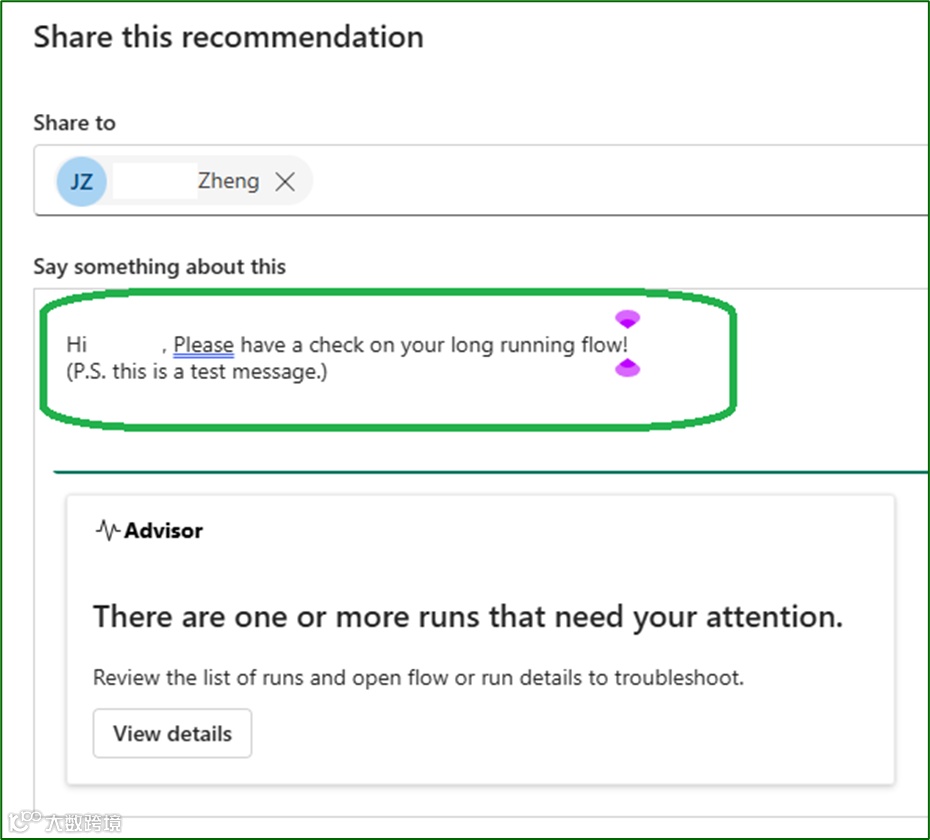
Within the “Cloud flow run success rate” graph section, you can click the “Share in Teams” button. This allows you to share the alert along with a message to the flow owner. This feature is particularly useful because flow makers often don't have access to the Power Platform Admin Center. 
在 “云流运行成功率” 图表部分,你可以点击 “在 Teams 中分享” 按钮。这使你能够将警报连同一条消息分享给流所有者。此功能特别有用,因为流创建者通常无法访问 Power Platform 管理中心。

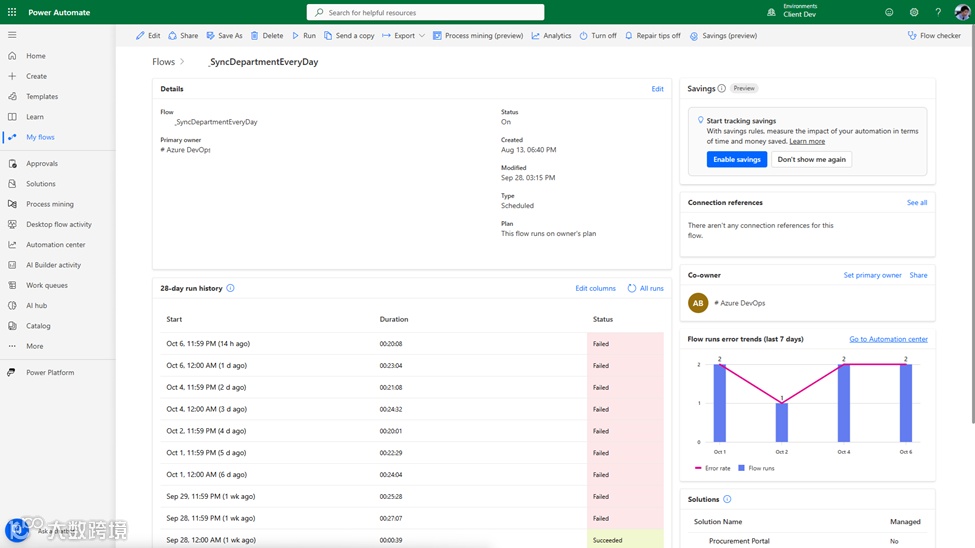
Once the flow maker gets the Teams message, they can click the "View details" button. This action will open the flow run history, enabling them to troubleshoot the issue at hand.
一旦流创建者收到 Teams 消息,他们可以点击 “查看详细信息” 按钮。这将打开流运行历史记录,使他们能够排查当前问题。

Within the “Cloud flow run success rate” graph section, a user can also click the “View details” option. This will open the flow run details within the “Automation centre”.
在 “云流运行成功率” 图表部分,用户还可以点击 “查看详细信息” 选项。这将在 “自动化中心” 内打开流运行详细信息。
Error flows alert(出错流警报)
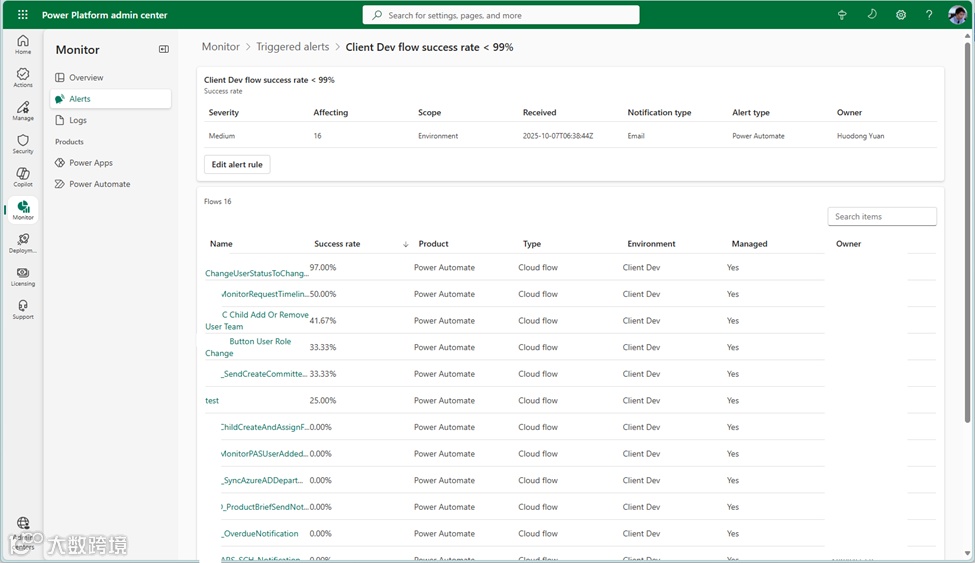
Similarly, we can set up an alert for flows that encounter errors during execution. For instance, I've created an alert rule as follows:
同样,我们可以为执行过程中遇到错误的流设置警报。例如,我创建了如下警报规则:
  • Product: Power Automate
  • Product type: Cloud flow
  • Scope: Environment
  • Environment: Client Dev
  • Condition: Metric Success rate Is Under 99 (Note: the unit for this condition is percentage)
  • Severity: Medium
  • Notification type: Email 
  • 产品:Power Automate
  • 产品类型:云流
  • 范围:环境
  • 环境:客户端开发环境
  • 条件:指标 “成功率” 低于 99(注:此条件的单位是百分比)
  • 严重程度:中
  • 通知类型:电子邮件
Once this alert rule is saved, I can view an alert along with its details, as depicted in the screenshot below.
保存此警报规则后,我可以查看警报及其详细信息,如下图所示。

Likewise, you can click on each alert item to view its details. These details present you with graphs such as the “Cloud flow run success rate,” “Cloud flow run count,” and “Cloud flow duration” graphs.
同样,你可以点击每个警报项查看其详细信息。这些详细信息会为你呈现诸如 “云流运行成功率”、“云流运行次数” 和 “云流持续时间” 等图表。
Power Apps Alerts(Power Apps 警报)
This section will showcase two real-world examples of alerts for Power Apps. These serve as references, allowing you to customize and create alerts that fit your unique needs.
本节将展示两个针对 Power Apps 的实际警报示例。这些示例可作为参考,让你能够自定义并创建符合自身独特需求的警报。
Slowness Canvas app alert(画布应用程序速度缓慢警报)
I define an alert rule with below details.
我定义了如下详细的警报规则:
  • Product and Product type: Power Apps – Canvas app
  • Scope: Environment – Client Dev
  • Condition: Metric “Time to full load (P75)” Is Over 5 (P.S. the unit here is second.)
  • 产品及产品类型:Power Apps - 画布应用程序
  • 范围:环境 - 客户端开发环境
  • 条件:指标 “完全加载时间(P75)” 超过 5(注:此处单位为秒)
It triggers below alert. We can identify the how slowness the Canvas from “Time to full load (P75)” column.
这将触发以下警报。我们可以从 “完全加载时间(P75)” 列中看出画布应用程序的缓慢程度。
You can click any one to see its details. You can see the “Time to full load”,  “App session count” charts,
你可以点击任意一个查看其详细信息。你可以看到 “完全加载时间”、“应用会话数” 图表,
As well as “App open success rate” and “Time to interactive” charts.
以及 “应用打开成功率” 和 “交互时间” 图表。
Open success rate under threshold alert(打开成功率低于阈值警报)
I define an alert rule with below details.
我定义了如下详细的警报规则:
  • Product: Power Apps
  • Product type: Canvas app
  • Scope: Environment
  • Environment: Client Dev
  • Condition: Metric “App open success rate” Is Under 100 (P.S. the unit here is %)
  • 产品:Power Apps
  • 产品类型:画布应用程序
  • 范围:环境
  • 环境:客户端开发环境
  • 条件:指标 “应用打开成功率” 低于 100(注:此处单位为 %)
It triggers below alert. 
这触发了以下警报。
I can also open its details to troubleshoot the issue.
我也可以打开其详细信息来排查问题。
Best Practices & Recommendations(最佳实践与建议)
1. Start Small(从小处着手)
Begin by crafting a select few high-value rules. These could include rules focused on performance - like open times of applications, error rates within flows or apps, and usage spikes. By starting with a small set of crucial rules, you can better manage and fine-tune your monitoring strategy without being overwhelmed. This approach also allows you to quickly identify and address the most critical issues affecting your Power Platform deployments.
从精心制定少数几个高价值规则开始。这些规则可以聚焦于性能方面,比如应用程序的打开时间、流或应用程序中的错误率以及使用量峰值。通过从少量关键规则入手,你可以更好地管理和微调监控策略,而不会感到无所适从。这种方法还能让你迅速识别并解决影响 Power Platform 部署的最关键问题。
2. Name Rules Consistently(规则命名保持一致)
Employ clear and consistent naming conventions for your alert rules. For example, use a format such as "Prod – Canvas apps – Availability < 90". This naming style makes it easy to understand at a glance what the rule pertains to, which environment it applies to, and what the specific metric and threshold are. Consistent naming simplifies rule management, especially when dealing with a large number of alerts across different parts of the Power Platform.
为你的警报规则采用清晰且一致的命名约定。例如,使用 “Prod – Canvas apps – Availability < 90” 这样的格式。这种命名方式能让你一眼就明白规则涉及的内容、应用的环境以及具体的指标和阈值。一致的命名简化了规则管理,尤其是在处理 Power Platform 不同部分的大量警报时。
3. Set Appropriate Severity(设置适当的严重程度)
Assign severity levels based on the impact of the metric on your production environment. Designate "High" severity for metrics that directly impact production operations, such as a significant drop in the success rate of mission-critical Power Automate flows. For trend monitoring, where the issue may not immediately disrupt production but could lead to problems in the future, use "Medium" or "Low" severity levels. This way, you can prioritize your response to alerts according to their importance.
根据指标对生产环境的影响来分配严重程度级别。对于直接影响生产运营的指标,如关键任务 Power Automate 流的成功率大幅下降,指定 “高” 严重程度。对于趋势监控,即问题可能不会立即中断生产,但未来可能导致问题的情况,使用 “中” 或 “低” 严重程度级别。这样,你就可以根据警报的重要性对其响应进行优先级排序。
4. Manage the 50-rule Limit(应对 50 条规则的限制)
A tenant can have 50 alerts rules turned on at one time. Be aware of the 50-rule limit and regularly review your alert rules. Delete any obsolete rules that are no longer relevant, perhaps because the associated application has been retired, or the metric has changed its significance. By keeping your rule set lean, you ensure that you can continue to create new, necessary rules within the limit and that your monitoring system remains efficient.
一个租户最多可同时启用 50 条警报规则。要注意这个 50 条规则的限制,并定期审查你的警报规则。删除任何不再相关的过时规则,比如相关应用程序已停用,或者指标的重要性已发生变化。通过保持规则集简洁,你可以确保在限制范围内继续创建新的必要规则,并且监控系统始终保持高效。
5. Validate Email Routing(验证邮件路由)
Ensure that the intended recipients can receive emails from the sender address PowerPlat-noreply@microsoft.com. This may involve adding this address to allow lists or whitelists in your email infrastructure. Failing to do so could result in important alert emails being blocked, leaving you unaware of potential issues in your Power Platform applications and flows.
确保预期收件人能够收到来自发件人地址 PowerPlat-noreply@microsoft.com 的邮件。这可能需要将此地址添加到你的邮件基础设施的允许列表或白名单中。如果不这样做,可能会导致重要的警报邮件被拦截,使你无法知晓 Power Platform 应用程序和流中潜在的问题。
6. Monitor the 24-hour Cadence(了解 24 小时节奏)
Understand that the evaluation of alert rules follows a daily (24-hour) cadence. This means that it's not a real-time monitoring system. Plan your operations and incident response strategies accordingly. If you require more immediate alerts for certain high-priority issues, you may need to explore additional monitoring tools or techniques in conjunction with Power Platform Monitor Alerts.
要明白警报规则的评估遵循每日(24 小时)的节奏。这意味着它不是一个实时监控系统。据此规划你的运营和事件响应策略。如果你对某些高优先级问题需要更即时的警报,可能需要结合 Power Platform 监控警报探索其他监控工具或技术。
Afterwords – Humble Suggestions to Microsoft(后记 —— 给微软的拙见)
I'm delighted to witness this new feature. However, like any other new addition to the Power Platform, there is significant room for improvement. Most of the suggestions I'll discuss here, I believe Microsoft is already aware of, as some are noted in the feature's limitations. Nevertheless, I feel compelled to emphasize the importance of overcoming these limitations, drawing from my extensive experience over the years in implementing and adopting the Power Platform within large enterprises, particularly those in the financial service industry, such as banking and insurance.
我很高兴看到这个新功能。然而,如同 Power Platform 的任何新功能一样,它仍有很大的改进空间。我在这里讨论的大多数建议,我认为微软已经有所了解,因为其中一些在该功能的限制说明中已被提及。尽管如此,基于我多年在大型企业(尤其是银行和保险等金融服务行业)实施和采用 Power Platform 的丰富经验,我觉得有必要强调克服这些限制的重要性。
1. Enable Near-Real-Time Monitoring and Alerting for Mission-Critical Applications(为关键任务应用程序实现近乎实时的监控和警报)
Firstly, I would greatly appreciate it if these alerts could offer near-real-time monitoring and alerting capabilities. This is of utmost importance for Tier 0 mission-critical applications and Tier 1 business-critical applications. Currently, even the integration between the Power Platform and Application Insights has yet to achieve this, as log synchronization can have a delay of up to 24 hours. If I were in Microsoft's position, tasked with providing this Power Platform Monitor Alert feature, a quick solution could be to create an Application Insights instance behind the scenes and leverage the existing Application Insights integration capabilities. Of course, I'm not privy to how Microsoft designed and implemented this new feature. But, if my intuition isn't too far-fetched, I suspect that achieving near-real-time monitoring and alerting would likely necessitate fundamental architectural changes. However, as more and more enterprises deepen their Power Platform adoption for Tier 1 and Tier 0 applications, the demand for this feature will surge, making it a worthy investment.
首先,如果这些警报能够提供近乎实时的监控和警报功能,我将不胜感激。这对于 0 级关键任务应用程序和 1 级业务关键型应用程序至关重要。目前,即使是 Power Platform 与应用洞察之间的集成也尚未实现这一点,因为日志同步可能会有长达 24 小时的延迟。如果我处在微软的位置,负责提供这个 Power Platform 监控警报功能,一个快速的解决方案可能是在后台创建一个应用洞察实例,并利用现有的应用洞察集成能力。当然,我并不清楚微软是如何设计和实现这个新功能的。但是,如果我的直觉不太离谱的话,我怀疑实现近乎实时的监控和警报可能需要进行根本性的架构更改。然而,随着越来越多的企业在 1 级和 0 级应用程序中更深入地采用 Power Platform,对该功能的需求将会激增,这使得它成为一项值得的投资。
2. Improve Scope and Threshold Definition(改进范围和阈值定义)
The current environment-wide monitoring setup is highly restrictive. Identifying the owner of specific alert-triggering apps or flows is difficult, and a one-size-fits-all threshold for all environment-wide resources is impractical. There's no solution-level alert-setting, nor can alerts target individual apps or flows. For instance, grouping flows with like threshold requirements for a single alert rule isn't possible, hampering effective monitoring tailoring. Microsoft should introduce individual app/flow alert-setting for more granular monitoring and enable solution-level alert-setting for critical apps/flows . Incorporating AI-powered flexible or auto-grouping based on similar thresholds for selected metrics would streamline alert-rule setup, saving time and enhancing the monitoring system's efficiency across diverse Power Platform assets.
当前全环境范围的监控设置限制很大。很难确定触发警报的特定应用程序或流的所有者,而且对全环境范围内的所有资源采用一刀切的阈值并不实际。既无法在解决方案级别设置警报,也不能针对单个应用程序或流设置警报。例如,无法将具有相似阈值要求的流归为一组设置单个警报规则,这阻碍了有效的监控定制。微软应该引入针对单个应用程序 / 流的警报设置,以实现更精细的监控,并为关键应用程序 / 流启用解决方案级别警报设置。结合基于选定指标相似阈值的人工智能驱动的灵活分组或自动分组功能,将简化警报规则设置,节省时间并提高整个 Power Platform 资产监控系统的效率。
3. Incorporate New Metrics(纳入新的指标)
The monitoring system currently lacks key performance metrics like average flow trigger - waiting time (the time a flow spends queuing before triggering) and throttling indicator (if the flow facing throttling). This absence significantly hampers users' ability to identify potential performance issues, make informed decisions on license upgrades, or optimize code for specific flows. Without the average trigger - waiting time, it's hard to detect system inefficiencies, and lacking throttling indicator makes it difficult to decide if flow optimization is needed. To address this, Microsoft should integrate these metrics. The average flow trigger time can help pinpoint performance bottlenecks in the triggering process for streamlining, while throttling stats can assist in determining when and how to optimize flows to avoid throttling, thus enhancing the overall performance and reliability of Power Platform's flow-based processes.
目前的监控系统缺少一些关键性能指标,如平均流触发等待时间(流在触发前排队等待的时间)和限流指示器(流是否面临限流)。这种缺失严重影响了用户识别潜在性能问题、做出明智的许可证升级决策或针对特定流优化代码的能力。没有平均触发等待时间,就很难检测系统效率低下的问题;缺少限流指示器,就难以判断是否需要对流进行优化。为了解决这个问题,微软应该整合这些指标。平均流触发时间有助于确定触发过程中的性能瓶颈,以便进行优化;而限流统计信息可以帮助确定何时以及如何优化流以避免限流,从而提高 Power Platform 基于流的流程的整体性能和可靠性。
4. Address User Access and Role Restrictions(解决用户访问和角色限制)
Currently, non-admin users' lack of access to the alert report restricts vital information to a select few, making alert emails to them ineffective as they can't view details. This bottleneck slows down issue response and reduces overall system efficiency. To overcome this, Microsoft should consider either attaching alert results to non-admin emails or providing read-only access to non-admin personal accounts. This would enhance system inclusivity, allowing all relevant users to access alert details and improve issue-resolution capabilities.
目前,非管理员用户无法访问警报报告,这使得重要信息仅为少数人所知,导致发送给他们的警报邮件因无法查看详细信息而失去作用。这个瓶颈减缓了问题响应速度,降低了整体系统效率。为了克服这一问题,微软应该考虑将警报结果附加到非管理员用户的电子邮件中,或者为非管理员个人账户提供只读访问权限。这将增强系统的包容性,使所有相关用户都能访问警报详细信息,提高问题解决能力。
5. Remove the 50-rule Limit for Enhanced Flexibility(取消 50 条规则的限制以增强灵活性)
Last but not least, the 50-rule limit should be removed. I believe this is already on Microsoft's roadmap. vPresumably, such a limit was imposed to manage usage volume during the preview phase. Removing this constraint would provide users with greater flexibility in tailoring their monitoring setups to their specific requirements, enabling more comprehensive and customized alerting configurations across the Power Platform.
最后但同样重要的是,应该取消 50 条规则的限制。我相信这已经在微软的路线图上了。大概在预览阶段设置这样的限制是为了管理使用量。取消这个限制将为用户提供更大的灵活性,使其能够根据特定需求定制监控设置,从而在 Power Platform 上实现更全面、更个性化的警报配置。
About me(关于作者)
  你好!我叫袁霍东,来自中国广东一个迷人的城市 —— 兴宁。我在广州上大学并工作了 22 年。目前,我居住在繁华的大都市 —— 香港。
我在信息技术领域拥有超过 18 年的经验,在多个技术方向上磨炼并积累了自己的技能与专长。我的职业生涯始于 C++ 和 C# 开发,在过去的四年里,我的工作重心转向了微软 Power Platform 技术。我的工作主要是利用Azure 和 Microsoft 365 产品来扩展 Power Platform 的能力,帮助企业通过技术投资实现更多价值。
我与来自 奔步科技(Bamboo Technologies)的团队成员一起,已成功为大型企业交付了多个大型业务应用,其中包括一些来自银行、保险和工业领域的重要客户。在这些行业中,严格的安全与合规控制至关重要。
我拥有多项微软认证,包括:
  • Power Platform Solutions Architect
  • Power Platform Functional Consultant
  • Power Platform Developer
  • Power BI Data Analyst
  • Power Automate RPA Developer
  • Azure Solutions Architect
  • Azure DevOps Engineer
  • Cybersecurity Architect
我热衷于通过博客分享知识和见解,探讨微软技术世界的最新趋势、技巧和最佳实践。我诚挚邀请你加入我的旅程,与我一同探索这个不断演进的 IT 世界。
微信官方账号: Power Platform 企业应用
小红书: Power Platform 企业应用
 Linked: yuan-huodong
X: @YuanHuodong

【声明】内容源于网络
0
0
Power Platform 企业应用
微软Power Platform企业应用账号,聚焦该平台在大企业应用中的核心挑战,同步分享实战解决方案、避坑技巧与落地案例,助力企业高效推进数字化转型。
内容 3
粉丝 0
Power Platform 企业应用 微软Power Platform企业应用账号,聚焦该平台在大企业应用中的核心挑战,同步分享实战解决方案、避坑技巧与落地案例,助力企业高效推进数字化转型。
总阅读2
粉丝0
内容3