


Introduction(引言)
In the development of large-scale Power Platform enterprise applications, having hundreds of developers working in a shared Dev environment often leads to chaos. For instance, if a table property is altered, it can be difficult to figure out who made the change. Also, preventing other developers from accidentally modifying one's source code in such a vast, shared space is a significant hurdle. Moreover, conducting code reviews for every change is no easy feat.
在大规模的 Power Platform 企业级应用程序开发中,数百名开发人员在共享的开发环境中工作,这往往会导致混乱。例如,如果一个表属性被更改,很难弄清楚是谁做出了这个改变。此外,在如此庞大的共享空间中,防止其他开发人员意外修改自己的源代码也是一个重大难题。而且,对每一个更改进行代码审查并非易事。
Fortunately, with the GA of Git integration[i] in the Power Platform, Microsoft offers a clear path to overcome these challenges through code-first development. While concepts like setting up an environment strategy[ii] , a branching strategy, and implementing a healthy Application Lifecycle Management (ALM) [iii] are well-known, the question remains: how do we effectively integrate them? This blog provides a practical design to address all these aspects. Although certain challenges may still persist in specific areas, it's evident that this is the direction Microsoft is steering towards, and I'm confident that these remaining obstacles will soon be overcome.
幸运的是,随着 Power Platform 中 Git 集成功能的正式发布(GA),微软通过代码优先开发为克服这些挑战提供了一条清晰的途径。虽然诸如制定环境策略、分支策略以及实施完善的应用程序生命周期管理(ALM)等概念已广为人知,但问题依然存在:我们如何有效地将它们整合起来呢?本博客提供了一个切实可行的设计,以解决所有这些方面的问题。尽管在某些特定领域可能仍然存在一些挑战,但很明显,这是微软正在引领的方向,我相信这些遗留的障碍很快就会被克服。
Branching Strategy for Business-critical Project(关键业务项目的分支策略)
In the realm of business-critical[iv] projects, a well-defined branching strategy, along with a structured environment setup and workflow, is paramount. This chapter delves into the branching model based on GitHub Flow [v], the distinct environments, and the step-by-step workflow essential for successful project delivery.
在关键业务项目领域,明确的分支策略以及结构化的环境设置和工作流程至关重要。本章深入探讨基于 GitHub Flow 的分支模型、不同的环境,以及成功交付项目所必需的分步工作流程。
Branches(分支)
• main (or master) - The main branch is always deployable and represents the latest stable, production-ready code. Any commit to main should be ready for immediate deployment.
主分支(main 或 master):主分支始终是可部署的,代表最新的稳定、可投入生产的代码。对主分支的任何提交都应随时可立即部署。
• feature - Developers create branches from main for any work: new features, bug fixes, or hotfixes for production issues. Branch names follow a convention tied to the work (e.g., feature/navbar-redesign, bugfix/flow-error, hotfix/core-banking-itegration-timeout). These branches are short-lived; once work is tested, they’re merged back into main via a pull request.
特性分支(feature):开发人员从主分支创建分支来开展各类工作,如开发新功能、修复 bug 或针对生产问题进行热修复。分支名称遵循与工作相关的命名约定(例如,feature / 导航栏重新设计、bugfix / 流程错误、hotfix / 核心银行集成超时)。这些分支存在时间较短,一旦工作测试完成,就通过拉取请求合并回主分支。
GitHub Flow keeps branching simple: main is the single deployable trunk, and all new work (features, bugs, hotfixes) happens in branches off main, then merges back to main when ready for deployment.
GitHub Flow 简化了分支操作:主分支是唯一可部署的主干,所有新工作(新功能、bug 修复、热修复)都在主分支之外的分支中进行,准备好部署时再合并回主分支。
Environments(环境)
• Dev Features environments: These are isolated spaces dedicated to daily development activities. By using the Developer-type environment, Dataverse capacity can be conserved. This setup allows developers to freely experiment and write code without over-consuming resources.
开发特性环境(Dev Features environments):这些是专门用于日常开发活动的独立空间。通过使用开发者类型的环境,可以节省 Dataverse 容量。这种设置允许开发人员自由进行实验和编写代码,而不会过度消耗资源。
• Dev Main environment: It serves as a singular environment for code merging and verification. Adopting a Sandbox-type environment here helps overcome the limitations associated with the Developer-type environment. This ensures that code integration is smooth and that any issues can be identified before moving forward.
开发主环境(Dev Main environment):它作为代码合并和验证的单一环境。在此采用沙盒类型的环境有助于克服开发者类型环境的局限性。这确保代码集成顺利进行,并在推进之前识别任何问题。
• Test environments (SIT, UAT): These are Sandbox-type environments. Only managed solutions are deployed to these test environments. System Integration Testing (SIT) and User Acceptance Testing (UAT) are carried out here to ensure the application functions as expected in different scenarios.
测试环境(SIT、UAT):这些是沙盒类型的环境。仅将托管解决方案部署到这些测试环境中。在此进行系统集成测试(SIT)和用户验收测试(UAT),以确保应用程序在不同场景下按预期运行。
• Production (Prod) environment: the live environment where the fully tested and approved applications and solutions are deployed for end-users. It requires the highest level of stability, security, and performance. Only release-ready, thoroughly tested managed solutions are deployed here. Strict change management and monitoring processes are in place to ensure seamless operation and minimize any potential disruptions to business operations.
生产(Prod)环境:这是实时环境,经过全面测试和批准的应用程序及解决方案在此部署给最终用户。它要求具备最高水平的稳定性、安全性和性能。仅在此部署准备好发布、经过全面测试的托管解决方案。严格的变更管理和监控流程到位,以确保无缝运行,并将对业务运营的潜在干扰降至最低。
This setup of different environments helps streamline the development lifecycle, from initial coding in the Dev Features environments, through code integration and verification in the Dev Main environment, followed by comprehensive testing in the Test environments, and finally, a reliable and secure deployment in the Production environment. Each environment plays a crucial role in ensuring the quality and success of the projects.
这种不同环境的设置有助于简化开发生命周期,从开发特性环境中的初始编码,到开发主环境中的代码集成与验证,再到测试环境中的全面测试,最后在生产环境中进行可靠且安全的部署。每个环境在确保项目质量和成功方面都起着关键作用。
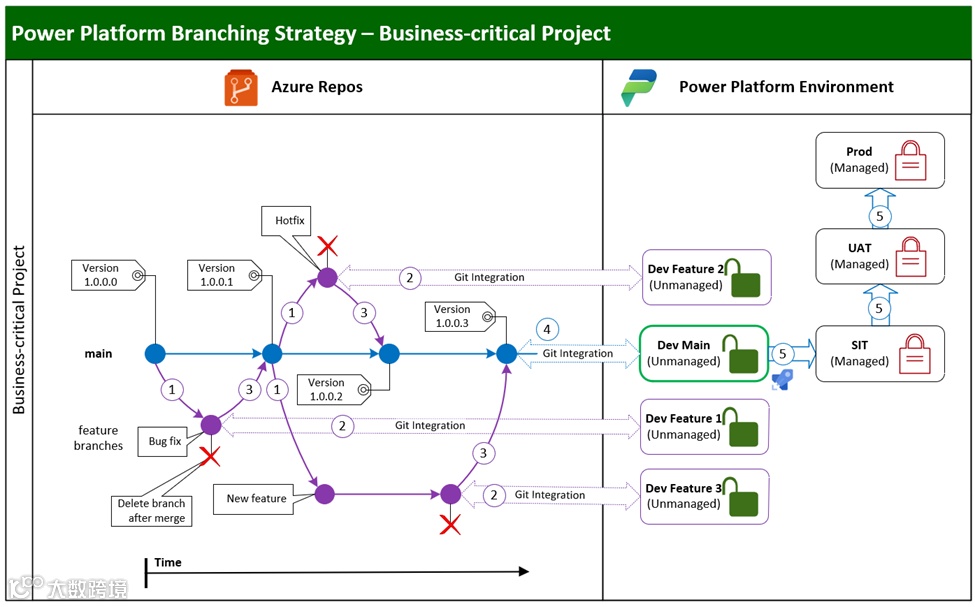
Workflow(工作流程)
1. Feature Branch Creation: Developers initiate the process by branching off from the main branch. They create feature branches specifically tailored for the changes they are working on. This isolation allows for independent development without affecting the stability of the main codebase.
特性分支创建:开发人员从主分支创建分支,开启整个流程。他们根据正在处理的变更创建特定的特性分支。这种隔离允许独立开发,而不影响主代码库的稳定性。
2. Git Integration with Dev Feature Environments: Leveraging Power Platform Git Integration, developers perform commit and pull operations. This enables seamless transfer of changes between the Dev Feature environments and the respective feature branches.
Git 与开发特性环境集成:借助 Power Platform Git 集成,开发人员执行提交和拉取操作。这使得开发特性环境与相应特性分支之间能够无缝传输变更。
3. Pull Request and main Branch Merge: Once the development work on a feature branch is complete, the developer creates a pull request. This is a crucial step as it signals the intention to merge the changes back into the main branch. Through the pull request process, code reviews can occur, ensuring code quality and adherence to coding standards before the merge.
拉取请求与主分支合并:一旦特性分支上的开发工作完成,开发人员创建拉取请求。这是关键步骤,表明要将变更合并回主分支的意图。通过拉取请求流程,可以进行代码审查,确保在合并之前代码质量和符合编码标准。
4. Verification in Dev Main Environment: After the merge into the main branch, developers once again use Git Integration. They commit and pull changes between the Dev Main environment and the main branch. This step is vital for verifying the merge result. The Dev Main environment provides a controlled space to test the integrated code and identify any potential issues arising from the merge.
在开发主环境中验证:合并到主分支后,开发人员再次使用 Git 集成,在开发主环境和主分支之间提交和拉取变更。此步骤对于验证合并结果至关重要。开发主环境提供了一个可控空间,用于测试集成后的代码,并识别合并可能引发的任何潜在问题。
5. Release Pipeline Execution: Finally, the developer triggers the Azure DevOps release pipeline. This pipeline takes the source code from the main branch and packages it into a deployable managed solution. The solution is then sequentially deployed to the SIT, UAT, and Prod environments. This ensures that the application undergoes thorough testing at different levels before being made available to end-users.
执行发布管道:最后,开发人员触发 Azure DevOps 发布管道。该管道从主分支获取源代码,并将其打包成可部署的托管解决方案。然后,该解决方案依次部署到 SIT、UAT 和生产环境。这确保应用程序在面向最终用户之前,在不同级别上都经过了全面测试。
⚠ Warning!(警告!)
“Using clone a patch and clone solution to update a solution isn't recommended because it limits team development and increases complexity when storing your solution in a source control system.” [vi]
“不建议使用‘克隆补丁’和‘克隆解决方案’来更新解决方案,因为这会限制团队开发,并且在将解决方案存储在源代码控制系统中时会增加复杂性。”
Branching Strategy for Mission-critical Project(关键使命项目的分支策略)
Mission-critical[vii] projects, with higher stakes, require a more sophisticated branching strategy than business-critical ones. Any disruption in mission-critical scenarios can have severe, far-reaching consequences, impacting core operations, customer safety, or business viability.
关键使命项目的风险和重要性远超关键业务项目,因此需要更为精妙复杂的分支策略。在关键使命场景中,任何故障都可能带来极其严重且影响广泛的后果,冲击核心业务运作、危及客户安全,甚至关乎企业的生死存亡。
The branching strategy is a linchpin. The main (or master) branch holds the current production-released code, ensuring stability. The develop branch integrates new features and enhancements, and feature branches enable modular, independent development without disturbing the main codebase.
分支策略在此类项目中起着决定性作用。主(或 master)分支承载当前已发布到生产环境的代码,全力保障稳定性。开发(develop)分支负责整合新功能与优化内容,而特性分支则让开发工作能以模块化、独立的方式进行,不会干扰主代码库。
The environment setup is equally vital. Different environments, from Dev Features for daily development to Production for live deployment, play specific roles in ensuring quality. The Dev Hotfix Environment is for rapid response to critical production issues, bypassing normal procedures to minimize impact.
环境设置同样不可或缺。从用于日常开发的开发特性环境,到用于实际部署的生产环境,不同环境在确保项目质量方面各自发挥独特作用。开发热修复环境专门针对关键生产问题做出迅速响应,为将影响降到最低,可绕过常规流程。
Both regular development and hotfix workflows are carefully structured, incorporating quality gates such as code review, automated testing, and regression testing. These measures are essential for early issue detection and maintaining project integrity. In contrast, business-critical projects have more leeway in time and impact, needing a less complex setup. This chapter details these strategies to help teams manage mission-critical projects precisely.
常规开发与热修复工作流程都经过缜密设计,融入了代码审查、自动化测试和回归测试等质量把控环节。这些举措对于尽早发现问题、维护项目完整性至关重要。相比之下,关键业务项目在时间和影响程度上的限制相对宽松,所需的设置也没那么复杂。本章将详细讲解这些策略,帮助团队精确管理关键使命项目。
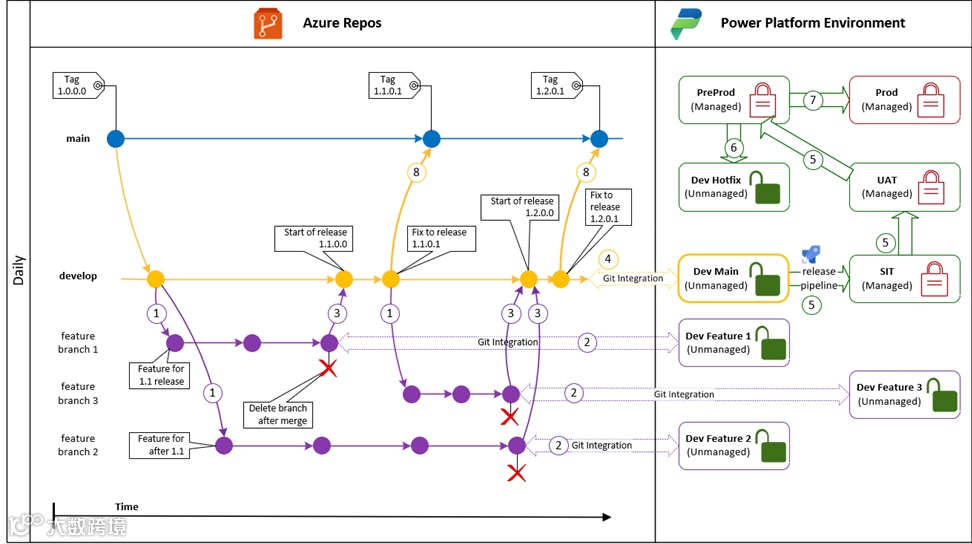
Mission-critical Project – Daily(关键使命项目 - 日常工作)
In the context of mission-critical projects, the daily developments are meticulously structured to uphold the highest standards of quality, stability, and reliability. This section details the essential components of these operations: the branching model, environment setup, workflow, and key considerations. The branching strategy, with distinct Main, Develop, and Feature branches, provides a clear framework for development. The carefully defined environments, from Dev Features for daily coding to Production for live deployment, ensure proper resource management and rigorous testing. The workflow outlines the step-by-step process from feature creation to release, while also highlighting the importance of quality gates and potential pitfalls like the inadvisability of certain solution-update methods.
在关键使命项目中,日常开发工作经过精心规划,以维持最高水准的质量、稳定性与可靠性。本节详细阐述这些操作的关键要素:分支模型、环境设置、工作流程以及关键注意事项。分支策略通过明确的主分支(main)、开发分支(develop)和特性分支(feature),为开发工作提供清晰框架。从用于日常编码的开发特性环境到用于实际部署的生产环境,精心设定的各类环境确保了合理的资源管理与严格的测试流程。工作流程概述了从特性创建到发布的逐步过程,同时强调了质量关卡的重要性,以及诸如某些解决方案更新方法不可取等潜在风险。
Branches(分支)
• main (or master) - The main (or master in older Git setups) branch serves as the repository for the currently released version of the code. It is crucial that the code in this branch precisely mirrors what is deployed in the production environment. This provides a stable and reliable reference point, ensuring that the production-facing application is always in a known and tested state.
主分支(main 或 master):主分支(在旧版 Git 设置中称为 master)存储当前已发布的代码版本。此分支中的代码必须与生产环境中部署的代码精确匹配,这一点至关重要。它提供了一个稳定可靠的参考点,确保面向生产的应用程序始终处于已知且经过测试的状态。
• develop - The develop branch contains a copy of the main branch, augmented with all the additional changes that have been incorporated since the last release. It acts as an integration hub for ongoing development efforts. All new features, bug fixes, and enhancements are funneled into this branch, allowing developers to work towards the next release in a unified yet evolving codebase.
开发分支(develop):开发分支包含主分支的副本,并融入自上次发布以来所有新增的变更。它充当持续开发工作的集成中心。所有新特性、错误修复和功能增强都汇总到这个分支,使开发人员能够在一个统一且不断演进的代码库中为下一次发布开展工作。
• features - Developers create feature branches by branching off from the develop branch. These branches are dedicated to the development of new features. Unlike the main and develop branches, there isn't a single overarching feature branch. Instead, each feature has its own separate branch, named according to the nature of the change, typically following a convention that includes the bug or feature name. For example, a branch for improving the user login functionality might be named feature/navbar-redesign. This modular approach to feature development enables teams to work independently on different aspects of the project without interfering with each other's work or the stability of the main codebase.
特性分支(features):开发人员从开发分支创建特性分支。这些分支专门用于开发新特性。与主分支和开发分支不同,不存在单一的总体特性分支,而是每个特性都有其独立的分支,并根据变更的性质命名,通常遵循包含错误或特性名称的命名约定。例如,用于改进用户登录功能的分支可能命名为 feature / 用户登录功能优化。这种模块化的特性开发方式使团队能够独立开展项目不同方面的工作,而不会相互干扰,也不会影响主代码库的稳定性。
Environments(环境)
• Dev Features environments: These are isolated spaces dedicated to daily development activities. By using the Developer-type environment, Dataverse capacity can be conserved. This setup allows developers to freely experiment and write code without over-consuming resources.
开发特性环境(Dev Features environments):这些是专门用于日常开发活动的独立空间。通过使用开发者类型的环境,可以节省 Dataverse 容量。这种设置允许开发人员自由进行实验和编写代码,而不会过度消耗资源。
• Dev Main environment: It serves as a singular environment for code merging and verification. Adopting a Sandbox-type environment here helps overcome the limitations associated with the Developer-type environment. This ensures that code integration is smooth and that any issues can be identified before moving forward.
开发主环境(Dev Main environment):它作为代码合并和验证的单一环境。在此采用沙盒类型的环境有助于克服开发者类型环境的局限性,确保代码集成顺利进行,并在推进之前识别任何问题。
• Test environments (SIT, UAT): These are Sandbox-type environments. Only managed solutions are deployed to these test environments. SIT and UAT are carried out here to ensure the application functions as expected in different scenarios.
测试环境(SIT、UAT):这些是沙盒类型的环境。仅将托管解决方案部署到这些测试环境中。在此进行系统集成测试(SIT)和用户验收测试(UAT),以确保应用程序在不同场景下按预期运行。
• Dev Hotfix Environment: The Dev Hotfix Environment is a specialized space for emergency production hotfixes. Using a Sandbox-type setup with unmanaged solutions, it gives developers the flexibility to act quickly.
This isolation is crucial. It avoids interference from unreleased Dev Main environment changes, which could otherwise complicate reproducing production issues. Additionally, it prevents the accidental release of develop-branch changes alongside the hotfix, ensuring only the essential fix reaches production to maintain its stability.
开发热修复环境(Dev Hotfix Environment):开发热修复环境是用于紧急生产热修复的特殊空间。采用带有非托管解决方案的沙盒类型设置,为开发人员提供了快速行动的灵活性。这种隔离至关重要,它避免了来自未发布的开发主环境变更的干扰,否则可能会使重现生产问题变得复杂。此外,它还防止在热修复时意外发布开发分支的变更,确保只有必要的修复内容进入生产环境,以维持其稳定性。
• Test Environment – PreProd: The PreProd (Pre-Production) environment is a key part of the testing infrastructure. It is configured as a Production-type environment to closely mimic the actual production setup. This high-level of similarity allows for more accurate testing, as it exposes any potential issues that could occur in the live environment.
Only managed solutions are deployed to the PreProd environment, as well as other test environments. Managed solutions help maintain a controlled and consistent testing environment, ensuring that the tests are reliable and reproducible. This approach enables teams to identify and address any bugs or compatibility issues before the final deployment to the production environment.
测试环境 - 预生产环境(Test Environment – PreProd):预生产(Pre - Production)环境是测试基础设施的关键部分。它配置为生产类型的环境,以紧密模拟实际生产设置。这种高度相似性能够实现更准确的测试,因为它可以暴露出在实际生产环境中可能出现的任何潜在问题。与其他测试环境一样,仅将托管解决方案部署到预生产环境。托管解决方案有助于维持一个可控且一致的测试环境,确保测试结果可靠且可重现。这种方法使团队能够在最终部署到生产环境之前识别并解决任何错误或兼容性问题。
• Production environment: the live environment where the fully tested and approved applications and solutions are deployed for end-users. It requires the highest level of stability, security, and performance. Only release-ready, thoroughly tested managed solutions are deployed here. Strict change management and monitoring processes are in place to ensure seamless operation and minimize any potential disruptions to business operations.
生产环境(Production environment):这是实时环境,经过全面测试和批准的应用程序及解决方案在此部署给最终用户。它要求具备最高水平的稳定性、安全性和性能。仅在此部署准备好发布、经过全面测试的托管解决方案。严格的变更管理和监控流程到位,以确保无缝运行,并将对业务运营的潜在干扰降至最低。
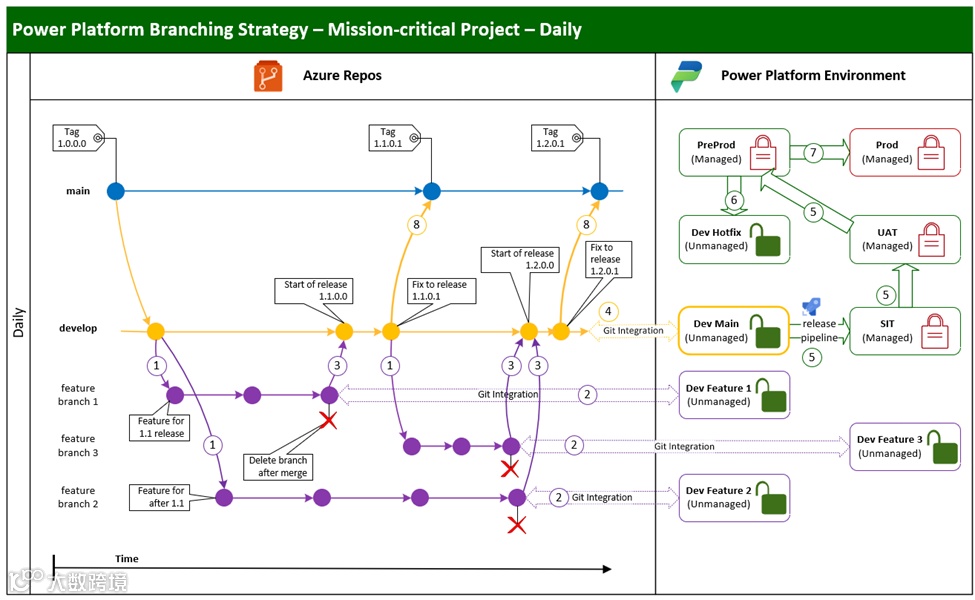
Workflow(工作流程)
1. Feature Branch Creation: Developers start by branching off from the develop branch. They create feature branches tailored to specific changes, enabling independent development of new features or improvements.
特性分支创建:开发人员从开发分支创建分支,开启工作流程。他们针对特定的变更创建特性分支,以便独立开发新特性或进行改进。
2. Git Integration with Dev Feature Environments: Utilizing Git Integration, developers perform commit and pull operations between their Personal Dev environments and the feature branches. This enables seamless transfer of changes between the Dev Feature environments and the respective feature branches.
Git 与开发特性环境集成:借助 Git 集成功能,开发人员在个人开发环境与特性分支之间执行提交和拉取操作。这使得开发特性环境与相应特性分支之间能够无缝传输变更。
3. Pull Request and main Branch Merge: Once the work on a feature branch is completed, developers create a pull request. This signals the intention to merge the changes back into the main branch, and code review should be enforced to ensure quality.
拉取请求与主分支合并:当特性分支上的工作完成后,开发人员创建拉取请求。这表明他们打算将变更合并回主分支,并且应强制进行代码审查以确保质量。
4. Verification in Dev Main Environment: After the merge into the main branch, developers use Git Integration again to commit and pull changes between the Dev Main environment and the develop branch. Here, they verify the merge result to confirm that the combined code functions as expected.
在开发主环境中验证:合并到主分支后,开发人员再次使用 Git 集成,在开发主环境与开发分支之间提交和拉取变更。在此过程中,他们验证合并结果,确认整合后的代码按预期运行。
5. Release Pipeline Execution: The developer kick-starts the Azure DevOps release pipeline. This pipeline extracts the source code from the develop branch, packages it into both an unmanaged solution and a managed solution. Subsequently, it deploys the managed solution to the SIT, UAT, and PreProd environments for thorough testing.
执行发布管道:开发人员启动 Azure DevOps 发布管道。该管道从开发分支提取源代码,将其打包成非托管解决方案和托管解决方案。随后,将托管解决方案部署到系统集成测试(SIT)、用户验收测试(UAT)和预生产(PreProd)环境进行全面测试。
6. Hotfix Environment Deployment: The unmanaged package is deployed to the Hotfix environment. This is used for quickly addressing urgent production issues in an isolated space that allows for rapid development of fixes.
热修复环境部署:非托管包被部署到热修复环境。该环境用于在隔离空间中快速解决紧急生产问题,以便迅速开发修复程序。
7. Production Environment Deployment: The managed package, which has passed all the previous testing stages, is deployed to the Prod environment. This ensures that the end-users receive a stable and reliable product.
生产环境部署:通过之前所有测试阶段的托管包被部署到生产(Prod)环境。这确保最终用户获得稳定可靠的产品。
8. Code Merge into main Branch: All code changes that have been released to the Production environment are eventually merged back into the main branch. This ensures that the code in the main branch consistently aligns with the code deployed in production.
代码合并入主分支:所有已发布到生产环境的代码变更最终都会合并回主分支。这确保主分支中的代码始终与生产环境中部署的代码保持一致。
In such a comprehensive testing process, we can incorporate manual approval prior to promoting the solution package to the next environment. Additionally, multiple quality gates like code review tools, automated testing, and regression testing can be implemented to ensure the quality of every release.
在如此全面的测试过程中,我们可以在将解决方案包推进到下一个环境之前加入人工审批环节。此外,还可实施多种质量关卡,如代码审查工具、自动化测试和回归测试,以确保每次发布的质量。
Mission-critical Project – Hotfix(关键使命项目 - 热修复)
In mission-critical projects, the ability to address hotfixes promptly is paramount. This section focuses on the specialized hotfix workflow designed for such projects. When a critical bug surfaces in production, time is of the essence. The workflow starts with creating a hotfix branch directly from the main branch, isolating the fix from other ongoing development. It then details the steps of resolving the bug in a dedicated Dev Hotfix environment, deploying the fix to PreProd for testing, and finally pushing it to production. The process concludes with integrating the hotfix back into the main and develop branches to maintain code consistency. This streamlined approach enables rapid response, minimizing the disruption caused by critical production bugs.
在关键使命项目中,迅速处理热修复的能力至关重要。本节聚焦于专为这类项目设计的热修复工作流程。当生产环境中出现严重漏洞时,时间紧迫。该工作流程首先直接从主分支创建热修复分支,将修复工作与其他正在进行的开发工作隔离开来。随后详细阐述在专用的开发热修复环境中解决漏洞、将修复部署到预生产环境进行测试,最后推送到生产环境的步骤。流程结束时,将热修复集成回主分支和开发分支,以保持代码一致性。这种精简的方法能够实现快速响应,将生产环境中严重漏洞造成的干扰降至最低。
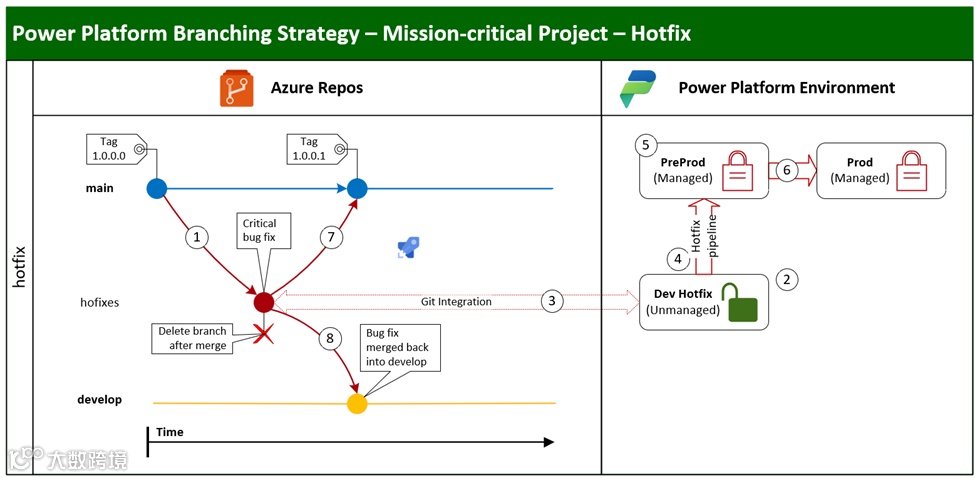
Workflow(工作流程)
1. Hotfix Branch Creation: The developer begins by creating a hotfix branch directly from the main branch. This isolation ensures that the hotfix development doesn't interfere with ongoing development in other branches.
热修复分支创建:开发人员首先直接从主分支创建热修复分支。这种隔离确保热修复开发不会干扰其他分支正在进行的开发工作。
2. Bug Fix in Dev Hotfix Environment: In the dedicated Dev Hotfix environment, the developer focuses on resolving the bug. This environment is specifically designed to replicate production-like conditions, enabling efficient debugging and quick resolution.
在开发热修复环境中修复漏洞:在专用的开发热修复环境中,开发人员专注于解决漏洞。此环境专门设计用于模拟生产环境条件,以便高效调试并快速解决问题。
3. Git Integration with Dev Hotfix Environment: Using Git Integration, the developer performs commit and push operations between the Dev Hotfix environment and the hotfix branch. This keeps the local development work in sync with the remote repository, facilitating seamless collaboration and version control.
Git 与开发热修复环境集成:开发人员使用 Git 集成,在开发热修复环境和热修复分支之间执行提交和推送操作。这使本地开发工作与远程存储库保持同步,便于无缝协作和版本控制。
4. Hotfix Deployment to PreProd: The developer initiates the hotfix Azure DevOps pipeline, which packages the code into a managed solution and deploys it to the PreProd environment.
将热修复部署到预生产环境:开发人员启动热修复的 Azure DevOps 管道,该管道将代码打包成托管解决方案并部署到预生产环境。
5. Testing in PreProd Environment: The tester then conducts tests in the PreProd environment. This comprehensive testing phase aims to identify any potential issues before the hotfix is deployed to the live production environment.
在预生产环境中测试:测试人员随后在预生产环境中进行测试。这一全面的测试阶段旨在在热修复部署到实际生产环境之前识别任何潜在问题。
6. Production Deployment: Upon successful completion of testing in the PreProd environment, the hotfix is deployed to the production environment. This ensures that end-users are promptly provided with the fix.
生产环境部署:预生产环境中的测试成功完成后,热修复将部署到生产环境。这确保最终用户能及时获得修复。
7. Code Merge into main Branch: After the production deployment, the pipeline automatically creates a pull request and merges the hotfix branch back into the main branch. This action keeps the main branch up to date with the production-deployed code.
代码合并入主分支:生产环境部署完成后,管道会自动创建拉取请求,并将热修复分支合并回主分支。这一操作使主分支与生产环境中部署的代码保持同步更新。
8. Code Merge into develop Branch: The developer also creates a pull request to merge the hotfix branch into the develop branch. This step is crucial. Failing to do so means that the next release from the develop branch could potentially re-introduce the bug into production, disrupting the stability of the application.
代码合并入开发分支:开发人员还需创建拉取请求,将热修复分支合并到开发分支。这一步至关重要,若不这样做,开发分支的下一次发布可能会再次将漏洞引入生产环境,破坏应用程序的稳定性。
This shortened hotfix process enables the team to act swiftly in response to critical production issues, bypassing lengthy approval procedures and long-running automated testing. This helps to reduce the impact of critical bugs in production.
这个缩短的热修复流程使团队能够快速响应生产环境中的严重问题,绕过冗长的审批程序和耗时的自动化测试,有助于降低生产环境中严重漏洞的影响。
Summary(总结)
This blog addresses challenges in large-scale Power Platform enterprise applications development and presents solutions via branching strategies, environment setups, and workflows for business - and mission - critical projects.
本博客探讨了大规模 Power Platform 企业应用程序开发中面临的挑战,并通过为关键业务项目和关键使命项目制定分支策略、环境设置及工作流程来提出解决方案。
Shared Dev Environment Challenges(共享开发环境的挑战)
Developing large-scale Power Platform apps with many developers in a shared Dev space brings issues like change tracking, preventing code interference, and conducting code reviews. Git integration in Power Platform offers a path forward through code-first development, enabling the integration of environment, branching, and ALM strategies.
众多开发人员在共享开发空间中开发大规模 Power Platform 应用程序时,会面临诸如变更追踪、防止代码干扰以及进行代码审查等问题。Power Platform 中的 Git 集成通过代码优先开发为解决这些问题提供了方向,使得环境、分支和应用程序生命周期管理(ALM)策略能够得以整合。
Business-critical Project Strategies(关键业务项目策略)
• Branching: Follows GitHub Flow. The main branch has production-ready code. Feature branches are created for new work and merged back via pull requests after testing.
分支:遵循 GitHub Flow 模型。主分支包含可投入生产的代码。为新工作创建特性分支,经测试后通过拉取请求合并回主分支。
• Environments: Dev Features for daily dev, Dev Main for code integration, Test (SIT, UAT) for comprehensive testing, and Production for live deployment. Each plays a key role in the development lifecycle.
环境:开发特性环境用于日常开发,开发主环境用于代码集成,测试环境(系统集成测试 SIT 和用户验收测试 UAT)用于全面测试,生产环境用于实际部署。每个环境在开发生命周期中都发挥着关键作用。
• Workflow: Involves creating feature branches, using Git for change transfer, code reviews via pull requests, merge verification, and an Azure DevOps release pipeline for deployment. A warning against "clone a patch" and "clone solution" updates is given.
工作流程:包括创建特性分支、使用 Git 进行变更传输、通过拉取请求进行代码审查、合并验证以及利用 Azure DevOps 发布管道进行部署。同时,还特别提醒避免使用 “克隆补丁” 和 “克隆解决方案” 进行更新。
Mission-Critical Daily Developments(关键使命项目的日常开发)
• Branching: Clear-cut main, develop, and feature branches. Main mirrors production, develop integrates, and feature enables independent dev.
分支:设有明确的主分支、开发分支和特性分支。主分支与生产环境代码一致,开发分支用于集成,特性分支支持独立开发。
• Environments: Dev Features to Production, with a Dev Hotfix Environment for quick response to production issues, and a PreProd for accurate pre-production testing.
环境:从开发特性环境到生产环境,另外设有开发热修复环境以快速响应生产问题,还有预生产环境用于精确的上线前测试。
• Workflow: Feature creation from develop branch, Git-based change transfer, pull requests with code review, merge verification, release pipeline, and hotfix handling. Code syncs with production via main branch merges. Quality gates enhance release quality.
工作流程:从开发分支创建特性分支,基于 Git 进行变更传输,通过拉取请求进行代码审查并合并,进行合并验证,使用发布管道,以及处理热修复。通过将代码合并入主分支与生产环境保持同步。设置质量关卡以提升发布质量。
Mission-critical Hotfix Workflow(关键使命项目的热修复工作流程)
When a critical bug hits production, a hotfix branch is made from the main branch. Fixed in the Dev Hotfix Environment, tested in PreProd, and then deployed to production. The hotfix branch is merged back into main and develop branches to maintain code consistency, enabling a fast response to critical issues.
当生产环境出现严重漏洞时,从主分支创建热修复分支。在开发热修复环境中修复漏洞,在预生产环境进行测试,然后部署到生产环境。之后将热修复分支合并回主分支和开发分支,以保持代码一致性,从而能够快速响应严重问题。
In conclusion, the blog offers practical designs for integrating development strategies in Power Platform projects, despite some lingering challenges, with the anticipation of their resolution as Microsoft progresses with code-first development.
总之,尽管仍存在一些挑战,但随着微软在代码优先开发方面的推进,有望解决这些问题。本博客为 Power Platform 项目中整合开发策略提供了切实可行的设计方案。
如果您觉得这篇博客中分享的见解和策略对您有所帮助,我们将非常感激您的支持。请为这篇文章点赞,以表认可。将其分享给您的同事、朋友或相关专业社群,能让更多人在应对 Power Platform 开发难题时有所参考。您的评论同样弥足珍贵,它们能引发讨论、带来新观点,或提出更多问题。要是您认为这些内容对您的认知或工作产生了重大影响,也可考虑通过小额打赏来表达感谢。感谢您的支持!
About me(关于作者)
 你好!我叫袁霍东,来自中国广东一个迷人的城市 —— 兴宁。我在广州上大学并工作了 22 年。目前,我居住在繁华的大都市 —— 香港。
我拥有多项微软认证,包括:
Power Platform Solutions Architect
Power Platform Functional Consultant
Power Platform Developer
Power BI Data Analyst
Power Automate RPA Developer
Azure Solutions Architect
Azure DevOps Engineer
Cybersecurity Architect
我热衷于通过博客分享知识和见解,探讨微软技术世界的最新趋势、技巧和最佳实践。我诚挚邀请你加入我的旅程,与我一同探索这个不断演进的 IT 世界。
微信官方账号: Power Platform 企业应用
小红书: Power Platform 企业应用
LinkedIn: yuan-huodong
X: @YuanHuodong
[i] Git Integration is Generally Available - Microsoft Power Platform Blog
[ii] Develop a tenant environment strategy to adopt Power Platform at scale - Power Platform | Microsoft Learn
[iii] Use scenarios to implement healthy ALM with Microsoft Power Platform - Power Platform | Microsoft Learn
[iv] Service Criticality Tiers Standard and Architecture | LinkedIn
[v] Git Flow vs GitHub Flow | Alex Hyett
[vi] Create solution patches - Create and update custom solutions for ALM in Power Platform - Power Platform | Microsoft Learn
[vii] Service Criticality Tiers Standard and Architecture | LinkedIn