
我们在使用 Windows Server Core 的时候,默认会启动一个工具Sconfig, 透过这个工具可以配置很多基本的管理功能,如下图所示,我们可以看到所有的功能:
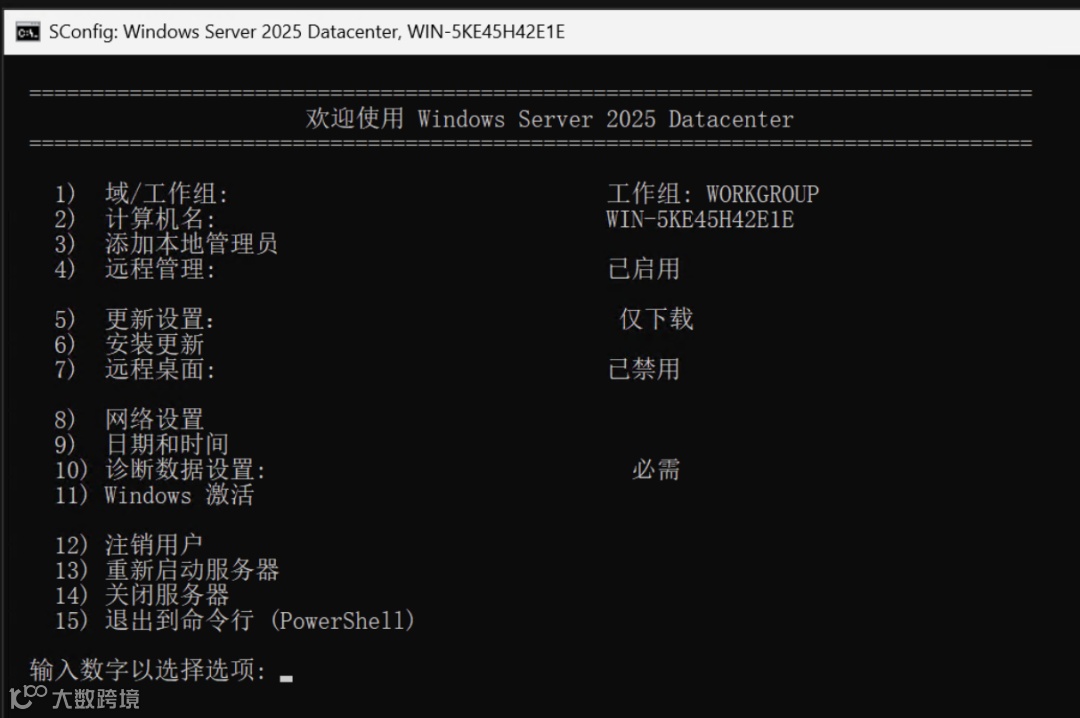
虽然这个工具很好用,但是这个工具也有很多问题,例如在中文版的时候,有些问题的答案只能是中文的是或者否, 有时候刚配置的时候还无法正确的输入中文,就会导致无法输入,物理机的时候就很尴尬。例如有些子工具还有bug: 配置网络的时候,如果先禁止了ipv6, 那么配置静态网卡,还配置不了。诸如此类的问题还是不少,为了更好的应付日常的Server Core的管理工具,我们是应该数量的使用各种日常的命令行工具,本篇就是介绍一下常用的Server Core的日常管理工具。
关闭自动启动Sconfig
每次进去到Server Core都会启动打开一个终端窗口,并且自动一个Sconfig, 要关闭这个行为只需要在命令行上运行:
Set-SConfig -AutoLaunch $false
如何启动新窗口
虽然自从Windows Server core 2022 之后,cmd.exe 窗口无法关闭,但是如果想启动一个新的窗口,可以按快捷键:Crtl + shift + ESC 启动Task Manager, 然后从文件 -> 运行新任务, 输入cmd.exe 或者 powershell.exe 打开新的窗口。
Windows Server激活以及Production Key管理工具
slmgr.vbs
这个工具主要就是用来管理激活以及产品key的主要工具,而且该工具还是自带帮助系统的,只需要输入slmgr.vbs, 不带任何参数,即会弹出一个窗口,显示所有的用法,如下图:
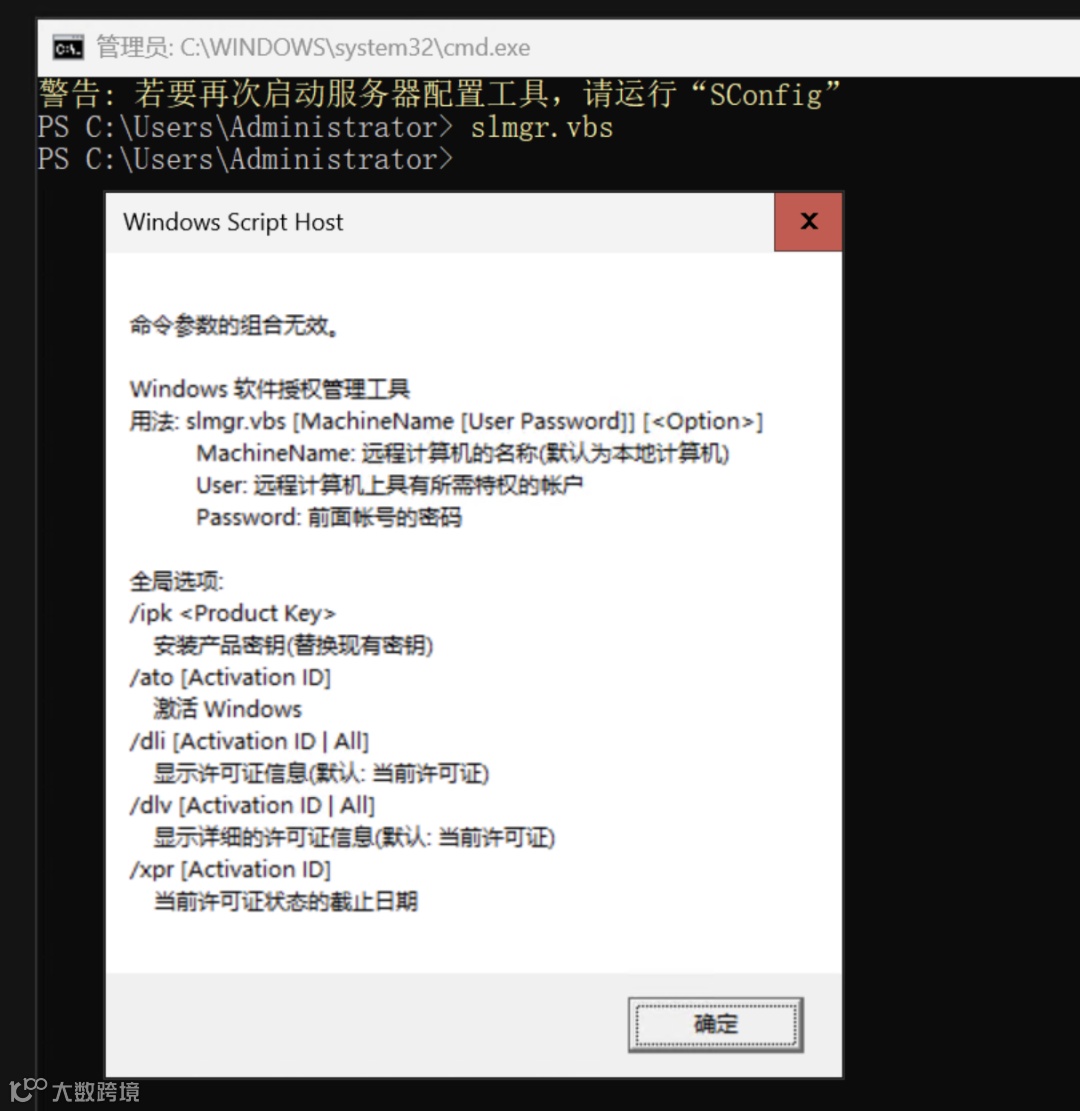
注意一个重要的缩写:slmgr == Software Licensing Management Tool
这样的话,我们可以使用如下的命令来更改产品的Key:
slmgr.vbs /ipk {Your Production Key}
使用如下的语句激活你的Windows:
slmgr.vbs /ato
使用如下语句用于查看激活的状态:
slmgr.vbs /dli
slmgr.vbs /xpr
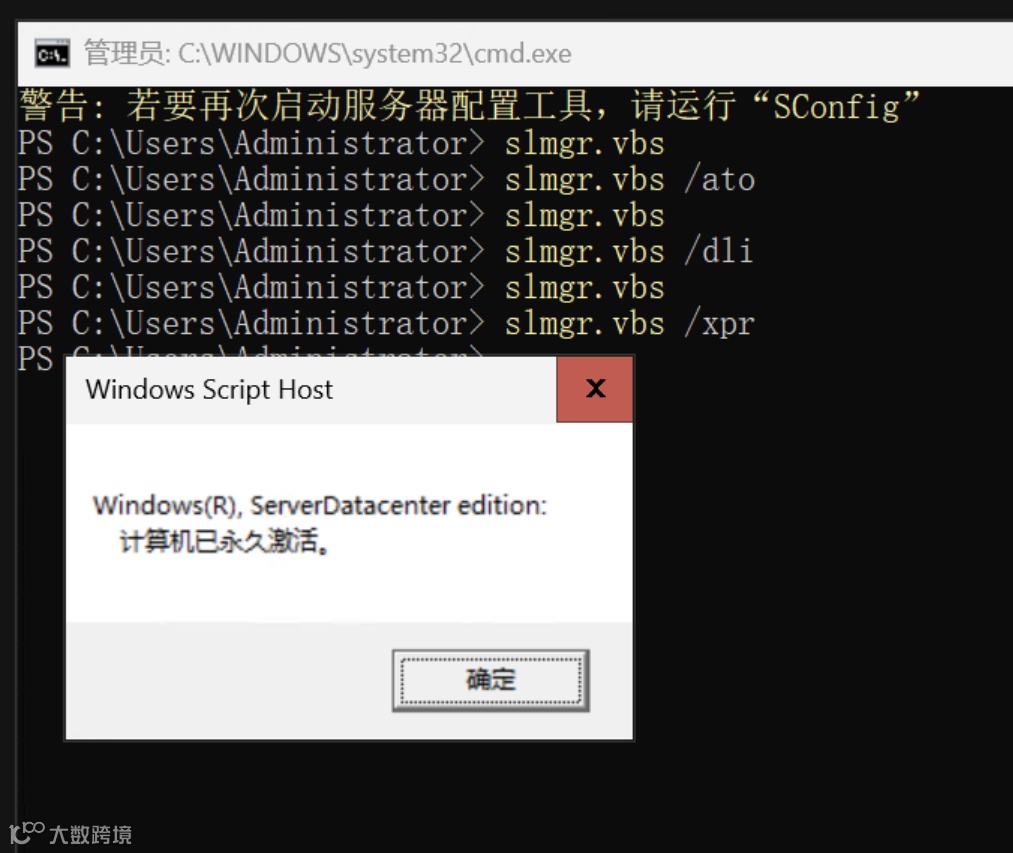
更多的用法,使用上述的自动帮助系统可以详细的查看用法。
检查和设置更新状态以及自动更新
使用如下的PowerShell或者命令行来检查当前的更新设置:
PowerShell:
& $env:SystemRoot\system32\cscript C:\WINDOWS\system32\SCregEdit.wsf /AU /v
Cmd:
%systemroot%\system32\cscript %systemroot%\system32\scregedit.wsf /AU /v
为了启用启动更新
PowerShell:
Net stop wuauserv
& $env:SystemRoot\system32\cscript $env:SystemRoot\system32\scregedit.wsf /AU 4
Net start wuauserv
Cmd:
Net stop wuauserv
%systemroot%\system32\cscript %systemroot%\system32\scregedit.wsf /AU /v 4
Net start wuauserv
禁止自动更新
PowerShell:
Net stop wuauserv
& $env:SystemRoot\system32\cscript $env:SystemRoot\system32\scregedit.wsf /AU 1
Net start wuauserv
Cmd:
Net stop wuauserv
%systemroot%\system32\cscript %systemroot%\system32\scregedit.wsf /AU /v 1
Net start wuauserv
强迫Windows理解检查和安装更新
PowerShell:
wuauclt /detectnow
参考的Url: https://learn.microsoft.com/en-us/windows-server/administration/server-core/server-core-servicing?tabs=cmd%2Cupdate-powershell
使用PowerShell安装Windows更新
如果计划使用Powershell来安装更新,需要额外安装一个模块: PSWindowsUpdate:
-
安装模块: Install-Module PSWindowsUpdate -
检查 Windows更新:Get-Windowsupdate -
安装 Windows更新:Install-WindowsUpdate
启用远程桌面管理以及设置服务器可以ping通
reg add "HKEY_LOCAL_MACHINE\SYSTEM\CurrentControlSet\Control\Terminal Server" /v fDenyTSConnections /t REG_DWORD /d 0 /f
netsh advfirewall firewall set rule group="remote desktop" new enable=Yes
允许ping
IPV4:
netsh advfirewall firewall add rule name="ICMP Allow incoming V4 echo request" protocol=icmpv4:8,any dir=in action=allow
IPV6:
netsh advfirewall firewall add rule name="ICMP Allow incoming V6 echo request" protocol=icmpv6:8,any dir=in action=allow
禁止ping:
IPV4:
netsh advfirewall firewall add rule name="ICMP Allow incoming V4 echo request" protocol=icmpv4:8,any dir=in action=block
IPV6:
netsh advfirewall firewall add rule name="ICMP Allow incoming V6 echo request" protocol=icmpv6:8,any dir=in action=block
配置网络
可以使用powershell来配置网络:
取得网络的基本信息:
Get-NetAdapter
Get-NetAdapter -Physical | ? {$_.Status -eq "Up"}
Get-NetAdapter |Select-Object name,LinkSpeed,InterfaceOperationalStatus,MacAddress
Get-NetAdapter | Select -property *
设置静态IP地址:
Get-NetAdapter -Name Ethernet0| New-NetIPAddress –IPAddress 192.168.2.50 -DefaultGateway 192.168.2.1 -PrefixLength 24
如果静态地址已经设置,可以使用如下命令重新配置:
Set-NetIPAddress -InterfaceAlias Ethernet0 -IPAddress 192.168.2.90
移除静态IP地址:
Remove-NetIPAddress -IPAddress "xxx.xxx.xxx.xxx"
禁止DHCP:
Set-NetIPInterface -InterfaceAlias Ethernet0 -Dhcp Disabled
启用DHCP
Set-NetIPInterface -InterfaceAlias Ethernet0 -Dhcp Enabled
设置DNS:
Set-DNSClientServerAddress –InterfaceIndex 8 –ServerAddresses 192.168.2.11,10.1.2.11
清除DNS配置:
Set-DnsClientServerAddress –InterfaceAlias Ethernet0 -ResetServerAddresses
清楚DNS 缓存:
Clear-DnsClientCache
或者
ipconfig /flushdns
重启网卡:
Restart-NetAdapter -InterfaceAlias Ethernet0
关闭ipv6:
管理防火墙:
添加inbound规则:
New-NetFirewallRule -DisplayName "Allow Access Local Port 9000" -Direction Inbound -RemoteAddress {Remote IP Address} -Protocol TCP -LocalPort 9000 -Action Allow
根据端口找到防火墙规则:
Get-NetFirewallPortFilter | where {$_.LocalPort -eq '3389' } | Get-NetFirewallRule
禁止防火墙规则:
Set-NetFirewallRule -Name RemoteDesktop-UserMode-In-TCP -Enabled False
禁止ipv6:
reg add "HKEY_LOCAL_MACHINE\SYSTEM\CurrentControlSet\Services\Tcpip6\Parameters" /v DisabledComponents /t REG_DWORD /d 0xFF /f
禁止ipv6要重启。
更改计算机名称以及加入域
更改计算机名称
rename-computer -NewName {新名字}
加入域
Add-Computer -DomainName {域名} -restart
查看系统日志
D:\MyProjects\mydocuments
❯ get-eventlog-list
Max(K) Retain OverflowAction Entries Log
-------------------------- ----------
20,480 0 OverwriteAsNeeded 28,947 Application
20,480 0 OverwriteAsNeeded 0 HardwareEvents
512 7 OverwriteOlder 0 Internet Explorer
20,480 0 OverwriteAsNeeded 0 Key Management Service
128 0 OverwriteAsNeeded 10 OAlerts
512 7 OverwriteOlder 0 PDW Component Failures
0 Security
20,480 0 OverwriteAsNeeded 21,491 System
512 7 OverwriteOlder 59 Visual Studio
512 7 OverwriteOlder 0 Windows Azure
15,360 0 OverwriteAsNeeded 8,189 Windows PowerShell
D:\MyProjects\mydocuments
❯ Get-EventLog-LogName Application | more
Index Time EntryType Source InstanceID Message
--------- --------- ------ -----------------
28947 3月 14 20:51 Information Software Protection… 1073758208 Successfully scheduled Software Protection service for re-start at 2125-02-18T12…
28946 3月 14 20:51 Information Software Protection… 3221241866 Offline downlevel migration succeeded.
28945 3月 14 20:30 Information Software Protection… 1073758208 Successfully scheduled Software Protection service for re-start at 2125-02-18T12…
28944 3月 14 20:30 Information Software Protection… 3221241866 Offline downlevel migration succeeded.
28943 3月 14 20:29 Information Software Protection… 1073758208 Successfully scheduled Software Protection service for re-start at 2125-02-18T12…
28942 3月 14 20:28 Information Software Protection… 3221241866 Offline downlevel migration succeeded.
D:\MyProjects\mydocuments
❯ Get-EventLog-LogName Application -EntryType Error | more
Index Time EntryType Source InstanceID Message
--------- --------- ------ -----------------
28907 3月 14 17:29 Error CertEnroll 3260678230 The description for Event ID '-1034289066' in Source 'CertEnroll' cannot be foun…
28877 3月 14 17:21 Error .NET Runtime 1023 Description: A .NET application failed.…
28791 3月 13 21:54 Error CertEnroll 3260678230 The description for Event ID '-1034289066' in Source 'CertEnroll' cannot be foun…
28790 3月 13 21:54 Error CertEnroll 3260678230 The description for Event ID '-1034289066' in Source 'CertEnroll' cannot be foun…
28752 3月 13 20:37 Error Application Hang 1002 The program SmartEngineHost.exe version 1.0.110.11301 stopped interacting with W…
D:\MyProjects\mydocuments
❯ Get-EventLog-LogName application -Index 28907 |select-Property *
EventID : 86
RunspaceId : 065a9d30-7751-4df6-bbc3-d9f227e867ad
MachineName : HongWei-Games
Data : {}
Index : 28907
Category : (0)
CategoryNumber : 0
EntryType : Error
当然还有更多的使用命令,以后一边用一边记录,另外也可以参考:
https://www.azuredeveloper.cn/Article/FilterByCategory/category-windows-server
往期文章:
在Azure Bot中使用User-assigned managed identity完成认证
使用SQL Server Profiler追踪Power BI Desktop刷新问题
尝试缓解Power BI报表数据源为Azure Databricks在代理服务器环境中刷新出错的问题
在Azure Synpase Spark Pool中移动外部分区表数据到新位置后新建分区表发现丢失所有数据
诡异的Databricks Delta Lake Table History
在MVVM项目中使用async/await - 数据绑定
Windows Server 2022 Core迁移记录
async/wait和ConfigureWait(false)在异步编程中有什么关系?
AzureDeveloper(WebSite: https://www.azuredeveloper.cn), 一个分享和学习Azure技术的好去处,欢迎关注