



What happens when a successful Power Automate MVP suddenly faces a tenfold data increase? When a design pattern shifts from "good enough" to the main bottleneck, how do you respond?
In this real-world case study, we demonstrate how two targeted optimizations transformed an unmanageable data volume—first from a failed process to a 7.5-hour job, and then to a streamlined 2.5-hour operation—while drastically reducing platform requests and significantly enhancing stability.
在这个真实案例研究中,我们展示了两项有针对性的优化举措,是如何改变难以处理的数据量状况的。首先,让一个原本失败的流程转变为一项7.5小时即可完成的工作,进而优化为仅需2.5小时的高效运作流程,同时大幅减少平台请求次数,并显著提升稳定性。
You'll learn:
How to diagnose quota limitations hidden behind shared service account
如何诊断共享服务账户背后隐藏的配额限制
A simple loop refactoring technique that can instantly reduce tens of thousands of operations
一种简单的循环重构技巧,可即刻减少数以万计的操作量
Various Best Practices on Power Automate performance
关于Power Automate 性能的各类最佳实践
Whether you're a developer troubleshooting performance issues or an architect seeking a scalable low-code strategy, this case study offers immediately applicable insights.
无论您是正在排查性能问题的开发人员,还是在探寻可扩展低代码策略的架构师,本案例研究都能提供可立即应用的深刻见解。
Problem Statement(问题陈述)
Our journey began simply enough. A Power Apps with Dataverse application needed daily customer data from an upstream system. The data landed in Google Cloud, where a custom pro-code app wrote it to a Dataverse staging table via the Web API. A Power Automate flow then orchestrated the Extract, Transform, Load (ETL) process—retrieving records, performing quality checks against related tables, and updating the Dataverse business tables.
我们的历程起始颇为简单。一个基于Power Apps与Dataverse的应用程序,需要每日从上游系统获取客户数据。这些数据先存于谷歌云,在那里有一个定制的代码应用程序通过Web API将其写入Dataverse的临时表。随后,一个Power Automate流负责协调提取、转换、加载(ETL)流程——检索记录,对照相关表格执行质量检查,然后更新Dataverse业务表。
This architecture wasn't born from a belief that Power Automate is the ideal ETL tool. As any seasoned Solutions Architect would note, Dataflow [i] or Azure Data Factory [ii]would be more appropriate for heavy data workloads. We evaluated Dataflow initially but encountered limitations with specific transformations. We recognize Azure Data Factory as the more scalable and robust choice. However, it introduces significant upfront costs—including infrastructure setup, an extended architecture review cycle, and a team ramp-up period—which conflicted with our goal of rapid delivery.
这种架构的诞生并非源于认为Power Automate是理想的ETL工具。任何经验丰富的解决方案架构师都会指出,对于繁重的数据工作负载而言,Dataflow或Azure Data Factory会更为合适。我们最初评估过Dataflow,但在特定转换方面遇到了限制。我们也承认Azure Data Factory是更具可扩展性且更强大的选择。然而,它会带来可观的前期成本,包括基础设施搭建、漫长的架构审查周期,以及团队的学习适应期,这些都与我们快速交付的目标相悖。
Given our Agile delivery model, we prioritized rapid implementation and iteration. Power Automate—already approved, familiar to the team, and immediately implementable—was the pragmatic choice. It allowed us to quickly deliver a minimum viable product (MVP) [iii]for a small market and iterate based on feedback, squarely aligning with the Agile principle: “Our highest priority is to satisfy the customer through early and continuous delivery of valuable software.” [iv]
鉴于我们采用敏捷交付模式,我们优先考虑快速实施与迭代。Power Automate已获批准,团队成员熟悉,且可立即投入使用,因此成为务实之选。它使我们能够迅速为一个小市场交付最小可行产品(MVP),并根据反馈进行迭代,这完全契合敏捷原则:“我们最优先的事,是通过尽早且持续地交付有价值的软件来满足客户需求。”
And so we did. The solution worked beautifully at first. But as we expanded to more markets, the data volume grew. Then came the tipping point: the business decided to onboard a major new market, projected to add up to 150,000 records at peak. Our pragmatic MVP was about to face a scalability crisis. What once ran efficiently began run with failure after very long time with stress testing of 200,000 records.
于是我们照做了。起初,这个解决方案运行得非常顺利。但随着我们拓展到更多市场,数据量不断增长。接着,转折点出现了:公司决定进军一个重要的新市场,预计高峰期将新增多达15万条记录。我们务实的最小可行产品(MVP)即将面临可扩展性危机。曾经高效运行的系统,在对20万条记录进行压力测试时,经过很长时间后开始出现运行失败的情况。
Faced with this inflection point, we had to decide: should we abandon our Power Automate implementation and pivot to another approach, as Agile methodologies sometimes prescribe, or should we double down and optimize the existing solution? We chose the latter. This is the story of how we engineered our way out of an impending performance meltdown.
面对这一转折点,我们必须做出抉择:是像敏捷方法有时所建议的那样,放弃现有的Power Automate实施方案,转而采用其他方法,还是加大投入优化现有解决方案?我们选择了后者。以下讲述的就是我们如何通过精心设计,摆脱即将出现的性能崩溃困境的故事。
From Form to Function: The Hidden Bottleneck(从形式到功能:隐藏的瓶颈)
The team returned to me, frustration evident in their voices. “We followed the flow splitting pattern from your email throttling design—exactly,” one engineer said, pulling up a flow diagram on their laptop. “Batched market data into the Dataverse staging table, triggered dedicated flows per batch… but the 200k test failed, and 60k took almost forever. Why isn’t it scaling?”
团队成员带着明显的沮丧情绪找到我。“我们完全按照您在邮件限流设计中提到的流程拆分模式做的,” 一位工程师说着,在笔记本电脑上调出一个流程图,“将市场数据分批导入Dataverse临时表,针对每一批数据触发专门的流程…… 但20万条数据的测试失败了,6万条数据的处理也几乎耗费了无尽的时间。为什么无法实现扩展呢?”
I leaned in, scanning their setup. The logic looked sound on paper: market-specific data batches landed in the staging table, a status update triggered a corresponding Power Automate flow, and each flow handled ETL for its assigned market. This was flow splitting pattern they’d referenced from "Power Platform for Enterprise - 1 - Overcoming Email Throttling with Innovative Load Balancing" [v], but not functioning well.
我凑近仔细查看他们的设置。从理论上看,逻辑似乎没什么问题:按市场划分的数据批次先进入临时表,状态更新会触发相应的Power Automate流,每个流负责处理其对应市场的ETL操作。这正是他们从《Power Platform 企业应用-1-通过创新负载均衡克服邮件限流》中借鉴的流程拆分模式,但实际效果却不尽如人意。
Then I saw it. Buried in the flow settings was the service account: a single Power Automate Premium-licensed user, shared across every new flow they’d built. “You’ve copied theform of the pattern,” I said, “but missed the function.”
接着我发现了问题所在。在流设置中隐藏着服务账户信息:这是一个拥有Power Automate高级许可证的单一用户,他们创建的每个新流都在共享使用。“你们照搬了模式的形式,” 我说,“却没领会其功能实质。”
They’d hit a critical but often overlooked constraint: Power Platform request (PPR) limits [vi]are tied to the executing identity by default, not the flow itself. Splitting flows without separating the service accounts meant all those “independent” processes still competed for the same request quota—40,000 requests per 24 hours from that single account with Power Automate Premium license. It was like adding more lanes to a highway but forcing all cars to share one engine.
他们遇到了一个关键却常被忽视的限制:默认情况下,Power Platform请求(PPR)限制是与执行身份相关联,而非与流本身相关。拆分流却不分离服务账户,意味着所有这些“独立” 的流程仍在争夺相同的请求配额 —— 拥有Power Automate高级许可证的单个账户每24小时仅有40,000次请求配额。这就好比给高速公路增加了更多车道,却让所有车辆共用一个引擎。

The fix was clear, if tedious: provision dedicated Premium-licensed service accounts for each market flow. No more shared resources, no more bottlenecked quotas. The team navigated the IT approval process, waited for license provisioning, and reran the tests two weeks later.
解决办法虽然繁琐,但却很明确:为每个市场流配备专门的高级许可证服务账户。不再共享资源,也就不会再有配额瓶颈。团队走完了IT审批流程,等待许可证配置完成,两周后重新进行测试。
The results were half-victory. “200k completed this time!” the lead engineer reported, relieved—then hesitated. “But it still took 7.5 hours. And if three markets sync at once? We’ll max out even the dedicated accounts.”
结果喜忧参半。“这次 20 万条数据的任务完成了!” 主工程师如释重负地汇报,但随后又犹豫起来,“但还是花了 7.5 个小时。要是三个市场同时同步数据呢?就算是专用账户,我们也会达到配额上限。”
I nodded. The dedicated accounts had solved thequota problem, but not the efficiency one. Daily incremental data was manageable, but peak loads—like the upcoming launch of that major new market, projected to add 150k records in a single batch—would still break the system. We were no longer failing, but we were still far from performing.
我点了点头。专用账户解决了配额问题,但效率问题依然存在。日常增量数据还能应付,但高峰负载,比如即将开启的那个重要新市场,预计一次性会增加15万条记录,仍会让系统崩溃。我们现在虽不会失败,但离高效运行还差得远。
I nodded. The dedicated accounts had solved thequota problem, but not the efficiency one. Daily incremental data was manageable, but peak loads—like the upcoming launch of that major new market, projected to add 150k records in a single batch—would still break the system. We were no longer failing, but we were still far from performing.
我颔首示意。专用账户的确解决了配额问题,然而效率方面的问题依旧悬而未决。日常的增量数据尚在可处理范围内,但是像即将启动的那个重要新市场这样的高峰负载情况——预计单次就会新增15万条记录——仍会致使系统瘫痪。我们如今虽不再遭遇失败,可距离实现高效运行,依然有着不小的差距。
The zoom meeting fell quiet. The unspoken question hung in the air: Had we reached the end of what Power Automate could do? Abandoning it for Azure Data Factory would mean rebuilding from scratch—architectural reviews, infrastructure setup, team upskilling—all pushing our delivery timeline back months.
这次线上会议陷入了沉默。一个大家都心照不宣却未说出口的问题悬在半空:我们是不是已经触及Power Automate能力的极限了?要是放弃它转而采用Azure Data Factory,那就意味着要从头开始重建——进行架构评审、搭建基础设施、让团队学习新技能——这一切都会让交付时间推迟数月。
From 7.5 Hours to 2.5 Hours: The Power of One Action(从7.5小时到2.5小时:一个操作的力量)
After collecting the necessary preliminary data, I informed the team that I would conduct an investigation and provide an update shortly. I opened Power Automate analytics [vii] for one of the slower-running flows to begin my analysis.
收集完必要的初步数据后,我告知团队我会展开调查,并很快给出最新进展。我打开了其中一个运行较慢的流的Power Automate分析工具,开始我的分析工作。
Key Findings: Excessive Request Count(主要发现:请求次数过多)
The flow run generated an extraordinary 1,396,796 billable actions (Power Platform requests). This directly impacts Power Platform's Service Protection Limit - 100,000 PPRs per 5 minutes [viii].
该流程运行产生了多达1,396,796个可计费操作(Power Platform请求)。这直接影响到Power Platform的服务保护限制——每5分钟100,000次Power Platform请求(PPRs)。
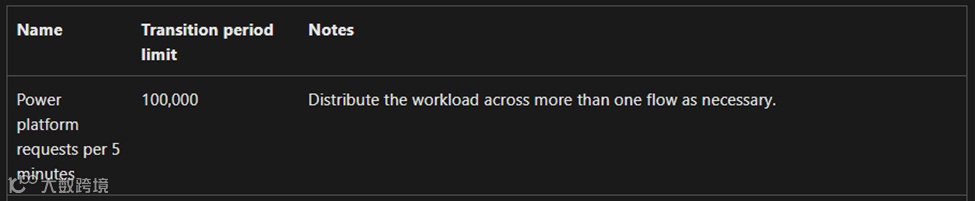
1,396,796/100,000 * 5 minutes ≈ 70 minutes
What counts as Power Platform request? [ix] See below copied content from Microsoft documentation “What counts as Power Platform request? - Power Automate licensing FAQ”.
什么算是Power Platform请求呢?以下内容摘自微软文档链接。
"Here are some insights to estimate the request usage of a flow:
1. A simple flow with one trigger and one action results in two "actions" each time the flow runs, consuming two requests.
2. Every trigger/action in the flow generates Power Platform requests. All kinds of actions like connector actions, HTTP actions, built-in actions (from initializing variables, creating scopes to a simple compose action) generate Power Platform requests. For example, a flow that connects to SharePoint or Exchange, Twitter, Dataverse; all those actions are counted towards Power Platform request limits.
3. Both succeeded and failed actions count towards these limits. Skipped actions aren't counted towards these limits.
4. Each action generates one request. If the action is in an apply to each loop, it generates more Power Platform requests as the loop executes.
5. An action can have multiple expressions but it's counted as one API request.
6. Retries and extra requests from pagination count as action executions as well."
“以下是一些估算流请求使用量的要点:
1. 一个仅有一个触发器和一个操作的简单流,每次运行会产生两个‘操作’,消耗两次请求。
2. 流中的每个触发器/操作都会生成Power Platform请求。各类操作,如连接器操作、HTTP操作、内置操作(从初始化变量、创建作用域到简单的组合操作)都会生成Power Platform请求。例如,连接到SharePoint、Exchange、Twitter或Dataverse的流,所有这些操作都计入Power Platform请求限制。
3. 成功和失败的操作均计入这些限制。跳过的操作不计入。
4. 每个操作生成一次请求。如果该操作在‘应用到每个’循环中,随着循环执行,会生成更多Power Platform请求。
5.一个操作可以包含多个表达式,但仅计为一次API请求。
6.重试和分页产生的额外请求也计为操作执行次数。”
Bottleneck Identification: Too Many Actions Inside a Loop(瓶颈识别:循环内操作过多)
I pull up the flow’s run history. I can easily identify the bottleneck is the “Apply to Each” loop processing 40,000 records, eating 1 hour and 45 minutes of runtime. Removing just one action from the 'Apply to Each' loop will cut 40,000 PPRs, directly improving both performance and efficiency.
我调出该流的运行历史记录,很容易就发现瓶颈在于“应用到每个” 循环,它要处理40,000条记录,耗费了1小时45分钟的运行时间。从 “应用到每个”循环中移除一个操作,就能减少40,000次Power Platform请求(PPRs),直接提升性能和效率。
Optimization Strategy & Implementation(优化策略与实施)
The loop contained an empty Scope, five Compose actions, and an If condition—all prime candidates for optimization—followed by a single Dataverse action that persisted the record after transformation.
该循环包含一个空的“范围”、五个 “组合” 操作以及一个 “条件判断”操作 —— 这些都是优化的主要对象 —— 随后是一个将转换后的记录保存到Dataverse的操作。
The empty Scope action can be simply removed.
这个空的“范围”操作可以直接删除。
Since the Compose results serve solely as Dataverse input parameters, we can eliminate the intermediate steps and place the expressions directly in the Dataverse action, as illustrated below.
鉴于“组合”操作的结果仅用作Dataverse的输入参数,我们可以省去中间步骤,将表达式直接置于Dataverse操作中,如下所示。
The If condition within the loop is redundant and can be safely removed without impacting business logic. This is because the Dataverse list action executed prior to the loop already applies the necessary data filtering, rendering the condition permanently "false" and non-functional.
循环内的“条件判断”操作是多余的,在不影响业务逻辑的前提下可以放心移除。这是因为在循环之前执行的Dataverse列表操作已经应用了必要的数据筛选,使得该条件始终为“假”,不起任何作用。
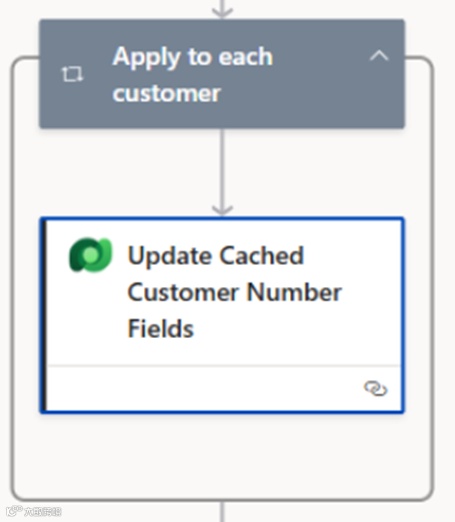
After optimization, only one core Dataverse action, "Update Cached Customer Number Fields", remained inside the loop.
经过优化后,循环内仅保留了一个核心的Dataverse操作,即“更新缓存客户编号字段”。
Optimization Results(优化成果)
I presented my findings and recommendations to the team, who promptly refactored the other market-specific flows accordingly. After rerunning the performance tests, the results were dramatic: the overall execution time in the test environment dropped to 2.5 hours from 7.5 hours—well beyond our business team’s expectations.
我向团队展示了我的发现及建议,团队随即据此对其他针对特定市场的流进行了重构。重新运行性能测试后,结果令人瞩目:测试环境中的整体执行时间从7.5小时缩短至2.5小时,远超业务团队的预期。
Business Benefits(商业效益)
The flows can handle significant large data volume (200k above) processing, which was impossible
这些流现在能够处理海量数据(20 万条以上),而这在之前是无法实现的。
The overall process runtime was reduced by more than 66.7% in the test environment with the same data volume
在测试环境中,对于相同的数据量,整体流程运行时间缩短了超过66.7%。
Even more significant performance improvements were observed in the Production environment.
在生产环境中,观察到了更为显著的性能提升。
The Power Platform request count was drastically reduced, enhancing the flow's stability and scalability.
Power Platform 的请求次数大幅减少,从而增强了工作流的稳定性和可扩展性。
Best Practices & Recommendations(最佳实践与建议)
From this case, we derive the following general best practices for Power Automate performance optimization:
从这个案例中,我们总结出以下Power Automate性能优化的通用最佳实践:
1. Isolate Critical Flows [x](分离关键流)
Principle: Allocate dedicated resources to critical flows to ensure they receive sufficient capacity and execute with priority.
原则:为关键流程分配专用资源,确保它们获得足够的处理能力并优先执行。
Methods:
Capacity Allocation: Assign fixed resources such as dedicated service accounts, or Power Automate Process licenses.
容量分配:分配诸如专用服务账户或 Power Automate 流程许可证等固定资源。
Prioritization Criteria: Define clear standards for identifying critical flows based on user experience impact and business importance.
优先级标准:基于对用户体验的影响和业务重要性,明确界定关键流的标准。
Benefits:
Enhances stability and performance of key business processes
提升关键业务流程的稳定性与性能
Prevents resource contention with non-critical workloads
防止与非关键工作负载产生资源争用。
2. Minimize Actions Inside Loops(尽量减少循环内的操作)
Principle: This is the most impactful performance optimization.
原则:这是对性能优化影响最大的一点。
Methods:
Inline: Merge simple "Compose" or variable operations directly into the final consuming action.
内联操作:将简单的 “组合(Compose)” 操作或变量操作直接合并到最终使用这些结果的操作中。
Simplification: Remove non-function actions, such as “Scope” and always false If condition in this case.
简化操作:移除无实际功能的操作,例如本案例中的 “范围(Scope)” 操作以及始终为假的条件判断(If condition)操作。
3. Push Filtering Upstream(将筛选前置)
Principle: Apply filters, sorting, and pagination at the data source (e.g., in Dataverse "List Records" or SQL "Execute Query" actions).
原则:在数据源处(例如在 Dataverse 的 “列出记录” 或SQL的“执行查询” 操作中)应用筛选、排序和分页。
Rationale: Reduces the volume of data entering the flow, minimizing the number of loop iterations from the start.
基本原理:减少进入流的数据量,从一开始就尽量减少循环迭代次数。
4. Monitor Power Platform Request Count(监控 Power Platform 请求次数)
Principle: Treat request count as a key performance metric.
原则:将请求次数视为一项关键性能指标。
Method: Regularly review environment usage in the Power Platform Admin Center to proactively identify flows at risk of hitting limits.
方法:定期在 Power Platform 管理中心查看环境使用情况,以便主动识别有达到请求次数限制风险的流。
Afterwords(后记)
As data volumes continue to grow, can we further improve performance while maintaining a low-code approach? We've already optimized the heavy loops to a single Dataverse action—the core of our ETL process. While there may be opportunities to simplify other actions outside the loop, they currently don't represent performance bottlenecks, so optimization would yield minimal gains.
随着数据量持续增长,我们能否在坚持低代码方法的同时进一步提升性能呢?我们已经将繁重的循环优化为单个Dataverse 操作,这是我们ETL 流程的核心。虽然在循环之外的其他操作或许还有简化的空间,但目前它们并非性能瓶颈,所以优化带来的收益微乎其微。
This outcome does not indicate that our low-code strategy using Power Automate has reached its limits for this use case. Multiple scaling pathways remain to be explored.
这一结果并不意味着在这个用例中,我们基于Power Automate 的低代码策略已达极限。仍有多种可拓展的途径有待探索。
Dataverse Bulk Operations: Consider implementing Dataverse's Bulk Operation APIs to replace the current iterative update pattern, which could deliver exponential performance improvements. [xi]
Dataverse 的批量操作: 考虑采用Dataverse 的批量操作 API 来取代当前的迭代更新模式,这有望带来指数级的性能提升。
While not yet supported directly by the Dataverse connector, this functionality can be implemented using the HTTP with Microsoft Entra ID connector [xii]. Given our endpoint controls within the DLP policy, this approach requires:
尽管Dataverse 连接器目前尚未直接支持此功能,但可通过“带Microsoft Entra ID 的 HTTP 连接器” 来实现。鉴于我们在数据丢失防护(DLP)策略中的端点控制,此方法需要:
A cybersecurity review prior to connecting to any external URL (in this case, the Power Platform environment URL)
在连接任何外部URL(在此例中为 Power Platform 环境 URL)之前进行网络安全审查。
Whitelisting the environment URL in the endpoint list for the HTTP with Microsoft Entra ID connector within the DLP policy [xiii]
在DLP策略中,将环境 URL列入“带 Microsoft Entra ID 的 HTTP 连接器” 的端点列表白名单中。
In the financial services industry, these security reviews typically have long lead times, but they're an essential part of the process.
在金融服务行业,这些安全审查通常耗时较长,但却是流程中必不可少的部分。
Power Automate Process plan: Use Power Automate Process plan to increase the PPR capacity. [xiv]
Power Automate 流程计划:使用Power Automate 流程计划来提高PPR容量。
It is worth noting that the team had already implemented several performance optimization best practices prior to my deeper analysis, including enabling concurrency control in "Apply to Each" loops [xv]and reducing table sizes by selecting only necessary columns [xvi]. For additional insights, see Microsoft documentation at endnote or Matthew Devaney's excellent blog post, "Power Automate Standards: Performance Optimization"
值得注意的是,在我进行更深入分析之前,团队就已实施了多项性能优化最佳实践,包括在“应用到每个” 循环中启用并发控制,以及仅选择必要列以减小表尺寸。如需更多见解,可参考文末的微软文档,或 Matthew Devaney 的精彩博文"Power Automate Standards: Performance Optimization"。
About me(关于作者)

你好!我叫袁霍东,来自中国广东一个迷人的城市 —— 兴宁。我在广州上大学并工作了 22 年。目前,我居住在繁华的大都市 —— 香港。
我在信息技术领域拥有超过 18 年的经验,在多个技术方向上磨炼并积累了自己的技能与专长。我的职业生涯始于 C++ 和 C# 开发,在过去的四年里,我的工作重心转向了微软 Power Platform 技术。我的工作主要是利用
Azure 和 Microsoft 365 产品来扩展 Power Platform 的能力,帮助企业通过技术投资实现更多价值。
我与来自奔步科技(Bamboo Technologies)的团队成员一起,已成功为大型企业交付了多个大型业务应用,其中包括一些来自银行、保险和工业领域的重要客户。在这些行业中,严格的安全与合规控制至关重要。
我拥有多项微软认证,包括:
Power Platform Solutions Architect
Power Platform Functional Consultant
Power Platform Developer
Power BI Data Analyst
Power Automate RPA Developer
Azure Solutions Architect
Azure DevOps Engineer
Cybersecurity Architect
我热衷于通过博客分享知识和见解,探讨微软技术世界的最新趋势、技巧和最佳实践。我诚挚邀请你加入我的旅程,与我一同探索这个不断演进的 IT 世界。
微信官方账号: Power Platform 企业应用
小红书: Power Platform 企业应用
LinkedIn: yuan-huodong
X: @YuanHuodong
________________________________________
[i]Create and use dataflows in Power Apps - Power Apps | Microsoft Learn
[ii]Ingest Dataverse data with Azure Data Factory - Power Apps | Microsoft Learn
[iii]What Is a Minimum Viable Product? | Coursera
[iv]Principles behind the Agile Manifesto
[v]Power Platform for Enterprise: Overcoming Email Throttling with Innovative Load Balancing | LinkedIn
[vi]Licensed user request limits - Requests limits and allocations - Power Platform | Microsoft Learn
[vii]Power Automate analytics - Training | Microsoft Learn
[viii]Power Platform request limits - Limits of automated, scheduled, and instant flows - Power Automate | Microsoft Learn
[ix]What counts as Power Platform request? - Power Automate licensing FAQ - Power Platform | Microsoft Learn
[x]Isolate critical flows - Prioritize the performance of critical flows recommendation for Power Platform workloads - Power Platform | Microsoft Learn
[xi]Bulk operation APIs - Optimize performance for bulk operations - Power Apps | Microsoft Learn
[xii]HTTP with Microsoft Entra ID (preauthorized) - Connectors | Microsoft Learn
[xiii]HTTP with Microsoft Entra ID - Connector endpoint filtering (preview) - Power Platform | Microsoft Learn
[xiv]Isolate critical flows - Prioritize the performance of critical flows recommendation for Power Platform workloads - Power Platform | Microsoft Learn
[xv]Optimize flows with parallel execution and concurrency - Power Automate | Microsoft Learn
[xvi]Work only with relevant data - Power Automate | Microsoft Learn