



M
点击蓝字 / 微软开发者MSDN
关注我们
作者:Tomas Vesely
排版:Alan Wang
我最新的应用是完全用 Markdown 编写的,然后让 GitHub Copilot 将其编译为 Go。这样做的结果是:规范更清晰、迭代更快速,而且再也不会丢失上下文。✨
使用 GitHub Copilot 等 AI 编码 agent 的常见工作流程其实很简单:
“编写一个能执行 X 的应用 A。”
你从这个种子开始,然后不断迭代:
“添加功能 Y”、“修复 Bug Z”。
这种方式是可行的——至少在 Agent 没有忘记你应用的目标或过去的设计决策之前。
如果你刚开始接触 AI 编码 Agent,这种变化可能是很微妙的。突然之间, Agent 会要求你重复已经解释过的内容,或者提出忽略你先前指令的修改建议。
有时,它会忘记某个功能存在的原因,甚至提出与早期决策相矛盾的解决方案。
一些 AI 编码 Agent 尝试通过支持自定义说明文件来解决这个问题。 例如,GitHub Copilot 支持 copilot-instructions.md 文件。你可以把应用的目标和设计决策写在这个 Markdown 文件中,GitHub Copilot 每次生成代码时都会读取它。
但当我在“编码冲刺”中时,我常常会忘记在让 Copilot 执行任务后去更新 copilot-instructions.md。把同样的信息既写在聊天提示里,又写进说明文件里,显得有些多余。
支持
https://docs.github.com/en/copilot/how-tos/configure-custom-instructions/add-repository-instructions?tool=vscode/?wt.mc_id=3reg_webpage_reactor
Spec Kit 提供了一套结构化流程,让你可以在 GitHub Copilot、Claude Code、Gemini CLI 等 AI 编码 Agent 中实践规范驱动开发。此外,它是开源的(我们也在持续更新中)。
👉 在 GitHub 上开始使用 Spec Kit
这让我开始思考:如果我把整个应用都“写”在 Markdown 说明文件中,会怎样?
在我最新的个人项目——GitHub Brain MCP Server 中,我尝试了这种方法:在 Markdown 中编写应用代码,然后让 GitHub Copilot 将其编译为 Go 代码。结果,我几乎不再直接编辑或查看 Go 源码。
这种流程理论上适用于任何 AI 编码 Agent 与编程语言,不过下面我会以 VS Code、GitHub Copilot 和 Go 作为示例,并以 GitHub Brain MCP Server 作为贯穿全文的案例。
那就开始吧。
在 GitHub 上开始使用 Spec Kit
https://github.blog/ai-and-ml/generative-ai/spec-driven-development-with-ai-get-started-with-a-new-open-source-toolkit/?wt.mc_id=3reg_webpage_reactor
GitHub Brain MCP Server
https://github.com/wham/github-brain/?wt.mc_id=3reg_webpage_reactor
共有四个关键文件:
.├── .github/│ └── prompts/│ └── compile.prompt.md├── main.go├── main.md└── README.md
整体思路是:我在 README.md 或 main.md 中编辑内容来开发应用,再调用 compile.prompt.md 让 AI 编码 Agent 生成 main.go,然后像普通 Go 应用一样构建并运行。接下来,我会逐个拆解这些文件与对应流程。
README.md:面向用户的文档
示例应用 GitHub Brain MCP Server 是一个命令行工具。它的 README.md 提供了清晰的安装与使用说明。如果你写的是库文件,这里应包含 API 文档。以下是该示例 README.md 的简化片段:
# GitHub Brain MCP Server**GitHub Brain** is an experimental MCP server for summarizing GitHub discussions, issues, and pull requests.## Usage```shgo run main.go <command> [<args>]```**Workflow:**1. Populate the local database with the `pull` command.2. Start the MCP server with the `mcp` command.### `pull`Populate the local database with GitHub data.Example:```shgo run main.go pull -o my-org```Arguments:- `-t`: Your GitHub personal access token. **Required.**- `-o`: The GitHub organization to pull data from. **Required.**- `-db`: Path to the SQLite database directory. Default: `db` folder in the current directory.### `mcp`Start the MCP server using the local database....README.md continues...
这里没有什么特别的内容,只是常规的文档。但当这个文件被包含进 main.md 时,事情就变得有趣了。
GitHub Brain MCP Server
https://github.com/wham/github-brain/?wt.mc_id=3reg_webpage_reactor
README.md
https://github.com/wham/github-brain/blob/main/README.md/?wt.mc_id=3reg_webpage_reactor
main.md:AI 编码 Agent 规范
main.md 是该应用程序的实际源代码:一个用 Markdown 编写的指令文件。每当我需要添加功能或修复错误时,我都会编辑这个文件。以下是示例应用程序 main.md 的开头部分:
# GitHub Brain MCP ServerAI coding agent specification. User-facing documentation in [README.md](README.md).## CLIImplement CLI from [Usage](README.md#usage) section. Follow exact argument/variable names. Support only `pull` and `mcp` commands.## pull- Resolve CLI arguments and environment variables into `Config` struct:- `Organization`: Organization name (required)- `GithubToken`: GitHub API token (required)- `DBDir`: SQLite database path (default: `./db`)- Use `Config` struct consistently, avoid multiple environment variable reads- Pull items: Repositories, Discussions, Issues, Pull Requests, Teams- Use `log/slog` custom logger for last 5 log messages with timestamps in console output...main.md continues...
请注意:README.md 被直接嵌入在规范中。这样可以保证文档与实现保持一致。如果我要为 -o 参数增加一个别名,只需修改 README.md 即可,无需额外步骤。
以下是示例应用程序 main.md 的另一段代码片段:
### Discussions- Query discussions for each repository with `has_discussions_enabled: true`- Record most recent repository discussion `updated_at` timestamp from database before pulling first page```graphql{repository(owner: "<organization>", name: "<repository>") {discussions(first: 100, orderBy: { field: UPDATED_AT, direction: DESC }) {nodes {urltitlebodycreatedAtupdatedAtauthor {login}}}}}```- If repository doesn't exist, remove the repository, and all associated items from the database and continue- Query discussions ordered by most recent `updatedAt`- Stop pulling when hitting discussions with `updatedAt` older than recorded timestamp- Save or update by primary key `url`- Preserve the discussion markdown body...main.md continues...
这其实就是在用 Markdown 和自然语言进行编程:存变量、写循环、设条件。拥有类似 if、foreach、continue 等逻辑结构。它融合了结构化与声明式风格,用 Markdown 链接 []() 来充当导入。
数据库模式同样写在 Markdown 中:
## DatabaseSQLite database in `{Config.DbDir}/{Config.Organization}.db` (create folder if needed). Avoid transactions. Save each GraphQL item immediately.### Tables#### table:repositories- Primary key: `name`- Index: `updated_at`- `name`: Repository name (e.g., `repo`), without organization prefix- `has_discussions_enabled`: Boolean indicating if the repository has discussions feature enabled- `has_issues_enabled`: Boolean indicating if the repository has issues feature enabled- `updated_at`: Last update timestamp...main.md continues...
main.md
https://github.com/wham/github-brain/blob/main/main.md/?wt.mc_id=3reg_webpage_reactor
README.md
http://readme.md/?wt.mc_id=3reg_webpage_reactor
compile.prompt.md:AI 编译提示文件
compile.prompt.md 使用 GitHub Copilot 的提示文件格式,它指示 Agent 将 main.md 编译为 main.go。以下是示例应用程序中的 compile.prompt.md 文件内容:
---mode: agent---- Update the app to follow [the specification](../../main.md)- Build the code with the VS Code tasks. Avoid asking me to run `go build` or `go test` commands manually.- Fetch the GitHub home page for each used library to get a documentation and examples.
我让这个提示尽量简洁,因为真正的信息都在 main.md 中。虽然它用的是 GitHub Copilot 的格式,但简单设计让它能轻松移植到其他 Agent 中。
提示文件
https://docs.github.com/en/copilot/tutorials/customization-library/prompt-files/your-first-prompt-file/?wt.mc_id=3reg_webpage_reactor
compile.prompt.md
https://github.com/wham/github-brain/blob/main/.github/prompts/compile.prompt.md/?wt.mc_id=3reg_webpage_reactor
main.md
http://main.md/?wt.mc_id=3reg_webpage_reactor
整个开发循环很直接:
编辑 main.md 或 README.md 中的规范
让 AI 编码 Agent 将其编译为 Go 代码
运行并测试
若结果不符合预期,再更新规范
在 VS Code 的 Copilot 中,只需使用 / 命令调用对应提示。
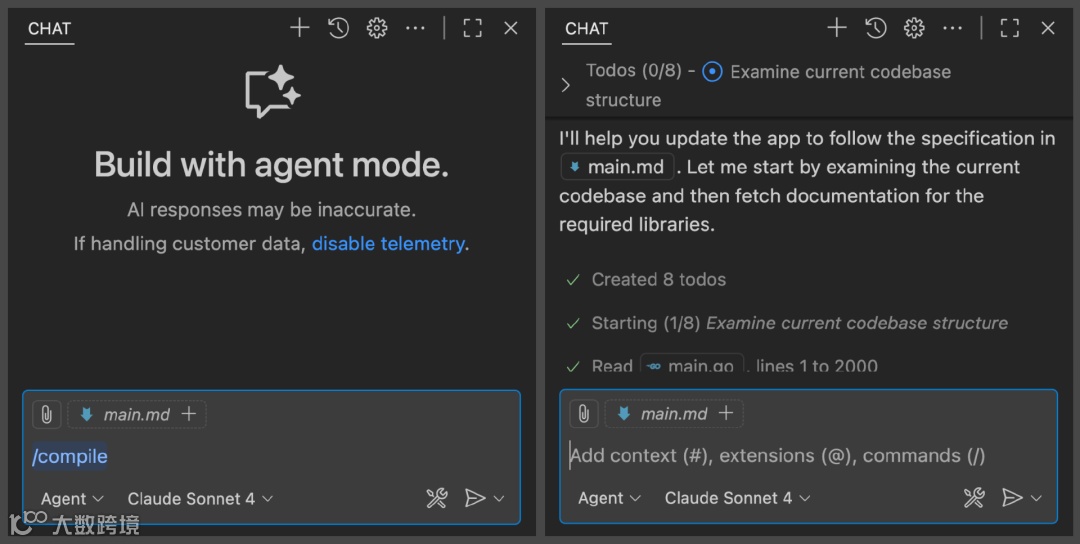
对于较小的规格说明,GitHub Copilot 通常会自动捕捉更改。随着规格说明变大,我会通过在提示末尾添加“focus on <the-change>”来引导它朝正确方向调整。
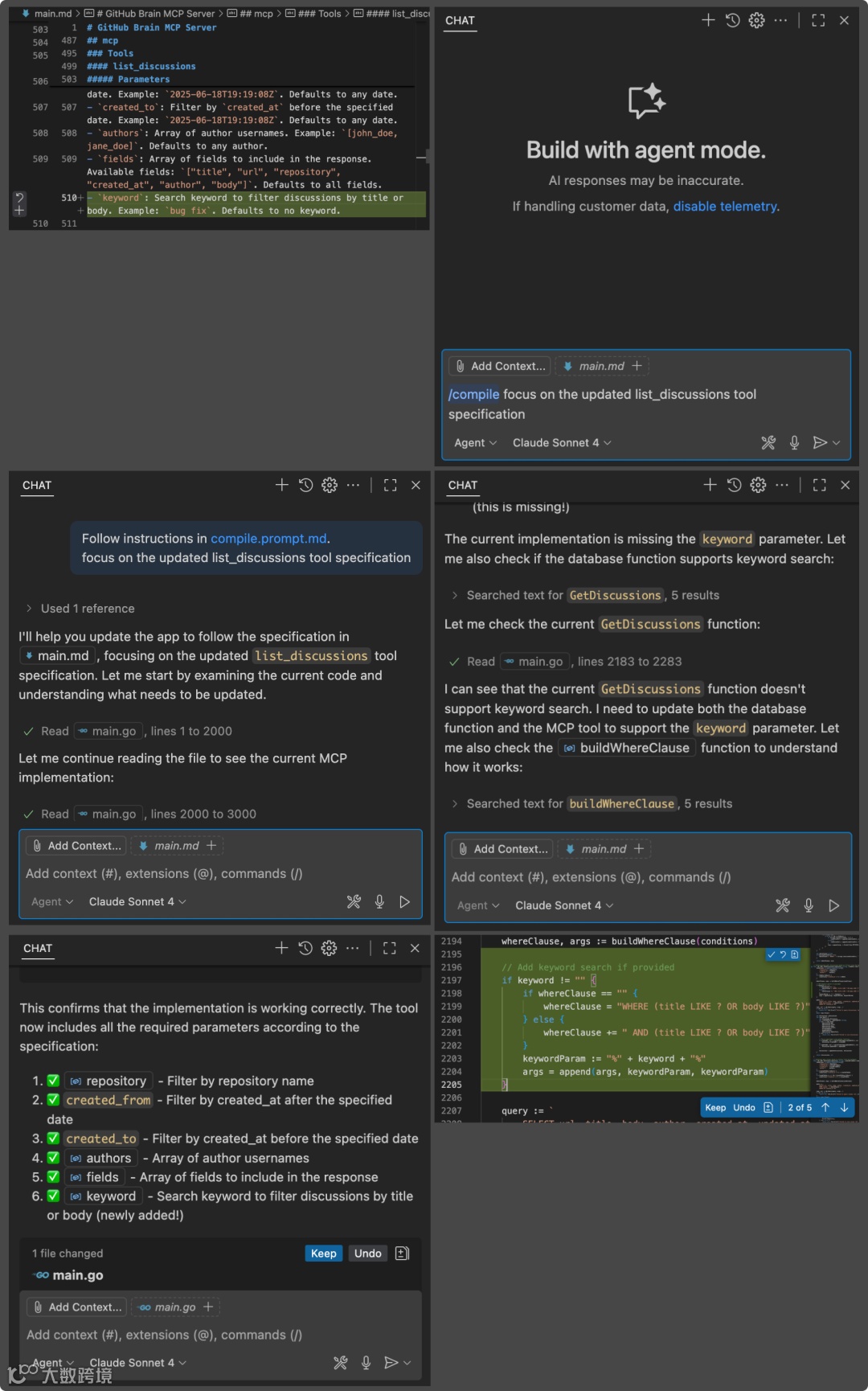
编码
在 main.md 中编码有时比直接编写 Go 代码更难 。你必须清楚地描述你想要的内容,而这可能是软件开发中最难的部分 😅。幸运的是,你可以像日常使用 GitHub Copilot 编写 Go 代码一样,让它来帮你完成这部分工作。
这里我们让它为 main.md 中的所有 MCP 工具添加分页。Copilot 不仅帮我们节省了重复操作的时间,还会推荐合适的分页风格和参数名称。
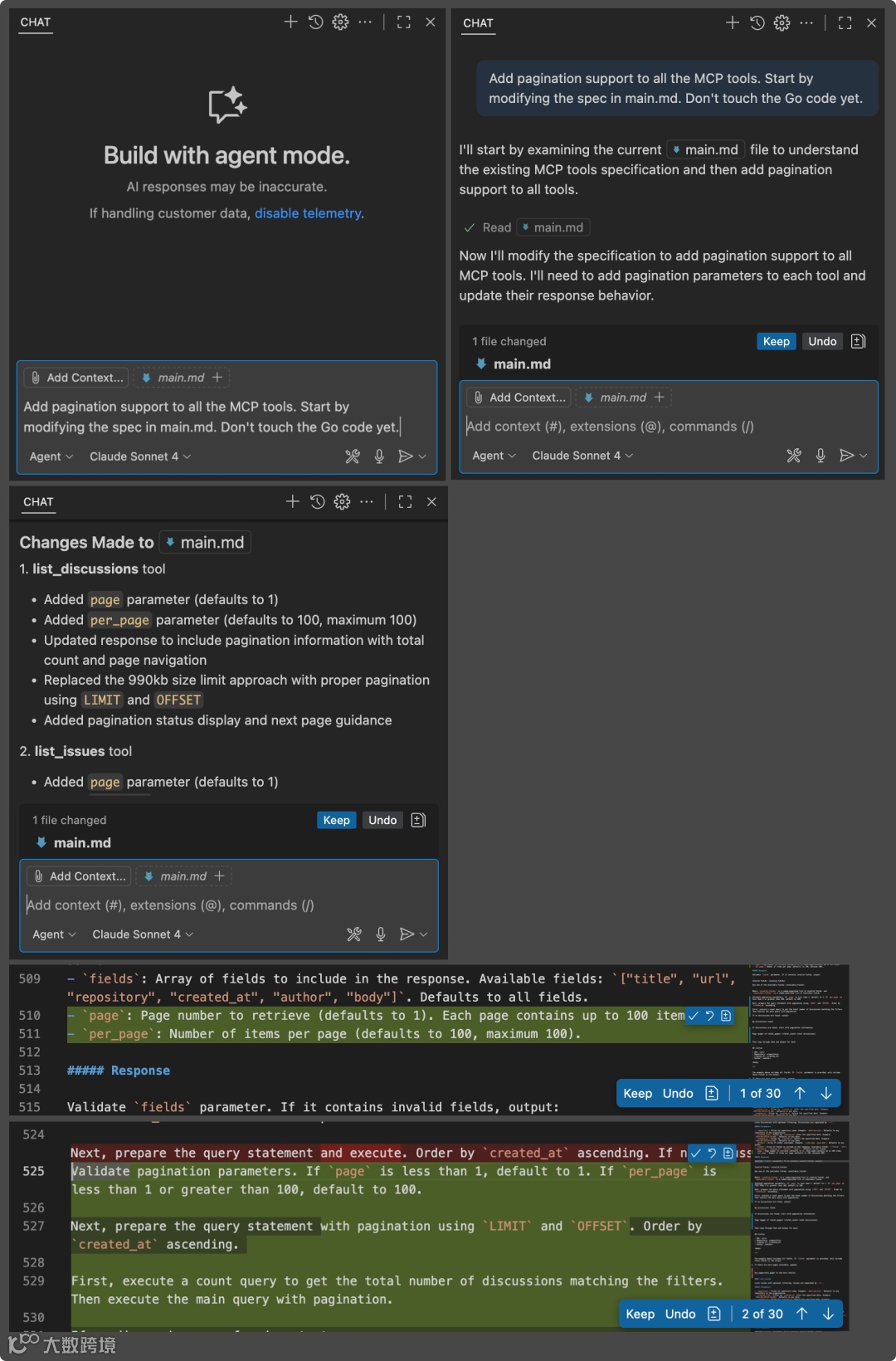
代码整理
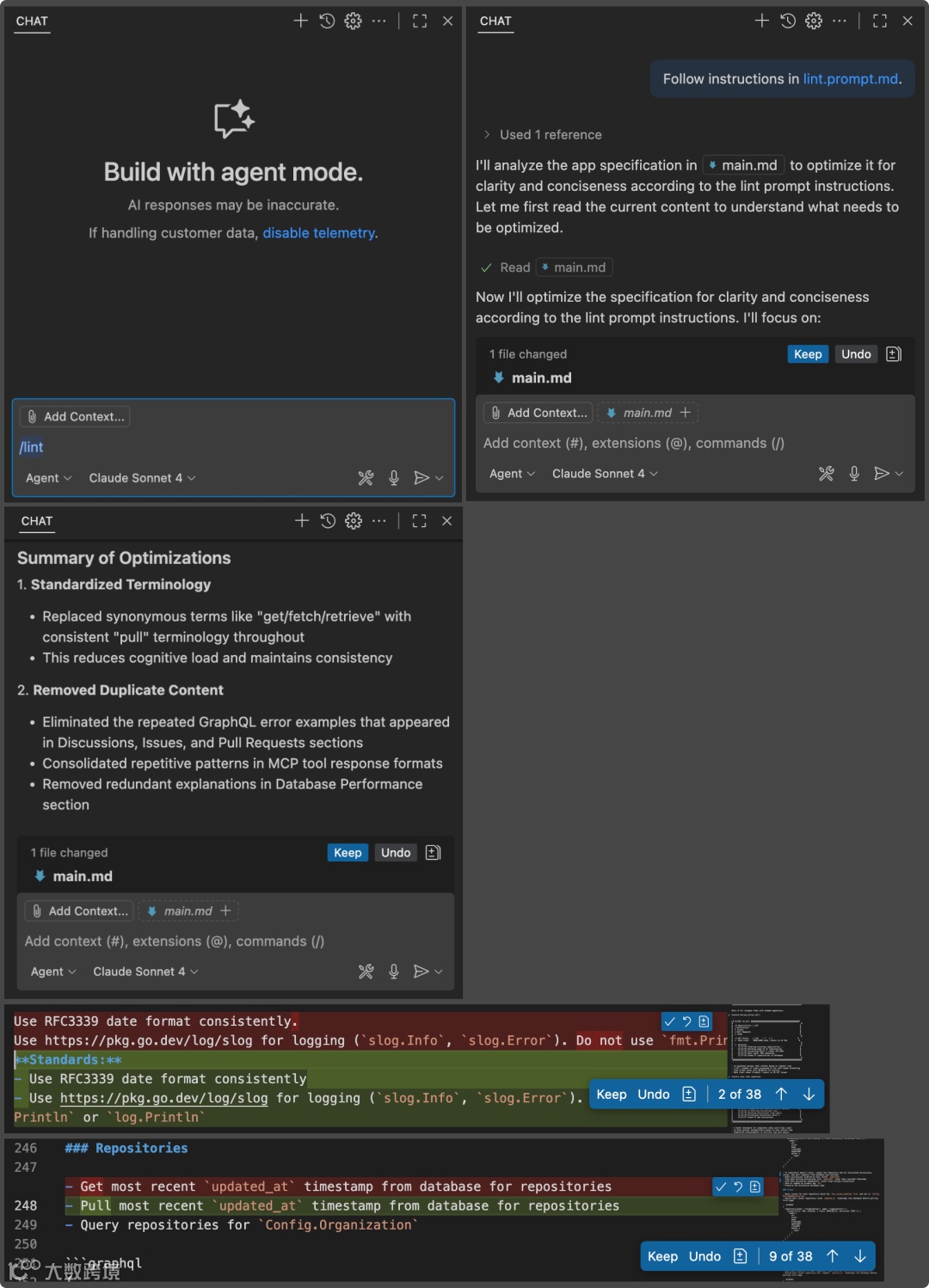
main.md 也会像任何代码一样变得凌乱。你可以请 Copilot 来清理它。示例应用的 lint.prompt.md 内容如下:
---mode: agent---- Optimize [the app specification](../../main.md) for clarity and conciseness- Treat the english language as a programming language- Minimize the number of synonyms - i.e. pull/get/fetch. Stick to one term.- Remove duplicate content- Preserve all important details- Do not modify the Go code withthis. Only optimize the Markdown file.- Do not modify this prompt itself.
同样地,我通过 / 命令调用它,AI 编码 Agent 会优化 main.md,若结果满意,再使用 compile.prompt.md 将其编译为 Go 代码。
lint.prompt.md
https://github.com/wham/github-brain/blob/main/.github/prompts/lint.prompt.md/?wt.mc_id=3reg_webpage_reactor
经过几个月的实践,我的观察如下:
它确实有效!而且随着 Copilot 的 Agent 功能更新越来越好。
编译速度会随着 main.go 的增长而变慢。我接下来想做的事情是修改规范,将编译后的代码拆分成多个模块——通过添加“Break each ## section into its own code module.”。
测试?我还没加上测试。但即使是规范驱动开发,测试仍然必不可少。 规范描述“期望行为”,测试验证“实际行为”。
我还想尝试的另一件事: 丢弃所有 Go 代码,直接让 AI 用另一种语言重新生成整个应用。新代码能立即正常运行吗?
AI 编码领域的快速进步令人鼓舞,希望我的这些实验性流程,能给你带来一些可实践的灵感。

微信公众号|微软开发者MSDN
新浪微博|微软中国MSDN
·END·