


机器规划
|
|
|
|
|
|---|---|---|---|
|
|
|
|
|
|
|
|
|
|
|
|
|
|
|
前期准备

三个节点设置免密登录
K8s-1上执行
 ssh-copy-id root@k8s-2
 ssh-copy-id root@k8s-3
后续kubeadm初始化会在k8s-1节点上操作

确保更新debian系统到最新,移除不再需要的软件,清理无用的安装包:
sudo apt update && sudo apt full-upgrade -y
sudo apt autoremove
sudo apt autoclean

apt install -y ntpsec-ntpdate
crontab设置定时同步时间
*/5 * * * * /usr/sbin/ntpdate cn.pool.ntp.org &> /dev/null

apt install ipvsadm ipset sysstat conntrack -y

root@k8s-2:~# cat >> /etc/modules-load.d/ipvs.conf <<EOF
ip_vs
ip_vs_rr
ip_vs_wrr
ip_vs_sh
nf_conntrack
ip_tables
ip_set
xt_set
ipt_set
ipt_rpfilter
ipt_REJECT
ipip
EOF

临时关闭
sudo swapoff -a
可以编辑/etc/fstab永久关闭
在 /etc/fstab 中 swap 分区这行前加 #
# UUID=643eef2a-5712-4d76-9887-f0b2e36533ea none swap sw 0 0
或者
sudo sed -i '/ swap / s/^\(.*\)$/#\1/g' /etc/fstab

hostnamectl  hostname k8s-1
hostnamectl  hostname k8s-2
hostnamectl  hostname k8s-3

编辑 /etc/hosts文件 添加
192.168.2.101 k8s-1
192.168.2.102 k8s-2
192.168.2.103 k8s-3

cat <<EOF | sudo tee /etc/modules-load.d/k8s.conf
overlay
br_netfilter
EOF
执行
sudo modprobe overlay
sudo modprobe br_netfilter

写入配置文件永久生效
cat <<EOF | sudo tee /etc/sysctl.d/k8s.conf
net.bridge.bridge-nf-call-iptables  = 1
net.bridge.bridge-nf-call-ip6tables = 1
net.ipv4.ip_forward                 = 1
EOF
保存后执行命令立即生效
sudo sysctl --system
安装containerd

这里手动安装containerd,下载containerd
root@k8s-2:/home/ls# wget https://github.com/containerd/containerd/releases/download/v2.1.4/containerd-2.1.4-linux-amd64.tar.gz
root@k8s-2:/home/ls# tar -xzf containerd-2.1.4-linux-amd64.tar.gz -C /usr/local/
root@k8s-2:/home/ls# ls /usr/local/bin/
containerd  containerd-shim-runc-v2  containerd-stress  ctr
root@k8s-2:/home/ls# cont
containerd               containerd-shim-runc-v2  containerd-stress        continue
root@k8s-2:/home/ls# containerd -v
containerd github.com/containerd/containerd/v2 v2.1.4 75cb2b7193e4e490e9fbdc236c0e811ccaba3376

cat > /etc/systemd/system/containerd.service <<EOF
[Unit]
Description=containerd container runtime
Documentation=https://containerd.io
After=network.target local-fs.target

[Service]
ExecStartPre=-/sbin/modprobe overlay
ExecStart=/usr/local/bin/containerd
Type=notify
Delegate=yes
KillMode=process
Restart=always
RestartSec=5
LimitNPROC=infinity
LimitCORE=infinity
LimitNOFILE=infinity
TasksMax=infinity
OOMScoreAdjust=-999

[Install]
WantedBy=multi-user.target
EOF

# 创建默认配置文件
mkdir -p /etc/containerd
containerd config default | tee /etc/containerd/config.toml

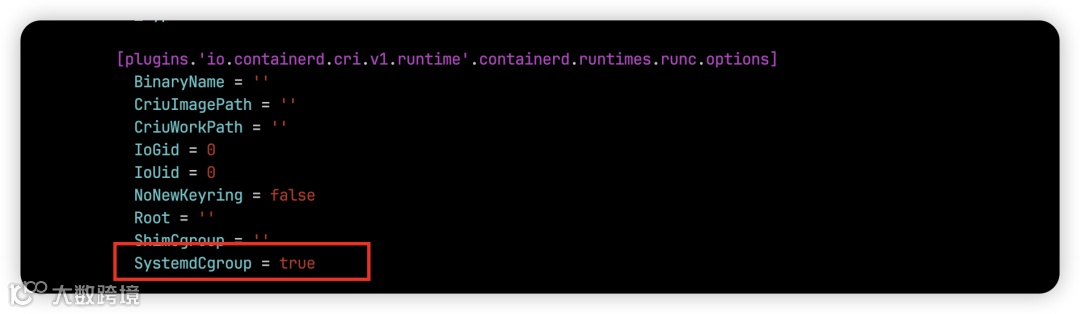
修改Containerd的配置文件,找到containerd.runtimes.runc.options,添加SystemdCgroup = true
cat /etc/containerd/config.toml | grep SystemdCgroup
#如果grep能差到就执行sed命令替换,找不到就自己手动添加
sed -i "s#SystemdCgroup\ \=\ false#SystemdCgroup\ \=\ true#g" /etc/containerd/config.toml
修改沙箱pause镜像
root@k8s-2:/home/ls# sed  -i 's#registry.k8s.io#registry.aliyuncs.com/google_containers#g' /etc/containerd/config.toml
root@k8s-2:/home/ls# cat /etc/containerd/config.toml | grep sandbox
      sandbox = 'registry.aliyuncs.com/google_containers/pause:3.10'
          sandboxer = 'podsandbox'

在配置文件的[plugins.'io.containerd.cri.v1.images'.registry]项下添加
# 配置加速器
root@k8s-2:/home/ls# vim /etc/containerd/config.toml
root@k8s-2:/home/ls# cat /etc/containerd/config.toml | grep certs.d -C 5
    [plugins.'io.containerd.cri.v1.images'.pinned_images]
      sandbox = 'registry.aliyuncs.com/google_containers/pause:3.10'
    [plugins.'io.containerd.cri.v1.images'.registry]
      config_path = '/etc/containerd/certs.d'   ##修改这里
    [plugins.'io.containerd.cri.v1.images'.image_decryption]
      key_model = 'node'
  [plugins.'io.containerd.cri.v1.runtime']
创建加速器配置文件
root@k8s-2:/home/ls# mkdir /etc/containerd/certs.d/docker.io -pv
root@k8s-2:/home/ls# cat > /etc/containerd/certs.d/docker.io/hosts.toml << EOF
server = "https://docker.io"
[host."https://docker.m.daocloud.io"]
  capabilities = ["pull", "resolve"]

[host."https://docker.1panel.live"]
  capabilities = ["pull", "resolve"]

[host."https://hub.rat.dev"]
  capabilities = ["pull", "resolve"]

###server:被加速的服务器访问地址; host:镜像加速器地址; capabilities:镜像加速器提供的加速服务类型。

设置为开机启动
root@k8s-2:/home/ls# systemctl  enable --now containerd
Created symlink '/etc/systemd/system/multi-user.target.wants/containerd.service' → '/etc/systemd/system/containerd.service'.
这里推荐一下contained客户端工具 nerdctl ,比crictl体验更好,这里使用nerdctl查看一下info信息
root@k8s-2:/home/ls/demo/bin# nerdctl  info
Client:
 Namespace:     default
 Debug Mode:    false
Server:
 Server Version: v2.1.4
 Storage Driver: overlayfs
 Logging Driver: json-file
 Cgroup Driver: systemd
 Cgroup Version: 2
 Plugins:
  Log:     fluentd journald json-file none syslog
  Storage: native overlayfs
 Security Options:
  apparmor
  seccomp
   Profile: builtin
  cgroupns
 Kernel Version:   6.12.43+deb13-amd64
 Operating System: Debian GNU/Linux 13 (trixie)
 OSType:           linux
 Architecture:     x86_64
 CPUs:             4
 Total Memory:     3.793GiB
 Name:             k8s-2
 ID:               9201a50a-2d6f-4c99-8b00-80bcfd4bb1f4
安装runc
安装runc,不安装这个kubelet无法创建pod
wget https://github.com/opencontainers/runc/releases/download/v1.3.0/runc.amd64
install -m 755 runc.amd64 /usr/local/sbin/runc
cp -p /usr/local/sbin/runc  /usr/local/bin/runc
cp -p /usr/local/sbin/runc  /usr/bin/runc
kubeadm
apt install -y apt-transport-https ca-certificates curl gpg

curl -fsSL https://mirrors.tuna.tsinghua.edu.cn/kubernetes/core:/stable:/v1.34/deb/Release.key | gpg --dearmor -o /etc/apt/keyrings/kubernetes-apt-keyring.gpg

echo "deb [signed-by=/etc/apt/keyrings/kubernetes-apt-keyring.gpg] https://mirrors.tuna.tsinghua.edu.cn/kubernetes/core:/stable:/v1.34/deb/ /" | tee /etc/apt/sources.list.d/kubernetes.list

sudo apt update
sudo apt-get install -y kubelet kubeadm kubectl
#a安装后验证一下版本
root@k8s-3:/home/ls# kubectl version --client && echo && kubeadm version
Client Version: v1.34.0
Kustomize Version: v5.7.1
kubeadm version: &version.Info{Major:"1", Minor:"34", EmulationMajor:"", EmulationMinor:"", MinCompatibilityMajor:"", MinCompatibilityMinor:"", GitVersion:"v1.34.0", GitCommit:"f28b4c9efbca5c5c0af716d9f2d5702667ee8a45", GitTreeState:"clean", BuildDate:"2025-08-27T10:15:59Z", GoVersion:"go1.24.6", Compiler:"gc", Platform:"linux/amd64"}
启动kubelet
确指定kubelet的CGroup驱动为systemd,修改/etc/default/kubelet文件,内容如下:
KUBELET_EXTRA_ARGS="--cgroup-driver=systemd"
设置为开机启动
systemctl enable kubelet --now
我机器是Debian 13 minimal 安装,默认没有 persistent journal ,无法使用journalctl 查看kubelet日志,可以先确认 journal 是否启用:
sudo journalctl --list-boots
如果没有日志或显示空,可能需要启用 persistent journal:
sudo mkdir -p /var/log/journal
sudo systemd-tmpfiles --create --prefix /var/log/journal
sudo systemctl restart systemd-journald
创建负载均衡
三个节点上安装 haproxy和keepalived
apt -y install keepalived haproxy
备份一下haproxy配置文件
cp /etc/haproxy/haproxy.cfg /etc/haproxy/haproxy.cfg-bak
创建新配置文件
cat >/etc/haproxy/haproxy.cfg<<"EOF"
global
 maxconn 2000
 ulimit-n 16384
log 127.0.0.1 local0 err
 stats timeout 30s

defaults
log global
 mode http
 option httplog
timeout connect 5000
timeout client 50000
timeout server 50000
timeout http-request 15s
timeout http-keep-alive 15s


frontend monitor-in
bind *:33305
 mode http
 option httplog
 monitor-uri /monitor

frontend k8s-master
bind 0.0.0.0:9443
bind 127.0.0.1:9443
 mode tcp
 option tcplog
 tcp-request inspect-delay 5s
 default_backend k8s-master


backend k8s-master
 mode tcp
 option tcplog
 option tcp-check
 balance roundrobin
 default-server inter 10s downinter 5s rise 2 fall 2 slowstart 60s maxconn 250 maxqueue 256 weight 100
 server  k8s-1  192.168.2.101:6443 check
 server  k8s-2  192.168.2.102:6443 check
 server  k8s-3  192.168.2.103:6443 check
EOF
备份keepalived配置文件
cp /etc/keepalived/keepalived.conf /etc/keepalived/keepalived.conf.bak
修改keepalived配置文件
K8s-1:
cat > /etc/keepalived/keepalived.conf << EOF
! Configuration File for keepalived

global_defs {
    router_id LVS_DEVEL
}
vrrp_script chk_apiserver {
    #script "/etc/keepalived/check_port.sh 9443 "
    script "/etc/keepalived/check_port.sh  "
    interval 5
    weight -5
    fall 2
    rise 1
}
vrrp_instance VI_1 {
    state MASTER
    interface ens33                #本机网卡名
    mcast_src_ip 192.168.2.101   #本机ip地址
    virtual_router_id 51
    priority 100                   #本机权重
    nopreempt
    advert_int 2
    authentication {
        auth_type PASS
        auth_pass K8SHA_KA_AUTH
    }
    virtual_ipaddress {
        192.168.2.105             #VIP
    }
    track_script {
      chk_apiserver
} }

EOF
K8s-2:
root@k8s-2:~# cat /etc/keepalived/keepalived.conf
! Configuration File for keepalived

global_defs {
    router_id LVS_DEVEL
}
vrrp_script chk_apiserver {
    #script "/etc/keepalived/check_port.sh 9443 "
    script "/etc/keepalived/check_port.sh  "
    interval 5
    weight -5
    fall 2
    rise 1
}
vrrp_instance VI_1 {
    state BACKUP
    interface ens33                #本机网卡名
    mcast_src_ip 192.168.2.102   #本机ip地址
    virtual_router_id 51
    priority 98                   #本机权重
    nopreempt
    advert_int 2
    authentication {
        auth_type PASS
        auth_pass K8SHA_KA_AUTH
    }
    virtual_ipaddress {
        192.168.2.105             #VIP
    }
    track_script {
      chk_apiserver
} }
K8s-3:
root@k8s-3:~# cat /etc/keepalived/keepalived.conf
! Configuration File for keepalived

global_defs {
    router_id LVS_DEVEL
}
vrrp_script chk_apiserver {
    #script "/etc/keepalived/check_port.sh 9443 "
    script "/etc/keepalived/check_port.sh  "
    interval 5
    weight -5
    fall 2
    rise 1
}
vrrp_instance VI_1 {
    state BACKUP
    interface ens33                #本机网卡名
    mcast_src_ip 192.168.2.103   #本机ip地址
    virtual_router_id 51
    priority 97                  #本机权重
    nopreempt
    advert_int 2
    authentication {
        auth_type PASS
        auth_pass K8SHA_KA_AUTH
    }
    virtual_ipaddress {
        192.168.2.105             #VIP
    }
    track_script {
      chk_apiserver
} }
创建keepalived健康检查脚本
root@k8s-1:~# cat /etc/keepalived/check_port.sh
#!/bin/bash
err=0
for k in $(seq 1 3); do
    if ! pgrep haproxy >/dev/null; then
        err=$((err + 1))
        sleep 1
        continue
    else
        err=0
        break
    fi
done
if [[ $err != 0 ]]; then
    echo"Stopping keepalived because haproxy is not running"
    /usr/bin/systemctl stop keepalived
    exit 1
else
    exit 0
fi

root@k8s-1:~# chmod +x /etc/keepalived/check_port.sh
也可以用这个脚本
cat > /etc/keepalived/check_port.sh <<'EOF'
#!/bin/bash

CHK_PORT=9443
if [ -n "$CHK_PORT" ];then
    PORT_PROCESS=`ss -lt|grep $CHK_PORT|wc -l`
    if [ $PORT_PROCESS -eq 0 ];then
        echo "Port $CHK_PORT Is Not Used,End."
        systemctl stop keepalived
    fi
else
    echo "Check Port Cant Be Empty!"
fi
EOF
chmod +x /etc/keepalived/check_port.sh
三个节点上启动haproxy
#所有节点启动 haproxy 服务

systemctl enable --now haproxy
systemctl restart haproxy
systemctl status haproxy
ss -ntl | egrep "9443|33305"
基于 webUI 进行验证
curl http://192.168.2.101:33305/monitor
curl http://192.168.2.102:33305/monitor
curl http://192.168.2.102:33305/monitor
正确的应该是如下
root@k8s-1:~/kubeadm# curl http://192.168.2.101:33305/monitor
<html><body><h1>200 OK</h1>
Service ready.
</body></html>
启动keepalived
systemctl daemon-reload
systemctl enable --now keepalived
systemctl status keepalived
启动正常,vip 192.168.2.105 已经被绑定到k8s-1节点上
root@k8s-1:~# ip a
1: lo: <LOOPBACK,UP,LOWER_UP> mtu 65536 qdisc noqueue state UNKNOWN group default qlen 1000
    link/loopback 00:00:00:00:00:00 brd 00:00:00:00:00:00
    inet 127.0.0.1/8 scope host lo
       valid_lft forever preferred_lft forever
    inet6 ::1/128 scope host noprefixroute
       valid_lft forever preferred_lft forever
2: ens33: <BROADCAST,MULTICAST,UP,LOWER_UP> mtu 1500 qdisc fq_codel state UP group default qlen 1000
    link/ether 00:0c:29:b4:94:d5 brd ff:ff:ff:ff:ff:ff
    altname enp2s1
    altname enx000c29b494d5
    inet 192.168.2.101/24 brd 192.168.2.255 scope global ens33
       valid_lft forever preferred_lft forever
    inet 192.168.2.105/32 scope global proto keepalived ens33
       valid_lft forever preferred_lft forever
在别的节点也可以正常访问vip
root@k8s-2:~# ping -c 4 192.168.2.105
PING 192.168.2.105 (192.168.2.105) 56(84) bytes of data.
64 bytes from 192.168.2.105: icmp_seq=1 ttl=64 time=0.712 ms
64 bytes from 192.168.2.105: icmp_seq=2 ttl=64 time=0.706 ms
64 bytes from 192.168.2.105: icmp_seq=3 ttl=64 time=0.437 ms
64 bytes from 192.168.2.105: icmp_seq=4 ttl=64 time=0.863 ms
--- 192.168.2.105 ping statistics ---
4 packets transmitted, 4 received, 0% packet loss, time 3061ms
rtt min/avg/max/mdev = 0.437/0.679/0.863/0.153 ms
初始化k8s-1
生成默认配置
mkdir /root/kubeadm
cd /root/kubeadm
kubeadm config print init-defaults > kubeadm-config.yaml
修改配置文件
root@k8s-1:~/kubeadm# catkubeadm-config.yaml
apiVersion:kubeadm.k8s.io/v1beta4
bootstrapTokens:
-groups:
-system:bootstrappers:kubeadm:default-node-token
token:abcdef.0123456789abcdef
ttl:24h0m0s
usages:
-signing
-authentication
kind:InitConfiguration
localAPIEndpoint:
advertiseAddress:192.168.2.101#修改为节点ip
bindPort:6443
nodeRegistration:
criSocket:unix:///var/run/containerd/containerd.sock
imagePullPolicy:IfNotPresent
imagePullSerial:true
name:k8s-1            #修改为节点hostname
taints:null
timeouts:
controlPlaneComponentHealthCheck:4m0s
discovery:5m0s
etcdAPICall:2m0s
kubeletHealthCheck:4m0s
kubernetesAPICall:1m0s
tlsBootstrap:5m0s
upgradeManifests:5m0s
---
apiServer:
certSANs:
-192.168.2.105        #修改为负载均衡的ip
-k8s.lishuai.fun      #增加一个备用
apiVersion:kubeadm.k8s.io/v1beta4
caCertificateValidityPeriod:87600h0m0s
certificateValidityPeriod:8760h0m0s
certificatesDir:/etc/kubernetes/pki
clusterName:kubernetes
controlPlaneEndpoint:192.168.2.105:9443     # 修改为负载均衡ip
controllerManager: {}
dns: {}
encryptionAlgorithm:RSA-2048
etcd:
local:
    dataDir:/var/lib/etcd
imageRepository:registry.aliyuncs.com/google_containers#修改为国内仓库
kind:ClusterConfiguration
kubernetesVersion:1.34.0
networking:
dnsDomain:cluster.local
serviceSubnet:10.96.0.0/12
podSubnet:10.244.0.0/16        #增加一个设置pod网段
proxy: {}
scheduler: {}
在k8s-1上执行kubeadm init --config=/root/kubeadm/kubeadm-config.yaml --upload-certs使用配置文件初始化,其中--upload-certs 的作用
当你在 第一个 master 节点执行 kubeadm init 时加上 --upload-certs,kubeadm 会:
-
自动生成并加密证书。 -
把证书加密数据上传到集群的 kube-system命名空间的 Secret 里。 -
当你在其他控制平面节点执行 kubeadm join ... --control-plane时,可以直接从 Secret 里下载证书,不需要你手动拷贝。
root@k8s-1:~/kubeadm# kubeadm init --config=/root/kubeadm/kubeadm-config.yaml --upload-certs
[init] Using Kubernetes version: v1.34.0
[preflight] Running pre-flight checks
[preflight] Pulling images required for setting up a Kubernetes cluster
[preflight] This might take a minute or two, depending on the speed of your internet connection
[preflight] You can also perform this action beforehand using 'kubeadm config images pull'
[certs] Using certificateDir folder "/etc/kubernetes/pki"
[certs] Generating "ca" certificate and key
[certs] Generating "apiserver" certificate and key
[certs] apiserver serving cert is signed for DNS names [k8s-1 k8s.lishuai.fun kubernetes kubernetes.default kubernetes.default.svc kubernetes.default.svc.cluster.local] and IPs [10.96.0.1 192.168.2.101 192.168.2.105]
......
[addons] Applied essential addon: kube-proxy
Your Kubernetes control-plane has initialized successfully!
To start using your cluster, you need to run the following as a regular user:
mkdir -p $HOME/.kube
sudocp -i /etc/kubernetes/admin.conf $HOME/.kube/config
sudochown $(id -u):$(id -g) $HOME/.kube/config
Alternatively, if you are the root user, you can run:
export KUBECONFIG=/etc/kubernetes/admin.conf
You should now deploy a pod network to the cluster.
Run "kubectl apply -f [podnetwork].yaml" with one of the options listed at:
  https://kubernetes.io/docs/concepts/cluster-administration/addons/
You can now join any number of control-plane nodes running the following command on each as root:
  kubeadm join 192.168.2.105:9443 --token abcdef.0123456789abcdef \
        --discovery-token-ca-cert-hash sha256:82b49f9454be3d0449795750d21a5fed11ebe49c877b0fb107568682c9d7a610 \
        --control-plane --certificate-key ff73231b4f2a59137303cfbf1d19e086ac3f55d1bcb637eaa7a7f845fa0e3c28
Please note that the certificate-key gives access to cluster sensitive data, keep it secret!
As a safeguard, uploaded-certs will be deleted in two hours; If necessary, you can use
"kubeadm init phase upload-certs --upload-certs" to reload certs afterward.
Then you can join any number of worker nodes by running the following on each as root:
kubeadm join 192.168.2.105:9443 --token abcdef.0123456789abcdef \
        --discovery-token-ca-cert-hash sha256:82b49f9454be3d0449795750d21a5fed11ebe49c877b0fb107568682c9d7a610
如果集群初始化失败可以执行如下命令清理
 kubeadm reset -f kubeadm-config.yaml
 rm /etc/kubernetes/* -rf
 rm /etc/cni  /var/lib/etcd/* -rf
 ipvsadm --clear
 iptables -F && iptables -t nat -F && iptables -t mangle -F && iptables -X
K8s-2,k8s-3加入集群
这里我们可以看到提示master节点加入集群的命令,我们在k8s-2机器上执行
root@k8s-2:/home/ls/demo#   kubeadm join 192.168.2.105:9443 --token abcdef.0123456789abcdef \
        --discovery-token-ca-cert-hash sha256:82b49f9454be3d0449795750d21a5fed11ebe49c877b0fb107568682c9d7a610 \
        --control-plane --certificate-key ff73231b4f2a59137303cfbf1d19e086ac3f55d1bcb637eaa7a7f845fa0e3c28
[preflight] Running pre-flight checks
[preflight] Reading configuration from the "kubeadm-config" ConfigMap in namespace "kube-system"...
[preflight] Use 'kubeadm init phase upload-config kubeadm --config your-config-file' to re-upload it.
[preflight] Running pre-flight checks before initializing the new control plane instance
[preflight] Pulling images required for setting up a Kubernetes cluster
[preflight] This might take a minute or two, depending on the speed of your internet connection
[preflight] You can also perform this action beforehand using 'kubeadm config images pull'
[download-certs] Downloading the certificates in Secret "kubeadm-certs" in the "kube-system" Namespace
[download-certs] Saving the certificates to the folder: "/etc/kubernetes/pki"
[certs] Using certificateDir folder "/etc/kubernetes/pki"
K8s-3节点上执行
root@k8s-3:/home/ls/demo#   kubeadm join 192.168.2.105:9443 --token abcdef.0123456789abcdef \
        --discovery-token-ca-cert-hash sha256:82b49f9454be3d0449795750d21a5fed11ebe49c877b0fb107568682c9d7a610 \
        --control-plane --certificate-key ff73231b4f2a59137303cfbf1d19e086ac3f55d1bcb637eaa7a7f845fa0e3c28
[preflight] Running pre-flight checks
[preflight] Reading configuration from the "kubeadm-config" ConfigMap in namespace "kube-system"...
[preflight] Use 'kubeadm init phase upload-config kubeadm --config your-config-file' to re-upload it.
[preflight] Running pre-flight checks before initializing the new control plane instance
[preflight] Pulling images required for setting up a Kubernetes cluster
[preflight] This might take a minute or two, depending on the speed of your internet connection
[preflight] You can also perform this action beforehand using 'kubeadm config images pull'
[download-certs] Downloading the certificates in Secret "kubeadm-certs" in the "kube-system" Namespace
[download-certs] Saving the certificates to the folder: "/etc/kubernetes/pki"
[certs] Using certificateDir folder "/etc/kubernetes/pki"
....
如果是node节点加入集群执行
kubeadm join 192.168.2.105:9443 --token abcdef.0123456789abcdef \
        --discovery-token-ca-cert-hash sha256:82b49f9454be3d0449795750d21a5fed11ebe49c877b0fb107568682c9d7a610
查看集群状态
root@k8s-1:~/kubeadm# kubectl  get nodes
NAME    STATUS     ROLES           AGE     VERSION
k8s-1   NotReady   control-plane   7m30s   v1.34.0
k8s-2   NotReady   control-plane   4m38s   v1.34.0
k8s-3   NotReady   control-plane   3m55s   v1.34.0
如果 Token 过期以后,可以输入以下命令,生成新的 Token
#生成token并输出完整的加入节点的命令
kubeadm token create --print-join-command

#如果需要添加Master,certificate-key也需要重新生成:
kubeadm init phase upload-certs --upload-certs
安装calico
wget https://raw.githubusercontent.com/projectcalico/calico/v3.30.3/manifests/calico.yaml
修改calico.yaml文件,取消注释CALICO_IPV4POOL_CIDR,修改Pod CIDR与kubeadm-config.yaml配置中的设置一致:
             - name: CALICO_IPV4POOL_CIDR
               value: "10.244.0.0/16"
使用kubectl apply安装Calico网络插件:
root@k8s-1:~/k8s-app/calico# kubectl  apply -f calico.yaml
poddisruptionbudget.policy/calico-kube-controllers created
serviceaccount/calico-kube-controllers created
serviceaccount/calico-node created
serviceaccount/calico-cni-plugin created
configmap/calico-config created
Warning: unrecognized format "int32"
customresourcedefinition.apiextensions.k8s.io/bgpconfigurations.crd.projectcalico.org created
customresourcedefinition.apiextensions.k8s.io/bgpfilters.crd.projectcalico.org created
customresourcedefinition.apiextensions.k8s.io/bgppeers.crd.projectcalico.org created
customresourcedefinition.apiextensions.k8s.io/blockaffinities.crd.projectcalico.org created
customresourcedefinition.apiextensions.k8s.io/caliconodestatuses.crd.projectcalico.org created
customresourcedefinition.apiextensions.k8s.io/clusterinformations.crd.projectcalico.org created
customresourcedefinition.apiextensions.k8s.io/felixconfigurations.crd.projectcalico.org created
customresourcedefinition.apiextensions.k8s.io/globalnetworkpolicies.crd.projectcalico.org created
customresourcedefinition.apiextensions.k8s.io/globalnetworksets.crd.projectcalico.org created
customresourcedefinition.apiextensions.k8s.io/hostendpoints.crd.projectcalico.org created
Warning: unrecognized format "int64"
customresourcedefinition.apiextensions.k8s.io/ipamblocks.crd.projectcalico.org created
customresourcedefinition.apiextensions.k8s.io/ipamconfigs.crd.projectcalico.org created
customresourcedefinition.apiextensions.k8s.io/ipamhandles.crd.projectcalico.org created
customresourcedefinition.apiextensions.k8s.io/ippools.crd.projectcalico.org created
customresourcedefinition.apiextensions.k8s.io/ipreservations.crd.projectcalico.org created
customresourcedefinition.apiextensions.k8s.io/kubecontrollersconfigurations.crd.projectcalico.org created
customresourcedefinition.apiextensions.k8s.io/networkpolicies.crd.projectcalico.org created
customresourcedefinition.apiextensions.k8s.io/networksets.crd.projectcalico.org created
customresourcedefinition.apiextensions.k8s.io/stagedglobalnetworkpolicies.crd.projectcalico.org created
customresourcedefinition.apiextensions.k8s.io/stagedkubernetesnetworkpolicies.crd.projectcalico.org created
customresourcedefinition.apiextensions.k8s.io/stagednetworkpolicies.crd.projectcalico.org created
customresourcedefinition.apiextensions.k8s.io/tiers.crd.projectcalico.org created
customresourcedefinition.apiextensions.k8s.io/adminnetworkpolicies.policy.networking.k8s.io created
customresourcedefinition.apiextensions.k8s.io/baselineadminnetworkpolicies.policy.networking.k8s.io created
clusterrole.rbac.authorization.k8s.io/calico-kube-controllers created
clusterrole.rbac.authorization.k8s.io/calico-node created
clusterrole.rbac.authorization.k8s.io/calico-cni-plugin created
clusterrole.rbac.authorization.k8s.io/calico-tier-getter created
clusterrolebinding.rbac.authorization.k8s.io/calico-kube-controllers created
clusterrolebinding.rbac.authorization.k8s.io/calico-node created
clusterrolebinding.rbac.authorization.k8s.io/calico-cni-plugin created
clusterrolebinding.rbac.authorization.k8s.io/calico-tier-getter created
daemonset.apps/calico-node created
deployment.apps/calico-kube-controllers created
去除master节点污点
因为就三个节点并且都是master,所以这里
kubectl taint nodes --all node-role.kubernetes.io/control-plane-
安装metrics
官方有个兼容性列表,参考:https://github.com/kubernetes-sigs/metrics-server?tab=readme-ov-file#compatibility-matrix
这里我们选择0.8.0这个版本安装,先下载yaml文件
wget https://github.com/kubernetes-sigs/metrics-server/releases/download/v0.8.0/components.yaml

默认是启用证书验证来和kubelet通讯,需要我们挂载证书到容器内,不启用证书验证我们需要修改components.yaml ,添加--kubelet-insecure-tls
  template:
    metadata:
      labels:
        k8s-app: metrics-server
    spec:
      containers:
      - args:
        - --kubelet-insecure-tls  ## 添加
        - --cert-dir=/tmp
        - --secure-port=10250
        - --kubelet-preferred-address-types=InternalIP,ExternalIP,Hostname
        - --kubelet-use-node-status-port
        - --metric-resolution=15s
已知问题
kubectl补全时候会出现如下问题,deployment configmap 补全都会出现这样的问题,我都以为是我bash-completion出问题了,结果是1.34.0的kubectl的bug,目前是官方已经修复,但是修复版本可能要随着1.34.1 一起发布
root@k8s-1:~# ./kubectl get deployments\ \ \ \ \ \ \ \ \ \ \ \ \ \ \ \ \ \ \ \ \ \ \ \ \ deploy\ \ \ \ \ apps/v1\ \ \ \ \ \ \ \ \ \ \ \ \ \ \ \ \ \ \ \ \ \ \ \ \ \ \ \ \ true\ \ \ \ Deployment
kubectl版本 ,精确点的版本应该是(1.34.0-1.1)
root@k8s-1:~# kubectl  version
Client Version: v1.34.0
Kustomize Version: v5.7.1
Server Version: v1.34.0
参见issue :
https://github.com/kubernetes/kubernetes/issues/133864
https://github.com/kubernetes/kubectl/issues/1775