


Introduction
In the world of software development, maintaining a clean and accurate version history is not just a matter of tidiness; it is a critical part of ensuring code integrity and collaboration. Recently, a workflow involving a series of advanced Git commands proved to be very valuable for handling submission verifications. This article will explore these commands, breaking down their purpose and demonstrating how they can be combined to refine the commit history before sharing it with a team. We will look at signing commits, amending author information, undoing commits while keeping changes, and safely force-pushing to a remote repository.
Signing Commits for Verifiable Trust
The first step in ensuring the integrity of a commit is to sign it. Signing a commit cryptographically proves that the person who made the commit is who they say they are. This is especially important in open-source projects or in any environment where code security is a high priority.
To sign a commit, a GPG key must be generated and associated with the Git configuration. The git config user.signingkey command is used to tell Git which key to use for signing. When creating a commit, adding the -S flag, as in git commit -S, will sign it. This adds a layer of trust, and platforms like GitHub will show a "Verified" badge next to the commit, giving everyone confidence in the origin of the code change.
Correcting Author Information with Amend
Mistakes happen, and sometimes a commit is made with incorrect author information. This can occur when working on multiple machines or when the Git configuration is not set up correctly. The git commit --amend command is a powerful tool for fixing this.
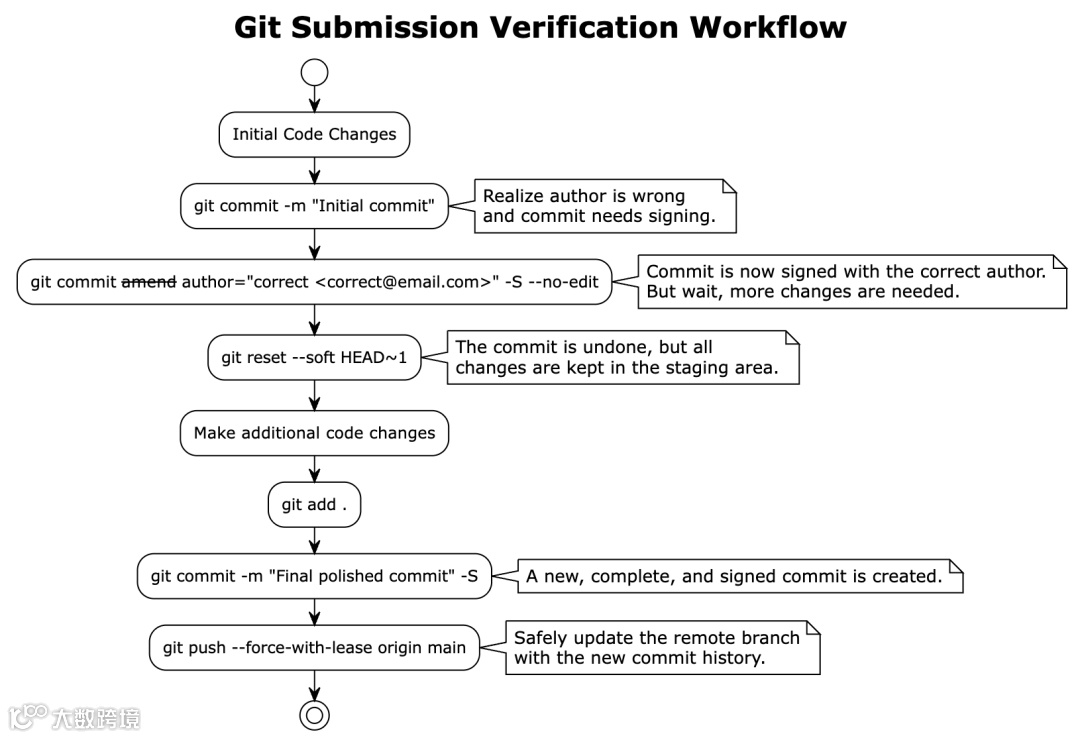
By using git commit --amend --author="New Author <new.email@example.com>", it is possible to change the author of the most recent commit. This command creates a new commit with the corrected author details and replaces the old, incorrect one. If no other changes are needed, the --no-edit flag can be used to keep the original commit message. This ensures that the project's history accurately reflects who made the changes.
Rewriting History Safely with Soft Reset
There are times when a commit is made, but it is not quite right. Perhaps it was premature, or it needs to be combined with other changes. The git reset --soft command is perfect for these situations.
git reset --soft HEAD~1 will undo the last commit in the history, but it will keep all the changes from that commit in the staging area. This is incredibly useful because it allows for making additional changes, amending the commit message, or even combining several commits into one without losing any work. The code is still there, ready to be recommitted in a more polished form.
Pushing Changes with Confidence Using Force-with-Lease
After amending a commit or performing a reset, the local branch history will be different from the remote branch history. To update the remote branch, a force push is necessary. However, git push --force can be dangerous because it can overwrite changes made by other people without warning.
A much safer alternative is git push --force-with-lease. This command will only force the push if the remote branch has not been updated by anyone else since the last fetch. If someone else has pushed new commits, the command will fail, preventing the accidental loss of their work. This makes it the ideal choice for workflows that involve rewriting local history before sharing it.
The Complete Workflow
Let's put all these commands together in a sequence that shows how they work to refine a commit before pushing it to a remote repository.
Conclusion
The Git commands discussed in this article are powerful tools for managing commit history. From signing commits to prove their origin, to amending them for accuracy, and from resetting them for refinement to pushing them safely, each command plays a vital role in maintaining a clean and trustworthy codebase. While rewriting history should be done with care, especially in collaborative projects, using these advanced features responsibly can lead to a more professional and understandable project history. Embracing these techniques can elevate anyone's Git skills and contribute to better development practices.