

![[第二篇] Terraform 核心概念(上):Providers, Resources, State](https://cdn.10100.com/user/057c851f94cf6e5d10ea3bafcde82473.png?x-oss-process=style/180x)
在上一篇文章中,我们对 Terraform 有了一个整体的认识。现在,让我们深入了解 Terraform 的三个核心概念:Providers、Resources 和 State。这三个概念是 Terraform 的基石,理解它们对于编写和管理 Terraform 配置至关重要。
1. Provider:连接云平台
Provider 是 Terraform 与各种云平台、SaaS 提供商和其他 API 进行交互的桥梁。它们负责理解 API 交互并暴露资源。可以将 Provider 理解为特定平台的“驱动程序”。
Terraform 支持多种 Provider,包括:
- 官方 Provider
:由 HashiCorp 或云平台官方维护,通常质量较高,更新及时。 - 社区 Provider
:由社区贡献者维护,数量众多,但质量参差不齐。 - 私有 Provider
:可以自定义 Provider 来管理内部系统或私有云。
常用的 Provider:
aws:Amazon Web Services azurerm:Microsoft Azure google:Google Cloud Platform alicloud:阿里云 kubernetes:Kubernetes vsphere:VMware vSphere docker:Docker
如何配置 Provider:
在 Terraform 配置文件中,使用 provider 块来配置 Provider。例如,配置 AWS Provider:
provider "aws" {
  region     = "ap-southeast-1"  # 指定 AWS 区域
  access_key = "YOUR_ACCESS_KEY" # AWS 访问密钥
  secret_key = "YOUR_SECRET_KEY" # AWS 秘密密钥
}
注意: 最佳实践推荐使用环境变量或共享凭证文件配置访问凭证, 不要直接将明文凭证信息直接写在代码里。
可以配置多个 Provider 来管理不同平台的资源。例如,同时管理 AWS 和 Azure 资源:
provider "aws" {
  region = "ap-southeast-1"
  # ...
}

provider "azurerm" {
  features {}
  # ...
}
每个 Provider 都有自己的配置选项,具体请参考官方文档。
2. Resource:定义基础设施资源
Resource 是 Terraform 中最重要的概念,它代表了基础设施中的一个具体组件,如虚拟机、网络、数据库、存储桶等。每个 Resource 都由一个 Provider 管理。
Resource 的基本结构:
resource "resource_type" "resource_name" {
  # 资源属性
  attribute1 = value1
  attribute2 = value2
  # ...
}
resource:关键字,表示定义一个 Resource。 resource_type:资源类型,由 Provider 定义,如 aws_instance(AWS EC2 实例)、azurerm_virtual_machine(Azure 虚拟机)。resource_name:资源名称,在 Terraform 配置中唯一标识该资源,用于引用和管理。 attribute:资源属性,用于配置资源的各种参数,如虚拟机大小、磁盘类型、网络配置等。
示例:创建一个 AWS EC2 实例
resource "aws_instance" "example" {
  ami           = "ami-0672fd5b9210aa093" # Amazon Linux 2 AMI ID
  instance_type = "t2.micro"            # 实例类型

  tags = {
    Name = "terraform-example"
  }
}
示例:创建一个阿里云 ECS 实例
resource "alicloud_instance" "example" {
    image_id = "centos_7_9_x64_20G_alibase_20230808.vhd"
    instance_type = "ecs.t6-c1m1.large"
    system_disk_category = "cloud_efficiency"
    internet_charge_type = "PayByTraffic"
    internet_max_bandwidth_out = "5"

    tags = {
        Name = "terraform-example-alicloud"
    }
}
这个例子演示了如何使用 alicloud Provider 创建一台阿里云ECS实例,并配置了操作系统镜像,实例类型,系统盘类型等参数。
3. State:状态管理与状态文件
Terraform 的 State(状态)记录了当前基础设施的真实状态。它是一个 JSON 文件,默认名为 terraform.tfstate。
State 的作用:
- 映射真实资源
:State 文件将 Terraform 配置中的资源与云平台上的实际资源进行映射。 - 跟踪资源变化
:Terraform 通过比较 State 文件和配置文件来确定需要进行的更改。 - 依赖管理
:Terraform 根据 State 文件中的依赖关系来确定资源的创建和销毁顺序。 - 缓存属性值
:State 文件缓存了资源的属性值,避免每次都向云平台 API 发起请求。
状态文件的重要性:
- 不要手动修改 State 文件!
手动修改 State 文件可能导致 Terraform 无法正确管理资源。 - 妥善保管 State 文件!
State 文件丢失或损坏可能导致 Terraform 无法识别现有资源。 - 使用远程状态!
在团队协作环境中,建议使用远程状态来共享和锁定 State 文件。
State 文件的基本结构:
{
  "version":4,
"terraform_version":"1.2.0",
"serial":1,
"lineage":"a1b2c3d4-e5f6-7890-1234-567890abcdef",
"outputs":{},
"resources":[
    {
      "mode":"managed",
      "type":"aws_instance",
      "name":"example",
      "provider":"provider[\"registry.terraform.io/hashicorp/aws\"]",
      "instances":[
        {
          "schema_version":1,
          "attributes":{
            "ami":"ami-0c55b31ad2299a796",
            "instance_type":"t2.micro",
            "id":"i-0123456789abcdef0",
            "tags":{
              "Name":"terraform-example"
            },
            "...":"..."
          },
          "sensitive_attributes":[],
          "private":"..."
        }
      ]
    }
]
}
4. 第一个 Terraform 项目:创建一台虚拟机
现在,让我们通过一个简单的项目来实践一下:在 AWS 或阿里云上创建一台虚拟机。
步骤:
创建工作目录:创建一个新的目录,用于存放 Terraform 配置文件。
编写配置文件:在工作目录中创建一个名为
main.tf的文件,并写入以下内容(根据选择的云平台选择对应的代码):AWS (main.tf):
provider "aws" {
  region = "ap-southeast-1" # 根据需要修改区域
  # 建议通过环境变量或共享凭证文件配置访问凭证
}

resource "aws_instance" "example" {
  ami           = "ami-0c55b31ad2299a796" # 根据需要修改 AMI ID
  instance_type = "t2.micro"            # 根据需要修改实例类型

  tags = {
    Name = "terraform-example"
  }
}
阿里云 (main.tf):
```terraform
    provider "alicloud" {
    }

    resource "alicloud_instance" "example" {
        image_id = "centos_7_9_x64_20G_alibase_20230808.vhd"
        instance_type = "ecs.t6-c1m1.large"
        system_disk_category = "cloud_efficiency"
        internet_charge_type = "PayByTraffic"
        internet_max_bandwidth_out = "5"

        tags = {
            Name = "terraform-example-alicloud"
        }
    }

```
- 初始化
:在命令行中进入工作目录,运行 terraform init命令。这将下载所需的 Provider 插件并初始化 Terraform 环境。 - 计划
:运行 terraform plan命令。Terraform 将分析配置文件并显示将要创建的资源。 - 应用
:运行 terraform apply命令。Terraform 将根据计划创建虚拟机。确认提示后,Terraform 将开始创建资源。 - 验证
:创建完成后,可以登录到云平台的控制台,验证虚拟机是否已成功创建。 - 销毁
:当不再需要虚拟机时,运行 terraform destroy命令。Terraform 将销毁所有由配置文件管理的资源。
5. terraform init, terraform plan, terraform apply, terraform destroy 命令详解
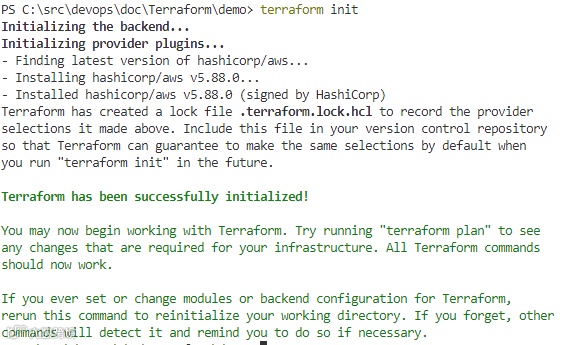
terraform init:terraform init
Initializing the backend...
Initializing provider plugins...
- Finding latest version of hashicorp/aws...
- Installing hashicorp/aws v5.88.0...
- Installed hashicorp/aws v5.88.0 (signed by HashiCorp)
Terraform has created a lock file .terraform.lock.hcl to record the provider
selections it made above. Include this file in your version control repository
so that Terraform can guarantee to make the same selections by default when
you run "terraform init" in the future.
Terraform has been successfully initialized!
You may now begin working with Terraform. Try running "terraform plan" to see
any changes that are required for your infrastructure. All Terraform commands
should now work.
If you ever set or change modules or backend configuration for Terraform,
rerun this command to reinitialize your working directory. If you forget, other
commands will detect it and remind you to do so if necessary.-
初始化一个新的或已有的 Terraform 工作目录。 -
下载并安装配置文件中指定的 Provider 插件。 -
初始化后端(如果配置了远程状态)。 -
通常只需要在第一次使用 Terraform 项目或修改了 Provider 配置后运行。 terraform plan:terraform plan -out=tfplan
Terraform used the selected providers to generate the following execution plan. Resource actions are indicated with the following symbols:
+ create
Terraform will perform the following actions:
# aws_instance.example will be created
+ resource "aws_instance" "example" {
+ ami = "ami-0672fd5b9210aa093"
+ arn = (known after apply)
+ associate_public_ip_address = (known after apply)
+ availability_zone = (known after apply)
+ cpu_core_count = (known after apply)
+ cpu_threads_per_core = (known after apply)
+ disable_api_stop = (known after apply)
+ disable_api_termination = (known after apply)
+ ebs_optimized = (known after apply)
+ enable_primary_ipv6 = (known after apply)
+ get_password_data = false
+ host_id = (known after apply)
+ host_resource_group_arn = (known after apply)
+ iam_instance_profile = (known after apply)
+ id = (known after apply)
+ instance_initiated_shutdown_behavior = (known after apply)
+ instance_lifecycle = (known after apply)
+ instance_state = (known after apply)
+ instance_type = "t2.micro"
+ ipv6_address_count = (known after apply)
+ ipv6_addresses = (known after apply)
+ key_name = (known after apply)
+ monitoring = (known after apply)
+ outpost_arn = (known after apply)
+ password_data = (known after apply)
+ placement_group = (known after apply)
+ placement_partition_number = (known after apply)
+ primary_network_interface_id = (known after apply)
+ private_dns = (known after apply)
+ private_ip = (known after apply)
+ public_dns = (known after apply)
+ public_ip = (known after apply)
+ secondary_private_ips = (known after apply)
+ security_groups = (known after apply)
+ source_dest_check = true
+ spot_instance_request_id = (known after apply)
+ subnet_id = (known after apply)
+ tags = {
+ "Name" = "terraform-example"
}
+ tags_all = {
+ "Name" = "terraform-example"
}
+ tenancy = (known after apply)
+ user_data = (known after apply)
+ user_data_base64 = (known after apply)
+ user_data_replace_on_change = false
+ vpc_security_group_ids = (known after apply)
+ capacity_reservation_specification (known after apply)
+ cpu_options (known after apply)
+ ebs_block_device (known after apply)
+ enclave_options (known after apply)
+ ephemeral_block_device (known after apply)
+ instance_market_options (known after apply)
+ maintenance_options (known after apply)
+ metadata_options (known after apply)
+ network_interface (known after apply)
+ private_dns_name_options (known after apply)
+ root_block_device (known after apply)
}
Plan: 1 to add, 0 to change, 0 to destroy.
─────────────────────────────────────────────────────────────────────────────────────────────────────────────────────────────────────────────────────────────────────────────────────────────────────────
Saved the plan to: tfplan
To perform exactly these actions, run the following command to apply:
terraform apply "tfplan"-
创建一个执行计划。 -
Terraform 会分析配置文件,并与当前状态进行比较,确定需要进行的更改(创建、修改或销毁资源)。 -
显示执行计划,但不会实际执行更改。 -
用于预览 Terraform 将要执行的操作,确保安全性和正确性。 terraform apply:terraform apply "tfplan"
aws_instance.example: Creating...
aws_instance.example: Still creating... [10s elapsed]
aws_instance.example: Creation complete after 16s [id=i-0410fde18ac3f04f2]
Apply complete! Resources: 1 added, 0 changed, 0 destroyed.-
执行 terraform plan生成的执行计划。 -
创建、修改或销毁基础设施资源。 -
默认情况下,会提示确认是否执行更改。 -
执行后,Terraform 会更新 State 文件。 terraform destroy:terraform destroy
aws_instance.example: Refreshing state... [id=i-0410fde18ac3f04f2]
Terraform used the selected providers to generate the following execution plan. Resource actions are indicated with the following symbols:
- destroy
Terraform will perform the following actions:
# aws_instance.example will be destroyed
- resource "aws_instance" "example" {
- ami = "ami-0672fd5b9210aa093" -> null
- arn = "arn:aws:ec2:ap-southeast-1:084375585383:instance/i-0410fde18ac3f04f2" -> null
- associate_public_ip_address = true -> null
- availability_zone = "ap-southeast-1a" -> null
- cpu_core_count = 1 -> null
- cpu_threads_per_core = 1 -> null
- disable_api_stop = false -> null
- disable_api_termination = false -> null
- ebs_optimized = false -> null
- get_password_data = false -> null
- hibernation = false -> null
- iam_instance_profile = "AmazonSSMRoleForInstancesQuickSetup" -> null
- id = "i-0410fde18ac3f04f2" -> null
- instance_initiated_shutdown_behavior = "stop" -> null
- instance_state = "running" -> null
- instance_type = "t2.micro" -> null
- ipv6_address_count = 0 -> null
- ipv6_addresses = [] -> null
- monitoring = false -> null
- placement_partition_number = 0 -> null
- primary_network_interface_id = "eni-014db077ce6251fd6" -> null
- private_dns = "ip-172-31-22-57.ap-southeast-1.compute.internal" -> null
- private_ip = "172.31.22.57" -> null
- public_dns = "ec2-13-213-37-65.ap-southeast-1.compute.amazonaws.com" -> null
- public_ip = "13.213.37.65" -> null
- secondary_private_ips = [] -> null
- security_groups = [
- "default",
] -> null
- source_dest_check = true -> null
- subnet_id = "subnet-035f06b51f11cea0e" -> null
- tags = {
- "Name" = "terraform-example"
} -> null
- tags_all = {
- "Name" = "terraform-example"
} -> null
- tenancy = "default" -> null
- user_data_replace_on_change = false -> null
- vpc_security_group_ids = [
- "sg-038dff9f98db292c1",
] -> null
# (7 unchanged attributes hidden)
- capacity_reservation_specification {
- capacity_reservation_preference = "open" -> null
}
- cpu_options {
- core_count = 1 -> null
- threads_per_core = 1 -> null
# (1 unchanged attribute hidden)
}
- credit_specification {
- cpu_credits = "standard" -> null
}
- enclave_options {
- enabled = false -> null
}
- maintenance_options {
- auto_recovery = "default" -> null
}
- metadata_options {
- http_endpoint = "enabled" -> null
- http_protocol_ipv6 = "disabled" -> null
- http_put_response_hop_limit = 2 -> null
- http_tokens = "required" -> null
- instance_metadata_tags = "disabled" -> null
}
- private_dns_name_options {
- enable_resource_name_dns_a_record = false -> null
- enable_resource_name_dns_aaaa_record = false -> null
- hostname_type = "ip-name" -> null
}
- root_block_device {
- delete_on_termination = true -> null
- device_name = "/dev/sda1" -> null
- encrypted = false -> null
- iops = 3000 -> null
- tags = {} -> null
- tags_all = {} -> null
- throughput = 125 -> null
- volume_id = "vol-0f097988ce52ffb23" -> null
- volume_size = 8 -> null
- volume_type = "gp3" -> null
# (1 unchanged attribute hidden)
}
}
Plan: 0 to add, 0 to change, 1 to destroy.
Do you really want to destroy all resources?
Terraform will destroy all your managed infrastructure, as shown above.
There is no undo. Only 'yes' will be accepted to confirm.
Enter a value: yes
aws_instance.example: Destroying... [id=i-0410fde18ac3f04f2]
aws_instance.example: Still destroying... [id=i-0410fde18ac3f04f2, 10s elapsed]
aws_instance.example: Still destroying... [id=i-0410fde18ac3f04f2, 20s elapsed]
aws_instance.example: Still destroying... [id=i-0410fde18ac3f04f2, 30s elapsed]
aws_instance.example: Still destroying... [id=i-0410fde18ac3f04f2, 40s elapsed]
aws_instance.example: Still destroying... [id=i-0410fde18ac3f04f2, 50s elapsed]
aws_instance.example: Destruction complete after 53s
Destroy complete! Resources: 1 destroyed.-
销毁所有由 Terraform 配置文件管理的资源。 -
默认情况下,会提示确认是否执行销毁操作。 -
执行后,Terraform 会更新 State 文件。
总结
本篇文章介绍了 Terraform 的三个核心概念:Provider、Resource 和 State,并通过一个创建虚拟机的项目演示了它们的基本用法。同时,我们详细解释了 terraform init、terraform plan、terraform apply 和 terraform destroy 这四个常用命令的功能。在下一篇文章中,我们将继续探讨 Terraform 的核心概念,包括 Variables、Outputs 和 Modules。