


1、下载地址:https://release-assets.githubusercontent.com/github-production-release-asset/244694886/5677d100-4415-41e0-a4e2-8d80c373aa5a?sp=r&sv=2018-11-09&sr=b&spr=https&se=2025-11-27T03%3A32%3A03Z&rscd=attachment%3B+filename%3Dn9e-v8.4.1-linux-amd64.tar.gz&rsct=application%2Foctet-stream&skoid=96c2d410-5711-43a1-aedd-ab1947aa7ab0&sktid=398a6654-997b-47e9-b12b-9515b896b4de&skt=2025-11-27T02%3A31%3A51Z&ske=2025-11-27T03%3A32%3A03Z&sks=b&skv=2018-11-09&sig=jcVoPkTQTy6OCDLUjCc4eZ1RxTxhVMfAQF87jorrDF4%3D&jwt=eyJ0eXAiOiJKV1QiLCJhbGciOiJIUzI1NiJ9.eyJpc3MiOiJnaXRodWIuY29tIiwiYXVkIjoicmVsZWFzZS1hc3NldHMuZ2l0aHVidXNlcmNvbnRlbnQuY29tIiwia2V5Ijoia2V5MSIsImV4cCI6MTc2NDIxNDA1MCwibmJmIjoxNzY0MjEyMjUwLCJwYXRoIjoicmVsZWFzZWFzc2V0cHJvZHVjdGlvbi5ibG9iLmNvcmUud2luZG93cy5uZXQifQ.ez0HA3x6wFGvC3ulAsKJK6EaRfzPUWY2h_bLjyjizPo&response-content-disposition=attachment%3B%20filename%3Dn9e-v8.4.1-linux-amd64.tar.gz&response-content-type=application%2Foctet-stream
2、修改配置
tar xf n9e-v8.4.1-linux-amd64.tar.gz
vi docker/compose-bridge/docker-compose.yaml
#修改最下面的categraf如下:PS:注意修改IP地址
categraf:
image: "flashcatcloud/categraf:latest"
container_name: "categraf"
hostname: "categraf01"
restart: always
network_mode: "host"
environment:
TZ: Asia/Shanghai
HOST_PROC: /hostfs/proc
HOST_SYS: /hostfs/sys
HOST_MOUNT_PREFIX: /hostfs
WAIT_HOSTS: 192.168.10.176:17000, 192.168.10.176:20090
volumes:
- ./etc-categraf:/etc/categraf/conf
- /:/hostfs:ro
depends_on:
- nightingale
cd etc-categraf
#PS:注意修改IP地址
cat config.toml
[global]
print_configs = false
hostname = "$HOSTNAME"
omit_hostname = false
precision = "ms"
interval = 15
[writer_opt]
batch = 2000
chan_size = 10000
[[writers]]
url = "http://192.168.10.176:17000/prometheus/v1/write"
basic_auth_user = ""
basic_auth_pass = ""
timeout = 5000
dial_timeout = 2500
max_idle_conns_per_host = 100
[http]
enable = false
address = ":9100"
print_access = false
run_mode = "release"
[heartbeat]
enable = true
url = "http://192.168.10.176:17000/v1/n9e/heartbeat"
interval = 10
basic_auth_user = ""
basic_auth_pass = ""
timeout = 5000
dial_timeout = 2500
max_idle_conns_per_host = 100
[ibex]
enable = true
interval = "1000ms"
servers = ["192.168.10.176:20090"]
meta_dir = "./meta"
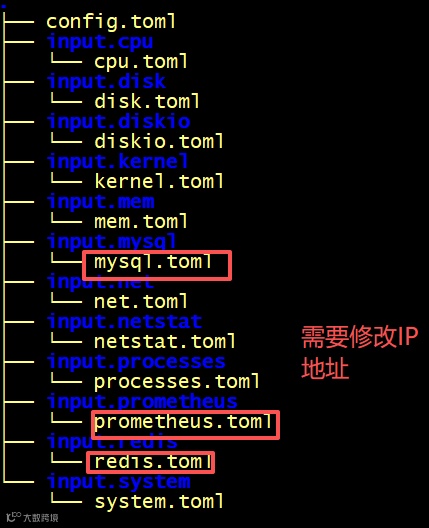
#其它,取消原有#号,加上配置enable = true,如图:

3、安装
cd docker/compose-bridge
docker-compose up -d #PS:离线安装需要提前导入镜像

4、web端操作
登陆地址:http://192.168.10.176:17000
账号密码:root/root.2020


