
Sometimes you need to get rid of all your personal data .The easiest way to do this is something called factory reset - an option that allows you to bring your smartphone to the state it was in right out of the factory floor. No personal photos, no sensitive documents, nothing that you may otherwise forget to delete will get in the hands of other people.
So how do you do it?

If your phone is fully functional.all it takes is:
1. Go into Settings -> ‘Backup & Reset’
2. Select ‘Factory data reset’
3. Then tap on ‘Reset phone’
4. Finally, touch ‘Erase everything’ and wait a few minutes until it’s all done. That’s it! finally.
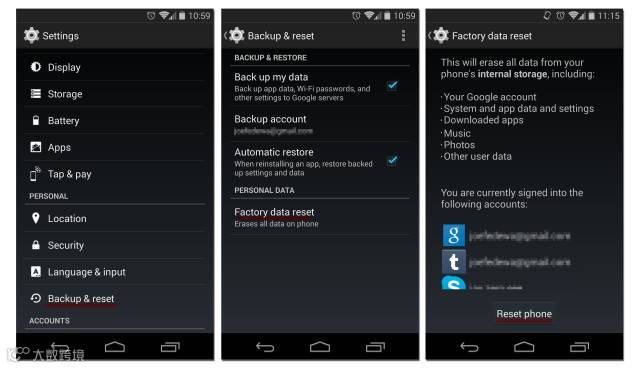
This is the exact steps you should follow on just about any Android smartphone.

In case your smartphone is not starting up properly, you’d need some other tactics. Do the following:
1. Power your gadget off.
2. Hold down the Volume Down key and the Power/Lock key simultaneously for a few seconds.
3. After letting go, you’d see a menu with several options. Navigate using ONLY the volume down key. Go to ‘Factory’ and select it by pressing the volume up key. Your phone will do the rest of the magic, and will restore itself to factory settings in just a few minutes.
Tip:Once you do a factory reset, ALL of your personal data - including photos and all other documents - will be deleted off your phone and there will be no way to get it back. MAKE SURE YOU HAVE BACKED UP ALL YOUR IMPORTANT DATA FIRST.