



Paying Vendors with Multiple Bank Accounts
这句话怎么翻译
如果你三秒钟,还没有弄清楚所以,直接看答案吧。
# Tip 3
# 技巧 3
Paying Vendors with Multiple Bank Accounts
正确翻译 向拥有多个银行帐户的供应商付款
By assigning partner bank types to each vendor bank account, you can easily pay vendors who have multiple banks.
通过为每个供应商银行帐户分配伙伴银行类型,您可以轻松地向拥有多个银行的供应商付款。
If you are making payments using an automatic bank transfer payment method(such as by wire or ACH), the system will normally expect you to select just one bank account that is specified in the vendor's master record. However, in some cases your vendor(or customer)may have several bank accounts and may request that you make a payment to a specific one, depending on the invoice that is being paid. Alternatively, they may require that you make payments to multiple banks, depending on when the payment is made.
如果您使用自动银行转帐付款方式(例如电汇或ACH)进行付款,系统通常期望您只选择供应商主记录中指定的一个银行帐户。但是,在某些情况下,您的供应商(或客户)可能拥有多个银行帐户,并且可能要求您根据正在支付的发票向特定帐户付款。或者,他们可能要求您根据付款时间向多个银行付款。
✅ And Here's How...
✅具体做法如下...
To meet this payment requirement, you need to set up partner bank types in the vendor master record so you can select the bank to which you want to make the payment. Partner bank types are alphanumeric keys of up to four characters, but can be made up of any combination of letters and numbers the business wants to use. You can enter the partner bank type by following these steps:
为了满足此付款要求,您需要在供应商主记录中设置伙伴银行类型,以便可以选择要付款的银行。伙伴银行类型是最多4个字符的字母数字键,但可以由企业想要使用的任何字母和数字组合组成。您可以通过以下步骤输入伙伴银行类型:
1. Go to Transaction FK01 to create the vendor master record or FK02 to change the record.
1. 转到事务代码FK01创建供应商主记录或FK02更改记录。
2. Go to the Payment Transactions screen in the General Data tab.
2. 转到“常规数据”选项卡中的“付款交易”屏幕。
3. Enter the various bank accounts of the vendor, as shown in Figure 1.
3. 输入供应商的各个银行帐户,如图1所示。
4. Enter unique keys for each bank in the Partner Bank Type column, which is denoted BnKT.
4. 在“伙伴银行类型”列(表示为BnKT)中为每个银行输入唯一键。
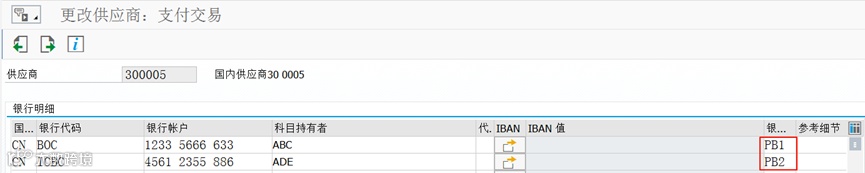
Figure 1 Multiple Banks in Vendor Master
图1 供应商主数据中的多个银行
There are a couple of ways to specify which partner bank type can be used on an invoice.
有几种方法可以指定在发票上使用哪个伙伴银行类型。
#Option 1
#选项 1
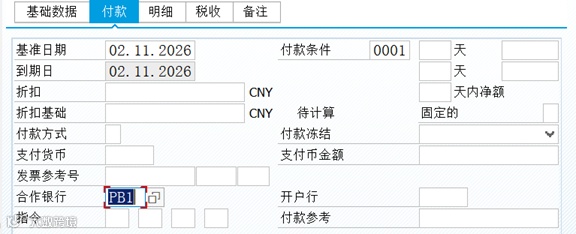
The first is when you are creating the invoice using either Transaction FB60 for direct invoices or MIRO for purchasing invoices. When you have entered the details as usual, go to the Payment tab. In the Part. Bank field, you can specify which of the partner bank types entered in the vendor master record you want to use.
第一种是在您使用事务代码FB60创建直接发票或使用MIRO创建采购发票时。当您像往常一样输入详细信息后,转到“付款”选项卡。在“合作银行”字段中,您可以指定要使用的在供应商主记录中输入的伙伴银行类型。
#Option 2
#选项 2
If you forgot to enter the partner bank type when creating the invoice or did not have the relevant information at the time of posting, you can also specify the bank type by going to Transaction FB02 to change the invoice. When you have entered the invoice number and year to display the lines, double-click on the vendor line and click on the Additional Data tab. This takes you to the screen shown in Figure 2. Then use the drop-down menu on the Part. Bank TYPE field to select the option that relates to the bank you want to use.
如果您在创建发票时忘记输入伙伴银行类型,或在过帐时没有相关信息,您也可以通过转到事务代码FB02更改发票来指定银行类型。当您输入发票编号和年份以显示行项目后,双击供应商行并单击“附加数据”选项卡。这将带您到图2所示的屏幕。然后使用“合作伙伴银行类型”字段的下拉菜单选择与您要使用的银行相关的选项。
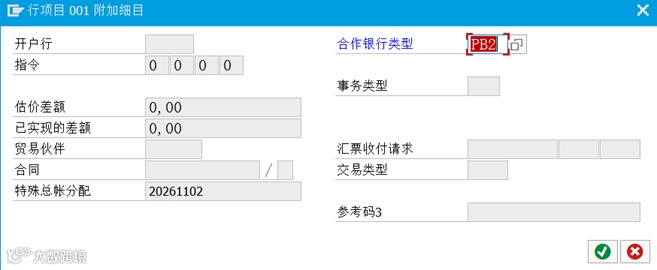
Figure 2 Additional Data Screen
图2 附加数据屏幕
This second option may be necessary when you are creating invoices through automated settlement processes such as consignment(using Transaction MRKO)or evaluated receipt settlement(using Transaction MRRL). With these processes, the partner bank type field is not available when the invoice is created, so you have to retroactively populate the field on the invoice document.
当您通过自动化结算流程(例如寄售,使用事务代码MRKO)或评估收据结算(使用事务代码MRRL)创建发票时,可能需要这第二种选项。使用这些流程时,创建发票时伙伴银行类型字段不可用,因此您必须事后在发票凭证上填充该字段。
如果看完,你还没想到该如何翻译,用鼠标横扫“正确翻译”那一行吧。