-
创建ttk::treeview组件,增加水平和垂直两个调节scrollbar。
package require Tk
toplevel .test
scrollbar .test.vscrollbar -command {.test.tree yview} -orient vertical
scrollbar .test.hscrollbar -command {.test.tree xview} -orient horizontal
ttk::treeview .test.tree -yscrollcommand {.test.vscrollbar set} \
                         -xscrollcommand {.test.hscrollbar set} \
                         -height 18 \
                         -style user.Treeview
ttk::style configure user.Treeview -background white
#
grid .test.tree -row 0 -column 0 -sticky nswe
grid .test.vscrollbar -row 0 -column 1 -sticky ns
grid .test.hscrollbar -row 1 -column 0 -columnspan 2 -sticky we
scrollbar 组件 -command 后面的{.test.tree(目录树组件名) yview} 返回两个参数 first 和last,first和last是0到1的数字,标识可见范围,如图1.
这两个参数会传递给ttk::treeview组件中的 -yscrollcommand {.test.vscrollbar set} (完整的set命令为:scrollbar组件名 set first last )。
ttk::treview没有像Button(按钮组件)一样的-background 选项,需要用-style 创建一个style 然后用ttk::style configure命令。
.test.tree configure -columns "a b"
.test.tree heading #0 -text "entity name"
.test.tree heading a -text "type"
.test.tree heading b -text "id"
.test.tree column a -anchor center
.test.tree column b -anchor center
.test.tree column #0 -width 100
.test.tree column a -width 100
.test.tree column b -width 100
.test.tree column #0 -minwidth 100
.test.tree column a -minwidth 100
.test.tree column b -minwidth 100
-column “a b”标识添加了两列,a/b可以是任意字符。几个字符标识增加了几列图2。
.test.tree insert {} end -id Part -text "Part"
.test.tree insert {Part} end -id Part1 -text "Part1" -values {Shell 1001 }
.test.tree insert {Part} end -id Part2 -text "Part2" -values {Solid 1002 }
.test.tree insert {Part} end -id Part3 -text "Part3" -values {Beam 1002 }
.test.tree insert {} end -id Set -text "Set"
set setitem1 [.test.tree insert {Set} end -text "Set1" -values {Node 1001 }]
set setitem2 [.test.tree insert {Set} end  -text "Set2" -values {Part 1002 }]
set setitem3 [.test.tree insert {Set} end  -text "Set3" -values {Shell 1002 }]
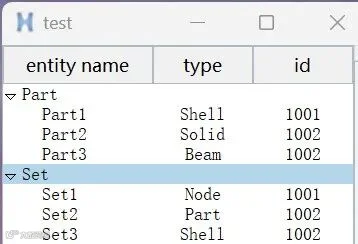
使用 {组件名 insert }创建元素insert后的 {} 表示最高级如图3中的Part和Set;end表示插入的位置-id 表示元素的识别id(比如人的身份证),-values 表示前面-column a b对应列的内容。
bind .test.frameright.tree <<TreeviewSelect>> { puts [set select_item [%W selection]] }
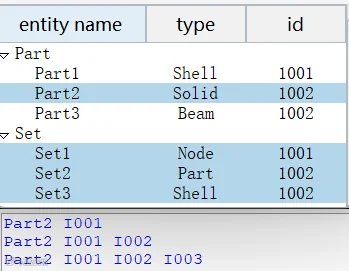
使用绑定bind,[%W selection],比如上面命令可输出选中了哪个元素。如图4,选中Part2/I001/I002/I003四个元素。
.test.tree configure -selectmode none
.test.tree configure -selectmode browse
.test.tree configure -selectmode extended
none表示不能选择,browse表示单选,extended多选。