


🍓 课程推荐:连享会:2025CGE 专题:理论与实操·网络直播
嘉宾:贾智杰 (西安交通大学)
时间:2025 年 11月23日、30日, 12月7日
咨询:王老师 18903405450(微信)

作者:游万海 (福州大学)
目录
一. 命令基本语法
二. 基本规则
(1)元字符
(2) 序列
(3) 字符类
(4) 表示数量
(5) POSIX字符类
(6) 回溯引用
(7) () 和 [] 的区别
(8) 常用匹配
三. Stata 范例:利用正则表达式爬取豆瓣影评数据
四、总结
参考资料
附录:推文 dofile 合集
温馨提示: 文中链接在微信中无法生效。请点击底部「阅读原文」。或直接长按/扫描如下二维码,直达原文:

给你一份公司年报,如何快速地从中找出与数值有关的内容。好朋友让你推荐好看的电影,如何快速地从豆瓣网站下载到每部电影的评分。这里涉及到的问题就是如何从文本数据中挖掘出所需要的信息。Stata 中的字符函数为这一操作的实现提供了便利,详细可以通过 help string_functions 查看具体的用法和实例。本文主要是针对字符函数里面的正则表达式函数 ( regular expression )。
Stata 14 之前的版本主要的正则表达式函数有:regexm,regexr和regexs, reg 代表regular,ex代表expression。匹配主要是基于 Henry Spencer's NFA 算法, 与 POSIX.2 标准相似。
regexm : m 代表 match-----匹配。
regexr : r 代表 replace-----替代。
regexs : s 代表 subexpression-----截取。
Stata14 之前版本只能处理普通的 ASCII 字符,例如字母( a-z,A-z),数字 ( 0-9 )及普通的标点符号字符。Stata 14 之后的版本加强了编码转换 ( unicode ),能够处理其他非普通编码 ASCII 字符,如中文,日语和韩语等。相应的,Stata 14 引入了几个新的有关正则表达式命令:
Stata 14 版本主要的正则表达式函数有:ustrregexm,ustrregexrf,ustrregexra 和 ustrregexs,unstr 代表 unicode string。
ustrregexm : 匹配
ustrregexrf : f 代表 first。表示只替代第一次出现的匹配字符。
ustrregexra : a 代表 all。表示替代全部匹配到的字符。
ustrregexs : 截取
因此,Stata 14 加强了正则表达式的功能,可以根据 序列、POSIX 字符类 等进行匹配。下面我们将进行一一说明。
一. 命令基本语法
本文以Stata 14 之前版本的三个主要正则表达式命令为例,对其语法进行说明,如下图所示:
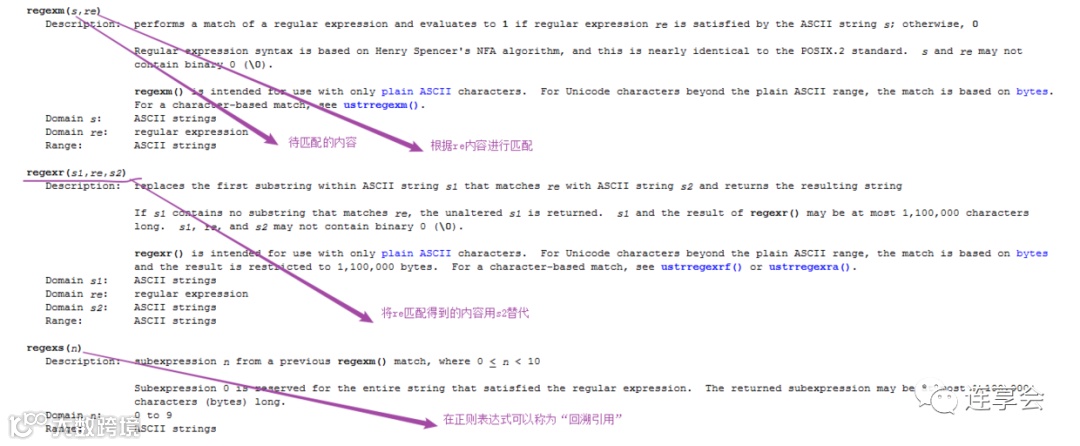
从上面语法可以看出,正确使用这些命令的一个关键点在于如何填写待匹配规则,比如想从文本中匹配出与数值有关的内容,可以用 0-9,那么命令可以写为:
clear
input str10 income
"abc"
"ab"
"aa"
"abcd"
"aad"
"aab123"
"cdf12345"
"123"
"Abc"
end

. gen index1 = regexm(income,"[0-9]") /* [0-9] 表示数值*/
基于此,本文以下部分主要针对匹配内容的相关规定进行阐述,分别介绍 元字符,序列,字符类,数量词,POSIX字符类等进 行介绍。
二. 基本规则
(1)元字符
元字符是指的一类特殊字符,包括 *+?^$|()[]{}\ 等。匹配这些字符需要在前面加上\。
例如:
clear
input str3 num str2 name str10 per str6 income
           -1       a          "10%"    "[9747"
            1       b          "62%"    "1,234"
            1       a          "53%"    "938.9"
           -1       c          "48,6%"  "*8344"
            2       d          "58%"    "2398"
           -2       e          "46%"    "-"
           -3       c          "78%"    "53822"
            3       d          "92,2%"  "na"
           -1       e          "65%"    "$28477"
            1       b          "3,6%"   "n/a"
end
若想匹配出包括 [,*,$ 等特殊字符的部分,可以利用如下代码:
gen index  = regexm(income,"\[")   /*匹配包含[号的*/
gen index1 = regexm(income,"\\$")  /*匹配包含$号的*/
gen index2 = regexm(income,"[\$]")
gen index3 = regexm(income,"[$]")
gen index4 = regexm(income,"[`=char(36)']") /*利用charlist查看相应的代码*/
gen index5 = regexm(income,"\*")            /*匹配包含*号的*/
gen index6 = regexm(income,"[\*|\[]")       /*|表示或者,匹配包含[号或者*号的*/
list
需要特别注意的是 $ 符号比较特殊,其在 Stata 中还可以表示全局宏的引用,所以可以不加 \。
(2) 序列
较为常用的序列主要有如下:
\d 匹配数字字符
\D 匹配非数字字符
\s 匹配间隔符(空格)
\S 匹配非间隔符(非空格)
\w 匹配单词字符
\W 匹配非单词字符
\b 匹配词界
\B 匹配非词界
第一:\D 表示非数值,\d 表示数值
回顾下前面的例子,若要从文本中匹配包括数值的部分,可以用 0-9,这里也可以用 \d 进行匹配。例如:
clear
input str12 income
"123"
"acb"
"12a"
end

gen index1 = ustrregexm(income,"\D") /*\D表示非数值*/
gen index2 = ustrregexm(income,"\d") /*\D表示数值*/
第二:\w 和 \W 表示单词和非单词字符
单词字符是包括下划线的任何单词字符(字母,数字,下划线,汉字),即 [a-zA-Z_0-9]
clear
input str64 income
"the dandelion war 2010"
end
gen make2 = income
gen make3 = income
replace make2 = ustrregexra(make2, "\w", "_")
replace make3 = ustrregexra(make2, "\W", "_")
第三:\b 和 \B 是位置匹配符
如果前面和后面的字符不全是 \w (字母,数字,下划线,汉字),则匹配;反过来理解就是,如果 \b 的前面和后面都是 \w,则不匹配。前面讲的匹配都是匹配内容,而这里是匹配位置。这组命令也是非常常用,请看如下例子。
clear
input str12 income
"abc"
"abc"
"1ab"
"1abc"
"ab_"
"ab"
end
上述数据中都包括了 ab 字符,若我们只想匹配最后一个,看如下命令是否可以:
gen index1 = ustrregexm(income,"ab") /*等价于gen index1 = regexm(income,"ab") */
 list

     +-----------------+
     | income   index1 |
     |-----------------|
  1. |    abc        1 |
  2. |    abc        1 |
  3. |    1ab        1 |
  4. |   1abc        1 |
  5. |    ab_        1 |
     |-----------------|
  6. |     ab        1 |
     +-----------------+
从匹配结果来看,把所有包括 ab 的元素都匹配出来的,这是因为遵循了贪婪匹配( greedy )模式。在这种情况下,我们可以使用位置匹配符进行限定。
gen index2 = ustrregexm(income,"\bab")
// Q: 也等价于 gen index2 = regexm(income,"\bab") 吗?
gen index3 = ustrregexm(income,"ab\b")
gen index4 = ustrregexm(income,"\bab\b")
list

     +--------------------------------------------+
     | income   index1   index2   index3   index4 |
     |--------------------------------------------|
  1. |    abc        1        1        0        0 |
  2. |    abc        1        1        0        0 |
  3. |    1ab        1        0        1        0 |
  4. |   1abc        1        0        0        0 |
  5. |    ab_        1        1        0        0 |
     |--------------------------------------------|
  6. |     ab        1        1        1        1 |
     +--------------------------------------------+
大家可以看到,index4 就是我们要的内容。这就是位置匹配符的神奇之处!此外,位置匹配符还包括 ^ 和 $,匹配开始和结束位置。例如:
clear
input str10 income
"abc"
"ab"
"aa"
"abcd"
"aad"
"a1"
"aab123"
"cdf12345"
"123"
end
gen index1 = regexm(income, "(^[a-z]+)([0-9]$)") /*^放在括号外表示以...开始;$表示结束*/
. list

     +-------------------+
     |   income   index1 |
     |-------------------|
  1. |      abc        0 |
  2. |       ab        0 |
  3. |       aa        0 |
  4. |     abcd        0 |
  5. |      aad        0 |
     |-------------------|
  6. |       a1        1 |
  7. |   aab123        0 |
  8. | cdf12345        0 |
  9. |      123        0 |
     +-------------------+
(3) 字符类
字符类主要包括如下:
[aeiou] 匹配任意元音字母
[AEIOU] 匹配任何一个大写元音
[0123456789] 匹配任意单个数字
[0-9] 匹配任意数字(同上)
[a-z] 匹配任何ASCII小写字母
[A-Z] 匹配任何ASCII大写字母
[a-zA-Z0-9] 匹配任意上面的类
[^aeiou] 匹配除小写元音外的字母
[^0-9] 匹配除数字外的字符
clear
input str10 income
"abc"
"ab"
"aa"
"abcd"
"aad"
"aab123"
"cdf12345"
"123"
"Abc"
end
gen index1 = ustrregexm(income,"[0-9]") /* [0-9] 表示数值,是否可以用\d?*/
gen index2 = ustrregexm(income,"[a-z]") /* [a-z] 表示小写字母*/
gen index3 = ustrregexm(income,"[aeiou]") /* aeiou 表示元音 */
gen index4 = ustrregexm(income,"[^aeiou]") /*括号[]内时,^表示否定,即排除aeiou*/
gen index5 = ustrregexm(income,"[A-Z]") /* [A-Z] 表示大写字母*/
(4) 表示数量
表示数量有两类:
第一类:
{n} 前面待匹配的项目将匹配n个;
{n,} 前面待匹配的项目将匹配n个或更多个;
{n,m} 前面待匹配的项目将匹配至少n个最多m个;
第二类:
? 前面的待匹配的项目是可选的,且最多匹配一个
* 前面待匹配的项目可以匹配0个或更多个
+ 前面待匹配的项目将匹配一个或多个
clear
input str10 income
"abc"
"ab"
"aa"
"abcd"
"aad"
"a1"
"aab123"
"cdf12345"
"123"
end

gen index1 = ustrregexm(income, "[a]{1}") /*{1}表示数量,匹配a,{1}表示1次;这里是greedy匹配,只要出现>=1次就匹配*/
gen index2 = ustrregexm(income, "[a]{2}")
gen index3 = ustrregexm(income, "[0-9]{2}")
gen index4 = ustrregexm(income, "[0-9]{3}")
gen index5 = ustrregexm(income, "[0-9]{4}")
gen index6 = ustrregexm(income, "[0-9]{1,3}")
gen index7 = ustrregexm(income, "[0-9]{4,5}")
gen index8 = ustrregexm(income, "[0-9]+") /*+表示1次或多次*/
gen index9 = ustrregexm(income, "[0-9]*") /*表示0次或多次*/
gen index10 = ustrregexm(income, "[0-9]?") /*表示0次或1次*/
gen index11 = ustrregexm(income, "^[0-9]") /*^放在括号外表示以...开始*/
gen index12 = ustrregexm(income, "(^[a-z]+)[1]$") /*若只想匹配 **a1**原始,以字母开头,以数字结束*/
gen index13 = ustrregexm(income, "(^[a-z]+)[0-9]$") /*效果等同于上句命令*/
(5) POSIX字符类
POSIX字符类是用 "[[ ]]“ 括起来的正则表达,常见的 POSIX 字符类有:
[[:lower:]] 小写字母
[[:upper:]] 大写字母
[[:alpha:]] 所有字母 ([[:lower:]] and [[:upper:]])
[[:digit:]] 数字: 0, 1, 2, 3, 4, 5, 6, 7, 8, 9
[[:alnum:]] 字母和数字 ([[:alpha:]] and [[:digit:]])
[[:blank:]] 空白字符: space and tab
[[:cntrl:]] 控制字符
[[:punct:]] 标点符号: ! ” # % & ' ( ) * + , - . / : ;
[[:space:]] 空格字符:制表符,换行符, 垂直制表符,换页符,回车和空格
[[:xdigit:]] 十六进制数字: 0-9 A B C D E F a b c d e f
[[:print:]] 控制字符 ([[:alpha:]], [[:punct:]] and space)
[[:graph:]] 图形化字符 ([[:alpha:]] and [[:punct:]])
clear
input str10 income
"abc"
"aB"
"aa"
"abcd"
"Aad"
"a1"
"aab123"
"cdf12345"
"123"
end
gen index1 = ustrregexm(income, "[[:lower:]]") /*小写字母*/
gen index2 = ustrregexm(income, "[[:upper:]]") /*大写字母*/
gen index3 = ustrregexm(income, "[[:digit:]]") /*大写字母*/
(6) 回溯引用
我们先看这个例子(例子数据来源于 statalist 论坛):
clear
input strL text
"pick  it 1 time"
"pick  it 2 times"
"picks it 3 time"
"picks it 4 times"
"push  it 5 time"
"push  it 6 times"
"xxx   it yyy"
"pick  it either yyy"
"xxx nor this time"
end
若我们想取出 it 1, it 2等,大家发现与前面说的匹配存在什么不同?前述例子我们都是从多个数中匹配出符合条件的数,而这里是从每个数中取出符合条件的一部分。这时候可以采用回溯引用方法。即先根据字符数据,利用正则表达式将完整的字符匹配出来,然后利用**()**来取出我们感兴趣的部分。这时可以利用 regexm 和 regexs 函数。
0 表示匹配出来的全部内容;1 表示第一个括号的内容;2 表示第二个括号的内容;3 表示第三个括号的内容。例如:
gen pick0=regexs(0) if regexm(lower(text),"^(picks|pick|push)(.*)(times|time)$") /* .表示匹配任何字符*/
gen pick1=regexs(1) if regexm(lower(text),"^(picks|pick|push)(.*)(times|time)$")
gen pick2=regexs(2) if regexm(lower(text),"^(picks|pick|push)(.*)(times|time)$")
gen pick3=regexs(3) if regexm(lower(text),"^(picks|pick|push)(.*)(times|time)$")
format _all %-20s

. list , compress clean noobs
 text                  pick0              pick1   pick2     pick3
 pick  it 1 time       pick  it 1 time    pick      it 1    time
 pick  it 2 times      pick  it 2 times   pick      it 2    times
 picks it 3 time       picks it 3 time    picks    it 3     time
 picks it 4 times      picks it 4 times   picks    it 4     times
 push  it 5 time       push  it 5 time    push      it 5    time
 push  it 6 times      push  it 6 times   push      it 6    times
 xxx   it yyy
 pick  it either yyy
 xxx nor this time
思考:
clear
input str10 income
"abc123"
"a1"
"abcdef12345"
end
如何取出其中的数值部分?
(7) () 和 [] 的区别
clear
input str10 income
"abc"
"ab"
"aa"
"abcd"
"aad"
"aab123"
"cdf12345"
"123"
end
gen index1 = regexm(income,"[ab]") /*表示匹配a或者b*/
gen index2 = regexm(income,"(a|b)") /*表示匹配a或者b*/
gen index3 = regexm(income,"(ab)") /*表示匹配ab*/
(8) 常用匹配
(参考来源:https://blog.csdn.net/wangjia55/article/details/7877915)
-
匹配中文字符的正则表达式: [\u4e00-\u9fa5]
评注:匹配中文还真是个头疼的事,有了这个表达式就好办了
-
匹配双字节字符(包括汉字在内): [^\x00-\xff]
评注:可以用来计算字符串的长度(一个双字节字符长度计2,ASCII字符计1)
-
匹配空白行的正则表达式: \n\s*\r
评注:可以用来删除空白行
-
匹配 HTML 标记的正则表达式: <(\S*?)[^>]*>.*?</\1>|<.*? />
评注:网上流传的版本太糟糕,上面这个也仅仅能匹配部分,对于复杂的嵌套标记依旧无能为力
-
匹配首尾空白字符的正则表达式: ^\s*|\s*$
评注:可以用来删除行首行尾的空白字符(包括空格、制表符、换页符等等)
-
匹配 Email 地址的正则表达式: \w+([-+.]\w+)*@\w+([-.]\w+)*\.\w+([-.]\w+)*
评注:表单验证时很实用
-
匹配网址 URL 的正则表达式: [a-zA-z]+://[^\s]*
评注:网上流传的版本功能很有限,上面这个基本可以满足需求
-
匹配帐号是否合法(字母开头,允许 5-16 字节,允许字母数字下划线): ^[a-zA-Z][a-zA-Z0-9_]{4,15}$
评注:表单验证时很实用
-
匹配国内电话号码: \d{3}-\d{8}|\d{4}-\d{7}
评注:匹配形式如 0511-4405222 或 021-87888822
-
匹配腾讯 QQ 号: [1-9][0-9]{4,}
评注:腾讯 QQ 号从 10000 开始
-
匹配中国邮政编码: [1-9]\d{5}(?!\d)
评注:中国邮政编码为 6 位数字
-
匹配身份证: \d{15}|\d{18}
评注:中国的身份证为 15 位或 18 位
-
匹配 ip 地址: \d+\.\d+\.\d+\.\d+
评注:提取 ip 地址时有用
三. Stata 范例:利用正则表达式爬取豆瓣影评数据
说明:以下例子我主要是利用了外部命令 moss,大家可以用上述讲过的命令试试
clear
import delimited "https://movie.douban.com/top250?start=25&filter=",delimiters("^") varnames(1) rowrange(3) encoding("UTF-8") clear
**评价人数 net install moss, from(http://fmwww.bc.edu/RePEc/bocode/m)
moss doctypehtml, match("(人评价)") regex prefix(c_)
gen comment_num = real(regexs(1)) if regexm(doctypehtml,"([0-9]+)") & c_count==1
tempfile comment_num score title year comment
preserve
drop if comment_num==.
keep comment_num
save `comment_num',replace
restore
**use `comment_num',clear
**评分
moss doctypehtml, match("(v:average)") regex prefix(s_)
gen score = real(regexs(1)) if regexm(doctypehtml,"([0-9][\.][0-9])") & s_count==1
preserve
drop if score==.
keep score
save `score',replace
restore
**use `score',clear
**标题
gen title1 = regexs(1) if regexm(doctypehtml,"(\<span(.+)title(.*)\>$)")==1
**gen title6 = regexs(1) if regexm(doctypehtml,"(\<)span(.+)(.*)title(\>)(^ )(.+)")==1
gen title2 = title1 if regexm(title1,"(\ )")==1
gen title=(title1~=title2)
gen title_for = doctypehtml if title==1
preserve
drop if title_for==""
drop in 1
keep title_for
split title_for,parse(> <)
keep title_for3
save `title',replace
restore
**年份
gen year= real(regexs(1)) if regexm(doctypehtml,"([0-9][0-9][0-9][0-9])(\ )")
preserve
drop if year==.
keep year
save `year',replace
restore
**精选评论
gen comment_text= regexs(0) if regexm(doctypehtml,"(\<)span(.+)inq")
gen comment = doctypehtml if comment_text~=""
preserve
drop if comment==""
keep comment
split comment,parse(> 。)
keep comment2
save `comment',replace
restore
use `comment_num',clear
merge 1:1 _n using `year',nogenerate
merge 1:1 _n using `comment',nogenerate
merge 1:1 _n using `title',nogenerate
merge 1:1 _n using `score',nogenerate
**split comment,parse(> 。)
drop if year==.
list,table
order title_for3 year score comment_num comment2
rename (title_for3 year score comment_num comment2) (电影名称 出版年份 电影评分 评论人数 经典评论)
. gsort -电影评分
. list 电影名称 出版年份 电影评分 评论人数, sep(10)
+-----------------------------------------------------+
| 电影名称 出版年份 电影评分 评论人数 |
|-----------------------------------------------------|
1. | 控方证人 1957 9.6 272992 |
2. | 十二怒汉 1957 9.4 316355 |
3. | 乱世佳人 1939 9.3 476047 |
4. | 蝙蝠侠:黑暗骑士 2008 9.2 716568 |
5. | 鬼子来了 2000 9.2 432480 |
6. | 指环王3:王者无敌 2003 9.2 526120 |
7. | 天堂电影院 1988 9.2 469036 |
8. | 素媛 2013 9.2 429385 |
9. | 末代皇帝 1987 9.2 495894 |
10. | 辩护人 2013 9.2 425387 |
|-----------------------------------------------------|
11. | 活着 1994 9.2 554915 |
12. | 寻梦环游记 2017 9.1 1039719 |
13. | 何以为家 2018 9.1 626432 |
14. | 闻香识女人 1992 9.1 596168 |
15. | 死亡诗社 1989 9.1 488362 |
16. | 少年派的奇幻漂流 2012 9.1 1007555 |
17. | 天空之城 1986 9.1 594695 |
18. | 哈尔的移动城堡 2004 9.1 681760 |
19. | 飞屋环游记 2009 9 937055 |
20. | 我不是药神 2018 9 1459258 |
|-----------------------------------------------------|
21. | 大话西游之月光宝盒 1995 9 841469 |
22. | 搏击俱乐部 1999 9 620969 |
23. | 哈利·波特与魔法石 2001 9 639162 |
24. | 摔跤吧!爸爸 2016 9 1085716 |
25. | 罗马假日 1953 9 686761 |
+-----------------------------------------------------+
思考:上述程序只爬取了第一页的数据,若要爬取前10页的数据(^^这里仅做科研目的,大家悠着点,不要爬虫的太频繁),应该如何?
tempfile building
save `building', emptyok
scalar web1="https://movie.douban.com/top250?start="
scalar web3="&filter="
forv i = 10(-1)1{
local k = (`i'-1)*25
local url=web1 + "`k'" + web3
*scalar list url
di `"`url'"'
import delimited "`url'",delimiters("^") varnames(1) rowrange(3) encoding("UTF-8") clear
**评价人数 net install moss, from(http://fmwww.bc.edu/RePEc/bocode/m)
moss doctypehtml, match("(人评价)") regex prefix(c_)
gen comment_num = real(regexs(1)) if regexm(doctypehtml,"([0-9]+)") & c_count==1
tempfile comment_num score title year comment
preserve
drop if comment_num==.
keep comment_num
save `comment_num',replace
restore
**评分
moss doctypehtml, match("(v:average)") regex prefix(s_)
gen score = real(regexs(1)) if regexm(doctypehtml,"([0-9][\.][0-9])") & s_count==1
preserve
drop if score==.
keep score
save `score',replace
restore
**标题
gen title1 = regexs(1) if regexm(doctypehtml,"(\<span(.+)title(.*)\>$)")==1
**gen title6 = regexs(1) if regexm(doctypehtml,"(\<)span(.+)(.*)title(\>)(^ )(.+)")==1
gen title2 = title1 if regexm(title1,"(\ )")==1
gen title=(title1~=title2)
gen title_for = doctypehtml if title==1
preserve
drop if title_for==""
drop in 1
keep title_for
split title_for,parse(> <)
keep title_for3
save `title',replace
restore
**年份
gen year= real(regexs(1)) if regexm(doctypehtml,"([0-9][0-9][0-9][0-9])(\ )")
preserve
drop if year==.
keep year
save `year',replace
restore
**精选评论
gen comment_text= regexs(0) if regexm(doctypehtml,"(\<)span(.+)inq")
gen comment = doctypehtml if comment_text~=""
preserve
drop if comment==""
keep comment
split comment,parse(> 。)
keep comment2
save `comment',replace
restore
use `comment_num',clear
merge 1:1 _n using `year',nogenerate
merge 1:1 _n using `comment',nogenerate
merge 1:1 _n using `title',nogenerate
merge 1:1 _n using `score',nogenerate
drop if year==.
append using `building'
save `"`building'"', replace
}
list in 1/10
use `"`building'"',clear
四、总结
-
若用 Stata 14以后的版本,尽量用 ustr开头的命令,功能较为齐全。 -
学习正则表达式要多练习,多练习,多练习!!
参考资料
-
How can I extract a portion of a string variable using regular expressions? -
What are regular expressions and how can I use them in Stata? -
New program for regular expressions -
Stata14 VS Stata13 之字符串函数 PK -
Regular Expressions in Stata -
Regular Expression Matching Can Be Simple And Fast -
在线正则表达式测试
附录:推文 dofile 合集
【Stata: 正则表达式和文本分析】推文中的所有 dofile 文档
🍓 课程推荐:连享会:2025文本分析专题·网络直播
嘉宾:陈婷 (香港浸会大学)
时间:2025 年 11月22日、29日, 12月6日
咨询:王老师 18903405450(微信)
连享会微信小店上线啦!
Note:扫一扫进入“连享会微信小店”,你想学的课程在这里······


New! Stata 搜索神器:
lianxh和songblGIF 动图介绍
搜: 推文、数据分享、期刊论文、重现代码 ……
👉 安装:. ssc install lianxh. ssc install songbl
👉 使用:. lianxh DID 倍分法. songbl all

🍏 关于我们
-
连享会 ( www.lianxh.cn,推文列表) 由中山大学连玉君老师团队创办,定期分享实证分析经验。 -
直通车: 👉【百度一下:连享会】即可直达连享会主页。亦可进一步添加 「知乎」,「b 站」,「面板数据」,「公开课」 等关键词细化搜索。
