


高质量的文本嵌入(Embedding)是驱动智能搜索、检索增强生成(RAG)以及推荐系统等应用的核心技术。
在传统的信息检索系统中,搜索主要依赖 倒排索引(Inverted Index) 与 关键词匹配:系统将文本分解为词项,通过统计共现频率或关键词相似度来检索文档。这种方法虽然高效,但存在明显局限——它依赖词面匹配,无法真正理解语义关系。例如,“汽车保险”和“车辆保障”在语义上接近,却因为缺少相同词汇而难以被匹配到。
文本嵌入(Embedding)技术通过深度神经网络将文本映射到高维向量空间,使语义相似的句子在该空间中距离更近。这一机制让模型能够基于 语义层面的关联 而非字面重合来完成检索,从而显著提升搜索和问答系统的“理解力”。在 RAG(Retrieval-Augmented Generation) 场景中,高质量的文本嵌入模型可以为大语言模型(LLM)提供更准确、更上下文相关的外部知识,使生成的答案更加精确、可控与可解释。
为破解这一难题,腾讯优图实验室正式开源Youtu-Embedding,这是一款面向企业级应用打造的通用文本表示模型,可同时胜任文本检索、意图理解、相似度判断、分类聚类等六大主流任务。它在信息检索(IR)、语义相似度(STS)、聚类、重排序和分类等一系列广泛的自然语言处理任务上,均展现出卓越的性能。
Youtu-Embedding的核心优势包括:
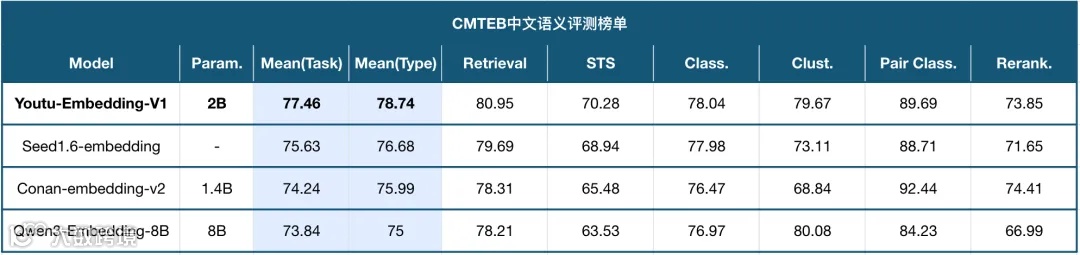
🏆 顶尖性能: 在权威的中文文本嵌入评测基准 CMTEB 上,以 77.46 的高分荣登榜首(截至2025年09月),证明了其强大的表征能力。
🧠 精密的三阶段训练: 通过“LLM基础预训练 → 弱监督对齐 → 协同-判别式微调”的训练流程,系统性地将大模型的广博知识转化为专用于嵌入任务的判别能力。
⭐ 创新的微调框架: 设计了统一数据格式、任务差异化损失函数和动态单任务采样机制,解决了多任务学习中的“负迁移”难题,实现了多任务的稳定协同训练。(该框架在多种基础编码器上进行了验证,保障其通用性和有效性)
🛠️ 精细化的数据工程: 结合了基于LLM的高质量数据合成技术与高效的难负例挖掘策略,为模型训练提供了最坚实的数据基础。
我们在此开源模型权重、推理代码及完整的训练框架,首个模型版本已在HuggingFace上发布,这是一个拥有20亿(2B)参数的通用语义表示模型。源代码已在GitHub上开源。

Hugging Face链接:https://huggingface.co/tencent/Youtu-Embedding
GitHub链接:https://github.com/TencentCloudADP/youtu-embedding
🚀 快速使用Embedding
您可以通过两种方式来生成文本嵌入(Embeddings):便捷的官方 API 调用,或在本地环境中部署并运行模型。
选项 1:☁️ 使用腾讯云 API 获取文本向量(免部署方案)
腾讯优图提供了云端版 Youtu-Embedding 接口,您无需在本地下载模型或配置环境,即可直接在线生成文本向量。
这对于希望快速验证模型效果、或在生产环境中集成云端推理能力的用户来说,都是最便捷的选择。
在页面中复制接口的 请求域名(例如 lkeap.tencentcloudapi.com),参考文档填写输入参数等信息。
如需将接口集成到业务后端,可使用腾讯云官方 SDK 调用。
安装命令:
pip install --upgrade tencentcloud-sdk-python
选项 2:💻 本地部署
在您自己的机器上运行模型可以赋予您完全的控制权,非常适合离线使用、自定义或数据隐私优先的场景。
本指南将帮助您从零开始,在本地快速加载并测试腾讯优图的 Youtu-Embedding 模型。
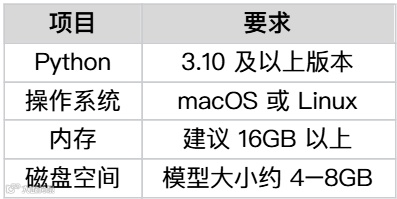
一、系统与环境要求
二、创建并激活虚拟环境
建议为本项目单独创建 Python 虚拟环境,以保持依赖清晰。
# 拉取 Youtu-Embedding 项目git clone https://github.com/TencentCloudADP/youtu-embedding.git# 检查 Python 版本python --version# (如使用 pyenv,可设置 Python 3.10)pyenv local 3.10.14# 创建并激活虚拟环境python -m venv youtu-envsource youtu-env/bin/activate
三、安装依赖
pip install -U pippip install "transformers==4.51.3" torch numpy scipy scikit-learn huggingface_hub
说明:huggingface_hub 用于从 Hugging Face 下载模型。
四、下载模型
下载完成后,模型将保存在当前目录的 ./youtu-model 文件夹下。
4.1从仓库克隆模型
您也可以通过手动拉取模型仓库的方式,将 Embedding 模型拉取至本地项目内。
git clone https://huggingface.co/tencent/Youtu-Embedding4.2创建测试脚本
接下来将通过一个测试脚本,展示如何在macOS环境下使用 Transformers 加载模型、计算文本嵌入并输出相似度矩阵。在本地创建 test_transformers_online_local.py 测试脚本,填写以下内容:
import torchimport numpy as npfrom transformers import AutoModel, AutoTokenizerclass LLMEmbeddingModel():def __init__(self,model_name_or_path,batch_size=128,max_length=1024,gpu_id=0):"""Local embedding model with automatic device selection"""self.model = AutoModel.from_pretrained(model_name_or_path, trust_remote_code=True)self.tokenizer = AutoTokenizer.from_pretrained(model_name_or_path, padding_side="right", trust_remote_code=True)# Device selection: CUDA -> MPS -> CPUif torch.cuda.is_available():self.device = torch.device(f"cuda:{gpu_id}")elif torch.backends.mps.is_available():self.device = torch.device("mps")else:self.device = torch.device("cpu")self.model.to(self.device).eval()self.max_length = max_lengthself.batch_size = batch_sizequery_instruction = "Given a search query, retrieve passages that answer the question"if query_instruction:self.query_instruction = f"Instruction: {query_instruction} \nQuery:"else:self.query_instruction = "Query:"self.doc_instruction = ""print(f"Model loaded: {model_name_or_path}")print(f"Device: {self.device}")def mean_pooling(self, hidden_state, attention_mask):s = torch.sum(hidden_state * attention_mask.unsqueeze(-1).float(), dim=1)d = attention_mask.sum(dim=1, keepdim=True).float()embedding = s / dreturn embedding@torch.no_grad()def encode(self, sentences_batch, instruction):inputs = self.tokenizer(sentences_batch,padding=True,truncation=True,return_tensors="pt",max_length=self.max_length,add_special_tokens=True,)# Move inputs to deviceinputs = {k: v.to(self.device) for k, v in inputs.items()}with torch.no_grad():outputs = self.model(**inputs)last_hidden_state = outputs[0]instruction_tokens = self.tokenizer(instruction,padding=False,truncation=True,max_length=self.max_length,add_special_tokens=True,)["input_ids"]if len(np.shape(np.array(instruction_tokens))) == 1:inputs["attention_mask"][:, :len(instruction_tokens)] = 0else:instruction_length = [len(item) for item in instruction_tokens]assert len(instruction) == len(sentences_batch)for idx in range(len(instruction_length)):inputs["attention_mask"][idx, :instruction_length[idx]] = 0embeddings = self.mean_pooling(last_hidden_state, inputs["attention_mask"])embeddings = torch.nn.functional.normalize(embeddings, dim=-1)return embeddingsdef encode_queries(self, queries):queries = queries if isinstance(queries, list) else [queries]queries = [f"{self.query_instruction}{query}" for query in queries]return self.encode(queries, self.query_instruction)def encode_passages(self, passages):passages = passages if isinstance(passages, list) else [passages]passages = [f"{self.doc_instruction}{passage}" for passage in passages]return self.encode(passages, self.doc_instruction)def compute_similarity_for_vectors(self, q_reps, p_reps):if len(p_reps.size()) == 2:return torch.matmul(q_reps, p_reps.transpose(0, 1))return torch.matmul(q_reps, p_reps.transpose(-2, -1))def compute_similarity(self, queries, passages):q_reps = self.encode_queries(queries)p_reps = self.encode_passages(passages)scores = self.compute_similarity_for_vectors(q_reps, p_reps)scores = scores.detach().cpu().tolist()return scoresdef display_results(self, query, passages, scores):"""Display similarity results in a simple format"""print(f"\nQuery: {query}")print("-" * 50)# Sort by similarity score (highest first)ranked_results = list(zip(passages, scores[0]))ranked_results.sort(key=lambda x: x[1], reverse=True)for i, (passage, score) in enumerate(ranked_results, 1):print(f"{i}. Score: {score:.4f} - {passage}")print("-" * 50)def main():queries = ["What's the weather like?"]passages = ['The weather is lovely today.',"It's so sunny outside!",'He drove to the stadium.']model_name_or_path = "./Youtu-Embedding"model = LLMEmbeddingModel(model_name_or_path)scores = model.compute_similarity(queries, passages)# Display results with enhanced formattingmodel.display_results(queries[0], passages, scores)# Also show raw scores for referenceprint(f"\nRaw scores: {scores}")if __name__ == "__main__":main()
运行脚本:
python test_transformers_local.py终端出现以下结果说明成功调用本地模型:
Model loaded: ./Youtu-EmbeddingDevice: mpsQuery: What's the weather like?--------------------------------------------------1. Score: 0.4465 - The weather is lovely today.2. Score: 0.3124 - It's so sunny outside!3. Score: 0.0304 - He drove to the stadium.--------------------------------------------------Raw scores: [[0.44651979207992554, 0.31240469217300415, 0.030404280871152878]]
根据结果可知,与当前天气有关的回答分值更高,因此排在前列。
🤝一起参与开源
Youtu-Embedding 不仅是一款高性能的通用文本向量模型,更是推动 AI 语义理解落地的重要基石。
通过开源共享,我们希望携手开发者,共同推动语义检索与 RAG 技术的普及,让每个团队都能轻松拥有强大的文本理解与检索能力。
💡 立即体验 Youtu-Embedding,开启智能检索与语义理解的新篇章!
扫码前往 GitHub 获取源代码:

网址:https://github.com/TencentCloudADP/youtu-embedding
扫码加入技术讨论社群:


点击阅读原文访问源码,立即开始你的AI应用之旅。