









PART 01
邮箱钓鱼?我不上钩
Email Phishing? Don’t Get Hooked
同学你好,这是关于XX区域协同创新体系建设的文件,我们专家组发现并重视你的潜力,希望你可以加入,以下是登录注册页面。
“Hello, this is a document regarding the construction of the collaborative innovation system in the XX region. Our expert panel has recognized your potential and sincerely invites you to join us. Please find the registration page below.”
随着新学年各项工作推进,钓鱼骗子也盯上了校园场景:他们伪装成教育部门、学术机构,模仿学校行政部门的口吻,用“学术认证”“补贴发放”“课程报名”等师生关心的话题设套,有的还标注“仅限本校人员”“24小时内截止” 制造紧张感,点进去不仅要求填学号、教职工号,甚至还要绑定银行卡。警惕!别掉进这类钓鱼邮件的坑里!
With the new school year underway, phishing scammers are also targeting the campus. They pose as education authorities or academic institutions, imitating the tone of university offices. Using topics that attract the attention of students and staff such as “academic verification,” “subsidy distribution,” and “course registration,” they set traps. Some messages even claim “for this school only” or “deadline within 24 hours” to create a sense of urgency. Once you click, you may be asked to provide your student or staff ID, and even to link your bank card. Stay alert! Don’t fall for these phishing emails!

避坑指南
Safety Tips

仔细甄别邮件真伪,注意发件人邮箱地址。
三思而后行,确定邮件真伪前,不轻易回复邮件,不点击邮件提供的链接、打开邮件附件等。
若已将邮箱账号密码发送给对方,请立即修改相关邮箱密码。如发现邮箱账号密码已被窃取,请核查是否存在敏感邮件文件被窃的情况。
若已回复,点击链接,或下载附件,或扫描二维码,请立即查杀病毒木马,并修改邮箱密码为复杂密码!
遇到不明邮件时请及时删除并把相关信息转发至:mail_team@zju.edu.cn,或电话联系:87951669(24小时咨询服务电话)。
Carefully verify the authenticity of the email and pay attention to the sender’s address.
Think twice before taking action. Do not reply, click on links, or open attachments until you confirm its authenticity.
If you have already shared your email account and password, change your password immediately. If you suspect that your account has been compromised, check whether any sensitive emails or files have been stolen.
If you have replied, clicked a link, downloaded an attachment, or scanned a QR code, run an antivirus scan right away and reset your email password to a strong one.
For suspicious emails, delete them immediately and forward the details to mail_team@zju.edu.cn, or call 87951669 (24-hour hotline).
PART 02
木马病毒?我有防护
Trojan Viruses? Stay Protected
为什么写论文写了一半,文档突然被加密了?
Why did my thesis draft suddenly get encrypted halfway through writing?
我的电脑怎么忽然没有反应了?
Why did my computer suddenly freeze?
这些情况,可能是电脑中的病毒在“作怪”!校内计算机感染木马病毒后,会导致院系服务器计算资源被占用、师生学术数据被加密,严重影响科研正常开展。快快擦亮眼睛,检查你的电脑里面有没有下列三种病毒吧!
These problems may be caused by hidden viruses in your computer! Once infected with a Trojan virus, campus computers can consume server resources from schools and departments, encrypt academic data of faculty and students, and severely disrupt research work. Stay alert and check whether your computer has any of the following three types of viruses:
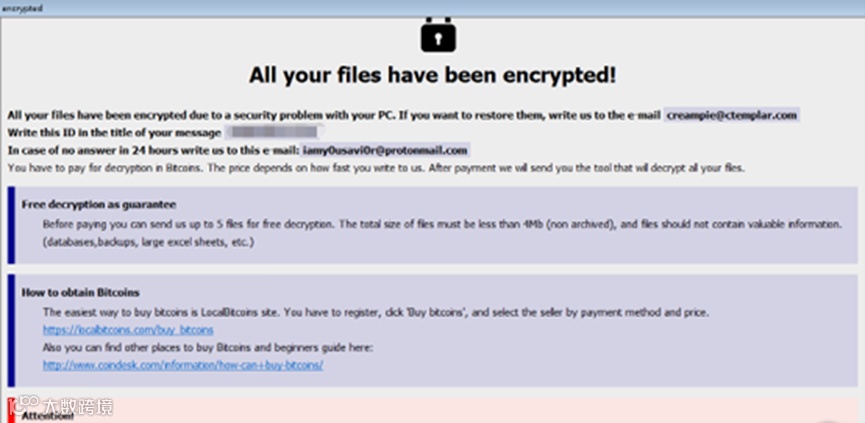
一是勒索病毒。这种病毒主要以邮件、程序木马、网页挂马、暴力破解等形式进行传播,利用各种加密算法对文件进行加密。感染该类病毒的用户电脑或服务器上会出现类似提示:
The first is ransomware, which usually spreads through emails, Trojan programs, compromised websites, or brute-force attacks, and encrypts files using various algorithms. Infected computers or servers may display warning messages like this:
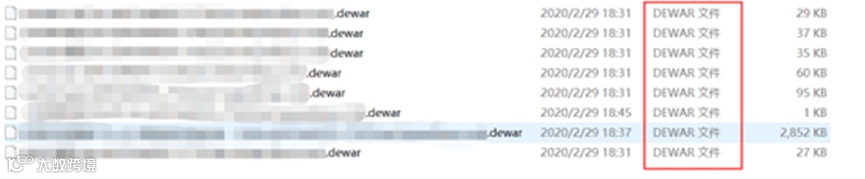
遭到攻击的文件可能会被加密为异常的后缀名,如下图所示:
Files under attack may also be encrypted with unusual extensions, as shown below:
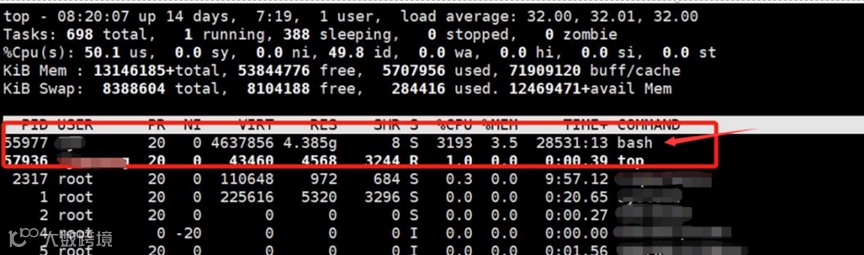
二是挖矿病毒。这种病毒通过各种途径将挖矿程序植入用户的电脑或服务器中,利用这些电脑或服务器的运算力进行挖矿。挖矿木马病毒截图如下:
The second is mining viruses. These viruses implant mining programs into computers or servers through various channels, exploiting their computing power for cryptocurrency mining. A screenshot of a mining Trojan is shown below:
三是银狐病毒。这种高级木马病毒正通过名为“奖学金公示”、“课程表更新”或“会议纪要”的文件,在高校中肆意传播。它不仅能像变形虫一样改变自身代码,逃避查杀,更能像幽灵一样藏在你的系统最深处,窃取你的一切信息。
The third is the SilverFox virus. Rampant in universities, it disguises itself as files named “Scholarship Announcement,” “Updated Course Schedule,” or “Meeting Minutes.” Like an amoeba, it mutates its code to escape detection, and like a ghost, it hides deep in your system to steal all your information.

避坑指南
Safety Tips

安装杀毒软件,定期进行病毒查杀。
定期检测电脑和服务器中的安全漏洞,及时打上补丁。
定期检查服务器是否存在异常,查看范围包括但不限于:是否有新增账户、未知进程;系统日志是否存在异常;杀毒软件是否存在异常拦截情况。
服务器配置访问控制,建议仅允许授权IP访问。
不出借vpn账号,及时更新vpn账号密码。
多台机器或多个平台,不要使用相同的密码。密码要有足够的长度和复杂性,并定期更换密码。
重要资料定期异地备份。
从正规渠道下载安装软件,不安装未知的第三方软件,不点击未知的链接。
若发现电脑或服务器已经感染了木马病毒,或者存在其他异常行为,请立即断网,防止扩散,并根据实际情况采取相应的处置措施。同时,建议对同一个局域网内的其他设备进行排查。
Install antivirus software and perform regular scans.
Regularly check for security vulnerabilities in computers and servers, and apply patches in time.
Periodically review servers for abnormalities, including but not limited to: new accounts, unknown processes, unusual system logs, or abnormal blocks by antivirus software.
Configure access control for servers, and allow access only from authorized IP addresses.
Do not share VPN accounts, and update VPN passwords promptly.
Avoid using the same password across multiple devices or platforms. Passwords should be sufficiently long and complex, and changed regularly.
Back up important data regularly to offsite locations.
Download and install software only from official sources. Do not install unknown third-party applications or click on unfamiliar links.
If you discover that a computer or server has been infected with a Trojan virus or shows other abnormal behavior, disconnect it from the network immediately to prevent further spread. Take appropriate action based on the situation, and check other devices on the same local network.
PART 03
钉钉诈骗?我很谨慎
DingTalk Scams? Be Vigilant

同学你好,我是XX老师,你报名的XX项目现在需要马上缴费。
“Hello, I’m Professor XX. You need to make an immediate payment for the XX program you signed up for.”
同学们好,这个群聊是为了帮助大家申请XX补助组建的,请大家填好链接中的问卷。
“Hi everyone, this group chat was created to help you apply for the XX subsidy. Please complete the questionnaire in the link.”

近日发生几起不法分子冒充钉钉群主、老师或群友进行诈骗的案件。不法分子以品牌合作方需要共享屏幕、项目缴费等为由,不断施压催促转账汇款。担心无法分辨对方钉钉号码是否被盗?请查收下面几条建议。
Recently, several cases have emerged where scammers impersonated DingTalk group owners, teachers, or classmates to commit fraud. They pressured victims to transfer money by claiming it was required for things like project fees or screen-sharing with brand partners. Worried about whether a DingTalk account has been hacked or impersonated? Here are a few tips to help you stay alert.

避坑指南
Safety Tips

从浙大钉网站下载客户端(https://m.zju.edu.cn)。升级“浙大钉”和电脑端钉钉应用程序至最新版本(目前“浙大钉”版本号为:7.6.55,电脑端钉钉版本号为8.0.10,最新版“浙大钉”和电脑客户端下载地址https://m.zju.edu.cn) 。
强化浙大钉、钉钉群组使用风险防范。群管理员可关闭“群可被搜索”功能,开启“禁止群成员私聊”等隐私保护,利用权限管理强化身份验证。
牢记两个“凡是”:凡是涉及交易的屏幕共享、索要账号密码,都是诈骗!凡是要求屏幕共享、索要账号密码的客服、卖家,都是骗子!
强化实时通讯软件(浙大钉、钉钉、微信、QQ等)的风险防范意识,不要随便点未经确认的文档或扫描二维码。
Download the client from the official ZJU Ding website (https://m.zju.edu.cn).Update the ZJU Ding mobile app and the DingTalk desktop application to the latest versions (current versions: ZJU Ding 7.6.55, DingTalk desktop 8.0.10. The latest versions can be downloaded here: https://m.zju.edu.cn).
Strengthen risk awareness when using ZJU Ding and DingTalk groups. Group admins can disable the “Searchable Group” function, enable “Restrict Private Chats,” and use permission management to enhance identity verification.
Keep in mind the two golden rules: If screen sharing or requests for account passwords involve a transaction, it’s a scam! If any “customer service” or “seller” asks you to share your screen or provide your password, they are fraudsters!
Strengthen awareness of risks when using real-time communication apps (such as ZJU Ding, DingTalk, WeChat, QQ, etc.), and avoid clicking on unverified documents or scanning unknown QR codes.
校内同学发现类似可疑诈骗信息,请立即报给安全保卫处或信息技术中心。
安全保卫处:81897110
信息技术中心:87951669
Current students, if you encounter any suspicious or scam messages, please report them immediately to the Security Office or the IT Center.
Security Office: 81897110
IT Center: 87951669
PART 04
网络陷阱?一网打尽
Online Traps? Outsmart Them All
除了上述三类陷阱,网络安全还有很多需要注意的地方,这四条全方位避坑建议,帮助你将网络陷阱一网打尽,快收好!
Beyond the three types of scams mentioned earlier, there are many more cybersecurity risks to watch out for. Here are four all-round safety tips to help you steer clear of online traps, keep them handy!
1
密码管理要做好
Password management
密码要长且复杂,最好是“字母+数字+符号”的组合;不同平台用不同密码,比如钉钉密码、邮箱密码、支付密码不要一样;定期更换密码,避免密码用太久被破解。
Use long and complex passwords, ideally a mix of letters, numbers, and symbols. Avoid using the same password across platforms. For example, your DingTalk password, email password, and payment password should all be different. Change passwords regularly to reduce the risk of being cracked.
2
设备防护别大意
Device protection
电脑、手机都要定期杀毒,不轻易安装来源不明的软件;公共WiFi不随便连接,尤其是没有密码的免费WiFi,防止连接之后信息被盗;出门时手机、电脑要锁屏,设置密码,以防设备丢失后信息泄露。
Run antivirus scans on your computer and phone regularly, and avoid installing software from unknown sources. Don’t casually connect to public Wi-Fi, especially free Wi-Fi without a password, to prevent information theft. When out and about, lock your phone and computer with a passcode to protect data in case of loss.
3
信息保护不放松
Information security
不在网上透露自己的学号、身份证号、银行卡号、家庭住址等隐私信息;遇到陌生网站需要填写个人信息的,三思而后行;快递单、银行卡账单等有个人信息的单据,丢弃之前先将信息涂抹干净。
Never share sensitive details such as your student ID, national ID number, bank card number, or home address online. Think twice before filling in personal information on unfamiliar websites. Before discarding items like delivery slips or bank statements, make sure to cover or erase personal information.
4
应急处理有方法
Emergency response
万一不幸“中招”,可以先尝试这些方法!一旦发现账号被盗,先马上修改密码,再联系平台客服冻结账号;要是设备感染病毒,先断网再杀毒,解决不了就找技术人员;如果遭遇网络诈骗,别慌,先保留好聊天记录、转账凭证,然后报警,同时联系学校信息技术中心求助,学校会帮你跟进处理。
If you fall victim to an online attack, here’s what you can do. If your account is hacked, immediately reset the password and contact the platform to freeze it. If your device is infected with a virus, disconnect from the internet, run antivirus software, and if needed, seek technical help. In the case of online fraud, don’t panic. Keep evidence such as chat records and transaction receipts, then report to the police and contact Zhejiang University Information Technology Center for further support.
PART 05
文明上网 人人有责
Civilized Internet Use,
A Shared Responsibility
收好这份指南,能帮助大家避开许多网络陷阱,而整体网络环境的清朗,则需要每个人践行依法安全文明上网理念,共同营造更健康的网络生态。
This guide can help you avoid many online traps. But building a clean and positive cyberspace requires everyone to follow the principles of lawful, safe, and civil internet use, working together to create a healthier online environment.
1
自觉做网络安全的维护者
Guard cybersecurity
自觉遵守互联网法律法规;增强网络安全意识,做好个人信息保护;合理支配上网时间,利用网络促进个人成长。
Follow internet laws and regulations, strengthen your awareness of online safety, protect your personal information, and use your online time wisely to support personal growth.
2
自觉做网络文明的践行者
Practice online civility
尊重他人,不谩骂、诋毁、诽谤他人;抵制网络低俗之风,不浏览不健康网站,不参与网络赌博、低俗群聊、暴恐游戏等不良网络活动;不信谣、不传谣、不造谣。
Respect others and avoid insults, defamation, or slander. Resist unhealthy trends by staying away from harmful websites, online gambling, vulgar chat groups, and violent or extremist games. Do not believe, spread, or create rumors.
3
自觉做网络正能量的传播者
Spread positive energy
恪守网络道德,广泛传递向善向上的精神力量,让网络空间充满正气和阳光;积极维护国家、社会和个人合法权益,主动抵制和举报各种网络不文明行为,努力营造积极健康的网络环境。
Uphold online ethics, share uplifting values, and help fill cyberspace with integrity and positivity. Safeguard the legitimate rights and interests of the nation, society, and individuals, and actively report uncivil behavior to create a healthier online environment.

扫码关注 留学浙大
JOIN ZJU COMMUNITY
中文来源丨“浙江大学”微信公众号
特别鸣谢 | 安全保卫处、浙江大学信息技术中心
编辑、翻译丨学生新媒体中心