


本文分享一种微信小程序引导用户“添加到我的小程序”的交互实现方案。页面加载时,右上角将动态弹出一个带尖角的黑色气泡,精准指向胶囊按钮「···」,提示用户点击以固定小程序入口。
效果图:
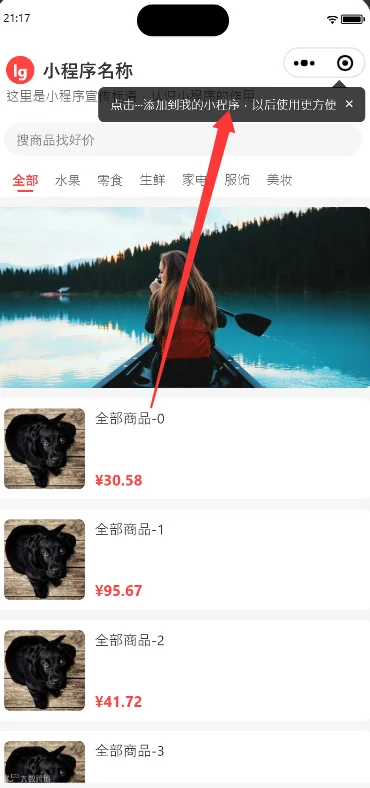
核心难点与解决方案
该气泡本质为前端实现的固定浮层。由于不同机型(如折叠屏、平板)的胶囊按钮位置存在差异,核心难点在于动态获取胶囊坐标并进行精确定位。
完整代码实现
WXML 结构
<!-- 添加到我的小程序引导气泡 --><view wx:if="{{showGuideTip}}"class="guide-tip"style="top: {{tipTop}}px; right: {{tipRight}}px;"><view class="tip-arrow"></view><view class="tip-content"><view>点击···添加到我的小程序,以后使用更方便</view></view><view class="tip-close" bindtap="closeTip">×</view></view>
WXSS 样式
.guide-tip {position: fixed;z-index: 9999;width: 440rpx;opacity: 0;animation: fadeIn 0.3s ease forwards;}/* 尖角,指向胶囊 */.tip-arrow {width: 0;height: 0;border-left: 16rpx solid transparent;border-right: 16rpx solid transparent;border-bottom: 16rpx solid rgba(0,0,0,0.75);position: absolute;top: -14rpx;/* 尖角往右侧偏移,对准胶囊中间,按需微调 */right: 36rpx;}.tip-content {background: rgba(0,0,0,0.75);color: #ffffff;padding: 20rpx 24rpx;border-radius: 12rpx;font-size: 28rpx;line-height: 44rpx;}.tip-close {position: absolute;top: 8rpx;right: 12rpx;color: #fff;font-size: 32rpx;width: 40rpx;height: 40rpx;text-align: center;line-height: 40rpx;}/* 淡入动画 */@keyframes fadeIn {from {opacity: 0;transform: translateY(-6rpx);}to {opacity: 1;transform: translateY(0);}}
JS 逻辑
Page({data: {showGuideTip: false,tipTop: 0,tipRight: 0},onLoad() {this.initAddGuide()},initAddGuide() {// 读取本地缓存,关闭过就不再展示const hasShow = wx.getStorageSync('hasShowAddMiniGuide')if (hasShow) return// 获取胶囊位置const menuRect = wx.getMenuButtonBoundingClientRect()// 获取屏幕宽度const sysInfo = wx.getSystemInfoSync()const windowWidth = sysInfo.windowWidth// 气泡放在胶囊底部往下10pxconst top = menuRect.bottom + 10// 气泡右边和胶囊右边对齐const right = windowWidth - menuRect.rightthis.setData({showGuideTip: true,tipTop: top,tipRight: right})},// 关闭气泡,标记已展示closeTip() {this.setData({showGuideTip: false})wx.setStorageSync('hasShowAddMiniGuide', 1)}})
开发踩坑总结
wx.getMenuButtonBoundingClientRect()在部分折叠屏或平板机型上可能存在坐标偏差,建议通过调整 CSS 中的right值(如36rpx)进行微调,以确保尖角准确对准胶囊。建议将浮层的
z-index设置得足够大,避免被页面其他元素遮挡。注意 Storage 缓存 Key 的命名规范,避免与项目中其他存储键值冲突。
#微信小程序 #前端实战