




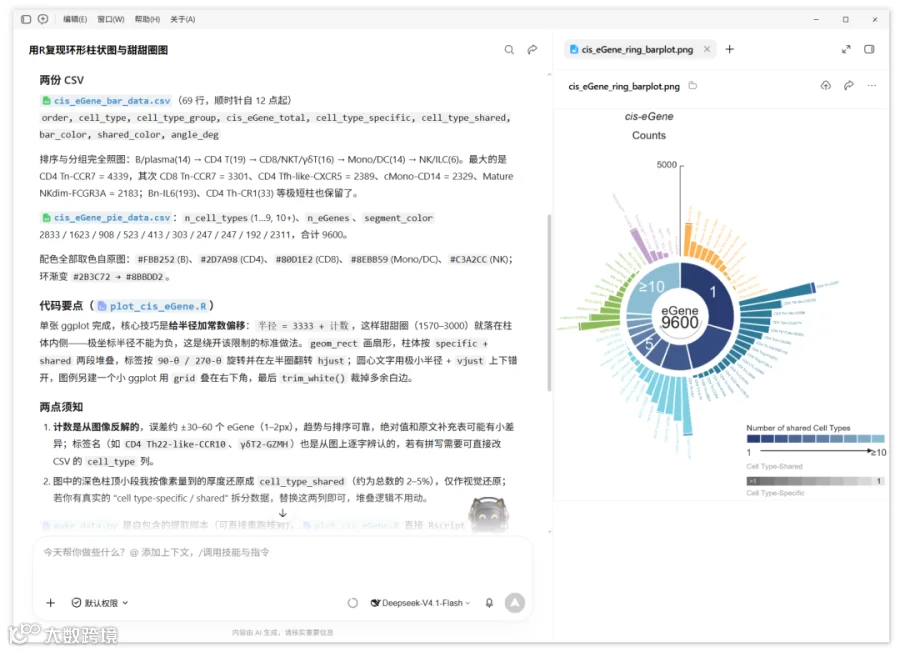


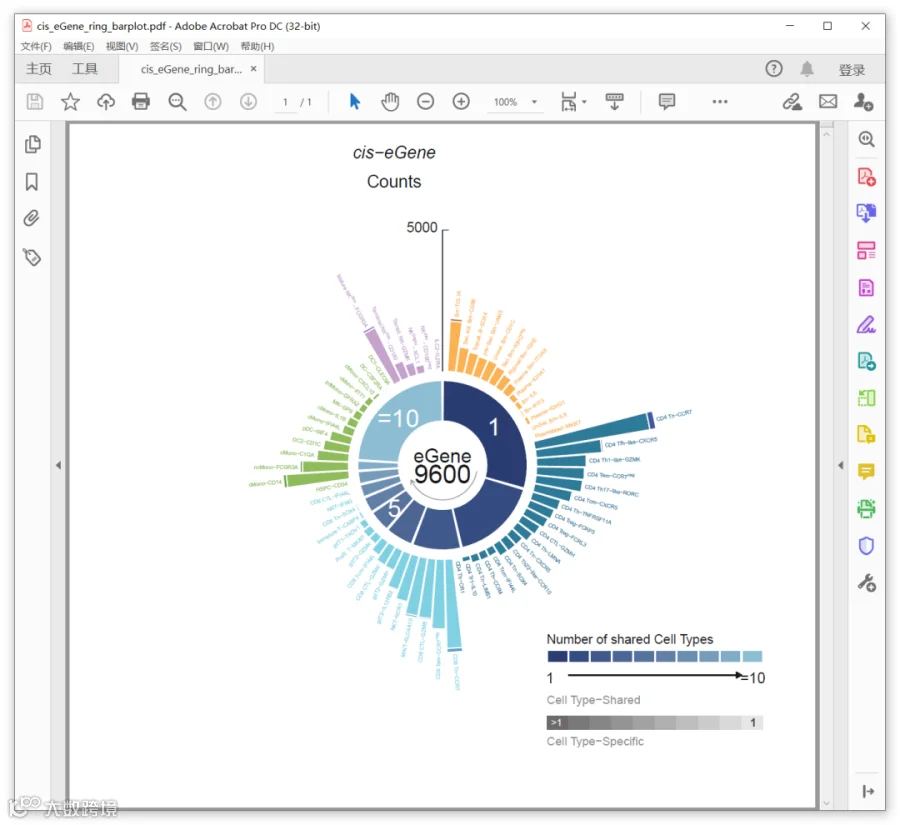


library(ggplot2)library(dplyr)library(grid)# 1. 读入数据bars <- read.csv("cis_eGene_bar_data.csv", fileEncoding = "UTF-8-BOM",encoding = "UTF-8", check.names = FALSE, stringsAsFactors = FALSE)pie <- read.csv("cis_eGene_pie_data.csv", fileEncoding = "UTF-8-BOM",encoding = "UTF-8", check.names = FALSE, stringsAsFactors = FALSE)# 带上下标的标签:plotmath 写法;其余标签统一加引号,避免被当作运算符解析sup_map <- c("Swi. Bm-IGHDneg" = '"Swi. Bm-IGHD"^"neg"',"CD4 Tem-CCR7neg" = '"CD4 Tem-CCR7"^"neg"',"CD8 Tem-CCR7neg" = '"CD8 Tem-CCR7"^"neg"',"Mature NKdim-FCGR3A" = '"Mature NK"^"dim"-"FCGR3A"',"Terminal NKdim-CD160" = '"Terminal NK"^"dim"-"CD160"',"NKbright-XCL1" = '"NK"^"bright"-"XCL1"',"NKdim-CD160neg" = '"NK"^"dim"-"CD160"^"neg"')bars$lab <- ifelse(bars$cell_type %in% names(sup_map),sup_map[bars$cell_type],paste0('"', bars$cell_type, '"'))# 2. 几何参数BASE_R <- 3333 # 柱体基线(= 甜甜圈之外留白处的半径)RING_IN <- 1570 # 甜甜圈内径RING_OUT <- 3000 # 甜甜圈外径BAR_W <- 4.8 # 单根柱的角宽度(度)R_TICK <- 5000 # 刻度值Y_MAX <- 9500# 3. 柱体:拆成“specific + shared”两段堆叠bars <- bars %>%mutate(xmin = angle_deg - BAR_W / 2,xmax = angle_deg + BAR_W / 2)stack_df <- bind_rows(bars %>% transmute(xmin, xmax,ymin = BASE_R,ymax = BASE_R + cell_type_specific,fill = bar_color),bars %>% transmute(xmin, xmax,ymin = BASE_R + cell_type_specific,ymax = BASE_R + cis_eGene_total,fill = shared_color))# 4. 甜甜圈:按 eGene 数把 360° 分给 10 个分段pie <- pie %>%mutate(width = 360 * n_eGenes / sum(n_eGenes),start = cumsum(width) - width,end = cumsum(width)) %>%mutate(start = start + 0.6, end = end - 0.6, mid = (start + end) / 2) %>%mutate(tag = ifelse(n_cell_types == "10+", "\u226510", n_cell_types))# 5. 标签角度:右半圈 left-aligned,左半圈 right-alignedbars <- bars %>%mutate(lab_angle = ifelse(angle_deg <= 180, 90 - angle_deg, 270 - angle_deg),hjust_v = ifelse(angle_deg <= 180, 0, 1),lab_y = BASE_R + cis_eGene_total + 70)# 6. 主图p <- ggplot() +# 甜甜圈geom_rect(data = pie,aes(xmin = start, xmax = end, ymin = RING_IN, ymax = RING_OUT),fill = pie$segment_color, colour = "white", linewidth = 0.45) +geom_text(data = filter(pie, n_cell_types %in% c("1", "5", "10+")),aes(x = mid, y = (RING_IN + RING_OUT) / 2, label = tag),colour = "white", size = 6.0) +# 柱体(堆叠)geom_rect(data = stack_df,aes(xmin = xmin, xmax = xmax, ymin = ymin, ymax = ymax, fill = fill),colour = "white", linewidth = 0.5) +# 刻度轴(12 点方向)与 5000annotate("segment", x = 0, xend = 0, y = BASE_R, yend = BASE_R + R_TICK,colour = "grey25", linewidth = 0.45) +annotate("segment", x = 0, xend = 1.5, y = BASE_R + R_TICK,yend = BASE_R + R_TICK, colour = "grey25", linewidth = 0.45) +annotate("text", x = 0.7, y = BASE_R + R_TICK, label = "5000",hjust = 1.25, vjust = 0.25, size = 4.5, colour = "grey10") +# 细胞类型标签geom_text(data = bars,aes(x = angle_deg, y = lab_y, label = lab, angle = lab_angle,hjust = hjust_v, colour = bar_color),parse = TRUE, size = 3, vjust = 0.5) +# 圆心文字(极坐标半径不能为负,故置于圆心后用 vjust 上下错开)annotate("text", x = 0, y = 60, label = "eGene", size = 4.5, colour = "grey20",vjust = -0.1) +annotate("text", x = 0, y = 60, label = "9600", size = 4.5, colour = "grey20",vjust = 1.1) +# 圆心小箭头geom_path(data = data.frame(x = seq(100, 245, length.out = 60), y = 1230),aes(x = x, y = y), colour = "grey60", linewidth = 0.5,arrow = arrow(length = unit(1.6, "mm"), type = "open")) +scale_fill_identity() +scale_colour_identity() +scale_x_continuous(limits = c(0, 360), expand = c(0, 0), breaks = NULL) +scale_y_continuous(limits = c(0, Y_MAX), expand = c(0, 0), breaks = NULL) +coord_polar(theta = "x", start = 0, direction = 1, clip = "off") +theme_void() +theme(plot.background = element_rect(fill = "white", colour = NA),plot.margin = margin(5, 5, 5, 5, unit = "pt"))p# 7. 图例(右下角,用 grid 叠加)grad_cols <- c("#2B3C72", "#344B80", "#40598B", "#4C6594", "#56729D","#617FA6", "#6B8DB0", "#769CBB", "#80ACC6", "#8BBDD2")leg <- ggplot() +annotate("text", x = 0, y = 3.15, label = "Number of shared Cell Types",hjust = 0, size = 3, colour = "grey10") +geom_rect(data = data.frame(xmin = 0:9, xmax = 1:10),aes(xmin = xmin, xmax = xmax, ymin = 2.45, ymax = 2.85),fill = grad_cols, colour = "white", linewidth = 0.6) +annotate("text", x = 0, y = 2.02, label = "1", hjust = 0.1, size = 3.5, colour = "grey10") +annotate("text", x = 10, y = 2.02, label = "\u226510", hjust = 0.9, size = 3.5, colour = "grey10") +annotate("segment", x = 1.0, xend = 8.0, y = 2.02, yend = 2.02,colour = "grey10", linewidth = 0.6,arrow = arrow(length = unit(1.6, "mm"), type = "open")) +annotate("text", x = 0, y = 1.38, label = "Cell Type-Shared",hjust = 0, size = 3, colour = "grey55") +geom_rect(data = data.frame(xmin = 0:9, xmax = 1:10),aes(xmin = xmin, xmax = xmax, ymin = 0.50, ymax = 0.90),fill = gray(seq(0.42, 0.90, length.out = 10)), colour = NA) +annotate("text", x = 9.55, y = 0.70, label = "1", hjust = 0.5, size = 3.8,colour = "grey25", fontface = "bold") +annotate("text", x = 0.45, y = 0.70, label = ">1", hjust = 0.5, size = 3.2,colour = "white") +annotate("text", x = 10, y = 0.16, label = "Cell Type-Specific",hjust = 1, size = 3, colour = "grey55") +coord_cartesian(xlim = c(-0.25, 10.6), ylim = c(-0.02, 3.5), expand = FALSE) +theme_void()leg# 8. 输出draw_all <- function() {print(p)grid.text("cis-eGene", x = unit(0.495, "npc"), y = unit(0.945, "npc"),gp = gpar(fontsize = 14, col = "grey8", fontface = "italic"))grid.text("Counts", x = unit(0.495, "npc"), y = unit(0.905, "npc"),gp = gpar(fontsize = 14, col = "grey8"))pushViewport(viewport(x = 0.76, y = 0.155, width = 0.215, height = 0.175))grid.draw(ggplotGrob(leg))popViewport()}draw_all()dev.off()
*未经许可,不得以任何方式复制或抄袭本篇文章之部分或全部内容。版权所有,侵权必究。


基迪奥旗下绘图公众号
分享科研绘图技能与工具
欢迎关注与转发~

你的好友拍了拍你
并请你帮她点一下“分享”~