



10 个关键问题 Q&A
- Supermemory 是什么?
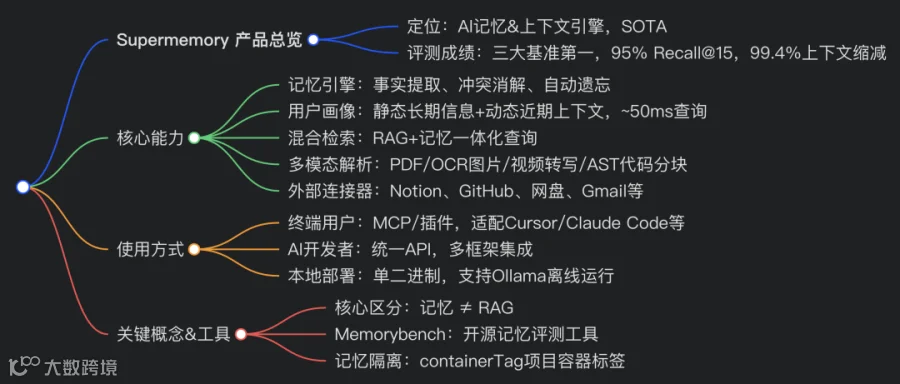
面向 AI 的记忆与上下文层引擎,给大模型提供跨对话持久记忆,集成 RAG、用户画像、文件处理全套上下文能力。 - 它和普通 RAG 最大区别?
RAG 只检索静态文档片段;Supermemory 会理解用户事实、处理信息更新与矛盾,自动淘汰过期记忆,具备时序推理能力。 - 性能指标有哪些?
三大 AI 记忆基准第一;Recall@15 召回率 95%,上下文缩减 99.4%;用户画像单次调用约 50ms。 - 哪些 AI 客户端可以直接接入?
Claude Desktop、Cursor、Windsurf、VS Code、Claude Code、OpenCode、Hermes 等,通过 MCP 或插件接入。 - 本地部署难度高吗?
一键脚本安装,单二进制文件,零基础配置,支持搭配 Ollama 完全离线,数据保存在本地目录。 - 开发接入是否需要维护向量数据库?
不需要,API 封装嵌入、分块、向量检索底层逻辑,开发者直接调用接口即可。 - containerTag 容器标签作用?
用于记忆空间隔离,可按项目、客户区分上下文,分开存储工作、私人记忆。 - 支持哪些外部数据源同步?
Google Drive、Gmail、Notion、OneDrive、GitHub,支持 webhook 实时同步文档。 - 支持哪些文件类型?
PDF、图片(OCR)、视频(字幕转写)、代码(AST 感知智能分块)。 - Memorybench 是什么?
Supermemory 开源评测框架,标准化测试 AI 记忆方案,可横向对比 Supermemory、Mem0、Zep 等竞品。 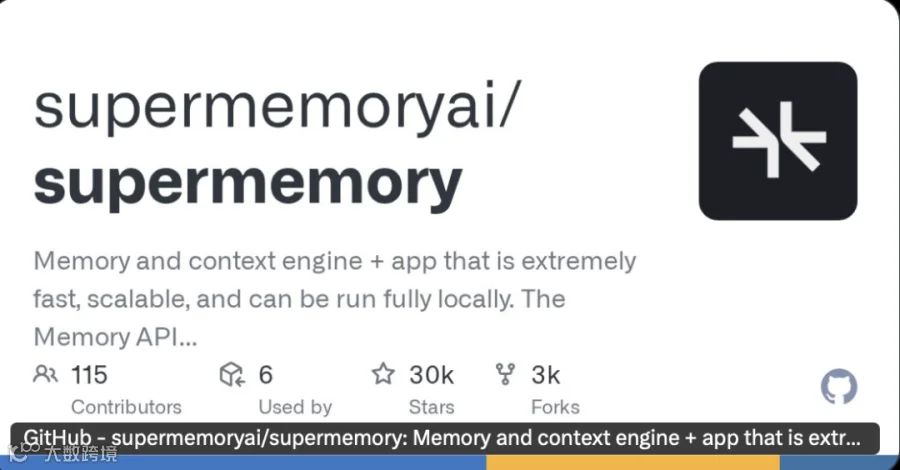
官网文档:https://supermemory.ai/docs・快速入门:https://supermemory.ai/docs/quickstart・本地部署概览:https://supermemory.ai/docs/self-hosting/overview・控制台:https://console.supermemory.ai/・Discord 社区:https://supermemory.link/discord
NPM 包:https://www.npmjs.com/package/supermemoryPyPI 包:https://pypi.org/project/supermemory/文档主页:https://supermemory.ai/docs
英文原版・中文 README:https://github.com/supermemoryai/supermemory/blob/main/README.zh-CN.md
在所有主流 AI 记忆评测基准上排名第一 —— 评测项目包括 LongMemEval、Locomo(Snap 研究院)、ConvoMem(Salesforce)。Recall@15 召回率 95%,上下文缩减率 99.4%;用户资料查询耗时约 50 毫秒。研究报告:https://supermemory.ai/research
Supermemory 是 AI 的记忆与上下文层。在三大主流 AI 记忆基准 LongMemEval、Locomo、Salesforce ConvoMem 中均取得第一名。
我们是一家研究实验室,致力于打造这套引擎,以及配套插件与工具。
你的 AI 在对话间隙会遗忘一切。Supermemory 解决这个痛点。它能自动从对话中学习、提取事实、构建用户画像,处理知识更新与信息冲突,自动淘汰过期信息,在恰当的时机返回所需上下文。内置完整检索增强生成(RAG)、数据连接器、文件处理能力 —— 一整套上下文栈,集成在同一个系统内。
🧠 记忆模块从对话提取事实,处理时间变化、信息矛盾,并自动遗忘失效内容。
👤 用户画像自动维护用户上下文:长期稳定事实 + 近期活动记录。单次调用,耗时约 50 毫秒。
🔍 混合检索单次查询同时支持 RAG 检索 + 记忆检索。知识库文档与个性化上下文一并返回。
🔌 连接器谷歌云盘、Gmail、Notion、OneDrive、GitHub,支持通过 Webhook 实时自动同步。
📄 多模态提取器支持 PDF、图片(OCR 文字识别)、视频(语音转文字)、代码(基于抽象语法树 AST 智能分块)。上传即可直接使用。
以上所有能力,统一基于一套记忆结构与本体模型。
使用 Supermemory
https://github.com/supermemoryai/supermemory#use-supermemory
🧑💻 我使用 AI 工具https://github.com/supermemoryai/supermemory#%E2%80%8D-i-use-ai-tools
通过插件或 MCP 服务,为 Claude Code、Muse Code、Cursor、Codex、OpenCode 在所有对话中提供持久记忆。你的 AI 可以记住你的偏好、项目、过往讨论,并随着使用持续变聪明。https://github.com/supermemoryai/supermemory#give-your-ai-memory
🔧 我正在开发 AI 产品https://github.com/supermemoryai/supermemory#-im-building-ai-products
只需调用一套 API,即可为你的智能体与应用增加记忆、RAG、用户画像、外部数据连接器能力。无需配置向量数据库,不用搭建嵌入向量流水线,不用手动设计文本分块策略。https://github.com/supermemoryai/supermemory#build-with-supermemory-api
🖥️ 我想本地自行部署https://github.com/supermemoryai/supermemory#%EF%B8%8F-i-want-to-run-it-myself
在本地设备上运行顶尖记忆引擎。单二进制文件,零配置。可接入任意大模型;搭配 Ollama 可实现完全离线运行。
bash
curl-fsSL https://supermemory.ai/install |bash
https://github.com/supermemoryai/supermemory#supermemory-local--run-it-yourself
赋予 AI 记忆
https://github.com/supermemoryai/supermemory#give-your-ai-memory插件与 MCP 服务可为所有兼容的 AI 助手提供持久记忆。安装一次,AI 就能记住你。
Supermemory 插件
https://github.com/supermemoryai/supermemory#supermemory-plugins内置适配 Claude Code、Muse Code、Cursor、Codex、OpenCode、OpenClaw、Hermes 的插件。
这些插件均基于 Supermemory API 实现,开源免费!插件仓库地址:
-
Claude Code 插件:https://github.com/supermemoryai/claude-supermemory -
Muse Code 插件:https://github.com/supermemoryai/muse-supermemory -
Cursor 插件:https://github.com/supermemoryai/cursor-supermemory -
Codex 插件:https://github.com/supermemoryai/codex-supermemory -
OpenClaw 插件:https://github.com/supermemoryai/openclaw-supermemory -
OpenCode 插件:https://github.com/supermemoryai/opencode-supermemory -
Hermes 智能体(Supermemory 记忆提供方):https://github.com/NousResearch/hermes-agent
MCP(模型上下文协议)
https://github.com/supermemoryai/supermemory#mcp服务地址:https://mcp.supermemory.ai/mcp
json
{
"mcpServers":{
"supermemory":{
"url":"https://mcp.supermemory.ai/mcp"
}
}
}
MCP 详细文档:https://supermemory.ai/docs/supermemory-mcp/mcp
AI 将获得哪些能力
https://github.com/supermemoryai/supermemory#what-your-ai-gets
|
|
|
|---|---|
|
|
|
|
|
|
|
|
/context即可调用。
|
工作原理
https://github.com/supermemoryai/supermemory#how-it-works安装完成后,Supermemory 在后台运行:
-
你照常和 AI 对话,告知偏好、提及项目、讨论问题; -
Supermemory 提取并存储关键信息:事实、偏好、项目上下文,过滤无效噪音; -
开启新一轮对话时,AI 已经了解你:记得你正在做的工作、你的习惯偏好、过往讨论内容。
记忆按项目容器标签隔离。你可以区分工作 / 私人上下文,也可以按客户、代码仓库等维度分组管理。
支持客户端
https://github.com/supermemoryai/supermemory#supported-clientsClaude 桌面端、Cursor、Windsurf、VS Code、Claude Code、OpenCode、OpenClaw、Hermes
MCP 服务开源:https://supermemory.ai/docs/supermemory-mcp/mcp
手动配置
https://github.com/supermemoryai/supermemory#manual-configuration将下面配置添加到你的 MCP 客户端配置文件:
json
{
"mcpServers":{
"supermemory":{
"url":"https://mcp.supermemory.ai/mcp"
}
}
}
通过 Supermemory API 进行开发
https://github.com/supermemoryai/supermemory#build-with-supermemory-api如果你正在开发 AI 智能体或应用,Supermemory 通过单一 API 提供整套上下文栈:记忆、RAG、用户画像、连接器、文件处理。
安装
bash
npminstall supermemory
# 或者
pip install supermemory
https://github.com/supermemoryai/supermemory#install
快速上手
javascript
importSupermemoryfrom"supermemory";
const client =newSupermemory();
// 存储一段对话内容
await client.add({
content:"用户喜欢TypeScript,偏好函数式编程范式",
containerTag:"user_123",
});
// 一次调用获取用户画像 + 相关记忆
const{ profile, searchResults }=await client.profile({
containerTag:"user_123",
q:"用户偏好哪种编程风格?",
});
// profile.static → ["喜欢TypeScript", "偏好函数式编程"]
// profile.dynamic → ["正在做API集成开发"]
// searchResults → 根据相似度排序的相关记忆
python
from supermemory import Supermemory
client = Supermemory()
client.add(
content="用户喜欢TypeScript,偏好函数式编程范式",
container_tag="user_123"
)
result = client.profile(container_tag="user_123", q="编程风格")
print(result.profile.static)# 长期不变事实
print(result.profile.dynamic)# 近期上下文
Supermemory 自动提取记忆、构建用户画像,并返回相关上下文。无需搭建向量嵌入流水线,不用配置向量数据库,无需设计文本分块策略。
框架集成
https://github.com/supermemoryai/supermemory#framework-integrations提供主流 AI 框架开箱即用封装:
javascript、
// Vercel AI SDK
import{ withSupermemory }from"@supermemory/tools/ai-sdk";
const model =withSupermemory(openai("gpt-4o"),{containerTag:"user_123",customId:"conv-1"});

// Mastra
import{ withSupermemory }from"@supermemory/tools/mastra";
const agent =newAgent(withSupermemory(config,"user-123",{mode:"full"}));
支持:Vercel AI SDK、LangChain、LangGraph、OpenAI Agents SDK、Mastra、Agno、Claude Memory Tool、n8n
检索模式
javascript
// 混合检索(默认):单次查询同时检索RAG文档 + 记忆
const results =await client.search({
q:"如何部署?",
containerTag:"user_123",
searchMode:"hybrid",
});
// 返回部署文档(RAG) + 用户的部署偏好(记忆)

// 仅检索记忆
const results =await client.search({
q:"用户偏好设置",
containerTag:"user_123",
searchMode:"memories",
});
https://github.com/supermemoryai/supermemory#search-modes
用户画像
https://github.com/supermemoryai/supermemory#user-profiles传统记忆方案依赖检索,你必须明确知道要查询什么。Supermemory 为每位用户自动维护画像:
javascript
const{ profile }=await client.profile({containerTag:"user_123"});
// profile.static → ["Acme公司高级工程师", "偏好暗色模式", "使用Vim编辑器"]
// profile.dynamic → ["正在做身份认证迁移", "调试限流问题"]
单次调用,约 50 毫秒。直接注入系统提示词,智能体立刻了解对话对象。
外部连接器
https://github.com/supermemoryai/supermemory#connectors将外部数据自动同步到知识库:谷歌云盘、Gmail、Notion、OneDrive、GitHub、网页爬虫支持实时 Webhook,文档自动处理、分块,随时可检索。
API 总览
https://github.com/supermemoryai/supermemory#api-at-a-glance
|
|
|
|---|---|
|
|
|
|
|
|
|
|
|
|
|
|
|
|
|
|
|
|
|
|
|
完整 API 参考文档 → https://supermemory.ai/docs
Supermemory Local:本地部署
https://github.com/supermemoryai/supermemory#supermemory-local--run-it-yourself本地设备上运行顶尖记忆引擎。单二进制程序,零配置。
curl-fsSL https://supermemory.ai/install |bash
# 或者 npx supermemory local
supermemory-server
首次启动会初始化内置的 Supermemory 图引擎、本地向量嵌入、凭证信息,并输出 API 密钥。完整记忆 API(文档、记忆、用户画像、混合检索)在 http://localhost:6767提供服务。
javascript
const client =newSupermemory({
apiKey:"sm_...",
baseURL:"http://localhost:6767",// 仅需修改这一行
});
可接入任意模型:OpenAI、Anthropic、Gemini、Groq,或是任意兼容 OpenAI 接口的端点。首次启动有交互式向导引导配置。
向量嵌入:默认使用本地 Xenova/bge-base-en-v1.5,无需额外 API 密钥;也可选择 OpenAI、Gemini、Ollama。云端与本地使用同一套嵌入服务商体系。
可完全离线运行:对接 Ollama(gpt-oss:20b效果很好),所有数据不会流出本机。
数据统一存放:全部数据保存在 ./.supermemory目录,方便备份与迁移。
本地与云端 API 完全一致:本地原型开发完成后,只需修改 baseURL 即可切换到托管平台上线。
本地部署文档:概览 https://supermemory.ai/docs/self-hosting/overview;快速入门 https://supermemory.ai/docs/self-hosting/configuration;嵌入模型 https://supermemory.ai/docs/self-hosting/embeddings;本地版 vs 企业版 https://supermemory.ai/docs/self-hosting/local-vs-enterprise
评测基准
https://github.com/supermemoryai/supermemory#benchmarksSupermemory 在全部主流 AI 记忆评测基准上达到 SOTA 顶尖水平:
|
|
|
|
|---|---|---|
|
|
|
|
|
|
|
|
|
|
|
|
LongMemEval 测试中,Supermemory 在 Recall@15 达到 95% 召回率,仅增加约 720 个上下文 token,上下文缩减率 99.4%(Recall@10 缩减率 99.6%,Recall@5 缩减率 99.8%)。分项召回率:知识更新 99%,助手记忆 100%,用户信息 97%,跨会话记忆 93%,时序推理 91%,用户偏好 90%。
项目还自研了 Supermemory 文件系统(SMFS)。在 xAFS 基准(110 道问题)中,Claude 场景下 token 用量减少至原来 1/3(24M 对比 72M);Codex 场景 token 减少 1.75 倍。完整研究论文:https://supermemory.ai/research
同时开源了 Memorybench 框架,用于标准化、可复现地评测记忆服务。可横向对比 Supermemory、Mem0、Zep 等产品:
bash
bun run src/index.ts run -p supermemory -b longmemeval -j gpt-4o -r my-run
文档:https://supermemory.ai/docs/memorybench/overview
评测自研记忆方案
https://github.com/supermemoryai/supermemory#benchmarking-your-own-memory-solution提供 Agent 技能包,企业可将自研上下文 / 记忆方案和 Supermemory 做对比测试。
bash
npx skills add supermemoryai/memorybench
执行后输入 /benchmark-context,Supermemory 会自动完成评测。
底层原理:记忆如何工作
你的应用/AI工具
        ↓
Supermemory
│   ├── 记忆引擎:提取事实、跟踪更新、消解信息冲突,自动遗忘过期信息
│   ├── 用户画像:由记忆引擎持续构建,包含静态事实 + 动态上下文,始终保持最新
│   ├── 混合检索:单次查询同时执行RAG检索 + 记忆检索
│   ├── 连接器:谷歌云盘、Gmail、Notion、GitHub等实时同步
│   └── 文件处理:PDF、图片、视频、代码 → 可检索文本块
记忆 ≠ RAGRAG 返回文档片段,是无状态的,所有人检索得到相同结果。记忆是持续追踪用户相关事实:理解 “我刚搬到旧金山” 会覆盖旧信息 “我住在纽约”。Supermemory 默认同时提供两种能力,每次查询既检索知识库文档,也调取个性化上下文。详细文档:https://supermemory.ai/docs/concepts/memory-vs-rag
自动遗忘机制Supermemory 可以识别失效记忆。临时信息(例如 “我明天有一场考试”)会随时间到期自动失效;信息冲突自动消解;无效噪音不会永久保存。
相关链接
📖 https://supermemory.ai/docs🚀 https://supermemory.ai/docs/quickstart🖥️ https://supermemory.ai/docs/self-hosting/overview🧪 https://supermemory.ai/docs/memorybench/overview🔌 https://supermemory.ai/docs/integrations💬 https://supermemory.link/discord𝕏 https://twitter.com/supermemory