

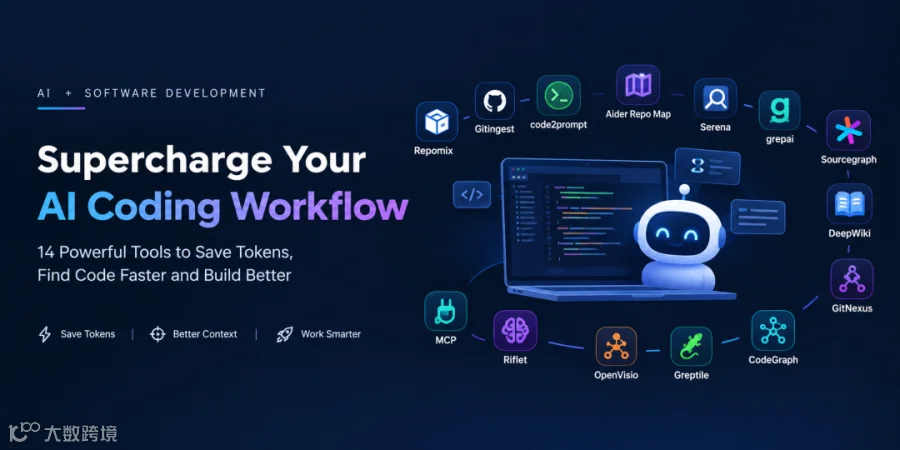
涵盖的工具: Repomix • Gitingest • code2prompt • Aider Repo Map • Serena • grepai • Sourcegraph • DeepWiki • GitNexus • CodeGraph • Greptile • OpenVisio • Riflet • MCP
AI 编程工具已经改变了我们编写软件的方式。
Cursor、Claude Code、GitHub Copilot、Aider、Codex 以及其他 AI 驱动的开发工具可以理解代码、修改多个文件、调试问题、编写测试,甚至浏览整个代码库。
但随着你的代码库不断增长,一个问题会变得很明显:
更多上下文并不一定意味着更好的结果。
给 AI agent 2,000 个文件,并不会自动让它更聪明。
在很多情况下,它会产生相反的效果:
更多输入 token
更多无关信息
更多噪声
更慢的响应
更高的成本
模型更容易关注错误的代码
变更更不可预测
真正的能力不再只是:
“我如何把代码库提供给 AI?”
更好的问题是:
“我如何只给 AI 它真正需要的上下文?”
这正是 repository context tools、code search、repository maps、semantic retrieval、code graphs 以及基于 MCP 的工具变得极其有用的地方。
在本文中,我们将介绍这些工具:
Repomix
Gitingest
code2prompt
Aider Repo Map
Serena
grepai
Sourcegraph
DeepWiki
GitNexus
Code Graph tools
Greptile
OpenVisio
Riflet
更重要的是,你应该在什么时候使用哪种方法。
1. 先理解问题:上下文是昂贵的
假设你有一个大型 Angular 应用:
   src/
├── app/
│   ├── auth/
│   ├── campaigns/
│   ├── dashboard/
│   ├── settings/
│   ├── reports/
│   ├── journeys/
│   ├── shared/
│   └── core/
├── assets/
├── environments/
└── tests/
现在你提出:
“修复 campaign dashboard 的加载问题。”
一种天真的做法可能是:
   Entire repository
        ↓
       AI
        ↓
    Fix the bug
但 AI 很可能并不需要:
   settings/
reports/
assets/
node_modules/
coverage/
old migrations/
generated files/
unrelated tests/
它可能只需要:
   campaign-dashboard.component.ts
campaign-dashboard.service.ts
campaign.store.ts
campaign.effects.ts
campaign-dashboard.html
relevant API
relevant test
这就是:
更多上下文
和
更好上下文
之间的区别。
2. Context Engineering 思维方式
我喜欢把 AI 辅助开发分为四个层级。
   Level 1
-------
Paste code manually
   Level 2
-------
Pack repository context
   Repomix
Gitingest
code2prompt
   Level 3
-------
Retrieve relevant code
   Aider Repo Map
Serena
grepai
Sourcegraph
   Level 4
-------
Understand relationships dynamically
   Code Graph
GitNexus
MCP
AI Agents
层级越高,你就越不需要盲目地发送整个代码库。
3. Repomix - 打包你的代码库
Repomix GitHub repository
Repomix 是最容易理解的工具之一。
它接收一个代码库,并将其打包成 AI 友好的表示形式。
你不必把几十个或几百个独立文件交给 AI,而是可以生成一个合并后的上下文文件。
该项目将自己描述为一个把代码库打包成单个 AI 友好文件的工具,支持 token 计数、include/exclude 控制、Git 感知以及可选压缩。
Install / Run
你可以无需全局安装直接运行:
npx repomix@latest
或者安装它:
npm install -g repomix
然后:
repomix
它会生成:
repomix-output.xml
不要盲目打包所有内容
这一点很重要。
不要只执行:
repomix
你可以指定特定文件:
repomix --include "src/**/*.ts,src/**/*.html,README.md"
或者排除不必要的文件:
repomix --ignore "**/*.test.ts,dist/**,coverage/**"
Repomix 还支持 Git-aware exclusions 和 .repomixignore 配置。
Compression
对于较大的代码库:
repomix --compress
Repomix 的 compression mode 使用 Tree-sitter 提取重要代码元素,同时减少上下文量。
Git history
你还可以包含 Git history:
repomix --include-logs
或者:
repomix --include-logs --include-diffs
当 AI 需要理解代码是如何演进的时,这会很有用。
什么时候应该使用 Repomix?
在以下场景使用它:
你想要一个代码库快照
你要让 AI 分析一个不熟悉的项目
你想与 AI 共享一个代码库
你需要 repository-level 架构分析
你想明确控制包含/排除的文件
主要收益
简单的代码库打包 + token 可见性 + 过滤能力。
4. Gitingest - 快速将 Git Repository 转换为 AI 上下文
Gitingest 遵循类似的思路:
   GitHub Repository
       ↓
   Gitingest
       ↓
AI-readable context
       ↓
LLM
当你查看外部 GitHub 项目并想快速理解其结构时,它尤其方便。
例如:
https://github.com/some-org/some-project
可以被转换成更容易提供给 AI model 的表示形式。
它在什么时候有用?
假设你正在评估一个开源库。
与其手动打开:
   README.md
src/
package.json
config/
tests/
你可以 ingest 这个代码库,然后询问:
“解释这个项目的架构,并识别主要扩展点。”
收益
极低门槛的 repository ingestion。
重要区别是:
当你需要可控的代码库打包时,Repomix 非常优秀。
当你需要快速 repository ingestion 时,Gitingest 很方便。
5. code2prompt - 将代码转换为结构化 Prompt
另一种方法是直接从选定的源文件生成 prompt。
基本思路是:
   Source files
     ↓
code2prompt
     ↓
Structured prompt
     ↓
LLM
当你不想完整 dump 整个代码库时,这很有用。
例如:
   src/
  auth/
    auth.service.ts
    auth.guard.ts
    auth.interceptor.ts
可以变成一个只包含这些文件的聚焦 prompt。
为什么这有用?
假设你的任务是:
“调查为什么 authentication tokens 没有被刷新。”
你很可能不需要:
   dashboard/
reports/
campaigns/
settings/
你需要的是 authentication subsystem。
这就是面向任务的上下文生成。
收益
你可以精确控制哪些内容进入模型上下文。
6. Aider Repo Map - 不要发送整个代码库
Aider documentation
这是这个领域中我最喜欢的概念之一。
Aider 会创建一个简洁的 repository map,其中包含重要文件、类、函数、类型和签名。然后它使用基于图的排序,在 token budget 内选择最相关的部分。
概念上:
Traditional approach
   Repository
    ↓
Read everything
    ↓
LLM
Aider:
   Repository
    ↓
Repository Map
    ↓
Important symbols
    ↓
Relevant context
    ↓
LLM
repo map 可以包含如下信息:
campaign.service.ts
class CampaignService
     createCampaign()
  updateCampaign()
  deleteCampaign()
  getCampaign()
模型可以获得结构信息,而不一定要读取每个文件的每一行。
Aider 的 repository map 会基于 token budget 动态优化;其文档中的默认 map budget 约为 1,000 tokens,可通过 --map-tokens 配置。
例如:
aider --map-tokens 2048
为什么这很重要
你不必花费数千个 token 描述整个代码库,而是给 AI:
   What exists
+
Where it exists
+
How important pieces relate
然后它可以请求所需的详细代码。
收益
无需盲目加载整个代码库,也能具备 repository awareness。
7. Serena - 语义代码检索
Serena on GitHub
Serena 将这个思路推进了一步。
它不是把代码当作纯文本,而是为 coding agents 提供语义化、符号级别的工具。
例如:
   find_symbol
find_referencing_symbols
insert_after_symbol
这使 agent 可以处理:
   Class
Function
Method
Symbol
Reference
Relationship
而不是反复扫描整个文件。
Serena 将自己描述为面向 coding agents 的 IDE-like toolkit,在 symbol level 提供 semantic retrieval 和 editing capabilities,并通过 MCP 集成。
示例
不要这样问:
“在整个文件中搜索
CampaignService的引用。”
agent 在概念上可以这样请求:
   Find CampaignService
        ↓
Find references
        ↓
Find callers
        ↓
Inspect relevant symbols
为什么这能节省 token
如果一个 2,000 行文件只包含一个相关方法,读取全部 2,000 行就是浪费。
Symbol-level retrieval 让 agent 专注于:
   relevant symbol
+
related symbols
收益
对于读取整个文件成本很高的大型代码库极其有用。
8. grepai - 语义代码搜索
传统搜索:
grep -R "authentication" src/
在你知道精确词语时有效。
但如果你的任务是:
“找到负责检查用户是否允许访问 campaign 的代码。”
实现中可能包含:
   permission
authorization
role
access
guard
policy
canActivate
语义搜索工具可以帮助找到概念相关的代码,而不只是依赖精确字符串匹配。
这正是 grepai 这类工具的用武之地。
概念上:
   Natural language question
          ↓
Semantic search
          ↓
Relevant code
          ↓
AI agent
收益
无需加载整个代码库,也能找到相关代码。
9. Sourcegraph - 组织规模的 Code Intelligence
Sourcegraph Code Search
如果你处理的是:
1 repository
通常可以依靠本地工具解决。
但企业环境可能包含:
   200 repositories
20 teams
multiple languages
multiple branches
shared libraries
microservices
legacy systems
这正是 Sourcegraph 变得有意思的地方。
Sourcegraph 提供跨代码库的 code search、navigation、natural-language Deep Search、code insights 和 integrations。
你可以跨以下维度搜索:
   Repository
Branch
Commit
Language
File
Symbol
它还支持 commit 和 diff 搜索。
示例
假设你想知道:
“
UserService在所有 microservices 中哪里被使用?”
不必把所有内容都 clone 到本地:
   Sourcegraph
    ↓
Search repositories
    ↓
Find references
    ↓
Inspect relationships
Sourcegraph 还有 Deep Search,这是一种 agentic natural-language code exploration 能力。
Search contexts
Search contexts 可以将搜索限制在特定 repositories 和 revisions 内,当你不希望 AI/search operation 在过于宽泛的代码宇宙中搜索时,这很有用。
收益
非常适合拥有大型、多代码库 codebases 的组织。
10. DeepWiki - 将代码库转换为文档
DeepWiki
有时候你的问题不是:
“找到这个函数。”
而是:
“帮我理解这个代码库。”
DeepWiki 采用了不同的方法。
它会生成可交互的文档,帮助你理解代码库。其当前网站将其描述为可对话的、面向 repositories 的 up-to-date documentation。
这在加入以下场景时尤其有用:
   legacy project
open-source project
new team
unfamiliar architecture
你不必询问:
“这个代码库是做什么的?”
然后把数千个文件交给 LLM,而是可以先建立高层理解。
示例问题
How is authentication implemented?
What are the main modules?
How does the API layer communicate with the database?
Where is state management implemented?
What are the main entry points?
收益
非常适合 onboarding 和架构理解。
11. GitNexus - 用 Code Graph 思考
现在我们进入一个更高级的概念。
代码库不只是一组文件。
它是一张图。
例如:
   Component
   ↓
Service
   ↓
API
   ↓
Repository
   ↓
Database
或者:
   Function A
   ↓ calls
Function B
   ↓ calls
Function C
code graph 试图表示这些关系。
与其让 AI 读取:
500 files
你可以让它理解:
What depends on CampaignService?
并遍历相关关系。
GitNexus 特别有意思,因为它将 code-graph 概念与 agent/MCP workflows 结合起来。
为什么 graph 很重要
考虑一个重构任务:
“重命名这个 service,并更新所有受影响的 consumers。”
相关上下文不一定是:
every file
而是:
   Service
 ↓
References
 ↓
Consumers
 ↓
Tests
 ↓
Related modules
收益
基于关系感知的上下文,而不是面向文件的上下文。
12. Code Graph Tools
Code graph tools 通常遵循这个模型:
   Source Code
     ↓
Parser / Indexer
     ↓
Code Graph
     ↓
Query
     ↓
Relevant relationships
     ↓
AI
节点可以表示:
   Files
Classes
Functions
Methods
Interfaces
Modules
APIs
Database models
边可以表示:
   imports
calls
extends
implements
references
depends-on
这对于以下场景尤其有价值:
大规模重构
架构分析
依赖分析
影响分析
遗留应用
Microservice 关系
收益
AI 可以基于关系推理,而不只是基于文本。
13. Greptile - AI Codebase Intelligence
Greptile 采用另一种方法:索引代码库,并利用这种理解进行 AI 辅助的 code review 和代码库问答。
这对希望将 AI 集成到以下流程中的团队尤其相关:
   Pull Requests
Code Review
Repository Understanding
Engineering Workflows
让每次 PR review 不再从零开始:
   PR
 ↓
Codebase context
 ↓
AI analysis
 ↓
Review
收益
当 AI 代码理解需要成为团队日常开发流程的一部分时很有用。
14. OpenVisio - 面向关系的上下文
OpenVisio 属于更广泛的 code-graph / code-intelligence 类别。
思路类似:
   Code
 ↓
Relationships
 ↓
Queryable representation
 ↓
Relevant context
 ↓
AI
随着代码库变大,这种方法会更有价值。
对于一个小项目:
50 files
你可能不需要它。
对于:
   5,000+ files
multiple applications
shared packages
complex dependencies
relationship-aware retrieval 会变得有用得多。
15. Riflet - 不只是来自代码的上下文
有些工程任务并不完全是关于源代码的。
你可能需要:
   Code
+
README
+
Architecture document
+
API specification
+
PDF
+
Ticket
+
Database schema
这正是 Riflet 这类 context-builder tools 变得有意思的地方。
工作流变成:
   Multiple sources
       ↓
Context builder
       ↓
Relevant information
       ↓
AI
而不是手动从五个不同地方复制信息。
收益
适用于需要 code + documentation + external engineering context 的任务。
16. 不要忘记 Git 本身
你并不总是需要另一个 AI 工具。
Git 已经给你提供了一个极其强大的 context engine。
例如:
git diff
不要把整个文件交给 AI,而是把实际变更给它。
git diff -- src/app/campaign/
或者:
git diff HEAD~1
查看历史:
git log --oneline -- src/app/campaign/
查看特定文件:
git blame src/app/campaign/campaign.service.ts
你还可以搜索代码库:
git grep "CampaignService"
原则很简单:
先用 Git 识别发生了什么变化,再让 AI 解释为什么发生变化。
这可以显著减少无关上下文。
17. 先用确定性工具,再用 AI
这是最重要的经验之一。
不要让 AI 执行那些确定性工具能做得更好的事情。
例如:
不要问 AI:
“找出所有 TypeScript 错误。”
运行:
npx tsc --noEmit
然后把错误交给 AI。
不要问 AI:
“找出 lint 问题。”
运行:
npm run lint
然后把失败信息交给 AI。
不要问 AI:
“发生了什么变化?”
运行:
git diff
不要问 AI:
“找出所有引用。”
使用:
   IDE
Sourcegraph
Serena
code search
然后让 AI 对结果进行推理。
这会形成一个强大的工作流:
   Deterministic tools
        ↓
Facts
        ↓
AI reasoning
        ↓
Decision
        ↓
Implementation
而不是:
   AI
 ↓
Search
 ↓
Guess
 ↓
Generate
18. AGENTS.md 和 AI 代码库说明
另一种强大的技术不需要外部工具。
创建一个 repository instruction file,例如:
AGENTS.md
你可以记录:
   Project architecture
Coding conventions
Testing commands
Build commands
Important directories
Do-not-modify areas
API conventions
State management conventions
Naming conventions
Security rules
例如:
# Project Instructions
## Architecture
This project uses Angular + NgRx.
## State Management
Use existing NgRx patterns.
Do not introduce another state-management library.
## Testing
Run:
npm test
before submitting changes.
## Styling
Use the existing design-system components.
Do not introduce custom Material overrides unless necessary.
现在你不必在每个 prompt 中重复这些说明。
19. Cursor Rules / Project Rules
如果你使用支持 repository rules 的 AI-enabled IDE,请将项目特定说明保存在代码库中。
例如:
   .cursor/
└── rules/
    ├── architecture.mdc
    ├── angular.mdc
    ├── testing.mdc
    └── security.mdc
不要这样:
   Prompt 1:
Remember that we use NgRx...
   Prompt 2:
Remember that we use NgRx...
   Prompt 3:
Remember that we use NgRx...
而是让这些信息可复用。
这就是持久化上下文。
20. MCP 再次改变模型
下一次演进是 MCP。
你不必给 AI 一个巨大的上下文文件:
   Repository
    ↓
Huge context
    ↓
AI
而是可以暴露工具:
   AI Agent
   │
   ├── Search code
   ├── Find symbol
   ├── Find references
   ├── Read file
   ├── Search Git history
   ├── Run tests
   └── Inspect browser
AI 会在需要时检索信息。
这更接近人类开发者的工作方式。
开发者不会在修复一个 bug 之前阅读整个 500,000 行代码库。
他们会:
   Search
 ↓
Inspect
 ↓
Follow references
 ↓
Read relevant code
 ↓
Change
 ↓
Test
AI agents 也应越来越以相同方式工作。
21. 这些工具之间的最大区别
事情在这里变得有意思。
它们并不全是竞争对手。
可以把它们看作不同层级。
   | Layer            | Tools                          | Main Idea                          |
| ---------------- | ------------------------------ | ---------------------------------- |
| 📦  Pack          | Repomix, Gitingest             | Package repository context         |
| 📝  Prompt        | code2prompt                    | Build focused AI prompts           |
| 🗺 ️ Map          | Aider Repo Map                 | Understand repository structure    |
| 🔎  Search        | grepai, Sourcegraph            | Find relevant code                 |
| 🧠 Semantic      | Serena                         | Understand symbols and references  |
| 📚  Documentation | DeepWiki                       | Understand repository architecture |
| 🕸 ️ Graph        | GitNexus, CodeGraph, OpenVisio | Understand code relationships      |
| 🤖 Review        | Greptile                       | AI code intelligence and review    |
| 🧰 Context       | Riflet                         | Combine multiple context sources   |
| 🔌  Agent Tools   | MCP                            | Retrieve context dynamically       |
关键结论是:
代码库上下文正在从静态文件 → 搜索 → 语义检索 → 图 → agent 驱动检索演进。
22. 你应该使用哪个工具?
你不需要所有工具。
小型项目
使用:
   Git
+
ripgrep
+
Repomix
+
AI coding assistant
这可能已经足够。
中型项目
使用:
   Git
+
Repo rules
+
Repomix
+
Aider-style repository mapping
+
semantic search
大型项目
考虑:
   Sourcegraph
+
Serena
+
code search
+
code graph
+
MCP
+
AI agent
企业 / 多代码库
架构可以变成:
   AI Agent
                       │
                       ↓
                      MCP
                       │
        ┌──────────────┼──────────────┐
        ↓              ↓              ↓
   Code Search     Code Graph      Git History
        │              │              │
        ↓              ↓              ↓
   Sourcegraph     GitNexus       Git
        │              │              │
        └──────────────┼──────────────┘
                       ↓
                 Relevant Context
                       ↓
                      LLM
这比把每个代码库都 dump 到一个 prompt 中更具可扩展性。
23. 我推荐的实用工作流
假设你有这样一个任务:
“将一个 Angular service 从旧的 RxJS pattern 迁移到现代做法。”
不要从这里开始:
"Here is my entire repository. Migrate this."
而是:
Step 1 - Search
git grep "OldService"
Step 2 - Find references
使用:
   IDE
Serena
Sourcegraph
Step 3 - Inspect history
git log --oneline -- src/app/services/old.service.ts
Step 4 - Build focused context
使用:
   Repomix
code2prompt
并且只包含:
   service
consumer
interfaces
tests
related utilities
Step 5 - Give AI the task
   Goal:
Modernize OldService.
   Constraints:
- Preserve public API
- Don't change unrelated modules
- Preserve existing behavior
- Add/update tests
- Follow existing architecture
Step 6 - Run deterministic validation
   npm run lint
npx tsc --noEmit
npm test
Step 7 - Give failures back to AI
不要再次发送整个代码库,而是:
   Here are the 3 TypeScript errors.
Fix only these issues.
这就是 token efficiency 变得实际可用的地方。
24. 最重要的规则:Context Quality > Context Quantity
比较两个 prompt。
Prompt A
Here is my entire repository.
Fix the bug.
Prompt B
   Goal:
Fix the campaign loading race condition.
   Relevant files:
- campaign.component.ts
- campaign.service.ts
- campaign.effects.ts
- campaign.store.ts
   Constraints:
- Preserve existing API behavior
- Don't modify unrelated modules
- Follow existing NgRx patterns
- Add regression coverage
   Known failure:
The second API response sometimes overwrites the first selection.
   First analyze the data flow.
Do not modify files until you identify the root cause.
Prompt B 更短。
但它包含的每个 token 的有用信息更多。
这才是真正的优化。
25. Token Optimization 不是使用最短 Prompt
这是另一个误解。
一个糟糕的短 prompt:
Fix auth.
不一定比下面更好:
Investigate why refresh-token requests can execute concurrently.
   Inspect:
- auth.service.ts
- auth.interceptor.ts
- token.store.ts
Preserve the public API.
   First identify the race condition.
Then propose the smallest safe change.
第二个 prompt 使用了更多文字。
但它可以减少无效工作。
所以:
Token efficiency ≠ 更少的文字。
而是:
Token efficiency = 每个 token 最大化有用信息。
26. 我推荐的 AI-Ready Repository
如果今天要搭建一个大型软件项目,我会倾向于这样的结构:
   project/
│
├── AGENTS.md
├── README.md
├── package.json
│
├── .cursor/
│   └── rules/
│
├── .github/
│   └── copilot-instructions.md
│
├── .repomixignore
│
├── src/
│
├── tests/
│
└── docs/
以及这样的工作流:
   AI Coding Agent
                      │
                      ↓
                    MCP
                      │
        ┌─────────────┼─────────────┐
        ↓             ↓             ↓
      Search        Symbols        Git
        ↓             ↓             ↓
    grepai         Serena       git diff
        │             │             │
        └─────────────┼─────────────┘
                      ↓
                Relevant Context
                      ↓
                     LLM
                      ↓
                 Code Change
                      ↓
             TypeScript / Tests
                      ↓
                 Validation
27. 最终结论
我们正在进入 AI 辅助开发的新阶段。
第一代 AI 编程看起来像这样:
   Human
  ↓
Prompt
  ↓
LLM
  ↓
Code
下一代更像是:
   Developer
    ↓
AI Agent
    ↓
Repository Search
    ↓
Semantic Retrieval
    ↓
Code Graph
    ↓
Git History
    ↓
Relevant Context
    ↓
LLM Reasoning
    ↓
Code Change
    ↓
Tests
    ↓
Validation
制胜策略不是把你的整个代码库交给 AI。
而是构建一个代码库和工作流,让 AI 能够在需要时找到正确的信息。
Repomix、Aider Repo Map、Serena、Sourcegraph、DeepWiki、GitNexus、semantic search、code graphs 和 MCP 等工具,代表了这场演进中的不同部分。
最重要的原则很简单:
不要优化更多上下文。要优化更好的上下文。
因为最好的 AI 编程工作流不是给模型最多信息的工作流。
而是在正确时间给模型正确的信息的工作流。
Quick Cheat Sheet
   Need a repository snapshot?
→ Repomix
   Need quick GitHub ingestion?
→ Gitingest
   Need custom prompt context?
→ code2prompt
   Need a compact repository map?
→ Aider Repo Map
   Need symbol-level code retrieval?
→ Serena
   Need semantic code search?
→ grepai
   Need enterprise-scale code search?
→ Sourcegraph
   Need repository documentation?
→ DeepWiki
   Need dependency/relationship analysis?
→ Code Graph / GitNexus
   Need AI-powered code review?
→ Greptile
   Need multi-source context?
→ Riflet
   Need dynamic agent access?
→ MCP
未来不只是更大的 context windows。
未来是智能上下文选择。
🔗 Tools & Official Links
📦 Repomix - Repomix - 将你的代码库打包成 AI-friendly format。
🌐 Gitingest - Gitingest GitHub - 将 Git repositories 转换为 AI-friendly text。
📝 code2prompt - code2prompt GitHub - 将 codebase 转换为带 token counting 的结构化 LLM prompt。
🗺 ️ Aider Repo Map - Aider - 创建重要文件、类、函数和关系的 compact map。
🧠 Serena - Serena GitHub — 在 symbol level 进行 semantic code retrieval 和 editing。
🔎 grepai - grepai GitHub - 面向 codebases 的 semantic search。
🔍 Sourcegraph - Sourcegraph Code Search - 跨 repositories 搜索和导航代码。
📚 DeepWiki - DeepWiki - 面向 repositories 的 AI-generated、interactive documentation。
🕸 ️ GitNexus - GitNexus GitHub - 探索 codebase relationships 和 dependency graphs。
🧩 CodeGraph - CodeGraph - 可视化并理解 code relationships。
🤖 Greptile - Greptile — AI-powered code review 和 repository intelligence。
🕸 ️ OpenVisio - OpenVisio - 为 AI coding agents 构建 deterministic code graphs。
🧰 Riflet - Riflet — 将选定文件、repositories、websites 和其他 sources 组合为优化后的 AI context。
🔌 Model Context Protocol (MCP) - MCP - 将 AI agents 连接到 external tools 和 data sources。MCP specification 正在持续演进。