


要获得免税买家的验证,买家可以通过从此处提交信息(例如买家的税号)来注册我们的免税计划。一旦买家的详细信息得到确认,买家在我们平台上进行的商业购物将不再被收取新加坡GST。
以下是注册新加坡 GST 的手动步骤:
电脑端申请:
1)点击"My Alibaba"登录买家的阿里巴巴账户。
2)点击"Orders",进入"Tax Information",然后点击" +Add tax information"。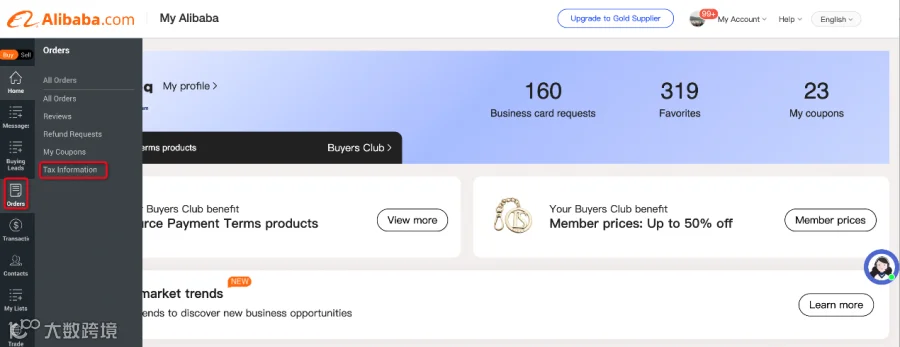
3)选择国家"Singapore"并输入"Tax number without the country code "和"Full registration name"。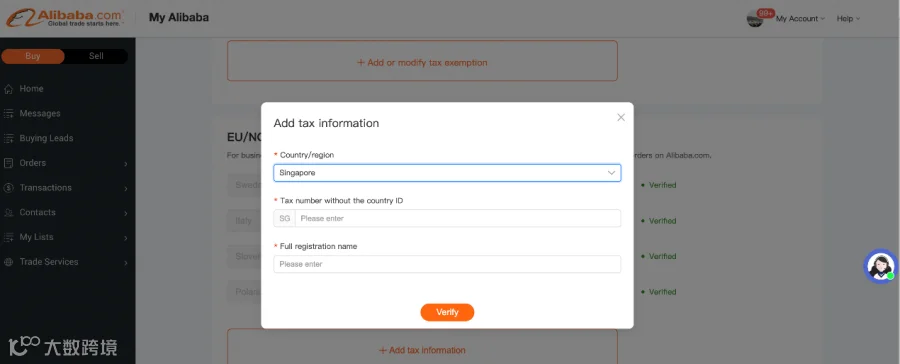
APP端申请:
请进入My Alibaba->Profile photo->Tax Information->For EU/NO/UK or AU/NZ/SG tax exemption->Add tax information