

点击上方  蓝字关注我们

作者 | 罗友谋
如果你也需要基于 HDP 3.1.5 Kerberos 环境安装 Apache DolphinScheduler,不妨看看这篇经验贴。
参考:https://dolphinscheduler.apache.org/zh-cn/docs/2.0.1/user_doc/cluster-deployment.html
https://github.com/apache/dolphinscheduler/pull/5831/files
开发环境搭建参考:https://dolphinscheduler.apache.org/zh-cn/development/development-environment-setup.html
备注:自己编译安装,导致“3.1 api server 启动报错”(可以解决), 用下载的 bin 文件直接解压安装是没问题的。
01
编译 DolphinScheduler
注意:Python3.7 安装参考:
  mkdir -p /DATA/disk1/software/python/;
cd /DATA/disk1/software/python/;
# wget https://www.python.org/ftp/python/3.7.12/Python-3.7.12.tgz
tar -xvf Python-3.7.12.tgz

cd Python-3.7.12/
./configure --enable-optimizations
make altinstall
1.1 下载 dolphinscheduler 2.0.1
  mkdir -p /DATA/disk1/software/dolphinscheduler/;
cd /DATA/disk1/software/dolphinscheduler/;
# wget --no-check-certificate https://dlcdn.apache.org/dolphinscheduler/2.0.1/apache-dolphinscheduler-2.0.1-bin.tar.gz
# wget --no-check-certificate https://dlcdn.apache.org/dolphinscheduler/2.0.1/apache-dolphinscheduler-2.0.1-src.tar.gz

tar -xvf apache-dolphinscheduler-2.0.1-src.tar.gz
cd ./apache-dolphinscheduler-2.0.1-src/;

mkdir -p /DATA/disk1/software/dolphinscheduler/ds_conf_139;

# modify root pom and api-server pom, upgrade jsp-2.1 version from 6.1.4 to 7.5.4.v20111024
1.2 vi pom.xml-修改各组件相关版本
1.3 vi pom.xml-add hdp & cdh repo
    <repositories>
        <!-- <repository>
            <id>my-alternate-repository</id>
            <url>http://myrepo.net/repo</url>
        </repository> -->
        <repository>
            <id>cloudera</id>
            <url>https://repository.cloudera.com/artifactory/cloudera-repos/</url>
        </repository>
        <repository>
            <id>public</id>
            <url>http://repo.hortonworks.com/content/groups/public</url>
        </repository>
        <repository>
            <id>cloudera-repo-releases</id>
            <url>http://repo.hortonworks.com/content/repositories/releases/</url>
        </repository>
        <repository>
            <id>alimaven</id>
            <name>aliyun maven</name>
            <url>http://maven.aliyun.com/nexus/content/groups/public/</url>
            <releases>
                <enabled>true</enabled>
            </releases>
            <snapshots>
                <enabled>false</enabled>
            </snapshots>
        </repository>
    </repositories>
1.4 mysql install on onedts-devclient-v01
rpm -qa |grep mariadb-libs|awk '{print $1}'|xargs rpm -e --nodeps

yum -y install perl;
rpm -ivh mysql-community-common-5.7.30-1.el7.x86_64.rpm;
rpm -ivh mysql-community-libs-5.7.30-1.el7.x86_64.rpm;
rpm -ivh mysql-community-libs-compat-5.7.30-1.el7.x86_64.rpm;
rpm -ivh mysql-community-client-5.7.30-1.el7.x86_64.rpm;
yum -y install net-tools;
yum -y install libaio;
rpm -ivh mysql-community-server-5.7.30-1.el7.x86_64.rpm;

-- start mysql
systemctl enable mysqld;
systemctl start mysqld;
systemctl status mysqld;

-- get mysql password and modify.
cat /var/log/mysqld.log | grep 'password'

[root@onedts-devclient-v01 mysql]# cat /var/log/mysqld.log | grep 'password'
2020-11-15T08:26:21.343703Z 1 [Note] A temporary password is generated for root@localhost: nHQCh<=ha6B9

mysql -uroot -p

# 注意:在执行修改密码前,先执行 "1.4" 步骤 (否则:修改密码将失败)
ALTER USER 'root'@'localhost' IDENTIFIED BY 'Bee56915lym';
flush privileges;
1.5 vi /etc/my.cnf
-
添加如下行(降低密码要求),然后重启 mysql
validate_password_policy=LOW
1.6 编译 DolphinScheduler
  cd /DATA/disk1/software/dolphinscheduler/apache-dolphinscheduler-2.0.1-src/;
# mvn -U clean package -Prelease -Dmaven.test.skip=true
./mvnw clean install -Prelease

# 编译完成后,将生成类似如下 tar.gz 文件
[root@onedts-devclient-v01 apache-dolphinscheduler-2.0.1-src]# find ./ -name *.tar.gz
./dolphinscheduler-dist/target/apache-dolphinscheduler-2.0.1-bin.tar.gz
./dolphinscheduler-dist/target/apache-dolphinscheduler-2.0.1-src.tar.gz

mkdir -p /DATA/disk1/software/dolphinscheduler/2.0.1;
\cp /DATA/disk1/software/dolphinscheduler/apache-dolphinscheduler-2.0.1-src/dolphinscheduler-dist/target/*.tar.gz /DATA/disk1/software/dolphinscheduler/2.0.1/;
02
DolphinScheduler 安装
参考: https://dolphinscheduler.apache.org/zh-cn/docs/2.0.1/user_doc/cluster-deployment.html
注意:安装到 onedts-dev-client-v01 & onedts-dev-master-v01 & onedts-dev-master-v02 三台服务器
2.1 将 apache-dolphinscheduler-2.0.1-bin.tar.gz 解压到 /DATA/disk1/apps
cd /DATA/disk1/software/dolphinscheduler/2.0.1/;
tar -xvf apache-dolphinscheduler-2.0.1-bin.tar.gz -C /DATA/disk1/apps/;
cd /DATA/disk1/apps/;
unlink dolphinscheduler-bin
ln -s ./apache-dolphinscheduler-2.0.1-bin ./dolphinscheduler-bin
2.2 创建部署用户和 hosts 映射
# 创建用户需使用root登录,设置部署用户名,请自行修改,后面以 dolphinscheduler 为例
useradd dolphinscheduler

# 设置用户密码,请自行修改,后面以 dolphinscheduler123 为例
echo "dolphinscheduler123" | passwd --stdin dolphinscheduler

# 配置 sudo 免密
echo 'dolphinscheduler  ALL=(ALL)  NOPASSWD: NOPASSWD: ALL' >> /etc/sudoers
sed -i 's/Defaults    requirett/#Defaults    requirett/g' /etc/sudoers
2.3 配置 hosts 映射和 ssh 打通及修改目录权限
yum install -y epel-release

yum repolist

yum install -y sshpass

su - dolphinscheduler;

ssh-keygen -t rsa -P '' -f ~/.ssh/id_rsa
cat ~/.ssh/id_rsa.pub >> ~/.ssh/authorized_keys
chmod 600 ~/.ssh/authorized_keys

ssh-copy-id -p22 -i  ~/.ssh/id_rsa.pub dolphinscheduler@onedts-dev-client-v01
ssh-copy-id -p22 -i  ~/.ssh/id_rsa.pub dolphinscheduler@onedts-dev-master-v01
ssh-copy-id -p22 -i  ~/.ssh/id_rsa.pub dolphinscheduler@onedts-dev-master-v02

cd /DATA/disk1/apps/;
chown -R dolphinscheduler:dolphinscheduler apache-dolphinscheduler-2.0.1-bin;
2.4 数据库初始化
2.4.1 创建数据库及用户
mysql -uroot -p

# 进入数据库命令行窗口后,执行数据库初始化命令,设置访问账号和密码。注: {user} 和 {password} 需要替换为具体的数据库用户名和密码
# DROP DATABASE IF EXISTS dolphinscheduler;
CREATE DATABASE dolphinscheduler DEFAULT CHARACTER SET utf8 DEFAULT COLLATE utf8_general_ci;
GRANT ALL PRIVILEGES ON dolphinscheduler.* TO 'dolph'@'%' IDENTIFIED BY 'Dolph123456';
GRANT ALL PRIVILEGES ON dolphinscheduler.* TO 'dolph'@'localhost' IDENTIFIED BY 'Dolph123456';
flush privileges;
2.4.2 vi /DATA/disk1/apps/dolphinscheduler-bin/conf/datasource.properties
#
# Licensed to the Apache Software Foundation (ASF) under one or more
# contributor license agreements.  See the NOTICE file distributed with
# this work for additional information regarding copyright ownership.
# The ASF licenses this file to You under the Apache License, Version 2.0
# (the "License"); you may not use this file except in compliance with
# the License.  You may obtain a copy of the License at
#
#     http://www.apache.org/licenses/LICENSE-2.0
#
# Unless required by applicable law or agreed to in writing, software
# distributed under the License is distributed on an "AS IS" BASIS,
# WITHOUT WARRANTIES OR CONDITIONS OF ANY KIND, either express or implied.
# See the License for the specific language governing permissions and
# limitations under the License.
#

# postgresql
# spring.datasource.driver-class-name=org.postgresql.Driver
# spring.datasource.url=jdbc:postgresql://127.0.0.1:5432/dolphinscheduler
# spring.datasource.username=test
# spring.datasource.password=test

# mysql
spring.datasource.driver-class-name=com.mysql.cj.jdbc.Driver
spring.datasource.url=jdbc:mysql://onedts-dev-client-v01.zjyg.com:3306/dolphinscheduler?useUnicode=true&characterEncoding=UTF-8&useSSL=false
spring.datasource.username=dolph
spring.datasource.password=Dolph123456

# connection configuration
#spring.datasource.initialSize=5
# min connection number
#spring.datasource.minIdle=5
# max connection number
#spring.datasource.maxActive=50

# max wait time for get a connection in milliseconds. if configuring maxWait, fair locks are enabled by default and concurrency efficiency decreases.
# If necessary, unfair locks can be used by configuring the useUnfairLock attribute to true.
#spring.datasource.maxWait=60000

# milliseconds for check to close free connections
#spring.datasource.timeBetweenEvictionRunsMillis=60000

# the Destroy thread detects the connection interval and closes the physical connection in milliseconds if the connection idle time is greater than or equal to minEvictableIdleTimeMillis.
#spring.datasource.timeBetweenConnectErrorMillis=60000

# the longest time a connection remains idle without being evicted, in milliseconds
#spring.datasource.minEvictableIdleTimeMillis=300000

#the SQL used to check whether the connection is valid requires a query statement. If validation Query is null, testOnBorrow, testOnReturn, and testWhileIdle will not work.
#spring.datasource.validationQuery=SELECT 1

#check whether the connection is valid for timeout, in seconds
#spring.datasource.validationQueryTimeout=3

# when applying for a connection, if it is detected that the connection is idle longer than time Between Eviction Runs Millis,
# validation Query is performed to check whether the connection is valid
#spring.datasource.testWhileIdle=true

#execute validation to check if the connection is valid when applying for a connection
#spring.datasource.testOnBorrow=true
#execute validation to check if the connection is valid when the connection is returned
#spring.datasource.testOnReturn=false
#spring.datasource.defaultAutoCommit=true
#spring.datasource.keepAlive=true

# open PSCache, specify count PSCache for every connection
#spring.datasource.poolPreparedStatements=true
#spring.datasource.maxPoolPreparedStatementPerConnectionSize=20
2.4.3 执行 Script 目录下的创建表及导入基础数据脚本
  su - dolphinscheduler

# 需要 mysql-jdbc 8.16 版本
cp ~/mysql-connector-java-8.0.16.jar /DATA/disk1/apps/dolphinscheduler-bin/lib/;

# cd /DATA/disk1/apps/dolphinscheduler-bin/lib; chown dolphinscheduler:dolphinscheduler mysql-connector-java-8.0.16.jar;

cd /DATA/disk1/apps/dolphinscheduler-bin/;
sh script/create-dolphinscheduler.sh

# 注意:记得将 hive-exec-3.1.0.3.1.5.0-152.jar 放到 dolphinscheduler-bin/lib 目录下
cp /usr/hdp/3.1.5.0-152/hive/lib/hive-exec-3.1.0.3.1.5.0-152.jar /DATA/disk1/apps/dolphinscheduler-bin/lib/;
cp /usr/hdp/3.1.5.0-152/hive/lib/hive-exec-3.1.0.3.1.5.0-152.jar /DATA/disk1/dolphinscheduler/lib/;

sh sync_to_all_node.sh /usr/hdp/current/hive-client/lib/hive-exec-3.1.0.3.1.5.0-152.jar /DATA/disk1/apps/dolphinscheduler-bin/lib
sh sync_to_all_node.sh /usr/hdp/current/hive-client/lib/hive-exec-3.1.0.3.1.5.0-152.jar /DATA/disk1/dolphinscheduler/lib
2.4.4 sync_to_all_node.sh
#!/bin/bash

ssh_port=22
domain_name="zjyg.com"

if [ $# -eq 2 ]
then
  source_file=$1
  target_dir=$2
elif [ $# -eq 3 ]
then
  source_file=$1
  target_dir=$2
  grep_host=$3
else
  echo "Must at least Two parameter: 1. source file, 2. TargetDir, 3.grepForHostName"
  exit 1
fi

echo $source_file
echo $target_dir

local_host=$(hostname -f)
echo $local_host
echo "---------------------------------------------------------"
echo "Begin sync file from ${local_host}:${source_file} to AllCusterNode, Please waitting..."
echo ""

if [ $# -eq 2 ]
then
  for target_host in `cat /etc/hosts |grep "${domain_name}"|grep -v 'ipa'|grep -v 'grep'|awk '{print $2}'`
  do
    if [ "${target_host}" != "${local_host}" ]; then
      echo "Sync file from ${source_file} to ${target_host}:${target_dir}"
      sleep 1
      scp -P${ssh_port} -r ${source_file} root@${target_host}:${target_dir}/
    fi
  done
fi

if [ $# -eq 3 ]
then
  for target_host in `cat /etc/hosts |grep "${domain_name}"|grep -v 'ipa'|grep -v 'grep'|grep "${grep_host}"|awk '{print $2}'`
  do
    if [ "${target_host}" != "${local_host}" ]; then
      echo "Sync file from ${source_file} to ${target_host}:${target_dir}"
      sleep 1
      scp -P${ssh_port} -r ${source_file} root@${target_host}:${target_dir}/
    fi
  done
fi
2.5 修改运行参数
2.5.1 修改 conf/env 目录下的 dolphinscheduler_env.sh 环境变量
export HADOOP_HOME=/usr/hdp/current/hadoop-client
export HADOOP_CONF_DIR=/etc/hadoop/conf
# export SPARK_HOME1=/opt/soft/spark1
export SPARK_HOME2=/usr/hdp/current/spark2-client
export SPARK_HOME3=/DATA/disk1/apps/spark
# export PYTHON_HOME=/opt/soft/python
# export PYTHON_HOME=/usr/local/python3.7
export JAVA_HOME=/usr/java/latest
export HIVE_HOME=/usr/hdp/current/hive-client
export FLINK_HOME=/DATA/disk1/apps/flink
export DATAX_HOME=/DATA/disk1/apps/datax

# export PATH=$HADOOP_HOME/bi:$SPARK_HOME3/bin:$PYTHON_HOME/bin:$JAVA_HOME/bin:$HIVE_HOME/bin:$FLINK_HOME/bin:$DATAX_HOME/bin:$PATH
export PATH=$HADOOP_HOME/bi:$SPARK_HOME3/bin:/usr/bin:$JAVA_HOME/bin:$HIVE_HOME/bin:$FLINK_HOME/bin:$DATAX_HOME/bin:$PATH
2.5.2 重新软链 /usr/bin/java
# 下面是原来的连接情况
[root@onedts-devclient-v01 ~]# ls -l /usr/bin/java
lrwxrwxrwx 1 root root 22 12月 13 2020 /usr/bin/java -> /etc/alternatives/java

unlink /usr/bin/java
ln -s /usr/java/latest/bin/java /usr/bin/java

# 进 onedts-devambari-v01 服务器操作
cd ~/scripts/;
sh ./ssh_to_all_node.sh "unlink /usr/bin/java;ln -s /usr/java/latest/bin/java /usr/bin/java;" master

sh ./ssh_to_all_node.sh "unlink /usr/bin/java;ln -s /usr/java/latest/bin/java /usr/bin/java;" client

# 逆操作
unlink /usr/bin/java
ln -s /etc/alternatives/java /usr/bin/java

cd ~/scripts/;
sh ./ssh_to_all_node.sh "unlink /usr/bin/java;ln -s /etc/alternatives/java /usr/bin/java;"
2.5.3 vi application-api.properties
#
# Licensed to the Apache Software Foundation (ASF) under one or more
# contributor license agreements.  See the NOTICE file distributed with
# this work for additional information regarding copyright ownership.
# The ASF licenses this file to You under the Apache License, Version 2.0
# (the "License"); you may not use this file except in compliance with
# the License.  You may obtain a copy of the License at
#
#     http://www.apache.org/licenses/LICENSE-2.0
#
# Unless required by applicable law or agreed to in writing, software
# distributed under the License is distributed on an "AS IS" BASIS,
# WITHOUT WARRANTIES OR CONDITIONS OF ANY KIND, either express or implied.
# See the License for the specific language governing permissions and
# limitations under the License.
#

# server port
server.port=21000

# session config
server.servlet.session.timeout=7200

# servlet config
server.servlet.context-path=/dolphinscheduler/

# time zone
spring.jackson.time-zone=GMT+8

# file size limit for upload
spring.servlet.multipart.max-file-size=1024MB
spring.servlet.multipart.max-request-size=1024MB

# enable response compression
server.compression.enabled=true
server.compression.mime-types=text/html,text/xml,text/plain,text/css,text/javascript,application/javascript,application/json,application/xml

# max http post size
server.jetty.max-http-form-post-size=5000000

# messages encoding
spring.messages.encoding=UTF-8

# i18n classpath folder, file prefix messages. if have many files, use "," seperator
spring.messages.basename=i18n/messages

# Authentication types (supported types: PASSWORD)
security.authentication.type=PASSWORD

# Traffic control, if you turn on this config, the maximum number of request/s will be limited.
# global max request number per second
# default tenant-level max request number
#traffic.control.global.switch=true
#traffic.control.max.global.qps.rate=500
#traffic.control.tenant.switch=true
#traffic.control.default.tenant.qps.rate=10
#traffic.control.customize.tenant.qps.rate={'tenant1':11,'tenant2':20}

#============================================================================
# LDAP Config
# mock ldap server from https://www.forumsys.com/tutorials/integration-how-to/ldap/online-ldap-test-server/
#============================================================================
# admin userId
#security.authentication.ldap.user.admin=read-only-admin
# ldap server config
#ldap.urls=ldap://ldap.forumsys.com:389/
#ldap.base.dn=dc=example,dc=com
#ldap.username=cn=read-only-admin,dc=example,dc=com
#ldap.password=password
#ldap.user.identity.attribute=uid
#ldap.user.email.attribute=mail
2.5.4 vi application-mysql.yaml
# Licensed to the Apache Software Foundation (ASF) under one
# or more contributor license agreements.  See the NOTICE file
# distributed with this work for additional information
# regarding copyright ownership.  The ASF licenses this file
# to you under the Apache License, Version 2.0 (the
# "License"); you may not use this file except in compliance
# with the License.  You may obtain a copy of the License at
#
#   http://www.apache.org/licenses/LICENSE-2.0
#
# Unless required by applicable law or agreed to in writing,
# software distributed under the License is distributed on an
# "AS IS" BASIS, WITHOUT WARRANTIES OR CONDITIONS OF ANY
# KIND, either express or implied.  See the License for the
# specific language governing permissions and limitations
# under the License.
#
spring:
  datasource:
    driver-class-name: com.mysql.cj.jdbc.Driver
    url: jdbc:mysql://onedts-dev-client-v01.zjyg.com:3306/dolphinscheduler?useSSL=false&useUnicode=true&characterEncoding=UTF-8
    username: dolph
    password: Dolph123456
    hikari:
      connection-test-query: select 1
      minimum-idle: 5
      auto-commit: true
      validation-timeout: 3000
      pool-name: DolphinScheduler
      maximum-pool-size: 50
      connection-timeout: 30000
      idle-timeout: 600000
      leak-detection-threshold: 0
      initialization-fail-timeout: 1
2.5.5 vi common.properties
#
# Licensed to the Apache Software Foundation (ASF) under one or more
# contributor license agreements.  See the NOTICE file distributed with
# this work for additional information regarding copyright ownership.
# The ASF licenses this file to You under the Apache License, Version 2.0
# (the "License"); you may not use this file except in compliance with
# the License.  You may obtain a copy of the License at
#
#     http://www.apache.org/licenses/LICENSE-2.0
#
# Unless required by applicable law or agreed to in writing, software
# distributed under the License is distributed on an "AS IS" BASIS,
# WITHOUT WARRANTIES OR CONDITIONS OF ANY KIND, either express or implied.
# See the License for the specific language governing permissions and
# limitations under the License.
#

# user data local directory path, please make sure the directory exists and have read write permissions
data.basedir.path=/tmp/dolphinscheduler

# resource storage type: HDFS, S3, NONE
resource.storage.type=HDFS

# resource store on HDFS/S3 path, resource file will store to this hadoop hdfs path, self configuration, please make sure the directory exists on hdfs and have read write permissions. "/dolphinscheduler" is recommended
resource.upload.path=/dolphinscheduler

# whether to startup kerberos
hadoop.security.authentication.startup.state=true

# java.security.krb5.conf path
java.security.krb5.conf.path=/etc/krb5.conf

# login user from keytab username
login.user.keytab.username=dolphinscheduler@ZJYG.COM

# login user from keytab path
login.user.keytab.path=/home/dolphinscheduler/security/keytabs/dolphinscheduler.keytab

# kerberos expire time, the unit is hour
kerberos.expire.time=24

# resource view suffixs
#resource.view.suffixs=txt,log,sh,bat,conf,cfg,py,java,sql,xml,hql,properties,json,yml,yaml,ini,js

# if resource.storage.type=HDFS, the user must have the permission to create directories under the HDFS root path
hdfs.root.user=dolphinscheduler

# if resource.storage.type=S3, the value like: s3a://dolphinscheduler; if resource.storage.type=HDFS and namenode HA is enabled, you need to copy core-site.xml and hdfs-site.xml to conf dir
fs.defaultFS=hdfs://odtscluster

# if resource.storage.type=S3, s3 endpoint
fs.s3a.endpoint=http://192.168.xx.xx:9010

# if resource.storage.type=S3, s3 access key
fs.s3a.access.key=A3DXS30FO22544RE

# if resource.storage.type=S3, s3 secret key
fs.s3a.secret.key=OloCLq3n+8+sdPHUhJ21XrSxTC+JK

# resourcemanager port, the default value is 8088 if not specified
resource.manager.httpaddress.port=8088

# if resourcemanager HA is enabled, please set the HA IPs; if resourcemanager is single, keep this value empty
yarn.resourcemanager.ha.rm.ids=onedts-dev-master-v01.zjyg.com,onedts-dev-master-v02.zjyg.com

# if resourcemanager HA is enabled or not use resourcemanager, please keep the default value; If resourcemanager is single, you only need to replace ds1 to actual resourcemanager hostname
yarn.application.status.address=http://ds1:%s/ws/v1/cluster/apps/%s

# job history status url when application number threshold is reached(default 10000, maybe it was set to 1000)
yarn.job.history.status.address=http://onedts-dev-master-v02.zjyg.com:19888/ws/v1/history/mapreduce/jobs/%s

# datasource encryption enable
datasource.encryption.enable=false

# datasource encryption salt
datasource.encryption.salt=!@#$%^&*

# use sudo or not, if set true, executing user is tenant user and deploy user needs sudo permissions; if set false, executing user is the deploy user and doesn't need sudo permissions
sudo.enable=true

# network interface preferred like eth0, default: empty
#dolphin.scheduler.network.interface.preferred=

# network IP gets priority, default: inner outer
#dolphin.scheduler.network.priority.strategy=default

# system env path
#dolphinscheduler.env.path=env/dolphinscheduler_env.sh

# development state
development.state=false

#datasource.plugin.dir config
datasource.plugin.dir=lib/plugin/datasource
2.5.6 vi master.properties
2.5.7 vi registry.properties
#
# Licensed to the Apache Software Foundation (ASF) under one or more
# contributor license agreements.  See the NOTICE file distributed with
# this work for additional information regarding copyright ownership.
# The ASF licenses this file to You under the Apache License, Version 2.0
# (the "License"); you may not use this file except in compliance with
# the License.  You may obtain a copy of the License at
#
#     http://www.apache.org/licenses/LICENSE-2.0
#
# Unless required by applicable law or agreed to in writing, software
# distributed under the License is distributed on an "AS IS" BASIS,
# WITHOUT WARRANTIES OR CONDITIONS OF ANY KIND, either express or implied.
# See the License for the specific language governing permissions and
# limitations under the License.
#

registry.plugin.name=zookeeper
registry.servers=127.0.0.1:2181
[root@onedts-dev-client-v01 conf]#
You have new mail in /var/spool/mail/root
[root@onedts-dev-client-v01 conf]#
[root@onedts-dev-client-v01 conf]# cat registry.properties
#
# Licensed to the Apache Software Foundation (ASF) under one or more
# contributor license agreements.  See the NOTICE file distributed with
# this work for additional information regarding copyright ownership.
# The ASF licenses this file to You under the Apache License, Version 2.0
# (the "License"); you may not use this file except in compliance with
# the License.  You may obtain a copy of the License at
#
#     http://www.apache.org/licenses/LICENSE-2.0
#
# Unless required by applicable law or agreed to in writing, software
# distributed under the License is distributed on an "AS IS" BASIS,
# WITHOUT WARRANTIES OR CONDITIONS OF ANY KIND, either express or implied.
# See the License for the specific language governing permissions and
# limitations under the License.
#

registry.plugin.name=zookeeper
registry.servers=onedts-dev-master-v01.zjyg.com:2181,onedts-dev-master-v02.zjyg.com:2181,onedts-dev-client-v01.zjyg.com:2181
2.5.8 vi worker.properties
2.5.9 修改一键部署配置文件 conf/config/install_config.conf 中的各参数,特别注意以下参数的配置
#
# Licensed to the Apache Software Foundation (ASF) under one or more
# contributor license agreements.  See the NOTICE file distributed with
# this work for additional information regarding copyright ownership.
# The ASF licenses this file to You under the Apache License, Version 2.0
# (the "License"); you may not use this file except in compliance with
# the License.  You may obtain a copy of the License at
#
#     http://www.apache.org/licenses/LICENSE-2.0
#
# Unless required by applicable law or agreed to in writing, software
# distributed under the License is distributed on an "AS IS" BASIS,
# WITHOUT WARRANTIES OR CONDITIONS OF ANY KIND, either express or implied.
# See the License for the specific language governing permissions and
# limitations under the License.
#

# ---------------------------------------------------------
# INSTALL MACHINE
# ---------------------------------------------------------
# A comma separated list of machine hostname or IP would be installed DolphinScheduler,
# including master, worker, api, alert. If you want to deploy in pseudo-distributed
# mode, just write a pseudo-distributed hostname
# Example for hostnames: ips="ds1,ds2,ds3,ds4,ds5", Example for IPs: ips="192.168.8.1,192.168.8.2,192.168.8.3,192.168.8.4,192.168.8.5"
# ips="ds1,ds2,ds3,ds4,ds5"
ips="onedts-dev-client-v01.zjyg.com,onedts-dev-master-v01.zjyg.com,onedts-dev-master-v02.zjyg.com"

# Port of SSH protocol, default value is 22. For now we only support same port in all `ips` machine
# modify it if you use different ssh port
sshPort="22"

# A comma separated list of machine hostname or IP would be installed Master server, it
# must be a subset of configuration `ips`.
# Example for hostnames: masters="ds1,ds2", Example for IPs: masters="192.168.8.1,192.168.8.2"
# masters="ds1,ds2"
masters="onedts-dev-master-v01.zjyg.com,onedts-dev-master-v02.zjyg.com"

# A comma separated list of machine <hostname>:<workerGroup> or <IP>:<workerGroup>.All hostname or IP must be a
# subset of configuration `ips`, And workerGroup have default value as `default`, but we recommend you declare behind the hosts
# Example for hostnames: workers="ds1:default,ds2:default,ds3:default", Example for IPs: workers="192.168.8.1:default,192.168.8.2:default,192.168.8.3:default"
# workers="ds1:default,ds2:default,ds3:default,ds4:default,ds5:default"
workers="onedts-dev-master-v01.zjyg.com:default,onedts-dev-master-v02.zjyg.com:default"

# A comma separated list of machine hostname or IP would be installed Alert server, it
# must be a subset of configuration `ips`.
# Example for hostname: alertServer="ds3", Example for IP: alertServer="192.168.8.3"
# alertServer="ds3"
alertServer="onedts-dev-client-v01.zjyg.com"

# A comma separated list of machine hostname or IP would be installed API server, it
# must be a subset of configuration `ips`.
# Example for hostname: apiServers="ds1", Example for IP: apiServers="192.168.8.1"
# apiServers="ds1"
apiServers="onedts-dev-client-v01.zjyg.com"

# The directory to install DolphinScheduler for all machine we config above. It will automatically be created by `install.sh` script if not exists.
# Do not set this configuration same as the current path (pwd)
# installPath="/data1_1T/dolphinscheduler"
installPath="/DATA/disk1/dolphinscheduler"

# The user to deploy DolphinScheduler for all machine we config above. For now user must create by yourself before running `install.sh`
# script. The user needs to have sudo privileges and permissions to operate hdfs. If hdfs is enabled than the root directory needs
# to be created by this user
deployUser="dolphinscheduler"

# The directory to store local data for all machine we config above. Make sure user `deployUser` have permissions to read and write this directory.
dataBasedirPath="/tmp/dolphinscheduler"

# ---------------------------------------------------------
# DolphinScheduler ENV
# ---------------------------------------------------------
# JAVA_HOME, we recommend use same JAVA_HOME in all machine you going to install DolphinScheduler
# and this configuration only support one parameter so far.
# javaHome="/your/java/home/here"
javaHome="/usr/java/latest"

# DolphinScheduler API service port, also this is your DolphinScheduler UI component's URL port, default value is 12345
# apiServerPort="12345"
apiServerPort="21000"

# ---------------------------------------------------------
# Database
# NOTICE: If database value has special characters, such as `.*[]^${}\+?|()@#&`, Please add prefix `\` for escaping.
# ---------------------------------------------------------
# The type for the metadata database
# Supported values: ``postgresql``, ``mysql`, `h2``.
# DATABASE_TYPE=${DATABASE_TYPE:-"h2"}
DATABASE_TYPE="mysql"
# dbtype="mysql"

# Spring datasource url, following <HOST>:<PORT>/<database>?<parameter> format, If you using mysql, you could use jdbc
# string jdbc:mysql://127.0.0.1:3306/dolphinscheduler?useUnicode=true&characterEncoding=UTF-8 as example
# SPRING_DATASOURCE_URL=${SPRING_DATASOURCE_URL:-"jdbc:h2:mem:dolphinscheduler;MODE=MySQL;DB_CLOSE_DELAY=-1;DATABASE_TO_LOWER=true;INIT=runscript from 'classpath:sql/dolphinscheduler_h2.sql'"}
SPRING_DATASOURCE_URL="jdbc:mysql://onedts-dev-client-v01.zjyg.com:3306/dolphinscheduler?useUnicode=true&characterEncoding=UTF-8"

# Spring datasource username
# SPRING_DATASOURCE_USERNAME=${SPRING_DATASOURCE_USERNAME:-"sa"}
SPRING_DATASOURCE_USERNAME=dolph

# Spring datasource password
# SPRING_DATASOURCE_PASSWORD=${SPRING_DATASOURCE_PASSWORD:-""}
SPRING_DATASOURCE_PASSWORD=Dolph123456

# ---------------------------------------------------------
# Registry Server
# ---------------------------------------------------------
# Registry Server plugin name, should be a substring of `registryPluginDir`, DolphinScheduler use this for verifying configuration consistency
registryPluginName="zookeeper"

# Registry Server address.
# registryServers="192.168.xx.xx:2181,192.168.xx.xx:2181,192.168.xx.xx:2181"
registryServers="onedts-dev-master-v01.zjyg.com:2181,onedts-dev-master-v02.zjyg.com:2181,onedts-dev-client-v01.zjyg.com:2181"

# The root of zookeeper, for now DolphinScheduler default registry server is zookeeper.
zkRoot="/dolphinscheduler"

# ---------------------------------------------------------
# Worker Task Server
# ---------------------------------------------------------
# Worker Task Server plugin dir. DolphinScheduler will find and load the worker task plugin jar package from this dir.
taskPluginDir="lib/plugin/task"

# resource storage type: HDFS, S3, NONE
resourceStorageType="HDFS"

# resource store on HDFS/S3 path, resource file will store to this hdfs path, self configuration, please make sure the directory exists on hdfs and has read write permissions. "/dolphinscheduler" is recommended
resourceUploadPath="/dolphinscheduler"

# if resourceStorageType is HDFS,defaultFS write namenode address,HA, you need to put core-site.xml and hdfs-site.xml in the conf directory.
# if S3,write S3 address,HA,for example :s3a://dolphinscheduler,
# Note,S3 be sure to create the root directory /dolphinscheduler
# defaultFS="hdfs://mycluster:8020"
defaultFS="hdfs://odtscluster"

# if resourceStorageType is S3, the following three configuration is required, otherwise please ignore
s3Endpoint="http://192.168.xx.xx:9010"
s3AccessKey="xxxxxxxxxx"
s3SecretKey="xxxxxxxxxx"

# resourcemanager port, the default value is 8088 if not specified
resourceManagerHttpAddressPort="8088"

# if resourcemanager HA is enabled, please set the HA IPs; if resourcemanager is single node, keep this value empty
yarnHaIps="192.168.xx.xx,192.168.xx.xx"

# if resourcemanager HA is enabled or not use resourcemanager, please keep the default value; If resourcemanager is single node, you only need to replace 'yarnIp1' to actual resourcemanager hostname
singleYarnIp="yarnIp1"

# who has permission to create directory under HDFS/S3 root path
# Note: if kerberos is enabled, please config hdfsRootUser=
# hdfsRootUser="hdfs"
hdfsRootUser="dolphinscheduler"

# kerberos config
# whether kerberos starts, if kerberos starts, following four items need to config, otherwise please ignore
# kerberosStartUp="false"
kerberosStartUp="true"

# kdc krb5 config file path
# krb5ConfPath="$installPath/conf/krb5.conf"
krb5ConfPath="/etc/krb5.conf"

# keytab username,watch out the @ sign should followd by \\
# keytabUserName="hdfs-mycluster\\@ESZ.COM"
keytabUserName="dolphinscheduler@ZJYG.COM"

# username keytab path
# keytabPath="$installPath/conf/hdfs.headless.keytab"
keytabPath="/home/dolphinscheduler/security/keytabs/dolphinscheduler.keytab"

# kerberos expire time, the unit is hour
# kerberosExpireTime="2"
kerberosExpireTime="24"

# use sudo or not
sudoEnable="true"

# worker tenant auto create
workerTenantAutoCreate="false"
2.5.10 针对上面配置文件中的参数的相关操作 ( 在集群服务器上操作 )
  # 1. 创建 dolphinscheduler 的 LDAP 账号,并生成票据 # 先在 onedts-dev-client-v01 服务器操作,然后将生成的票据文件 copy 到 master 服务器
su - dolphinscheduler
kinit admin
ipa user-add dolphinscheduler --first=dolphinscheduler --last=dolphinscheduler --shell=/bin/bash --homedir=/home/dolphinscheduler
mkdir -p ${HOME}/security/keytabs;
ipa_server=onedts-dev-ipa-v01.zjyg.com
ipa-getkeytab -s ${ipa_server} \
-p ${USER} \
-e aes256-cts-hmac-sha1-96,aes128-cts-hmac-sha1-96,aes256-cts-hmac-sha384-192,aes128-cts-hmac-sha256-128,des3-cbc-sha1,arcfour-hmac \
-k ${HOME}/security/keytabs/${USER}.keytab

# 2. 在 dolphinscheduler集群所有 服务器创建相关目录
su - dolphinscheduler
mkdir -p ${HOME}/security/keytabs;

# 3. 将 onedts-devclient-v01 服务器生成的票据文件 copy 到 master 服务器
scp -P22 /home/dolphinscheduler/security/keytabs/dolphinscheduler.keytab dolphinscheduler@onedts-devmaster-v01:/home/dolphinscheduler/security/keytabs/
scp -P22 /home/dolphinscheduler/security/keytabs/dolphinscheduler.keytab dolphinscheduler@onedts-devmaster-v02:/home/dolphinscheduler/security/keytabs/

# 4. 执行 "crontab -e" 命令,创建 crontab,以定期初始化票据 # 在集群所有服务器上操作
# Refersh Kerberos 票据
0 0 * * * kinit -kt ${HOME}/security/keytabs/${USER}.keytab ${USER}

# 5. 创建 /DATA/disk1/dolphinscheduler 目录,并授权
mkdir -p /DATA/disk1/dolphinscheduler;
chown dolphinscheduler:dolphinscheduler /DATA/disk1/dolphinscheduler;

# 6. 创建 /tmp/dolphinscheduler 目录,并授权
mkdir -p /tmp/dolphinscheduler;
chown -R dolphinscheduler:dolphinscheduler /tmp/dolphinscheduler;
chmod 777 /tmp/dolphinscheduler;

# 7. 创建 hdfs 目录,并授权 # hadoop 用户操作( hdp-hdfs 用户下操作)
# hdfs dfs -rm -r /dolphinscheduler/*;
hdfs dfs -mkdir /dolphinscheduler;
hdfs dfs -chown dolphinscheduler:dolphinscheduler /dolphinscheduler;

# hdfs dfs -rm -r /user/dolphinscheduler/*;
hdfs dfs -mkdir /user/dolphinscheduler;
hdfs dfs -chown dolphinscheduler:dolphinscheduler /user/dolphinscheduler;

# 8. 将  core-site.xml and hdfs-site.xml 配置文件软链到 conf 目录
cd /DATA/disk1/apps/dolphinscheduler-bin/conf/;
\cp /etc/hadoop/conf/core-site.xml ./;
\cp /etc/hadoop/conf/hdfs-site.xml ./;
chown -R dolphinscheduler:dolphinscheduler /DATA/disk1/apps/dolphinscheduler-bin/conf/;

# ln -s /etc/hadoop/conf/core-site.xml ./core-site.xml;
# ln -s /etc/hadoop/conf/hdfs-site.xml ./hdfs-site.xml;

# 9. 创建 /etc/security/keytabs/hdfs.headless.keytab 票据文件 # 先忽略该操作
kinit admin
ipa user-add hdfs-odtscluster --first=hdfs-odtscluster --last=hdfs-odtscluster --shell=/bin/bash --homedir=/home/hdfs-odtscluster
ipa_server=onedts-devipa-v01.zjyg.com
ipa-getkeytab -s ${ipa_server} \
-p hdfs-odtscluster \
-e aes256-cts-hmac-sha1-96,aes128-cts-hmac-sha1-96,aes256-cts-hmac-sha384-192,aes128-cts-hmac-sha256-128,des3-cbc-sha1,arcfour-hmac \
-k /etc/security/keytabs/hdfs.headless.keytab

chown hdfs:hadoop /etc/security/keytabs/hdfs.headless.keytab;
chmod 400 /etc/security/keytabs/hdfs.headless.keytab;

cd ~/scripts/;
sh ./sync_to_all_node.sh /etc/security/keytabs/hdfs.headless.keytab /etc/security/keytabs
sh ./ssh_to_all_node.sh "chown hdfs:hadoop /etc/security/keytabs/hdfs.headless.keytab;chmod 400 /etc/security/keytabs/hdfs.headless.keytab;"
2.6 一键部署
2.6.1 切换到部署用户 dolphinscheduler,然后执行一键部署脚本
su - dolphinscheduler

cd /DATA/disk1/apps/dolphinscheduler-bin/;
sh install.sh

# 脚本完成后,会启动以下 5 个服务,使用 jps 命令查看服务是否启动( jps 为 JDK 自带)
    MasterServer         ----- master服务
    WorkerServer         ----- worker服务
    LoggerServer         ----- logger服务
    ApiApplicationServer ----- api服务
    AlertServer          ----- alert服务

# 如果以上服务都正常启动,说明自动部署成功

# 部署成功后,可以进行日志查看,日志统一存放于 logs 文件夹内

# 发现无 "api服务" 相关进程 ???????
2.7 登录系统
  http://onedts-dev-client-v01.zjyg.com:21000/dolphinscheduler/ui/view/login/index.html

admin 密码:dolphinscheduler123

# api 文档链接
http://onedts-dev-client-v01.zjyg.com:21000/dolphinscheduler/doc.html?language=zh_CN&lang=cn
错误&解决方法
错误 1:
org.springframework.beans.factory.BeanCreationException: Error creating bean with name 'dolphinSchedulerManager' defined in URL [jar:file:/DATA/disk1/apps/apache-dolphinscheduler-2.0.1-SNAPSHOT-bin/lib/dolphinscheduler-dao-2.0.1-SNAPSHOT.jar!/org/apache/dolphinscheduler/dao/upgrade/DolphinSchedulerManager.class]: Bean instantiation via constructor failed; nested exception is org.springframework.beans.BeanInstantiationException: Failed to instantiate [org.apache.dolphinscheduler.dao.upgrade.DolphinSchedulerManager]: Constructor threw exception; nested exception is java.lang.RuntimeException: Cannot find UpgradeDao implementation for db type: H2

# 解决
# 将 install_config.conf 配置文件中
dbtype="mysql"
# 修改为
DATABASE_TYPE="mysql"
错误 2: 创建租户报错
  java.io.IOException: Login failure for hdfs-mycluster@ESZ.COM from keytab /home/dolphinscheduler/security/keytabs/dolphinscheduler.keytab: javax.security.auth.login.LoginException: Unable to obtain password from user

# 解决:vi common.properties # 修改两个参数
login.user.keytab.username=hdfs-mycluster@ESZ.COM
yarn.job.history.status.address=http://yarnIp1:19888/ws/v1/history/mapreduce/jobs/%s
# 修改为
login.user.keytab.username=dolphinscheduler@ZJYG.COM
yarn.job.history.status.address=http://onedts-dev-master-v02.zjyg.com:19888/ws/v1/history/mapreduce/jobs/%s

# 注意:如果报空指针异常,记得将 core-site.xml, hdfs-site.xml 文件放到 conf 目录。

# 1.3.9 成功创建数据源后,记录如下:
mysql> select * from t_ds_datasource\G
*************************** 1. row ***************************
               id: 1
             name: hive_ods_hdp_ambari
             note:
             type: 2
          user_id: 1
connection_params: {"address":"jdbc:hive2://onedts-dev-master-v01.zjyg.com:10000","database":"ods_hdp_ambari","jdbcUrl":"jdbc:hive2://onedts-dev-master-v01.zjyg.com:10000/ods_hdp_ambari;principal=hive/onedts-dev-master-v01.zjyg.com@ZJYG.COM","user":"hive","password":"hive","principal":"hive/onedts-dev-master-v01.zjyg.com@ZJYG.COM"}
      create_time: 2021-12-18 10:10:35
      update_time: 2021-12-18 10:17:25
1 row in set (0.00 sec)
错误 3: 运行任务的时候报错
  java.io.FileNotFoundException","message":"File does not exist: /DATA/disk1/ats/active"


# 解决 # 参考:https://community.cloudera.com/t5/Support-Questions/Restart-Resource-Manager-does-not-work-can-not-start-YARN/td-p/234316

su - hdp-hdfs;
hdfs dfs -chown -R hdp-yarn:hdp-hadoop /DATA/disk1/ats/active;
错误 4:
  Caused by: java.lang.ClassNotFoundException: com.ctc.wstx.io.InputBootstrapper
	at java.net.URLClassLoader.findClass(URLClassLoader.java:382)
	at java.lang.ClassLoader.loadClass(ClassLoader.java:424)
	at sun.misc.Launcher$AppClassLoader.loadClass(Launcher.java:349)
	at java.lang.ClassLoader.loadClass(ClassLoader.java:357)
	... 121 common frames omitted

# 解决:
将
woodstox-core-5.0.3.jar
stax2-api-3.1.4.jar
commons-configuration2-2.1.1.jar
htrace-core4-4.1.0-incubating.jar
# netty-transport-native-epoll-4.1.48.Final-linux-x86_64.jar  # 这个先不要
拷贝到 dolphinscheduler/lib 目录下

# cd /DATA/disk1/dolphinscheduler/lib/;
cp /DATA/disk1/dolphinscheduler.200/lib/woodstox-core-5.0.3.jar ./;
cp /DATA/disk1/dolphinscheduler.200/lib/stax2-api-3.1.4.jar ./;
cp /DATA/disk1/dolphinscheduler.200/lib/commons-configuration2-2.1.1.jar ./;
cp /DATA/disk1/dolphinscheduler.200/lib/htrace-core4-4.1.0-incubating.jar ./;

# cp netty-transport-native-epoll-4.1.48.Final-linux-x86_64.jar ./; # 这个先不要
错误 5: 运行任务的时候报错
[WARN] 2021-11-26 00:54:05.803 com.alibaba.druid.pool.DruidAbstractDataSource:[1489] - discard long time none received connection. , jdbcUrl : jdbc:mysql://onedts-dev-client-v01.zjyg.com:3306/dolphinscheduler?characterEncoding=UTF-8&allowMultiQueries=true, version : 1.2.4, lastPacketReceivedIdleMillis : 118661

# 解决:更新 druid 版本
/DATA/disk1/dolphinscheduler/lib/druid-1.2.8.jar

#
cd /usr/hdp/current/sqoop-client/lib/;ln -s /usr/hdp/current/atlas-client/hook/sqoop/atlas-sqoop-plugin-impl ./atlas-sqoop-plugin-impl
错误 6:
  [WARN] 2021-11-26 14:55:09.853 org.apache.dolphinscheduler.server.master.registry.ServerNodeManager:[246] - worker group path : /nodes/worker is not valid, ignore

# 尝试
hdfs dfs -mkdir -p /nodes/worker;
hdfs dfs -chown dolphinscheduler:dolphinscheduler /nodes/worker;
错误 7:
  Caused by: java.lang.ClassNotFoundException: com.google.common.util.concurrent.internal.InternalFutureFailureAccess
	at java.net.URLClassLoader.findClass(URLClassLoader.java:382)
	at java.lang.ClassLoader.loadClass(ClassLoader.java:418)
	at sun.misc.Launcher$AppClassLoader.loadClass(Launcher.java:355)
	at java.lang.ClassLoader.loadClass(ClassLoader.java:351)

# 解决
下载 failureaccess-1.0.1.jar 放到 lib 目录
错误 8:
  Exception in thread "Thread-7" java.lang.NoClassDefFoundError: org/apache/hadoop/util/ThreadUtil
	at org.apache.dolphinscheduler.server.master.runner.StateWheelExecuteThread.run(StateWheelExecuteThread.java:80)
Caused by: java.lang.ClassNotFoundException: org.apache.hadoop.util.ThreadUtil
	at java.net.URLClassLoader.findClass(URLClassLoader.java:382)
	at java.lang.ClassLoader.loadClass(ClassLoader.java:418)
	at sun.misc.Launcher$AppClassLoader.loadClass(Launcher.java:355)
	at java.lang.ClassLoader.loadClass(ClassLoader.java:351)
	... 1 more
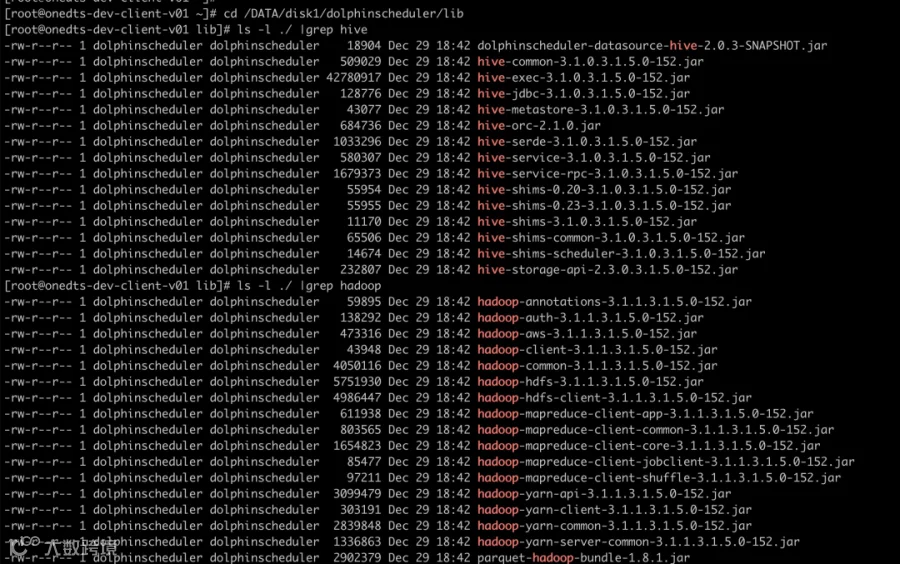
更换 hadoop, hive jar 包
[root@onedts-dev-client-v01 lib]# ls -l ./ |grep hadoop
-rw-r--r-- 1 dolphinscheduler dolphinscheduler    40863 Nov 19 05:36 hadoop-annotations-2.7.3.jar
-rw-r--r-- 1 dolphinscheduler dolphinscheduler    94150 Nov 19 05:36 hadoop-auth-2.7.3.jar
-rw-r--r-- 1 dolphinscheduler dolphinscheduler   126287 Nov 19 05:36 hadoop-aws-2.7.3.jar
-rw-r--r-- 1 dolphinscheduler dolphinscheduler    26012 Nov 19 05:36 hadoop-client-2.7.3.jar
-rw-r--r-- 1 dolphinscheduler dolphinscheduler  3479293 Nov 19 05:36 hadoop-common-2.7.3.jar
-rw-r--r-- 1 dolphinscheduler dolphinscheduler  8316190 Nov 19 05:36 hadoop-hdfs-2.7.3.jar
-rw-r--r-- 1 dolphinscheduler dolphinscheduler   542869 Nov 19 05:36 hadoop-mapreduce-client-app-2.7.3.jar
-rw-r--r-- 1 dolphinscheduler dolphinscheduler   776634 Nov 19 05:36 hadoop-mapreduce-client-common-2.7.3.jar
-rw-r--r-- 1 dolphinscheduler dolphinscheduler  1556539 Nov 19 05:36 hadoop-mapreduce-client-core-2.7.3.jar
-rw-r--r-- 1 dolphinscheduler dolphinscheduler    62304 Nov 19 05:36 hadoop-mapreduce-client-jobclient-2.7.3.jar
-rw-r--r-- 1 dolphinscheduler dolphinscheduler    71737 Nov 19 07:04 hadoop-mapreduce-client-shuffle-2.7.3.jar
-rw-r--r-- 1 dolphinscheduler dolphinscheduler  2039143 Nov 19 05:36 hadoop-yarn-api-2.7.3.jar
-rw-r--r-- 1 dolphinscheduler dolphinscheduler   165867 Nov 19 05:36 hadoop-yarn-client-2.7.3.jar
-rw-r--r-- 1 dolphinscheduler dolphinscheduler  1678642 Nov 19 05:36 hadoop-yarn-common-2.7.3.jar
-rw-r--r-- 1 dolphinscheduler dolphinscheduler   388235 Nov 19 05:36 hadoop-yarn-server-common-2.7.3.jar


-rw-r--r-- 1 dolphinscheduler dolphinscheduler   384969 Nov 19 05:36 hive-common-2.1.0.jar
-rw-r--r-- 1 dolphinscheduler dolphinscheduler   109678 Nov 19 05:36 hive-jdbc-2.1.0.jar
-rw-r--r-- 1 dolphinscheduler dolphinscheduler  7771689 Nov 19 05:36 hive-metastore-2.1.0.jar
-rw-r--r-- 1 dolphinscheduler dolphinscheduler   684736 Nov 19 05:36 hive-orc-2.1.0.jar
-rw-r--r-- 1 dolphinscheduler dolphinscheduler   915583 Nov 19 05:36 hive-serde-2.1.0.jar
-rw-r--r-- 1 dolphinscheduler dolphinscheduler   483319 Nov 19 05:36 hive-service-2.1.0.jar
-rw-r--r-- 1 dolphinscheduler dolphinscheduler  1538459 Nov 19 05:36 hive-service-rpc-2.1.0.jar
-rw-r--r-- 1 dolphinscheduler dolphinscheduler   109259 Nov 19 05:36 hive-storage-api-2.1.0.jar


cd /DATA/disk1/apps/dolphinscheduler-bin/lib/;
rm -rf ./hadoop*.jar;
rm -rf ./hive*.jar;

cd /DATA/disk1/apps/dolphinscheduler-bin/lib/;
\cp /usr/hdp/3.1.5.0-152/hadoop/hadoop-annotations-3.1.1.3.1.5.0-152.jar ./;
\cp /usr/hdp/3.1.5.0-152/hadoop/hadoop-auth-3.1.1.3.1.5.0-152.jar ./;
\cp /usr/hdp/3.1.5.0-152/hadoop-mapreduce/hadoop-aws-3.1.1.3.1.5.0-152.jar ./;
\cp /usr/hdp/3.1.5.0-152/spark2/jars/hadoop-client-3.1.1.3.1.5.0-152.jar ./;
\cp /usr/hdp/3.1.5.0-152/hadoop/client/hadoop-common-3.1.1.3.1.5.0-152.jar ./;
\cp /usr/hdp/3.1.5.0-152/hadoop-hdfs/hadoop-hdfs-3.1.1.3.1.5.0-152.jar ./;
\cp /usr/hdp/3.1.5.0-152/hadoop/client/hadoop-hdfs-client-3.1.1.3.1.5.0-152.jar ./;
\cp /usr/hdp/3.1.5.0-152/hadoop-mapreduce/hadoop-mapreduce-client-app-3.1.1.3.1.5.0-152.jar ./;
\cp /usr/hdp/3.1.5.0-152/hadoop/client/hadoop-mapreduce-client-common-3.1.1.3.1.5.0-152.jar ./;
\cp /usr/hdp/3.1.5.0-152/hadoop/client/hadoop-mapreduce-client-core-3.1.1.3.1.5.0-152.jar ./;
\cp /usr/hdp/3.1.5.0-152/hadoop/client/hadoop-mapreduce-client-jobclient-3.1.1.3.1.5.0-152.jar ./;
\cp /usr/hdp/3.1.5.0-152/hadoop-mapreduce/hadoop-mapreduce-client-shuffle-3.1.1.3.1.5.0-152.jar ./;
\cp /usr/hdp/3.1.5.0-152/hadoop/client/hadoop-yarn-api-3.1.1.3.1.5.0-152.jar ./;
\cp /usr/hdp/3.1.5.0-152/hadoop/client/hadoop-yarn-client-3.1.1.3.1.5.0-152.jar ./;
\cp /usr/hdp/3.1.5.0-152/hadoop/client/hadoop-yarn-common-3.1.1.3.1.5.0-152.jar ./;
\cp /usr/hdp/3.1.5.0-152/hadoop-yarn/hadoop-yarn-server-common-3.1.1.3.1.5.0-152.jar ./;

scp root@onedts-dev-master-v01:/usr/hdp/3.1.5.0-152/hive/lib/hive-common-3.1.0.3.1.5.0-152.jar ./;
scp root@onedts-dev-master-v01:/usr/hdp/3.1.5.0-152/hive/lib/hive-jdbc-3.1.0.3.1.5.0-152.jar ./;
scp root@onedts-dev-master-v01:/usr/hdp/3.1.5.0-152/hive/lib/hive-metastore-3.1.0.3.1.5.0-152.jar ./;
scp root@onedts-dev-master-v01:/usr/hdp/3.1.5.0-152/hive/lib/hive-serde-3.1.0.3.1.5.0-152.jar ./;
scp root@onedts-dev-master-v01:/usr/hdp/3.1.5.0-152/hive/lib/hive-service-3.1.0.3.1.5.0-152.jar ./;
scp root@onedts-dev-master-v01:/usr/hdp/3.1.5.0-152/hive/lib/hive-service-rpc-3.1.0.3.1.5.0-152.jar ./;
scp root@onedts-dev-master-v01:/usr/hdp/3.1.5.0-152/hive/lib/hive-storage-api-2.3.0.3.1.5.0-152.jar ./;

\cp /usr/hdp/3.1.5.0-152/hive/lib/hive-exec-3.1.0.3.1.5.0-152.jar ./;

cd /DATA/disk1/dolphinscheduler/lib/;
\cp /usr/hdp/3.1.5.0-152/hive/lib/hive-shims-0.20-3.1.0.3.1.5.0-152.jar ./;
\cp /usr/hdp/3.1.5.0-152/hive/lib/hive-shims-0.23-3.1.0.3.1.5.0-152.jar ./;
\cp /usr/hdp/3.1.5.0-152/hive/lib/hive-shims-3.1.0.3.1.5.0-152.jar ./;
\cp /usr/hdp/3.1.5.0-152/hive/lib/hive-shims-common-3.1.0.3.1.5.0-152.jar ./;
\cp /usr/hdp/3.1.5.0-152/hive/lib/hive-shims-scheduler-3.1.0.3.1.5.0-152.jar ./;
03
加入社区
随着国内开源的迅猛崛起,Apache DolphinScheduler 社区迎来蓬勃发展,为了做更好用、易用的调度,真诚欢迎热爱开源的伙伴加入到开源社区中来,为中国开源崛起献上一份自己的力量,让本土开源走向全球。

参与 DolphinScheduler 社区有非常多的参与贡献的方式,包括:

贡献第一个PR(文档、代码) 我们也希望是简单的,第一个PR用于熟悉提交的流程和社区协作以及感受社区的友好度。
社区汇总了以下适合新手的问题列表:https://github.com/apache/dolphinscheduler/issues/5689
非新手问题列表:https://github.com/apache/dolphinscheduler/issues?q=is%3Aopen+is%3Aissue+label%3A%22volunteer+wanted%22
如何参与贡献链接:https://dolphinscheduler.apache.org/zh-cn/community/development/contribute.html
来吧,DolphinScheduler开源社区需要您的参与,为中国开源崛起添砖加瓦吧,哪怕只是小小的一块瓦,汇聚起来的力量也是巨大的。
参与开源可以近距离与各路高手切磋,迅速提升自己的技能,如果您想参与贡献,我们有个贡献者种子孵化群,可以添加社区小助手微信(Leonard-ds) 手把手教会您( 贡献者不分水平高低,有问必答,关键是有一颗愿意贡献的心 )。添加小助手微信时请说明想参与贡献。
https://dolphinscheduler.apache.org/
(Leonard-ds)



☞一文给你整明白多租户在 Apache DolphinScheduler 中的作用
☞开源并不是大牛的专属,普通人也能有属于自己的一亩三分地
☞恭喜社区喜提三枚新 Committer!
☞在 Apache DolphinScheduler 上调试 LDAP 登录,亲测有效!
☞4 亿用户,7W+ 作业调度难题,Bigo 基于 Apache DolphinScheduler 巧化解
☞荔枝机器学习平台与大数据调度系统“双剑合璧”,打造未来数据处理新模式!
☞看到社区代码不规范,强迫症的我顺手就给格式化了!
☞最佳实践|联通数科基于 DolphinScheduler 的二次开发
☞DolphinScheduler 荣获 2021 中国开源云联盟优秀开源项目奖!
☞巨变!a16z 关于新一代数据基础设施架构的深度洞察
点击阅读原文,加入开源!

点个在看你最好看