


点击蓝字,关注我们
本文手把手演示了如何在 K8s + Rancher 环境中快速拉起一套生产可用的 Apache DolphinScheduler 3.2.2 集群。全文围绕“镜像加速、依赖本地化、存储持久化”三大痛点展开,附有详细的代码解析,收藏细看吧!
1
环境准备
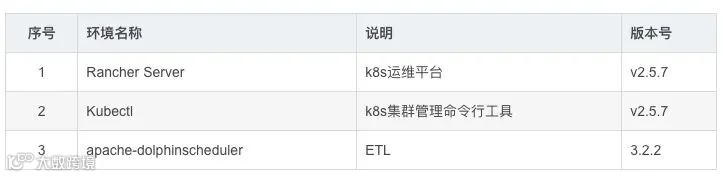
1、软件准备
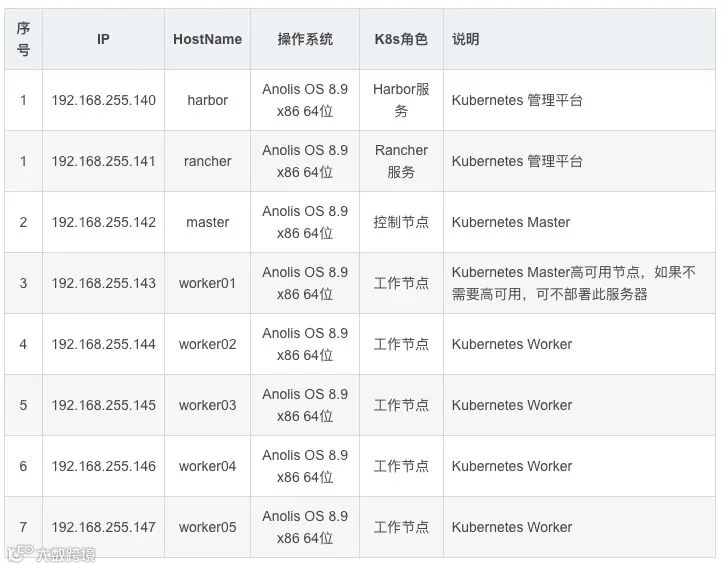
2、环境规划
2
部署
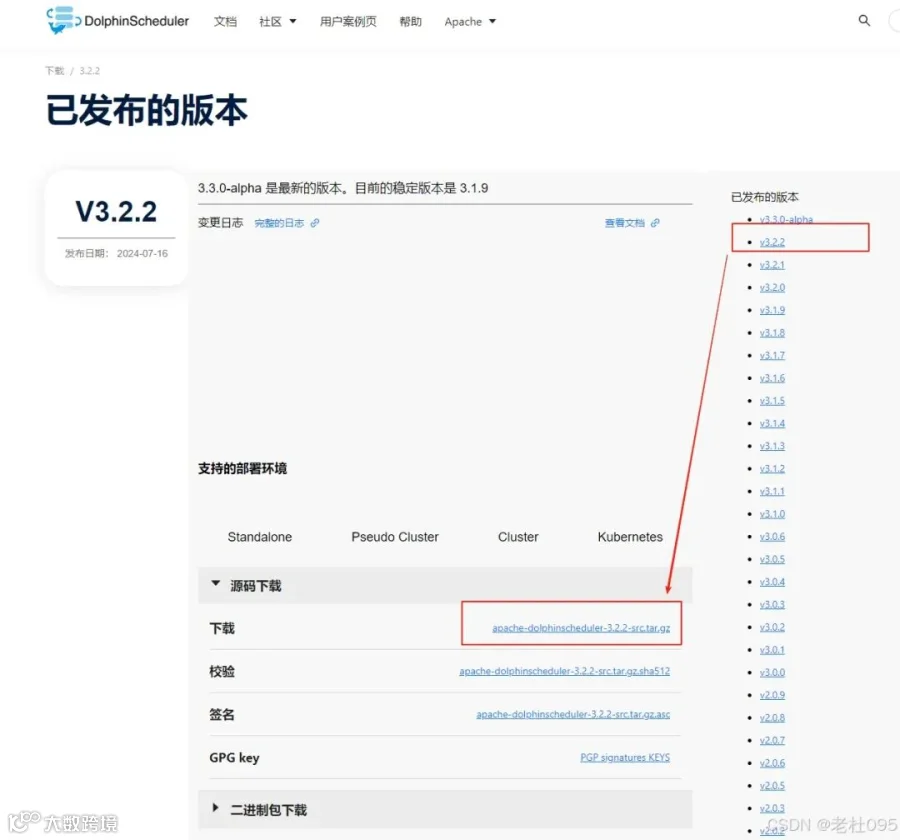
1、官网下载apache-dolphinscheduler源码
[][][][]
2、修改Chart的镜像地址配置
(1)、修改Chart.yaml配置文件
将repository: https://raw.githubusercontent.com/bitnami/charts/archive-full-index/bitnami改为repository: https://raw.gitmirror.com/bitnami/charts/archive-full-index/bitnami
[root dolphinscheduler]# cd /opt/dolphinscheduler/apache-dolphinscheduler-3.2.2-src/deploy/kubernetes/dolphinscheduler[root dolphinscheduler]# vim Chart.yaml
# Application charts are a collection of templates that can be packaged into versioned archives# to be deployed.## Library charts provide useful utilities or functions for the chart developer. They're included as# a dependency of application charts to inject those utilities and functions into the rendering# pipeline. Library charts do not define any templates and therefore cannot be deployed.type: application# This is the chart version. This version number should be incremented each time you make changes# to the chart and its templates, including the app version.version: 3.3.0-alpha# This is the version number of the application being deployed. This version number should be# incremented each time you make changes to the application.appVersion: 3.3.0-alphadependencies:- name: postgresqlversion: 10.3.18# Due to a change in the Bitnami repo, https://charts.bitnami.com/bitnami was truncated only# containing entries for the latest 6 months (from January 2022 on).# This URL: https://raw.githubusercontent.com/bitnami/charts/archive-full-index/bitnami# contains the full 'index.yaml'.# See detail here: https://github.com/bitnami/charts/issues/10833#repository: https://raw.githubusercontent.com/bitnami/charts/archive-full-index/bitnamirepository: https://raw.gitmirror.com/bitnami/charts/archive-full-index/bitnamicondition: postgresql.enabled- name: zookeeperversion: 6.5.3# Same as above.#repository: https://raw.githubusercontent.com/bitnami/charts/archive-full-index/bitnamirepository: https://raw.gitmirror.com/bitnami/charts/archive-full-index/bitnamicondition: zookeeper.enabled- name: mysqlversion: 9.4.1#repository: https://raw.githubusercontent.com/bitnami/charts/archive-full-index/bitnamirepository: https://raw.gitmirror.com/bitnami/charts/archive-full-index/bitnamicondition: mysql.enabled- name: minioversion: 11.10.13#repository: https://raw.githubusercontent.com/bitnami/charts/archive-full-index/bitnamirepository: https://raw.gitmirror.com/bitnami/charts/archive-full-index/bitnamicondition: minio.enabled
(2)、执行helm更新
Chart.yaml配置文件修改完成后执行下面的命令:
[root@master dolphinscheduler]# helm repo add bitnami-full-index https://raw.gitmirror.com/bitnami/charts/archive-full-index/bitnami[root@master dolphinscheduler]# helm repo add bitnami https://charts.bitnami.com/bitnami[root@master dolphinscheduler]# helm dependency update .
(3)、解压依赖文件
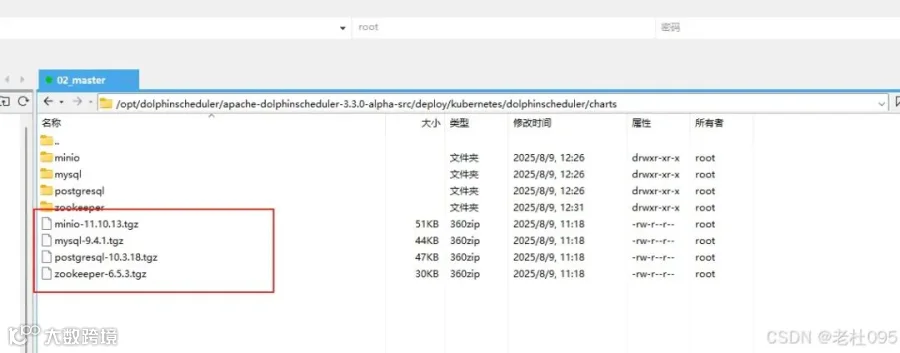
helm更新完成后,在当前目录会新生成【charts】目录,该目录下就是过helm更新下载到本地的依赖文件,如下图所示:
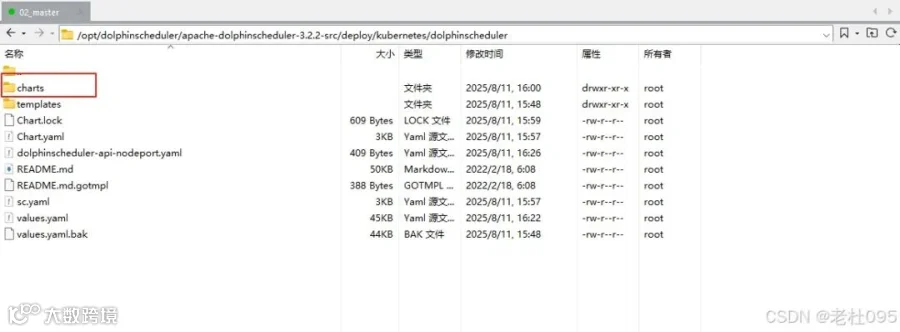
解压依赖包文件,因为本次安装除了Mysql都需要同步安装,所以要解压minio-11.10.13.tgz,postgresql-10.3.18.tgz,zookeeper-6.5.3.tgz这几个压缩包
[][][]
3、修改Dolphinscheduler的Helm配置文件
cd /opt/dolphinscheduler/apache-dolphinscheduler-3.2.2-src/deploy/kubernetes/dolphinschedulervim values.yaml
(1)、修改初始镜像
需要修改busybox和dolphinscheduler各个组件的镜像地址,修改后如下:
# -- World time and date for cities in all time zonestimezone: "Asia/Shanghai"# -- Used to detect whether dolphinscheduler dependent services such as database are readyinitImage:# -- Image pull policy. Options: Always, Never, IfNotPresentpullPolicy: "IfNotPresent"# -- Specify initImage repository#busybox: "busybox:1.30.1"busybox: "registry.cn-hangzhou.aliyuncs.com/docker_image-ljx/busybox:1.30.1"image:# -- Docker image repository for the DolphinSchedulerregistry: registry.cn-hangzhou.aliyuncs.com/docker_image-ljx# -- Docker image version for the DolphinSchedulertag: 3.2.2# -- Image pull policy. Options: Always, Never, IfNotPresentpullPolicy: "IfNotPresent"# -- Specify a imagePullSecretspullSecret: ""# -- master imagemaster: dolphinscheduler-master# -- worker imageworker: dolphinscheduler-worker# -- api-server imageapi: dolphinscheduler-api# -- alert-server imagealert: dolphinscheduler-alert-server# -- tools imagetools: dolphinscheduler-tools
(2)、修改postgresql配置
-
本文安装依赖的数据库配置了默认的数据库postgresql,参见配置 datasource.profile: postgresql,但是values.yaml的默认配置中并没有配置postgresql镜像,会导致postgresql镜像拉取失败。 -
本文dolphinscheduler依赖于 bitnami postgresql的Chart,且已经在上一步 解压了。获取镜像地址的方式只需进入解压目录(/opt/dolphinscheduler/apache-dolphinscheduler-3.2.2-src/deploy/kubernetes/dolphinscheduler/charts/postgresql)。
查看postgresql的values.yaml(/opt/dolphinscheduler/apache-dolphinscheduler-3.2.2-src/deploy/kubernetes/dolphinscheduler/charts/postgresql/values.yaml)找到镜像地址:
image:registry: docker.iorepository: bitnami/postgresqltag: 11.11.0-debian-10-r71# Specify a imagePullPolicy# Defaults to 'Always' if image tag is 'latest', else set to 'IfNotPresent'# ref: http://kubernetes.io/docs/user-guide/images/pre-pulling-images#pullPolicy: IfNotPresent# Optionally specify an array of imagePullSecrets.# Secrets must be manually created in the namespace.# ref: https://kubernetes.io/docs/tasks/configure-pod-container/pull-image-private-registry/#pullSecrets:- myRegistryKeySecretName# Set to true if you would like to see extra information on logs# It turns BASH and/or NAMI debugging in the image#debug: false
复制上述配置文件中的image配置信息,如下图所示:
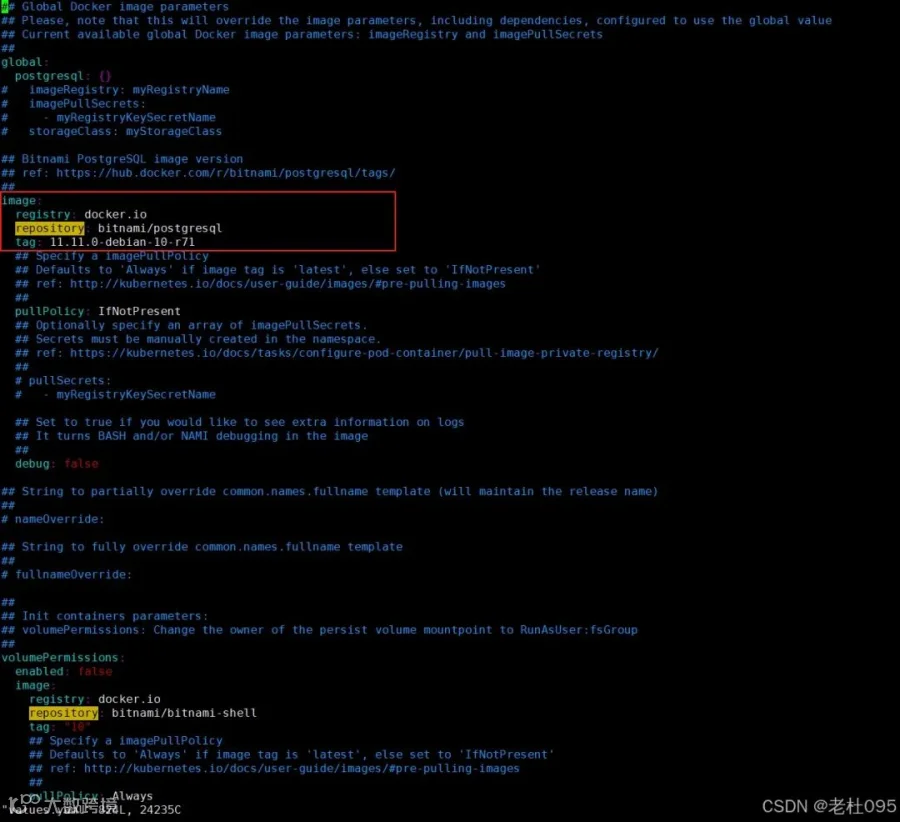
将上步复制到image粘贴至/opt/dolphinscheduler/apache-dolphinscheduler-3.2.2-src/deploy/kubernetes/dolphinscheduler/values.yaml配置文件中postgresql配置项下,如下所示:
datasource:# -- The profile of datasourceprofile: postgresqlpostgresql:image:registry: docker.iorepository: bitnami/postgresqltag: 11.11.0-debian-10-r71# -- If not exists external PostgreSQL, by default, the DolphinScheduler will use a internal PostgreSQLenabled: true# -- The username for internal PostgreSQLpostgresqlUsername: "root"# -- The password for internal PostgreSQLpostgresqlPassword: "root"# -- The database for internal PostgreSQLpostgresqlDatabase: "dolphinscheduler"# -- The driverClassName for internal PostgreSQLdriverClassName: "org.postgresql.Driver"# -- The params for internal PostgreSQLparams: "characterEncoding=utf8"persistence:# -- Set postgresql.persistence.enabled to true to mount a new volume for internal PostgreSQLenabled: false# -- `PersistentVolumeClaim` sizesize: "20Gi"# -- PostgreSQL data persistent volume storage class. If set to "-", storageClassName: "", which disables dynamic provisioningstorageClass: "-"
(3)、修改minio配置
查看minio的values.yaml(/opt/dolphinscheduler/apache-dolphinscheduler-3.2.2-src/deploy/kubernetes/dolphinscheduler/charts/minio/values.yaml)找到镜像地址:
image:registry: docker.iorepository: bitnami/miniotag: 2022.10.29-debian-11-r0digest: ""# Specify a imagePullPolicy# Defaults to 'Always' if image tag is 'latest', else set to 'IfNotPresent'# ref: https://kubernetes.io/docs/user-guide/images/pre-pulling-images#pullPolicy: IfNotPresent# Optionally specify an array of imagePullSecrets.# Secrets must be manually created in the namespace.# ref: https://kubernetes.io/docs/tasks/configure-pod-container/pull-image-private-registry/# e.g:# pullSecrets:# - myRegistryKeySecretName#pullSecrets: []# Set to true if you would like to see extra information on logs#debug: false
复制上述配置文件中的image配置信息,如下图所示:
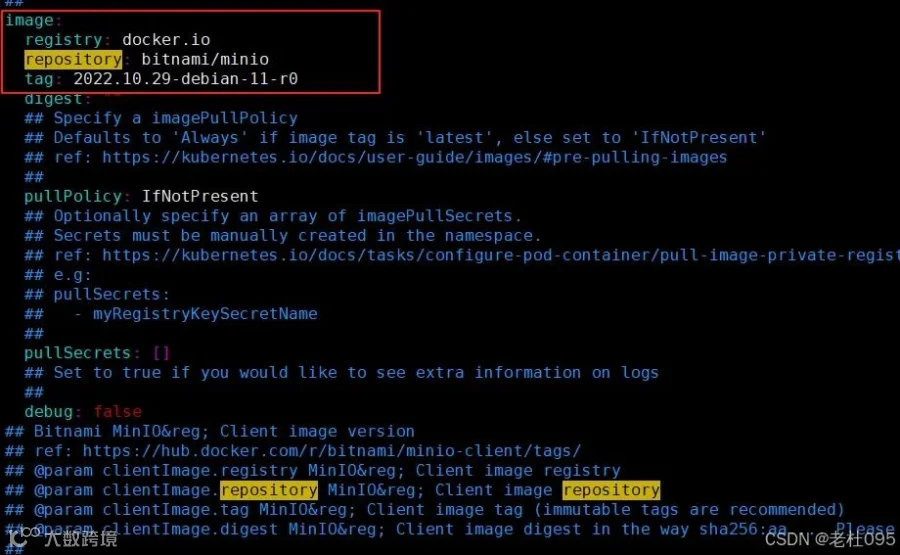
将上步复制到image粘贴至/opt/dolphinscheduler/apache-dolphinscheduler-3.2.2-src/deploy/kubernetes/dolphinscheduler/values.yaml配置文件中minio配置项下,如下所示:
minio:image:registry: docker.iorepository: bitnami/miniotag: 2022.10.29-debian-11-r0# -- Deploy minio and configure it as the default storage for DolphinScheduler, note this is for demo only, not for production.enabled: trueauth:# -- minio usernamerootUser: minioadmin# -- minio passwordrootPassword: minioadminpersistence:# -- Set minio.persistence.enabled to true to mount a new volume for internal minioenabled: false# -- minio default bucketsdefaultBuckets: "dolphinscheduler"
(4)、修改zookeeper配置
查看zookeeper的values.yaml(/opt/dolphinscheduler/apache-dolphinscheduler-3.2.2-src/deploy/kubernetes/dolphinscheduler/charts/zookeeper/values.yaml)找到镜像地址:
image:registry: docker.iorepository: bitnami/zookeepertag: 3.6.2-debian-10-r185# Specify a imagePullPolicy# Defaults to 'Always' if image tag is 'latest', else set to 'IfNotPresent'# ref: http://kubernetes.io/docs/user-guide/images/pre-pulling-images#pullPolicy: IfNotPresent# Optionally specify an array of imagePullSecrets.# Secrets must be manually created in the namespace.# ref: https://kubernetes.io/docs/tasks/configure-pod-container/pull-image-private-registry/#pullSecrets:- myRegistryKeySecretName# Set to true if you would like to see extra information on logs# It turns BASH and/or NAMI debugging in the image#debug: false
复制上述配置文件中的image配置信息,如下图所示:
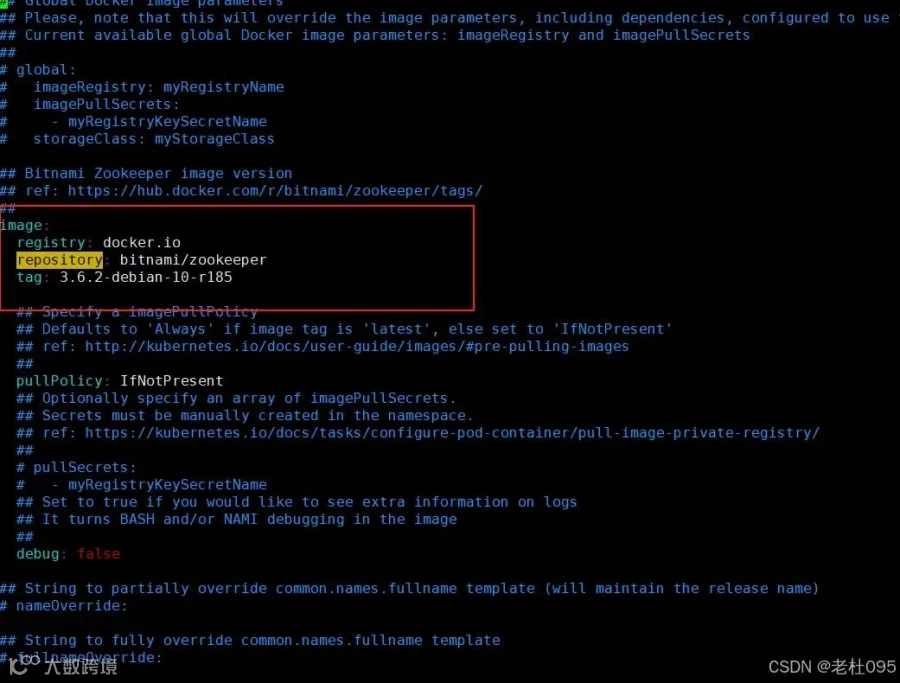
将上步复制到image粘贴至/opt/dolphinscheduler/apache-dolphinscheduler-3.2.2-src/deploy/kubernetes/dolphinscheduler/values.yaml配置文件中zookeeper配置项下,如下所示:
zookeeper:image:registry: docker.iorepository: bitnami/zookeepertag: 3.6.2-debian-10-r185# -- If not exists external registry, the zookeeper registry will be used by default.enabled: trueservice:# -- The port of zookeeperport: 2181# -- A list of comma separated Four Letter Words commands to usefourlwCommandsWhitelist: "srvr,ruok,wchs,cons"persistence:# -- Set `zookeeper.persistence.enabled` to true to mount a new volume for internal ZooKeeperenabled: false# -- PersistentVolumeClaim sizesize: "20Gi"# -- ZooKeeper data persistent volume storage class. If set to "-", storageClassName: "", which disables dynamic provisioningstorageClass: "-"
(5)、修改master配置
master:# -- Enable or disable the Master componentenabled: truereplicas: "1"resources:limits:memory: "4Gi"cpu: "4"requests:memory: "2Gi"cpu: "500m"persistentVolumeClaim:# -- Set `worker.persistentVolumeClaim.enabled` to `true` to enable `persistentVolumeClaim` for `worker`enabled: true## dolphinscheduler data volumedataPersistentVolume:# -- Set `worker.persistentVolumeClaim.dataPersistentVolume.enabled` to `true` to mount a data volume for `worker`enabled: true# -- `PersistentVolumeClaim` access modesaccessModes:- "ReadWriteOnce"# -- `Worker` data persistent volume storage class. If set to "-", storageClassName: "", which disables dynamic provisioningstorageClassName: "-"# -- `PersistentVolumeClaim` sizestorage: "20Gi"env:# -- The jvm options for master serverJAVA_OPTS: "-Xms1g -Xmx1g -Xmn512m"
(6)、修改worker配置
nfs-storage存储卷的创建
sc.yaml配置文件如下:
## 创建了一个存储类apiVersion: storage.k8s.io/v1kind: StorageClassmetadata:name: nfs-storageannotations:storageclass.kubernetes.io/is-default-class: "true"provisioner: k8s-sigs.io/nfs-subdir-external-provisionerparameters:archiveOnDelete: "true" ## 删除pv的时候,pv的内容是否要备份---apiVersion: apps/v1kind: Deploymentmetadata:name: nfs-clientlabels:app: nfs-client# replace with namespace where provisioner is deployednamespace: defaultspec:replicas: 1strategy:type: Recreateselector:matchLabels:app: nfs-clienttemplate:metadata:labels:app: nfs-clientspec:serviceAccountName: nfs-clientcontainers:- name: nfs-clientimage: registry.cn-hangzhou.aliyuncs.com/lfy_k8s_images/nfs-subdir-external-provisioner:v4.0.2# resources:# limits:# cpu: 10m# requests:# cpu: 10mvolumeMounts:- name: nfs-client-rootmountPath: /persistentvolumesenv:- name: PROVISIONER_NAMEvalue: k8s-sigs.io/nfs-subdir-external-provisioner- name: NFS_SERVERvalue: 192.168.255.140 ## 指定自己nfs服务器地址- name: NFS_PATHvalue: /data/nfsdata ## nfs服务器共享的目录volumes:- name: nfs-client-rootnfs:server: 192.168.255.140path: /data/nfsdata---apiVersion: v1kind: ServiceAccountmetadata:name: nfs-client# replace with namespace where provisioner is deployednamespace: default---kind: ClusterRoleapiVersion: rbac.authorization.k8s.io/v1metadata:name: nfs-client-runnerrules:- apiGroups: [""]resources: ["nodes"]verbs: ["get", "list", "watch"]- apiGroups: [""]resources: ["persistentvolumes"]verbs: ["get", "list", "watch", "create", "delete"]- apiGroups: [""]resources: ["persistentvolumeclaims"]verbs: ["get", "list", "watch", "update"]- apiGroups: ["storage.k8s.io"]resources: ["storageclasses"]verbs: ["get", "list", "watch"]- apiGroups: [""]resources: ["events"]verbs: ["create", "update", "patch"]---kind: ClusterRoleBindingapiVersion: rbac.authorization.k8s.io/v1metadata:name: run-nfs-clientsubjects:- kind: ServiceAccountname: nfs-client# replace with namespace where provisioner is deployednamespace: defaultroleRef:kind: ClusterRolename: nfs-client-runnerapiGroup: rbac.authorization.k8s.io---kind: RoleapiVersion: rbac.authorization.k8s.io/v1metadata:name: leader-locking-nfs-client# replace with namespace where provisioner is deployednamespace: defaultrules:- apiGroups: [""]resources: ["endpoints"]verbs: ["get", "list", "watch", "create", "update", "patch"]---kind: RoleBindingapiVersion: rbac.authorization.k8s.io/v1metadata:name: leader-locking-nfs-client# replace with namespace where provisioner is deployednamespace: defaultsubjects:- kind: ServiceAccountname: nfs-client# replace with namespace where provisioner is deployednamespace: defaultroleRef:kind: Rolename: leader-locking-nfs-clientapiGroup: rbac.authorization.k8s.io
执行命令:
kubectl apply -f sc.yamlkubectl get pod -A
Worker节点配置如下:
worker:# -- Enable or disable the Worker componentenabled: truereplicas: "1"resources:limits:memory: "4Gi"cpu: "2"requests:memory: "2Gi"cpu: "500m"persistentVolumeClaim:# -- Set `worker.persistentVolumeClaim.enabled` to `true` to enable `persistentVolumeClaim` for `worker`enabled: true## dolphinscheduler data volumedataPersistentVolume:# -- Set `worker.persistentVolumeClaim.dataPersistentVolume.enabled` to `true` to mount a data volume for `worker`enabled: true# -- `PersistentVolumeClaim` access modesaccessModes:- "ReadWriteOnce"# -- `Worker` data persistent volume storage class. If set to "-", storageClassName: "", which disables dynamic provisioningstorageClassName: "nfs-storage"# -- `PersistentVolumeClaim` sizestorage: "20Gi"env:# -- The jvm options for master serverJAVA_OPTS: "-Xms1g -Xmx1g -Xmn512m"
(6)、修改alter配置
alert:# -- Enable or disable the Worker componentenabled: truereplicas: "1"resources:limits:memory: "2Gi"cpu: "1"requests:memory: "1Gi"cpu: "500m"persistentVolumeClaim:# -- Set `worker.persistentVolumeClaim.enabled` to `true` to enable `persistentVolumeClaim` for `worker`enabled: true## dolphinscheduler data volumedataPersistentVolume:# -- Set `worker.persistentVolumeClaim.dataPersistentVolume.enabled` to `true` to mount a data volume for `worker`enabled: true# -- `PersistentVolumeClaim` access modesaccessModes:- "ReadWriteOnce"# -- `Worker` data persistent volume storage class. If set to "-", storageClassName: "", which disables dynamic provisioningstorageClassName: "-"# -- `PersistentVolumeClaim` sizestorage: "20Gi"env:# -- The jvm options for master serverJAVA_OPTS: "-Xms1g -Xmx1g -Xmn512m"
3、执行安装
(1)、安装前检查
[root@master dolphinscheduler]# helm template dolphinscheduler -f values.yaml ./(2)、安装
[root@master dolphinscheduler]# kubectl create namespace dolphinscheduler[root@master dolphinscheduler]# helm -n dolphinscheduler install dolphinscheduler -f values.yaml ./
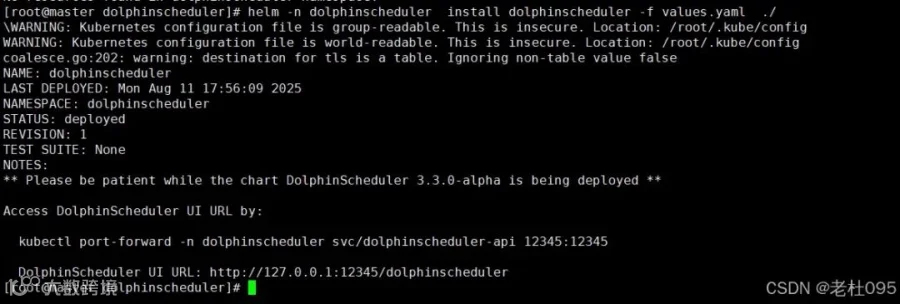
(3)、查看安装进度
[root@master dolphinscheduler]# kubectl get all -n dolphinscheduler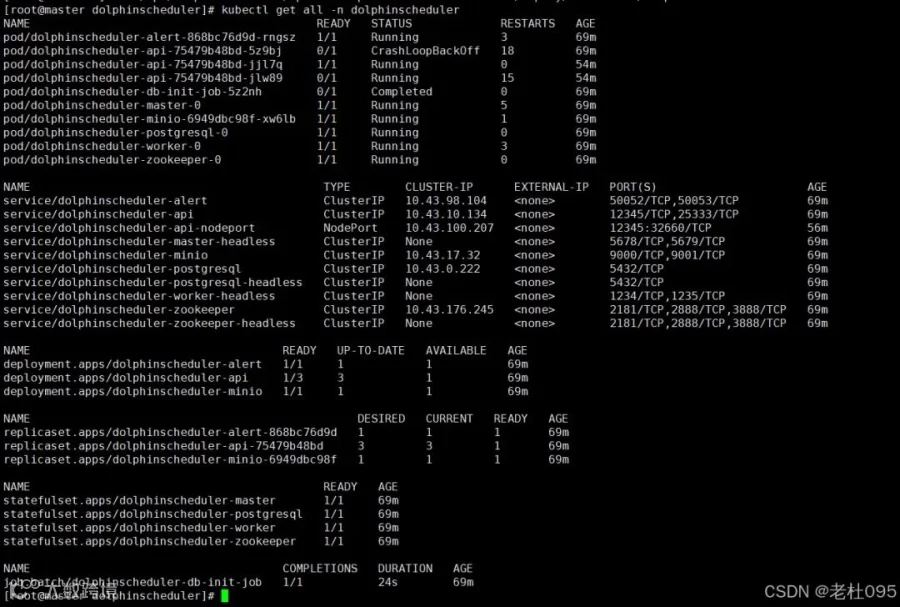
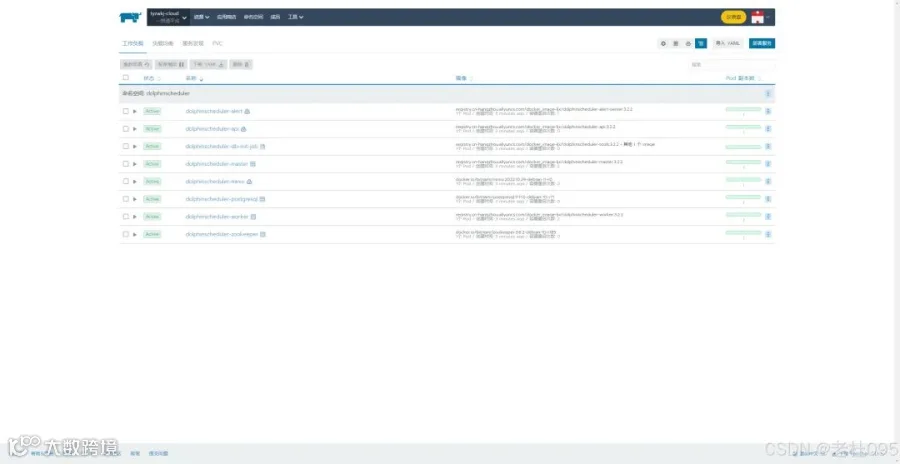
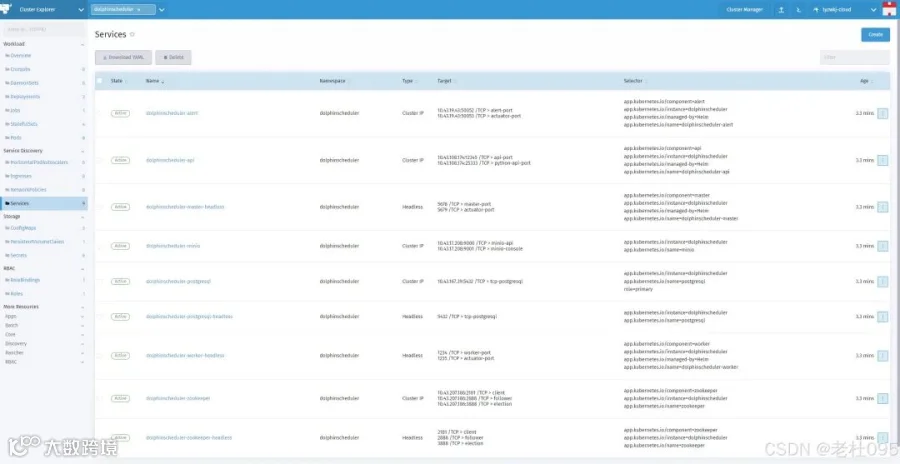
(4)、添加ingress配置实现访问ui
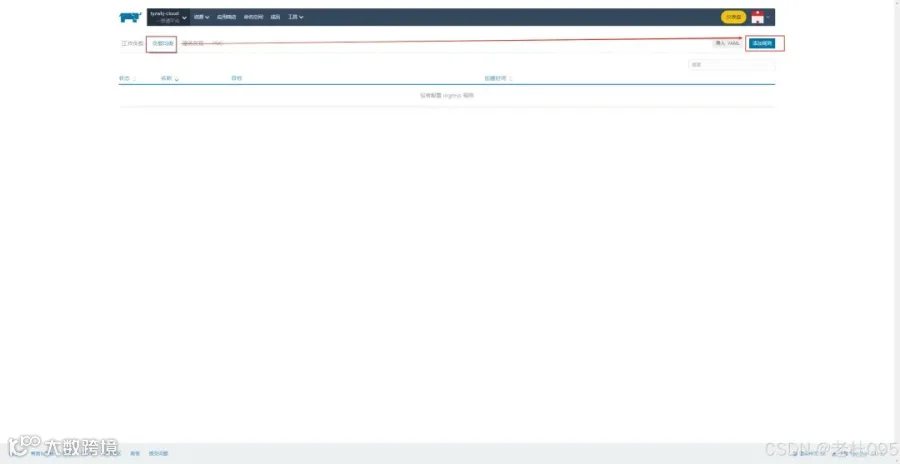
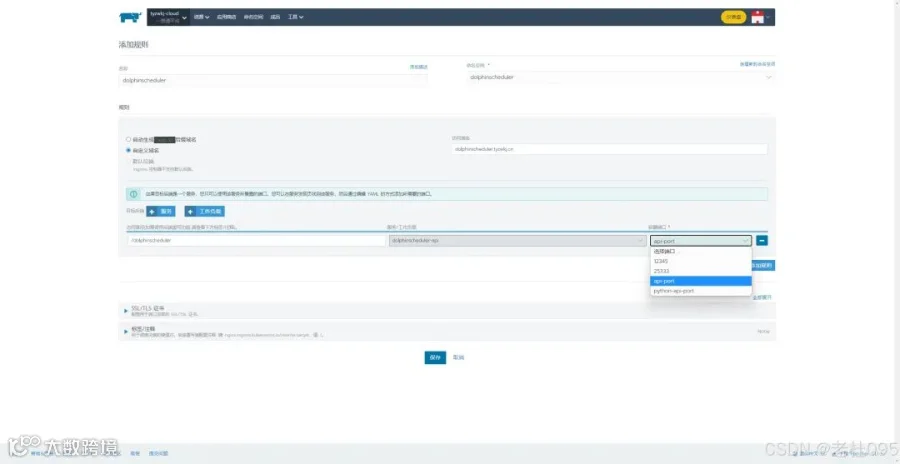
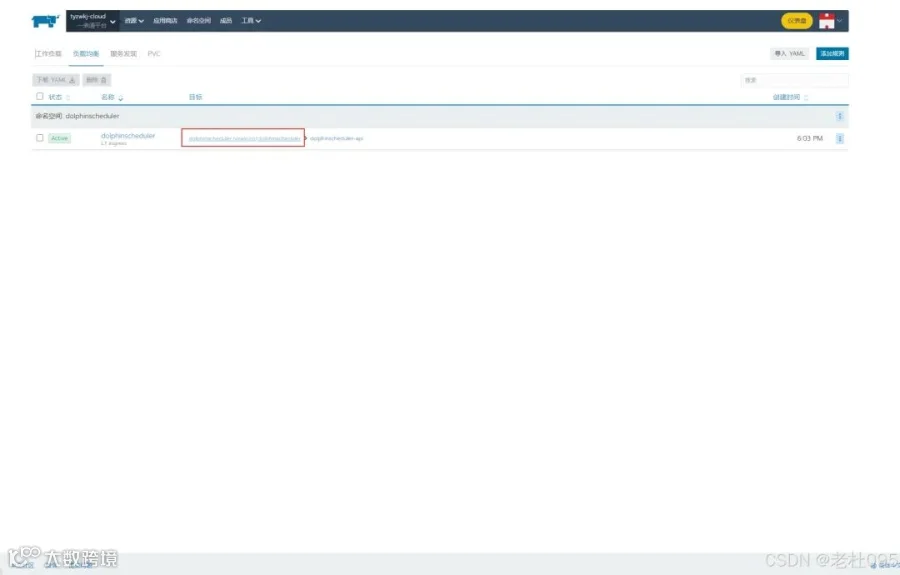
【重点】
配置完成后,Dolphinscheduler管理端的UI访问地址为: http://dolphinscheduler.tyzwkj.cn/dolphinscheduler/ui/。
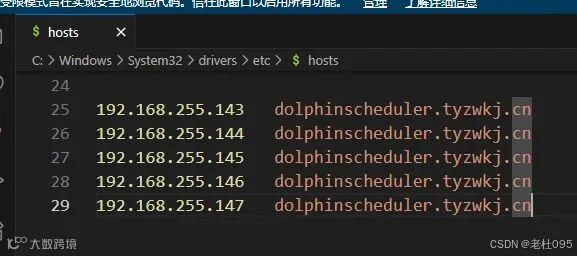
但是此时由于dolphinscheduler.tyzwkj.cn自定义域名还不能自动解析,需要在本地hosts文件中添加路由后才可以访问。
4、登录
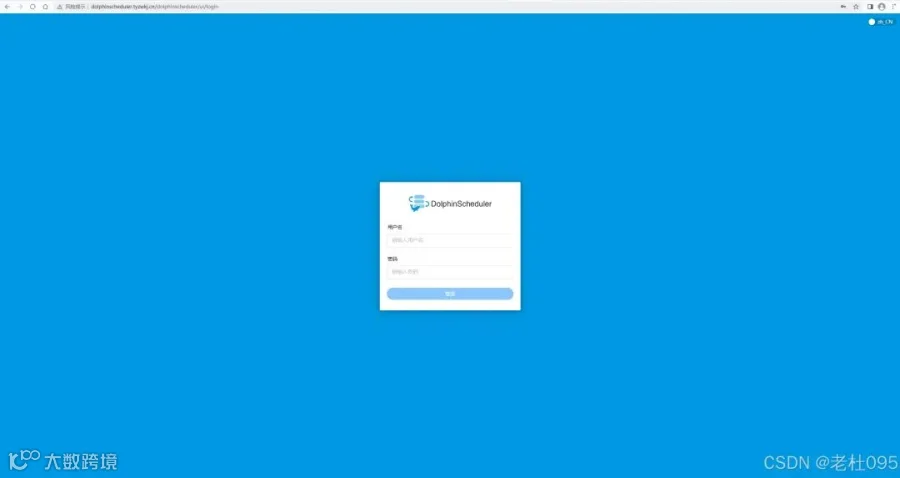
配置完hosts后在浏览器中输入http://dolphinscheduler.tyzwkj.cn/dolphinscheduler/ui/
用户名:admin
密码:dolphinscheduler123
结束,以上就是通过k8s部署Apache Dolphinscheduler集群的全部内容。
原文链接:https://blog.csdn.net/dyj095/article/details/150106792




用户案例

迁移实战

发版消息

加入社区
关注社区的方式有很多:
-
GitHub: https://github.com/apache/dolphinscheduler -
官网:https://dolphinscheduler.apache.org/en-us -
订阅开发者邮件:dev@dolphinscheduler@apache.org -
X.com:@DolphinSchedule -
YouTube:https://www.youtube.com/@apachedolphinscheduler -
Slack:https://join.slack.com/t/asf-dolphinscheduler/shared_invite/zt-1cmrxsio1-nJHxRJa44jfkrNL_Nsy9Qg
同样地,参与Apache DolphinScheduler 有非常多的参与贡献的方式,主要分为代码方式和非代码方式两种。
📂非代码方式包括:
完善文档、翻译文档;翻译技术性、实践性文章;投稿实践性、原理性文章;成为布道师;社区管理、答疑;会议分享;测试反馈;用户反馈等。
👩💻代码方式包括:
查找Bug;编写修复代码;开发新功能;提交代码贡献;参与代码审查等。

你的好友秀秀子拍了拍你
并请你帮她点一下“分享”