



点击蓝字,关注我们
1
GenericOptionsParser vs args区别
  GenericOptionsParser optionParser = new GenericOptionsParser(conf, args);
String[] remainingArgs = optionParser.getRemainingArgs();
  1、构造方法
public GenericOptionsParser(Configuration conf, String[] args)
      throws IOException {
    this(conf, new Options(), args);
}

2、点击 this
public GenericOptionsParser(Configuration conf,
      Options options, String[] args) throws IOException {
    this.conf = conf;
    parseSuccessful = parseGeneralOptions(options, args);
}

3、查看 parseGeneralOptions
private boolean parseGeneralOptions(Options opts, String[] args)
      throws IOException {
    opts = buildGeneralOptions(opts);
    CommandLineParser parser = new GnuParser();
    boolean parsed = false;
    try {
      commandLine = parser.parse(opts, preProcessForWindows(args), true);
      processGeneralOptions(commandLine);
      parsed = true;
    } catch(ParseException e) {
      LOG.warn("options parsing failed: "+e.getMessage());

      HelpFormatter formatter = new HelpFormatter();
      formatter.printHelp("general options are: ", opts);
    }
    return parsed;
}

4、看 GnuParser
package org.apache.commons.cli;

import java.util.ArrayList;
import java.util.List;

@Deprecated
public class GnuParser extends Parser {
.......
}

org.apache.commons.cli Parser,是不是有点熟悉?对,请参考 https://segmentfault.com/a/1190000045394541 这篇文章吧

5、看 processGeneralOptions 方法
private void processGeneralOptions(CommandLine line) throws IOException {
    if (line.hasOption("fs")) {
      FileSystem.setDefaultUri(conf, line.getOptionValue("fs"));
    }

    if (line.hasOption("jt")) {
      String optionValue = line.getOptionValue("jt");
      if (optionValue.equalsIgnoreCase("local")) {
        conf.set("mapreduce.framework.name", optionValue);
      }

      conf.set("yarn.resourcemanager.address", optionValue,
          "from -jt command line option");
    }
    if (line.hasOption("conf")) {
      String[] values = line.getOptionValues("conf");
      for(String value : values) {
        conf.addResource(new Path(value));
      }
    }

    if (line.hasOption('D')) {
      String[] property = line.getOptionValues('D');
      for(String prop : property) {
        String[] keyval = prop.split("=", 2);
        if (keyval.length == 2) {
          conf.set(keyval[0], keyval[1], "from command line");
        }
      }
    }

    if (line.hasOption("libjars")) {
      // for libjars, we allow expansion of wildcards
      conf.set("tmpjars",
               validateFiles(line.getOptionValue("libjars"), true),
               "from -libjars command line option");
      //setting libjars in client classpath
      URL[] libjars = getLibJars(conf);
      if(libjars!=null && libjars.length>0) {
        conf.setClassLoader(new URLClassLoader(libjars, conf.getClassLoader()));
        Thread.currentThread().setContextClassLoader(
            new URLClassLoader(libjars,
                Thread.currentThread().getContextClassLoader()));
      }
    }
    if (line.hasOption("files")) {
      conf.set("tmpfiles",
               validateFiles(line.getOptionValue("files")),
               "from -files command line option");
    }
    if (line.hasOption("archives")) {
      conf.set("tmparchives",
                validateFiles(line.getOptionValue("archives")),
                "from -archives command line option");
    }
    conf.setBoolean("mapreduce.client.genericoptionsparser.used", true);

    // tokensFile
    if(line.hasOption("tokenCacheFile")) {
      String fileName = line.getOptionValue("tokenCacheFile");
      // check if the local file exists
      FileSystem localFs = FileSystem.getLocal(conf);
      Path p = localFs.makeQualified(new Path(fileName));
      localFs.getFileStatus(p);
      if(LOG.isDebugEnabled()) {
        LOG.debug("setting conf tokensFile: " + fileName);
      }
      UserGroupInformation.getCurrentUser().addCredentials(
          Credentials.readTokenStorageFile(p, conf));
      conf.set("mapreduce.job.credentials.binary", p.toString(),
               "from -tokenCacheFile command line option");

    }
}

原理是把 fs、jt、D、libjars、files、archives、tokenCacheFile 相关参数放入到 Hadoop的 Configuration中了,终于清楚 GenericOptionsParser是干什么的了
2
Hadoop jar完整参数解释
  hadoop jar wordcount.jar org.myorg.WordCount \
    -fs hdfs://namenode.example.com:8020 \
    -jt resourcemanager.example.com:8032 \
    -D mapreduce.job.queuename=default \
    -libjars /path/to/dependency1.jar,/path/to/dependency2.jar \
    -files /path/to/file1.txt,/path/to/file2.txt \
    -archives /path/to/archive1.zip,/path/to/archive2.tar.gz \
    -tokenCacheFile /path/to/credential.file \
    /input /output
-
将作业提交到 hdfs://namenode.example.com:8020 文件系统 -
使用 resourcemanager.example.com:8032 作为 YARN ResourceManager -
提交到 default 队列 -
使用 /path/to/dependency1.jar 和 /path/to/dependency2.jar 作为依赖 -
分发本地文件 /path/to/file1.txt 和 /path/to/file2.txt,注意 : 是本地文件哦 -
解压并分发 /path/to/archive1.zip 和 /path/to/archive2.tar.gz -
分发凭证文件 /path/to/credential.file
3
MR实例
WordCount经典示例
  public class WCMapper extends Mapper<LongWritable, Text, Text, IntWritable> {

    private IntWritable one = new IntWritable(1);
    private Text word = new Text();

    @Override
    protected void map(LongWritable key,
                       Text value,
                       Mapper<LongWritable, Text, Text, IntWritable>.Context context) throws IOException, InterruptedException {
        String[] fields = value.toString().split("\\s+");
        for (String field : fields) {
            word.set(field);
            context.write(word, one);
        }
    }
}

public class WCReducer extends Reducer<Text, IntWritable, Text, IntWritable> {

    private IntWritable result = new IntWritable();

    @Override
    protected void reduce(Text key,
                          Iterable<IntWritable> values,
                          Reducer<Text, IntWritable, Text, IntWritable>.Context context) throws IOException, InterruptedException {

        int sum = 0;
        for (IntWritable val : values) {
            sum += val.get();
        }
        result.set(sum);
        context.write(key, result);
    }
}


public class WCJob {

    public static void main(String[] args) throws Exception {
        Configuration conf = new Configuration();

        // TODO 如果要是本地访问远程的hdfs,需要指定hdfs的根路径,否则只能访问本地的文件系统
//        conf.set("fs.defaultFS", "hdfs://xx.xx.xx.xx:8020");

        GenericOptionsParser optionParser = new GenericOptionsParser(conf, args);
        String[] remainingArgs = optionParser.getRemainingArgs();

        for (String arg : args) {
            System.out.println("arg :" + arg);
        }

        for (String remainingArg : remainingArgs) {
            System.out.println("remainingArg :" + remainingArg);
        }

        if (remainingArgs.length < 2) {
            throw new RuntimeException("input and output path must set.");
        }

        Path outputPath = new Path(remainingArgs[1]);
        FileSystem fileSystem = FileSystem.get(conf);
        boolean exists = fileSystem.exists(outputPath);
        // 如果目标目录存在,则删除
        if (exists) {
            fileSystem.delete(outputPath, true);
        }

        Job job = Job.getInstance(conf, "MRWordCount");
        job.setJarByClass(WCJob.class);
        job.setOutputKeyClass(Text.class);
        job.setOutputValueClass(IntWritable.class);
        job.setMapperClass(WCMapper.class);
        job.setReducerClass(WCReducer.class);
        FileInputFormat.addInputPath(job, new Path(remainingArgs[0]));
        FileOutputFormat.setOutputPath(job, new Path(remainingArgs[1]));
        System.exit(job.waitForCompletion(true) ? 0 : 1);
    }
}
文件分发
  public class ConfigMapper extends Mapper<LongWritable, Text, Text, NullWritable> {
    private List<String> whiteList = new ArrayList<>();
    private Text text = new Text();

    @Override
    protected void setup(Mapper<LongWritable, Text, Text, NullWritable>.Context context) throws IOException, InterruptedException {
        // 获取作业提交时传递的文件
        URI[] files = context.getCacheFiles();

        if (files != null && files.length > 0) {
            // 读取文件内容
            File configFile = new File("white.txt"); // 文件名要与传递的文件名保持一致
            try (BufferedReader reader = new BufferedReader(new FileReader(configFile))){
                String line = null;
                while ((line = reader.readLine()) != null) {
                    whiteList.add(line);
                }
            }
        }
    }

    @Override
    protected void map(LongWritable key,
                       Text value,
                       Mapper<LongWritable, Text, Text, NullWritable>.Context context) throws IOException, InterruptedException {

        String line = value.toString();
        String[] datas = line.split("\\s+");

        List<String> whiteDatas = Arrays.stream(datas).filter(data -> whiteList.contains(data)).collect(Collectors.toList());

        for (String data : whiteDatas) {
            text.set(data);
            context.write(text , NullWritable.get());
        }
    }
}


public class ConfigJob {

    public static void main(String[] args) throws Exception {

        // 设置用户名
        System.setProperty("HADOOP_USER_NAME", "root");

        Configuration conf = new Configuration();

        conf.set("fs.defaultFS", "hdfs://xx.xx.xx.xx:8020");

        GenericOptionsParser optionParser = new GenericOptionsParser(conf, args);
        String[] remainingArgs = optionParser.getRemainingArgs();

        if (remainingArgs.length < 2) {
            throw new RuntimeException("input and output path must set.");
        }

        Path outputPath = new Path(remainingArgs[1]);
        FileSystem fileSystem = FileSystem.get(conf);
        boolean exists = fileSystem.exists(outputPath);
        // 如果目标目录存在,则删除
        if (exists) {
            fileSystem.delete(outputPath, true);
        }

        Job job = Job.getInstance(conf, "MRConfig");
        job.setJarByClass(ConfigJob.class);
        job.setOutputKeyClass(Text.class);
        job.setOutputValueClass(NullWritable.class);
        job.setMapperClass(ConfigMapper.class);
        FileInputFormat.addInputPath(job, new Path(remainingArgs[0]));
        FileOutputFormat.setOutputPath(job, new Path(remainingArgs[1]));
        System.exit(job.waitForCompletion(true) ? 0 : 1);
    }
}
4
Dolphinscheduler MR使用
Yarn test队列设置
capacity-scheduler.xml
  <property>
    <name>yarn.scheduler.capacity.root.queues</name>
    <value>default, test</value>
</property>

<property>
    <name>yarn.scheduler.capacity.root.test.capacity</name>
    <value>30</value>
</property>

<property>
    <name>yarn.scheduler.capacity.root.test.maximum-capacity</name>
    <value>50</value>
</property>

<property>
    <name>yarn.scheduler.capacity.root.test.user-limit-factor</name>
    <value>1</value>
</property>
yarn rmadmin -refreshQueues
流程定义设置
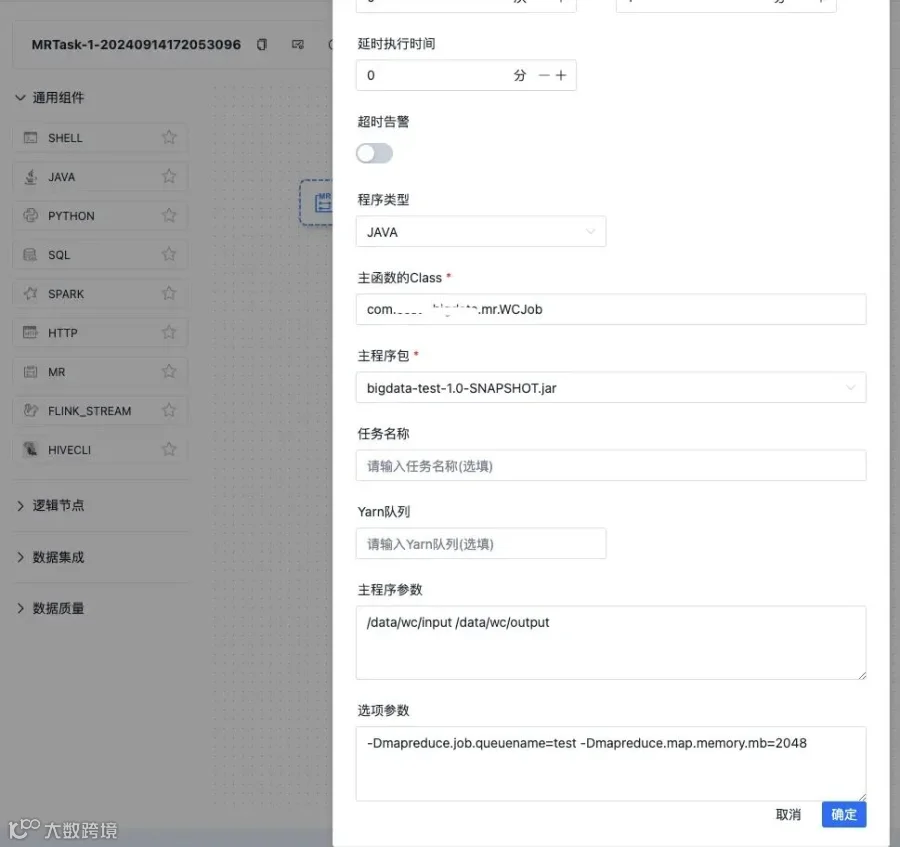
执行结果
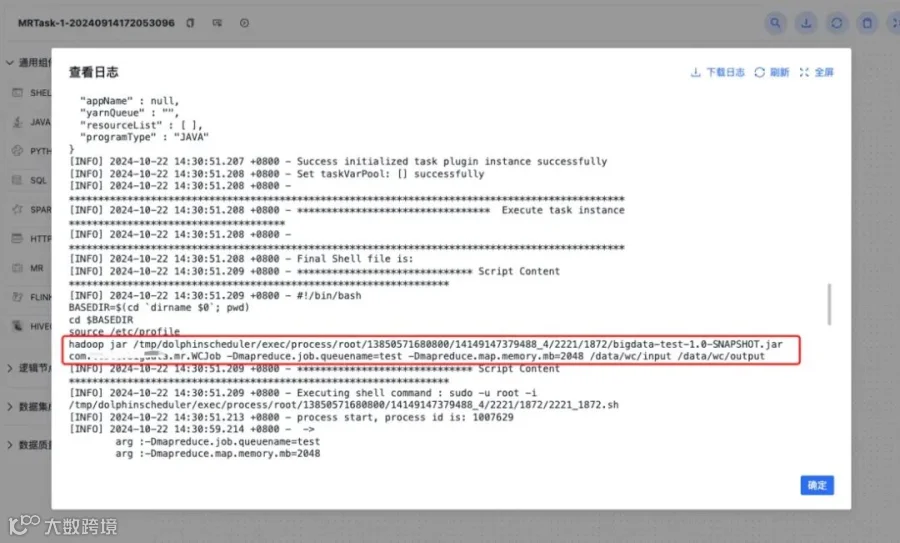
离线任务实例

YARN作业展示
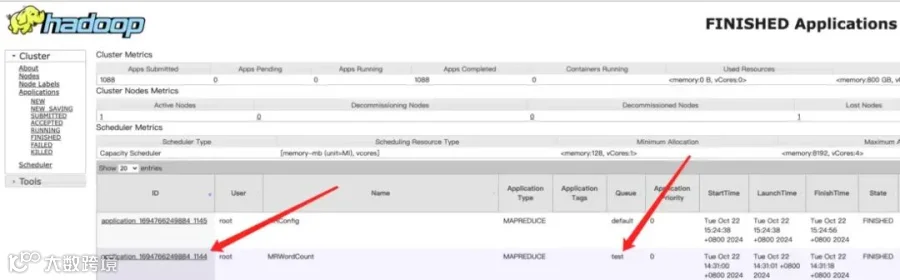
源码分析
  String others = param.getOthers();
// TODO 这里其实就是想说,没有通过 -D mapreduce.job.queuename 形式指定队列,是用页面上直接指定队列名称的,页面上 Yarn队列 输入框
if (StringUtils.isEmpty(others) || !others.contains(MR_YARN_QUEUE)) {
    String yarnQueue = param.getYarnQueue();
    if (StringUtils.isNotEmpty(yarnQueue)) {
        args.add(String.format("%s%s=%s", D, MR_YARN_QUEUE, yarnQueue));
    }
}

// TODO 这里就是页面上,选项参数 输入框
// -conf -archives -files -libjars -D
if (StringUtils.isNotEmpty(others)) {
    args.add(others);
}
原文链接:https://segmentfault.com/a/1190000045403915
参与Apache DolphinScheduler 社区有非常多的参与贡献的方式,包括:
