



点击蓝字,关注我们
1
手动安装
  https://arthas.aliyun.com/download/latest_version?mirror=aliyun
arthas-packaging-3.7.2-bin.zip

cp arthas-packaging-3.7.2-bin.zip /opt/arthas
cd /opt/arthas
unzip arthas-packaging-3.7.2-bin.zip

java -jar arthas-boot.jar

选择对应的进程号
2
报错解决
报错1
  [ERROR] Start arthas failed, exception stack trace:
com.sun.tools.attach.AttachNotSupportedException: Unable to open socket file: target process not responding or HotSpot VM not loaded
        at sun.tools.attach.LinuxVirtualMachine.<init>(LinuxVirtualMachine.java:106)
        at sun.tools.attach.LinuxAttachProvider.attachVirtualMachine(LinuxAttachProvider.java:78)
        at com.sun.tools.attach.VirtualMachine.attach(VirtualMachine.java:250)
        at com.taobao.arthas.core.Arthas.attachAgent(Arthas.java:102)
        at com.taobao.arthas.core.Arthas.<init>(Arthas.java:27)
        at com.taobao.arthas.core.Arthas.main(Arthas.java:161)
  进入 ${DOLPINSCHEUDLER_HOME}/api-server/bin下,在 jvm_args_env.sh 中添加如下 :
-XX:+StartAttachListener
报错2
  Picked up JAVA_TOOL_OPTIONS:
java.io.IOException: well-known file /tmp/.java_pid731688 is not secure: file should be owned by the current user (which is 0) but is owned by 989
        at sun.tools.attach.LinuxVirtualMachine.checkPermissions(Native Method)
        at sun.tools.attach.LinuxVirtualMachine.<init>(LinuxVirtualMachine.java:117)
        at sun.tools.attach.LinuxAttachProvider.attachVirtualMachine(LinuxAttachProvider.java:78)
        at com.sun.tools.attach.VirtualMachine.attach(VirtualMachine.java:250)
        at com.taobao.arthas.core.Arthas.attachAgent(Arthas.java:102)
        at com.taobao.arthas.core.Arthas.<init>(Arthas.java:27)
        at com.taobao.arthas.core.Arthas.main(Arthas.java:161)
[ERROR] Start arthas failed, exception stack trace:
[ERROR] attach fail, targetPid: 731688
arthas启动的服务和dolpinscheduler启动服务所属的用户要一样,不然有如上的报错
3
Watch
watch org.apache.dolphinscheduler.api.controller.UsersController queryUserList returnObj
  [arthas@731688]$ watch org.apache.dolphinscheduler.api.controller.UsersController queryUserList returnObj
Press Q or Ctrl+C to abort.
Affect(class count: 1 , method count: 1) cost in 126 ms, listenerId: 2
method=org.apache.dolphinscheduler.api.controller.UsersController.queryUserList location=AtExit
ts=2024-08-27 02:04:01; [cost=4.918943ms] result=@Result[
    code=@Integer[0],
    msg=@String[成功],
    data=@PageInfo[PageInfo(totalList=[User(id=1, userName=admin, userPassword=null, email=825193156@qq.com, phone=, userType=ADMIN_USER, tenantId=1, state=1, tenantCode=hdfs, queueName=default, alertGroup=null, queue=default, timeZone=null, createTime=Fri Jul 19 04:19:31 GMT-05:00 2024, updateTime=Mon Aug 12 22:15:58 GMT-05:00 2024)], total=1, totalPage=1, pageSize=10, currentPage=1, pageNo=0)],
]
method=org.apache.dolphinscheduler.api.controller.UsersController.queryUserList location=AtExit
ts=2024-08-27 02:04:18; [cost=6.905345ms] result=@Result[
    code=@Integer[0],
    msg=@String[成功],
    data=@PageInfo[PageInfo(totalList=[User(id=1, userName=admin, userPassword=null, email=825193156@qq.com, phone=, userType=ADMIN_USER, tenantId=1, state=1, tenantCode=hdfs, queueName=default, alertGroup=null, queue=default, timeZone=null, createTime=Fri Jul 19 04:19:31 GMT-05:00 2024, updateTime=Mon Aug 12 22:15:58 GMT-05:00 2024)], total=1, totalPage=1, pageSize=10, currentPage=1, pageNo=0)],
]
method=org.apache.dolphinscheduler.api.controller.UsersController.queryUserList location=AtExit
ts=2024-08-27 02:04:27; [cost=5.803269ms] result=@Result[
    code=@Integer[0],
    msg=@String[成功],
    data=@PageInfo[PageInfo(totalList=[User(id=1, userName=admin, userPassword=null, email=825193156@qq.com, phone=, userType=ADMIN_USER, tenantId=1, state=1, tenantCode=hdfs, queueName=default, alertGroup=null, queue=default, timeZone=null, createTime=Fri Jul 19 04:19:31 GMT-05:00 2024, updateTime=Mon Aug 12 22:15:58 GMT-05:00 2024)], total=1, totalPage=1, pageSize=10, currentPage=1, pageNo=0)],
]
4
Trace
  [arthas@973263]$ trace org.apache.dolphinscheduler.api.controller.UsersController queryUserList
Press Q or Ctrl+C to abort.
Affect(class count: 1 , method count: 1) cost in 319 ms, listenerId: 1
`---ts=2024-08-27 10:33:08;thread_name=qtp1836984213-26;id=26;is_daemon=false;priority=5;TCCL=sun.misc.Launcher$AppClassLoader@439f5b3d
    `---[13.962731ms] org.apache.dolphinscheduler.api.controller.UsersController:queryUserList()
        +---[0.18% 0.025123ms ] org.apache.dolphinscheduler.api.controller.UsersController:checkPageParams() #130
        +---[0.09% 0.012549ms ] org.apache.dolphinscheduler.plugin.task.api.utils.ParameterUtils:handleEscapes() #131
        `---[96.47% 13.469876ms ] org.apache.dolphinscheduler.api.service.UsersService:queryUserList() #132
5
Dump
  [arthas@973263]$ heapdump arthas-output/dump.hprof
Dumping heap to arthas-output/dump.hprof ...
Heap dump file created
6
查看JVM内存变化
  [arthas@973263]$ memory
Memory                                                         used                 total                max                  usage
heap                                                           485M                 900M                 900M                 53.91%
ps_eden_space                                                  277M                 327M                 358M                 77.61%
ps_survivor_space                                              61M                  61M                  61M                  99.98%
ps_old_gen                                                     146M                 512M                 512M                 28.54%
nonheap                                                        162M                 188M                 -1                   85.96%
code_cache                                                     11M                  32M                  240M                 4.89%
metaspace                                                      135M                 140M                 -1                   96.67%
compressed_class_space                                         14M                  15M                  1024M                1.43%
direct                                                         949K                 949K                 -                    100.00%
mapped                                                         0K                   0K                   -                    0.00%
7
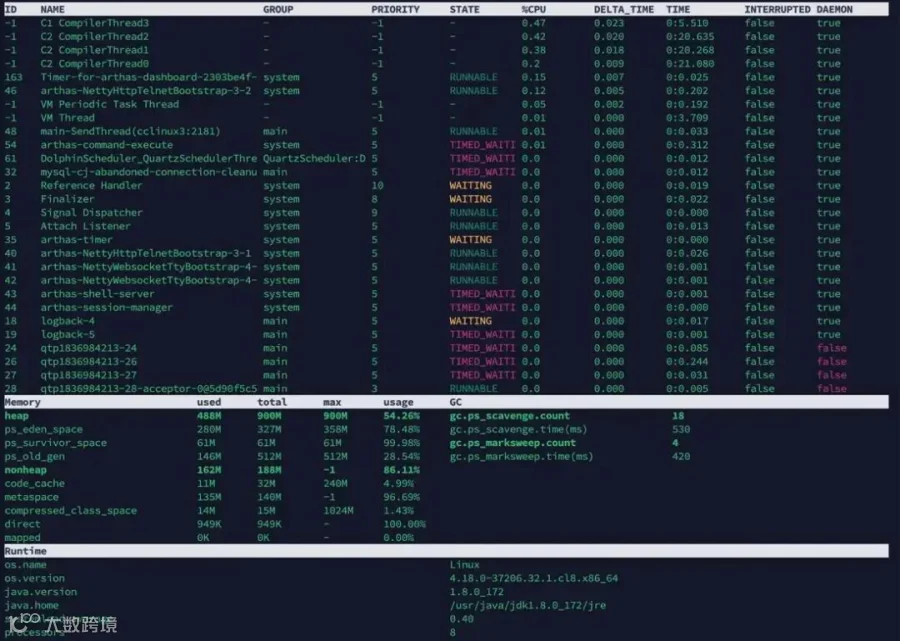
查看CPU使用率
参与Apache DolphinScheduler 社区有非常多的参与贡献的方式,包括:
