


点击蓝字 关注我们
注:本文为按照官方提供的文档进行操作的整理总结。
1
前提
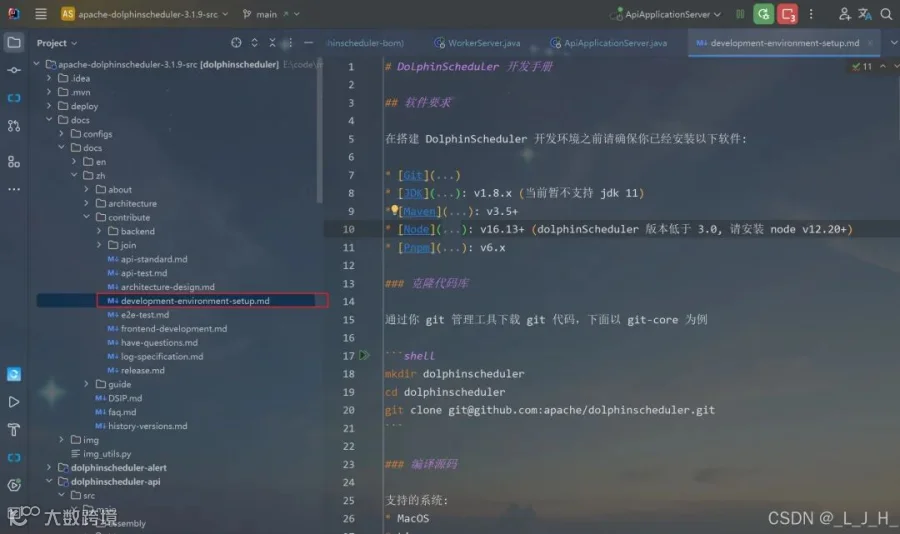
官方提供的开发手册位置:
Part.01
软件要求
Part.01
软件要求
在搭建 DolphinScheduler 开发环境之前请确保你已经安装以下软件:
-
Git -
JDK: v1.8.x (当前暂不支持 jdk 11) -
Maven: v3.5+ -
Node: v16.13+ (dolphinScheduler 版本低于 3.0, 请安装 node v12.20+) -
Pnpm: v6.x
Part.02
克隆代码库
通过你 git 管理工具下载 git 代码,下面以 git-core 为例
mkdir dolphinschedulercd dolphinschedulergit clone git@github.com:apache/dolphinscheduler.git
Part.03
编译源码
支持的系统:* MacOS* Linux【这个我没有运行试试】运行 `mvn clean install -Prelease -Dmaven.test.skip=true`
2
普通开发模式
2
普通开发模式
上面是官方提供的,我觉得有用就复制下来,
这里开始我就按照自己的操作顺序记录
Part.01
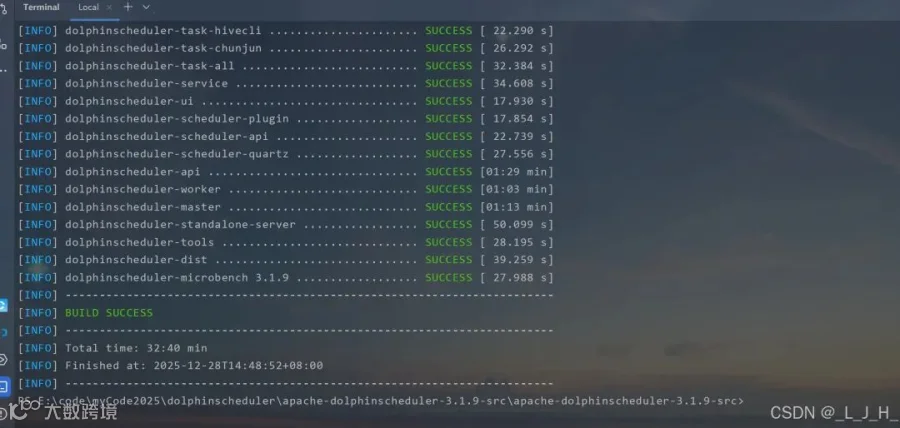
编译问题
1、git相关1-1:开启 Windows Git 长路径支持,管理员 PowerShell 执行,解决 DolphinScheduler 路径太深导致 git add 失败git config --system core.longpaths true1-2:先初始化git仓库,只在本地,不涉及账号、不推远程,Spotless 需要 HEADgit initgit add .git commit -m "initial commit"2、Maven 编译 / 格式化(IDEA 里的 Terminal)2-1:依赖 Git HEAD,自动修复格式问题mvn spotless:apply2-2:编译整个项目(跳过测试),确保所有模块已 installmvn clean install -DskipTests3、前端相关:查看 Node.js 是否已安装node -v查看 npm 版本npm -v安装 pnpmnpm install -g pnpmpnpm -v
编译都没有问题
Part.02
启动zookeeper
Part.02
启动zookeeper
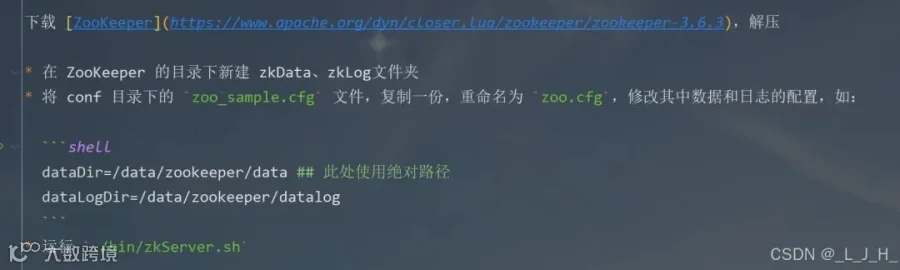
官方内容
下载 ZooKeeper,解压
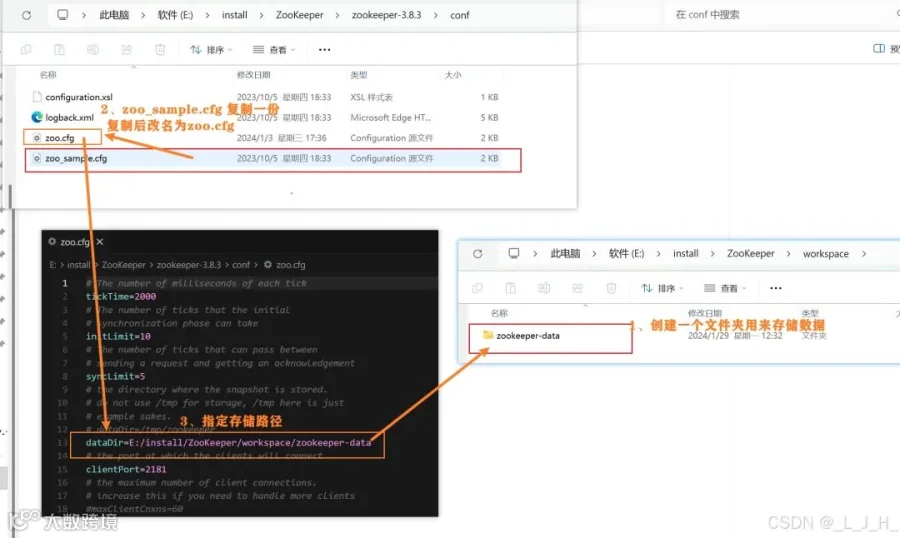
存储配置
启动脚本
搞个txt编辑完后,后缀该bat即可
@echo offecho 正在启动 ZooKeeper...cd /d E:\\install\\ZooKeeper\\zookeeper-3.8.3\\binzkServer.cmdpause
Part.03
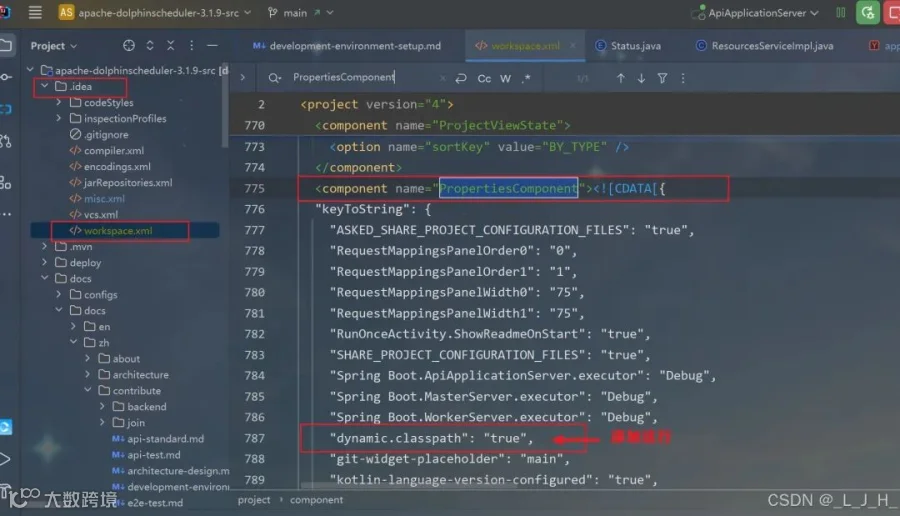
workspace.xml 修改
【可以不用,我也是看其他文章有添加的,不过我没添加也能正常运行,这里只做记录】
在其他文章看到说在这里添加这行,说是让 IDEA 在运行时动态使用模块的 classpath,而不是用启动时生成的静态 classpath。注意点:这个作用只会影响本地 IDEA 启动,线上环境如果有问题这个是解决不了的。"dynamic.classpath": "true",
Part.04
数据库
我这里用的是mysql,所以需要修改
4-1:数据初始化
创建名为【dolphinscheduler】的新数据库后,把这个位置的sql直接拷贝复制执行即可。
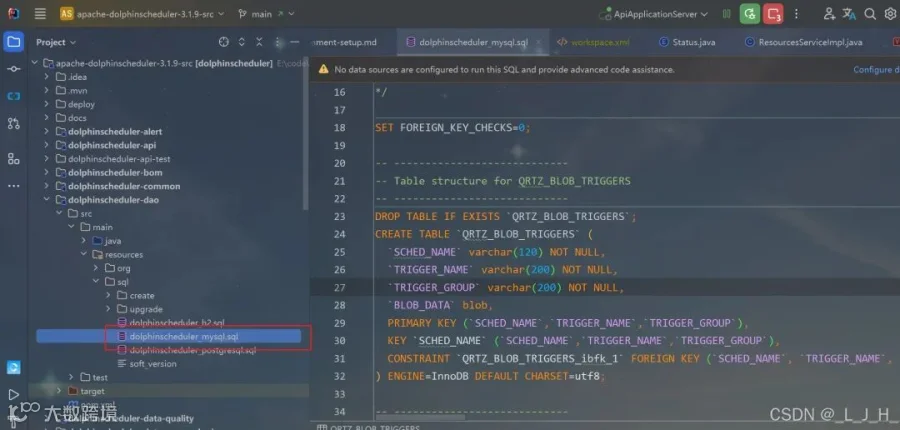
如图: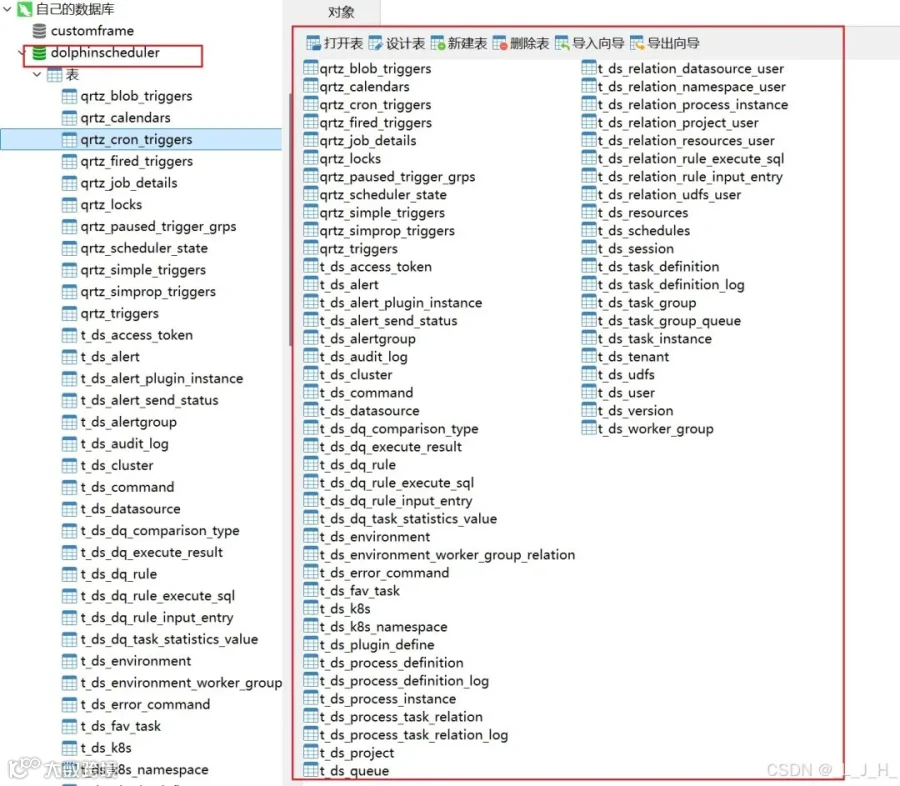
4-2:依赖相关修改
如果使用 MySQL 作为元数据库,需要先修改 `dolphinscheduler/pom.xml`,将 `mysql-connector-java` 依赖的 `scope` 改为 `compile`,使用 PostgreSQL 则不需要test 改成 compile
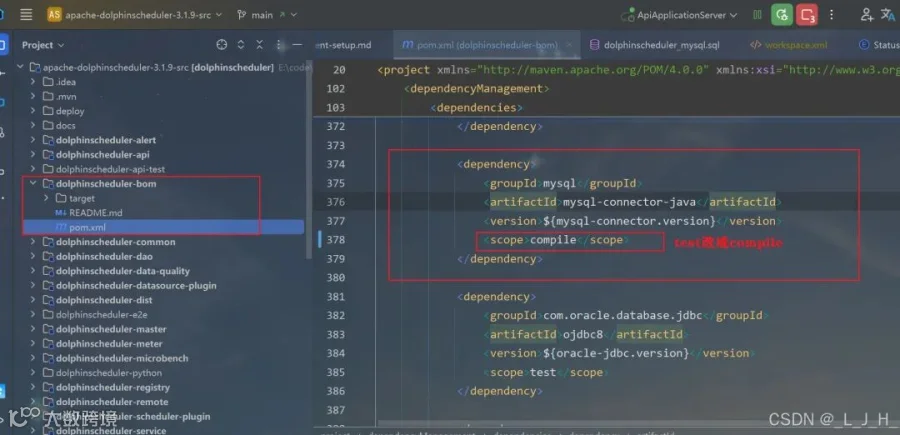
Part.05
application.yaml 修改数据库配置
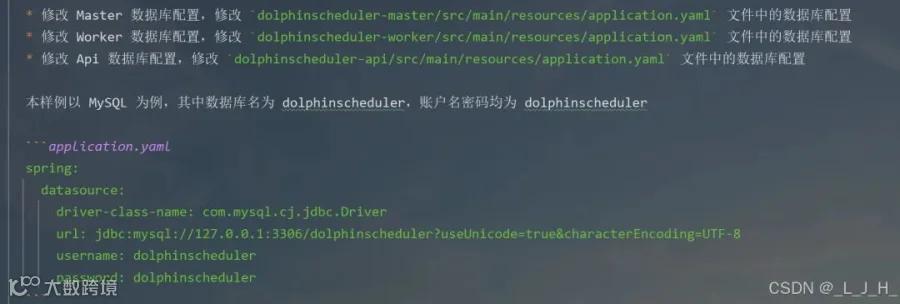
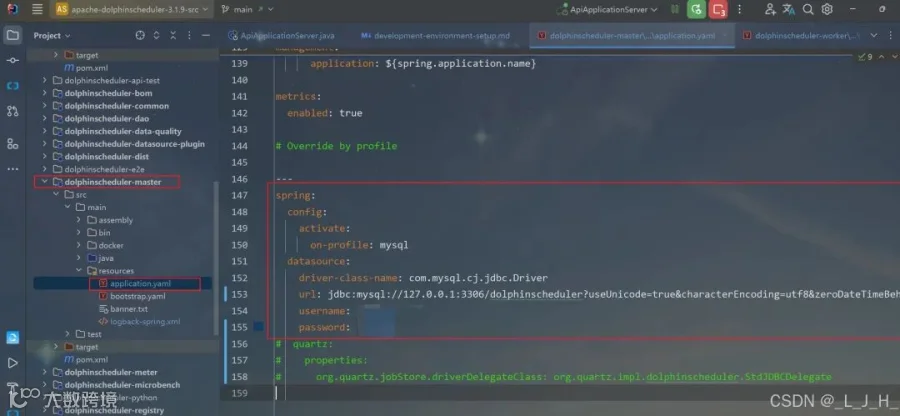
5-1:dolphinscheduler-master
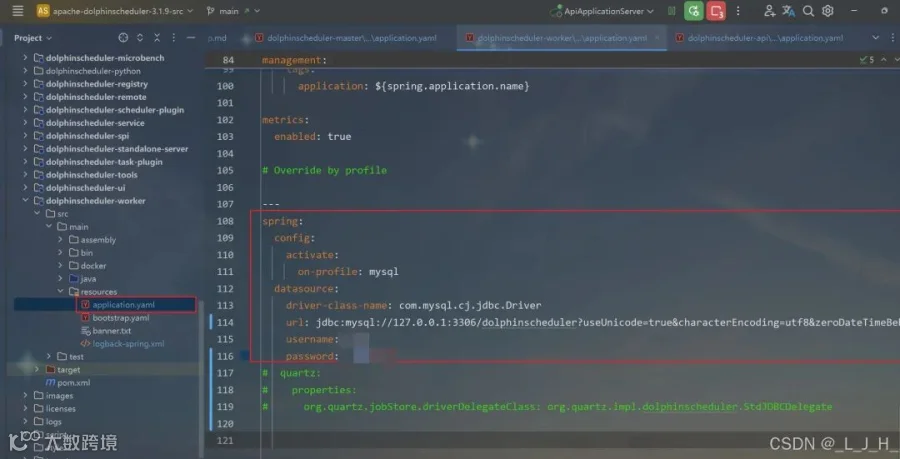
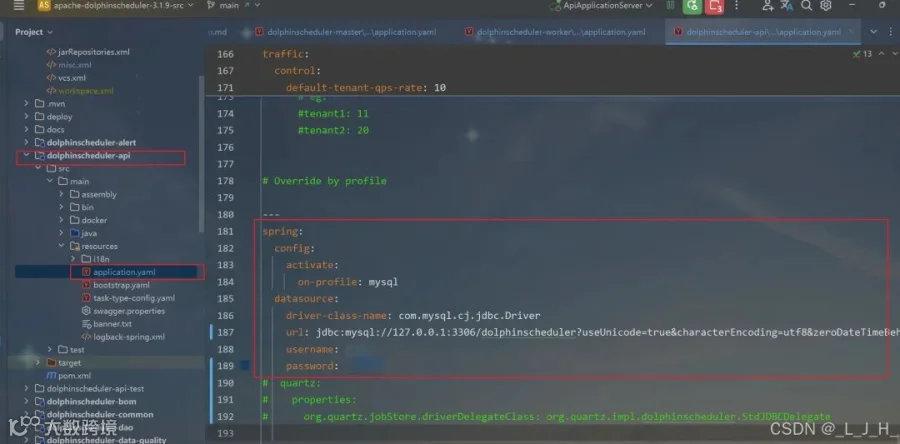
如图,配置文件中修改这些数据:三个内容都是一样的spring:config:activate:on-profile: mysqldatasource:driver-class-name: com.mysql.cj.jdbc.Driverurl: jdbc:mysql://127.0.0.1:3306/dolphinscheduler?useUnicode=true&characterEncoding=utf8&zeroDateTimeBehavior=convertToNull&useSSL=true&serverTimezone=GMT%2B8username: 账户名password: 数据库密码
5-2:dolphinscheduler-worker
5-3:dolphinscheduler-api
Part.06
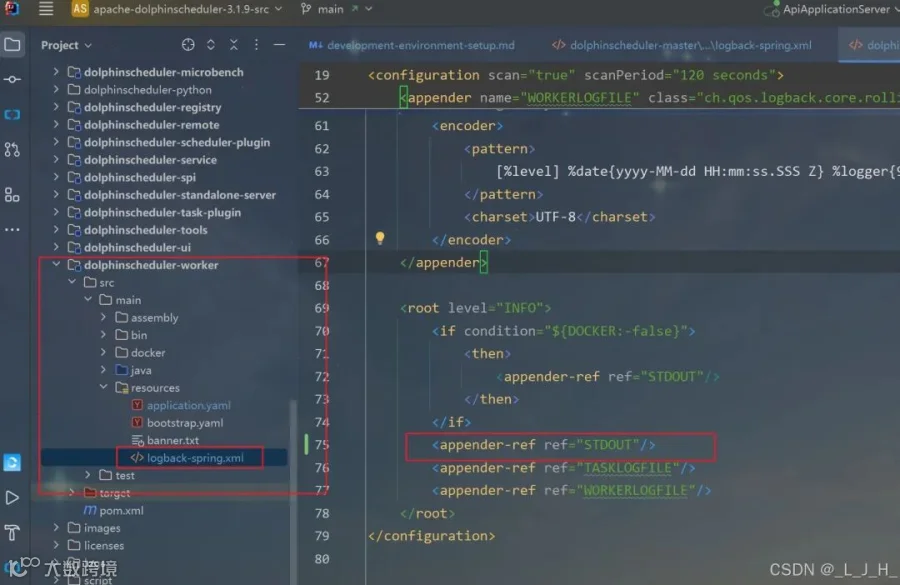
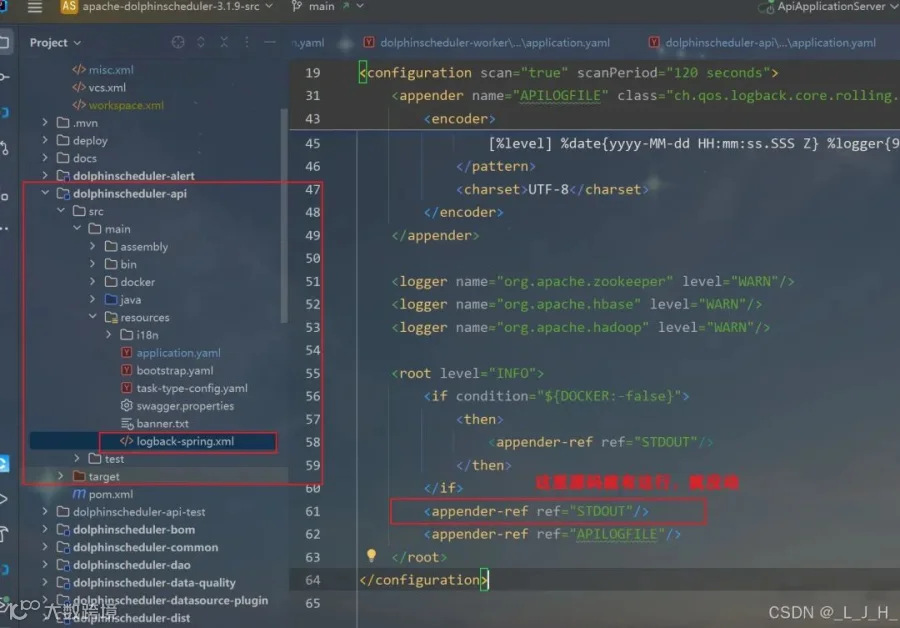
logback-spring.xml 修改日志级别
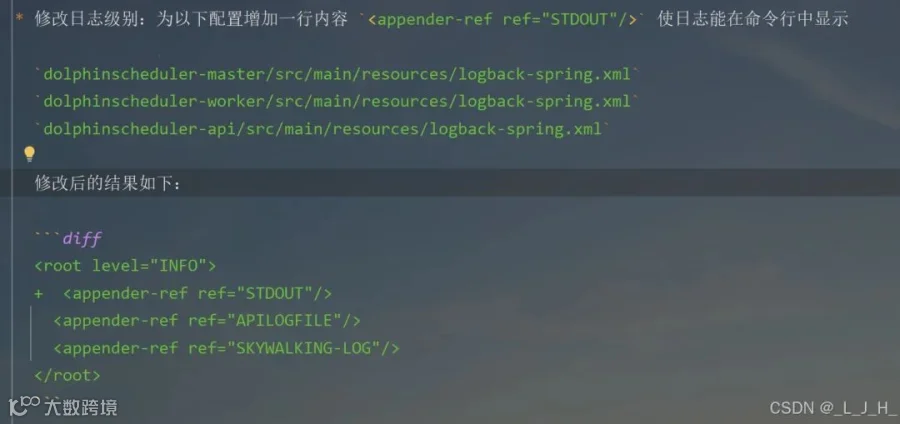
6-1:dolphinscheduler-master
<appender-ref ref="STDOUT"/>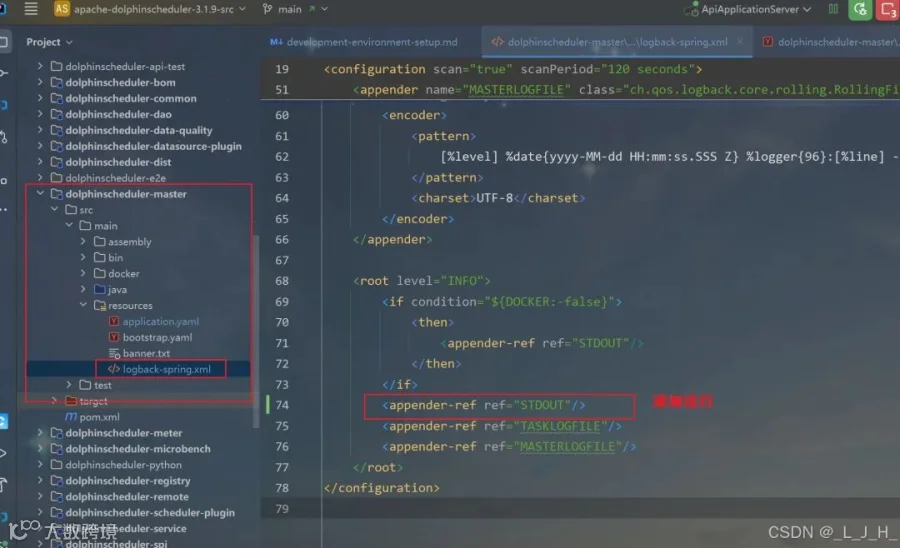
6-2:dolphinscheduler-worker
6-3:dolphinscheduler-api
Part.07
启动后端三个服务
Part.07
启动后端三个服务
我们需要启动三个服务,包括 MasterServer,WorkerServer,ApiApplicationServer* MasterServer:在 Intellij IDEA 中执行 `org.apache.dolphinscheduler.server.master.MasterServer` 中的 `main` 方法,并配置 *VM Options* `-Dlogging.config=classpath:logback-spring.xml -Ddruid.mysql.usePingMethod=false -Dspring.profiles.active=mysql`* WorkerServer:在 Intellij IDEA 中执行 `org.apache.dolphinscheduler.server.worker.WorkerServer` 中的 `main` 方法,并配置 *VM Options* `-Dlogging.config=classpath:logback-spring.xml -Ddruid.mysql.usePingMethod=false -Dspring.profiles.active=mysql`* ApiApplicationServer:在 Intellij IDEA 中执行 `org.apache.dolphinscheduler.api.ApiApplicationServer` 中的 `main` 方法,并配置 *VM Options* `-Dlogging.config=classpath:logback-spring.xml -Dspring.profiles.active=api,mysql`。启动完成可以浏览 Open API 文档,地址为 http://localhost:12345/dolphinscheduler/swagger-ui/index.html> VM Options `-Dspring.profiles.active=mysql` 中 `mysql` 表示指定的配置文件
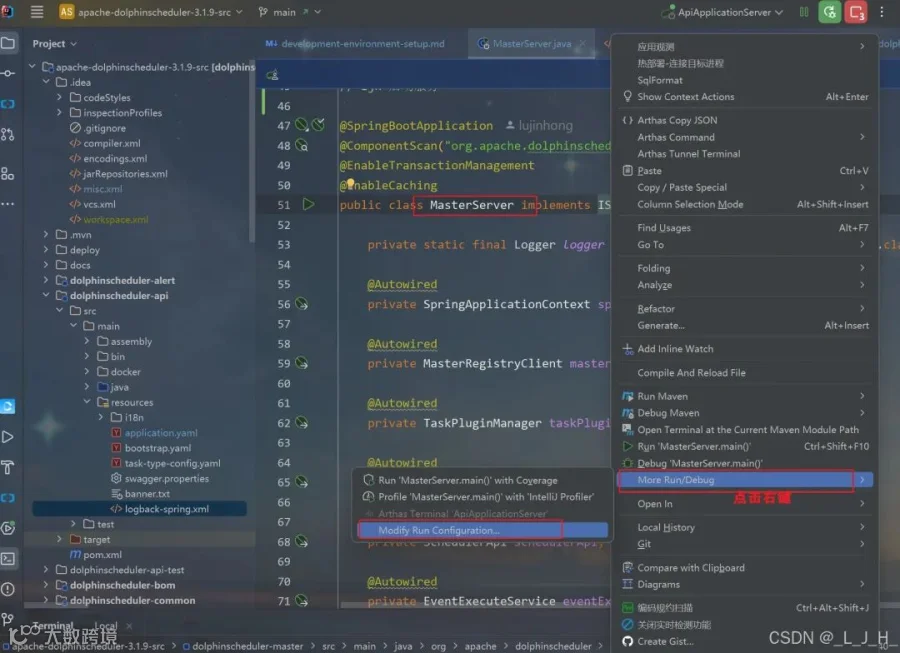
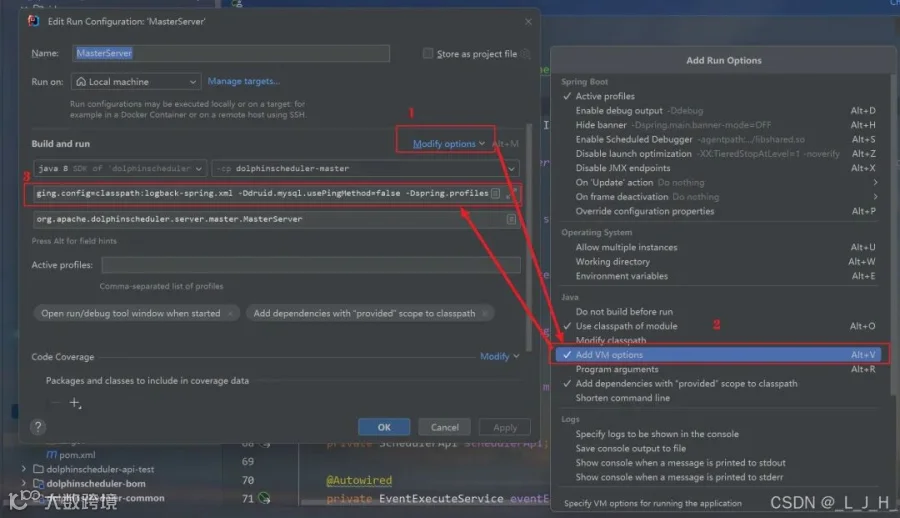
7-1:MasterServer
配置 VM Options
按照操作配置这个:打开后填入即可-Dlogging.config=classpath:logback-spring.xml -Ddruid.mysql.usePingMethod=false -Dspring.profiles.active=mysql
7-2:WorkerServer
配置 VM Options
跟上面一样操作:
-Dlogging.config=classpath:logback-spring.xml -Ddruid.mysql.usePingMethod=false -Dspring.profiles.active=mysql7-3:ApiApplicationServer
配置 VM Options
-Dlogging.config=classpath:logback-spring.xml -Dspring.profiles.active=api,mysql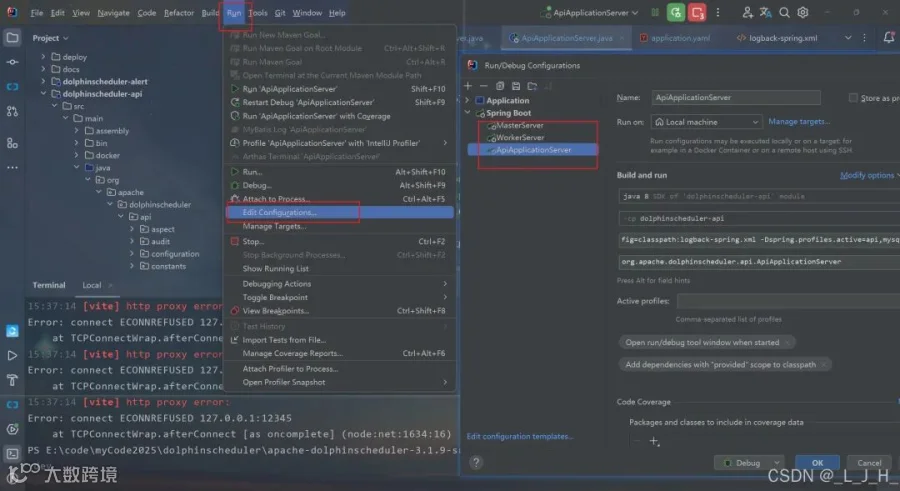
总的就这三个:
Part.08
启动前端服务
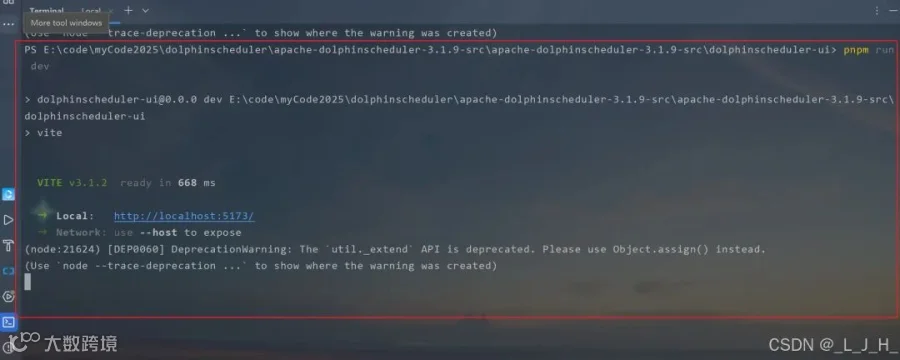
命令:
安装前端依赖并运行前端组件cd dolphinscheduler-uipnpm installpnpm run dev

Part.09
浏览器访问
账号密码:
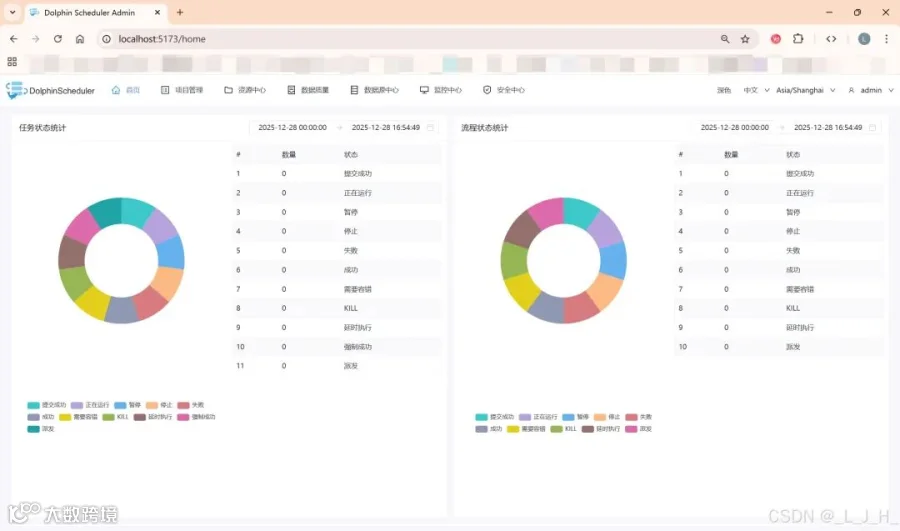
浏览器访问:http://localhost:5173/home默认账号密码:账号:admin密码:dolphinscheduler123
成功访问:
3
相关问题
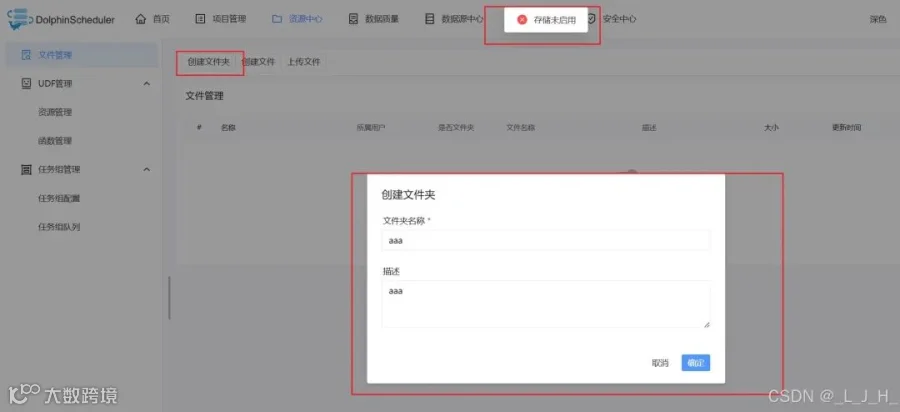
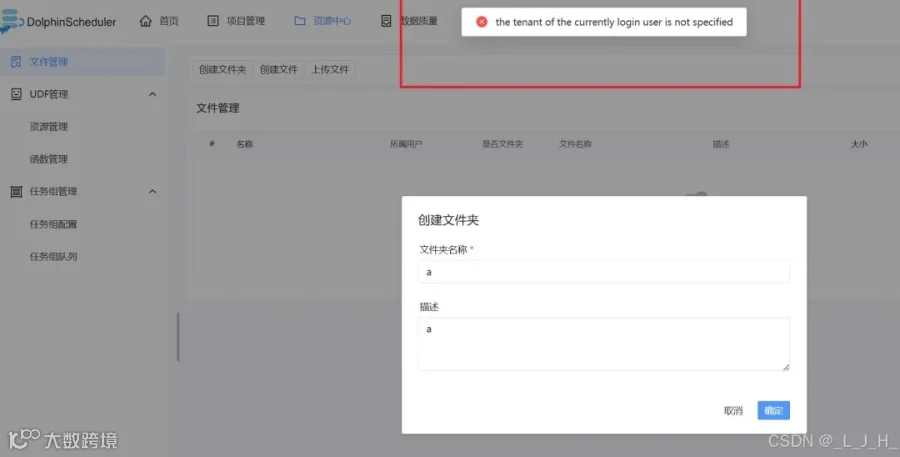
存储未启用、租户\用户 指定
问题:测试能否创建文件夹、上传文件等,提示【存储未启用】
问题:当前登录用户的租户信息未被指定
解决方法:
Minio 安装、启动
我这里直接用minio来尝试:
1、Minio 创建 dolphinscheduler 桶
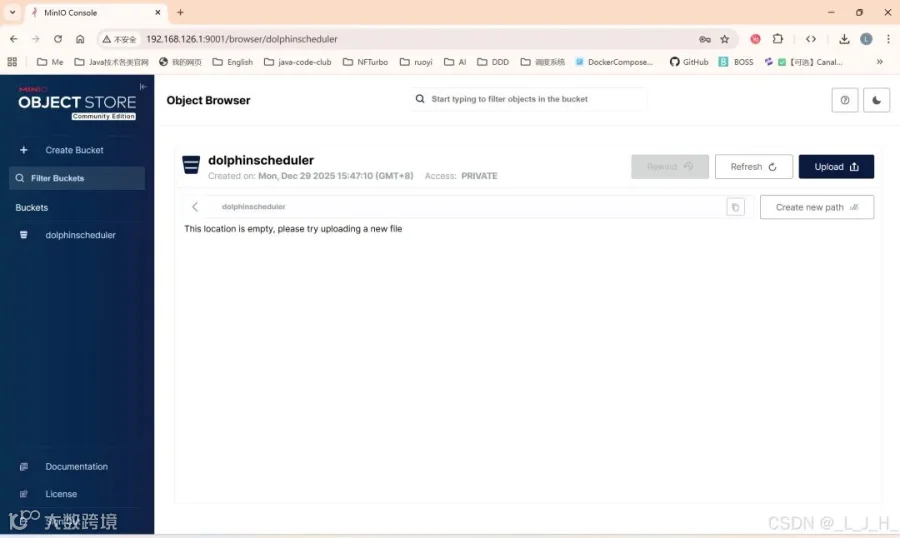
2、commom.properties 修改
配置文件改了这些地方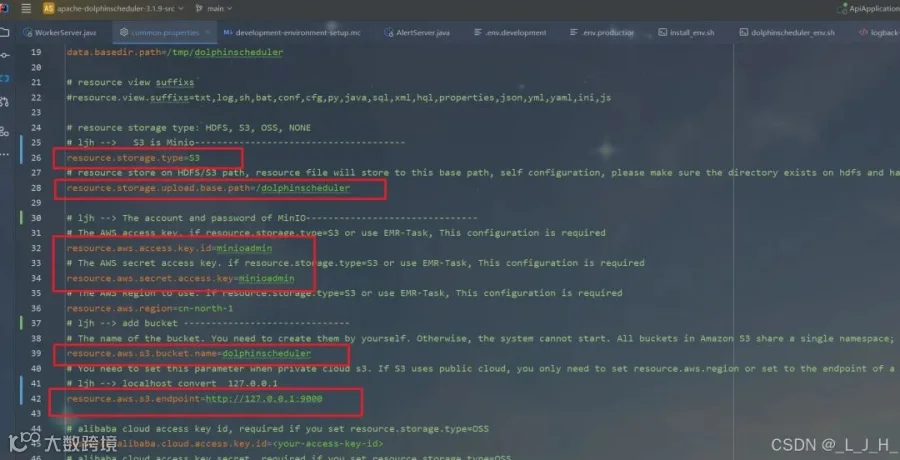
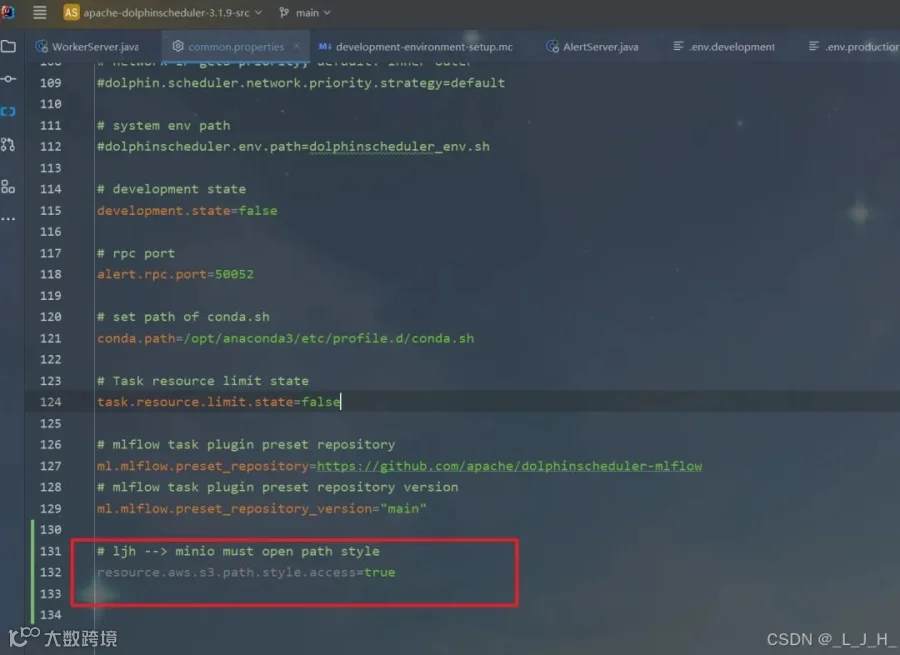
# Licensed to the Apache Software Foundation (ASF) under one or more# contributor license agreements. See the NOTICE file distributed with# this work for additional information regarding copyright ownership.# The ASF licenses this file to You under the Apache License, Version 2.0# (the "License"); you may not use this file except in compliance with# the License. You may obtain a copy of the License at## http://www.apache.org/licenses/LICENSE-2.0## Unless required by applicable law or agreed to in writing, software# distributed under the License is distributed on an "AS IS" BASIS,# WITHOUT WARRANTIES OR CONDITIONS OF ANY KIND, either express or implied.# See the License for the specific language governing permissions and# limitations under the License.## user data local directory path, please make sure the directory exists and have read write permissionsdata.basedir.path=/tmp/dolphinscheduler# resource view suffixs#resource.view.suffixs=txt,log,sh,bat,conf,cfg,py,java,sql,xml,hql,properties,json,yml,yaml,ini,js# resource storage type: HDFS, S3, OSS, NONE# ljh --> S3 is Minio--------------------------------------resource.storage.type=S3# resource store on HDFS/S3 path, resource file will store to this base path, self configuration, please make sure the directory exists on hdfs and have read write permissions. "/dolphinscheduler" is recommendedresource.storage.upload.base.path=/dolphinscheduler# ljh --> The account and password of MinIO-------------------------------# The AWS access key. if resource.storage.type=S3 or use EMR-Task, This configuration is requiredresource.aws.access.key.id=minioadmin# The AWS secret access key. if resource.storage.type=S3 or use EMR-Task, This configuration is requiredresource.aws.secret.access.key=minioadmin# The AWS Region to use. if resource.storage.type=S3 or use EMR-Task, This configuration is requiredresource.aws.region=cn-north-1# ljh --> add bucket ------------------------------# The name of the bucket. You need to create them by yourself. Otherwise, the system cannot start. All buckets in Amazon S3 share a single namespace; ensure the bucket is given a unique name.resource.aws.s3.bucket.name=dolphinscheduler# You need to set this parameter when private cloud s3. If S3 uses public cloud, you only need to set resource.aws.region or set to the endpoint of a public cloud such as S3.cn-north-1.amazonaws.com.cn# ljh --> localhost convert 127.0.0.1resource.aws.s3.endpoint=http://127.0.0.1:9000# alibaba cloud access key id, required if you set resource.storage.type=OSSresource.alibaba.cloud.access.key.id=<your-access-key-id># alibaba cloud access key secret, required if you set resource.storage.type=OSSresource.alibaba.cloud.access.key.secret=<your-access-key-secret># alibaba cloud region, required if you set resource.storage.type=OSSresource.alibaba.cloud.region=cn-hangzhou# oss bucket name, required if you set resource.storage.type=OSSresource.alibaba.cloud.oss.bucket.name=dolphinscheduler# oss bucket endpoint, required if you set resource.storage.type=OSSresource.alibaba.cloud.oss.endpoint=https://oss-cn-hangzhou.aliyuncs.com# if resource.storage.type=HDFS, the user must have the permission to create directories under the HDFS root pathresource.hdfs.root.user=hdfs# if resource.storage.type=S3, the value like: s3a://dolphinscheduler; if resource.storage.type=HDFS and namenode HA is enabled, you need to copy core-site.xml and hdfs-site.xml to conf dirresource.hdfs.fs.defaultFS=hdfs://mycluster:8020# whether to startup kerberoshadoop.security.authentication.startup.state=false# java.security.krb5.conf pathjava.security.krb5.conf.path=/opt/krb5.conf# login user from keytab usernamelogin.user.keytab.username=hdfs-mycluster@ESZ.COM# login user from keytab pathlogin.user.keytab.path=/opt/hdfs.headless.keytab# kerberos expire time, the unit is hourkerberos.expire.time=2# resourcemanager port, the default value is 8088 if not specifiedresource.manager.httpaddress.port=8088# if resourcemanager HA is enabled, please set the HA IPs; if resourcemanager is single, keep this value emptyyarn.resourcemanager.ha.rm.ids=192.168.xx.xx,192.168.xx.xx# if resourcemanager HA is enabled or not use resourcemanager, please keep the default value; If resourcemanager is single, you only need to replace ds1 to actual resourcemanager hostnameyarn.application.status.address=http://ds1:%s/ws/v1/cluster/apps/%s# job history status url when application number threshold is reached(default 10000, maybe it was set to 1000)yarn.job.history.status.address=http://ds1:19888/ws/v1/history/mapreduce/jobs/%s# datasource encryption enabledatasource.encryption.enable=false# datasource encryption saltdatasource.encryption.salt=!@#$%^&*# data quality optiondata-quality.jar.name=dolphinscheduler-data-quality-dev-SNAPSHOT.jar#data-quality.error.output.path=/tmp/data-quality-error-data# Network IP gets priority, default inner outer# Whether hive SQL is executed in the same sessionsupport.hive.oneSession=false# use sudo or not, if set true, executing user is tenant user and deploy user needs sudo permissions; if set false, executing user is the deploy user and doesn't need sudo permissionssudo.enable=truesetTaskDirToTenant.enable=false# network interface preferred like eth0, default: empty#dolphin.scheduler.network.interface.preferred=# network IP gets priority, default: inner outer#dolphin.scheduler.network.priority.strategy=default# system env path#dolphinscheduler.env.path=dolphinscheduler_env.sh# development statedevelopment.state=false# rpc portalert.rpc.port=50052# set path of conda.shconda.path=/opt/anaconda3/etc/profile.d/conda.sh# Task resource limit statetask.resource.limit.state=false# mlflow task plugin preset repositoryml.mlflow.preset_repository=https://github.com/apache/dolphinscheduler-mlflow# mlflow task plugin preset repository versionml.mlflow.preset_repository_version="main"# ljh --> minio must open path styleresource.aws.s3.path.style.access=true
3、dolphinscheduler 可视化页面添加租户
安全中心 - 租户管理 - 创建租户
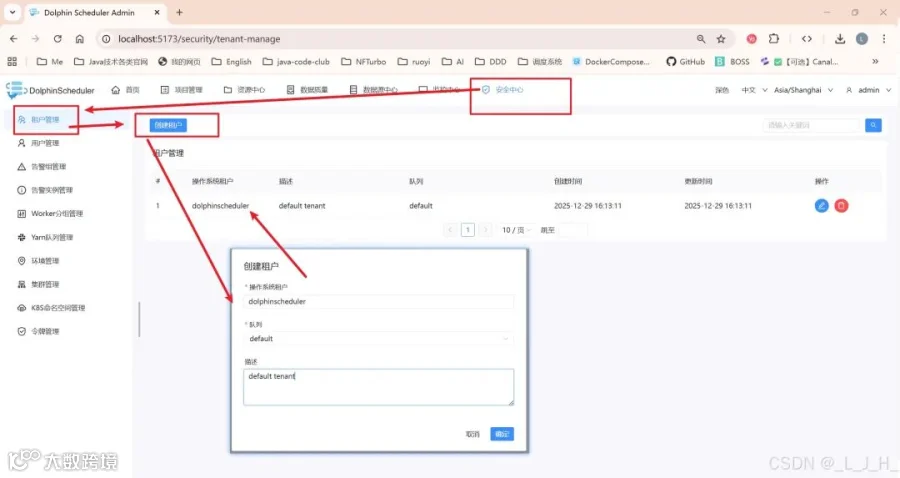
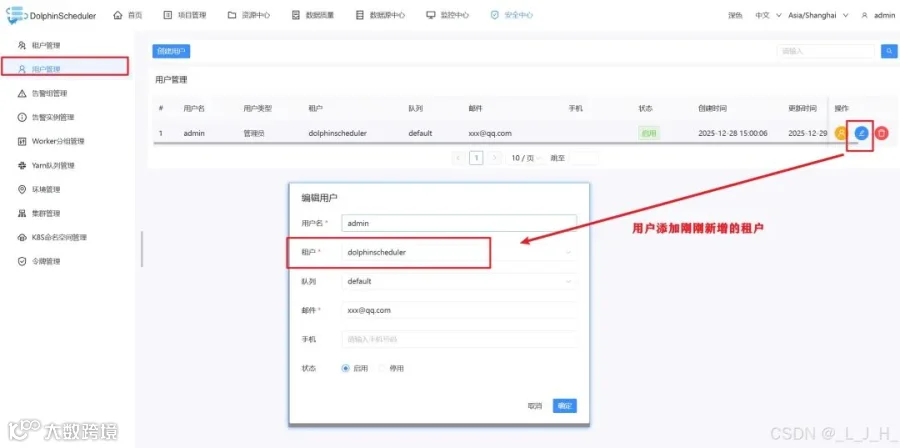
用户添加租户
4
演示
4
演示
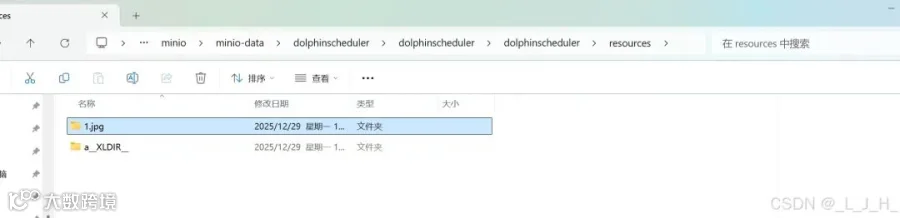
创建文件夹、上传文件成功
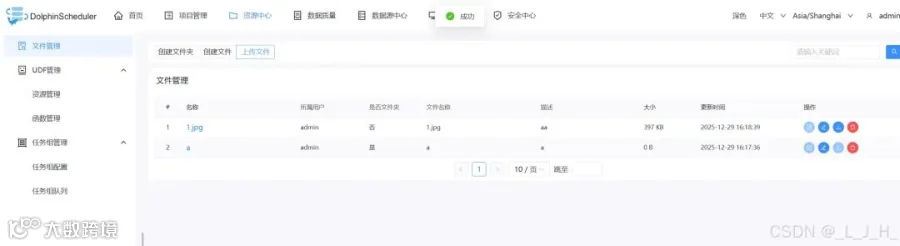
如图,数据已经存放在我指定的minio文件夹里面了




用户案例

迁移实战

最新发版消息

加入社区
关注社区的方式有很多:
-
GitHub: https://github.com/apache/dolphinscheduler -
官网:https://dolphinscheduler.apache.org/en-us -
订阅开发者邮件:dev@dolphinscheduler@apache.org(向邮箱发送任意内容,收到邮件后回复同意订阅即可) -
X.com:@DolphinSchedule -
YouTube:https://www.youtube.com/@apachedolphinscheduler -
Slack:https://join.slack.com/t/asf-dolphinscheduler/shared_invite/zt-1cmrxsio1-nJHxRJa44jfkrNL_Nsy9Qg
同样地,参与Apache DolphinScheduler 有非常多的参与贡献的方式,主要分为代码方式和非代码方式两种。
📂非代码方式包括:
完善文档、翻译文档;翻译技术性、实践性文章;投稿实践性、原理性文章;成为布道师;社区管理、答疑;会议分享;测试反馈;用户反馈等。
👩💻代码方式包括:
查找Bug;编写修复代码;开发新功能;提交代码贡献;参与代码审查等。

你的好友秀秀子拍了拍你
并请你帮她点一下“分享”